FleetQ
KI-Agenten-Missionskontrolle — Über 200 MCP-Werkzeuge zur Verwaltung von Agenten, Experimenten, Workflows, Crews, Fähigkeiten, Genehmigungen, Budgets und mehr.
Dokumentation
FleetQ — Open-Source AI Agent Orchestration Platform
Self-hosted mission control for AI agents. Build, run, and monitor autonomous multi-agent systems with a visual DAG builder, human-in-the-loop approvals, MCP server integration, and full audit trail. Works with Claude, GPT-4o, Gemini, Ollama, Codex, Claude Code, and any OpenAI-compatible LLM.





Keywords: AI agents · agent orchestration · MCP server · Model Context Protocol · LangGraph alternative · CrewAI alternative · n8n for AI · Claude agents · LLM workflow · autonomous agents · agent framework · AI automation · self-hosted
☁️ Prefer managed? Try FleetQ Cloud — zero setup, free tier. ⭐ Like the project? Give it a star on GitHub — it helps others find FleetQ.
Table of Contents
- Why FleetQ?
- Key Concepts
- Screenshots
- Features
- Use Cases
- How FleetQ compares
- Quick Start
- Authentication
- Configuration
- SSH Host Access
- Architecture
- MCP Server (675+ tools)
- Tech Stack
- Contributing
- Changelog
Why FleetQ?
Most agent frameworks give you a Python notebook. FleetQ gives you a production platform.
- 🧩 675+ MCP tools across 45 domains — every feature is exposed via Model Context Protocol, so any LLM (Claude Desktop, Cursor, ChatGPT, local agents) can drive the platform programmatically. New in 1.27: web UIs for previously headless capabilities (agent sessions, release signing keys, drift & eval monitors, broadcasts, test suites, CSV import); eight outbound chat channels as first-class drivers; the Agentic AI Flywheel (self-growing eval set + drift/production monitors); policy-governed autonomy (versioned per-agent policies + replay); cost-aware orchestration and Return on Cognitive Spend (ROCS) metrics.
- 🔁 Visual DAG workflows with 8 node types (agent, conditional, human-task, switch, dynamic-fork, do-while, compensation, sub-workflow) — no Python glue code.
- 👥 Multi-agent crews with coordinator/worker/reviewer roles, weighted QA scoring, and cross-validation.
- 🛡️ Real-World Action governance — assistant tool calls, integration writes, and git pushes route through a per-tier risk policy (auto / ask / reject for low / medium / high). Approvals auto-execute. Audit trail attached.
- 💰 Budget controls with a real credit ledger, pessimistic locking, and auto-pause on overspend — not just token counters.
- 🧠 Agent evolution — LLM analyzes execution history and proposes config changes you approve with one click.
- ⚙️ BYOK + Local LLMs — Anthropic, OpenAI, Google, plus Ollama, LM Studio, vLLM, Codex, Claude Code. Zero vendor lock-in.
- 🔒 Production-grade — tenant isolation, encrypted credential vault, HMAC webhooks, SSRF guards, circuit breakers, audit trail.
- 📊 OpenTelemetry observability — structured error codes (gRPC-canonical), deadline propagation, distributed tracing. Jaeger UI one-command away. Per-team OTLP collector endpoints for BYO observability.
- 📈 Live team graph — Cytoscape.js force-directed visualization of agents, humans, and crews. Real-time updates via Laravel Reverb WebSockets.
- 🏠 Self-host or cloud — MIT-friendly AGPLv3 license, runs on Docker Compose, or use FleetQ Cloud.
Key Concepts
| Concept | What it is | When to use |
|---|---|---|
| Agent | A configured AI personality with role, goal, backstory, skills, and tool access | The basic unit — one agent per specialized task |
| Skill | A reusable LLM prompt, rule, connector, or GPU compute call | When multiple agents need the same capability |
| Experiment | A stateful run through a 20-stage pipeline (scoring → planning → building → executing → evaluating) | Any non-trivial agent task with lifecycle |
| Crew | A team of agents working on one goal (sequential, parallel, hierarchical, adversarial, fanout, chat-room) | Multi-perspective tasks or when you need review/QA |
| Workflow | A visual DAG template (reusable across experiments) with branching, loops, human-tasks | Recurring processes — CI/CD, content pipelines, QA flows |
| Project | A continuous (cron-scheduled) or one-shot container for experiments, with budget + milestones | Long-running initiatives, scheduled agent work |
| Signal | An inbound event (webhook, RSS, email, bug report, GitHub issue) that can trigger agents | Event-driven automation |
| MCP Tool | A programmatic action any LLM can call to query or mutate the platform | Expose FleetQ to external agents (Claude, Cursor, etc.) |
Screenshots
|
Dashboard KPI overview with active experiments, success rate, budget spend, and pending approvals. 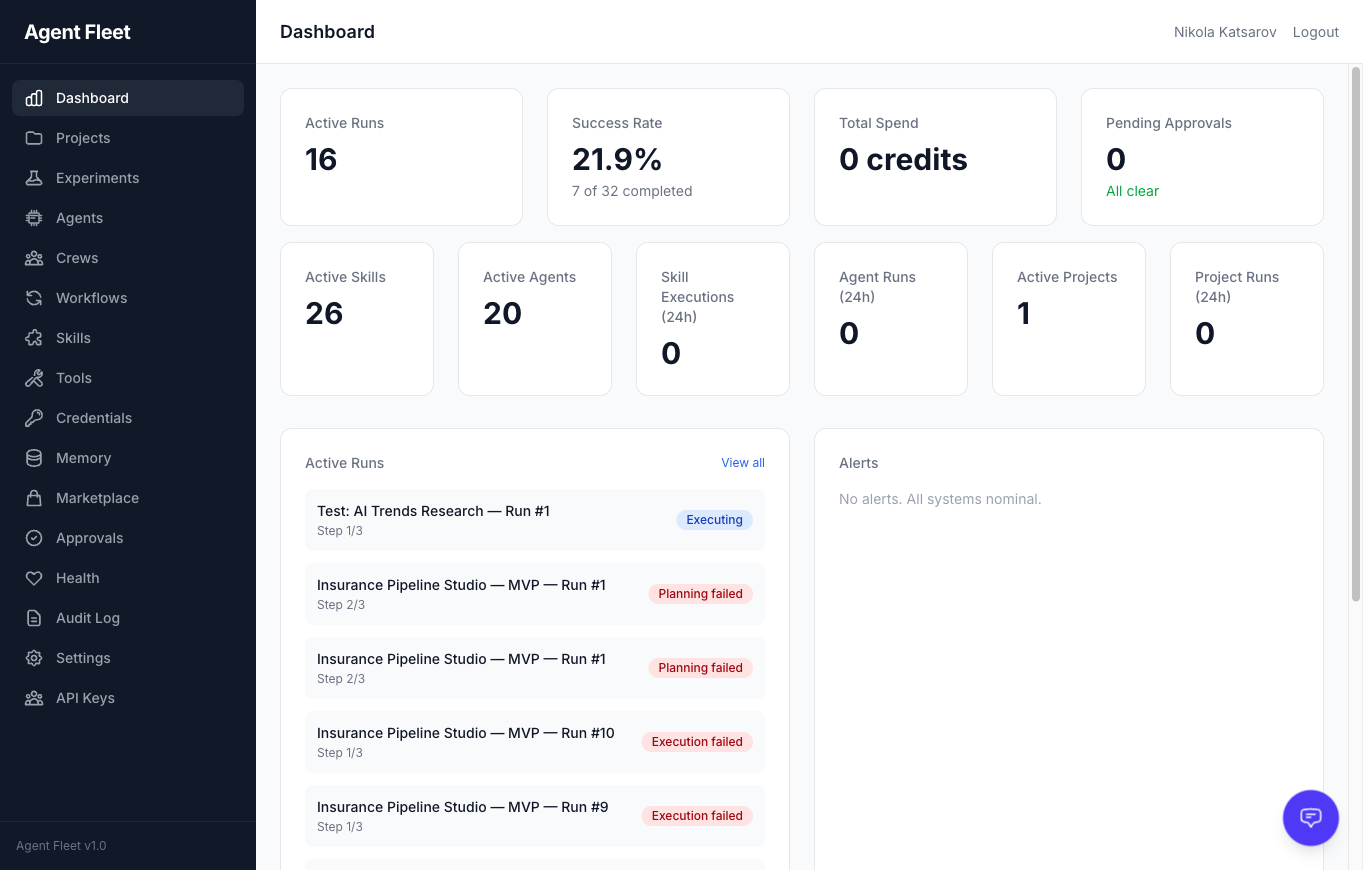
|
Agent Template Gallery Browse 14 pre-built agent templates across 5 categories. Search, filter by category, and deploy with one click. 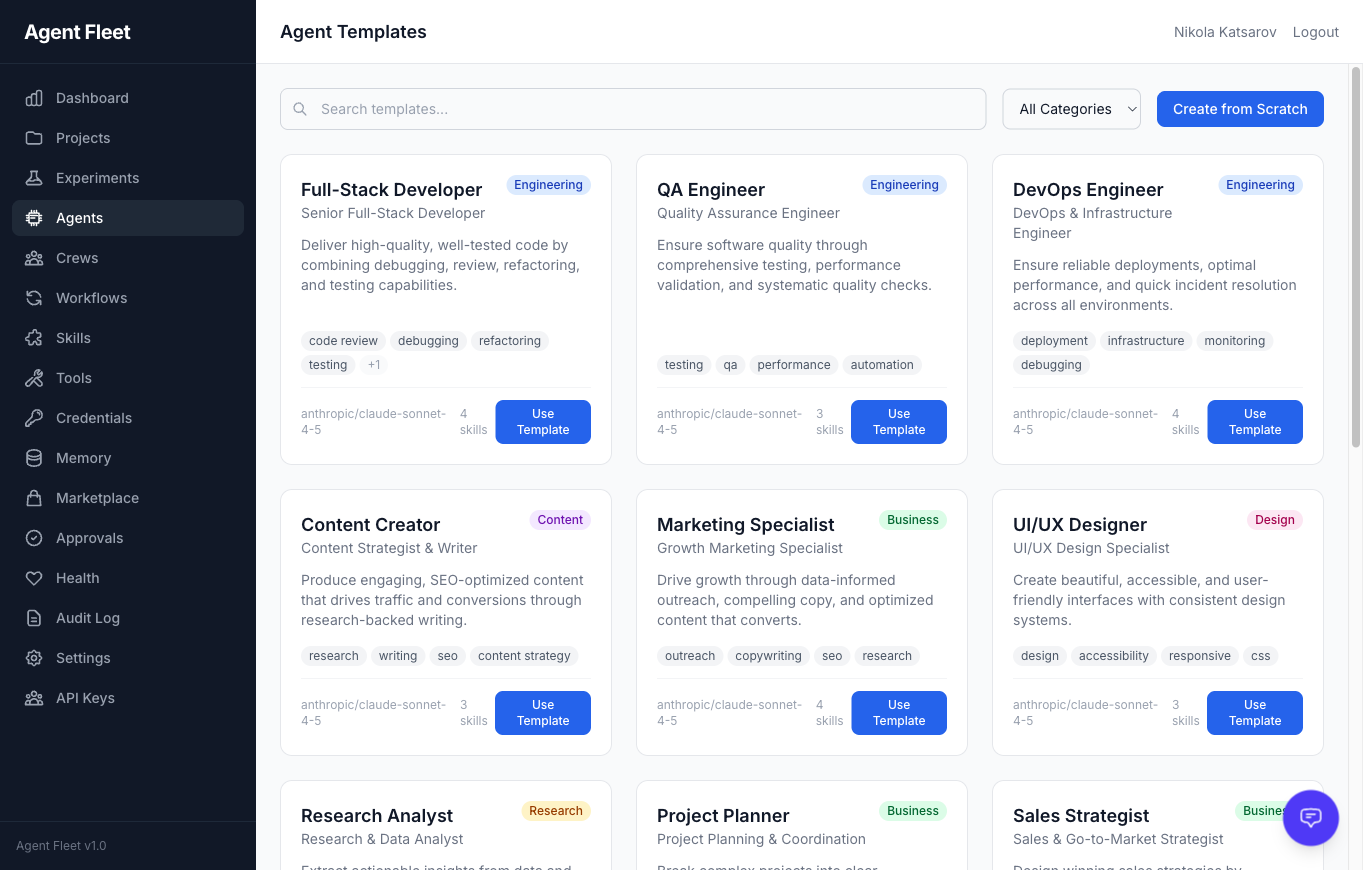
|
|
Agent LLM Configuration Per-agent provider and model selection with fallback chains. Supports Anthropic, OpenAI, Google, and local agents. 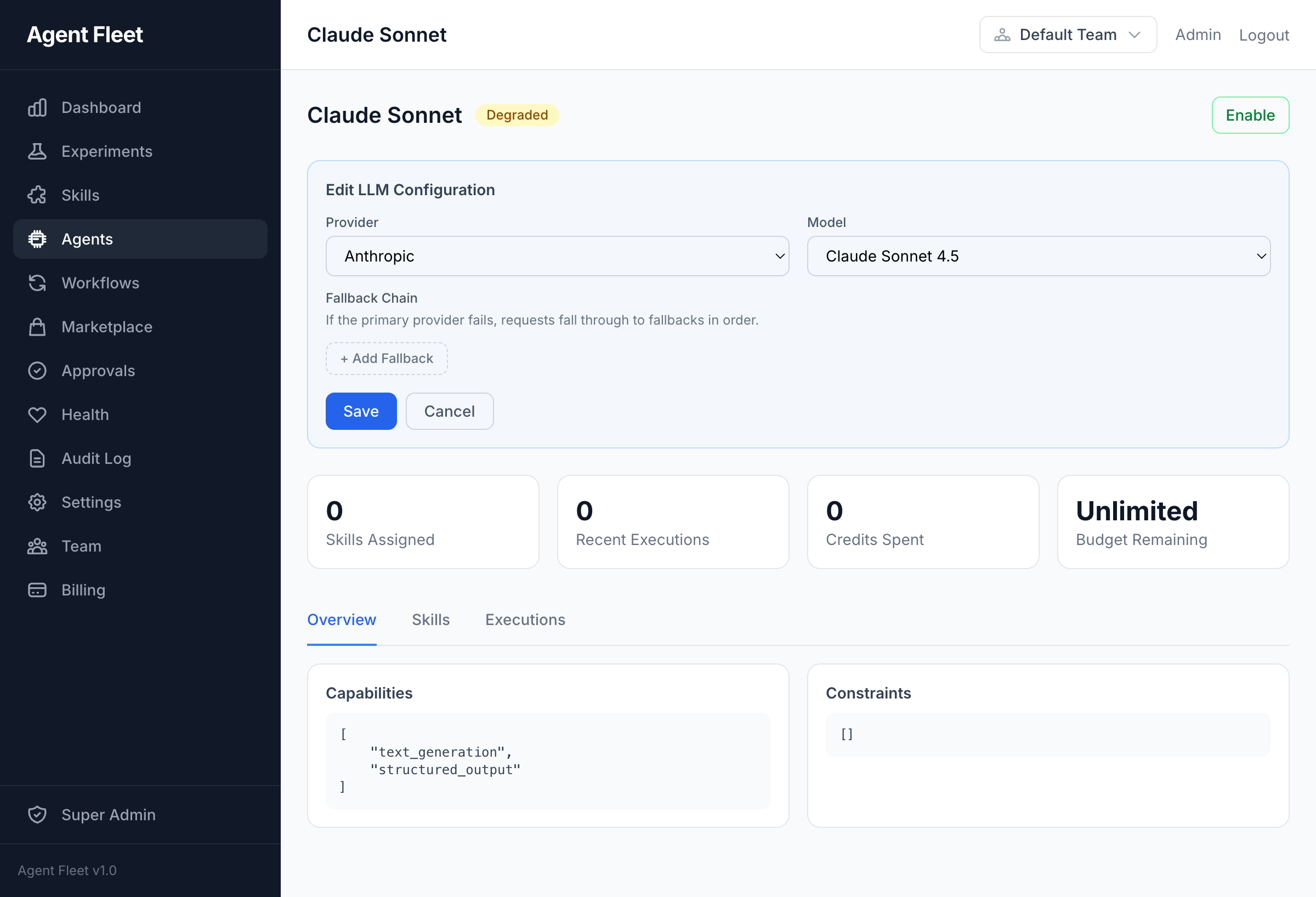
|
Agent Evolution AI-driven agent self-improvement. Analyze execution history, propose personality and config changes, and apply with one click. 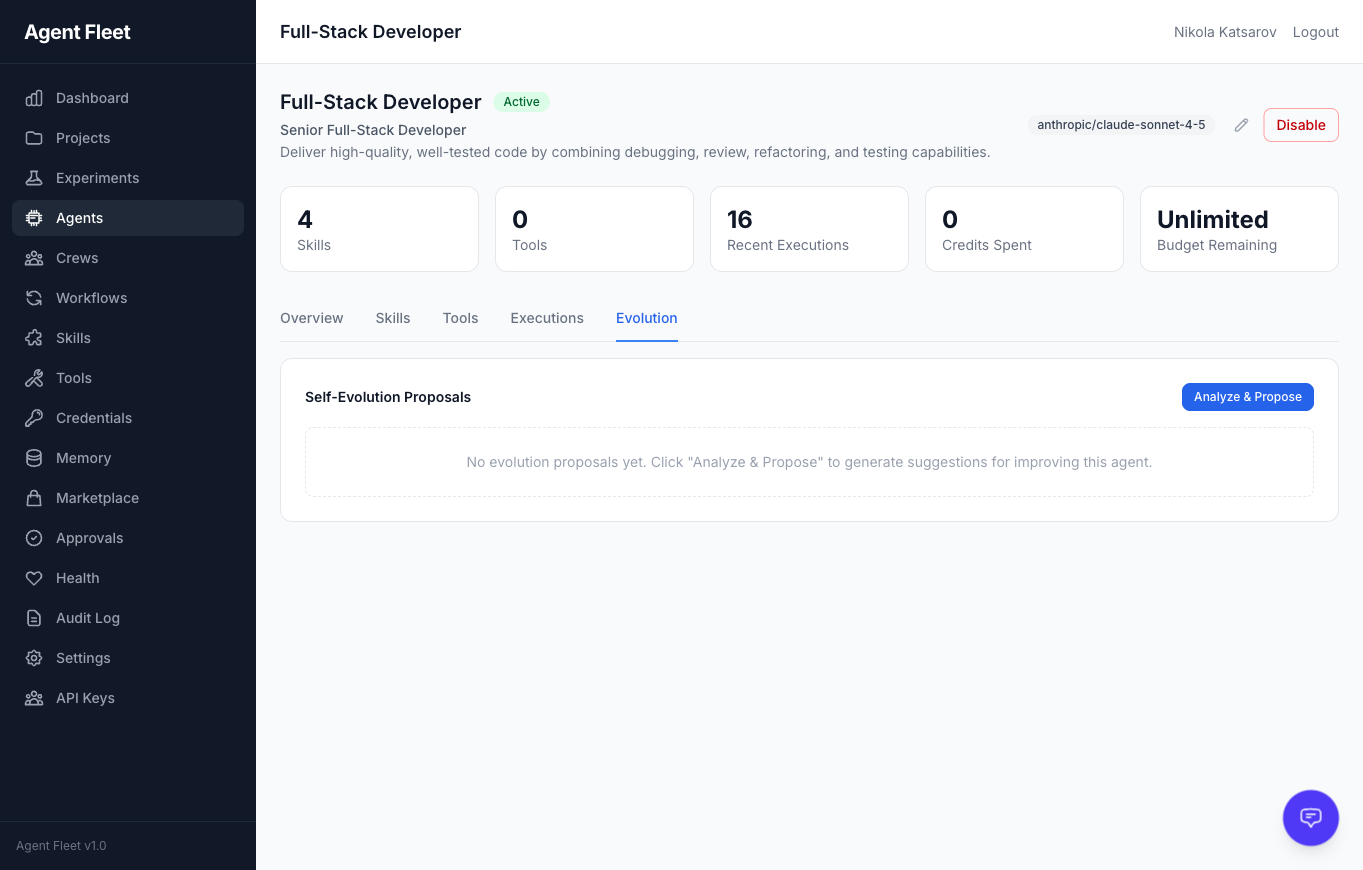
|
|
Crew Execution Live progress tracking during multi-agent crew execution. Each task shows its assigned skill, provider, and elapsed time. 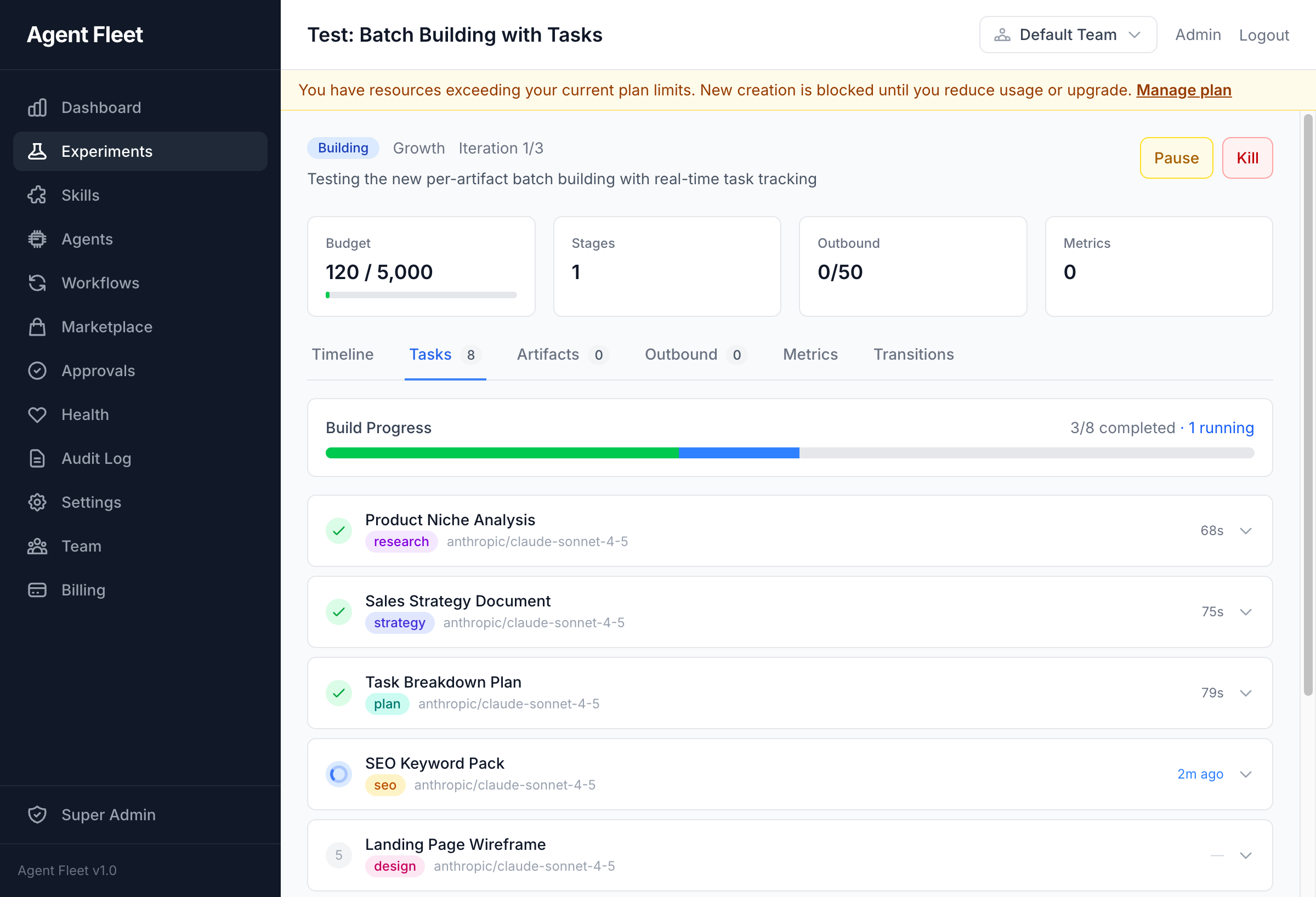
|
Task Output Expand any completed task to inspect the AI-generated output, including structured JSON responses. 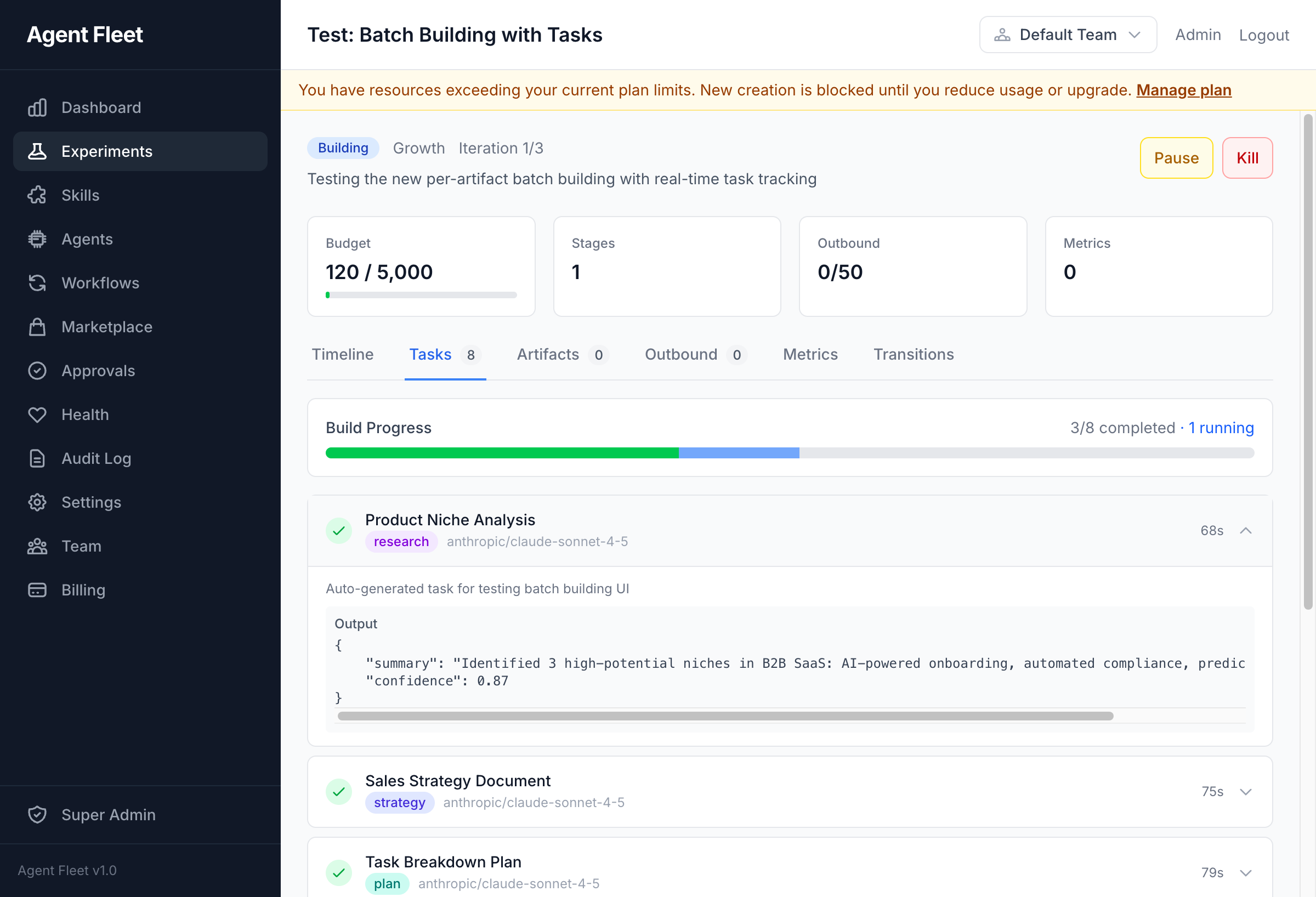
|
|
Visual Workflow Builder DAG-based workflow editor with conditional branching, human tasks, switch nodes, and dynamic forks. 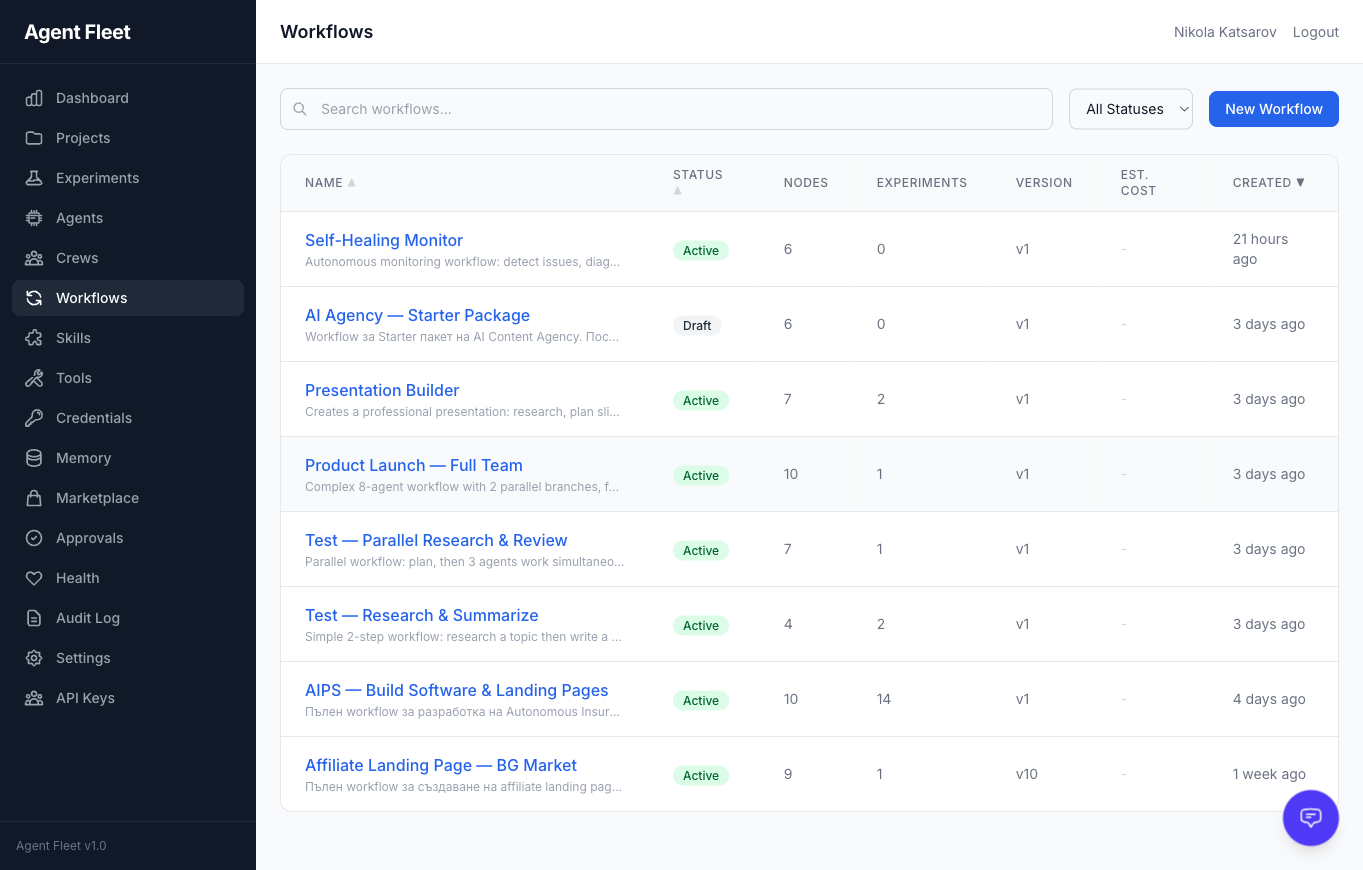
|
Tool Management Manage MCP servers, built-in tools, and external integrations with risk classification and per-agent assignment. 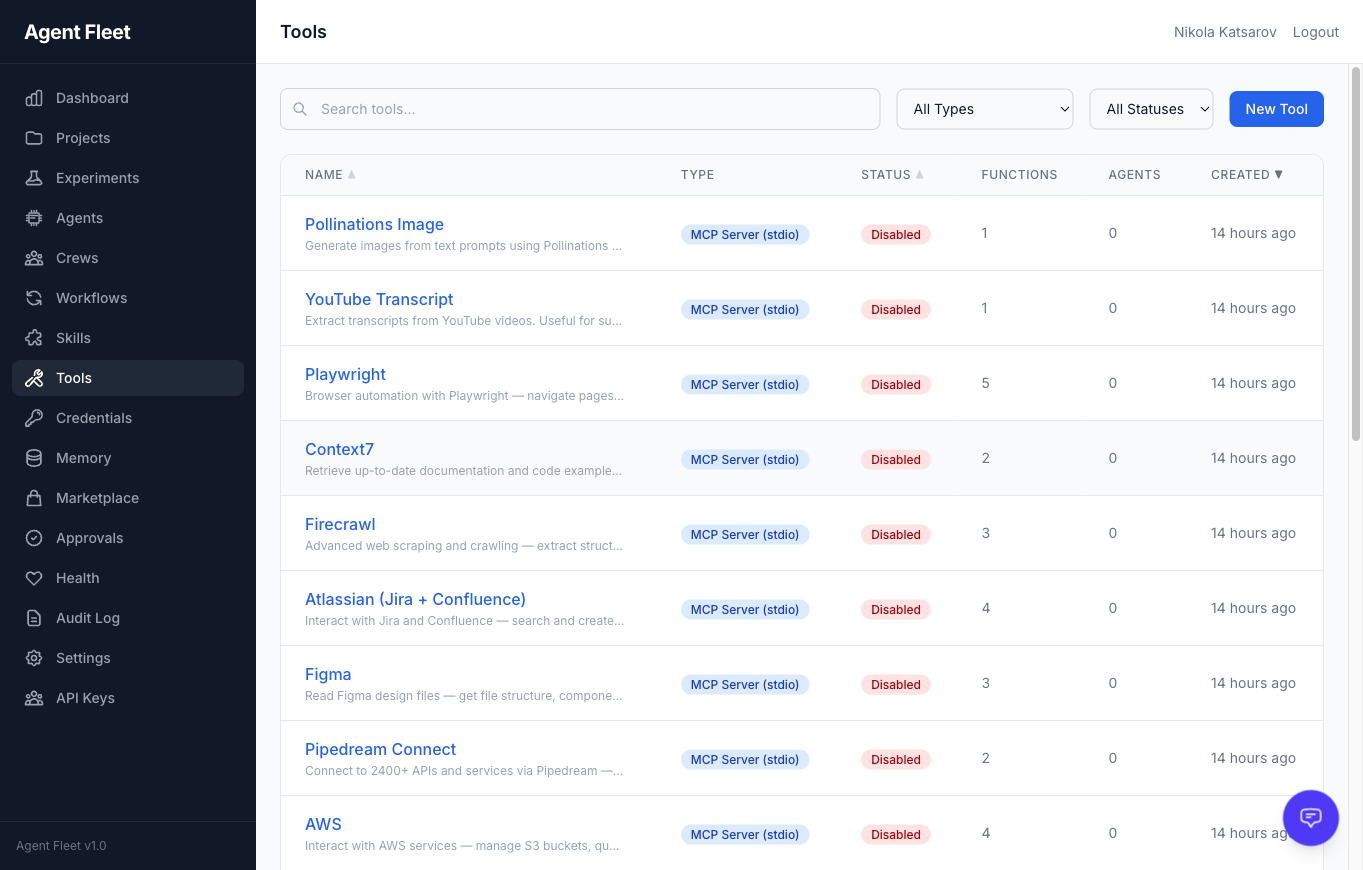
|
|
AI Assistant Sidebar Context-aware AI chat embedded in every page with 28 built-in tools for querying and managing the platform. 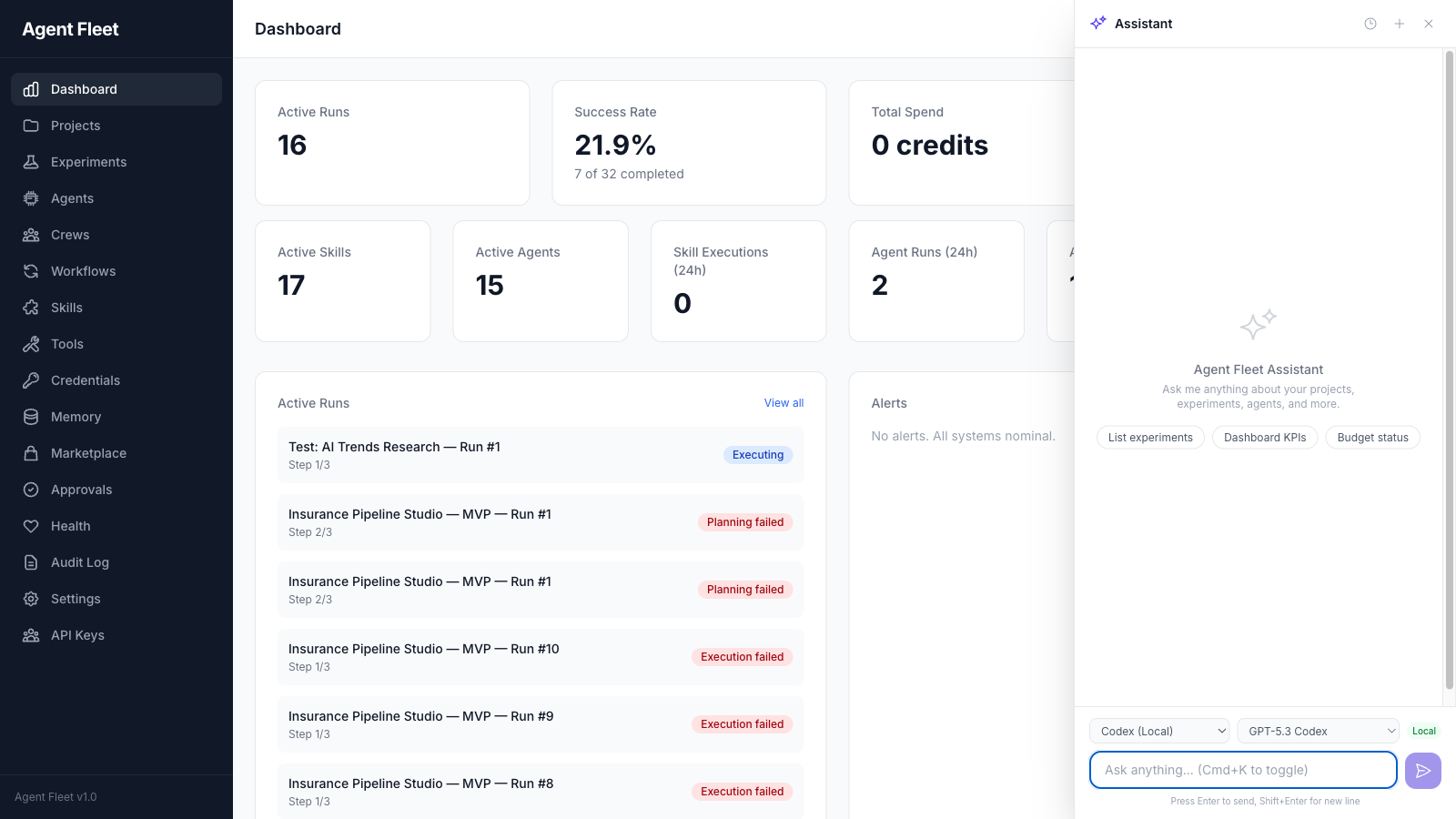
|
Experiment Detail Full experiment lifecycle view with timeline, tasks, transitions, artifacts, metrics, and outbound delivery. 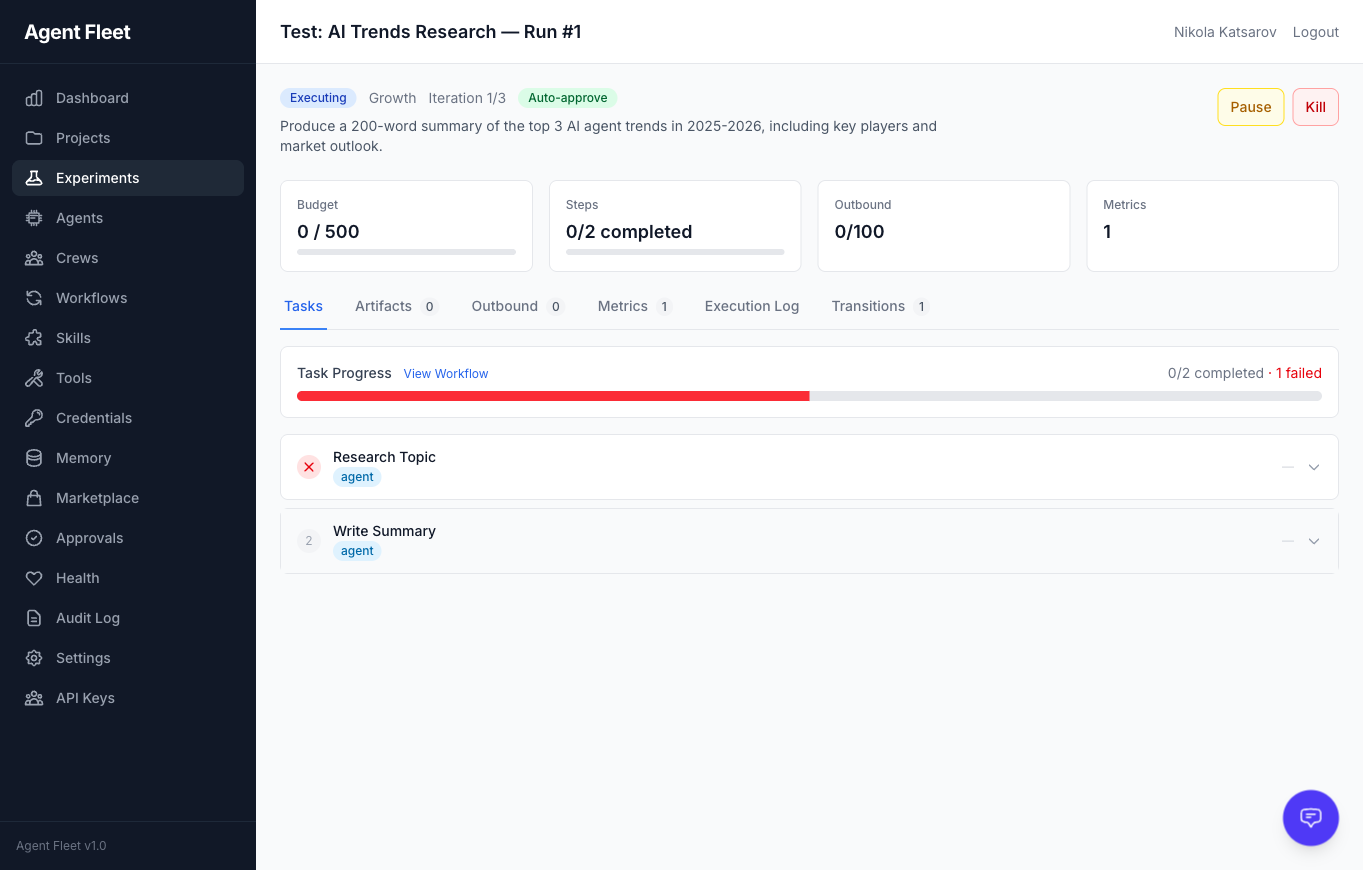
|
|
Settings & Webhooks Global platform settings, AI provider keys (BYOK), outbound connectors, and webhook configuration. 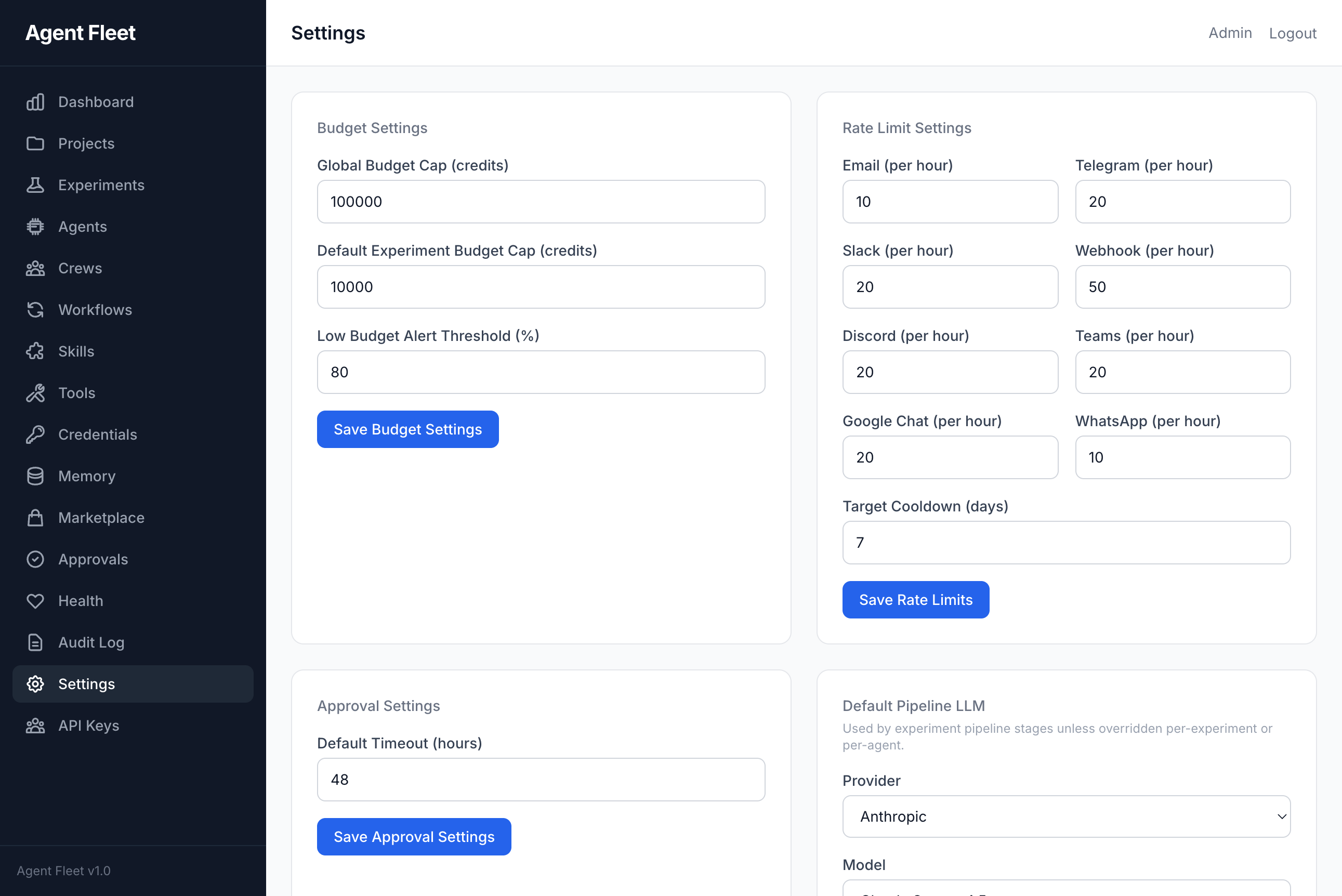
|
Error Handling Failed tasks display detailed error information including provider, error type, and request IDs for debugging. 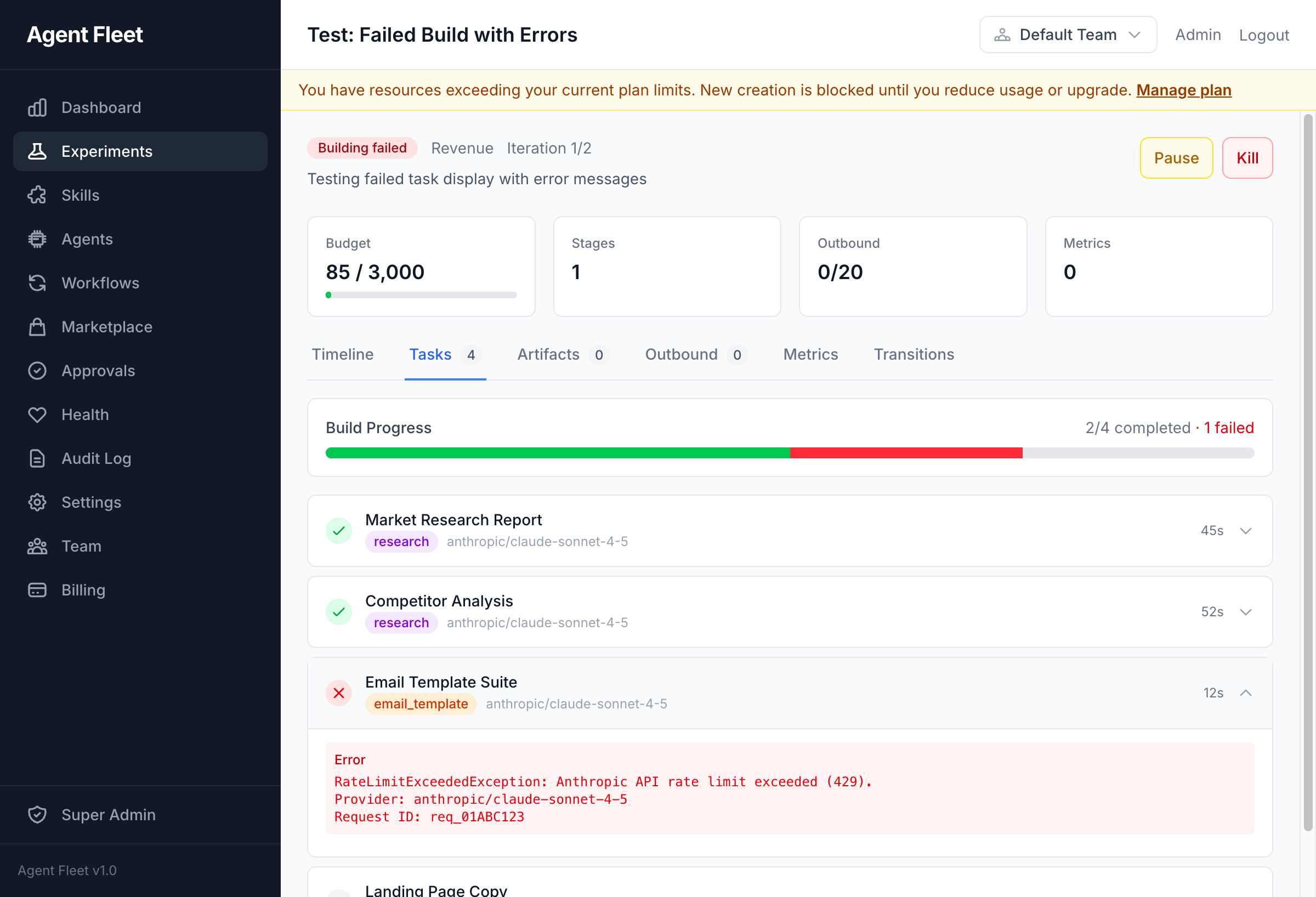
|
Features
Agents, crews, and workflows
- AI Agents — role, goal, backstory, personality traits, skill assignments, per-agent provider/model fallback chains
- Agent Templates — 14 pre-built templates across 5 categories (engineering, content, business, design, research)
- Agent Evolution — LLM analyzes execution history, proposes config changes, one-click approval
- Agent Crews — Multi-agent teams with coordinator/QA/worker roles, 7 process types (sequential, parallel, hierarchical, self-claim, adversarial, fanout, chat-room), weighted QA scoring
- Pre-Execution Scout Phase — cheap LLM pre-call identifies what knowledge the agent needs → targeted semantic search instead of generic recall
- Step Budget Awareness — agent system prompt targets 80% of allowed steps for core work, reserves the rest for synthesis
- Experiment Pipeline — 20-state machine with automatic stage progression (scoring → planning → building → approval → executing → metrics → evaluating)
- Visual Workflow DAG — 8 node types (agent, conditional, human-task, switch, dynamic-fork, do-while, compensation, sub-workflow). Pre-built Web Dev Cycle template. NL → workflow generator.
- Projects — one-shot and continuous projects with cron scheduling, budget caps, milestones, overlap policies
LLMs and compute
- BYOK — bring your own keys for Anthropic (Claude), OpenAI (GPT-4o), Google (Gemini)
- Local LLMs — Ollama, LM Studio, vLLM, llama.cpp via OpenAI-compatible endpoints; 17 preset Ollama models; SSRF protection
- Local Agents — Codex and Claude Code as execution backends (auto-detected, zero cost)
- Portkey Gateway — optional drop-in that unlocks 250+ LLM providers with semantic caching and fallbacks
- RunPod GPU Integration — invoke RunPod serverless endpoints or manage full GPU pod lifecycles as skills; BYOK API key; spot pricing
- Pluggable Compute Providers —
gpu_computeskills backed by RunPod, Replicate, Fal.ai, Vast.ai - AI Gateway — provider-agnostic via PrismPHP with 6-layer middleware (rate-limit, budget, idempotency, semantic-cache, schema-validation, usage-tracking), circuit breakers, fallback chains
- Semantic Cache — pgvector-backed cosine similarity (threshold 0.92) cross-team cache — cuts LLM spend on repeat prompts
Signals, triggers, outbound
- Signal connectors — 20+ drivers: webhook, RSS, IMAP, Slack, Discord, WhatsApp, GitHub, Linear, Jira, PagerDuty, Sentry, Datadog, ClearCue, Telegram, Matrix, Notion, Confluence, Screenpipe, Searxng, more
- Bug Report signals — lightweight QA pipeline with public JS widget, screenshot + console + network + action log capture, threaded comments (reporter + agent + support), agent delegation, SLA escalation
- Trigger rules — event-driven automation with condition evaluator, dry-run testing
- Multi-Channel Outbound — Email (SMTP), Webhook, ntfy plus eight chat channels as first-class drivers (Telegram, Slack, Discord, Microsoft Teams, Google Chat, Matrix, Signal, Supabase Realtime), each with a config page, rate limiting and blacklist
- Webhooks — inbound (HMAC-SHA256) + outbound (retry, event filtering)
Human-in-the-loop, budgets, security
- Approvals — inbox with SLA enforcement + escalation
- Human Tasks — embedded form schemas on workflow nodes
- Credit Ledger — per-experiment and per-project with pessimistic locking and auto-pause on overspend
- Credential Vault — encrypted external service credentials with rotation, OAuth2, expiry tracking, per-project injection
- SSH tools — TOFU (Trust On First Use) fingerprint verification, per-tool allowed-commands whitelist, multi-layer command security policy
- Audit Trail — full activity log (spatie/activitylog), searchable + filterable
- Tenant Isolation — multi-layer
TeamScope+BelongsToTeam+withoutGlobalScopes()discipline
Integrations & web dev pipeline
- Integrations — GitHub, Slack, Notion, Airtable, Linear, Stripe, Vercel, Netlify, generic webhook/polling with OAuth 2.0
- Autonomous Web Dev Pipeline — agents can open PRs, merge, dispatch CI workflows, create releases, trigger Vercel/Netlify/SSH deploys through MCP tools
- Website Builder — AI-generated static sites with 8 widget types, Vercel + ZIP deployment drivers, form submissions, blog/navigation/contact widgets
- Founder Mode pack — marketplace bundle of 6 persona agents (Strategist, Product Lead, Growth Hacker, Finance Advisor, Ops Manager, Risk Officer), 20 framework skills (RICE, SPIN, BANT, MEDDIC, OKRs, Shape Up, Unit Economics, Kano, TAM-SAM-SOM, K-Factor, NPV-IRR, RACI, A/B Testing, OWASP), 5 pre-built workflows
- Marketplace — browse, publish, install shared skills, agents, workflows, and bundles with AI risk scanning
API & MCP surface
- REST API — 175+ endpoints under
/api/v1/with Sanctum auth, cursor pagination, auto-generated OpenAPI 3.1 at/docs/api - MCP Server — 675+ Model Context Protocol tools across 45 domains (62 tool groups) (stdio + HTTP/SSE + OAuth2/PKCE)
- Real-World Action governance —
ActionProposalflow gates assistant tool calls, integration writes, and git pushes through a per-tier risk policy with auto-execute on approval - Public discovery endpoint —
GET /.well-known/fleetqreturns a config-gated capability manifest so external AI tools can auto-configure - Live team graph —
/team-graphpage with real-time updates via Laravel Reverb WebSockets - Structured MCP errors — canonical gRPC-style error codes (
UNAVAILABLE,PERMISSION_DENIED,RESOURCE_EXHAUSTED,DEADLINE_EXCEEDED,INVALID_ARGUMENT,FAILED_PRECONDITION,NOT_FOUND,INTERNAL) with retryable hints — agents know when to retry vs. fail fast - Per-tool deadlines — optional
deadline_msparameter on every MCP tool; agents can bound wall-clock time per call - OpenTelemetry tracing — OTLP HTTP exporter, Jaeger all-in-one via
docker compose --profile observability up, spans for MCP tool → AI gateway → LLM provider - Tool Management — MCP servers (stdio/HTTP), built-in tools (bash/filesystem/browser), risk classification, per-agent assignment
- MCP client compatibility — Claude Desktop, Claude.ai, ChatGPT Apps, Cursor, Codex, Claude Code, Gemini CLI, any OAuth2 client
Infrastructure
- Queue Management — Laravel Horizon with 6 priority queues and auto-scaling
- Testing — regression test suites for agent outputs with automated evaluation
- Per-Call Working Directory — local/bridge agents can operate in a configured working directory per-agent, isolated project contexts
Use Cases
FleetQ is built for teams running AI agents in production, not toy demos.
- Autonomous dev pipelines — agent opens PR → CI runs → reviewer agent approves → merge → deploy. Human approves only on risk signals.
- Customer support triage — bug report widget → agent extracts reproduction steps from console/network log → experiment runs → notifies reporter with fix or agent-generated workaround.
- Multi-agent research — crew of Strategist + Researcher + Writer with QA reviewer. Each step weighted by domain rubric.
- Scheduled content ops — continuous project runs daily, each run executes a DAG: draft → review → SEO-check → publish → schedule social.
- Incident response — PagerDuty/Sentry signal → trigger rule → diagnosis agent → human approval on runbook action → Slack notify.
- GPU workloads — agent calls
gpu_computeskill on RunPod serverless (Whisper, FLUX, Bark) as part of a larger workflow, with cost accounting. - Local-first agent dev — Ollama + Codex + Claude Code auto-detected, zero API cost for prototyping; switch to cloud providers for production.
- Bring FleetQ into Claude — expose your internal data + tools as MCP server, Claude Desktop/ChatGPT/Cursor can drive the platform programmatically.
How FleetQ compares
| FleetQ | n8n | CrewAI | LangGraph | Make.com | |
|---|---|---|---|---|---|
| Open source | ✅ AGPLv3 | ✅ Sustainable Use | ✅ MIT | ✅ MIT | ❌ Proprietary |
| Visual DAG builder | ✅ 8 node types | ✅ (not AI-first) | ❌ | ❌ | ✅ |
| Multi-agent crews | ✅ 7 process types | ❌ | ✅ | ✅ (build-your-own) | ❌ |
| MCP server (native) | ✅ 675+ tools | ❌ | ❌ | ❌ | ❌ |
| Human-in-the-loop | ✅ native | ⚠️ workaround | ⚠️ code | ⚠️ code | ⚠️ approve-node |
| Budget ledger + locks | ✅ pessimistic | ❌ | ❌ | ❌ | ❌ |
| Audit trail | ✅ every action | ✅ | ❌ | ❌ | ✅ |
| BYOK + local LLMs | ✅ both | ⚠️ BYOK only | ⚠️ depends | ⚠️ BYOK | ❌ |
| Self-hosted | ✅ Docker Compose | ✅ | n/a (library) | n/a (library) | ❌ |
| Agent evolution (self-improve) | ✅ | ❌ | ❌ | ❌ | ❌ |
| OpenTelemetry tracing | ✅ native | ❌ | ❌ | ⚠️ partial | ❌ |
| Credit/usage metering | ✅ per-team/project | ❌ | ❌ | ❌ | per-workspace |
TL;DR — if you're building production agent systems with LLMs and want visual workflows + MCP + human oversight, FleetQ is the only platform that bundles all of it.
Quick Start (Docker)
git clone https://github.com/escapeboy/agent-fleet-o.git
cd agent-fleet
make install
This will:
- Copy
.env.exampleto.env - Build and start all Docker services
- Run the interactive setup wizard (database, admin account, LLM provider)
Visit http://localhost:8080 when complete.
Quick Start (Manual — Web Setup)
Requirements: PHP 8.4+, PostgreSQL 17+, Redis 7+, Node.js 20+, Composer
git clone https://github.com/escapeboy/agent-fleet-o.git
cd agent-fleet
composer install
npm install && npm run build
cp .env.example .env
# Edit .env — set DB_HOST, DB_DATABASE, DB_USERNAME, DB_PASSWORD, REDIS_HOST
php artisan key:generate
php artisan migrate
php artisan horizon &
php artisan serve
Then open http://localhost:8000 in your browser. The setup page will guide you through creating your admin account.
Alternative: Run
php artisan app:installfor an interactive CLI setup wizard that also seeds default agents and skills.
Authentication
- No email verification — the self-hosted edition skips email verification entirely. Accounts are active immediately on registration.
- Single user — all registered users join the default workspace automatically.
No-Password Mode (local installs)
If you're running FleetQ locally on your own machine and don't want to enter a password on every visit, set APP_AUTH_BYPASS=true in .env:
APP_AUTH_BYPASS=true   # Auto-login as first user
APP_ENV=local          # Required — bypass is disabled in production
With bypass enabled, the app logs you in automatically on every request. A logout link is still shown but you'll be logged back in on the next page load — this is intentional.
Warning: Never set
APP_AUTH_BYPASS=trueon a server accessible from the internet.
Configuration
All configuration is in .env. Key variables:
# Database (PostgreSQL required)
DB_CONNECTION=pgsql
DB_HOST=postgres
DB_DATABASE=agent_fleet

# Redis (queues, cache, sessions, locks)
REDIS_HOST=redis
REDIS_DB=0          # Queues
REDIS_CACHE_DB=1    # Cache
REDIS_LOCK_DB=2     # Locks

# LLM Providers -- at least one required for AI features
ANTHROPIC_API_KEY=
OPENAI_API_KEY=
GOOGLE_AI_API_KEY=

# Auth bypass -- local no-password mode (never use in production)
APP_AUTH_BYPASS=false
Additional LLM keys can be configured in Settings > AI Provider Keys after login.
To use local models (Ollama, LM Studio, vLLM):
LOCAL_LLM_ENABLED=true
LOCAL_LLM_SSRF_PROTECTION=false  # set false if Ollama is on a LAN IP (192.168.x.x)
LOCAL_LLM_TIMEOUT=180
Then configure endpoints in Settings > Local LLM Endpoints.
SSH Host Access
Agents can execute commands on the host machine (or any remote server) via SSH using the built-in SSH tool type. This is useful for running local scripts, interacting with the filesystem, or orchestrating host-level processes from an agent.
How it works
- The platform stores SSH private keys encrypted in the Credential vault.
- An SSH Tool is configured with
host,port,username,credential_id, and an optionalallowed_commandswhitelist. - On the first connection to a host, the server's public key fingerprint is stored via TOFU (Trust On First Use). Subsequent connections verify the fingerprint — a mismatch raises an error to prevent MITM attacks.
- Manage trusted fingerprints via Settings > SSH Fingerprints or the
tool_ssh_fingerprintsMCP tool.
Setup (Docker — connecting container to host)
The containers reach the host machine via host.docker.internal, which is pre-configured in docker-compose.yml via extra_hosts: host.docker.internal:host-gateway.
Step 1 — Enable SSH on the host
| OS | Command |
|---|---|
| macOS | System Settings → General → Sharing → Remote Login → On |
| Ubuntu/Debian | sudo apt install openssh-server && sudo systemctl enable --now ssh |
| Fedora/RHEL | sudo dnf install openssh-server && sudo systemctl enable --now sshd |
| Windows | Settings → System → Optional Features → OpenSSH Server, then Start-Service sshd |
Step 2 — Generate an SSH key pair
ssh-keygen -t ed25519 -C "fleetq-agent@local" -f ~/.ssh/fleetq_agent_key -N ""
Step 3 — Authorize the key on the host
cat ~/.ssh/fleetq_agent_key.pub >> ~/.ssh/authorized_keys
chmod 600 ~/.ssh/authorized_keys
Step 4 — Create a Credential in FleetQ
Navigate to Credentials → New Credential:
- Type:
SSH Key - Paste the contents of
~/.ssh/fleetq_agent_key(private key)
Or via API:
curl -X POST http://localhost:8080/api/v1/credentials \
  -H "Authorization: Bearer $TOKEN" \
  -H "Content-Type: application/json" \
  -d '{
    "name": "Host SSH Key",
    "credential_type": "ssh_key",
    "secret_data": {"private_key": "<contents of fleetq_agent_key>"}
  }'
Step 5 — Create an SSH Tool
Navigate to Tools → New Tool → Built-in → SSH Remote, or via API:
curl -X POST http://localhost:8080/api/v1/tools \
  -H "Authorization: Bearer $TOKEN" \
  -H "Content-Type: application/json" \
  -d '{
    "name": "Host SSH",
    "type": "built_in",
    "risk_level": "destructive",
    "transport_config": {
      "kind": "ssh",
      "host": "host.docker.internal",
      "port": 22,
      "username": "your-username",
      "credential_id": "<credential-id>",
      "allowed_commands": ["ls", "pwd", "whoami", "uname", "date", "df"]
    },
    "settings": {"timeout": 30}
  }'
Step 6 — Assign the tool to an agent
In the Agent detail page, go to Tools and assign the SSH tool. The agent will now have an ssh_execute function available during execution.
Command security policy
The platform enforces a multi-layer security hierarchy for bash and SSH commands:
- Platform-level — always blocked:
rm -rf /,mkfs,shutdown,reboot, pipe-to-shell patterns - Organization-level — configure in Settings → Security Policy or via the
tool_bash_policyMCP tool - Tool-level —
allowed_commandswhitelist in the tool's transport config - Project-level — additional restrictions in project settings
- Agent-level — per-agent overrides on the tool pivot
More restrictive layers always win. A command blocked at the platform level cannot be unblocked by any other layer.
SSH fingerprint management
Trusted host fingerprints are viewable and removable via:
- API:
GET /api/v1/ssh-fingerprints/DELETE /api/v1/ssh-fingerprints/{id} - MCP:
tool_ssh_fingerprintswithlistordeleteaction
Remove a fingerprint when a host's SSH key is legitimately rotated — the next connection will re-verify via TOFU.
Architecture
flowchart LR
    subgraph Clients["Operators & external agents"]
        UI["Admin UI — Livewire 4 + Alpine"]
        MCPCLI["MCP clients (Claude Desktop, Cursor, Codex, Claude Code)"]
        APIC["REST clients — /api/v1/* (Sanctum)"]
        SIG["Inbound signals (webhook / RSS / IMAP / Slack / Telegram)"]
    end

    UI --> WEB
    APIC --> API
    MCPCLI -->|HTTP/SSE or stdio| MCP
    SIG --> INGEST

    subgraph App["FleetQ app (Laravel 13 / PHP 8.4)"]
        WEB["Web routes (auth:web)"] --> DOM
        API["/api/v1/* — Sanctum tokens"] --> DOM
        MCP["AgentFleetServer — 675+ MCP tools / 62 tool groups"] --> DOM
        INGEST["SignalWebhookController / IngestSignalAction"] --> TRIG["TriggerRule evaluator"]
        TRIG --> DOM

        DOM["Domain layer — Agent / Crew / Experiment / Workflow / Project / Approval / Budget / Tool / Credential / Skill / Outbound"]
        DOM --> SM["ExperimentStateMachine (20 states)"]
        SM --> EVT(("ExperimentTransitioned event"))
        EVT --> STAGE["BaseStageJob + PlaybookExecutor"]
        STAGE --> GATEWAY["AI Gateway (PrismPHP) — 6-layer middleware + circuit breakers"]
        GATEWAY --> LLM["Providers: Anthropic / OpenAI / Google / Ollama / vLLM / Codex / Claude Code"]
        STAGE --> TOOLS["ToolTranslator — MCP stdio/HTTP, bash, filesystem, browser, SSH (TOFU)"]
        STAGE --> APPR["ApprovalRequest / HumanTask (auth:web inbox)"]
        STAGE --> OUT["Outbound connectors — Email / Telegram / Slack / Webhook / ntfy"]
        STAGE --> ARTI[("Artifact + ArtifactVersion")]

        DOM --> DB[("Postgres 17 + pgvector — semantic cache, UUIDv7, JSONB+GIN")]
        STAGE --> QUEUE[("Redis 7 — 6 Horizon queues, cache, locks")]
        APPR --> DB
        ARTI --> DB
    end

    subgraph Optional["Optional Docker profiles"]
        REVERB["Reverb — WebSocket live team graph"]
        BROWSER["browserless (Chromium)"]
        SEARX["searxng"]
        VOICE["voice-worker (LiveKit / Deepgram)"]
        SANDBOX["bash_sidecar (sandboxed shell)"]
        RELAY["fleetq-bridge relay"]
        JAEGER["Jaeger — OTLP traces (--profile observability)"]
    end

    App -.OTLP spans.-> JAEGER
    UI <-->|WebSocket| REVERB
    TOOLS -.->|browser tools| BROWSER
    TOOLS -.->|web search skill| SEARX
    TOOLS -.->|bash skill| SANDBOX
    App <-->|relay| RELAY
    DOM <--> VOICE
The platform is a single Laravel 13 monolith that exposes three coequal control surfaces over the same domain layer: the Livewire admin UI, a Sanctum-authenticated REST API at /api/v1/* (~175 endpoints), and AgentFleetServer — an MCP server with 675+ tools across 62 tool groups served over both HTTP/SSE and local stdio. Inbound signals (webhook, RSS, IMAP, Slack, Telegram, and the rest of the 20+ connectors) flow through IngestSignalAction and the TriggerRule evaluator into the domain layer, where the ExperimentStateMachine walks a 20-state pipeline by emitting ExperimentTransitioned events whose listeners dispatch the next BaseStageJob onto Horizon-managed Redis queues. Stage jobs talk to LLMs through the PrismPHP-backed AI Gateway (rate-limit, budget, idempotency, semantic-cache, schema-validation, usage-tracking middleware + circuit breakers + provider fallbacks), invoke Tool instances translated to PrismPHP tool calls (MCP stdio/HTTP, built-in bash/filesystem/browser, SSH with TOFU fingerprints), park ApprovalRequest/HumanTask records for the human-in-the-loop inbox, and persist Artifact versions plus deliver outbound messages over Email/Telegram/Slack/Webhook/ntfy. State and tenant data live in Postgres 17 with pgvector (semantic cache, UUIDv7 primary keys, JSONB+GIN indexes); Redis 7 carries the six Horizon queues, application cache, and pessimistic budget locks. Optional Docker Compose profiles add Reverb for the live team-graph WebSocket, browserless for browser tools, searxng for web search, a voice worker (LiveKit/Deepgram), a sandboxed bash sidecar, the fleetq-bridge relay, and Jaeger for OpenTelemetry tracing via --profile observability.
Built with Laravel 13, Livewire 4, and Tailwind CSS. Domain-driven design with 45 bounded contexts — table below shows the 17 primary domains:
| Domain | Purpose |
|---|---|
| Agent | AI agent configs, execution, personality, evolution |
| Crew | Multi-agent teams with lead/member roles |
| Experiment | Pipeline, state machine, playbooks |
| Signal | Inbound data ingestion |
| Outbound | Multi-channel delivery |
| Approval | Human-in-the-loop reviews and human tasks |
| Budget | Credit ledger, cost enforcement |
| Metrics | Measurement, revenue attribution |
| Audit | Activity logging |
| Skill | Reusable AI skill definitions |
| Tool | MCP servers, built-in tools, risk classification |
| Credential | Encrypted external service credentials |
| Workflow | Visual DAG builder, graph executor |
| Project | Continuous/one-shot projects, scheduling |
| Assistant | Context-aware AI chat with 28 tools |
| Marketplace | Skill/agent/workflow sharing |
| Integration | External service connectors (GitHub, Slack, Notion, Airtable, Linear, Stripe, Generic) |
Docker Services
| Service | Purpose | Port |
|---|---|---|
| app | PHP 8.4-fpm | -- |
| nginx | Web server | 8080 |
| postgres | PostgreSQL 17 | 5432 |
| redis | Cache/Queue/Sessions | 6379 |
| horizon | Queue workers | -- |
| scheduler | Cron jobs | -- |
| vite | Frontend dev server | 5173 |
Common Commands
make start          # Start services
make stop           # Stop services
make logs           # Tail logs
make update         # Pull latest + migrate
make test           # Run tests
make shell          # Open app container shell
Or with Docker Compose directly:
docker compose exec app php artisan tinker       # REPL
docker compose exec app php artisan test          # Run tests
docker compose exec app php artisan migrate       # Run migrations
Decision-Model Eval Harness
jev:eval scores a decision model — TypeSafe's Jev, a second System One
endpoint, or an ordinary chat LLM — against a JSONL dataset, and jev:report
turns the recorded answers into accuracy, calibration, coverage, latency, cost
and determinism numbers. Nothing in the request path calls it: it is a
measurement tool, not a production dependency.
The API key never touches the repo
TYPESAFE_API_KEY lives in 1Password and reaches the process only through
op run. .env.op (committed) holds the reference, never the value:
TYPESAFE_API_KEY="op://AI Agent/Jev API Key/credential"
The baseline drivers follow the same rule — .env.op also carries references
for ANTHROPIC_API_KEY, GEMINI_API_KEY / GOOGLE_AI_API_KEY and
OPENAI_API_KEY, and each command passes only the names it needs through
docker compose run -e.
Every command that calls the API is run through op run, which resolves the
reference into the child process and masks it in the output. Do not pass
--no-masking, do not op read the item into a variable, and do not write the
value into .env, a compose file or a fixture.
Running an eval end to end
# 1. Build the datasets.
python3 base/scripts/jev-eval/export_next_tool_dataset.py    # -> next-tool.jsonl
python3 base/scripts/jev-eval/export_routing_v2_dataset.py   # -> routing-v2.jsonl + routing-v2-synth.jsonl
python3 base/scripts/jev-eval/export_domain_prefilter_dataset.py  # -> domain-prefilter.jsonl
#    both write into ~/jev-eval/datasets/fleetq/

# 2. Make them reachable from the container (storage/ is bind-mounted).
mkdir -p storage/app/jev-eval
cp ~/jev-eval/datasets/fleetq/*.jsonl storage/app/jev-eval/

# 3. Run the eval. The key is injected by op, by name, for this process only.
export OP_SERVICE_ACCOUNT_TOKEN=$(cat ~/.config/op/sa-token)

op run --env-file=.env.op -- docker compose run --rm -e TYPESAFE_API_KEY app \
  php artisan jev:eval storage/app/jev-eval/routing-v2.jsonl --driver=jev --split=test --concurrency=8

# 4. Report on the run id the eval printed.
docker compose exec app php artisan jev:report <run-id> \
  --dataset-path=storage/app/jev-eval/routing-v2.jsonl
Measuring determinism — the same requests sent N times:
op run --env-file=.env.op -- docker compose run --rm -e TYPESAFE_API_KEY app \
  php artisan jev:eval storage/app/jev-eval/routing-v2.jsonl --driver=jev --split=dev --repeat=3
Comparing Jev against a chat model on the same dataset — the LLM drivers use the platform AI gateway, so they need no TypeSafe key:
op run --env-file=.env.op -- docker compose run --rm -e ANTHROPIC_API_KEY app \
  php artisan jev:eval storage/app/jev-eval/routing-v2.jsonl --driver=haiku --split=test --team=<team-id>
--team is required: the gateway logs every call to the tenant-scoped
llm_request_logs, and an eval has no tenant of its own. The gateway also caps
Anthropic at 60 requests per minute across the whole process, so the LLM drivers
publish their own requests_per_minute and the eval throttles itself to it —
two of these running flat out in parallel will still starve each other.
gemini-flash and gpt-mini exist for one reason: on a dataset whose gold
labels were produced by Claude models, an Anthropic baseline is scoring its own
homework. A model family that had no hand in the labels is the only baseline
that means anything there.
When the metered Anthropic key is unavailable, claude_cli_haiku and
claude_cli_sonnet run the same prompts through the local Claude Code CLI on
its subscription credentials. They need no key, no --team and no gateway:
docker compose run --rm -v "$HOME/.claude/.credentials.json:/root/.claude/.credentials.json:ro" \
  -e CLAUDE_CLI_CONCURRENCY=5 app \
  php artisan jev:eval storage/app/jev-eval/topics-bg.jsonl --driver=claude_cli_sonnet --split=test
Without Docker, the same commands run directly:
op run --env-file=.env.op -- php artisan jev:eval ~/jev-eval/datasets/fleetq/routing-v2.jsonl --driver=jev --split=test
op run --env-file=.env.op -- php artisan jev:report
Options
jev:eval:
| Option | Default | Meaning |
|---|---|---|
--driver | jev | A key from config/decision.php: jev, jeff, haiku, sonnet, gemini-flash, gpt-mini, claude_cli_haiku, claude_cli_sonnet |
--split | test | dev, test, or all. 20/80, decided by a hash of the case id |
--repeat | 1 | Send each case N times; feeds the determinism columns |
--concurrency | 8 | Cases in flight at once, for drivers that support batching |
--limit | 0 | Stop after N cases, taken in file order so two drivers stay comparable |
--team | — | Team the LLM drivers log their gateway calls under (required for haiku/sonnet) |
jev:report:
| Option | Meaning |
|---|---|
run_id... | One or more runs; several put different drivers in one table set |
--group-by=meta.source | Split every table by a dataset meta key |
--where=meta.source=assistant_turn | Keep only cases matching a meta key (comma-separated values allowed) |
--questions=domain | Report only these question ids |
--multi-label | Score each case as one label SET (Noul per label) instead of per question |
--dataset-path= | The dataset file; required by --group-by, --where and the variant analysis |
Accuracy is printed with a 95% Wilson interval, which is what makes a per-source table readable when some sources have only a handful of cases.
Each question type also gets its own block under the headline table:
| Type | Extra metrics |
|---|---|
| Choice | top-2 accuracy (gold within the two highest-probability options), per-class precision / recall / F1, confusion pairs sorted by count |
| Noul | precision, recall and F1 of the positive class at t=0.5, PR-AUC (average precision), and the gold positive rate printed next to accuracy |
| Score | MAE on the level index, and binary accuracy for level 0 vs level > 0 |
The run stays under Jev's published ceilings (1,200 requests/minute and 250,000 tokens/second) on its own. A case whose state plus longest question is estimated over 32k tokens is rejected and logged by id, never truncated — a shortened state is a different case, and scoring it would move the accuracy number without saying so.
Datasets
JSONL, one case per line:
{"id":"routing-006cbe1f682e","state":{...},"questions":{"domain":{"type":"choice","instructions":"...","criteria":{...}}},"gold":{"domain":"filesystem"},"meta":{"lang":"en","source":"phoenix:local_agent.tool","split":"test"}}
| File | What it measures | Gold comes from |
|---|---|---|
next-tool.jsonl | next-tool prediction inside a coding loop | the tool the agent in fact called next |
routing-v2.jsonl | which FleetQ MCP domain handles a request | configuration, or a human's recorded choice |
routing-v2-synth.jsonl | the same question, on registry-phrased requests | the registry domain of the tool a description came from |
domain-prefilter.jsonl | which domains can be ruled out (multi-label) | every MCP domain the assistant drew a tool from in that turn |
next-tool.jsonl is one case per tool call an agent actually made inside a
session belonging to an experiment that reached completed. The state carries
the task brief and the steps already taken; the gold answer is the tool that was
in fact chosen next. The assistant's own narration is deliberately excluded — it
routinely names the next tool, which would turn routing into string extraction.
This is agent behaviour, not FleetQ routing.
routing-v2.jsonl never scores against what an agent decided. Each gold answer
is a configuration fact or an explicit human choice already in the database:
a user asked the assistant for something and it called tools from exactly one
MCP domain (turns spanning two domains are dropped, because the gold would be
ambiguous); a signal was routed into an experiment whose workflow template was
configured; a human created an experiment and assigned a specific agent to it.
meta.source records which, so a subset can be scored on its own. A single
source task contributes at most 15 cases.
routing-v2-synth.jsonl is generated from the tool registry's own descriptions
to cover the domains production data never exercises. Every case carries
meta.source = "synthetic" and it lives in its own file so it is never mixed
into headline numbers — score it separately or not at all.
domain-prefilter.jsonl asks a different question from routing-v2: not "which
one domain handles this" but "which domains can be ruled out" — the shape a
prefilter in front of a 700-tool MCP server needs. One Noul per domain, all 67
in a single request, gold true for every domain the turn drew a tool from.
Multi-domain turns are kept here, because a turn spanning two domains is a
correct multi-label answer rather than an ambiguous one. Score it with
jev:report --multi-label, which sweeps the threshold and reports the tightest
prefilter that still keeps essentially every true label.
On routing-v2 headline numbers: only the assistant_turn source belongs in
one. The signal_workflow and experiment_agent sources encode a
configuration fact that the request text cannot support — a Sentry bug report
reads like a signal whatever the tenant configured it to trigger — and
model_tier has a single value across every case where prod data can derive it.
Report those per source, never merged:
docker compose exec app php artisan jev:report <run-id> \
  --dataset-path=storage/app/jev-eval/routing-v2.jsonl \
  --where=meta.source=assistant_turn --questions=domain
The domain option list and its one-sentence descriptions are read out of the
registry by base/scripts/jev-eval/mcp_domain_registry.py; add a tool group and
the option appears on its own.
Upgrading
make update
This pulls the latest code, rebuilds containers, runs migrations, and clears caches.
Tech Stack
- Framework: Laravel 13 (PHP 8.4)
- Database: PostgreSQL 17
- Cache/Queue: Redis 7
- Frontend: Livewire 4 + Tailwind CSS 4 + Alpine.js
- AI Gateway: PrismPHP
- Queue: Laravel Horizon
- Auth: Laravel Fortify (2FA) + Sanctum (API tokens)
- Audit: spatie/laravel-activitylog
- API Docs: dedoc/scramble (OpenAPI 3.1)
- MCP: laravel/mcp (Model Context Protocol)
Contributing
Contributions are welcome. Please open an issue first to discuss proposed changes.
- Fork the repository
- Create a feature branch (
git checkout -b feat/my-feature) - Make your changes and add tests
- Run
php artisan testto verify - Submit a pull request
See CONTRIBUTING.md for coding conventions, commit style, and PR checklist.
Community & Support
- Issues — Bug reports + feature requests
- Discussions — Ask a question or share what you built
- Changelog — What changed in each release
- Cloud version — fleetq.net (free tier, no credit card)
Star History
If FleetQ saves you time, a ⭐ helps others find it. GitHub ranks repos by star velocity.
License
FleetQ Community Edition is open-source software licensed under the GNU Affero General Public License v3.0.
TL;DR of AGPLv3: You can self-host, modify, and run FleetQ for free — including commercial use. If you offer FleetQ as a hosted service to others, you must open-source your modifications. Questions? See our AGPLv3 FAQ.