rbx-studio-mcp
Kostenloser Open-Source-MCP-Server für Roblox Studio. Push-basierter SSE-Transport, editorsichere Skriptbearbeitungen, 29 token-sparsame Tools.
Dokumentation
Roblox Studio MCP
Let an AI agent drive Roblox Studio: read your place, edit scripts, build geometry, run playtests, take screenshots. 35 tools. MIT.
Install
1. The plugin
npx -y @el4cteo/rbx-studio-mcp --install-plugin
Or drop StudioMCP.rbxmx from Releases into your Studio plugins folder.
2. The server
claude mcp add roblox-studio -- npx -y @el4cteo/rbx-studio-mcp
Other clients
Codex CLI:
codex mcp add roblox-studio -- npx -y @el4cteo/rbx-studio-mcp
Cursor, Claude Desktop, Gemini CLI, Windsurf — add to their config file:
{
  "mcpServers": {
    "roblox-studio": {
      "command": "npx",
      "args": ["-y", "@el4cteo/rbx-studio-mcp"]
    }
  }
}
VS Code / Copilot (.vscode/mcp.json) uses "servers" instead of "mcpServers", plus "type": "stdio".
opencode (opencode.json):
{
  "mcp": {
    "roblox-studio": {
      "type": "local",
      "command": ["npx", "-y", "@el4cteo/rbx-studio-mcp"],
      "enabled": true
    }
  }
}
3. Open Studio and accept the 127.0.0.1 prompt. Check it works with studio_status.
Something wrong? Run npx -y @el4cteo/rbx-studio-mcp doctor — it says what is broken and how to fix it.
Port is 44755, loopback only. Change it with --port and match it in the plugin.
Tools
| Session | studio_status list_studios set_active_studio |
| Discover | tree inspect find api |
| Scripts | script_read script_edit script_grep script_create |
| Instances | create modify delete move |
| World | geometry terrain generate assets collision audio undo |
| Live game | universe |
| Run & debug | playtest execute_luau character input console debug performance |
| Look | screenshot viewport device |
Write tools take arrays — ten script edits is one call, one Ctrl+Z, and all-or-nothing.
Open Cloud
Some calls reach past Studio to Roblox itself. All need one API key; everything else works without it.
assets op="upload" | send a local audio/image/model/video file, get an asset id |
datastore target="live" | the running game's real player data |
execute_luau target="live" | run a script on the published place |
universe | restart servers, message them, ban players |
| also | assets op="grant", op="publish", script_read/script_edit target="live" |
Make a key at Creator Dashboard → Credentials, adding the permissions you want: assets, universe-datastores, ordered-data-stores, luau-execution-sessions, universe-places, universe-place-instances, universe, messaging-service, user-restrictions, inventory, users, asset-permissions.
Then in the Studio panel:
cloud key <paste>
cloud user <your user id>
cloud place <place id>
cloud place works out the universe for you. The typed key is masked in the log and in the history, and stored at ~/.rbx-studio-mcp/credentials.json (mode 0600) — never in the place file, never in the conversation. cloud shows what is set, cloud test re-checks it, cloud forget deletes it. ROBLOX_API_KEY and friends in the environment work too and take priority.
Two things to watch: a playtest connects a second session, so pass studioId and use the edit one for changes that must last; device emulation stays on until device op="stop".
The console panel
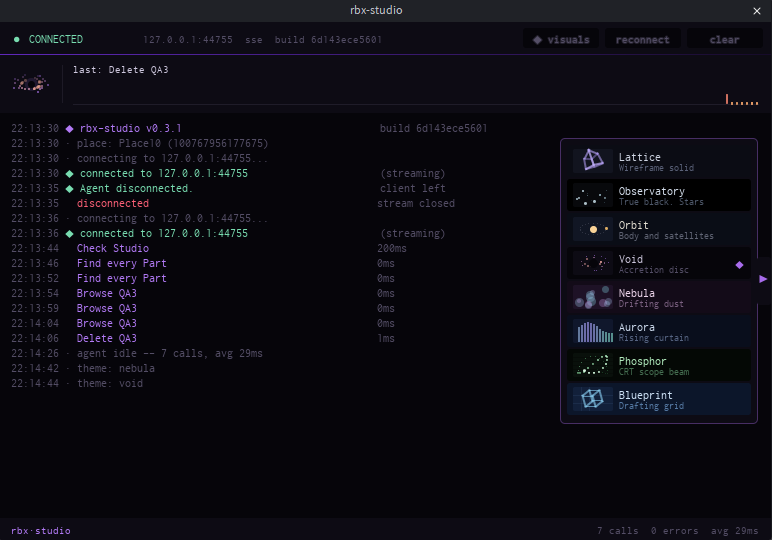
Every call is logged with how long it took. At the foot of the panel is a command line — type a command, or type a sentence and a coding agent answers it.
help | list everything |
doctor | check the setup |
status version place clients | what this session is |
studios use <n> | which Studio window calls go to |
theme [name] visuals autoopen [on|off] log [level] clear copy | the panel |
port [n] reconnect | the connection |
cloud [key|user|group|test|forget] | the Open Cloud key upload uses |
agent [use <id>|new] stop | which agent runs your prompts |
| anything else | sent to that agent |
Click the bar and every command is listed with what it does. Keep typing to filter, scroll for the rest, click one to fill it in.
Prompts start a real agent — whichever you have on PATH: Claude Code, Codex, opencode, Gemini, Cursor, Amp, Qwen Code, Factory Droid, goose, Copilot CLI, Aider, Crush, DeepSeek Harness. It runs headless, drives the same Studio, and its work appears in the log. It is a separate session from your terminal, billed separately, and allowed the rbx-studio tools only. stop cancels it.
Eight themes behind the tab on the right edge. Your pick is remembered.
Why this one
- Push, not poll — 13.6 ms per call against 25.8 ms.
- Safe script edits — writes go through the script editor, so unsaved work survives.
- Stale edits are refused — pass back the
revfromscript_readand a write lands only if nobody else touched the file. - Property names are checked against the running engine, so
Anchorredcomes back as a suggestion, not a runtime error.
DeepSeek Harness (dsh)
This server registers as a dsh plugin. Append this row to $DSH_HOME/cordis.patch.yml,
or to $DSH_HOME/profiles/<name>/cordis.patch.yml for one profile only:
- insert:
    - id: mcp-rbx-studio
      name: '@deepseek-ai/dsh-mcp-client'
      config:
        serverName: rbx-studio
        transport: stdio
        command: npx
        args: ['-y', '@el4cteo/rbx-studio-mcp']
        cwd: !!js process.cwd()
Then dsh --profile headless "what is in workspace". Needs DEEPSEEK_API_KEY.
The same row, commented, is in config/dsh.cordis.yml for use with dsh --patch.
Security
Loopback only, and requires a header a browser cannot set cross-origin. Your experience's "Allow HTTP Requests" setting is untouched.
Development
npm install
npm run build          # TypeScript -> dist/
npm run install:plugin # build the plugin and copy it into Studio
npm test
Needs luau, luau-compile and luau-analyze from the Luau releases on PATH or in tools/.
Licence
MIT.