Argus Testing
Autonomer QA-MCP, der Web- und macOS-Apps wie ein echter Ingenieur testet und jeden Fehler verifiziert.
Dokumentation

Argus
A testing-engineer toolkit for AI agents—explore user journeys, check outcomes, and reproduce bug symptoms with evidence, through MCP.
Argus is an MCP server that gives your coding agent a testing workflow: evidence-backed coverage, action-and-observation tools, persistence checks, independent reproduction receipts, and live progress. The host agent decides what to investigate; Argus helps it check what actually happened. Browser QA works across platforms, with a separate native macOS tool profile.





Product page · Quick start · Why Argus · Compared · Tools · Benchmarks
English (primary) · Simplified Chinese
Agent-first testing
Argus adds a testing workflow to the agent you already use: inspect, act, check persistence, independently reproduce a symptom, and link the evidence. HTML reports are an optional way to review the evidence, not the agent interface.
Since 0.8.0, tool responses preserve their text and
images while adding a versioned structuredContent envelope and output schema.
Core actions, observation, verification, findings, coverage and report operations expose
machine-readable data; other tools currently expose status/error metadata with
their existing content. Long workflows emit real phase notifications to MCP
clients that request progress. Clients that do not display them still receive
the phase summary in the final result. See the agent protocol.
- Coverage guidance: up to four evidence-based next checks, outstanding goals, persistence reminders, input-boundary probes and stalled-exploration detection.
- Action + observation: click, fill, select, navigate and keyboard actions return the current page evidence, reducing the need for a separate observation.
- Conservative checks: missing or malformed evidence stays unknown, not a guessed pass or a fabricated bug. Findings link to stable session references.
- Focused agent mode:
argus-mcp --tool-profile agent --response-mode compactexposes 19 common testing tools with concise discovery descriptions, preserves structured evidence, and avoids repeating migrated payloads as prose. Compatible mode remains the default. - Visible progress: real phases, goal counts and check counts over MCP;
--monitor-port 8765adds the local live dashboard without exposing goal text. - Measured response overhead (0.9): smaller output schemas, numeric payload
and component-timing counters, and opt-in
--response-mode deltafor clients that retain observation snapshots. Missing bases require a fullobserve; verification outcomes and image blocks are never replaced by cached verdicts.
Does installing Argus improve an agent? Measure it with the paired evaluation harness: the same model, task, fixture, initial state and budget, with both arms and failures retained. The local scripted smoke suite validates the harness; it is not evidence of agent performance gains.
What's new in 0.10.0
- Verify without repeating writes: persistence mismatches can suggest a fresh-load symptom check; existing findings allow at most two explicit rechecks with receipt history, instead of duplicating the finding or journey.
- Keep evidence on the right page: fresh-load findings capture the checked page before restoring the caller. Expected/actual outcomes survive every report format; missing or mismatched screenshots produce explicit warnings.
- Keep coverage focused: switching goal groups closes the previous evidence window without completing it. Revisited pages and explicitly goal-linked deferred findings remain attributable to the right journey.
- Finish with fewer bookkeeping calls:
end_session(coverage_updates=[...])validates final goals atomically before closing. Compact/delta output shares identical coverage evidence and omits empty optional metadata; text/value-aware diffs make post-action changes easier to interpret without exporting inputs.
See the 0.10 protocol and changelog. The default profile, response mode and version-1 result envelope remain unchanged. These changes do not establish a new model quality or token-cost benchmark.
The 0.8 Codex evaluation includes ten matched pairs: Argus found 6/6 defect opportunities versus 5/6 for the browser baseline, including one post-hoc fixture defect. Both had zero observed false positives and equal declared-goal coverage. Argus used more time and tokens. On four repeated pilot cases, the targeted update reduced Argus's median calls from 17 to 9; this small synthetic sample does not establish general superiority.
The no-model response encoding benchmark compares identical synthetic evidence, including navigation invalidation. Delta mode reduces aggregate result JSON by 48.25% versus compact mode across those 24 responses in 0.10.0; this measures bytes, not agent token usage or testing quality.
Live monitoring from a real local fixture run
The dashboard below captured a saved-name persistence failure, one independent reproduction receipt and two exercised goals. It shows actual runtime events, not model reasoning or a simulated percentage. MCP hosts decide whether to display progress notifications; the local dashboard works independently of that UI choice.
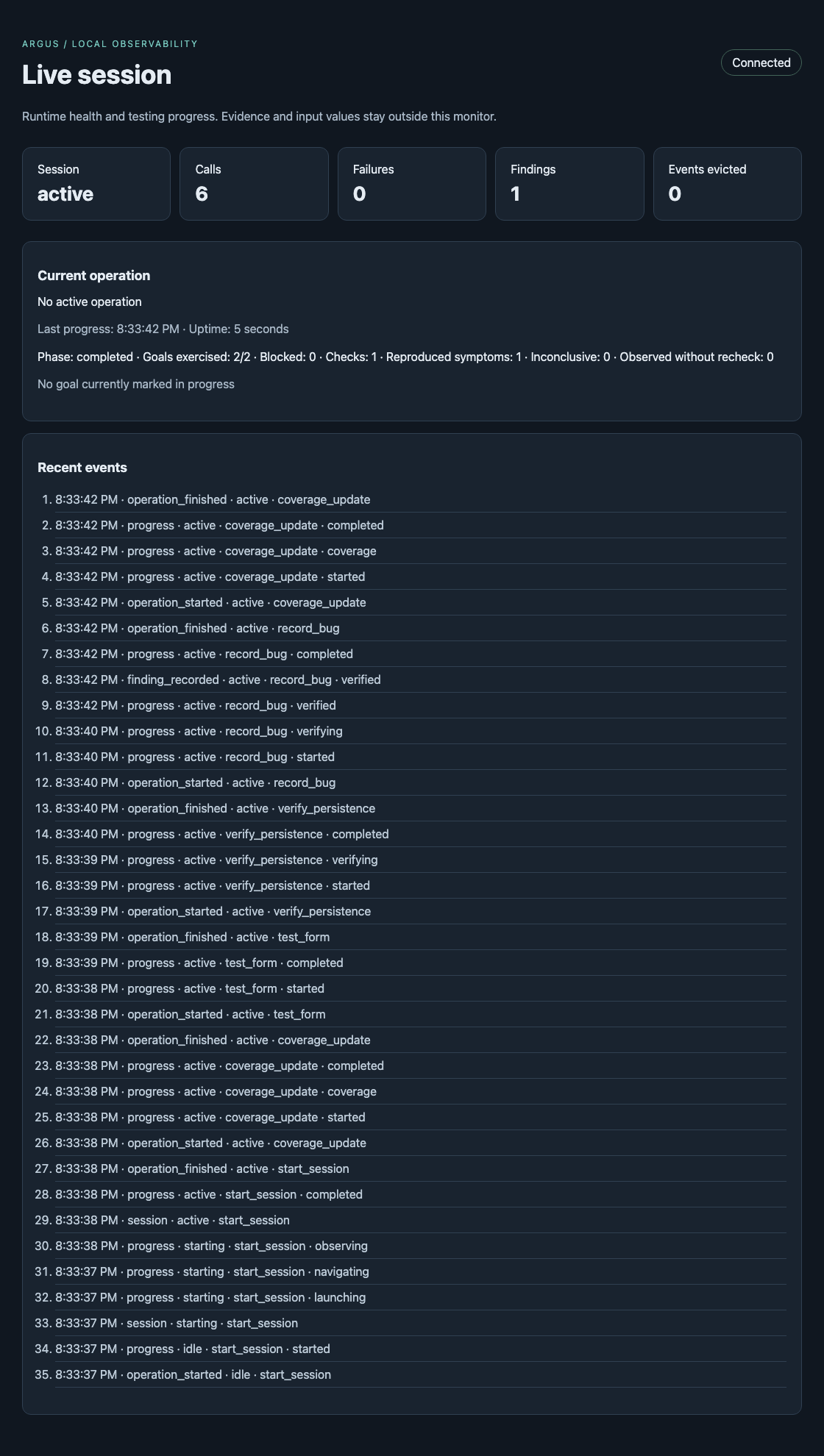
Reproduce without a model: run pytest tests/test_monitoring.py after installing
development dependencies and Chromium.
Evidence and reports
Give it a URL; get a report of bugs — each tagged with whether Argus independently reproduced it or only observed it:
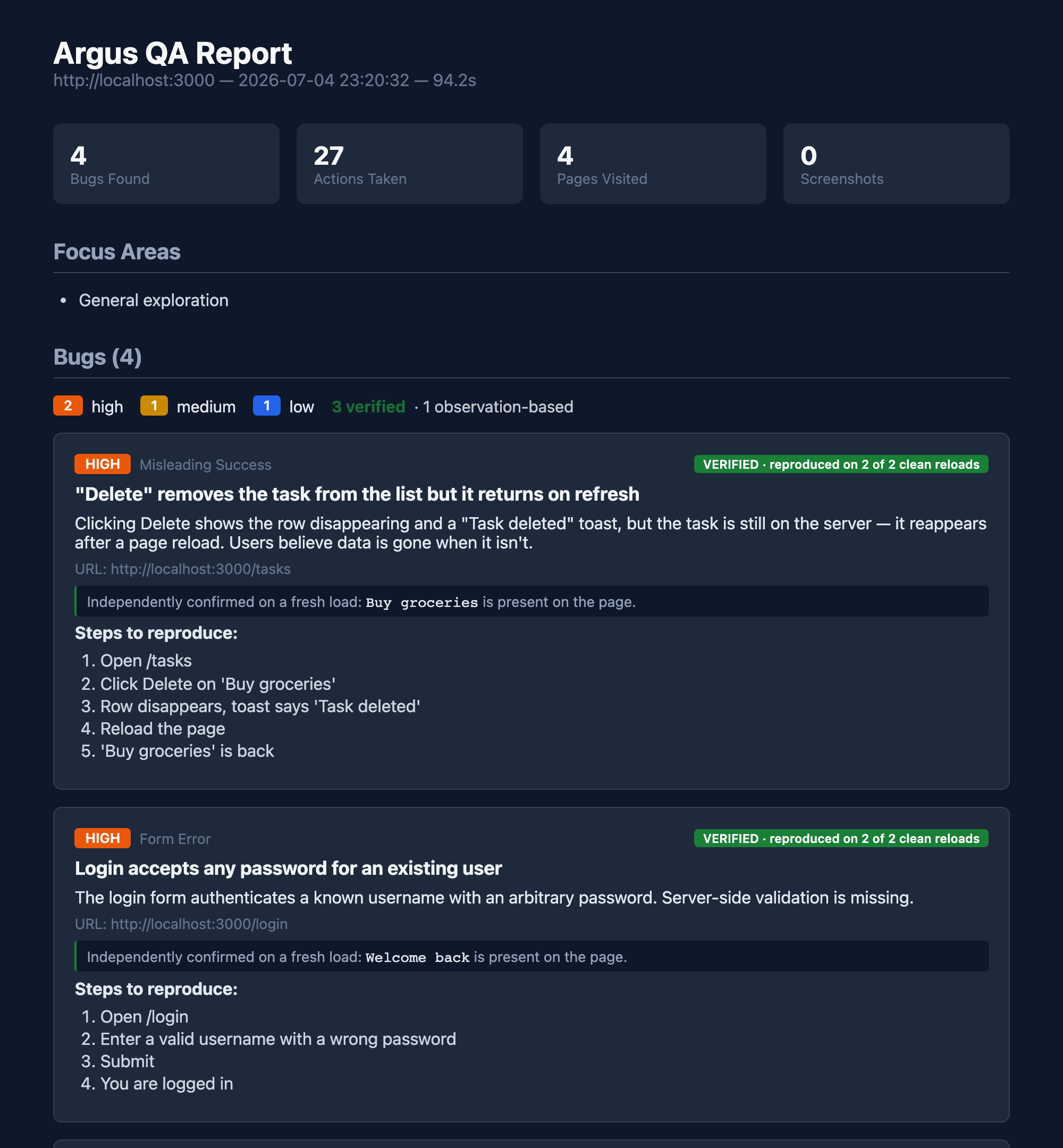
A reproduction receipt shows whether a specified symptom survived an independent recheck. It does not, by itself, prove a root cause or that the behavior violates the product requirements. Observations, inconclusive checks and reproduced symptoms remain distinguishable in the agent result and exported evidence.
How it works
flowchart LR
    A(["observe"]) --> B{"looks wrong?"}
    B -->|not sure| C["act: click · type · resize · verify"]
    C --> A
    B -->|suspected defect| D["verify_persistence — inspect a fresh load"]
    D --> E["record_bug with an independent recheck"]
    E --> F(["reproduced / not reproduced / inconclusive"])
    F --> G[["report: HTML · JSON · JUnit · SARIF"]]
The agent supplies the judgment. Argus supplies concise QA guidance, a description-keyed tool surface (click_what("Login button"), not click(7)), a goal coverage ledger, and a reproduction-receipt engine that distinguishes observed, reproduced and inconclusive symptoms.
A receipt confirms the specified observable symptom, not every possible root cause. A clean load preserves authentication and browser storage by default; replay can repeat real writes. Qualitative observations and inconclusive checks remain distinct from verified findings.
Quick start
Argus 0.7.1 and newer require Python 3.11+. If your default interpreter is
older, use uvx --python 3.12 --from argus-testing argus-mcp in your MCP
configuration. Upgrade Python before upgrading an existing pip installation.
With uv installed, no global Python package install is required. Install Chromium once:
uvx --from playwright playwright install chromium
If an upgrade reports a missing browser executable, install the browser matching Argus's own Playwright environment, then restart the MCP host:
uvx --from argus-testing python -m playwright install chromium
Then connect Argus to your MCP client.
Claude Code
claude mcp add argus -- uvx --from argus-testing argus-mcp
Codex and the ChatGPT desktop app
Codex CLI, the Codex IDE extension, and the ChatGPT desktop app share the same local MCP configuration:
codex mcp add argus -- uvx --from argus-testing argus-mcp
Cursor

The button adds Argus to Cursor; run the Chromium installation command above once before the first test.
Any stdio MCP client
{
  "mcpServers": {
    "argus": {
      "command": "uvx",
      "args": ["--from", "argus-testing", "argus-mcp"]
    }
  }
}
The default core profile exposes the primary web-testing workflow without flooding the host with every specialist tool. Use uvx --from argus-testing argus-mcp --list-tools to inspect the selected profile, --tool-profile screen for native macOS testing, or --tool-profile full for the entire advanced surface. ARGUS_TOOL_PROFILE provides the same setting through the environment.
For agents that read structured MCP results, use the focused configuration:
uvx --from argus-testing argus-mcp --tool-profile agent --response-mode compact --monitor-port 8765
Read returned observations before issuing another observe. Batch related goals
with coverage_update(goal=["edit profile", "reload profile"], status="in_progress");
finish them with observed evidence, not an assumed pass. The monitor stays local.
--response-mode delta is an additional opt-in for clients that can retain and
merge snapshot IDs. Keep compact if the host cannot reliably resolve bases.
See the snapshot contract.
To check installation, product version, stdio handshake, discovery and structured errors without opening a browser or calling a model:
uvx --from argus-testing python -m argus.install_check
Editable installs must be reinstalled after a version change so their package
metadata matches the source. MCP serverInfo.version now reports Argus's version,
not the MCP SDK version.
Then just ask, in your agent session:
"Test my app at http://localhost:3000 — find real bugs."
That's it. The agent drives; Argus keeps it honest and writes the report.
For a scoped review, the host can give start_session explicit goals, constraints, and an advisory time_budget_minutes. Argus returns the full testing protocol once and keeps outstanding goals and discovered pages visible in later observations. Mark a goal in_progress before its journey; when coverage_update marks it exercised or blocked, Argus requires a concrete explanation and automatically links the URLs, value-redacted actions, screenshots, persistence checks, bugs, and observations produced in that testing window. The final HTML and JSON reports preserve both completed and unfinished coverage instead of implying that an incomplete pass was comprehensive.
Since 0.10.0, switching to another goal group freezes the previous
evidence window without completing those goals. Deferred findings can name
evidence.goal or evidence.goals; their expected/actual outcomes are preserved
in reports. Fresh-load findings capture the checked page before returning to the
agent's current page, so recording a bug later does not attach an unrelated
screenshot. See the evidence contract.
pip installation
pip install argus-testing
playwright install chromium
claude mcp add argus -- argus-mcp
CLI mode (no MCP host — bring your own LLM)
# Uses a LiteLLM-backed planner. Set a provider key (OPENAI_API_KEY, DEEPSEEK_API_KEY, …).
uvx --from argus-testing argus http://localhost:3000 --model deepseek/deepseek-chat

# Higher recall: union N independent passes (deduped, proven instance kept)
uvx --from argus-testing argus http://localhost:3000 --passes 3
Screen mode (macOS) — test any native app, not just the web
pip install 'argus-testing[mac]'
brew install cliclick          # keystroke / coordinate fallback
argus-mcp --doctor             # check Screen Recording + Accessibility grants
claude mcp add argus-screen -- argus-mcp --tool-profile screen
Same description-keyed tools, but the target is whatever app is foreground on macOS — Notes, Cursor, Safari, your in-progress feature. No headless Chrome, no scripted Playwright. Argus sees what you see, via the Accessibility tree.
Artifact and resource limits
Argus writes each run's screenshots into its own run directory so later tests cannot overwrite earlier evidence. Long browser sessions also keep bounded in-memory event logs and only read response bodies for inspectable API traffic; binary and oversized bodies are skipped before they enter Python memory.
Report cleanup is explicit and dry-run by default. The newest 20 complete runs
are protected in this example; .argus journals and state capsules are never
deleted:
argus-cleanup --output ./argus-reports --keep-runs 20
argus-cleanup --output ./argus-reports --keep-runs 20 --apply
Use --older-than-days and --max-size-mb for stricter policies. Advanced
limits can be adjusted with ARGUS_MAX_NETWORK_EVENTS,
ARGUS_MAX_ERROR_EVENTS, ARGUS_MAX_DOWNLOAD_EVENTS,
ARGUS_MAX_DIALOG_EVENTS, ARGUS_MAX_RESPONSE_BODY_BYTES, and
ARGUS_MAX_RESPONSE_READ_BYTES. Responses without a declared length are skipped
by default; ARGUS_CAPTURE_UNKNOWN_LENGTH_BODY=1 opts into reading them. When a
limit discards old evidence, Argus says so in tool output and the final session
summary.
Live monitoring (0.7)
Add a monitor port to the command your MCP client launches:
argus-mcp --monitor-port 8765
# Or choose an available port automatically:
argus-mcp --monitor-port 0
Open http://127.0.0.1:8765 for session state, active operation and duration,
last progress, calls, operational failures, findings and recent events. The
selected URL is printed to stderr, so stdio MCP messages stay intact.
ARGUS_MONITOR_PORT is equivalent; monitoring is off by default.
| Route | Output |
|---|---|
/ | Local live dashboard |
/healthz | HTTP process liveness |
/readyz | Runtime initialized and not shutting down; 503 otherwise |
/api/status | Versioned state snapshot, counts, capture drops and numeric overhead |
/api/events | Server-Sent Events, Last-Event-ID reconnect and gap notices |
/metrics | Prometheus operation, response-byte and component-timing counters |
The monitor binds only to 127.0.0.1, rejects unrelated Host/Origin headers,
and has no action endpoints. It emits no page contents, URLs, typed values,
screenshots or tool arguments. It is not an authenticated remote service;
do not expose it through a public proxy. Event retention is bounded (512 by
default), with at most 32 simultaneous SSE subscribers.
Runtime settings are validated at startup. Explicit command-line options override environment variables, which override defaults:
| Environment variable | Default |
|---|---|
ARGUS_OPERATION_TIMEOUT_S | 120 seconds |
ARGUS_QUEUE_TIMEOUT_S | 5 seconds |
ARGUS_CLEANUP_TIMEOUT_S | 10 seconds per backend |
ARGUS_EVENT_CAPACITY | 512 events |
ARGUS_OUTPUT_DIR | ./argus-reports |
One runtime owns one active session. Actions and lifecycle changes are serialized; an operation timeout cancels the action and closes the backend. Side-effecting actions are never automatically retried. A separate MCP process is the supported way to run another independently controlled session.
Regression gates and evidence privacy
argus-regression http://localhost:3000 --output ./argus-reports
Exit codes: 0 no known symptom reproduced (or no journal), 1 a known symptom
still reproduces, 2 operational/storage failure, 3 inconclusive. An exit of
zero is not proof of complete application correctness. Automatic regression
uses built-in text/HTTP checks, never write-performing replay.
Typed, pasted and selected input values are held in a session-local input vault,
not in action traces or exported replay steps. Exported steps that need input
are marked requires_input; they cannot be replayed as if a redacted value were
real. Capsules deliberately contain credentials and are saved with owner-only
file permissions on POSIX. Reports and screenshots can still contain visible
application data; see Privacy.
Why Argus is different
Give exploratory testing a repeatable evidence workflow. An agent can use Argus to investigate journeys beyond prewritten checks, inspect what changed, and independently recheck suspected symptoms. The agent still decides whether the observed behavior violates the application's requirements; a reproduction receipt is supporting evidence, not a guarantee of correctness or zero false positives.
| Agent-directed & black-box | Give your agent a URL and scope. It explores through Argus without requiring application source access or prewritten test scripts. |
| Coverage contract | Optional natural-language goals, user constraints, discovered pages, and time budget stay visible throughout the session and in the final report. |
| Reproduction receipts | Independent checks distinguish reproduced, not-reproduced and inconclusive symptoms. Reloads preserve authentication and storage by default; replay can repeat writes. |
| Runtime evidence | Inspect misleading success messages, cross-page inconsistencies and persistence failures in the running app. The agent interprets this evidence against the intended behavior. |
| Discover → guard | Add argus-regression to CI to recheck eligible journaled findings without model calls. Exit codes distinguish reproduced symptoms, operational failures and inconclusive checks. |
| Machine-readable | JSON, JUnit and SARIF exports support downstream processing. CI gates and code-scanning uploads require integration; URL-based findings do not guarantee source-line PR annotations. |
How it compares
Use Argus when your agent can operate a browser but needs a repeatable QA workflow: track unfinished journeys, check saved/deleted state after reload, reproduce a reported symptom, and preserve evidence for a regression check. It complements general browser automation and debugging tools; it does not replace the host model's judgment or guarantee discovery of every defect.
The paired evaluation compares a conventional Playwright MCP adapter with Argus using the same host and tasks. That adapter is not the official Playwright MCP package, and these results must not be presented as a ranking of third-party products.
Benchmarks
$ python -m argus.bench --target all

  buggytasks    22 / 22  = 100 %   ·  mechanical bugs (console errors, fake delete, auth bypass…)
  darkshop      12 / 12  = 100 %   ·  human-eye bugs (fake scarcity, lying toasts, stale state…)
  ──────────────────────────────────────────────────────────────────────
  total         34 / 34  = 100 %   ·  reproducible from git clone in two commands
34 / 34 is the capability ceiling — what's findable through the tool surface, measured by deterministic scripts. It is deliberately separate from how often a given LLM remembers to use the tools well, which is noisy and honestly reported below.
Real-agent evaluation
The opt-in Codex runner uses real stdio MCP calls against eight synthetic cases: profile persistence, deletion, validation/recovery and cross-page totals. It keeps model/host settings fixed, isolates each run and caps calls and elapsed time. A separate trace-and-server-oracle review adjudicates findings and coverage before the scorer computes paired metrics. Read the published 0.8 results and limitations, including the residual defect in the nominally fixed form fixture and all invalid preflights.
The older argus.bench.agent_runner uses heuristic keyword matching. It is a
legacy exploratory diagnostic, not independent precision/recall evidence and
not the basis for current product claims. See methodology.
What the fixtures seed
BuggyTasks (:5555) — 22 mechanical bugs in a task app: console errors, dead links, fake delete (UI says "deleted!" but data persists on refresh), auth bypass, NaN dates, off-by-one counts, race conditions. The "scripted E2E could find these" tier.
DarkShop (:5556) — 12 seeded runtime and visual scenarios in a polished-looking store: hardcoded "Only 3 left!" scarcity, -50% badges where sale price equals original, a "free shipping over $50" banner contradicted by a flat $5 at checkout, inverted visual hierarchy ("Add to Cart" demoted under a prominent "Subscribe"), cross-page state drift (rename sticks on /account, navbar greeting doesn't). These fixtures exercise comparisons between visible claims and observed behavior; they are not a benchmark against static analysis tools.
python test-site/app.py           # BuggyTasks  :5555
python human-eye-fixture/app.py   # DarkShop    :5556
python -m argus.bench --target all
Tool surface
argus-mcp starts with the focused core web profile. Every public tool is documented below. The counts are also available directly from the installed server:
uvx --from argus-testing argus-mcp --list-tools
uvx --from argus-testing argus-mcp --tool-profile screen --list-tools
uvx --from argus-testing argus-mcp --tool-profile full --list-tools
| Profile | Public tools | Intended use |
|---|---|---|
core | 30 | Primary browser QA workflow; the default. |
agent | 19 | Focused browser journeys, concise descriptions and batch coverage; pair with compact responses when the host supports structured results. |
screen | 14 | Focused native macOS testing through Accessibility and screenshots. |
full | 77 | Everything in core and screen, plus specialist browser, state, network, coordinate, and crawl controls. |
Core profile — 30 tools
| Tools | Purpose |
|---|---|
start_session | Start an exploratory, visual, or regression browser review; optionally accept goals, constraints, and time_budget_minutes; return the one-time protocol and initial observation. |
observe | Return URL, title, description-keyed interactive elements, counts, visible feedback, ARIA tree, and viewport state. |
coverage_update | Open a goal evidence window with in_progress, then mark it exercised or blocked; terminal states require an explanation and automatically link session evidence. |
click_what | Click the element best matching a natural-language description; return candidates instead of guessing when ambiguous. |
type_into · select_into | Resolve a field by description, then type text or select an option. |
hover_what · press_key | Exercise hover states and keyboard interactions against description-keyed targets. |
resize · emulate_device | Test responsive breakpoints or reopen the page under real mobile touch, UA, DPR, and viewport settings. |
upload_file | Attach one or more local files to a matching file input. |
navigate · go_back · scroll_down | Navigate directly, return through browser history, or reveal content below the fold. |
inspect_element · check_layout | Inspect computed styles, ARIA and markup, or bounded overflow, clipping, small-target, and overlay signals. |
screenshot · screenshot_diff | Capture viewport, full-page, or element evidence and produce a red-tint pixel-diff overlay. |
get_errors | Drain correlated console errors and HTTP 4xx/5xx events captured since the previous read. |
capsule_save · capsule_restore | Save and restore a named authenticated or seeded browser state, with an optional liveness check. |
verify_persistence | Force a fresh load and return target presence plus the page observation. This checks persistence, not semantic correctness. |
test_action · test_form | Perform a description-keyed action or form submission and return the resulting state diff in one round trip. |
check_links · check_performance | Probe current-page internal links and expose raw browser performance metrics without auto-certifying generic audit findings. |
regression_check | Re-test journaled findings for the current origin without requiring another discovery pass. |
record_bug · record_observation | Record a finding with evidence and its recheck outcome, or keep a qualitative review note separate. Inspect the receipt rather than treating recording as confirmation. |
end_session | Atomically apply optional final coverage_updates, close the active session, and emit HTML, JSON, JUnit, and SARIF reports. Invalid updates keep the session open. |
Reports keep original screenshots as evidence and, by default, write compact WebP previews under report-assets/ instead of base64-embedding every full-size PNG into the HTML. Set ARGUS_PORTABLE_REPORT=1 when a single self-contained HTML file is more important than size. JSON output includes complete reproduction receipts, the coverage contract and its structured evidence references, constraints, review mode, tool-call and recorded-step counts, screenshot metadata, and qualitative observations. JUnit suite failure totals match the emitted <failure> nodes.
Screen profile — 14 tools
| Tools | Purpose |
|---|---|
start_screen_session | Bind to the foreground or a named macOS app after checking Screen Recording and Accessibility permissions. |
screen_observe | Return the foreground app, window title, bounded AX tree, screen coordinates, and a fresh screenshot. |
screen_click_what · screen_type_into · screen_press_key | Resolve against the AX tree and act through native accessibility, falling back to cliclick. |
screen_wait_for_stable | Wait until the target window remains visually stable within a configurable threshold. |
screen_launch · screen_quit · screen_is_running | Control and inspect an app by localized name, bundle ID, or absolute path. |
screen_screenshot_region | Capture a precise rectangular screen region for fine visual evidence. |
screen_session_status | Report elapsed time, remaining session budget, action counts, and the abort-file path. |
record_bug · record_observation · end_session | Use the shared evidence, reporting, and teardown tools in screen mode. |
Safety: per-call timeout, a 30-minute session cap, a ~/.argus/abort panic file that halts every subsequent action, and an automatic before/after screenshot trail on every action.
Full profile — 77 tools
The full profile includes every core and screen tool above plus these 36 specialist tools. Use it when the workflow genuinely needs low-level state, fault injection, multi-tab control, coordinates, or crawling.
| Additional tools | Purpose |
|---|---|
paste_into · right_click | Fire a real clipboard paste event or open a target's context menu. |
emulate_media | Emulate dark/light color schemes and reduced-motion preferences. |
click_at · type_at · hover_at · drag_at · drag_what | Exercise canvas/WebGL, hover-reveal, and drag-and-drop interfaces by coordinates or description. |
drop_file | Dispatch a real file drop onto a matching dropzone. |
set_dialog_handler | Queue an accept, dismiss, or prompt response for the next JavaScript dialog. |
eval_js | Run arbitrary page-context JavaScript. It remains disabled unless the server also starts with --unsafe. |
network_requests · network_request | Inspect the bounded request log or retrieve full detail for one matching request. |
network_mock · network_unmock · network_clear_mocks · network_clear_log | Inject canned HTTP responses and independently reset active mocks or captured traffic. |
cookies_get · cookies_set · cookies_clear | Inspect, seed, or clear browser-context cookies. |
storage_get · storage_set · storage_remove · storage_clear | Inspect and mutate page-local localStorage or sessionStorage. |
tabs_list · tabs_switch · tabs_close | Control OAuth, payment, and other popup or multi-tab journeys. |
wait_for_text · wait_for_request | Wait for specific visible text or matching outgoing traffic with a bounded timeout. |
get_downloads | Inspect files downloaded during the session, including their paths and sizes. |
crawl_site | Crawl bounded internal pages and collect browser events, link results, and performance evidence. |
screen_click_at · screen_hover_at · screen_drag · screen_keys · screen_type_at | Use absolute screen coordinates and multi-key sequences when a native app exposes no useful AX element. |
To expose eval_js as an operational tool rather than a disabled safety stub:
uvx --from argus-testing argus-mcp --tool-profile full --unsafe
Local-first security and privacy
Argus runs on your machine and does not send telemetry to an Argus-operated service. Reports and screenshots stay under ./argus-reports by default; your MCP host and its configured model provider can still receive tool results included in the conversation. Browser actions and native macOS controls can cause real side effects, so use test accounts and non-production data wherever possible.
Read the full privacy disclosure and security policy before using Argus against sensitive systems.
Local file uploads and file:// pages require an explicit fixture directory;
cookie/storage inspection hides values by default. Configure these capabilities
in the MCP host's server environment, not through page content or tool arguments:
{
  "ARGUS_FILE_ROOTS": "[\"/absolute/path/to/test-fixtures\"]",
  "ARGUS_ALLOWED_ORIGINS": "[\"http://localhost:3000\"]"
}
The optional origin policy restricts tool targets, not browser network egress.
Redirects and page resources still require network isolation for hostile targets.
Only enable ARGUS_ALLOW_SENSITIVE_READS=1 when raw cookie/storage inspection is
necessary and the host is authorized to receive credentials.
Philosophy
Trust the agent, don't simulate intelligence
The host agent makes semantic judgments. Argus supplies bounded observations, deterministic checks, evidence-linked coverage and explicit uncertainty. Guidance suggests applicable probes; it never silently executes them or treats a heuristic as a confirmed defect. Browser events are captured as observations, not proof that the user-facing behavior is wrong.
Guide the review; don't hijack the host task
The global instruction is intentionally tiny so it does not repeat a long QA prompt in every MCP tool description. start_session returns the full evidence-first ritual, goals, constraints, and budget once; observations then surface only the compact live coverage ledger. Argus remains a capability inside the user's current task: it does not prevent implementation work, replace the host's identity, or imply authority for irreversible external actions.
Description-keyed, not index-keyed
click_what("Login button"), not click(7). Element indices are a leaky abstraction even within one observe. A capable agent describes what it wants by what it is, and the resolver maps that to the right element — refusing to misclick on ambiguity rather than guessing.
Project layout
argus/
├── mcp_server.py      # process entry point and compatibility imports
├── entrypoints/mcp/   # public tool catalog, profiles and MCP adaptation
├── application/       # session manager and focused QA use cases
├── domain/            # models, errors, states, replay and verification contracts
├── adapters/          # monitoring, logs, file journal, report exporters, JS assets
├── bootstrap.py       # composition root: injected backend/repository factories
├── ports.py           # narrow lifecycle, observation, verification and storage protocols
├── settings.py        # validated, per-runtime configuration
├── browser.py         # Playwright adapter (public operations; private page ownership)
├── screen/            # macOS AX adapter, permissions, safety
├── reporter.py        # atomic report orchestration and exporter registry
├── resolver.py        # description → element (web + screen)
├── cli.py             # autonomous exploration and shared regression entry point
├── evaluation/        # paired schemas, isolated fixtures, opt-in host runner, adjudication
└── bench/             # deterministic capability + legacy heuristic harness
test-site/            # BuggyTasks  (22 mechanical bugs)
human-eye-fixture/    # DarkShop    (12 human-eye bugs)
Start with Architecture, design decisions and Contributing for implementation boundaries, tests and extension points. The autonomous LiteLLM exploration loop remains a separate workflow; shared regression does not import or mutate the MCP server.
MIT licensed · Product page · Agent install guide · Privacy · Security · Built by Yichen Wu