Chargebee
offiziellMCP-Server, der KI-Agenten mit der Chargebee-Plattform verbindet.
Was kann man mit Chargebee MCP machen?
- Chargebee-Dokumentation durchsuchen — Stellen Sie Fragen zu APIs, Funktionen oder Abrechnungskonzepten und erhalten Sie Antworten aus offiziellen Dokumenten über
chargebee_documentation_search. - Integrationscode-Entwürfe erstellen — Fordern Sie strukturierte Codepläne und Beispielschnipsel für Ihre Chargebee-Integration mit
chargebee_code_planneran. - Versionshinweise und FAQs nachschlagen — Rufen Sie die neuesten Produktaktualisierungen, häufig gestellte Fragen und andere Wissensdatenbankinhalte ab.
Dokumentation
Chargebee Model Context Protocol (MCP) Server


⚠️ Veraltungshinweis
Dieses Paket ist veraltet und wird keine Updates oder Unterstützung mehr erhalten. Bitte migrieren Sie zu unserem neuen KnowledgeBase MCP Server, der erweiterte Funktionen und verbesserte Genauigkeit bietet. Erfahren Sie mehr und aktualisieren Sie hier: Chargebee MCP Server Dokumentation
Model Context Protocol (MCP) ist ein standardisiertes Protokoll, das entwickelt wurde, um den Kontext zwischen großen Sprachmodellen (LLMs) und externen Systemen zu verwalten.
Der Chargebee MCP Server bietet eine robuste Sammlung von Werkzeugen zur Verbesserung der Entwicklereffizienz. Er integriert sich mit KI-gestützten Code-Editoren wie Cursor, Windsurf und Cline sowie mit universellen Werkzeugen wie Claude Desktop. Er ist mit jedem MCP-Client kompatibel.
Mit diesem MCP Server können Sie:
-
Sofortige Antworten zu den Chargebee-Produkten und API-Diensten erhalten.
-
Kontextbezogene Code-Snippets erhalten, die auf Ihre Integrationsanforderungen zugeschnitten sind.
-
Auf die Wissensdatenbank von Chargebee zugreifen, einschließlich:
- Dokumentation
- FAQs
- Versionshinweise
- Und vieles mehr
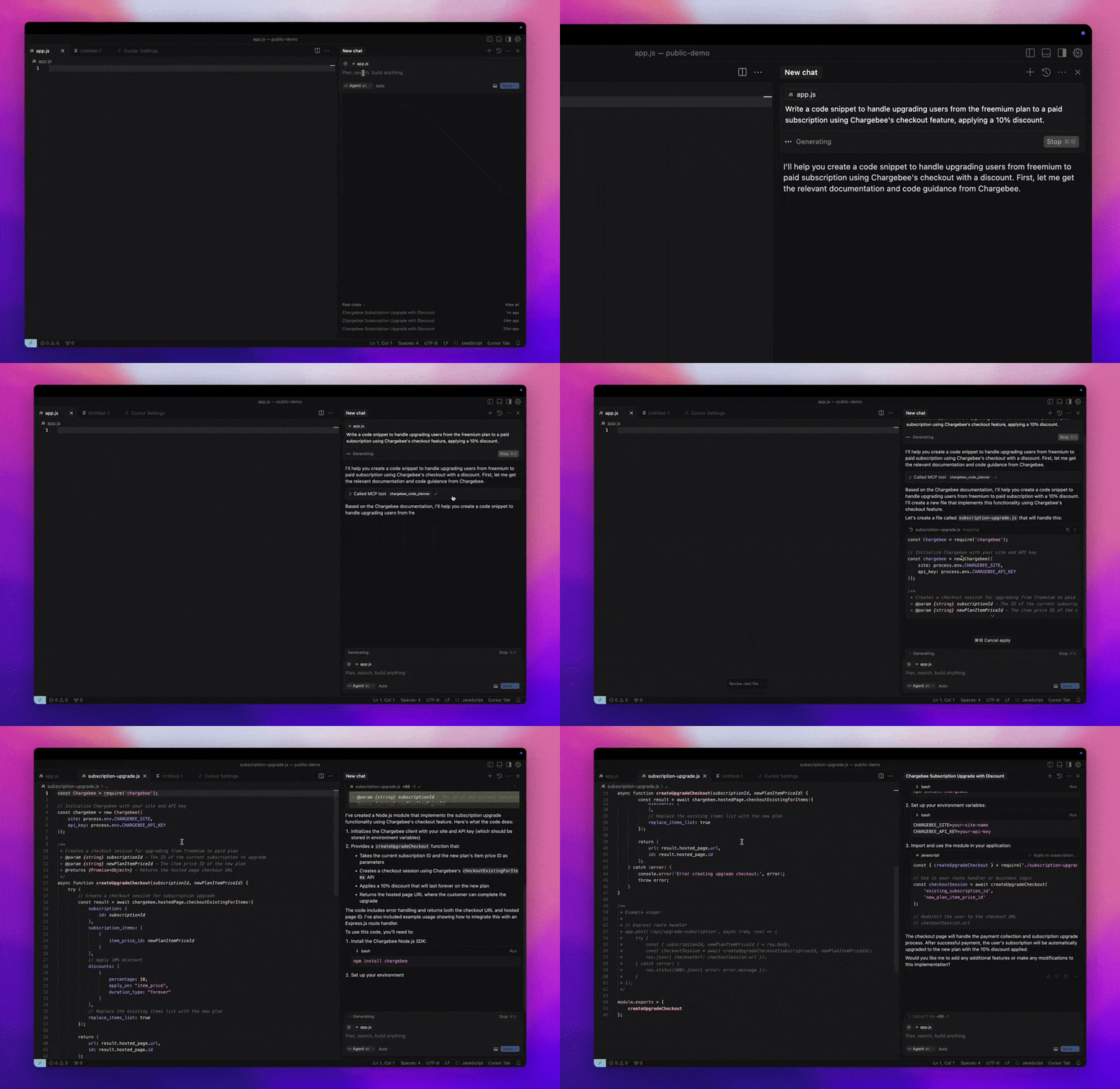
Voraussetzungen
- Node.js LTS – Der Chargebee MCP Server benötigt die Node.js LTS-Version, um ordnungsgemäß zu funktionieren.
Einrichtung
Um den Chargebee MCP Server mit Node.js npx auszuführen, führen Sie den folgenden Befehl aus:
npx -y @chargebee/mcp@latest
Verfügbare Werkzeuge
| Werkzeug | Beschreibung |
|---|---|
chargebee_documentation_search | Durchsuchen Sie die Chargebee-Dokumentation, um detaillierte Informationen und Nutzungsanleitungen abzurufen. |
chargebee_code_planner | Generieren Sie strukturierte Code-Gliederungen und Beispielcode für die Integration der APIs und Funktionen von Chargebee. |
Installation
Cursor
So fügen Sie diesen Server zur Cursor IDE hinzu:
- Navigieren Sie zu
Cursor Settings>MCP. - Klicken Sie auf
+ Add new Global MCP Server. - Fügen Sie die folgende Konfiguration zu Ihrer globalen
.cursor/mcp.json-Datei hinzu:
{
  "mcpServers": {
    "chargebee": {
      "command": "npx",
      "args": [
          "-y",
          "@chargebee/mcp"
      ]
    }
  }
}
Weitere Details finden Sie in der Cursor-Dokumentation. Hinweis: Sie können dies auch zu Ihrer projektspezifischen Cursor-Konfiguration hinzufügen (unterstützt in Cursor 0.46+).
Windsurf
So richten Sie MCP mit Cascade ein:
- Öffnen Sie Windsurf und navigieren Sie zu
Settings>Advanced Settingsoder verwenden Sie die Befehlspalette >Open Windsurf Settings Page. - Scrollen Sie zum Abschnitt Cascade, um einen neuen Server hinzuzufügen, vorhandene Server anzuzeigen oder auf die rohe JSON-Konfigurationsdatei unter
mcp_config.jsonzuzugreifen. - Klicken Sie auf „Benutzerdefinierten Server hinzufügen +“, um den Chargebee MCP Server direkt in
mcp_config.jsoneinzubinden:
{
  "mcpServers": {
    "chargebee": {
      "command": "npx",
      "args": [
          "-y",
          "@chargebee/mcp"
      ]
    }
  }
}
Weitere Informationen finden Sie in der Windsurf-Dokumentation.
VS Code
Installieren Sie den Chargebee MCP Server in VS Code mit einer dieser Schaltflächen:

Alternativ können Sie den Chargebee MCP Server mit der VS Code CLI installieren:
# For VS Code
code --add-mcp '{"name":"chargebee","command":"npx","args":["-y","@chargebee/mcp"]}'
# For VS Code Insiders
code-insiders --add-mcp '{"name":"chargebee","command":"npx","args":["-y","@chargebee/mcp"]}'
Nach der Installation steht der Chargebee MCP Server zur Verwendung mit Ihrem GitHub Copilot-Agenten in VS Code zur Verfügung.
Claude
Fügen Sie die folgende Konfiguration zu Ihrer claude_desktop_config.json-Datei hinzu. Weitere Details finden Sie in der Claude Desktop-Dokumentation:
{
  "mcpServers": {
    "chargebee": {
      "command": "npx",
      "args": [
          "-y",
          "@chargebee/mcp"
      ]
    }
  }
}
Cline
Fügen Sie das folgende JSON manuell zu Ihrer cline_mcp_settings.json-Datei über die Cline MCP Server-Einstellungen hinzu:
{
  "mcpServers": {
    "chargebee": {
      "command": "npx",
      "args": [
          "-y",
          "@chargebee/mcp"
      ]
    }
  }
}
Roo Code
Greifen Sie auf die MCP-Einstellungen zu, indem Sie Edit MCP Settings in den Roo Code-Einstellungen auswählen oder den Befehl Roo Code: Open MCP Config in der VS Code-Befehlspalette verwenden:
{
  "mcpServers": {
    "chargebee": {
      "command": "npx",
      "args": [
          "-y",
          "@chargebee/mcp"
      ]
    }
  }
}
Mitwirkung
Um zu diesem Projekt beizutragen, lesen Sie den Mitwirkungsleitfaden.