Armor Crypto MCP
offiziellMCP zur Anbindung mehrerer Blockchains, Staking, DeFi, Swap, Bridging, Wallet-Verwaltung, DCA, Limit Orders, Coin-Suche, Tracking und mehr.
Was kann man mit Armor Crypto MCP machen?
- Solana-Wallets erstellen und verwalten — Neue Wallets generieren, in Gruppen organisieren und ungenutzte Wallets über Wallet-Verwaltungstools archivieren.
- Token-Swaps durchführen — Normale Swaps auf Solana mit dem Swap-Tool ausführen.
- Automatisierte Handelsstrategien einrichten — DCA-Orders, Limit-Orders und geplante Trades platzieren, auflisten und stornieren.
- Tokens staken und entstaken — Staking-Tools verwenden, um Vermögenswerte zu staken oder gestakte Positionen zurückzuziehen.
- Trending-Token entdecken — Nach Token suchen und Trending-Token-Daten auf Solana abrufen.
- Statistische Analysen durchführen — Das statistische Rechner-Tool für präzise On-Chain-Datenanalysen anwenden.
Dokumentation
Armor Crypto MCP
Alpha-Testversion 0.1.24
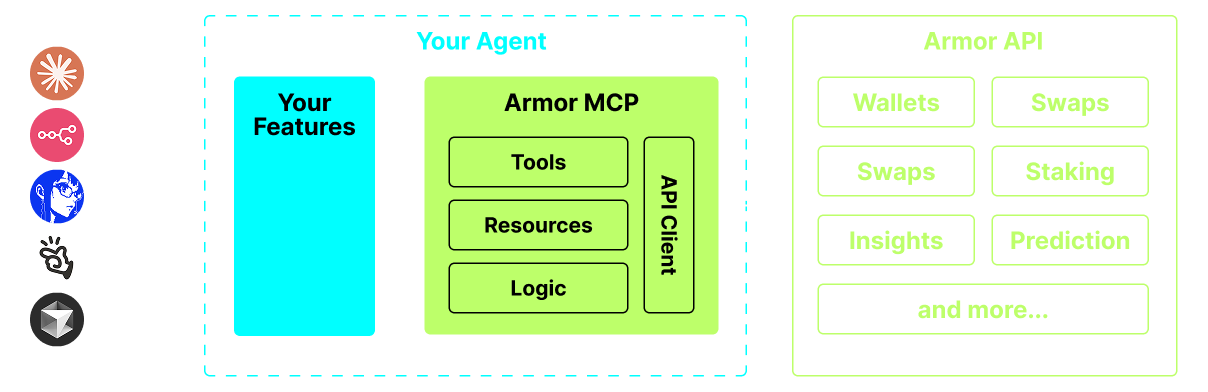
Eine einzige Quelle für die Integration von KI-Agenten in das Krypto-Ökosystem. Dies umfasst Wallet-Erstellung und -Verwaltung, Swaps, Transfers, ereignisbasierte Trades wie DCA, Stop-Loss und Take-Profit und vieles mehr. Das Armor MCP unterstützt Solana in der Alpha-Phase und wird in der Beta-Phase mehr als ein Dutzend Blockchains unterstützen, darunter Ethereum, Base, Avalanche, Bitcoin, Sui, Berachain, megaETH, Optimism, Ton, BNB und Arbitrum, unter anderem. Mit dem Armor MCP können Sie die gesamte Kryptowelt mit einheitlicher Logik und einem vollständigen Satz an Werkzeugen in Ihren KI-Agenten integrieren.
Funktionen
🧠 KI-nativ
📙 Wallet-Verwaltung
🔃 Swaps
🌈 Spezialisierte Trades (DCA, Stop-Loss usw.)
⛓️ Multi-Chain
↔️ Cross-Chain-Transaktionen
🥩 Staking
🤖 Schnelle Integration in agentische Frameworks
👫 Soziales Sentiment
🔮 Vorhersagen
Voraussetzungen
1. Stellen Sie sicher, dass Python installiert ist
2. Installieren Sie uv
Linux / Windows
pip install uv
Mac
brew install uv
3. Claude Desktop oder Ihr KI-Agent führt das MCP aus
Siehe Nutzung & Konfiguration für Details.
Alpha-Tests
Wir befinden uns derzeit in der Pre-Alpha-Phase und testen die Fähigkeiten verschiedener Agenten und agentischer Frameworks wie Claude Desktop, Cline, Cursor, n8n usw.
Aktuelle Funktionen & Werkzeuge
- Wallet-Verwaltung
- Gruppierung & Organisation
- Archivierung
- Swap & Trades
- Normaler Swap
- DCA (platzieren / auflisten / abbrechen)
- Geplante Aufträge
- Limit-Orders (platzieren / auflisten / abbrechen)
- Staking und Unstaking
- Token-Suche und Trend-Token
- Statistischer Rechner für genaue Analysen
- Unterstützt die Solana-Blockchain
Demnächst verfügbar
- Mehr Blockchain-Unterstützung
- Minting
- Armor-Agenten als Werkzeug (oder A2A)
MCP-Einrichtung
Derzeit benötigen Sie das Armor-NFT, um einen API-Schlüssel zu erhalten. Holen Sie es sich hier
Nutzung & Konfiguration
Um das Armor MCP mit Ihrem Agenten zu verwenden, benötigen Sie die folgende Konfiguration. Ersetzen Sie <PUT-YOUR-KEY-HERE> durch Ihren API-Schlüssel:
{
  "mcpServers": {
    "armor-crypto-mcp": {
      "command": "uvx",
      "args": ["armor-crypto-mcp@latest", "--version"],
      "env": {
        "ARMOR_API_KEY": "<PUT-YOUR-KEY-HERE>"
      }
    }
  }
}
Verwendung in Claude Desktop
- Der Entwicklermodus muss aktiviert sein
- Öffnen Sie das Dateimenü von Claude Desktop oben links im Fenster.
- Gehen Sie zu Datei > Einstellungen
- Klicken Sie unter Entwickler auf Konfiguration bearbeiten
- Fügen Sie in der Konfigurationsdatei den Abschnitt
armor-wallet-mcpvon oben ein - Stellen Sie sicher, dass Sie den Platzhalter durch Ihren API-Schlüssel ersetzen
- Speichern Sie die Datei und starten Sie einen neuen Chat in Claude Desktop
Verwendung in Cline
- Klicken Sie auf die Schaltfläche
MCP Serversim Cline-Tab in VSCode im linken Bereich - Scrollen Sie im linken Bereich nach unten und klicken Sie auf
Configure MCP Servers - Fügen Sie in der Konfigurationsdatei den Abschnitt
armor-wallet-mcpvon oben ein - Stellen Sie sicher, dass Sie den Platzhalter durch Ihren API-Schlüssel ersetzen
- Speichern Sie die Datei, klicken Sie auf
Doneunter dem TabMCP Serversund beginnen Sie mit Cline zu chatten
Verwendung in n8n
- Öffnen Sie die n8n-App
- Klicken Sie unten links auf dem Bildschirm auf
...neben Ihrem Benutzernamen und dann aufSettings - Klicken Sie im linken Bereich auf
Community nodesund dann auf die SchaltflächeInstall a Community Node - Geben Sie im Suchfeld für
npm Package Namemcp ein - Installieren Sie
MCP Nodes - Fügen Sie einen beliebigen MCP-Knoten hinzu, zum Beispiel:
List Tools - Klicken Sie im Tab
Parametersdes MCP-Clients aufSelect Credentialund dann aufCreate new credential - Geben Sie unter
Commanduvxein - Geben Sie unter
Argumentsarmor-crypto-mcpein - Geben Sie unter
EnvironmentsARMOR_API_KEY=eyJhbGciOiJIUzI1NiIsIn...ein und fügen Sie den vollständigen API-Schlüsselwert nach dem=ein - Zurück im Tab
Parameterskönnen Sie das MCPOperationfür diesen Knoten auswählen
Verwendung des Armor MCP
Sobald Sie das Armor MCP eingerichtet haben, finden Sie hier einige Prompts für den Einstieg