Company Jobs Feed (ATS jobs search)
Search open jobs by keyword across company career sites on Workday, Greenhouse, Lever, Ashby, Workable and Recruitee, or read live the companies you list. One table per run, with posted pay ranges where the company shows them and a mode that returns only new postings. It runs as an Apify Actor through Apify's hosted MCP server, so you need an Apify account and API token. Paid per job returned, 0.0015 USD a job on the Free plan plus a small start fee. Unofficial tool.
Gehosteter MCP-Server
npx add-mcp 'https://mcp.apify.com/?actors=plainrecordlabs/company-jobs-feed'Installiert in Claude Code, Codex, Cursor und mehr
Dokumentation
Workday Jobs and Greenhouse Jobs Scraper: ATS Jobs API (plainrecordlabs/company-jobs-feed) Actor
ATS jobs from Greenhouse, Lever, Ashby, Workable, Recruitee and Workday career pages, searched by keyword in one daily index or read live for the companies you list. One clean table with new and closed job alerts, seniority, country and exclusion filters and H-1B filing counts. Unofficial tool.
- URL: https://apify.com/plainrecordlabs/company-jobs-feed.md
- Developed by: Plain Record Labs (community)
- Categories: Jobs, Lead generation, Automation
- Features: Limited permissions
- Stats: 2 total users, 2 monthly users, 100.0% runs succeeded, 0 bookmarks
- User rating: No ratings yet
Pricing
from $1.00 / 1,000 jobs
This Actor is paid per event. You are not charged for the Apify platform usage, but only a fixed price for specific events. Since this Actor supports Apify Store discounts, the price gets lower the higher subscription plan you have.
Learn more: https://docs.apify.com/actors/running/actors-in-store.md#pay-per-event
What's an Apify Actor?
An Actor is a serverless cloud program that runs on the Apify platform. It has two run modes. In Batch mode, an Actor accepts a well-defined JSON input, performs an action which can take anything from a few seconds to a few hours, and optionally produces a well-defined JSON output, datasets with results, or files in key-value store. In Standby mode, an Actor provides a web server which can be used as a website, API, or an MCP server.
Apify vocabulary and the platform model are defined once, in the agent quickstart at https://apify.com/agents.md.
How to integrate an Actor?
If asked about integration, you help developers integrate Actors into their projects. You adapt to their stack and deliver integrations that are safe, well-documented, and production-ready.
Do not guess an integration path. Every one of them is in the agent quickstart at https://apify.com/agents.md: the Apify MCP server, Agent Skills with the Apify CLI, the JavaScript and Python clients, the REST API, and the account-free path for an agent with no human to sign in. It also carries the rule on stating cost before the first paid run.
For examples already wired to this Actor's own input schema, see the API section below.
Each client library has reference documentation the quickstart does not restate: JavaScript/TypeScript (npm install apify-client) and Python (pip install apify-client).
README
Workday Jobs and Greenhouse Jobs Scraper: ATS Jobs API
Find ATS jobs straight from company career sites, in one clean table. Search by keyword across every company in our daily index, or list the companies you care about. The data comes from the public job boards of Greenhouse, Lever, Ashby, Workable, Recruitee and Workday, the hiring systems behind thousands of careers pages.
Type a few title keywords and press Start. Or paste careers links. You get one row per open job, with the same fields whatever system the company uses. Turn on Only new jobs and schedule it daily to get just the postings that appeared since your last run. In company list mode it can also tell you which of those jobs have closed since.
This is an unofficial tool, not affiliated with any of these companies. It reads only the public job listings employers publish on their career sites and job boards. No logins and no private data.
Two ways to use it
1. Search by keyword (no company list needed). Leave Companies empty and add Title keywords such as
data engineer or account executive. The Actor searches our daily index of company job boards and returns matches,
newest first, with the date we first saw each job and how many days it has been open. The index is rebuilt once a
day. It covers a growing list of employers, mostly larger US companies today, so it will not have every company. For
Workday employers the index keeps each employer's 100 newest jobs. If a company you need is missing, or you need
every job at one company, list it directly (mode 2), which reads the board live and in full.
2. List companies. Add board URLs, ats:slug pairs, careers pages or plain company names to Companies. The
Actor reads those boards live at run time.
How to use
- Add one or more Title keywords, like
data engineer. - To search our daily index, leave Companies empty. To read certain companies live, add them to Companies, one per line.
- Optional: narrow the results with Location keywords, Remote jobs only, Only jobs that publish a pay range, Seniority levels, Countries, the three Exclude lists or Minimum H-1B filings by the employer.
- Set the cap. In search mode that is Max results (search mode). In company list mode it is Max jobs per company. The cap also limits what the run costs.
- Press Start. When the run ends, open the Output tab or download the results from the Storage tab as CSV, Excel or JSON.
- For daily alerts, turn on Only jobs not seen in my earlier runs and add a daily schedule in Apify Console.
What people use it for
- Hiring signals: see when target accounts open new roles, for sales prospecting, investing or competitor research.
- Job boards and newsletters: keep a niche board or a weekly jobs email filled with fresh postings.
- Recruiting and market research: compare titles, locations, remote policy and published salary ranges.
- Your own job search: follow a shortlist of companies and see only what's new.
Input
| Field | What it does |
|---|---|
| Title keywords | Keep jobs whose title contains any of these words. With no companies listed, these search the whole index. A run with no companies and no title or location keywords searches data engineer. |
| Location keywords | Keep jobs whose location contains any of these, like Remote or London. |
| Remote jobs only | Keep only jobs marked remote. A job the board calls hybrid is not counted as remote. |
| Only jobs that publish a pay range | Keep only postings with a salary range or pay text, which is more common where pay-transparency laws apply. |
| Seniority levels | Keep jobs at the levels you pick: intern, junior, mid, senior, lead, manager, director, vice president or C-level. The level comes from words in the title only, so a plain "Software Engineer" has none. Pick Not stated in title to keep those too. |
| Countries | Keep jobs in these countries, as codes like US and DE or names like Germany. Read from the location text, so a job that only says "Remote" has no country and is left out. |
| Exclude title keywords, Exclude companies, Exclude location keywords | Drop jobs whose title, company or location contains any of these. |
| Add seniority and country fields | Adds seniority and country to each job. They are added on their own when you pick seniority levels or countries. |
| Add H-1B filing counts | Adds h1bFilings to each job: how many certified H-1B filings the employer made in the US Department of Labor data we hold. The limits are under H-1B filing counts below. |
| Minimum H-1B filings by the employer | Keep only jobs at employers with at least this many of those filings, like 10. 0 means off. |
| Companies (optional) | One per line. A board URL (https://boards.greenhouse.io/airbnb, https://jobs.lever.co/spotify, https://jobs.ashbyhq.com/ramp, https://apply.workable.com/huggingface, https://bunq.recruitee.com, https://cisco.wd5.myworkdayjobs.com/Cisco_Careers), an ats:slug pair (greenhouse:airbnb, lever:plaid, ashby:ramp, workable:huggingface, recruitee:bunq), a company's own careers page (the Actor looks for a board linked there), or a plain company name like notion (the Actor tries Greenhouse, Lever, Ashby, Workable and Recruitee). |
| First seen within (days) | Search mode: only jobs our index first saw in the last N days. |
| Max results | Search mode: a cap on how many jobs one run returns, newest first. |
| Only jobs not seen in my earlier runs | Returns only new postings. The first run returns everything it finds and remembers it. |
| Also return jobs that closed since my last run | Company list mode, with the option above on: also returns jobs you got before that are gone from the board now, marked "status": "closed". |
| Include job description text | Company list mode: adds the plain-text description. Not available for Workday. |
| Max jobs per company | Company list mode: a cap per company. 0 means all. |
Output
One item per job:
{
  "company": "Cisco",
  "title": "System Hardware Board Design Engineering Lead (Onsite)",
  "location": "Milpitas, California, US",
  "allLocations": ["Milpitas, California, US"],
  "remote": false,
  "employmentType": "Full time",
  "salaryMin": null,
  "salaryMax": null,
  "salaryCurrency": null,
  "publishedAt": null,
  "postedText": "Posted Today",
  "firstSeenAt": "2026-10-23",
  "daysOpen": 0,
  "url": "https://cisco.wd5.myworkdayjobs.com/Cisco_Careers/job/Milpitas-California-US/System-Hardware-Board-Design-Engineering-Lead--PCB---Onsite-_2026365",
  "ats": "workday",
  "companySlug": "cisco",
  "jobId": "Cisco_Careers:2026365",
  "jobKey": "workday:cisco:Cisco_Careers:2026365"
}
firstSeenAt and daysOpen come from our daily index (search mode), so they count from the day we first saw the
job, not the day it was posted. Workday does not publish a date in its job list, so Workday jobs carry its own text
(postedText, like "Posted 3 Days Ago") instead of publishedAt. Salary fields are filled when the company publishes
a range: common on Greenhouse, Ashby, Lever and Recruitee, missing on Workable and Workday lists.
| Field | What it holds |
|---|---|
company, companySlug, ats | The employer, its name on the job board and the board system (greenhouse, lever, ashby, workable, recruitee or workday). |
title, department, team | The job title and where it sits, when the board lists them. |
location, allLocations | The main location and every place listed for the job. |
remote, workplaceType, employmentType | Remote flag, remote or hybrid or on-site, and full or part time, in the board's own words. |
salaryMin, salaryMax, salaryCurrency, salaryInterval, salaryText | The published pay range, when the board shows one. |
publishedAt, updatedAt, postedText | Dates the board publishes as ISO timestamps, or Workday's own posted text. |
firstSeenAt, daysOpen | Search mode: the day our index first saw the job, and days since. |
url, applyUrl | The job page and the apply link. |
jobId, jobKey | The job's ID on its board, and a stable key across runs. |
description | Company list mode with Include job description text on: the plain-text job description. |
scrapedAt | When the run read the job. |
Optional fields, only when you turn them on:
seniorityandcountry, with Add seniority and country fields or a seniority or country filter.seniorityis one of intern, junior, mid, senior, lead, manager, director, vp or c-level, read from the title words (so "Senior Product Manager" is manager, the highest level the title names).countryis a two-letter code read from the location text, including US state and Canadian province codes likeAustin, TX. Either one is null when the title or location does not say. These are simple word rules, not AI, so expect some misses.status(neworclosed) andclosedSeenAt, with closed job alerts on. A closed row carries the company, title, location and link the Actor remembered from when it first returned the job.h1bFilings,h1bEmployerOnFilingsandh1bFilingsPeriod, with Add H-1B filing counts on or a minimum set. For example"h1bFilings": 1184, "h1bEmployerOnFilings": "Cisco Systems, Inc.", "h1bFilingsPeriod": "FY2026 Q3".
Each run also saves a SUMMARY record in its key-value store, with how many jobs matched and, in company list mode,
which board was found for each company and why a company wasn't found.
Daily new-job alerts
- Turn on Only jobs not seen in my earlier runs.
- Save the input as a Task and add an Apify Schedule, for example every morning.
- Connect the Task to email, Slack, Google Sheets or a webhook with Apify integrations.
The list of jobs you've already seen is kept in a key-value store in your own Apify account
(company-jobs-feed-state), so nobody else's runs affect yours.
Closed job alerts
In company list mode, also turn on Also return jobs that closed since my last run. Each run then returns new
jobs marked "status": "new" and, after them, every job you got in an earlier run that is no longer on the company's
board, marked "status": "closed" with closedSeenAt. Each closed job is reported once.
Limits, in plain words:
- Closed means the job left the board's public list. A company can also pull a job for a while and post it again.
- Only jobs this alert has returned to you are tracked, so a job your filters left out is never reported closed.
- A board that could not be read in full in a run (for example a Workday site that pushed back) reports no closed jobs that run. They are reported on the next full read.
- The Actor starts remembering titles and links on the first run with this option on. A job that closed before that comes back with its job ID and board but no title or link.
- Not in search mode. Our index keeps a cap of jobs per Workday employer, so a job leaving a search result does not prove it closed.
H-1B filing counts
Turn on Add H-1B filing counts to see, for each job's employer, how many certified H-1B labor condition applications it filed with the US Department of Labor. Set Minimum H-1B filings by the employer to keep only employers that file at least that often. It works in both modes and costs nothing extra.
The counts come from the Department of Labor's public LCA disclosure data, the same data our
Visa Sponsor Jobs Actor uses. h1bFilingsPeriod names the
release, for example FY2026 Q3. Each release covers the federal fiscal year so far, and we refresh when the
department publishes a new one.
Limits, in plain words:
- A filing shows the employer sponsored H-1B workers before. It does not mean this job offers sponsorship.
- Employers are matched by company name. A company that files under a different legal name may show 0, or now and
then be matched to a similarly named company.
h1bEmployerOnFilingsshows the name we matched so you can check. - A company that files under several names counts only the one with the most filings, not their total. Visa Inc., for example, shows Visa Technology & Operations LLC.
- 0 means we found no filings under a matching name, not that the employer never sponsors.
- The count is per employer. For the filed job titles and wages behind it, use Visa Sponsor Jobs.
Good to know
- Company list mode covers boards on Greenhouse, Lever, Ashby, Workable, Recruitee and Workday. Companies on iCIMS, SmartRecruiters and others show up as not found in the SUMMARY, and you aren't charged for them.
- Workday is read gently from each employer's public career site: one request per second, the site's robots.txt is followed, and if a site pushes back the Actor stops for that employer instead of retrying. Large Workday employers take about a minute each in company list mode.
- A company that has switched off its public job feed is skipped and noted in the SUMMARY.
- Some careers pages build their job list with scripts and don't link the board in the page itself. For those, use
the board URL or the
ats:slugform.
FAQ
How do I scrape jobs from Greenhouse, Lever, Ashby or Workday career pages? Add the company's board URL, careers page or name to Companies and press Start. The Actor reads the public job board the company publishes, so no login is needed, and returns the same fields whatever system it uses.
Can I search jobs across many companies at once? Yes. Leave Companies empty and add Title keywords. The Actor searches our daily index of company job boards and returns matches newest first.
Can I get only new job postings every day? Turn on Only jobs not seen in my earlier runs, save the input as a Task and add a daily Schedule. Each run then returns only postings you have not had before.
Can I see which jobs closed? Yes, in company list mode. Turn on Only jobs not seen in my earlier runs and Also return jobs that closed since my last run, and schedule it. Jobs that left the board since your last run come back marked closed.
Can I filter by seniority or country? Yes. Seniority levels reads the level from the job title and Countries reads the country from the location text. Both are simple word rules, so a title or location that doesn't say is left out unless you pick Not stated in title.
Can I find jobs at companies that sponsor H-1B (H1B) visas? Yes. Set Minimum H-1B filings by the employer, for example to 10. Each job then shows how many H-1B filings its employer made in the Department of Labor data. A filing shows the employer has sponsored before, not that this job will.
Does it include salary? When the employer publishes a pay range on the posting, the row includes the minimum, maximum and currency. Many postings do not publish one.
Can I export the jobs to CSV, Excel or Google Sheets? Results download from the Storage tab as CSV, Excel or JSON, and Apify integrations can send them to Google Sheets.
Does it cover LinkedIn or Indeed? No. It reads company career sites only, never job boards that need a login or aggregate other sites.
Use it from an AI agent or MCP
AI agents can find and run this Actor through the Apify MCP server. Its search-actors
tool finds it, fetch-actor-details reads the input and output fields described above, and call-actor runs it on
your Apify account at the prices on the Pricing tab. To give an agent only this Actor as a tool, add it to the server
URL: https://mcp.apify.com?tools=plainrecordlabs/company-jobs-feed.
Every field is optional. An empty input {} searches the daily index for data engineer jobs and returns up to 100.
For example, this input searches the index for remote data engineer jobs in the US first seen in the last 3 days:
{ "titleKeywords": ["data engineer"], "remoteOnly": true, "countries": ["US"], "postedWithinDays": 3, "maxResults": 50 }
And this one reads three companies' boards live and returns only jobs not seen in your earlier runs:
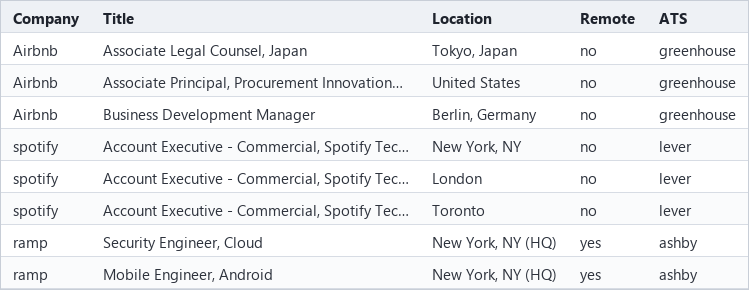
{ "companies": ["https://boards.greenhouse.io/airbnb", "lever:spotify", "ashby:ramp"], "onlyNew": true, "maxJobsPerCompany": 50 }
Pricing
You pay per job returned, plus a small start fee per run. There is no monthly rental.
| Apify plan | Per job | Start fee per run |
|---|---|---|
| Free and Bronze | 0.0015 USD | 0.0005 USD |
| Silver | 0.00125 USD | 0.0005 USD |
| Gold, Platinum and Diamond | 0.001 USD | 0.0005 USD |
The start fee is charged once per GB of run memory. This Actor runs at 256 MB by default, so that is one start fee. A company that isn't found, or a run with no new jobs, costs only the start fee. With closed job alerts on, each closed job returned is charged as one job too. The H-1B filing counts add no charge.
Example: a search that returns 100 jobs on the Free or Bronze plan costs 100 x 0.0015 = 0.15 USD for the jobs plus 0.0005 USD to start, so 0.1505 USD in all. This is only an example. The Pricing tab shows the current prices and is the one to go by. Max results (search mode) and Max jobs per company cap what one run can cost.
Related Actors
- Visa Sponsor Jobs: open jobs at employers with US H-1B filings, each matched to the employer's public filing record from the Department of Labor, including the job titles the employer filed for and the median wage it filed.
Feedback
Is there a company it misses, or a field you need? Open an issue on the Issues tab.
Actor input Schema
titleKeywords (type: array):
Keep only jobs whose title contains any of these words or phrases, for example "data engineer" or "nurse". Case does not matter and part of a word matches too, so "intern" also finds "internal". With no companies listed, these keywords search every company in our daily index. Left empty with no companies and no location keywords, the run searches "data engineer".
locationKeywords (type: array):
Keep only jobs whose location contains any of these, for example Remote, London or New York. Case does not matter, and a job listed in several places matches on any of them. Empty = all locations.
remoteOnly (type: boolean):
Keep only jobs the board marks remote, or whose location says Remote, for example to find remote data engineer jobs. A job whose board gives a hybrid or not remote workplace type is left out, even when its location mentions remote.
salaryOnly (type: boolean):
Keep only jobs whose posting includes a salary range or pay text (common where pay-transparency laws apply), for example to compare published pay for one title. Only some boards publish pay in their feed, so a job whose pay appears only inside the description is left out.
seniority (type: array):
Keep only jobs at these levels. The level is read from words in the job title only, for example Senior, Staff, Manager or Intern, so a plain title like Software Engineer has no level. Pick Not stated in title to keep those too. Level numbers like II or III are not read. Empty = all levels.
countries (type: array):
Keep only jobs in these countries. Type a two-letter code like US, GB or DE, or the English name like Germany. The country is read from the location text the board gives, including US state and Canadian province codes, so a location like Remote with no country is left out. A job listed in several places is kept when any of them is in one of your countries. Empty = all countries.
excludeTitleKeywords (type: array):
Drop jobs whose title contains any of these words or phrases, for example intern or sales. Case does not matter and part of a word matches too.
excludeCompanyKeywords (type: array):
Drop jobs from companies whose name or board name contains any of these, for example staffing for a staffing agency, or your own company.
excludeLocationKeywords (type: array):
Drop jobs where any listed location contains one of these, for example Remote or India.
includeSeniorityAndCountry (type: boolean):
Adds seniority (from the title) and country (a two-letter code from the location) to each job, for example senior and US. They are added on their own when you pick seniority levels or countries above. Each is empty when the title or location does not say.
includeH1bFilings (type: boolean):
Adds h1bFilings to each job: how many certified H-1B labor condition applications the employer filed in the US Department of Labor disclosure data we hold, with the employer name as filed and the data release, for example 1184 filings by Cisco Systems, Inc. in FY2026 Q3. Added on its own when you set a minimum below. The employer is matched by company name, so 0 means no filings were found under a matching name, not proof the employer never sponsors. A filing shows the employer sponsored H-1B workers before, not that this job offers sponsorship.
minH1bFilings (type: integer):
Keep only jobs at employers with at least this many certified H-1B filings in that data, for example 10. A company that files under a different legal name can show 0 and be left out. 0 = off.
companies (type: array):
Leave empty to search our daily index of company job boards. Or list companies, one per line: a job-board URL (boards.greenhouse.io/stripe, jobs.lever.co/spotify, jobs.ashbyhq.com/ramp, apply.workable.com/huggingface, bunq.recruitee.com, cisco.wd5.myworkdayjobs.com/Cisco_Careers), an ats:slug pair (greenhouse:airbnb, lever:plaid, ashby:ramp, workable:huggingface, recruitee:bunq), a company careers page URL (the Actor looks for a supported board linked there), or a plain company slug (the Actor tries Greenhouse, Lever, Ashby, Workable and Recruitee).
postedWithinDays (type: integer):
Search mode only: keep jobs our index first saw within this many days, for example 3 for jobs that appeared in the last three days. This is the day our daily index first found the job, which can be later than the day the company posted it. 0 = any age.
maxResults (type: integer):
Search mode only: return at most this many jobs, newest first, for example 50. 0 = no limit. Default 100. In company list mode use Max jobs per company instead.
onlyNew (type: boolean):
Remembers job IDs between your runs (in your own key-value store) and returns only new postings. Pair with an Apify schedule for daily new-job alerts, for example a run every morning that returns only jobs posted since the last one. The first run returns everything and records it.
includeClosed (type: boolean):
Company list mode with Only jobs not seen in my earlier runs on: also returns each job you got in an earlier run that is no longer on the company's board, marked status closed with the date this run noticed, for example to see which roles a competitor filled or pulled. Closed means gone from the public list. A company can also pull a job and post it again. A board that could not be read in full that run reports no closed jobs. Each closed job is charged as one job.
includeDescription (type: boolean):
Company list mode only: adds the plain-text job description to each job, for example to search the text for a skill or a visa note. Not available for Workday boards or in search mode.
maxJobsPerCompany (type: integer):
Company list mode only: stop after this many jobs per company, for example 50. 0 = no limit.
Actor input object example
{
  "titleKeywords": [
    "data engineer",
    "analytics engineer"
  ],
  "locationKeywords": [
    "Remote",
    "New York"
  ],
  "remoteOnly": true,
  "salaryOnly": true,
  "seniority": [
    "senior",
    "lead"
  ],
  "countries": [
    "US",
    "CA"
  ],
  "excludeTitleKeywords": [
    "intern",
    "sales"
  ],
  "excludeCompanyKeywords": [
    "staffing"
  ],
  "excludeLocationKeywords": [
    "India"
  ],
  "includeSeniorityAndCountry": true,
  "includeH1bFilings": true,
  "minH1bFilings": 10,
  "companies": [
    "https://boards.greenhouse.io/airbnb",
    "lever:spotify",
    "https://cisco.wd5.myworkdayjobs.com/Cisco_Careers"
  ],
  "postedWithinDays": 3,
  "maxResults": 50,
  "onlyNew": true,
  "includeClosed": true,
  "includeDescription": true,
  "maxJobsPerCompany": 50
}
Actor output Schema
jobs (type: string):
One item per open job, in the same schema for Greenhouse, Lever, Ashby, Workable, Recruitee and Workday.
summary (type: string):
Per company: the board found, jobs open and returned, and why a company was not found.
API
You can run this Actor programmatically using our API. Below are code examples in JavaScript, Python, and CLI, as well as the OpenAPI specification and MCP server setup.
JavaScript example
import { ApifyClient } from 'apify-client';

// Initialize the ApifyClient with your Apify API token
// Replace the '<YOUR_API_TOKEN>' with your token
const client = new ApifyClient({
    token: '<YOUR_API_TOKEN>',
});

// Prepare Actor input
const input = {
    "titleKeywords": [
        "data engineer"
    ],
    "maxResults": 20
};

// Run the Actor and wait for it to finish
const run = await client.actor("plainrecordlabs/company-jobs-feed").call(input);

// Fetch and print Actor results from the run's dataset (if any)
console.log('Results from dataset');
console.log(`💾 Check your data here: https://console.apify.com/storage/datasets/${run.defaultDatasetId}`);
const { items } = await client.dataset(run.defaultDatasetId).listItems();
items.forEach((item) => {
    console.dir(item);
});

// 📚 Want to learn more 📖? Go to → https://docs.apify.com/api/client/js/docs
Python example
from apify_client import ApifyClient

# Initialize the ApifyClient with your Apify API token
# Replace '<YOUR_API_TOKEN>' with your token.
client = ApifyClient("<YOUR_API_TOKEN>")

# Prepare the Actor input
run_input = {
    "titleKeywords": ["data engineer"],
    "maxResults": 20,
}

# Run the Actor and wait for it to finish
run = client.actor("plainrecordlabs/company-jobs-feed").call(run_input=run_input)

# Fetch and print Actor results from the run's dataset (if there are any)
print(f"💾 Check your data here: https://console.apify.com/storage/datasets/{run.default_dataset_id}")
for item in client.dataset(run.default_dataset_id).iterate_items():
    print(item)

# 📚 Want to learn more 📖? Go to → https://docs.apify.com/api/client/python/docs/quick-start
CLI example
echo '{
  "titleKeywords": [
    "data engineer"
  ],
  "maxResults": 20
}' |
apify call plainrecordlabs/company-jobs-feed --silent --output-dataset
MCP server setup
{
    "mcpServers": {
        "apify": {
            "type": "http",
            "url": "https://mcp.apify.com/?tools=fetch-actor-details,plainrecordlabs/company-jobs-feed"
        }
    }
}
The hosted server signs you in with OAuth on first connect, so no API token belongs in this config. Clients without OAuth support can send an Authorization: Bearer <APIFY_API_TOKEN> header instead, using a token from API & Integrations in Apify Console (https://console.apify.com/settings/integrations).
OpenAPI specification
Download the OpenAPI definition: https://api.apify.com/v2/actors/1hdPPgLWlR6AB6CBd/builds/2ROhws9xtFuroE9Zs/openapi.json