Apple Notes
Talk with your Apple Notes
MCP Apple Notes

A Model Context Protocol (MCP) server that enables semantic search and RAG (Retrieval Augmented Generation) over your Apple Notes. This allows AI assistants like Claude to search and reference your Apple Notes during conversations.
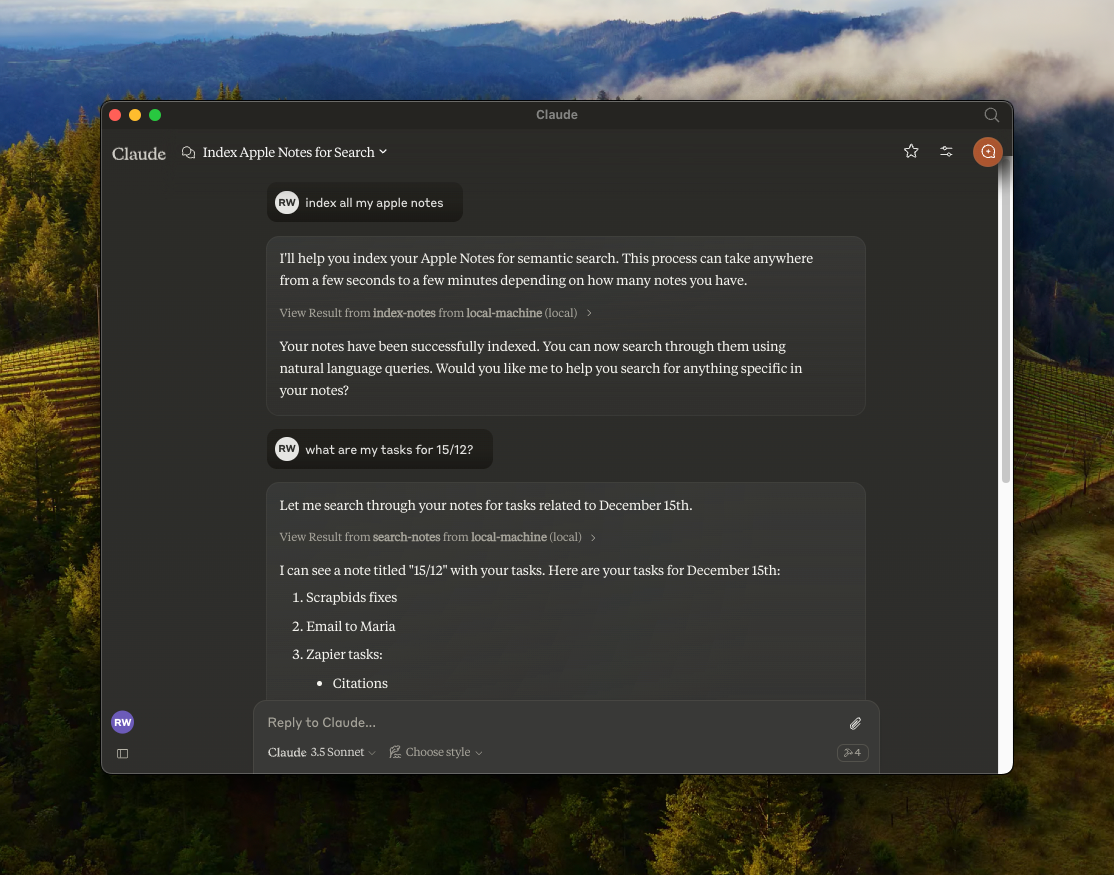
Features
- 🔍 Semantic search over Apple Notes using
all-MiniLM-L6-v2on-device embeddings model - 📝 Full-text search capabilities
- 📊 Vector storage using LanceDB
- 🤖 MCP-compatible server for AI assistant integration
- 🍎 Native Apple Notes integration via JXA
- 🏃♂️ Fully local execution - no API keys needed
Prerequisites
Installation
- Clone the repository:
git clone https://github.com/RafalWilinski/mcp-apple-notes
cd mcp-apple-notes
- Install dependencies:
bun install
Usage
- Open Claude desktop app and go to Settings -> Developer -> Edit Config
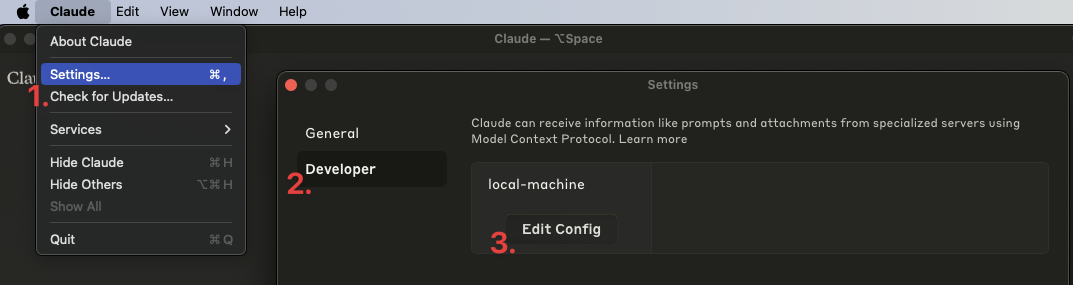
- Open the
claude_desktop_config.jsonand add the following entry:
{
"mcpServers": {
"local-machine": {
"command": "/Users/<YOUR_USER_NAME>/.bun/bin/bun",
"args": ["/Users/<YOUR_USER_NAME>/apple-notes-mcp/index.ts"]
}
}
}
Important: Replace <YOUR_USER_NAME> with your actual username.
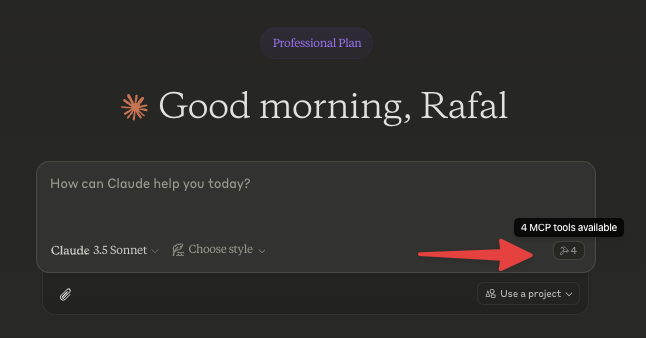
- Restart Claude desktop app. You should see this:
- Start by indexing your notes. Ask Claude to index your notes by saying something like: "Index my notes" or "Index my Apple Notes".
Troubleshooting
To see logs:
tail -n 50 -f ~/Library/Logs/Claude/mcp-server-local-machine.log
# or
tail -n 50 -f ~/Library/Logs/Claude/mcp.log
Todos
- Apple notes are returned in the HTML format. We should turn them to Markdown and embed that
- Chunk source content using recursive text splitter or markdown text splitter
- Add an option to use custom embeddings model
- More control over DB - purge, custom queries, etc.
- Storing notes in Notes via Claude
Verwandte Server
Kone.vc
SponsorMonetize your AI agent with contextual product recommendations
Trello
Interact with Trello boards, lists, and cards using the Trello REST API.
Reclaim AI
Reclaim is an ai calendar management tool that helps you plan your schedule and tasks.
che-ical-mcp
Native macOS Calendar & Reminders MCP server with 24 tools using Swift EventKit - supports recurring events, location triggers, search, batch operations
Jira MCP
MCP server for connecting AI assistants to your own Jira instance
mpesa-mcp
MCP server for M-Pesa (Safaricom Daraja) and Africa's Talking APIs. Gives AI coding assistants — Claude Code, Cursor, GitHub Copilot — direct access to East African payment and SMS infrastructure from a single server. What it does: STK Push payments via Safaricom Daraja (triggers M-Pesa prompt on user's phone) Transaction status queries SMS to 20+ African telecom networks via Africa's Talking Airtime top-up across East and West Africa Safety: All 5 tools are annotated per MCP 2025-03-26 spec — payment and SMS tools declare destructiveHint: true, so Claude Desktop and other clients show confirmation dialogs before executing. Query tools declare readOnlyHint: true for auto-approval. Install: pip install mpesa-mcp Who it's for: Developers building AI agents for East African markets. M-Pesa handles ~$50B/year in transactions and reaches 50M+ users. Africa's Talking reaches 300M+ phones across 20+ telecoms.
Qingma Yizhan Auto Answer
An MCP server that provides an automatic answering function for the Qingma Yizhan platform.
MCP Resume Server
Fetches resume data from a GitHub gist to provide professional background context to LLMs.
Dashform
Connect AI assistants to Dashform — build and manage AI-powered forms, funnels, quizzes, and lead qualification workflows through MCP.
MCP Workflow Orchestration Server
Enables AI agents to discover, create, and execute complex, multi-step workflows defined in simple YAML files.
mindpm
Persistent project & task management for AI coding assistants. Track tasks, decisions, and notes across sessions with a real-time Kanban board. Works with Claude Code, Cursor, Cline, Copilot, and Windsurf.