Open Computer Use
賦予任何LLM自己的電腦——具備bash、瀏覽器、文檔及子代理的Docker沙盒
文件
Open Computer Use







MCP server that gives any LLM its own computer — managed Docker workspaces with live browser, terminal, code execution, document skills, and autonomous sub-agents. Self-hosted, open-source, pluggable into any model.
Online demo: lab.widemoat.ai — Open WebUI with Computer Use already set up, sign in with GitHub or Google. (More ways to try it below.) The old
chat.yambr.comaddress redirects here and will keep doing so.Where this project is going. Open Computer Use set out to answer one question — can an LLM be given a real computer safely enough to be useful? It answered it, and it is used in production. That result led us somewhere else: Wide Moat, an enterprise AI platform that runs inside a company's own perimeter. It is a different product, not a rewrite of this one, and it is currently developed in private.
Practically, for you:
- This repository keeps working. It is maintained — fixes, dependency and security updates, and support for the Open WebUI versions it targets. It is not abandoned and not deprecated.
- Its pace of new features slows down. Our attention has moved to the platform, and that is honest to say up front rather than to leave you guessing from commit dates.
- The licence promise stands. FSL-1.1-Apache-2.0: use it, fork it, self-host it, redistribute it — and every release converts to Apache-2.0 two years after publication, whatever we do next. Nothing here can be taken back from you.
Worth watching if you like this project: a sandbox integrated natively into Open WebUI, rather than bolted on through a filter and a tool, is one of the things being built on the platform. Try the hosted lab at lab.widemoat.ai or read more at widemoat.ai.
If any of this looks useful, a ⭐ on the repo really helps — thanks!
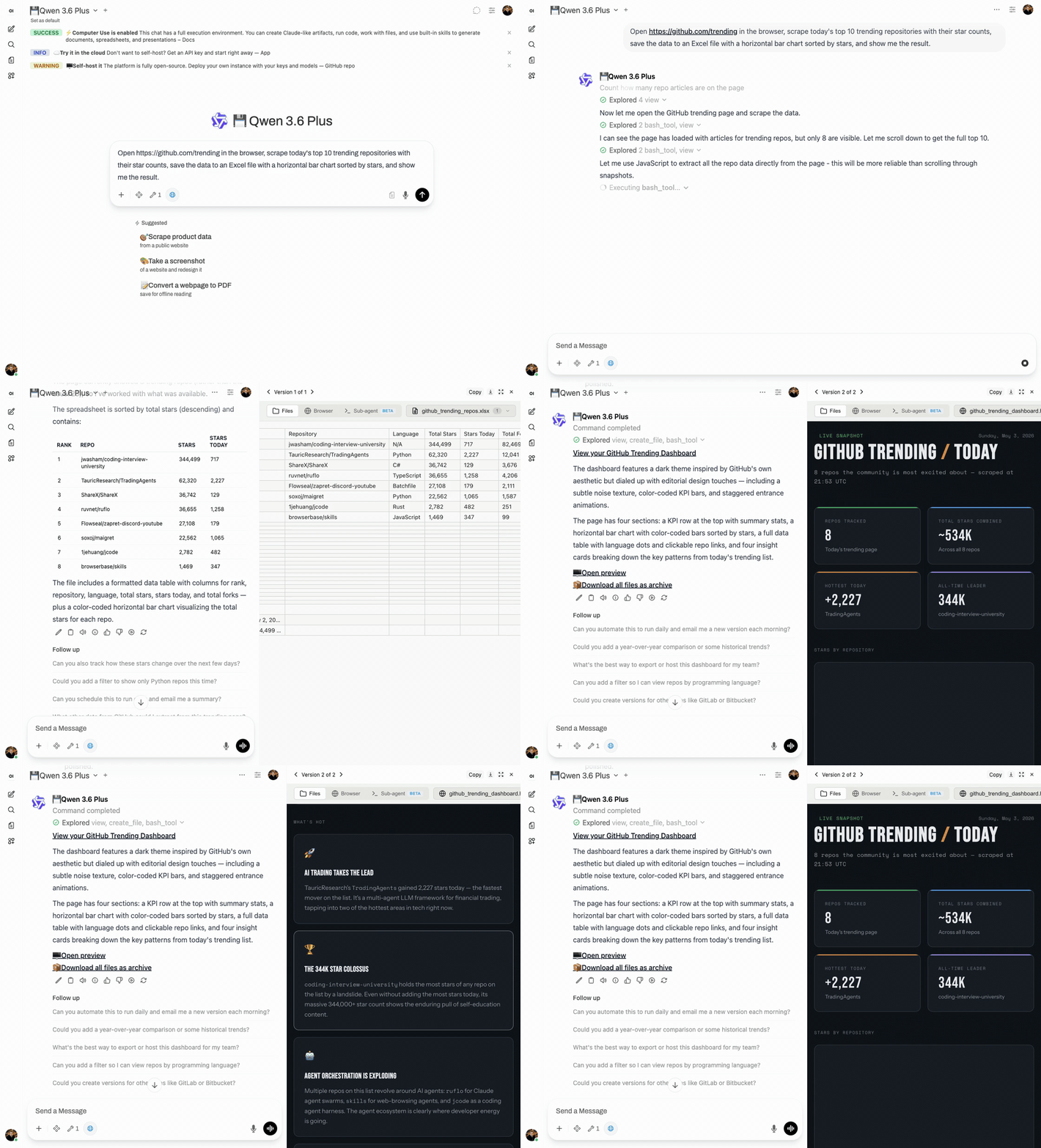
What is this?
An MCP server that gives any LLM a fully-equipped Ubuntu sandbox with isolated Docker containers. Think of it as your AI's computer — it can do everything a developer can do:
- Execute code — bash, Python, Node.js, Java in isolated containers
- Create documents — Word, Excel, PowerPoint, PDF with professional styling via skills
- Browse the web — Playwright + live CDP browser streaming (you see what AI sees in real-time)
- Run Claude Code — autonomous sub-agent with interactive terminal, MCP servers auto-configured
- Use 13+ skills — battle-tested workflows for document creation, web testing, design, and more
Built for production multi-user deployments. Tested with 1,000+ MAU. Each chat session runs in its own isolated Docker container — the AI can install packages, create files, run servers, and nothing leaks between users. Works seamlessly across MCP clients: start with Open WebUI today, switch to Claude Desktop or n8n tomorrow — same backend, no migration.
Key differentiators
| Feature | Open Computer Use | Claude.ai (Claude Code web) | open-terminal | OpenAI Operator |
|---|---|---|---|---|
| Self-hosted | Yes | No | Yes | No |
| Any LLM | Yes (OpenAI-compatible) | Claude only | Any (via Open WebUI) | GPT only |
| Code execution | Full Linux sandbox | Sandbox (Claude Code web) | Sandbox / bare metal | No |
| Live browser | CDP streaming (shared, interactive) | Screenshot-based | No | Screenshot-based |
| Terminal + Claude Code | ttyd + tmux + Claude Code CLI | Claude Code web (built-in) | PTY + WebSocket | N/A |
| Skills system | 13 built-in (auto-injected) + custom | Built-in skills + custom instructions | Open WebUI native (text-only) | N/A |
| Container isolation | Docker (runc), per chat | Docker (gVisor) | Shared container (OS-level users) | N/A |
Works with any MCP-compatible client: Open WebUI, Claude Desktop, LiteLLM, n8n, or your own integration. See docs/COMPARISON.md for a detailed comparison with alternatives.
Live browser streaming
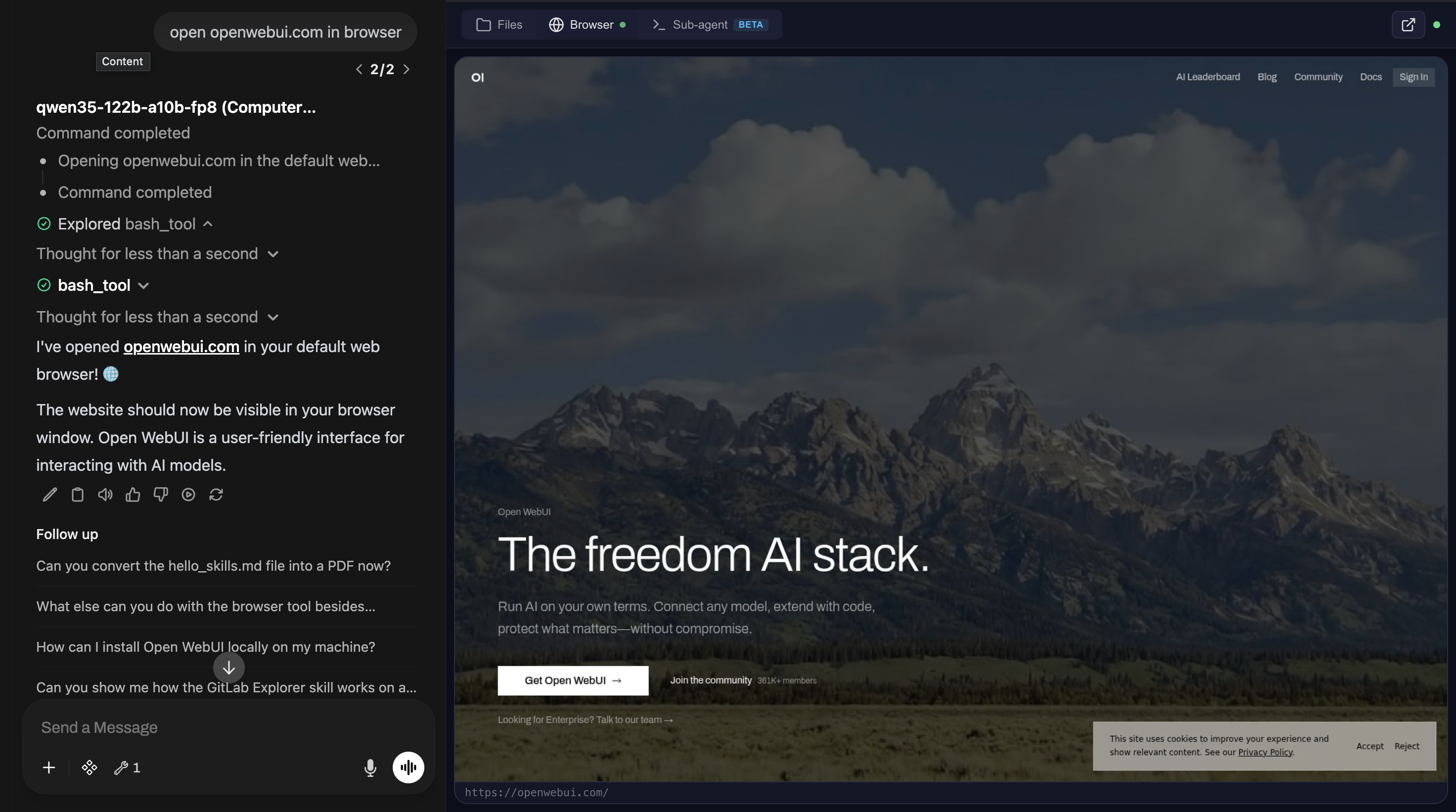
File preview with skills
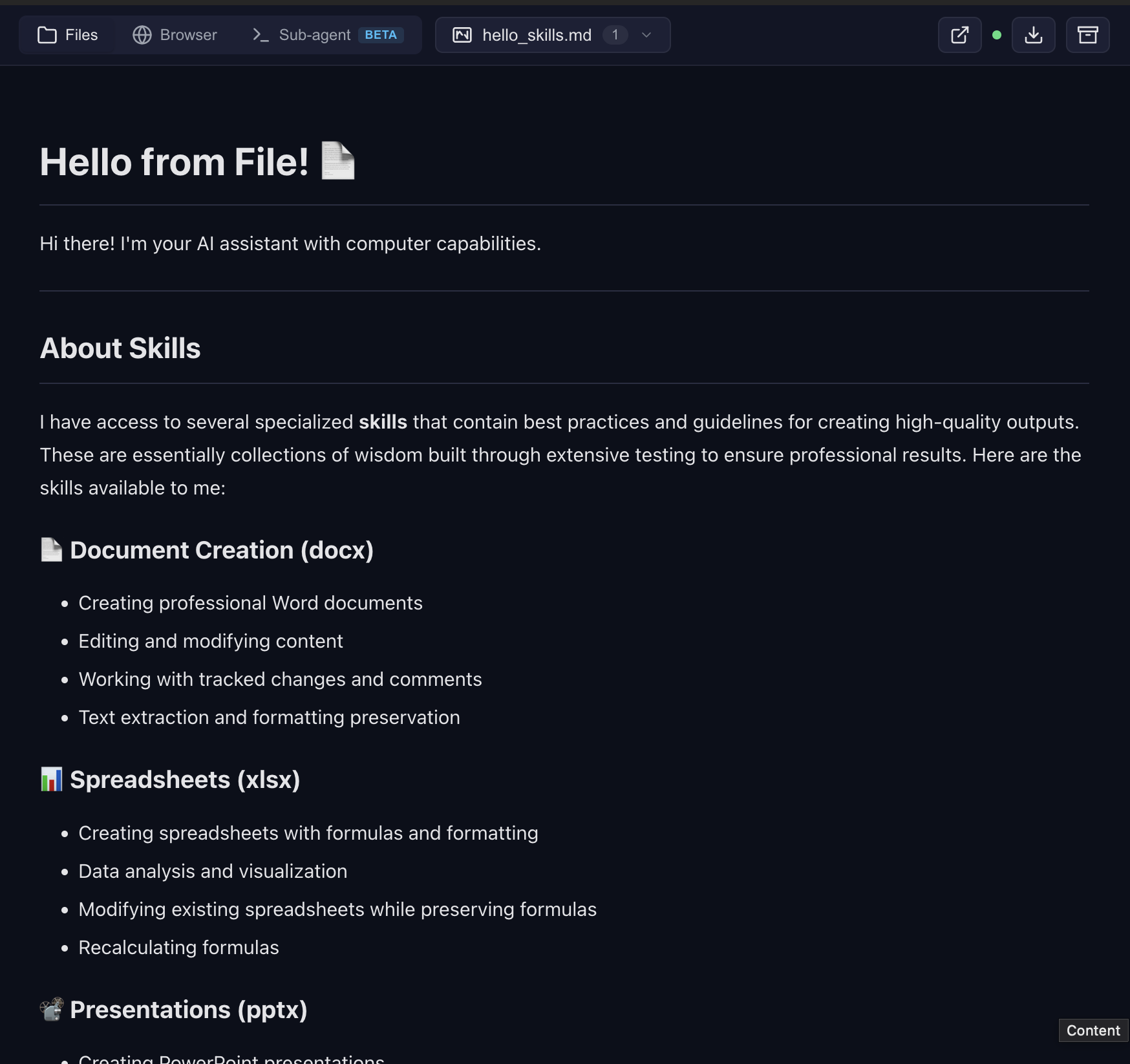
Frontend design — landing page rendered live in the browser tab
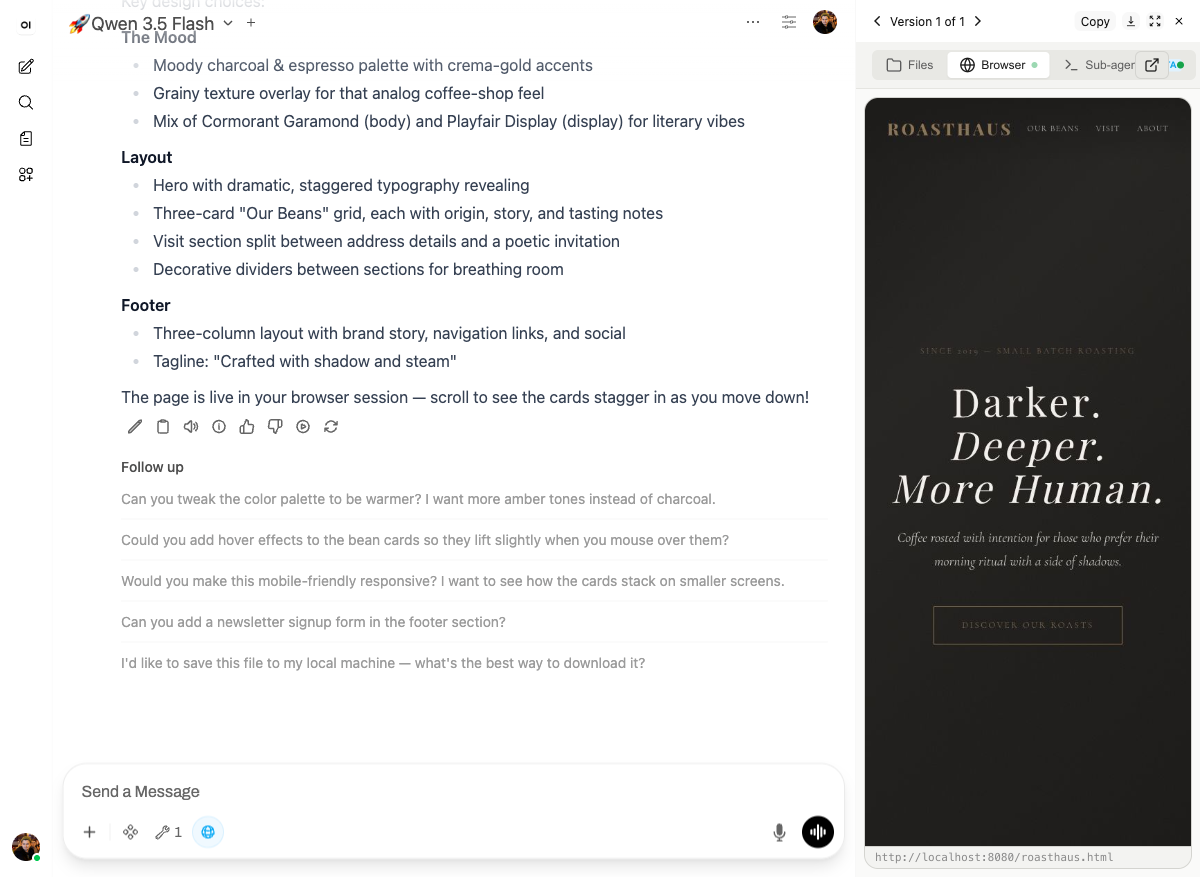
Presentations — custom design system, not the default white template
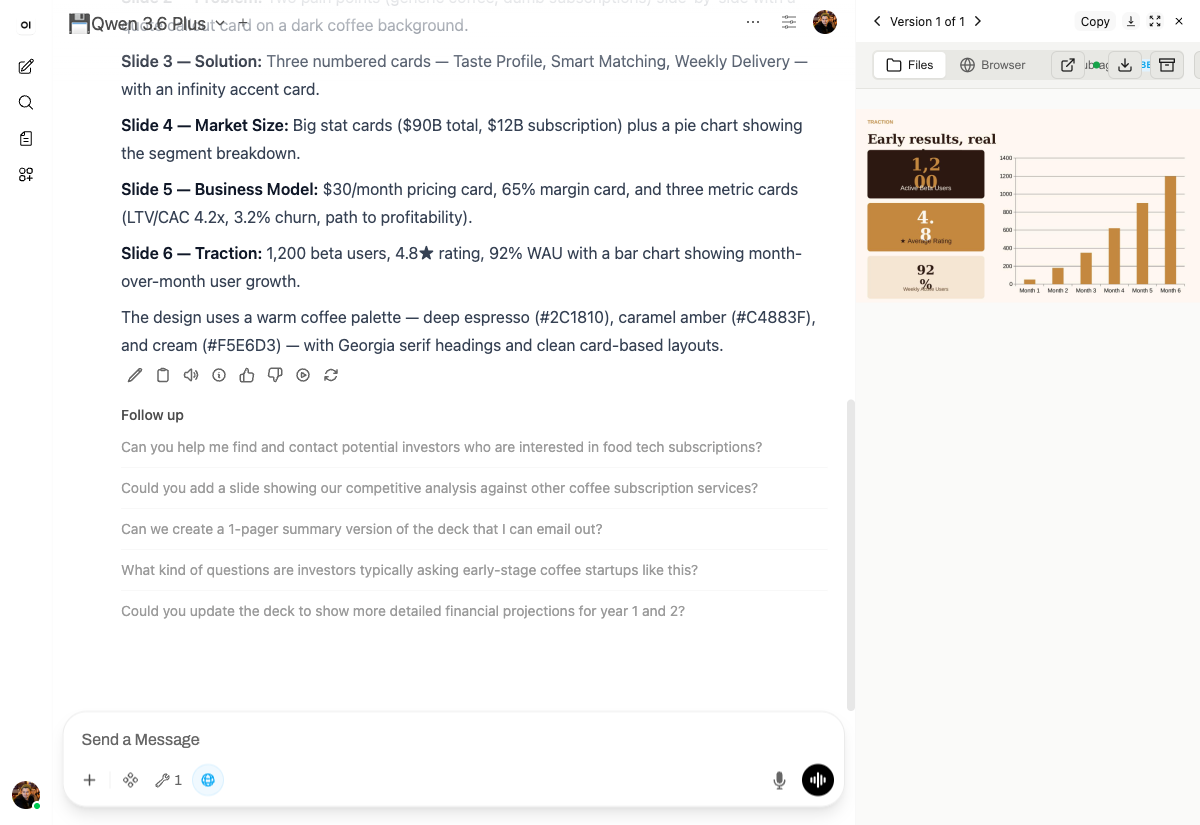
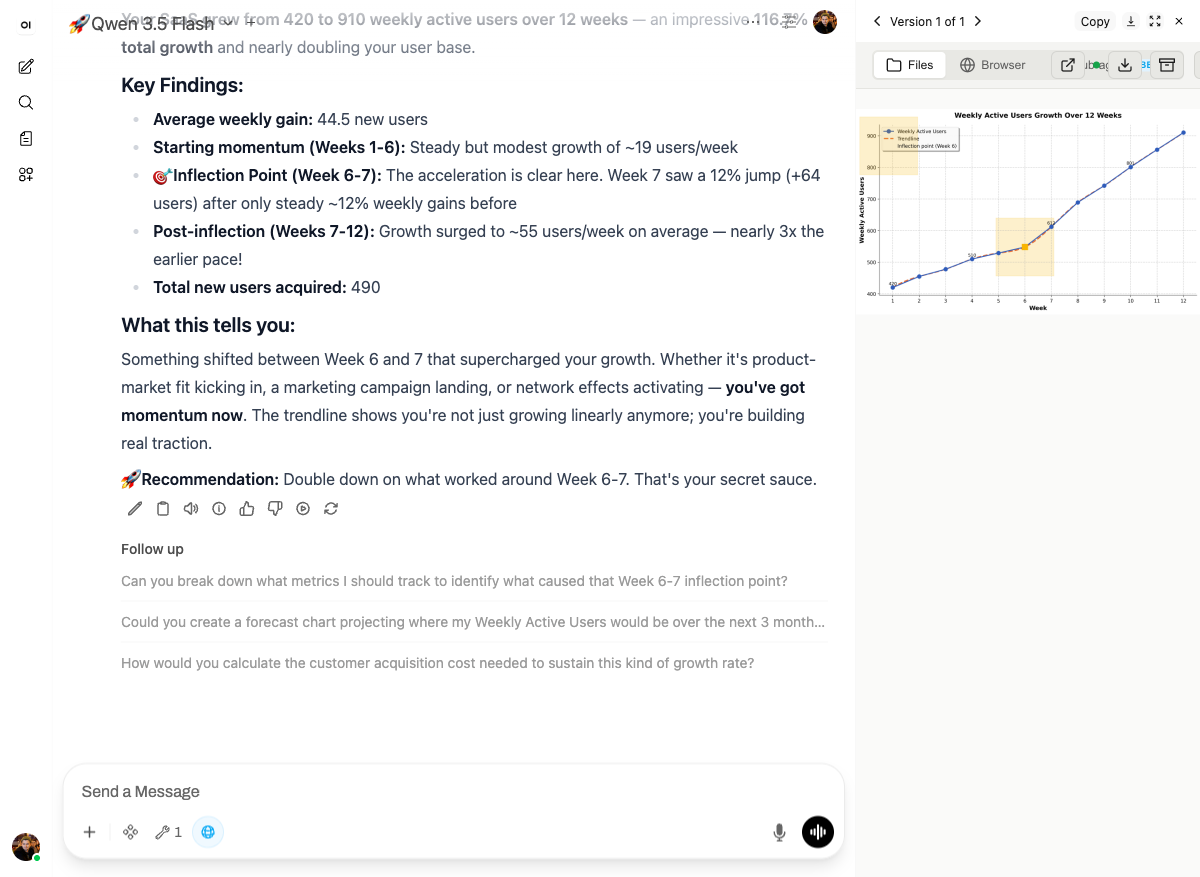
Build your own skills — package recurring work into reusable functions
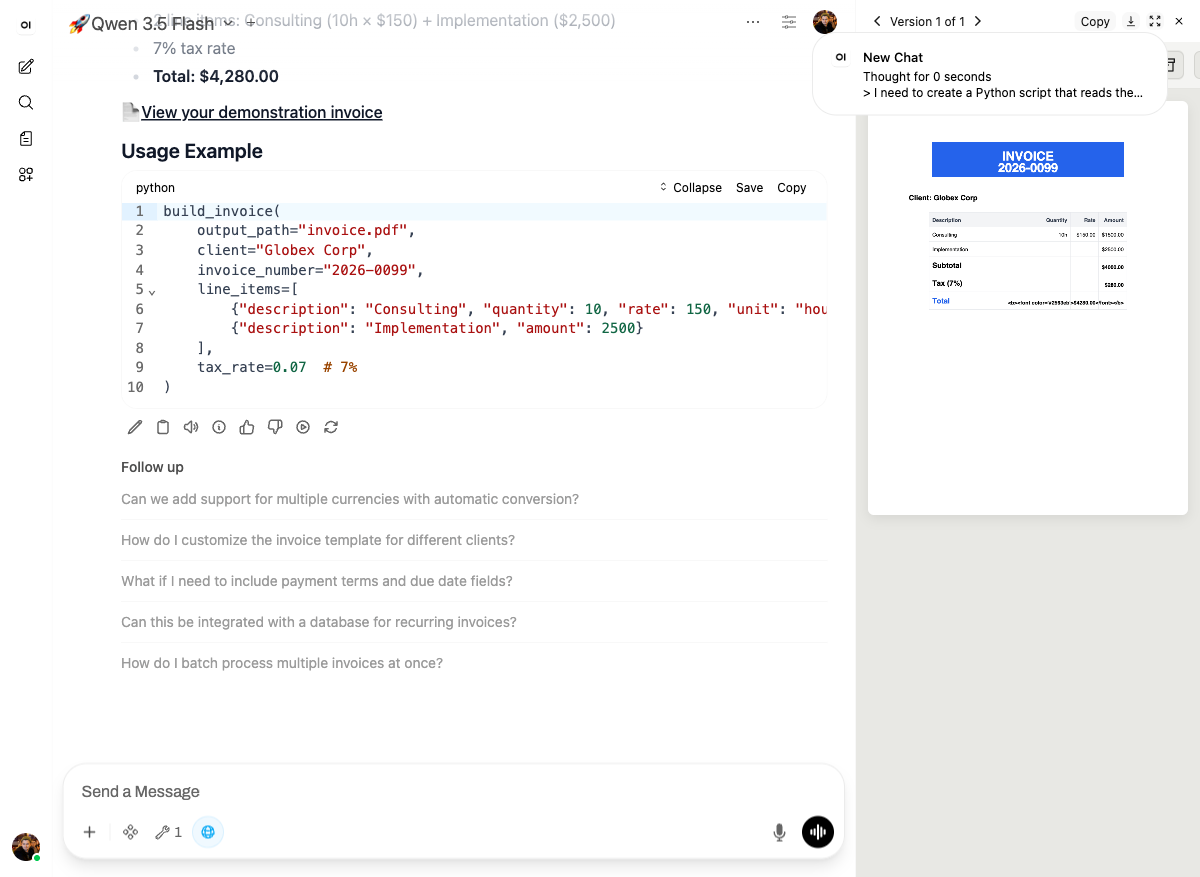
Data → chart with analysis
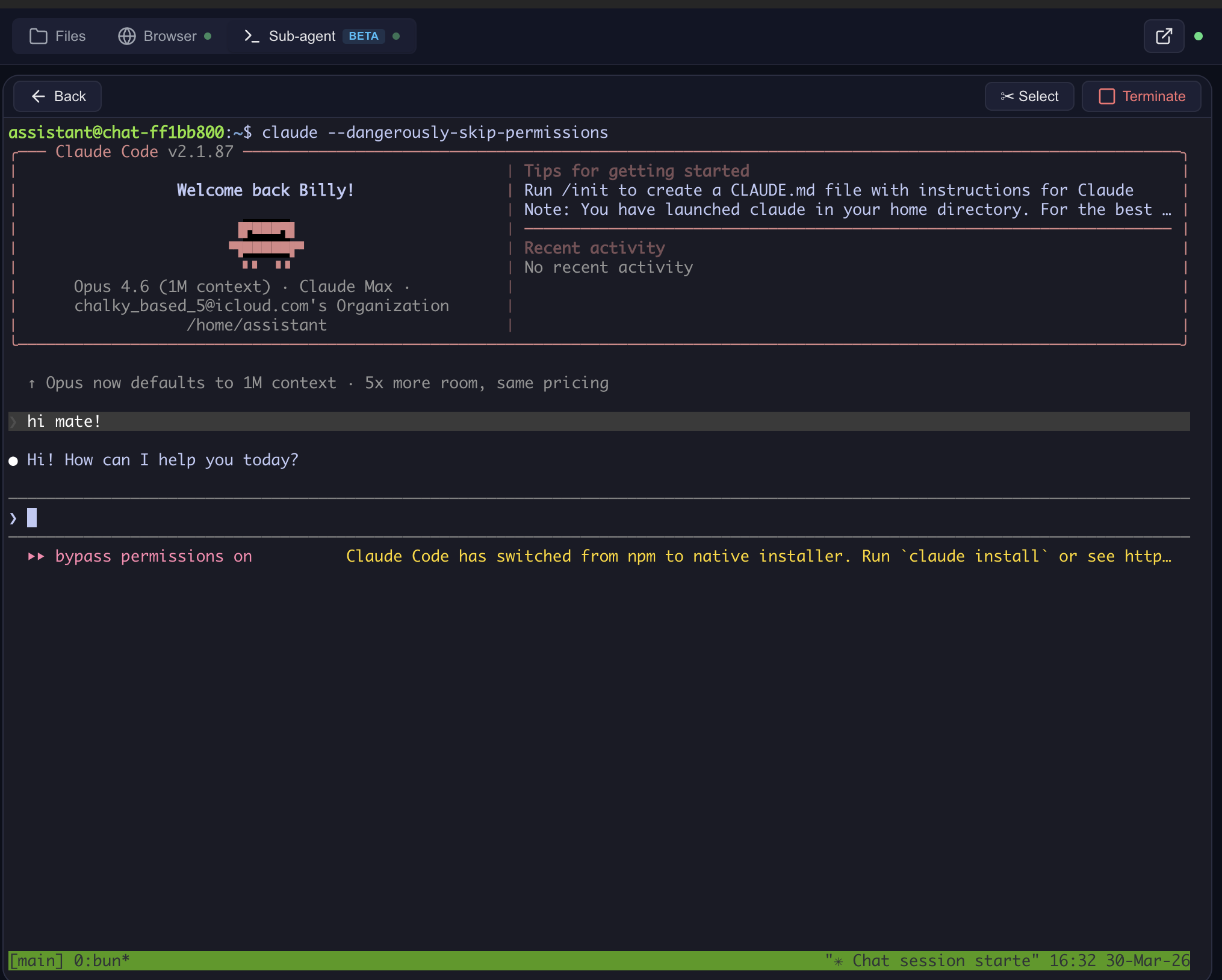
Claude Code — interactive terminal in the cloud
Sub-agent dashboard — monitor and control
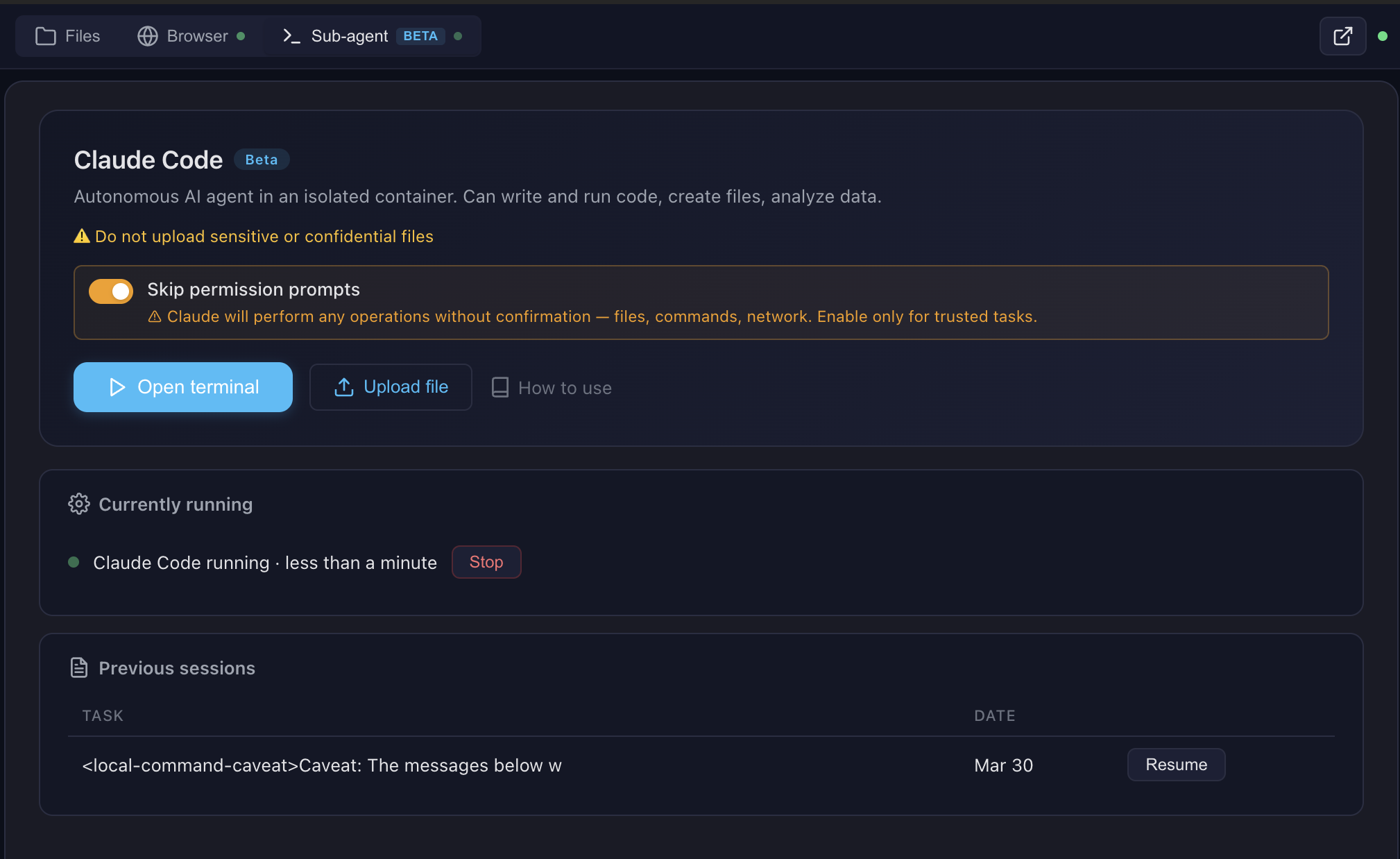
See docs/FEATURES.md for architecture details and docs/SCREENSHOTS.md for all screenshots.
Pro tip: Create skills with Claude Code in the terminal, then use them with any model in the chat. Skills are model-agnostic — write once, use everywhere.
Multi-CLI sub-agent runtime (v0.9.2.1+): The sub-agent dispatch supports Claude Code (default), OpenAI Codex, and OpenCode (with OpenRouter / qwen / DeepSeek / 75+ providers). Flip
SUBAGENT_CLI=claude|codex|opencodein.env— see docs/multi-cli.md for the worked OpenCode + qwen3-coder + OpenRouter recipe.
Architecture
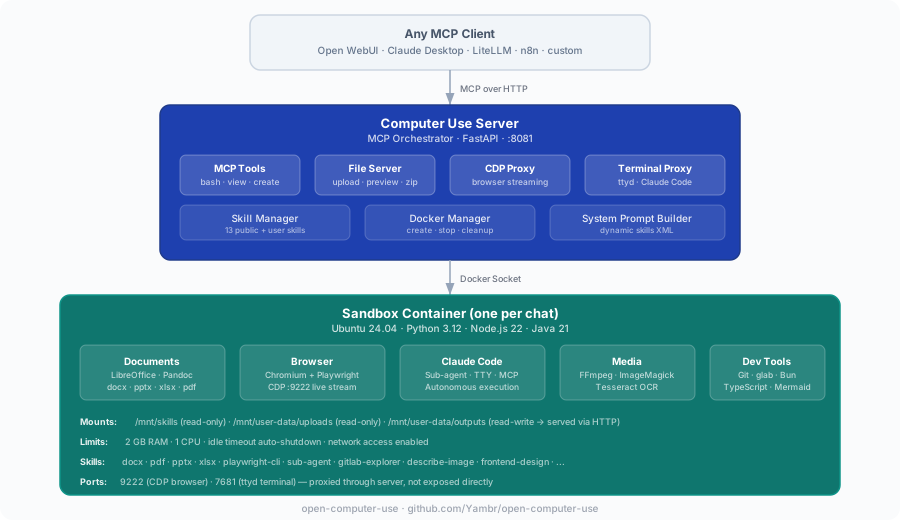
Looking ahead: a Kubernetes-friendly architecture with object-storage-backed user data and squashfs-packaged skills is being designed in docs/future-architecture/. Docker Compose remains the primary supported path.
Ways to try it
| Path | URL | What you need | Best for |
|---|---|---|---|
| Free online demo — Open WebUI + Computer Use, models included | lab.widemoat.ai | GitHub or Google sign-in | Trying it end-to-end in 30 seconds |
| Self-host | Quick Start below | Docker, ~15 min first build | Full control, air-gapped, heavy use |
OAuth only — no email/password, no SMS. On lab.widemoat.ai models are bundled as a free convenience. The hosted MCP endpoint is offline during the transformation; see docs/CLOUD.md.
Quick Start
git clone https://github.com/Wide-Moat/open-computer-use.git
cd open-computer-use
cp .env.example .env
# Edit .env — set OPENAI_API_KEY (or any OpenAI-compatible provider)

# 1. Start Computer Use Server (builds workspace image on first run, ~15 min)
docker compose up --build

# 2. Start Open WebUI (in another terminal)
docker compose -f docker-compose.webui.yml up --build
Open http://localhost:3000 — Open WebUI with Computer Use ready to go.
Note: Two separate docker-compose files:
docker-compose.yml(Computer Use Server) anddocker-compose.webui.yml(Open WebUI). They communicate vialocalhost:8081. This mirrors real deployments where the server and UI run on different hosts.
Model Settings (important!)
After adding a model in Open WebUI, go to Model Settings and set:
| Setting | Value | Why |
|---|---|---|
| Function Calling | Native | Required for Computer Use tools to work |
| Stream Chat Response | On | Enables real-time output streaming |
Without Function Calling: Native, the model won't invoke Computer Use tools.
What's Inside the Sandbox
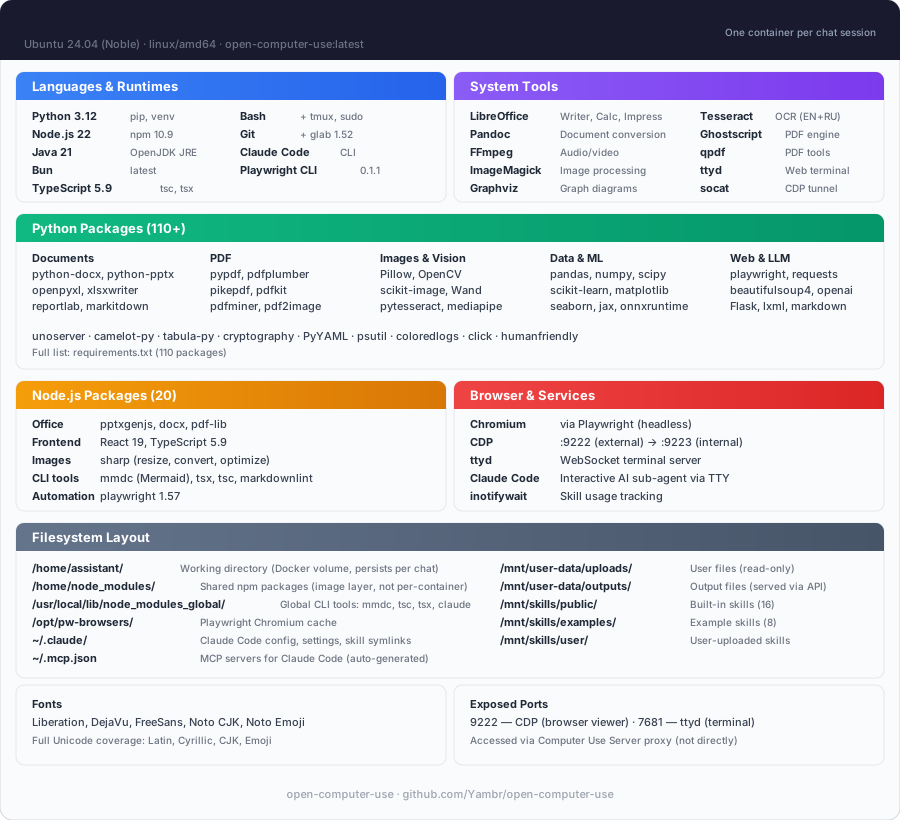
| Category | Tools |
|---|---|
| Languages | Python 3.12, Node.js 22, Java 21, Bun |
| Documents | LibreOffice, Pandoc, python-docx, python-pptx, openpyxl |
| pypdf, pdf-lib, reportlab, tabula-py, ghostscript | |
| Images | Pillow, OpenCV, ImageMagick, sharp, librsvg |
| Web | Playwright (Chromium), Mermaid CLI |
| AI | Claude Code CLI, Playwright MCP |
| OCR | Tesseract (configurable languages) |
| Media | FFmpeg |
| Diagrams | Graphviz, Mermaid |
| Dev | TypeScript, tsx, git |
Skills
13 built-in public skills + 14 examples:
| Skill | Description |
|---|---|
| pptx | Create/edit PowerPoint presentations with html2pptx |
| docx | Create/edit Word documents with tracked changes |
| xlsx | Create/edit Excel spreadsheets with formulas |
| Create, fill forms, extract, merge PDFs | |
| sub-agent | Delegate complex tasks to Claude Code |
| playwright-cli | Browser automation and web scraping |
| describe-image | Vision API image analysis |
| frontend-design | Build production-grade UIs |
| webapp-testing | Test web applications with Playwright |
| doc-coauthoring | Structured document co-authoring workflow |
| test-driven-development | TDD methodology enforcement |
| skill-creator | Create custom skills |
| gitlab-explorer | Explore GitLab repositories |
14 example skills: web-artifacts-builder, copy-editing, social-content, canvas-design, algorithmic-art, theme-factory, mcp-builder, and more.
See docs/SKILLS.md for details.
MCP Integration
The server speaks standard MCP over Streamable HTTP. Point any MCP client at your own deployment.
- Self-hosted:
http://localhost:8081/mcp. Quick sanity check:
Full self-host integration guide (LiteLLM, Claude Desktop, custom clients): docs/MCP.md. The per-chat system prompt rides six redundant MCP-native channels (tool descriptions,curl -X POST http://localhost:8081/mcp \ -H "Content-Type: application/json" \ -H "X-Chat-Id: test" \ -d '{"jsonrpc":"2.0","id":1,"method":"initialize","params":{"protocolVersion":"2024-11-05","capabilities":{},"clientInfo":{"name":"test","version":"1.0"}}}'/home/assistant/README.mdin the sandbox,InitializeResult.instructions,resources/listfor uploaded files, plus an HTTP/system-promptendpoint for legacy integrations) — full map in docs/system-prompt.md.
Configuration
All settings via .env:
| Variable | Default | Description |
|---|---|---|
OPENAI_API_KEY | — | LLM API key (any OpenAI-compatible) |
OPENAI_API_BASE_URL | — | Custom API base URL (OpenRouter, etc.) |
MCP_API_KEY | — | Bearer token for MCP endpoint |
DOCKER_IMAGE | open-computer-use:latest | Sandbox container image |
COMMAND_TIMEOUT | 120 | Bash tool timeout (seconds) |
SUB_AGENT_TIMEOUT | 3600 | Sub-agent timeout (seconds) |
SINGLE_USER_MODE | — | true = one container, no chat ID needed; false = require X-Chat-Id; unset = lenient |
PUBLIC_BASE_URL | http://computer-use-server:8081 | Browser-reachable URL of the Computer Use server. Baked into /system-prompt and returned to the Open WebUI filter in the X-Public-Base-URL response header — single source of truth for the public URL. Open WebUI filter URL requirements. |
CHAT_RESPONSE_MAX_TOOL_CALL_ITERATIONS, ORCHESTRATOR_URL, TOOL_RESULT_MAX_CHARS, TOOL_RESULT_PREVIEW_CHARS | — | Settings on the open-webui container (not CU-server). Required when embedding — see Required setup when embedding Open WebUI. |
POSTGRES_PASSWORD | openwebui | PostgreSQL password |
VISION_API_KEY | — | Vision API key (for describe-image) |
ANTHROPIC_AUTH_TOKEN | — | Anthropic key (for Claude Code sub-agent) |
MCP_TOKENS_URL | — | Settings Wrapper URL (optional, see below) |
MCP_TOKENS_API_KEY | — | Settings Wrapper auth key |
Custom Skills & Token Management (optional)
By default, all 13 built-in skills are available to everyone. For per-user skill access and custom skills, deploy the Settings Wrapper — see settings-wrapper/README.md.
Personal Access Tokens (PATs): The settings wrapper can also store encrypted per-user PATs for external services (GitLab, Confluence, Jira, etc.). The server fetches them by user email and injects into the sandbox — so each user's AI has access to their repos/docs without sharing credentials. The server-side code for token injection is implemented (docker_manager.py), but the Open WebUI tool doesn't pass the required headers yet. This is on the roadmap — if you need PAT management, open an issue.
MCP Client Integrations
The Computer Use Server speaks standard MCP over Streamable HTTP — any MCP-compatible client can connect. Open WebUI is the primary tested frontend, but not the only option.
| Client | Self-hosted URL | Status |
|---|---|---|
| Open WebUI | Docker Compose stack included, auto-configured | Tested in production |
| Claude Desktop | http://localhost:8081/mcp — see docs/MCP.md | Works |
| n8n | MCP Tool node → http://computer-use-server:8081/mcp | Works |
| LiteLLM | MCP proxy config — see docs/MCP.md | Works |
| Custom client | Any HTTP client with MCP JSON-RPC — see curl examples in docs/MCP.md | Works |
Open WebUI Integration
Open WebUI is an extensible, self-hosted AI interface. We use it as the primary frontend because it supports tool calling, function filters, and artifacts — everything needed for Computer Use.
Compatibility: This build is strictly built and verified against Open WebUI 0.11.0. The first 3 segments of our build version (v0.11.0.X) always match the Open WebUI base version it targets. If you run a different Open WebUI version, pick the Open Computer Use build whose first 3 version segments match yours — e.g., for Open WebUI 0.8.12 use a v0.8.12.Y build.
Why not a fork? Computer Use itself is not a fork: it bolts on through the official plugin API — tools and functions — so stock Open WebUI works with just the tool and filter installed. (A separate fork does exist for changes that cannot be expressed as plugins, but nothing in this repository depends on it.)
Running Claude Code through a corporate gateway (LiteLLM, Azure, Bedrock)? See docs/claude-code-gateway.md for the three-path operator recipe.
The openwebui/ directory contains:
- tools/ — MCP client tool (thin proxy to Computer Use Server). Required — this is the bridge between Open WebUI and the sandbox.
- functions/ — System prompt injector + file link rewriter + archive button. Required — without it the model doesn't know about skills and file URLs.
- patches/ — Build-time fixes for artifacts, error handling, file preview. Optional but recommended — improves UX significantly.
- init.sh — Auto-installs tool + filter on first startup. Optional — you can install manually via Workspace UI instead.
- init.sh — Installs the tool and filter on first start and sets their valves.
How auto-init works
On first docker compose up, the init script automatically:
- Creates an admin user (
admin@open-computer-use.dev/admin) - Installs the Computer Use tool via
POST /api/v1/tools/create - Installs the Computer Use filter via
POST /api/v1/functions/create - Configures tool and filter valves (
ORCHESTRATOR_URL=http://computer-use-server:8081— internal URL for server↔server, seeded into both Valves) - Marks the tool public-read (access grants for both
group:*anduser:*wildcards) — so non-admin users see the tool in their workspace - Marks the filter both active and global (two separate toggles:
/toggleand/toggle/global) — active-but-not-global is silently inert and a common manual-setup mistake - Merges
{function_calling: "native", stream_response: true}intoDEFAULT_MODEL_PARAMSviaPOST /api/v1/configs/models— every model gets the right defaults without per-model Advanced Params clicks
A marker file (.computer-use-initialized) prevents re-running on subsequent starts.
Note: Open WebUI doesn't support pre-installed tools from the filesystem — they must be loaded via the REST API. The init script automates this so you don't have to do it manually.
Manual setup (if not using docker-compose)
If you run Open WebUI separately, you need to manually:
- Go to Workspace > Tools → Create new tool → paste contents of
openwebui/tools/computer_use_tools.py - Set Tool ID to
ai_computer_use(required for filter to work) - Configure Valves:
ORCHESTRATOR_URL= internal URL of your Computer Use Server (http://computer-use-server:8081for Docker compose) - Open the tool's ⋯ → Share menu and set access to Public (grants read to both
group:*anduser:*wildcards) — otherwise only your admin account sees the tool and non-admin users get an empty tool list with no error - Go to Workspace > Functions → Create new function → paste
openwebui/functions/computer_link_filter.py - Enable the filter: toggle Active and toggle Global in the Functions list — these are two separate switches, and active-but-not-global means the filter loads but is never applied to chats
- In your model settings, set Function Calling =
Nativeand Stream Chat Response =On. Or set them globally once in Admin → Settings → Models → Advanced Params (function_calling: native,stream_response: true) — that becomesDEFAULT_MODEL_PARAMSfor every model.
The docker-compose stack handles all of this automatically.
Required setup when embedding Open WebUI into your own stack
If you run Open WebUI outside the stock docker-compose.webui.yml — your own compose, Kubernetes, Portainer, or a downstream repo — there are four traps that will silently break Computer Use. All four hit us in production. Check in this order.
Step 1 — A stock upstream image is all this repo needs
Install the tool and the filter and Computer Use works against
ghcr.io/open-webui/open-webui as published. Nothing here has to be rebuilt.
This used to be the opposite: the repository carried eight patch scripts and a Dockerfile that applied them to an already-built image, and pulling upstream silently skipped all of them. Those patches are gone. Three of the problems they addressed have since been fixed upstream; the rest live as source commits in a fork, which is a separate concern from running this integration.
Preview URL detection needs no build-time host configuration either — the iframe origin
is read from the URL the model wrote, which comes from the server's PUBLIC_BASE_URL.
Step 3 — Two URL settings, two roles (public vs internal)
v4.0.0: the old "three FILE_SERVER_URL places that must match" footgun is gone. There are now only two places and two distinct roles — public (browser-reachable) vs internal (Docker-local). The COMPUTER_USE_SERVER_URL build-arg was removed in v0.9.2.0 — fix_preview_url_detection is now host-agnostic (see Step 2).
| Where | Role | Who reads it | Prod (with domain) | Local dev (Docker Desktop) |
|---|---|---|---|---|
PUBLIC_BASE_URL env on the computer-use-server container (docker-compose.yml / .env) | PUBLIC — baked into /system-prompt links + returned to filter via X-Public-Base-URL response header | Server (single source of truth for public URL) | https://cu.your-domain.com | http://localhost:8081 |
Filter + Tool Valves ORCHESTRATOR_URL (seeded by init.sh from ORCHESTRATOR_URL env on the open-webui container) | INTERNAL — server↔server fetch of /system-prompt; MCP tools/call forwarding | Filter and tool (Docker network) | http://computer-use-server:8081 | http://computer-use-server:8081 |
⚠️ Do NOT point ORCHESTRATOR_URL at your public domain. It technically works, but every MCP request then goes browser→CDN→Traefik→container. Any hiccup in that chain kills the stream mid-tool-call and the user sees MCP call failed: Session terminated. Stay inside the Docker network.
The filter no longer has a public-URL Valve at all — it reads the public URL from the server's X-Public-Base-URL response header and caches it alongside the prompt. One public knob, one internal knob.
See also docs/openwebui-filter.md.
Step 4 — Four env vars on the open-webui container
Copy-paste into your downstream compose environment: block:
services:
  open-webui:
    environment:
      # --- Computer Use required env vars (read by build-time patches) ---
      - CHAT_RESPONSE_MAX_TOOL_CALL_ITERATIONS=200
      - TOOL_RESULT_MAX_CHARS=50000
      - TOOL_RESULT_PREVIEW_CHARS=2000
      # Internal URL of the Computer Use server — seeded by init.sh into both
      # Tool and Filter Valves, and read by the fix_large_tool_results patch.
      # Same Docker network: use the service DNS name.
      - ORCHESTRATOR_URL=http://computer-use-server:8081
| Variable | Default if unset | Effect when correctly set |
|---|---|---|
CHAT_RESPONSE_MAX_TOOL_CALL_ITERATIONS | 256 (upstream) | Tool-call cap per turn; stock repo sets 200, -1 disables the cap. Open WebUI reads the pre-0.10 name CHAT_RESPONSE_MAX_TOOL_CALL_RETRIES as a fallback. |
TOOL_RESULT_MAX_CHARS | 50000 (patch built-in) | Truncation threshold above which a tool result is truncated or uploaded. 0 disables. |
TOOL_RESULT_PREVIEW_CHARS | 2000 (patch built-in) | Preview size the model sees after truncation or upload. |
ORCHESTRATOR_URL | empty | Seeded into both Tool and Filter Valves by init.sh, and read by fix_large_tool_results patch as the upload target. If empty, oversized results are silently truncated — the model loses the data. |
Note: the last three are no-ops if the image is upstream ghcr.io — they need
fix_large_tool_resultsfrom Step 1.
Step 5 — Filter must be global, tool must be public-read
Open WebUI has two separate switches for each function (is_active and is_global) and two required grants for each tool (group:* + user:*). The stock init.sh does this for you; manual / custom deployments commonly miss one side and then spend hours wondering why "everything is installed but nothing works."
| Resource | What to flip | UI path | Endpoint | Why |
|---|---|---|---|---|
Filter computer_use_filter | is_active = true AND is_global = true | Admin → Functions → computer_use_filter → toggle Active + toggle Global | POST /api/v1/functions/id/computer_use_filter/toggle + .../toggle/global | is_active only loads the function; is_global actually applies it to every chat. Active-but-not-global is silently inert with no log line. |
Tool ai_computer_use | access_grants for group:* AND user:*, permission: read | Workspace → Tools → ai_computer_use → ⋯ → Share → Public | POST /api/v1/tools/id/ai_computer_use/access/update with {"access_grants":[{"principal_type":"group","principal_id":"*","permission":"read"},{"principal_type":"user","principal_id":"*","permission":"read"}]} | Without grants, only the admin account that created the tool sees it. Non-admin users get an empty tool list and no error. The UI "Public" toggle writes both wildcards; writing only one leaves the tool visible to some users and invisible to others depending on Open WebUI version. |
Verify against the database (Postgres used by the stock stack; see docker-compose.webui.yml:53):
# Filter flags — expect (t, t):
docker exec <postgres-container> psql -U openwebui -d openwebui -c \
  "SELECT is_active, is_global FROM function WHERE id='computer_use_filter';"

# Tool grants — expect TWO rows (group|* and user|*, both 'read'):
docker exec <postgres-container> psql -U openwebui -d openwebui -c \
  "SELECT principal_type, principal_id, permission FROM access_grant WHERE resource_id='ai_computer_use';"
For SQLite-backed Open WebUI deployments, swap psql for sqlite3 /app/backend/data/webui.db with the same SQL.
Step 6 — Verify everything at once
# 1. Env vars reached the container:
docker exec open-webui env | grep -E 'CHAT_RESPONSE_MAX_TOOL_CALL_ITERATIONS|TOOL_RESULT_|ORCHESTRATOR_URL'

# 4. Tool+Filter Valve (Session-terminated trap) — Admin UI is simplest:
#    Workspace → Tools → ai_computer_use → Valves → ORCHESTRATOR_URL
#    Admin → Functions → computer_link_filter → Valves → ORCHESTRATOR_URL
#    → both must be http://computer-use-server:8081 (internal URL, Docker service DNS),
#      NOT your public domain.

# 5. Server env (baked into system prompt AND returned to filter via header):
docker exec computer-use-server env | grep ^PUBLIC_BASE_URL=
# → must be a URL your browser can reach (e.g. http://localhost:8081 for local dev).

# 7. Filter is ACTIVE *and* GLOBAL (see Step 5):
docker exec <postgres-container> psql -U openwebui -d openwebui -c \
  "SELECT is_active, is_global FROM function WHERE id='computer_use_filter';"
# → expect (t, t). Two 't's, not one.

# 8. Tool is public-read with both wildcards (see Step 5):
docker exec <postgres-container> psql -U openwebui -d openwebui -c \
  "SELECT principal_type, principal_id, permission FROM access_grant WHERE resource_id='ai_computer_use';"
# → expect TWO rows: (group, *, read) and (user, *, read).
After rebuilding the image, do a hard reload in the browser (Cmd+Shift+R / Ctrl+Shift+R). Otherwise it keeps the old cached JS chunks and you'll think the fix didn't work.
Symptom → which step is wrong
| Symptom | Step |
|---|---|
HTML artifact renders as raw <iframe ...> text in chat | 1 (upstream image, fix_artifacts_auto_show missing) |
| Preview iframe auto-insertion doesn't happen for file links | 1 (fix_preview_url_detection missing) or PUBLIC_BASE_URL unreachable from browser |
MCP call failed: Session terminated on every tool call | 3 (tool Valve points at public domain) |
| Tool loop cuts off early; banner "Model temporarily unavailable" | 4 (CHAT_RESPONSE_MAX_TOOL_CALL_ITERATIONS not set) |
Large tool outputs silently ...(truncated); model makes wrong decisions | 4 (ORCHESTRATOR_URL not set or unreachable) OR 1 (fix_large_tool_results missing) |
| Tool-loop errors show raw Python exception | 1 (fix_tool_loop_errors missing) |
| Tool list is empty for non-admin users (admin sees it) | 5 (tool missing access_grants — not public-read) |
| Filter looks "Active" in UI but preview iframe / archive button never appear | 5 (filter is_global=false — only is_active=true was flipped) |
| File links in chat go to 404 / white screen | PUBLIC_BASE_URL on the server doesn't match what the browser can reach — see docs/openwebui-filter.md |
| New behavior didn't appear even after rebuild | Browser cached old JS — hard reload |
Security Notes
Production tested with 1000+ users on Open WebUI in a self-hosted environment. For public-facing deployments, see the hardening roadmap below.
Current model
- Docker socket: The server needs Docker socket access to manage sandbox containers. This grants significant host access — run in a trusted environment only.
- MCP_API_KEY: Set a strong random key in production. Without it, anyone with network access to port 8081 can execute arbitrary commands in containers.
- Sandbox isolation: Each chat session runs in a separate container with resource limits (2GB RAM, 1 CPU). On Docker Compose, containers use the standard runtime (runc) and share the host kernel. The Kubernetes Helm chart defaults to rootless Podman — user namespaces plus AppArmor, and no privileged container — and can opt into Kata Containers for a hypervisor-grade boundary. On Compose, switch to gVisor (see roadmap). Containers have network access by default.
- POSTGRES_PASSWORD: Change the default password in
.envfor production.
Known limitations
- Unauthenticated file/preview endpoints:
/files/{chat_id}/,/api/outputs/{chat_id},/browser/{chat_id}/,/terminal/{chat_id}/— accessible to anyone who knows the chat ID. Chat IDs are UUIDs (hard to guess but not a real security boundary). - No per-user auth on server: The MCP server trusts whoever sends a valid
MCP_API_KEY. User identity (X-User-Email) is passed by the client but not verified server-side. - Credentials in HTTP headers: API keys (GitLab, Anthropic, MCP tokens) are passed as HTTP headers from client to server. Safe within Docker network, but use HTTPS if exposing externally.
- Default admin credentials:
admin@open-computer-use.dev/admin— change immediately in multi-user setups.
Security roadmap
We plan to address these in future releases:
- Per-session signed tokens for file/preview/terminal endpoints (replace chat ID as auth)
- Server-side user verification via Open WebUI JWT validation
- HTTPS support with automatic TLS certificates
- Audit logging for all tool calls and file access
- Network policies for sandbox containers (restrict egress by default)
- Secret management — move credentials from headers to encrypted server-side storage
- gVisor (runsc) runtime — optional container sandboxing for stronger isolation (like Claude.ai)
Ideas? Open a GitHub Issue. Want to contribute? See CONTRIBUTING.md or email developer@widemoat.ai.
Development
# Build workspace image locally
docker build --platform linux/amd64 -t open-computer-use:latest .

# Run tests
./tests/test-docker-image.sh open-computer-use:latest
./tests/test-no-corporate.sh
./tests/test-project-structure.sh

# Build and run full stack
docker compose up --build
Contributing
See CONTRIBUTING.md. PRs welcome!
Community
- Free online demo: lab.widemoat.ai — hosted by the maintainers
- Issues & Ideas: GitHub Issues
- Contact: developer@widemoat.ai
License
This project uses a multi-license model:
- Core (
computer-use-server/,openwebui/,settings-wrapper/, Docker configs): Functional Source License, Version 1.1, Apache 2.0 Future License (FSL-1.1-Apache-2.0). Free to use, modify, fork, redistribute, and self-host internally. Each release automatically converts to Apache 2.0 two years after publication. Offering a hosted or embedded service that competes with our paid version(s) requires a commercial agreement. - Our skills (
skills/public/describe-image,skills/public/sub-agent): MIT - Third-party skills: see individual LICENSE.txt files or original sources.
Attribution required: include "Open Computer Use" and a link to this repository.
See NOTICE for details. For third-party dependency licenses (PyMuPDF AGPL, Anthropic Skill License, Apache 2.0 bundles, etc.), see THIRD-PARTY-LICENSES.md.