hypotree
會遺忘的記憶。一個持久、自我修正的信念狀態,適用於代理式研發。修剪死枝,並在不耗費探針的情況下推導出答案。
文件
Memory That Forgets





A persistent, self-revising hypothesis DAG for agentic R&D — exposed as an MCP server and a Python API.
Current agent memory is passive: vector stores and scratchpads accumulate facts but never revise them. Hypotree structures the agent's working knowledge as a directed acyclic graph of hypotheses backed by SQLite-WAL. When an experiment fails, the engine walks the dependency edges and retracts what rested on it. When a premise collapses, every dependent subtree is pruned automatically.
What it does
- Write-back belief revision — an ATMS-style engine (de Kleer, 1986) that propagates evidence failures upstream through the dependency graph.
- Cascading prune — invalidating a parent hypothesis instantly transitions its entire subtree to
PRUNED. No tokens spent on dead branches. - Exclusion-group inference — confirming one member of a mutually exclusive group retires the rest as
EXHAUSTEDwithout probing them. - Deduction by elimination — last-man-standing: when all but one alternative in an exclusion group are refuted, the survivor is
VERIFIEDwithout a probe. - Backward pruning over a complete question — the dual of the above: when every candidate answer to a question is ruled out on its own evidence, nothing that assumes one of them can be satisfied, so those branches are
PRUNEDand the navigator names the question that ran out. - The closed-world assumption is declared, not assumed. Both inferences above are sound only if the listed answers are all the answers.
exclusion_closed=Falsesays they are not — "which learning rate?" always admits another — and the engine then withholds both. And when a deduction it did draw turns out to rest on an incomplete list, it is withdrawn rather than defended: the node goes back on the frontier and one probe settles which premise was wrong. - Thompson Sampling navigation — Beta-distribution sampling over the open frontier, giving bounded worst-case regret (no catastrophic lock-in).
- Conflict resolution via differential ablation — when an integration test fails but every component passes alone, the engine rebuilds the failing combination one swap at a time to pinpoint the culprit.
- A derivation trail, not just a state —
generate_learning_pathnarrates what was settled, in order, separating what an experiment paid for from what the engine inferred for free, and calling out beliefs that were later withdrawn. - Persistent across sessions, models, agents, users, and projects — the belief state is a SQLite database, not a context window.
Features
Key features
Everything here is on by default and covered by the pre-registered benchmark.
| Feature | What it is for |
|---|---|
| Write-back belief revision | An experiment that fails does not just get logged — the engine walks the dependency edges and retracts what rested on it. This is the thing passive memory cannot do. |
| Cascading prune | Invalidating a premise transitions its whole subtree to PRUNED in one transaction. No tokens are ever spent re-reading a dead branch. |
| Exclusion-group inference | Declare competing answers to one question; confirming one retires the rest without probing them. In the benchmark this is where most of the saving comes from — 342 questions closed for free in the latest run. |
| Deduction by elimination | Rule out all but one candidate and the survivor is confirmed with no probe at all. |
| Backward pruning over a dead question | The dual: when every candidate answer is ruled out on its own evidence, nothing that assumes one of them can be satisfied, and the navigator names the question that ran out instead of reporting an empty frontier. |
| A declared closed-world assumption | Both inferences above are sound only if your list of answers is complete. exclusion_closed=False says it is not — "which learning rate?" always admits another — and the engine withholds them. A deduction later found to rest on an incomplete list is withdrawn, not defended. |
| Conflict sets and differential ablation | When components pass alone but fail together, the engine records what cannot all hold and narrows it by rebuilding the combination one swap at a time. Each swap is decisive; m assumptions cost at most m probes. |
| Confirmation depth | "It passed the unit test" and "it works in production" are different claims. A confirmation supports nothing tested deeper than itself, and blame lands only on assumptions confirmed shallower than the failure. |
| What would change my mind | For any goal, the cheapest experiments that would overturn its current conclusion, weakest evidence first. A belief confirmed by elimination ranks top however confident the posterior is — nothing ever measured it. Available as a tool, and as a dashboard panel. |
| Learning-path diff | generate_learning_path(since=…) reports what changed over a window — confirmed, withdrawn, newly questioned — which is the sentence a standup or a PR description wants. as_of reconstructs any past instant; pass both for a closed window. |
| Thompson Sampling navigation | Beta sampling over the open frontier: bounded worst-case regret and no catastrophic lock-in. Seeded, so a run is reproducible. |
| Goal scoping | goal_id on dispatch, status and narrative restricts everything to one objective, its dependency ancestry, and the competing answers to those questions. |
| Bi-temporal history | Every status and posterior change is stored as an interval, so "what did we believe on Tuesday" is a WHERE clause — and the dashboard scrubber is that query with a handle on it. |
| Live read-only dashboard | Runs beside the MCP server by default. Watch the graph grow, replay any instant, read the narrative typeset. Nothing on it writes evidence. |
| Leases for long-running work | A dispatched node is reserved until you report it. renew_claim for a multi-day experiment, release_claims to hand work back rather than fabricate a result. |
| Batch-native everywhere | create_hypotheses, get_next_targets, record_evidence and update_status all take lists, and recording can fuse the next dispatch into the same round-trip. |
Experimental features
Off by default, and staying off until a full evaluation with a live model has scored them. Behaviour with the flag absent is bit-identical to a build that has never heard of the feature.
| Feature | Status |
|---|---|
Cost-aware selection (--experimental-cost-aware) | Ranks candidates by expected value per unit cost instead of by promise alone, using the duration_s your results report and the estimated_cost you declare. On a cost-weighted benchmark it cuts total cost to goal by 77% for 1.5% more probes, solving every seed — but that was measured against a scripted caller on a synthetic tariff, which justifies the mechanism and not the default. Expected to become the default in a later minor release (0.7.0 or above) once a run with a live model has scored it; the flag disappears at that point. Recording duration_s and estimated_cost is always safe and always useful — both are stored and displayed whether or not the flag is on. |
Why the saving exists, since it is not obvious: the last surviving answer to a closed question is deduced rather than probed, so whichever answer you never reach is never paid for. Ordering cheapest-first puts the expensive answer in that free slot. Probe count barely moves — the winner's position is uniform, so any order settles a question in the same expected number of probes — while probe cost falls a long way.
Watch it think
A belief state that revises itself is hard to appreciate from a status column. The dashboard runs by default, beside the MCP server, so the graph is already there the first time you look for it:
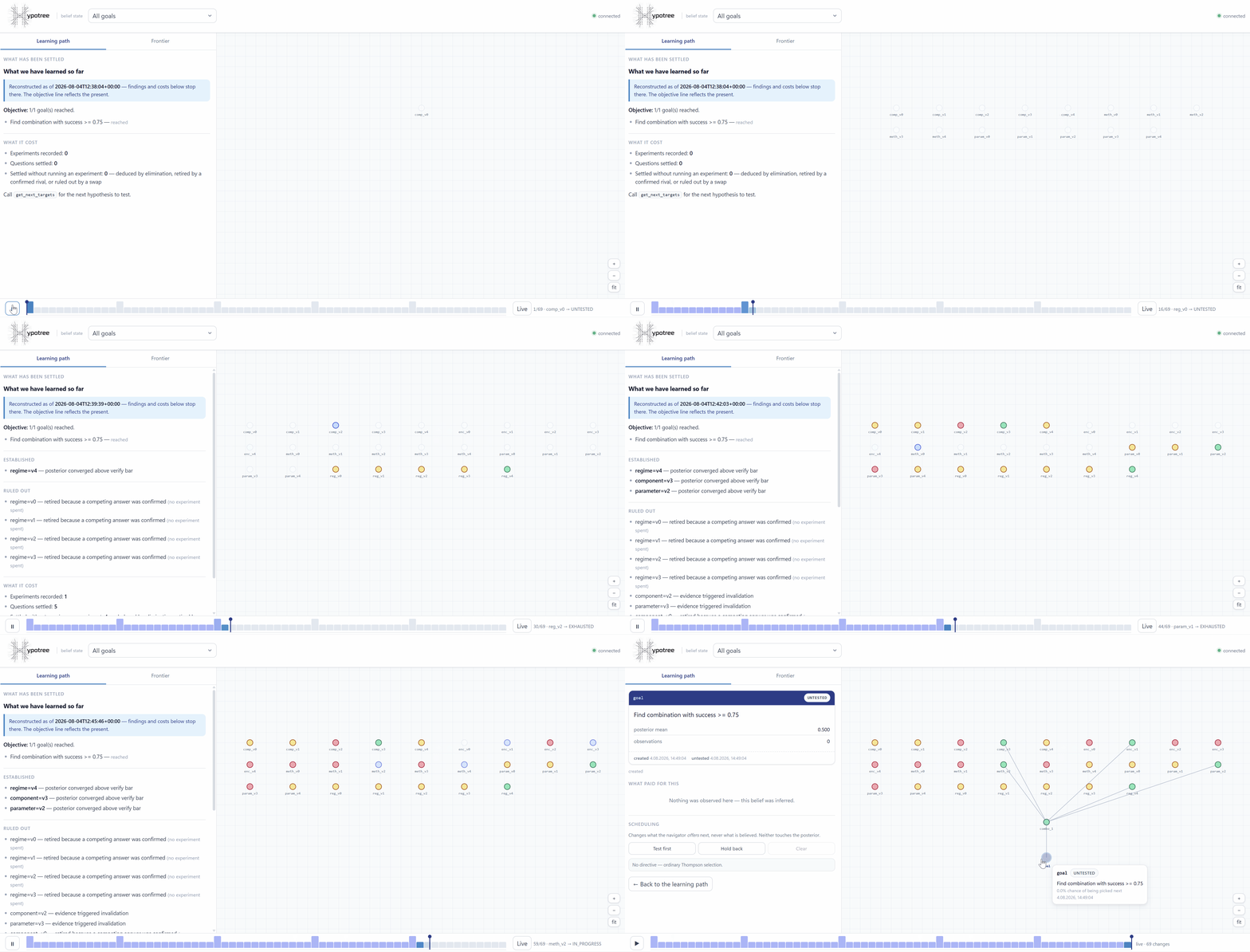
That is a real run. Nodes arrive as the agent creates them and glow at their actual chance of being dispatched next; confirmed answers turn green and their rivals retire without ever being probed; a refuted premise takes its subtree with it. Optional 128-character titles keep large graphs readable while preserving stable ids in details. Goal progress names pending dependencies, evidence can be filtered and paged with attestation and trend context, and dedicated conflict and live-claim views expose why work is blocked or leased. The layout remains usable on compact screens by stacking the narrative and graph. The bar along the bottom is the run's own activity — drag it and the whole graph rewinds to what was believed at that moment, narrative included.
Nothing on that page writes evidence. If a belief moved, an experiment moved it.
Install
# From PyPI
uvx hypotree
# or
pip install hypotree

# From source
git clone https://github.com/tygryso/hypotree.git
cd hypotree
uv sync
Requires: Python 3.10+ · Runs on: Linux, macOS, Windows
Check the install without wiring up a client — the server speaks JSON-RPC on stdin, so starting it in a terminal otherwise looks like a hang:
hypotree --version   # or: uvx hypotree --version
hypotree --info      # which belief state am I connected to, and where is it?
Quick start
1a. Connect to an MCP client
Add hypotree to your MCP client config (Cursor, Cline, Claude Desktop, etc.):
{
  "mcpServers": {
    "hypotree": {
      "command": "uvx",
      "args": ["hypotree"],
      "env": {
        "HYPOTREE_WORKSPACE_ID": "my-project"
      }
    }
  }
}
Or run directly:
uvx hypotree
To view a database owned by an embedding host without workspace resolution or an MCP server:
uv run hypotree --no-mcp --db-path /path/to/state.db
HYPOTREE_DB_PATH provides the same override.
1b. Or embed it in a Python agent — no MCP client
If your agent is Python, it does not need a transport to reach the belief state. HypoTreeToolset hands you OpenAI function-calling schemas and executes calls by name:
from hypotree import HypoTreeToolset

with HypoTreeToolset("beliefs.db", preset="essential") as ht:
    tools = ht.tools()                  # drop straight into your `tools=` argument
    result = ht.call("get_next_targets", {"count": 1})   # returns a JSON string
Both paths project the same schemas through the same dispatch, so the embedded surface and the MCP surface cannot drift apart.
Three things worth knowing:
preset="essential"exposes the six tools that run the loop instead of all twenty. Most clients re-send every schema on every turn, and an agent that already carries its own forty tools cannot also carry twenty of ours.ht.mutating_tool_namesis the set that changes the belief state — what to put behind an approval or reasoning gate.get_next_targetsis in it: it reads like a query and it issues leases, so it writes.ht.callnever raises. A bad node id or a malformed argument dict comes back as{"error": ...}, because those are recoverable by the model that caused them and killing the session over one is not.
Pass read_only=True for a reviewer or an untrusted sub-agent: it exposes the eleven sensors and refuses every write, including by name if the model asks for one it was not given.
Embedded hosts can keep state in their own isolated storage namespace and later launch
hypotree --no-mcp --db-path .../state.dbwithout copying it into hypotree's global workspace resolver.
2. Create hypotheses
The agent creates a tree with parent_ids wiring combinations to their premises and exclusion_group declaring competing answers to one question:
# Agent calls over MCP:
create_hypotheses(hypotheses=[
    {"node_id": "catalyst_A", "statement": "Pd/C catalyst works", "exclusion_group": "catalyst"},
    {"node_id": "catalyst_B", "statement": "Pt catalyst works",   "exclusion_group": "catalyst"},
    {"node_id": "catalyst_C", "statement": "Ni catalyst works",   "exclusion_group": "catalyst"},
    # Enumerable question → closed by default, so eliminating two confirms the third.
    # For "which learning rate?" pass exclusion_closed=False: there is always another,
    # and the engine then refuses to deduce a survivor it cannot justify.
    {"node_id": "yield_target", "statement": "reach 90% yield",
     "is_goal": True, "target_metric": 0.9, "parent_ids": ["catalyst_A"]},
])
3. Record evidence and let the engine infer
# Probe catalyst_A → fails outright, catalyst_B → fails outright.
# Two experiments, one call:
record_evidence(results=[
    {"node_id": "catalyst_A", "success": 0.0},
    {"node_id": "catalyst_B", "success": 0.0},
])
# Engine: catalyst_A, catalyst_B → INVALIDATED; anything depending on them → PRUNED
#         catalyst_C → VERIFIED by elimination — no probe spent
4. Ask what you learned
generate_learning_path()
# → markdown briefing + counters:
#   probes_spent = 2, conclusions = 3, conclusions_without_a_probe = 1
MCP with dashboard
Additionally, you can start the server with these flags:
hypotree                            # MCP server + dashboard on 127.0.0.1:7331
hypotree --dashboard-port 8080      # start probing from a port you choose
hypotree --no-dashboard             # MCP server only, no socket opened
hypotree --no-mcp                   # dashboard alone, against an existing belief state
hypotree --experimental-cost-aware  # rank by value per unit of probe cost (see Experimental features)
It binds 127.0.0.1 only and mints a session token at startup; the URL, token included, goes to stderr (stdout is the JSON-RPC channel). Ask the agent for it instead — get_workspace_info returns dashboard_url, and so does the hypotree://dashboard resource. If no port in the range is free the MCP server still starts and says so: a viewer must never be able to take the server down.
--no-mcp opens the database read-only, so it is safe to point at a workspace an agent is actively writing — and it needs no client configured to try.
What you get:
- A live graph. Nodes are laid out server-side with
networkxand rendered as SVG withd3-zoomfor hardware-accelerated pan and zoom. Untested nodes glow at their real chance of being dispatched next; in-progress nodes pulse; pruned branches desaturate instead of disappearing, because the point being shown is that they were considered and cut. - New nodes fade in. When the agent creates a hypothesis, it arrives as a ghost and resolves — you watch the search grow without touching the page.
- An activity timeline.
status_historyis bi-temporal, so any past instant is aWHEREclause. The bar chart is the shape of the run — where the bursts were, where it stalled — and the handle travels along it. Drag back to see what was believed then, or press play and watch the whole investigation replay. - Provenance on every card. What each belief cost: the score, the depth, the commit, the
source_ref, any files the experiment left behind, when it was created and when it settled. The graph is a ledger, not a drawing. - The learning path as typeset markdown, ready to paste into a report — and it rewinds with the graph, so a rewound picture is never captioned with conclusions it has not reached.
- Pin and suspend. Redirect the search without faking evidence — directives change what is offered, never what is believed.
Everything is vendored (Vue 3, d3 micromodules, marked — 276 KB total). No CDN, no npm, no build step: it works on a plane and in an air-gapped network.
The API is JSON and every /api/* call needs the token. Everything is a read except one route — pin and suspend are scheduling instructions, and they never touch a posterior:
| Route | What it returns |
|---|---|
GET /api/meta | workspace identity and the goal list |
GET /api/graph?goal_id=&at= | nodes and edges with server-computed layout; at reconstructs any past instant |
GET /api/node/<id> | one node's evidence, provenance and status intervals |
GET /api/frontier?goal_id=&k= | the top candidates and how likely the navigator is to pick each next |
GET /api/counterfactual?goal_id=&k= | the beliefs holding a conclusion up on the least evidence, and what would overturn each |
GET /api/learning-path?goal_id=&at=&since= | the narrative, same as the MCP tool; since makes it a diff over a range |
GET /api/timeline?goal_id= | every status change in order |
GET /api/events | server-sent revision numbers — the client refetches what it is showing |
POST /api/directive | pin / suspend / clear (the only write, and only when an engine is attached) |
p_select is the real thing, not a proxy: Thompson Sampling picks the argmax of one draw per candidate, so the number is how often each candidate wins that draw.
Tools (20)
Exposed over MCP, and in OpenAI function-calling form via hypotree.openai_tools() — one set of schemas, two projections. The six marked · make up preset="essential", the smallest surface that can still run the loop.
| Tool | What it does |
|---|---|
create_hypotheses · | Create one or many nodes with parent_ids, exclusion_group, exclusion_closed, is_goal |
add_edges · | Wire hypotheses that already exist, without recreating either. Takes edges, a list of {src, dst, type} |
get_next_targets · | Thompson Sampling — returns the next hypothesis to test, under a lease. goal_id narrows the search to one objective |
record_evidence · | Record one result — or every result from a turn at once with results=[…] — and trigger write-back propagation. Optional duration_s feeds cost-aware ranking |
generate_learning_path · | What we learned, in order, and what it cost — separates conclusions an experiment paid for from ones the engine inferred free. goal_id narrates one objective |
get_workspace_info | Which belief state you are connected to and which layer chose it — start here when the graph is unexpectedly empty |
update_status | Manually set node status (rarely needed — the engine does it) |
get_dag_context | Get a subgraph view for the agent's context window |
render_dag_map | Mermaid.js diagram of the current belief state |
get_goal_status · | Check whether the goal node is met. goal_id scopes the counts to one objective's subgraph |
get_conflicts | List unresolved conflicts (integration failures) |
suggest_discriminating_experiment | For a conflict, suggest the swap that separates the culprits |
what_would_change_my_mind | Name the cheapest experiments that would overturn a goal's current conclusion, weakest evidence first |
list_nodes | List/filter nodes by status, depth, or exclusion group |
get_evidence_history | Full evidence trail for a node |
get_active_claims | List nodes with active leases |
renew_claim | Extend a lease on a node |
release_claims | Release one or all leases |
invalidate_upstream | Revert VERIFIED status from parents based on child failures |
verify_upstream | Propagate confirmation up the dependency chain |
Slash commands
The server ships three MCP prompts. Clients that support them (Cursor, Claude Desktop, Cline) surface them as slash commands, so a human can steer the loop without retyping the protocol — and, more usefully, without the agent paraphrasing it.
| Command | What it does |
|---|---|
/hypotree-init | Create the goal node and the first 3–5 hypotheses under it, with exclusion groups where the hypotheses are competing answers to one question |
/hypotree-next | Get the next target, actually test it, and record the result against that same node — including what to do for each DONE reason |
/hypotree-status | Brief you on what is established, what was ruled out, what changed, and how many conclusions cost no experiment |
/hypotree-init takes an optional task argument. Exact invocation depends on the client (Cursor and Claude Desktop namespace prompts under the server, e.g. /hypotree:hypotree-init).
Resources
Three MCP resources, pulled on demand rather than carried in context:
| URI | What it is |
|---|---|
hypotree://guide | The full agent contract — every tool, the status lifecycle, exclusion groups, leases, confirmation depth, conflict sets, and the rules. ~23 KB, so it belongs nowhere near a system prompt |
hypotree://state | The current belief state as a narrative: what was established, how, and what it cost |
hypotree://dashboard | Where a human can watch this belief state move, token included — so the agent can answer "send me the link" without you going near a terminal |
Python API
For agents written in Python, MCP is a process boundary and a JSON round-trip between two objects in the same interpreter. Import them instead:
from hypotree import HypoTreeToolset, HypoTreeEngine, openai_tools
| What | Why you'd reach for it |
|---|---|
HypoTreeToolset(db_path, …) | The whole surface: .tools() for schemas, .call(name, args) for execution, context-manager lifecycle |
HypoTreeToolset.from_engine(engine) | Add the tool surface to an engine you already hold. Does not take over its lifecycle |
openai_tools(preset=…, include=…, exclude=…, read_only=…) | Just the schemas, if you route calls yourself |
HypoTreeEngine(db_path, …) | Typed Pydantic results instead of JSON strings |
Selection is composable — start from a preset and narrow:
openai_tools(preset="essential")                 # the 6 that run the loop
openai_tools(read_only=True)                      # the 11 sensors, no writes
openai_tools(preset="essential", exclude=["add_edges"])
Every tool also carries the metadata a host needs and no JSON schema can express:
from hypotree import TOOL_SPECS

{s.name for s in TOOL_SPECS if s.mutates}     # gate these
{s.name for s in TOOL_SPECS if s.essential}   # ship these when context is tight
Embedding it in an agent loop
The whole integration is three touch points: build the tool list once, execute by name, close on the way out. Everything else your loop already does.
from hypotree import HypoTreeToolset

belief = HypoTreeToolset(session_dir / "beliefs.db", preset="essential")
try:
    tools = my_own_tools() + belief.tools()

    while not done:
        reply = llm.chat(messages, tools=tools)
        for call in reply.tool_calls:
            if call.name in belief.tool_names:
                # Your gate, your policy — hypotree only tells you which calls
                # are consequential.
                if belief.is_mutation(call.name) and not gate.open:
                    result = "Belief writes are gated; think first."
                else:
                    result = belief.call(call.name, call.arguments)
            else:
                result = my_dispatch(call)
            messages.append(tool_result(call, result))
finally:
    belief.close()
Four things that are easy to get wrong and cheap to get right:
- Point the database at storage that survives the session, not at the working directory. The belief state outliving the run is the entire feature; a path under a git worktree forks it the first time you switch branches.
- Open the session by reading what is already known.
generate_learning_pathis in the essential preset for a measured reason: across three full evaluation runs the agent called it after a context reset exactly zero times, and every redundant probe in those runs followed a reset. - Do not charge belief writes against a code-mutation budget. Recording what you learned is not the work. An agent that runs low on budget and stops writing down its findings loses the memory exactly when it is worth most.
callnever raises. A bad node id comes back as{"error": …}, so the loop can hand it straight to the model and let it correct itself rather than dying on a typo.
Pass read_only=True for anything that should observe without writing — a reviewer, a monitoring pass, an untrusted sub-agent. It exposes the eleven sensors and refuses every write, including by name if the model asks for one it was never given.
Testing an integration costs nothing: the engine runs against a temporary SQLite file in milliseconds, so the full create → dispatch → record → conclude loop is a unit test, not an inference bill.
Agent rules — how your agent learns to use this
The operating contract reaches the model through four channels. You do not have to wire any of them up; they are listed so you know what is already in context and what is not.
- Server instructions. MCP hands a server-level
instructionsblock to the client duringinitialize, and every major client puts it in front of the model. Hypotree uses it for four rules: one hypothesis per node, mark the goal withis_goal=Trueand wire it to the work, record against the node you actually tested, and report what you were leased. Nothing to configure. - Tool descriptions. Each tool description carries the one rule that tool is misused without — that a goal never accepts evidence, that a lease reserves a node until you report it, that confirming one member of an exclusion group retires the rest. These are the only text guaranteed to be in context at the moment a tool is chosen.
- Resources. The full guide is
hypotree://guide. An agent that hits something surprising can read it without you pasting 23 KB into a system prompt.hypotree://dashboardhands over the live link. - Your project rules file — optional, and the only part you touch. If you want the agent to reach for hypotree unprompted on multi-day work, add the block below.
Optional: .cursorrules / AGENTS.md / CLAUDE.md
## Long-running R&D: use hypotree

For any task that spans more than one session, branches into competing
approaches, or where an early assumption could turn out wrong later, keep the
belief state in hypotree rather than in the conversation.

- Before starting, call `generate_learning_path`. Something may already be
  settled, and re-deriving it costs an experiment you do not have to run.
- Create the objective with `is_goal=True` and wire hypotheses to it with
  `parent_ids`. Progress is then derived, not asserted.
- Competing answers to one question share an `exclusion_group`. Confirming one
  retires the rest without testing them — this is where most of the saving is.
  If the list could always grow ("which learning rate?"), add
  `exclusion_closed: false` so the engine does not deduce a survivor it cannot
  justify.
- Ask `get_next_targets` for work and record every result you were handed. A
  target is leased to you; anything you hold and never report is work nobody
  can do. Probed several things in one turn? Report them in one call with
  `record_evidence(results=[...])`.
- Record against the node whose statement you actually tested. A composition's
  failure filed against a premise destroys a confirmation that is still true.
- When `get_next_targets` returns DONE, read the reason. Only `all_goals_met`
  and `empty_frontier` mean stop; the rest are instructions. `dead_question`
  means one of your questions ran out of candidate answers — add the one you
  have not thought of to the same `exclusion_group`.
Architecture
┌──────────────────────────┐   ┌──────────────────────────┐
│     MCP Client (agent)   │   │   Python agent (in-proc) │
│  Cursor / Cline / Claude │   │   HypoTreeToolset        │
└────────────┬─────────────┘   └────────────┬─────────────┘
             │ MCP (stdio/HTTP)             │ direct call
┌────────────▼─────────────┐                │
│    hypotree MCP server   │                │
└────────────┬─────────────┘                │
             │                              │
┌────────────▼──────────────────────────────▼─────────────┐
│  toolkit — 20 tool specs + dispatch (no transport)      │
│  one description of the contract; both paths project it │
└────────────────────────┬────────────────────────────────┘
┌────────────────────────▼────────────────────────────────┐
│  Engine                                                 │
│  • Write-back propagation    • Cascading prune          │
│  • Exclusion-group inference • Differential ablation    │
│  • Thompson Sampling navigator                          │
└────────────────────────┬────────────────────────────────┘
┌────────────────────────▼────────────────────────────────┐
│  SQLite-WAL                                             │
│  • Bi-temporal history                                  │
│  • Belief state + evidence + conflicts                  │
│  • Keyed by workspace_id                                │
└─────────────────────────────────────────────────────────┘
The toolkit layer is the reason the two entry points cannot drift: neither owns the schemas, and neither owns the routing.
Evaluation
Hypotree is validated by a pre-registered adversarial benchmark using qwen3.6:27b-q8_0 and gemma4:31b-it-q4_K_M. The benchmark is a set of 30 seeded combinatorial R&D problems, each with 3125 combinations (5 axes × 5 values). Each arm is run on all seeds, and the gate criteria are scored against the pre-registered thresholds.
Three arms across 30 seeded combinatorial R&D problems:
- Arm A — LLM agent with a manual Markdown scratchpad (ergonomic floor)
- Arm F — LLM agent with perfect-recall auto-transcript (steel-man baseline)
- Arm B — LLM agent on the full hypotree DAG belief state
The moat is inferential, not mnemonic. Arm F remembered every raw fact it ever saw — zero duplicate probes across the whole run — and still lost 30/0/0, because hypotree closes questions it never has to ask: 329 exclusion inferences, 37 answers deduced without a probe, 12 values eliminated by a swap that fell short. None of those is something you can look up.
Running the eval
# Pre-flight: confirm the engine solves every seed (no GPU)
uv run python -m eval.runner.engine_selfplay

# Pre-flight: score the cost-aware falsifier on a cost-weighted tariff (no GPU)
uv run python -m eval.cost_gate

# Full gate: 30 seeds × 3 arms
./eval.sh --run-iteration <X> --llm-model <model>
The eval harness lives in eval/ and includes the frozen landscape generators, the agent runner, and the gate scorer. Run artifacts are gitignored (eval/runs/).
eval.sh is bash — on Windows, run it under WSL or Git Bash. The Python parts of the harness (engine_selfplay, runner, analyse_gate, seed_reader) are cross-platform and can be driven directly.
Configuration
Workspace identity
The belief-state database is isolated by workspace. Four resolution layers, highest priority first:
HYPOTREE_WORKSPACE_IDenv var — an explicit name. Use this for global MCP configs, where the server's working directory is not your project.hypotree.yaml— copyhypotree.yaml.templateto your project root:workspace_id: my-project-name- Git remote hash — SSH and HTTPS spellings of one remote resolve to the same id.
- Project path hash — the fallback, and the weakest: it changes if the project moves or is mounted differently.
Layer 4 is where nearly every "my belief state is empty" report comes from. Run hypotree --info, or have the agent call get_workspace_info, to see which layer actually fired:
$ hypotree --info
{
  "workspace_id": "d94da5f61c664f94",
  "resolved_from": "git_remote",
  "database": "/home/you/.local/share/mcp_hypotree/d94da5f61c664f94/state.db",
  "database_exists": true,
  "warnings": []
}
Workspace names are lowercase [a-z0-9._~-], up to 128 characters.
Where state is stored
| Platform | Location |
|---|---|
| Linux / macOS | $XDG_DATA_HOME/mcp_hypotree/<workspace_id>/ — defaults to ~/.local/share |
| Windows | %LOCALAPPDATA%\mcp_hypotree\<workspace_id>\ |
XDG_DATA_HOME overrides on every platform, Windows included — that is how you run isolated instances side by side.
Keep it on a local disk. SQLite runs in WAL mode, which needs shared memory that network shares and most mapped drives do not provide. Pointing
XDG_DATA_HOMEat a UNC path or a mounted share will fail or corrupt the database.hypotree --infowarns when it detects one.
Windows notes
- Everything but
eval.shruns natively; the evaluation harness is a bash script and needs WSL or Git Bash. - Git is optional. Without it on
PATH, layers 3 and 4 both fall through to the path hash — pin the workspace with layer 1 or 2 instead.
Development
# Install in dev mode
uv sync

# Run tests
uv run pytest tests/ -x -q

# Lint + format
uv run ruff check src/ tests/ eval/
uv run ruff format src/ tests/ eval/

# Type check
uv run mypy src/hypotree/
License
MIT — Copyright © 2026 Damian Borowski
Links
- GitHub: github.com/tygryso/hypotree
- Changelog:
CHANGELOG.md— version history with gate results - Agent guide:
src/hypotree/AGENT_GUIDE.md— the full contract, also served live as thehypotree://guideMCP resource