audit-ledger-mcp
Tamper-evident audit logging for AI decisions. Three tools (record_decision, verify_decision, list_decisions) write to a regulator-grade ledger built on AWS S3 Object Lock with 7-year retention. Designed for EU AI Act Article 12 and FCA SS1/23 evidence requirements. Try zero-config: `npx audit-ledger-mcp` boots in sandbox mode against a public hosted tenant.
文件
audit-ledger-mcp
Connect Claude, Cursor, LangGraph, or your own agent to the AI Audit Ledger. This MCP server gives an agent the tools to record, check, and list decisions in a tamper-evident log with one line of config.
It is built for teams that need a clear record of AI decisions: EU AI Act Article 12 logging, FCA SS1/23 model risk evidence, and GDPR data minimisation. Raw personal data is hashed locally before anything is sent, so the ledger only sees fingerprints.



The AI Audit Ledger family. This MCP server writes decisions to the ledger, which proves what happened and whether the record was changed. The AI Decision Evidence Hub sits above the ledger, read-only. It turns each lightweight decision record into an audit case file by showing what evidence is present, what is still missing, who owns each gap, and the current readiness score. Family: audit-ledger · audit-ledger-mcp · evidence-hub.
Try the live dashboard → · 30 synthetic decisions written via this MCP server, queryable and verifiable.
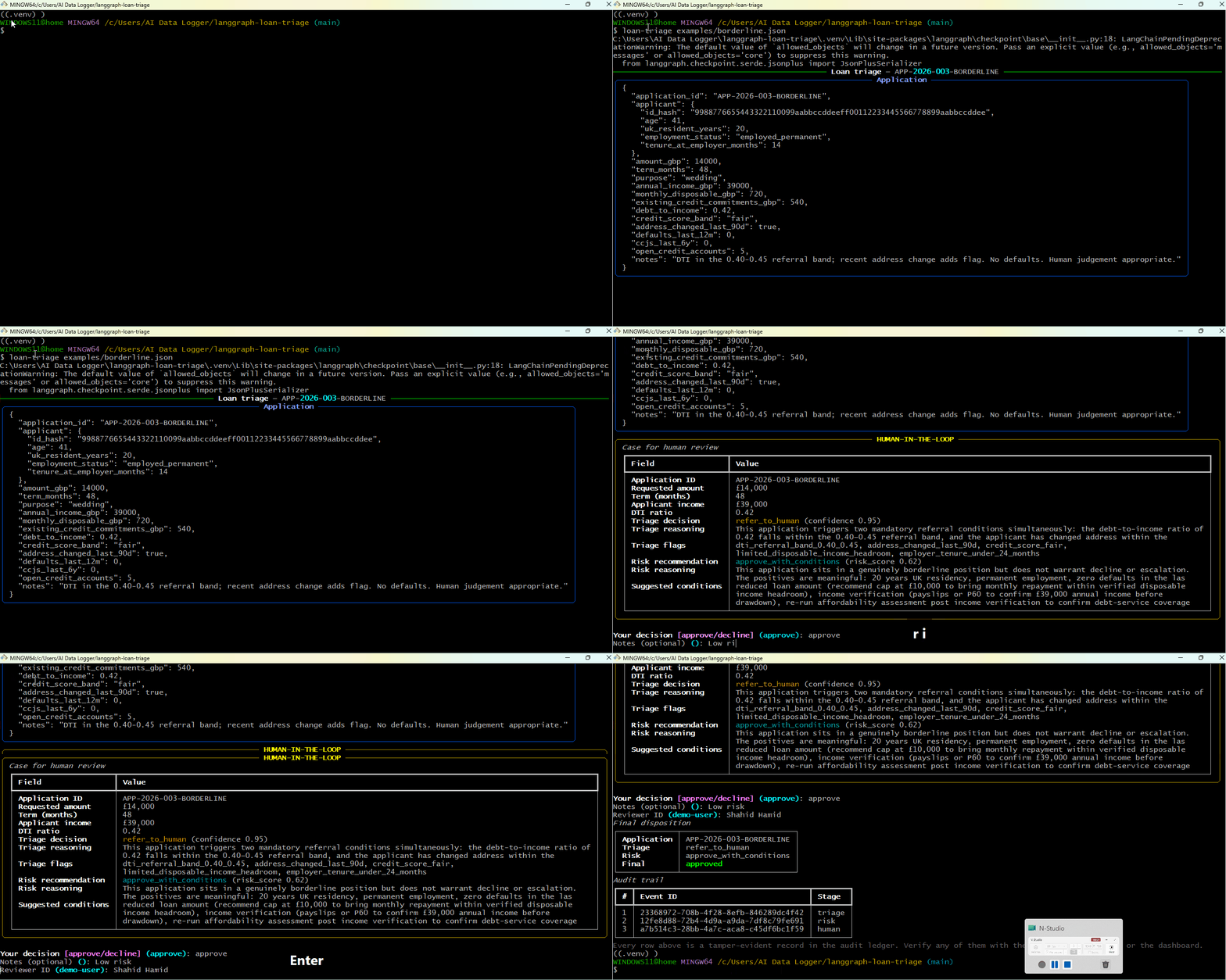
A LangGraph workflow calls
record_decisionafter each agent step. Three audit events written to the live ledger; every one independently verifiable.
What it does
Exposes four tools to any MCP-compatible agent:
| Tool | What it does |
|---|---|
record_decision | Log an AI decision. Hashes inputs locally, then writes through to the ledger. Returns an event ID. |
verify_decision | Cross-check a stored record against the immutable S3 Object Lock copy. Returns integrity_verified: true/false. |
verify_completeness | Detect deleted or missing records. Compares the ledger's per-tenant counter against the rows actually present and returns any sequence numbers that are gone. The answer to "can you prove the log is complete?" |
list_decisions | Query recent decisions, optionally filtered by time window. Tenant-scoped by API key. |
Each call ends up as a regulator-grade audit record in your deployed ledger — DynamoDB for query, S3 Object Lock COMPLIANCE mode for the immutable copy, 7-year retention by default.
Quick start — zero configuration
npx -y audit-ledger-mcp
That's it. With no environment variables, the server boots into sandbox mode and writes records to a shared public tenant on a hosted ledger. You can try every tool — record_decision, verify_decision, verify_completeness, list_decisions — without provisioning anything.
When sandbox mode is active, you'll see a banner on stderr:
[audit-ledger-mcp] ─────────────── SANDBOX MODE ───────────────
[audit-ledger-mcp] No AUDIT_API_URL configured.
[audit-ledger-mcp] Using the public sandbox at sandbox-public.
[audit-ledger-mcp]   View: https://d2pfirb2397ixy.cloudfront.net
[audit-ledger-mcp] Do NOT write real personal data...
Sandbox properties
| Hosted by | github.com/shahidh68/audit-ledger (same AWS deployment) |
| Tenant | sandbox-public (shared, public) |
| Rate limit | 100 requests/minute per IP |
| Retention | 7 years (records cannot be deleted) |
| Audience | Tyre-kickers, integration tests, framework demos |
| NOT for | Production data, customer PII, real compliance records |
Wire it into Claude Desktop with zero config
{
  "mcpServers": {
    "audit-ledger-sandbox": {
      "command": "npx",
      "args": ["-y", "audit-ledger-mcp"]
    }
  }
}
Restart Claude Desktop. The four tools appear in the MCP menu immediately. Try asking Claude to "record this decision: should X be approved?" and watch a record land in the sandbox dashboard.
Production install
For real workloads, deploy your own audit ledger and point the MCP server at it:
npm install -g audit-ledger-mcp
Configure with the API URL plus your tenant keys (any of them being set switches off sandbox mode). AUDIT_HMAC_KEY is technically optional for backwards compatibility but strongly recommended — see the note above the value below:
export AUDIT_API_URL="https://<api-id>.execute-api.<region>.amazonaws.com/prod"
export AUDIT_WRITE_KEY="<your-tenant-write-key>"
export AUDIT_READ_KEY="<your-tenant-read-key>"

# Strongly recommended. Tenant-held secret used to HMAC PII and prompts
# locally before sending. Generate once, store next to AUDIT_WRITE_KEY:
#   node -e "console.log(require('crypto').randomBytes(32).toString('hex'))"
# If unset, the MCP falls back to plain SHA-256 and warns once (back-compat).
export AUDIT_HMAC_KEY="<your-tenant-hmac-secret>"

# Optional
export AUDIT_TIMEOUT_MS=5000        # default 5000
export AUDIT_RETRY_ATTEMPTS=3       # default 3
The full template lives in .env.example.
Wire it into an agent
Claude Desktop
Edit your claude_desktop_config.json (macOS: ~/Library/Application Support/Claude/claude_desktop_config.json, Windows: %APPDATA%\Claude\claude_desktop_config.json):
{
  "mcpServers": {
    "audit-ledger": {
      "command": "npx",
      "args": ["-y", "audit-ledger-mcp"],
      "env": {
        "AUDIT_API_URL": "https://<api-id>.execute-api.<region>.amazonaws.com/prod",
        "AUDIT_WRITE_KEY": "<your-tenant-write-key>",
        "AUDIT_READ_KEY": "<your-tenant-read-key>",
        "AUDIT_HMAC_KEY": "<your-tenant-hmac-secret>"
      }
    }
  }
}
AUDIT_HMAC_KEY is the tenant secret used to keyed-hash PII locally before any payload leaves the MCP server process. Generate it once with node -e "console.log(require('crypto').randomBytes(32).toString('hex'))" and store the result in the env block above. The MCP never transmits this value, only reads it.
Restart Claude Desktop. You'll see "audit-ledger" in the MCP tools menu. Ask Claude something like "Record this decision: I declined the application because…" and watch it call record_decision automatically.
Cursor
In Cursor settings → MCP → add server:
{
  "mcpServers": {
    "audit-ledger": {
      "command": "npx",
      "args": ["-y", "audit-ledger-mcp"],
      "env": {
        "AUDIT_API_URL": "https://<api-id>.execute-api.<region>.amazonaws.com/prod",
        "AUDIT_WRITE_KEY": "<your-tenant-write-key>",
        "AUDIT_READ_KEY": "<your-tenant-read-key>",
        "AUDIT_HMAC_KEY": "<your-tenant-hmac-secret>"
      }
    }
  }
}
LangGraph (Python)
Using langchain-mcp-adapters:
from langchain_mcp_adapters.client import MultiServerMCPClient
from langgraph.prebuilt import create_react_agent
from langchain_anthropic import ChatAnthropic
import os

client = MultiServerMCPClient({
    "audit-ledger": {
        "command": "npx",
        "args": ["-y", "audit-ledger-mcp"],
        "transport": "stdio",
        "env": {
            "AUDIT_API_URL":   os.environ["AUDIT_API_URL"],
            "AUDIT_WRITE_KEY": os.environ["AUDIT_WRITE_KEY"],
            "AUDIT_READ_KEY":  os.environ["AUDIT_READ_KEY"],
            "AUDIT_HMAC_KEY":  os.environ["AUDIT_HMAC_KEY"],
        },
    }
})

tools = await client.get_tools()
agent = create_react_agent(
    ChatAnthropic(model="claude-sonnet-4-7-20251022"),
    tools,
)

# The agent can now call record_decision, verify_decision, verify_completeness, list_decisions
result = await agent.ainvoke({
    "messages": [{"role": "user", "content": "Triage this loan application…"}]
})
Custom client (raw MCP)
AUDIT_API_URL=... AUDIT_WRITE_KEY=... AUDIT_READ_KEY=... AUDIT_HMAC_KEY=... npx -y audit-ledger-mcp
The server speaks MCP over stdio. Send initialize, tools/list, and tools/call requests per the MCP specification.
How a record_decision call flows
Agent                  audit-ledger-mcp                  AWS (your ledger)
  |                          |                                 |
  |--- record_decision ----->|                                 |
  |   raw_user_input         | (hash locally — no PII over     |
  |   raw_system_prompt      |  the wire from this point)      |
  |   decision_output        |                                 |
  |   human_in_loop          |                                 |
  |                          |--- HTTPS POST /audit/events --->|
  |                          |    {hashes + decision +         |
  |                          |     x-api-key}                  |
  |                          |                                 |
  |                          |<--- 202 Accepted ---------------|
  |                          |    { event_id, ... }            |
  |<--- event_id ------------|                                 |
  |     recorded_at          |                                 |
  |     note                 |                                 |
Storage on the AWS side happens asynchronously through SQS → Processor Lambda → DynamoDB + S3 Object Lock. See the main repo's ARCHITECTURE.md for the full path.
Tool reference
record_decision
Record an AI decision to the ledger.
| Parameter | Type | Required | Notes |
|---|---|---|---|
model_version | string | Yes | e.g. "claude-sonnet-4-7-20251022" |
raw_system_prompt | string | Yes | Hashed locally |
raw_user_input | string | Yes | Hashed locally |
ai_decision_output | object | Yes | Stored verbatim — must not contain raw PII |
human_in_loop | boolean | Yes | Critical for EU AI Act Article 14 |
event_id | uuid v4 | No | Auto-generated if omitted |
timestamp | ISO 8601 | No | Defaults to now |
verify_decision
Tamper-check a stored record.
| Parameter | Type | Required | Notes |
|---|---|---|---|
event_id | uuid v4 | Yes | The ID of the record to verify |
Returns the DynamoDB record, the S3 record, and integrity_verified: true/false.
verify_completeness
Detect missing records. Sister tool to verify_decision: that one proves a record that exists has not been altered; this one proves no records have been deleted.
| Parameter | Type | Required | Notes |
|---|---|---|---|
from | integer | No | Inclusive lower bound on sequence_no. Defaults to 1. |
to | integer | No | Inclusive upper bound on sequence_no. Defaults to the tenant's current counter. |
tenant_id | string | No | Required only with the admin read key; ignored otherwise. |
Returns the requested range, the expected vs found count, the list of missing sequence numbers, and a human-readable note.
{
  "tenant_id": "acme-prod",
  "range": { "from": 1, "to": 142 },
  "expected_count": 142,
  "found_count": 140,
  "missing": [47, 91],
  "note": "Found 2 missing sequence number(s) in range. Each gap represents a deleted, lost, or never-written record. Cross-check against burned_sequence log entries before treating as a deletion."
}
list_decisions
List recent decisions for the calling tenant.
| Parameter | Type | Required | Notes |
|---|---|---|---|
from | ISO 8601 | No | Defaults to 7 days ago |
to | ISO 8601 | No | Defaults to now |
limit | integer 1–500 | No | Defaults to 100 |
Security
- PII hashing happens in this process, not in the ledger. HMAC-SHA256 over UTF-8, keyed off the
AUDIT_HMAC_KEYyou set in your environment. The key never leaves your process; only the 64-char hex digest is sent. Plain SHA-256 of low-entropy values (names, emails) is brute-forceable in seconds and under ICO/EDPB guidance still counts as personal data, which is why the keyed version is the default for new installs. For backwards compatibility, ifAUDIT_HMAC_KEYis unset the MCP falls back to plain SHA-256 and logs a one-time deprecation warning on stderr; existing setups keep working unchanged. - API keys are never logged. They come from environment variables, are passed in the
x-api-keyheader, and are never echoed back to the agent or written to disk. - Two key namespaces. Write keys cannot read; read keys cannot write. A leaked write key cannot exfiltrate data; a leaked read key cannot plant fake records.
- Errors are propagated with HTTP status passthrough. Rate limit, invalid key, and validation errors surface to the agent so it can react appropriately rather than retry blindly.
What this is not
- Not legal advice. This is infrastructure that produces audit evidence. Whether that evidence satisfies any specific regulatory obligation is a question for your legal team.
- Not a substitute for a model risk audit. It records what the AI did, not whether it was right.
- Not a bias or fairness testing tool. It is the audit layer underneath whatever testing you already do.
Companion: AI Decision Evidence Hub
This MCP server writes decisions to the ledger — the immutable record of what happened. The AI Decision Evidence Hub is the read-only workbench above the ledger. It answers the next question an auditor asks: the decision is recorded, but is the evidence complete enough to review?
For every recorded decision it produces:
- an audit-readiness score (0–100) across nine evidence categories (model, data, policy, human review, monitoring, prompt, integrity, retention, decision);
- exactly what evidence is present vs missing, and who owns each expected gap;
- a per-decision audit pack that can be printed, saved as PDF, or downloaded as JSON;
- a dashboard (cross-linked with the ledger's), plus a manifest-based resolver that auto-fills static evidence.
Open gaps are normal. The ledger keeps the decision record small and tamper-evident; Evidence Hub shows the follow-up evidence needed to make that decision audit-ready. It reads the ledger over its API and never modifies a record. Serverless on AWS (Lambda + DynamoDB). See its Customer Guide and Admin Runbook.
The family: audit-ledger (what happened) · audit-ledger-mcp (this server — how agents write decisions) · evidence-hub (audit-readiness).
Development
git clone https://github.com/shahidh68/audit-ledger-mcp.git
cd audit-ledger-mcp
npm install
npm run build
npm test
The server is TypeScript on Node 20+, ESM, stdio transport, using @modelcontextprotocol/sdk.
Related
- shahidh68/audit-ledger — the AWS infrastructure this server talks to. CDK stack, Python and Node SDKs, compliance dashboard, full architecture documentation.
- shahidh68/evidence-hub — the audit workbench above the ledger. It scores each decision's evidence, treats open gaps as expected follow-up work, and generates printable/downloadable audit packs. (Customer Guide · Admin Runbook)
License
Apache License 2.0 — see LICENSE.
The patent grant is intentional. Compliance infrastructure sits adjacent to enterprise legal review and the explicit grant matters there.
Author
Built by Shahid. Available for Principal AI Engineering and Head of AI Engineering roles, and fractional advisory engagements, in UK regulated fintech.