Semgrep
官方讓AI代理能夠使用Semgrep保護程式碼安全。
你可以用 Semgrep MCP 做什麼?
- 掃描程式碼以找出安全漏洞 — 要求助手對程式碼片段或檔案執行
security_check或semgrep_scan,以找出安全問題。 - 使用自訂 Semgrep 規則進行掃描 — 使用
semgrep_scan_with_custom_rule根據您內嵌提供的規則檢查程式碼。 - 從 Semgrep AppSec Platform 擷取發現結果 — 當已設定 Semgrep 權杖時,透過
semgrep_findings擷取現有專案的發現結果。 - 檢查程式碼結構 — 使用
get_abstract_syntax_tree取得程式碼片段的抽象語法樹,以了解其解析後的結構。 - 取得撰寫自訂規則的協助 — 使用
write_custom_semgrep_rule提示來產生新 Semgrep 規則的範本。
文件
⚠️ Semgrep MCP 伺服器已從獨立儲存庫移至主要 semgrep 儲存庫! ⚠️
此儲存庫已棄用,Semgrep MCP 伺服器的後續更新將透過官方 semgrep 二進位檔進行。




Semgrep MCP 伺服器









一個使用 Semgrep 掃描程式碼安全漏洞的模型上下文協定 (MCP) 伺服器。保護您的 vibe coding!😅
模型上下文協定 (MCP) 是一個標準化的 API,供 LLM、代理程式以及像 Cursor、VS Code、Windsurf 或任何支援 MCP 的 IDE 使用,以獲取專業協助、取得上下文並運用工具的強大功能。Semgrep 是一個快速、確定性的靜態分析工具,能語意化地理解多種語言,並內建超過 5,000 條規則。🛠️
[!NOTE] 此測試版專案正積極開發中。我們樂於收到您的回饋、錯誤回報、功能請求與程式碼。歡迎加入
#mcp社群 Slack 頻道!
目錄
入門指南
uvx semgrep-mcp # see --help for more options
或者,以 Docker 容器 執行:
docker run -i --rm ghcr.io/semgrep/mcp -t stdio
Cursor
範例 mcp.json
{
  "mcpServers": {
    "semgrep": {
      "command": "uvx",
      "args": ["semgrep-mcp"],
      "env": {
        "SEMGREP_APP_TOKEN": "<token>"
      }
    }
  }
}
在您的 .cursor/rules 中加入指令以自動使用:
Always scan code generated using Semgrep for security vulnerabilities
ChatGPT
- 前往 Connector Settings 頁面(直接連結)
- 將連線名稱設為
Semgrep - 將 MCP Server URL 設為
https://mcp.semgrep.ai/sse - 將 Authentication 設為
No authentication - 勾選 I trust this application 核取方塊
- 點擊 Create
詳情請參閱官方文件。
託管伺服器
[!WARNING] mcp.semgrep.ai 是一個實驗性伺服器,可能會無預警中斷。它將快速獲得新功能。🚀
Cursor
- 按下 Cmd + Shift + J 開啟 Cursor 設定
- 選擇 MCP Tools
- 點擊 New MCP Server
{
  "mcpServers": {
    "semgrep": {
      "type": "streamable-http",
      "url": "https://mcp.semgrep.ai/mcp"
    }
  }
}
展示

API
工具
讓 LLM 能夠執行動作、進行確定性計算,並與外部服務互動。
掃描程式碼
security_check:掃描程式碼中的安全漏洞semgrep_scan:使用指定的設定字串掃描程式碼檔案中的安全漏洞semgrep_scan_with_custom_rule:使用自訂 Semgrep 規則掃描程式碼檔案
理解程式碼
get_abstract_syntax_tree:輸出程式碼的抽象語法樹 (AST)
雲端平台(需登入及 Semgrep 權杖)
semgrep_findings:從 Semgrep AppSec 平台 API 擷取 Semgrep 發現結果
中繼
supported_languages:回傳 Semgrep 支援的語言清單semgrep_rule_schema:擷取最新的 Semgrep 規則 JSON Schema
提示
可重複使用的提示,用於標準化常見的 LLM 互動。
write_custom_semgrep_rule:回傳一個提示,協助撰寫 Semgrep 規則
資源
向 LLM 公開資料與內容
semgrep://rule/schema:使用 JSON Schema 規範 Semgrep 規則 YAML 語法semgrep://rule/{rule_id}/yaml:來自 Semgrep 註冊表的完整 Semgrep 規則 YAML 格式
使用方式
此 Python 套件以 semgrep-mcp 名稱發布至 PyPI,可使用 pip、pipx、uv、poetry 或任何 Python 套件管理器安裝並執行。
$ pipx install semgrep-mcp
$ semgrep-mcp --help

Usage: semgrep-mcp [OPTIONS]

  Entry point for the MCP server

  Supports both stdio and sse transports. For stdio, it will read from stdin
  and write to stdout. For sse, it will start an HTTP server on port 8000.

Options:
  -v, --version                Show version and exit.
  -t, --transport [stdio|sse]  Transport protocol to use (stdio or sse)
  -h, --help                   Show this message and exit.
標準輸入/輸出 (stdio)
stdio 傳輸透過標準輸入與輸出串流進行通訊。這對於本機整合與命令列工具特別有用。詳情請參閱規範。
Python
semgrep-mcp
預設情況下,Python 套件將以 stdio 模式執行。由於它使用標準輸入與輸出串流,工具看起來會像卡住且沒有任何輸出,但這是預期行為。
Docker
此伺服器發布至 Github 容器註冊表 (ghcr.io/semgrep/mcp)
docker run -i --rm ghcr.io/semgrep/mcp -t stdio
預設情況下,Docker 容器處於 SSE 模式,因此您必須在映像名稱後加上 -t stdio,並使用 -i 以互動模式執行。
可串流 HTTP
可串流 HTTP 透過 HTTP POST 請求在 JSON RPC 上啟用串流回應。詳情請參閱規範。
預設情況下,伺服器在 127.0.0.1:8000/mcp 上監聽客戶端連線。若要變更這些設定,請設定 FASTMCP_* 環境變數。伺服器必須正在執行,客戶端才能連線。
Python
semgrep-mcp -t streamable-http
預設情況下,Python 套件將以 stdio 模式執行,因此您必須加上 -t streamable-http。
Docker
docker run -p 8000:0000 ghcr.io/semgrep/mcp
伺服器傳送事件 (SSE)
[!WARNING] MCP 社群將此視為舊版傳輸協定,主要用於回溯相容性。可串流 HTTP 是建議的替代方案。
SSE 傳輸使用伺服器傳送事件進行客戶端到伺服器及伺服器到客戶端的通訊,以實現伺服器到客戶端的串流。詳情請參閱規範。
預設情況下,伺服器在 127.0.0.1:8000/sse 上監聽客戶端連線。若要變更這些設定,請設定 FASTMCP_* 環境變數。伺服器必須正在執行,客戶端才能連線。
Python
semgrep-mcp -t sse
預設情況下,Python 套件將以 stdio 模式執行,因此您必須加上 -t sse。
Docker
docker run -p 8000:0000 ghcr.io/semgrep/mcp -t sse
Semgrep AppSec 平台
(選擇性)若要連線至 Semgrep AppSec 平台:
- 登入 或註冊
- 從 Settings 產生權杖
- 將權杖加入您的環境變數:
-
CLI (
export SEMGREP_APP_TOKEN=<token>) -
Docker (
docker run -e SEMGREP_APP_TOKEN=<token>) -
MCP 設定 JSON
-
    "env": {
      "SEMGREP_APP_TOKEN": "<token>"
    }
[!TIP] 如有需要,請尋求支援。☎️
整合
Cursor IDE
將以下 JSON 區塊加入您的 ~/.cursor/mcp.json 全域或 .cursor/mcp.json 專案特定設定檔:
{
  "mcpServers": {
    "semgrep": {
      "command": "uvx",
      "args": ["semgrep-mcp"]
    }
  }
}
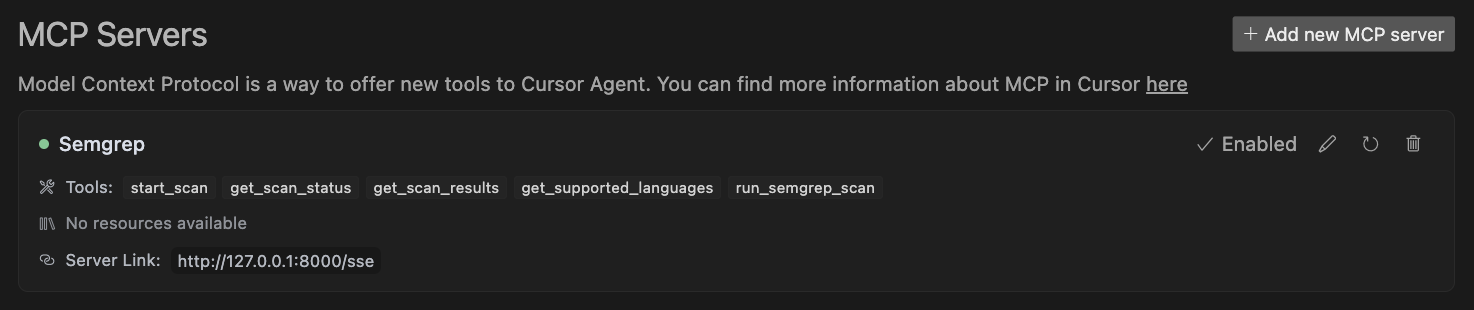
詳情請參閱 Cursor 文件。
VS Code / Copilot
點擊本 README 頂部的安裝按鈕以進行最快速的安裝。
手動設定
將以下 JSON 區塊加入 VS Code 中的使用者設定 (JSON) 檔案。您可以按下 Ctrl + Shift + P 並輸入 Preferences: Open User Settings (JSON) 來執行此操作。
{
  "mcp": {
    "servers": {
      "semgrep": {
        "command": "uvx",
        "args": ["semgrep-mcp"]
      }
    }
  }
}
(選擇性)您可以將其加入工作區中名為 .vscode/mcp.json 的檔案:
{
  "servers": {
    "semgrep": {
      "command": "uvx",
        "args": ["semgrep-mcp"]
    }
  }
}
使用 Docker
{
  "mcp": {
    "servers": {
      "semgrep": {
        "command": "docker",
        "args": [
          "run",
          "-i",
          "--rm",
          "ghcr.io/semgrep/mcp",
          "-t",
          "stdio"
        ]
      }
    }
  }
}
詳情請參閱 VS Code 文件。
Windsurf
將以下 JSON 區塊加入您的 ~/.codeium/windsurf/mcp_config.json 檔案:
{
  "mcpServers": {
    "semgrep": {
      "command": "uvx",
      "args": ["semgrep-mcp"]
    }
  }
}
詳情請參閱 Windsurf 文件。
Claude Desktop
以下是一段簡短影片,展示 Claude Desktop 使用此伺服器撰寫自訂規則。
將以下 JSON 區塊加入您的 claude_desktop_config.json 檔案:
{
  "mcpServers": {
    "semgrep": {
      "command": "uvx",
      "args": ["semgrep-mcp"]
    }
  }
}
詳情請參閱 Anthropic 文件。
Claude Code
claude mcp add semgrep uvx semgrep-mcp
詳情請參閱 Claude Code 文件。
OpenAI
請參閱官方文件:
Agents SDK
async with MCPServerStdio(
    params={
        "command": "uvx",
        "args": ["semgrep-mcp"],
    }
) as server:
    tools = await server.list_tools()
詳情請參閱 OpenAI Agents SDK 文件。
自訂客戶端
Python SSE 客戶端範例
請參閱 examples/sse_client.py 中的完整範例
from mcp.client.session import ClientSession
from mcp.client.sse import sse_client


async def main():
    async with sse_client("http://localhost:8000/sse") as (read_stream, write_stream):
        async with ClientSession(read_stream, write_stream) as session:
            await session.initialize()
            results = await session.call_tool(
                "semgrep_scan",
                {
                    "code_files": [
                        {
                            "path": "hello_world.py",
                            "content": "def hello(): print('Hello, World!')",
                        }
                    ]
                },
            )
            print(results)
[!TIP] 某些客戶端程式庫需要
URL:http://localhost:8000/sse 而其他程式庫只需要HOST:localhost:8000。 請在網頁瀏覽器中試用URL,以確認伺服器正在執行且沒有網路問題。
詳情請參閱官方 SDK 文件。
貢獻、社群與從原始碼執行
[!NOTE] 我們樂於收到您的回饋、錯誤回報、功能請求與程式碼。歡迎加入
#mcp社群 Slack 頻道!
詳情及如何從原始碼執行 MCP 伺服器的資訊,請參閱 CONTRIBUTING.md。
類似工具 🔍
- semgrep-vscode - 官方 VS Code 擴充功能
- semgrep-intellij - IntelliJ 外掛程式
社群專案 🌟
- semgrep-rules - Semgrep 規則的官方集合
- mcp-server-semgrep - 由 Szowesgad 和 stefanskiasan 撰寫的原始靈感來源
MCP 伺服器註冊表
由 Semgrep 團隊 用 ❤️ 打造