Oya Browser
Real Chrome for AI agents. Install the desktop app and click Connect, or use the cloud MCP endpoint. Signed-in browsing, human takeover, playbooks.
託管 MCP 伺服器
npx add-mcp 'https://oyabrowser.com/mcp/pool'可安裝到 Claude Code、Codex、Cursor 等客戶端
文件


Oya Browser
Oya Browser is a browser for AI agents that you can run on your own infrastructure or use as a managed service. An agent completes a task once in natural language; Oya records the steps as a playbook that replays deterministically, without calling a model, and repairs individual steps when a page changes. People can watch any session and take control at any time.
This repository contains the community edition: the browser, the control plane, the web console, the TypeScript SDK and the CLI.
- Features
- Requirements
- Quickstart
- Usage
- Samples
- Deployment
- Security and compliance
- Documentation
- Support
- Contributing
- License
Features
- Record and replay. A successful
ask()is saved withtoPlaybook()and replayed withplay()using new inputs and no model calls. Each playbook is also exported as a Playwright module. In a ten-site benchmark, nine sites replayed every recorded step with healing disabled. - Step repair. When a recorded step no longer matches the page, the agent completes that step and the playbook is updated. Repair can be disabled per call.
- Stable browser identity. Personas bind a fingerprint, cookie store and proxy that persist across sessions (stealth results: 0% headless on CreepJS, 31/31 on Sannysoft).
- Authentication. Stored passwords and TOTP seeds are sealed and never exposed to the model. CAPTCHA detection and solving, and reuse of logins from your desktop browser, are built in (logins).
- Human in the loop. Any session can be watched live and taken over, then returned to the agent.
- Provider choice. The same API runs browsers on your own Docker hosts, Oya Cloud, Browserbase, Steel, Anchor, Browser Use or any Chrome endpoint (comparison).
- Standard protocols. Every browser exposes CDP for Playwright, Puppeteer and similar clients, and an MCP endpoint for AI assistants.
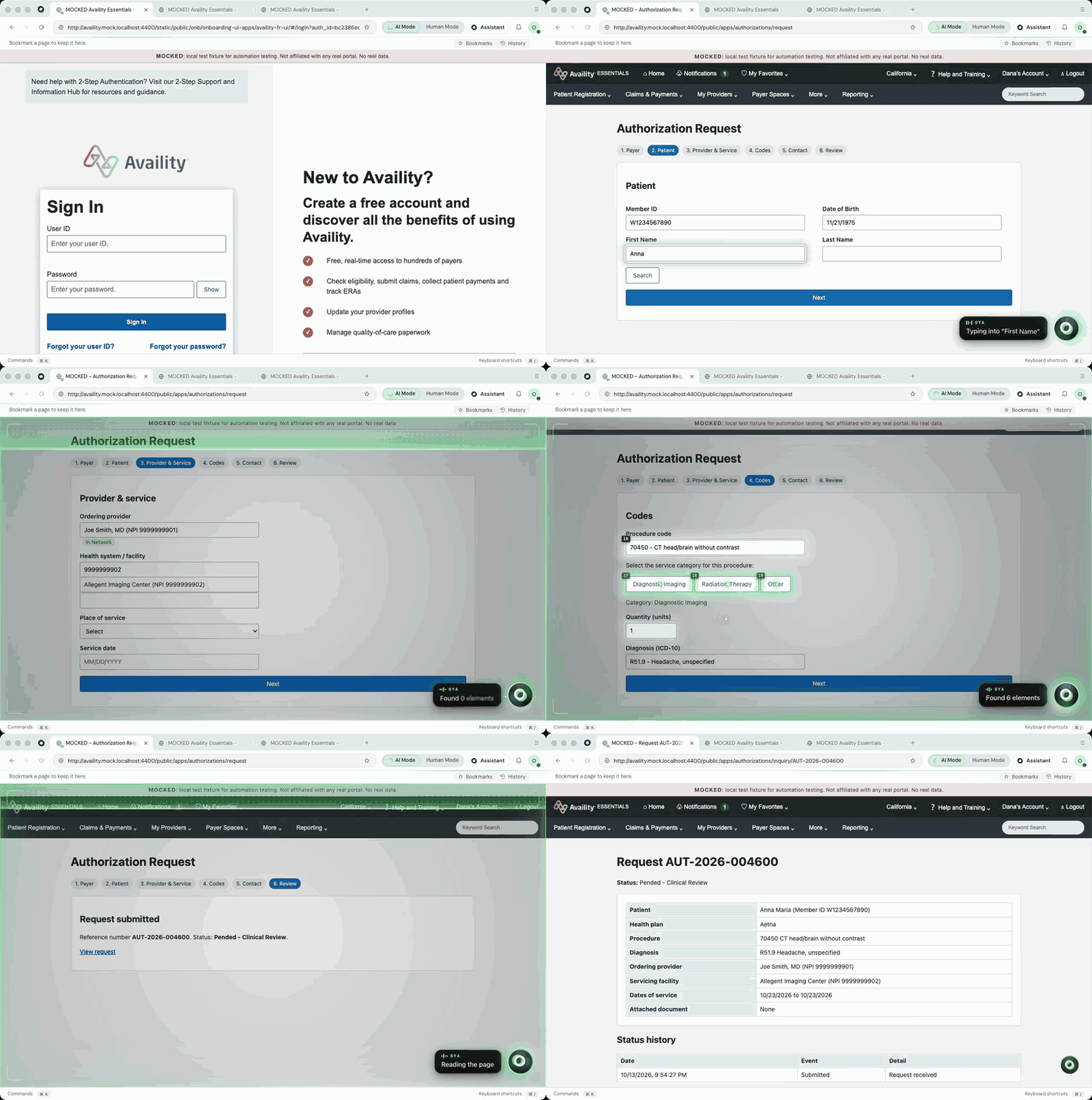
An agent session in the Oya desktop app, accelerated. The portal and patient data are fictional.
Requirements
| Component | Version |
|---|---|
| Node.js | 20 or later |
| Docker | Docker Desktop or Docker Engine with Compose 2.24 or later (local installation only) |
| Model API key | Anthropic, OpenAI or Gemini, for natural-language tasks |
Quickstart
This quickstart installs the control plane and one browser on your machine with Docker, then runs a sample that records a task and replays it.
1. Install the control plane
Export a model API key, then run the installer:
export ANTHROPIC_API_KEY=sk-ant-...   # or OPENAI_API_KEY, or GEMINI_API_KEY
curl -fsSL https://raw.githubusercontent.com/OyadotAI/oya-browser/main/install.sh | sh -s -- --yes
The installer clones this repository to ~/oya-browser, starts the services and prints the
connection settings. Export them:
export OYA_BASE_URL=http://localhost:3100
export OYA_API_KEY=oya_...
2. Install the SDK
npm install @oya-ai/browser
3. Run the sample
Save the following as agent.mjs and run node agent.mjs:
import { Oya } from '@oya-ai/browser';

const browser = await new Oya().browser.start();
await browser.goto('https://httpbin.org/forms/post');

// Run 1: the agent works it out, and Oya records what it did.
let t = Date.now();
await browser.ask('Order a large pizza for {{name}}, then submit the order', { data: { name: 'Ada' } });
await browser.toPlaybook('pizza');
console.log(`agent:  ${(Date.now() - t) / 1000}s`);

// Every run after: the recorded steps with new inputs. No LLM in the loop.
t = Date.now();
await browser.play('pizza', { name: 'Alan' });
console.log(`replay: ${(Date.now() - t) / 1000}s, no model`);
await browser.stop();
The agent completes the order once and the result is saved as the playbook pizza. The replay
submits the same order for a different name without calling the model. Output from one run with
Gemini 3.8 Flash:
agent:  152.712s
replay: 14.246s, no model
Agent time depends on the model; replay time does not. To watch the session, open http://localhost:3100 and sign in with the same API key.
Using Oya Cloud instead
To skip the local installation, create an API key at oyabrowser.com,
export only OYA_API_KEY, and run the same sample. start() uses the
Oya desktop app when it is open and signed in, and otherwise
starts a browser in Oya Cloud.
Usage
Choosing a model
By default, ask() uses the model configured for your API key. To choose one in code, pass
model to the client. The setting applies to that client only and is not saved:
const oya = new Oya({
  model: { provider: 'anthropic', name: 'claude-sonnet-5', apiKey: process.env.ANTHROPIC_API_KEY },
});
Supported providers are openai, anthropic, gemini, vertex and openrouter. When
apiKey is set, requests go directly to that provider and are billed to your account.
Connecting Playwright and other CDP clients
Every Oya browser exposes a CDP endpoint, so Playwright, Puppeteer, Stagehand and browser-use connect without changes:
import { chromium } from 'playwright-core';
import { Oya } from '@oya-ai/browser';

const browser = await new Oya().browser.start();
const cdp = await chromium.connectOverCDP(browser.cdpUrl);
const context = cdp.contexts()[0];
const page = context.pages()[0] ?? (await context.newPage());
await page.goto('https://example.com');
console.log(await page.title());
await cdp.close();
await browser.stop();
Connecting AI assistants
Install the desktop app, open it and click
Connect next to your agent (Claude Code, Codex, Cursor, VS Code and others appear
when installed). That adds an MCP server named oya-browser at
http://127.0.0.1:47321/mcp to the agent's config; no account, no key. The agent
then uses Oya as its browser in place of Chrome: each session gets its own tab,
you keep yours, and you can take control at any time.
With no desktop (servers, containers, CI), any MCP client can use Oya Cloud. For Claude Code:
claude mcp add --transport http oya https://oyabrowser.com/mcp/pool \
  --header "Authorization: Bearer $OYA_API_KEY"
Setup instructions written for agents are published at oyabrowser.com/llms.txt.
Samples
The examples directory contains runnable TypeScript samples. After the
quickstart, the installer's copy is ready to use:
cd ~/oya-browser/examples && npm install
cp .env.example .env   # set OYA_BASE_URL and OYA_API_KEY
npx tsx --env-file=.env playwright/01-connect.ts
| Sample | Description | Runs on |
|---|---|---|
sdk/01-quickstart.ts | Start a browser and complete a task in natural language | Local installation or Oya Cloud |
sdk/05-playbooks.ts | Record, replay, background runs and step repair | Local installation or Oya Cloud |
playwright/01-connect.ts | Playwright through the CDP endpoint | Local installation or Oya Cloud |
sdk/03-mfa.ts | Password and TOTP sign-in with sealed credentials | Desktop app |
sdk/02-captcha.ts | CAPTCHA detection and solving | Oya Cloud, or a configured solver |
sdk/04-personas.ts | Persistent browser identities | Oya Cloud |
playwright/reddit/ | Ten parallel browsers through a residential proxy | Oya Cloud, with a proxy assigned to the persona |
multi-vendor/ | One script across Oya Cloud, Browserbase, Steel, Anchor and Browser Use | Oya Cloud and each provider's API key |
The local installation runs one Docker browser. For samples that require Oya Cloud, use an API
key from oyabrowser.com and leave OYA_BASE_URL unset.
Deployment
The quickstart installs a single-node deployment with SQLite and one browser. For production, including Postgres, multiple browsers, Amazon ECS, Kubernetes and GKE, see the self-hosting guide and the deployment templates.
Security and compliance
Self-hosted deployments include host-level egress rules and a tamper-evident audit trail. See the control evidence and the trust center. To report a vulnerability, follow SECURITY.md.
An enterprise edition, including a HIPAA-ready offering, is maintained separately. Contact sales@getoya.ai.
Documentation
| Topic | Link |
|---|---|
| SDK reference | packages/sdk |
| CLI reference | packages/cli |
| Self-hosting | docs/self-hosting.md |
| Logins and sessions | docs/logins.md |
| Replay benchmark | docs/replay-benchmark.md |
| Architecture | ARCHITECTURE.md |
Support
- Questions and discussion: Discord
- Bug reports and feature requests: GitHub Issues
- Commercial licensing and enterprise: sales@getoya.ai
Contributing
Contributions are welcome. To set up a development environment:
git clone https://github.com/OyadotAI/oya-browser.git && cd oya-browser
npm run setup
Read ARCHITECTURE.md for an overview of the codebase and AGENTS.md for conventions and the checks each part requires.
| Path | Contents |
|---|---|
packages/sdk | @oya-ai/browser, the TypeScript SDK (MIT) |
packages/cli | @oya-ai/cli, installation and command-line tools (MIT) |
browser | The desktop browser and the cloud browser image |
server | API, MCP, browser connections and control plane |
ui | Web console and public site |
License
The SDK and CLI are licensed under MIT. All other components are available under the Sustainable Use License. See LICENSE.md for permitted use, self-hosting terms and commercial licensing.