MCP Telegram
具備20種工具的Telegram MCP伺服器——透過MTProto讀取聊天、搜尋訊息、下載媒體
文件
Telegram MCP Server







📖 Documentation · ☁️ Cloud version — connect Telegram to Claude.ai or ChatGPT in 30 seconds with QR code, no API keys needed.
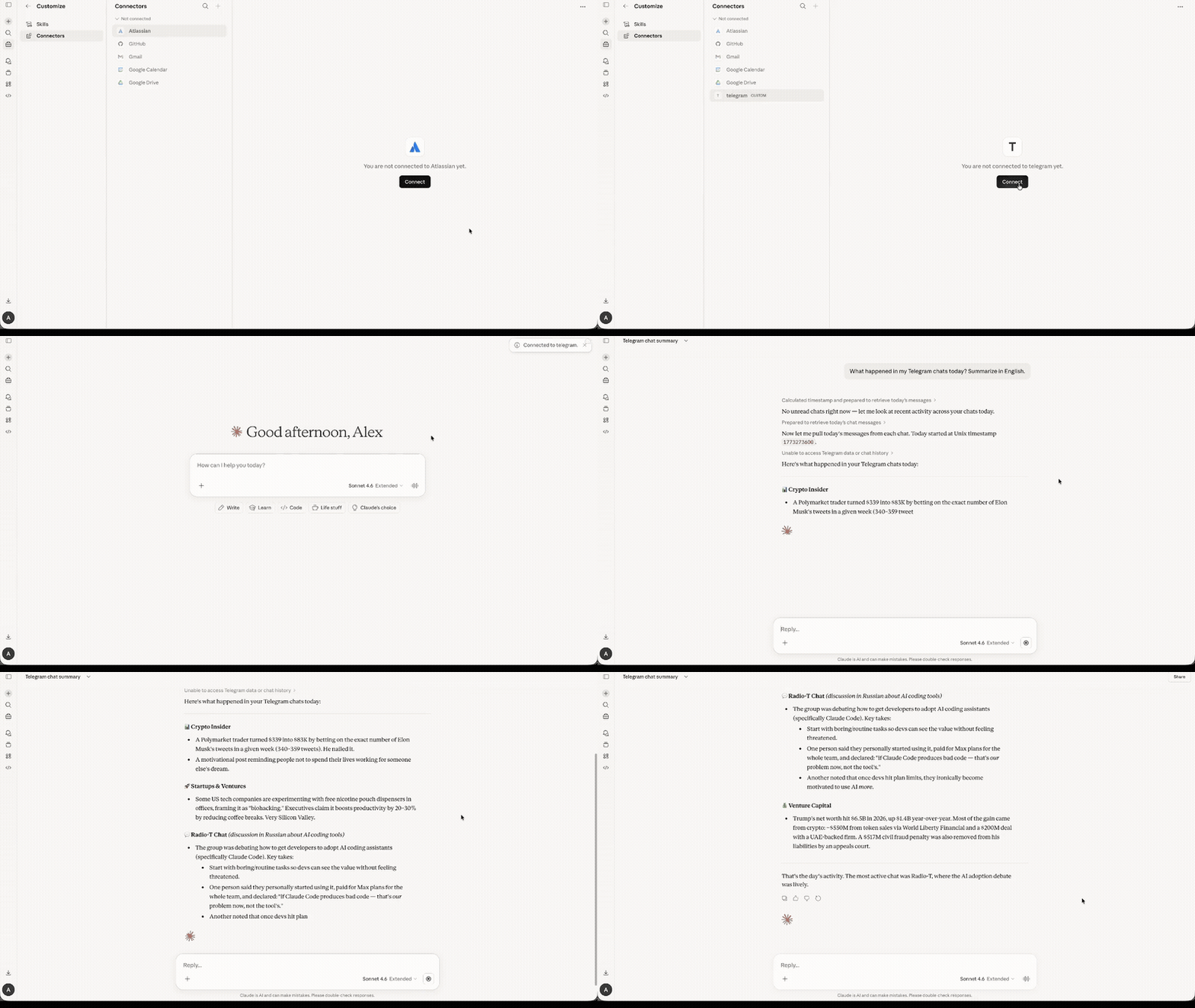
Telegram MCP Server — a Model Context Protocol server that connects AI assistants like Claude and ChatGPT to Telegram via the MTProto protocol. Unlike bots, this runs as a userbot -- it operates under your personal Telegram account using GramJS, giving full access to your chats, contacts, and message history.
Features
- Comprehensive tool coverage -- the most full-featured Telegram MCP server available
- MTProto protocol -- direct Telegram API access, not the limited Bot API
- Userbot -- operates as your personal account, not a bot
- Full-featured -- messaging, reactions, polls, scheduled messages, stickers, media, contacts, and more
- Forum Topics -- list topics, read per-topic messages, send to specific topics, per-topic unread counts
- Stickers -- search sticker sets, browse installed/recent stickers, send stickers to any chat
- Account & profile management -- update profile, set emoji status, birthday, personal channel, profile photo, manage privacy settings, sessions, auto-delete timers
- Chat folders -- create, edit, delete and reorder folders, toggle folder tags, read suggested folders (v1.33.0)
- Global privacy -- read and set account-wide privacy settings (v1.33.0)
- Global search -- search messages across all chats at once
- Real-time polling -- fetch updates via stateless cursors; agent owns
{pts, qts, date}state - Inline bots & buttons -- query inline bots, send results, press callback buttons
- Stories -- read stories from peers, get story view stats; publish/edit/delete stories, react, pin, stealth mode, archive, report (v1.30.0)
- Discussion -- get discussion-group info for channel posts with comments, list groups eligible for discussion (v1.30.0)
- Read Receipts -- who read a message in a small group, when your private message was read (v1.30.0)
- Admin controls -- toggle channel signatures, anti-spam, forum mode, prehistory; approve join requests
- Stats -- channel and supergroup analytics (GetBroadcastStats / GetMegagroupStats)
- Boosts & Business -- boost status, boosters list, Telegram Business chat links CRUD, work hours, location, greeting/away/intro messages
- Star gifts -- browse available and saved gifts, save/convert gifts, manage Stars balance and subscriptions (opt-in via
MCP_TELEGRAM_ENABLE_STARS=1, v1.34.0) - Shared daemon -- one background process serves multiple MCP clients over a single Telegram session; see the shared-daemon guide (v1.38.0)
- QR code login -- authenticate by scanning a QR code in the Telegram app
- Session persistence -- login once, stay connected across restarts
- Human-readable output -- sender names are resolved, not just numeric IDs
- Works with any MCP client -- Claude Code, Claude Desktop, ChatGPT, Cursor, VS Code, Mastra, etc.
Prerequisites
- Node.js 18 or later
- Telegram API credentials --
API_IDandAPI_HASHfrom my.telegram.org
Quick Start
1. Get Telegram API credentials
- Go to my.telegram.org and log in with your phone number.
- Navigate to API development tools.
- Create a new application (any name and platform).
- Copy the App api_id and App api_hash.
2. Login
TELEGRAM_API_ID=YOUR_ID TELEGRAM_API_HASH=YOUR_HASH npx @overpod/mcp-telegram login
A QR code will appear in the terminal. Open Telegram on your phone, go to Settings > Devices > Link Desktop Device, and scan the code. The session is saved to ~/.mcp-telegram/session and reused automatically.
Custom session path: set
TELEGRAM_SESSION_PATH=/path/to/sessionto store the session file elsewhere.
Two-step verification (2FA): if your account has a cloud password enabled, scanning the QR code is not enough — Telegram also requires the password. Provide it via
TELEGRAM_2FA_PASSWORDso the login can complete:TELEGRAM_API_ID=YOUR_ID TELEGRAM_API_HASH=YOUR_HASH TELEGRAM_2FA_PASSWORD=YOUR_PASSWORD npx @overpod/mcp-telegram loginThe password is only used locally to answer Telegram's SRP challenge and is never persisted.
3. Add to Claude
claude mcp add telegram -s user \
  -e TELEGRAM_API_ID=YOUR_ID \
  -e TELEGRAM_API_HASH=YOUR_HASH \
  -- npx @overpod/mcp-telegram
That's it! Ask Claude to run telegram-status to verify.
Multiple Accounts
Use TELEGRAM_SESSION_PATH to run separate Telegram accounts side by side:
# Login each account with a unique session path
TELEGRAM_API_ID=ID1 TELEGRAM_API_HASH=HASH1 TELEGRAM_SESSION_PATH=~/.mcp-telegram/session-work npx @overpod/mcp-telegram login
TELEGRAM_API_ID=ID2 TELEGRAM_API_HASH=HASH2 TELEGRAM_SESSION_PATH=~/.mcp-telegram/session-personal npx @overpod/mcp-telegram login
Then add each as a separate MCP server:
claude mcp add telegram-work -s user \
  -e TELEGRAM_API_ID=ID1 \
  -e TELEGRAM_API_HASH=HASH1 \
  -e TELEGRAM_SESSION_PATH=~/.mcp-telegram/session-work \
  -- npx @overpod/mcp-telegram

claude mcp add telegram-personal -s user \
  -e TELEGRAM_API_ID=ID2 \
  -e TELEGRAM_API_HASH=HASH2 \
  -e TELEGRAM_SESSION_PATH=~/.mcp-telegram/session-personal \
  -- npx @overpod/mcp-telegram
Each account gets its own session file — no conflicts.
Multiple agents / concurrent clients (shared daemon)
The opposite of multiple accounts: one account driven by many clients at once — several Claude Code windows, parallel sub-agents, or multiple IDEs. Normally each process opens the same session and they evict one another with AUTH_KEY_DUPLICATED. Serve mode fixes this.
Run a single persistent daemon that owns the one Telegram connection. Every other process auto-detects the daemon (via a PID lock) and becomes a thin client that proxies tool calls to it over a local Unix socket:
# On the host, once: start the daemon (owns the connection, no stdio)
TELEGRAM_API_ID=YOUR_ID TELEGRAM_API_HASH=YOUR_HASH mcp-telegram serve
# (or set MCP_TELEGRAM_DAEMON=1 instead of the `serve` argument)
Then point each MCP client at the same install with the same TELEGRAM_SESSION_PATH — no serve argument. They connect to the daemon automatically; closing any client never drops the shared connection. Credentials are only required by the daemon (the owner), so client commands can omit TELEGRAM_API_ID/TELEGRAM_API_HASH and keep them where the daemon runs.
See the shared daemon guide for a systemd unit and SSH usage.
Proxy Support
If Telegram is blocked or you're running in a containerized environment (Docker, K3s), use a SOCKS5 or MTProxy:
# SOCKS5 proxy
TELEGRAM_PROXY_IP=127.0.0.1 \
TELEGRAM_PROXY_PORT=10808 \
npx @overpod/mcp-telegram

# MTProxy
TELEGRAM_PROXY_IP=proxy.example.com \
TELEGRAM_PROXY_PORT=443 \
TELEGRAM_PROXY_SECRET=ee00000000000000000000000000000000 \
npx @overpod/mcp-telegram
| Variable | Description |
|---|---|
TELEGRAM_PROXY_IP | Proxy server address |
TELEGRAM_PROXY_PORT | Proxy server port |
TELEGRAM_PROXY_SOCKS_TYPE | 4 or 5 (default: 5) |
TELEGRAM_PROXY_SECRET | MTProxy secret (enables MTProxy mode) |
TELEGRAM_PROXY_USERNAME | Optional proxy auth |
TELEGRAM_PROXY_PASSWORD | Optional proxy auth |
Connecting via WSS (port 443)
If your VPS or hosting IP is reachable on outbound port 443 but not the default MTProto port 80 (some cloud providers ban port 80 on Telegram DC IP ranges as anti-abuse policy), set:
TELEGRAM_USE_WSS=true npx @overpod/mcp-telegram
| Variable | Description |
|---|---|
TELEGRAM_USE_WSS | When true, gramJS uses port 443 instead of 80 for the MTProto TCPFull transport. Default: false. Cannot be combined with TELEGRAM_PROXY_* (gramJS limitation) — if both are set, useWSS is ignored and the proxy takes precedence (a warning is logged). |
Installation Options
npx (recommended, zero install)
No need to clone or install anything. Just use npx @overpod/mcp-telegram.
Global install
npm install -g @overpod/mcp-telegram
mcp-telegram          # run server
mcp-telegram login    # QR login
Pre-built binary (no runtime needed)
Download from Releases — standalone single-file binaries, zero dependencies:
| Platform | Server | Login CLI |
|---|---|---|
| Linux x64 | mcp-telegram-linux-x64 | mcp-telegram-login-linux-x64 |
| Linux ARM64 | mcp-telegram-linux-arm64 | mcp-telegram-login-linux-arm64 |
| macOS x64 | mcp-telegram-darwin-x64 | mcp-telegram-login-darwin-x64 |
| macOS ARM64 | mcp-telegram-darwin-arm64 | mcp-telegram-login-darwin-arm64 |
| Windows x64 | mcp-telegram-windows-x64.exe | mcp-telegram-login-windows-x64.exe |
# Download (example for Linux x64)
curl -L -o mcp-telegram https://github.com/mcp-telegram/mcp-telegram/releases/latest/download/mcp-telegram-linux-x64
curl -L -o mcp-telegram-login https://github.com/mcp-telegram/mcp-telegram/releases/latest/download/mcp-telegram-login-linux-x64
chmod +x mcp-telegram mcp-telegram-login

# Login
TELEGRAM_API_ID=YOUR_ID TELEGRAM_API_HASH=YOUR_HASH ./mcp-telegram-login

# Run
./mcp-telegram
From source
git clone https://github.com/mcp-telegram/mcp-telegram.git
cd mcp-telegram
npm install && npm run build
Docker
docker build -t mcp-telegram https://github.com/mcp-telegram/mcp-telegram.git
Login (interactive terminal required):
docker run -it --rm \
  -e TELEGRAM_API_ID=YOUR_ID \
  -e TELEGRAM_API_HASH=YOUR_HASH \
  -v ~/.mcp-telegram:/root/.mcp-telegram \
  --entrypoint node mcp-telegram dist/qr-login-cli.js
Run the MCP server:
docker run -i --rm \
  -e TELEGRAM_API_ID=YOUR_ID \
  -e TELEGRAM_API_HASH=YOUR_HASH \
  -v ~/.mcp-telegram:/root/.mcp-telegram \
  mcp-telegram
Note: Login must be done once via terminal. After that, the session is persisted in
~/.mcp-telegramand reused automatically.
Usage with MCP Clients
Claude Code (CLI)
claude mcp add telegram -s user \
  -e TELEGRAM_API_ID=YOUR_ID \
  -e TELEGRAM_API_HASH=YOUR_HASH \
  -- npx @overpod/mcp-telegram
Claude Desktop
-
Open your config file:
- macOS:
~/Library/Application Support/Claude/claude_desktop_config.json - Windows:
%APPDATA%\Claude\claude_desktop_config.json
- macOS:
-
Add the Telegram server:
{
  "mcpServers": {
    "telegram": {
      "command": "npx",
      "args": ["@overpod/mcp-telegram"],
      "env": {
        "TELEGRAM_API_ID": "YOUR_ID",
        "TELEGRAM_API_HASH": "YOUR_HASH"
      }
    }
  }
}
-
Restart Claude Desktop.
-
Ask Claude: "Run telegram-login" -- a QR code will appear. If the image is not visible, it's also saved to
~/.mcp-telegram/qr-login.png. Scan it in Telegram (Settings > Devices > Link Desktop Device). -
Ask Claude: "Run telegram-status" to verify the connection.
Note: No terminal required! Login works entirely through Claude Desktop.
Claude Desktop (Binary)
Same setup, but using the pre-built binary instead of npx:
{
  "mcpServers": {
    "telegram": {
      "command": "/path/to/mcp-telegram",
      "env": {
        "TELEGRAM_API_ID": "YOUR_ID",
        "TELEGRAM_API_HASH": "YOUR_HASH"
      }
    }
  }
}
Claude Desktop (Docker)
-
Login via terminal first (see Docker section above).
-
Add to your config file:
{
  "mcpServers": {
    "telegram": {
      "command": "docker",
      "args": [
        "run", "-i", "--rm",
        "-e", "TELEGRAM_API_ID=YOUR_ID",
        "-e", "TELEGRAM_API_HASH=YOUR_HASH",
        "-v", "~/.mcp-telegram:/root/.mcp-telegram",
        "mcp-telegram"
      ]
    }
  }
}
- Restart Claude Desktop. Ask Claude: "Run telegram-status" to verify.
Cursor / VS Code
Add the same JSON config above to your MCP settings (Cursor Settings > MCP, or VS Code MCP config).
Mastra
import { MCPClient } from "@mastra/mcp";

const telegramMcp = new MCPClient({
  id: "telegram-mcp",
  servers: {
    telegram: {
      command: "npx",
      args: ["@overpod/mcp-telegram"],
      env: {
        TELEGRAM_API_ID: process.env.TELEGRAM_API_ID!,
        TELEGRAM_API_HASH: process.env.TELEGRAM_API_HASH!,
      },
    },
  },
});
Tools
All tools are auto-discoverable via MCP — your AI client will see the full list with parameters and descriptions when connected.
| Category | Tools |
|---|---|
| Auth | telegram-status, telegram-login, telegram-logout |
| Messaging | telegram-send-message (incl. quoteText for verbatim reply quotes and Premium message effect), telegram-edit-message, telegram-delete-message, telegram-forward-message, telegram-send-scheduled, telegram-send-typing, telegram-translate-message, telegram-get-message-link |
| Scheduled | telegram-get-scheduled, telegram-delete-scheduled |
| Reading | telegram-list-chats, telegram-read-messages, telegram-search-messages, telegram-search-global, telegram-search-chats, telegram-get-unread, telegram-mark-as-read, telegram-get-replies, telegram-get-unread-mentions, telegram-get-unread-reactions, telegram-get-saved-dialogs |
| Drafts | telegram-save-draft, telegram-get-drafts, telegram-clear-drafts |
| Forum Topics | telegram-list-topics, telegram-read-topic-messages, telegram-create-topic, telegram-edit-topic, telegram-delete-topic |
| Polls | telegram-create-poll |
| Poll Interaction (v1.31.0) | telegram-vote-poll, telegram-get-poll-results, telegram-get-poll-voters, telegram-close-poll |
| Reactions | telegram-send-reaction, telegram-get-reactions, telegram-set-default-reaction, telegram-get-top-reactions, telegram-get-recent-reactions |
| Paid Reactions (v1.31.0) | telegram-send-paid-reaction (★ Stars), telegram-toggle-paid-reaction-privacy, telegram-get-paid-reaction-privacy |
| Audio Transcription (v1.31.0) | telegram-transcribe-audio (Premium), telegram-get-transcription, telegram-rate-transcription |
| Fact-check (v1.31.0) | telegram-get-fact-check, telegram-edit-fact-check, telegram-delete-fact-check |
| Stickers | telegram-send-sticker, telegram-get-installed-stickers, telegram-get-recent-stickers, telegram-get-sticker-set, telegram-search-sticker-sets |
| Media | telegram-send-file, telegram-download-media, telegram-get-profile-photo, telegram-get-web-preview |
| Rich Media Sending | telegram-send-voice, telegram-send-video-note (round video), telegram-send-location (static or live), telegram-send-venue, telegram-send-contact, telegram-send-dice (🎲🎯🎰🏀⚽🎳), telegram-send-album (2–10 grouped photos/videos) |
| Groups | telegram-create-group, telegram-edit-group, telegram-invite-to-group, telegram-join-chat, telegram-leave-group, telegram-kick-user, telegram-ban-user, telegram-unban-user, telegram-set-admin, telegram-remove-admin, telegram-get-my-role, telegram-set-chat-permissions, telegram-set-slow-mode, telegram-get-admin-log |
| Chat Info | telegram-get-chat-info, telegram-get-chat-members, telegram-get-chat-folders |
| Folders (v1.33.0) | telegram-create-folder, telegram-edit-folder, telegram-delete-folder, telegram-reorder-folders, telegram-get-suggested-folders, telegram-toggle-folder-tags |
| Global Privacy (v1.33.0) | telegram-get-global-privacy-settings, telegram-set-global-privacy-settings |
| Invite Links | telegram-create-invite-link, telegram-get-invite-links, telegram-revoke-invite-link |
| Contacts | telegram-get-contacts, telegram-add-contact, telegram-get-contact-requests |
| Moderation | telegram-block-user, telegram-unblock-user, telegram-report-spam |
| Profiles (read) | telegram-get-profile, telegram-update-profile |
| Profile (write, v1.32.0) | telegram-set-emoji-status (Premium), telegram-list-emoji-statuses, telegram-clear-recent-emoji-statuses, telegram-set-profile-color (Premium), telegram-set-birthday, telegram-set-personal-channel, telegram-set-profile-photo, telegram-delete-profile-photo |
| Account | telegram-get-sessions, telegram-terminate-session, telegram-set-privacy, telegram-set-auto-delete |
| Pinning | telegram-pin-message, telegram-unpin-message |
| Chat Settings | telegram-mute-chat, telegram-archive-chat, telegram-pin-chat, telegram-mark-dialog-unread |
| Admin Toggles | telegram-toggle-channel-signatures, telegram-toggle-anti-spam, telegram-toggle-forum-mode, telegram-toggle-prehistory-hidden, telegram-set-chat-reactions, telegram-approve-join-request |
| Stats | telegram-get-broadcast-stats, telegram-get-megagroup-stats |
| Inline Bots & Buttons | telegram-inline-query, telegram-inline-query-send, telegram-press-button, telegram-get-message-buttons |
| Real-Time Polling | telegram-get-state, telegram-get-updates, telegram-get-channel-updates |
| Stories (read) | telegram-get-all-stories, telegram-get-peer-stories, telegram-get-stories-by-id, telegram-get-story-views |
| Stories (write, v1.30.0) | telegram-send-story, telegram-edit-story, telegram-delete-stories, telegram-react-to-story, telegram-export-story-link, telegram-read-stories, telegram-toggle-story-pinned, telegram-toggle-story-pinned-to-top, telegram-activate-stealth-mode (Premium), telegram-get-stories-archive, telegram-report-story |
| Discussion (v1.30.0) | telegram-get-discussion-message, telegram-get-groups-for-discussion |
| Read Receipts (v1.30.0) | telegram-get-message-read-participants, telegram-get-outbox-read-date |
| Boosts | telegram-get-my-boosts, telegram-get-boosts-status, telegram-get-boosts-list |
| Business (v1.32.0) | telegram-get-business-chat-links, telegram-create-business-chat-link, telegram-edit-business-chat-link, telegram-delete-business-chat-link, telegram-resolve-business-chat-link, telegram-set-business-hours, telegram-set-business-location, telegram-set-business-greeting, telegram-set-business-away, telegram-set-business-intro |
| Opt-in (env-gated) | telegram-get-group-call, telegram-get-group-call-participants (requires MCP_TELEGRAM_ENABLE_GROUP_CALLS=1); Stars & gifts telegram-get-stars-status, telegram-get-stars-transactions, telegram-get-stars-topup-options, telegram-get-stars-subscriptions, telegram-change-stars-subscription, telegram-get-available-star-gifts, telegram-get-saved-star-gifts, telegram-save-star-gift, telegram-convert-star-gift (requires MCP_TELEGRAM_ENABLE_STARS=1); telegram-get-quick-replies, telegram-get-quick-reply-messages (requires MCP_TELEGRAM_ENABLE_QUICK_REPLIES=1) |
Tip: Ask your AI assistant "What Telegram tools are available?" to get the full list with parameters and descriptions.
Optional Features
Some tools are disabled by default and must be opted in via environment variables:
| Variable | Value | Tools enabled |
|---|---|---|
MCP_TELEGRAM_ENABLE_GROUP_CALLS | 1 | telegram-get-group-call, telegram-get-group-call-participants |
MCP_TELEGRAM_ENABLE_STARS | 1 | Stars balance & transactions, top-up options, subscriptions, and Star Gifts (browse / save / convert) |
MCP_TELEGRAM_ENABLE_QUICK_REPLIES | 1 | telegram-get-quick-replies, telegram-get-quick-reply-messages |
Add these to your .env file or MCP client config to enable them.
Development
npm run dev        # Start with file watching (tsx)
npm start          # Start the MCP server
npm run login      # QR code login in terminal
npm run build      # Compile TypeScript
npm run lint       # Check code with Biome
npm run lint:fix   # Auto-fix lint issues
npm run format     # Format code with Biome
Project Structure
src/
  index.ts            -- MCP server entry point
  telegram-client.ts  -- TelegramService class (GramJS wrapper)
  qr-login-cli.ts     -- CLI utility for QR code login
  tools/              -- Modular tool definitions
    auth.ts           -- Connection & login
    messages.ts       -- Send, read, search, edit, delete, forward; inline bots; real-time polling
    chats.ts          -- Chat listing, group management, admin toggles, stats
    contacts.ts       -- Contacts, profiles, moderation
    media.ts          -- Files, photos, downloads
    reactions.ts      -- Reactions, set-chat-reactions
    extras.ts         -- Pin, schedule, polls, topics
    stickers.ts       -- Sticker sets, send, search, browse
    account.ts        -- Sessions, privacy, auto-delete, profile, emoji status, birthday, chat mute/folders, invite links
    business.ts       -- Telegram Business: chat links CRUD, work hours, location, greeting/away/intro
    boosts.ts         -- Boost status, my boosts, boosters list
    stories.ts        -- Stories: list all, peer, by-id, view stats
    group-calls.ts    -- Group call info and participants (opt-in: MCP_TELEGRAM_ENABLE_GROUP_CALLS)
    stars.ts          -- Stars wallet status and transactions (opt-in: MCP_TELEGRAM_ENABLE_STARS)
    quick-replies.ts  -- Quick replies and messages (opt-in: MCP_TELEGRAM_ENABLE_QUICK_REPLIES)
    shared.ts         -- Shared utilities
Tech Stack
- TypeScript -- ES2022, ESM modules
- GramJS (
telegram) -- Telegram MTProto client - @modelcontextprotocol/sdk -- MCP server framework
- Zod -- Runtime schema validation for tool parameters
- Biome -- Linter and formatter
- tsx -- TypeScript execution without a build step
- dotenv -- Environment variable management
Troubleshooting
AUTH_KEY_DUPLICATED
A Telegram session can only be used by one process at a time. If you get AUTH_KEY_DUPLICATED, it means another process is already using the same session file.
Solution: Create separate sessions for each environment:
# Local development
TELEGRAM_SESSION_PATH=~/.mcp-telegram/session-local npx @overpod/mcp-telegram login

# Production server
TELEGRAM_SESSION_PATH=~/.mcp-telegram/session-prod npx @overpod/mcp-telegram login
Then set TELEGRAM_SESSION_PATH in each environment's MCP config accordingly.
Security
- API credentials are stored in
.env(gitignored) - Session is stored in
~/.mcp-telegram/sessionwith0600permissions (owner-only access) - Session directory is created with
0700permissions - Phone number is not required -- QR-only authentication
- No data is sent to third-party services -- all communication goes directly to Telegram servers via MTProto
- QR login codes are generated locally and never leave your machine
- One session per process -- using the same session in multiple processes simultaneously causes
AUTH_KEY_DUPLICATEDerrors (see Troubleshooting) - This is a userbot (personal account), not a bot -- respect the Telegram Terms of Service
License
MIT