AgentMemory
MCP原生記憶層,適用於Claude Code、Cursor、Cline、Continue及其他16種AI工具。混合搜尋(BM25 + pgvector + 圖形),自架於Supabase + Vercel,100% MIT授權,無付費牆。
文件
AgentMemory.fyi
Visual memory manager for AI agents. One source of truth for Claude Code, Cursor, Cline, Continue.



* Hosted preview on Vercel — sign in with email or GitHub to try. Your data stays private to your account via Supabase RLS. For self-hosting or local-only mode, see Quick start below.
Screenshots
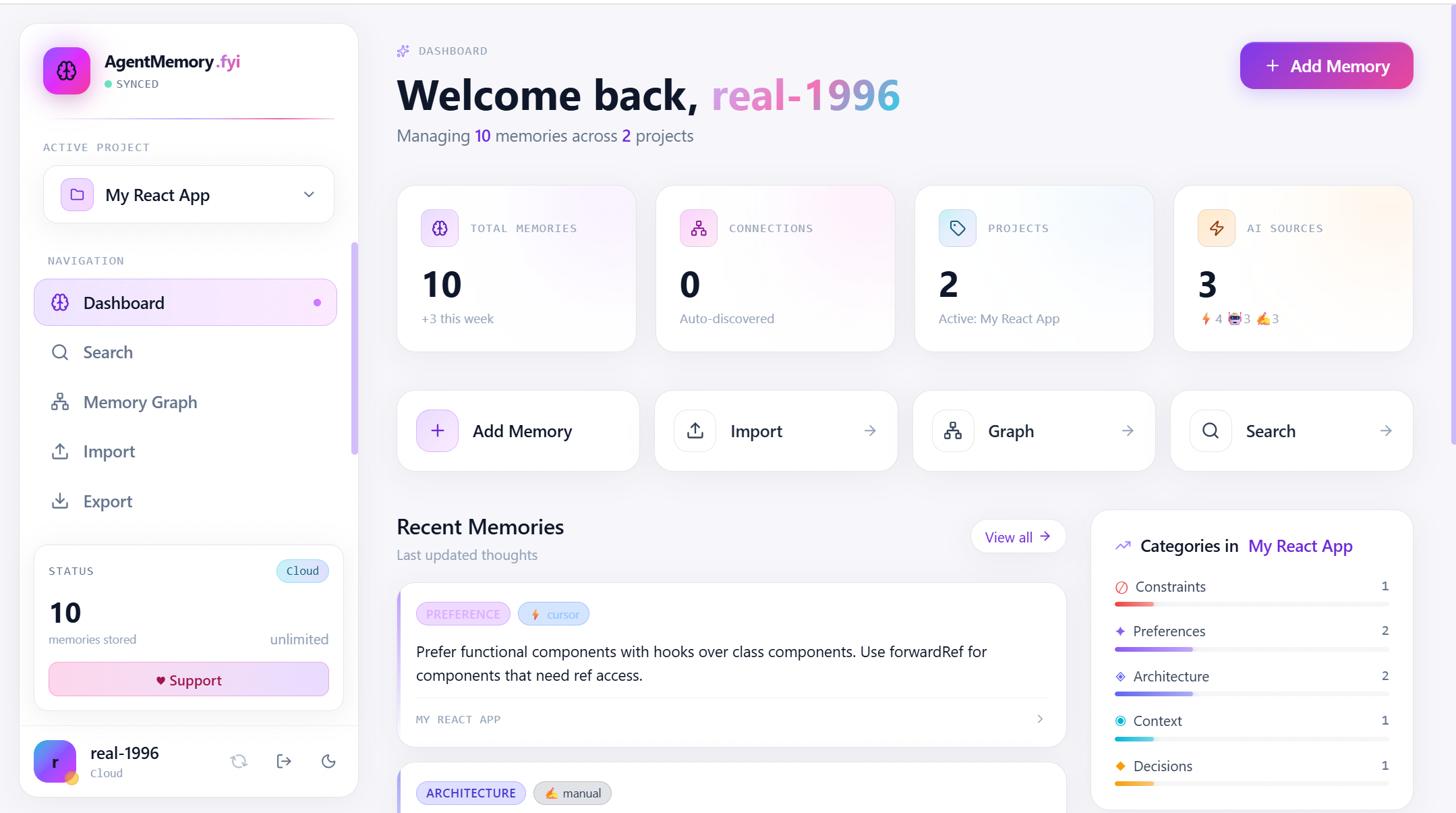
Dashboard — at-a-glance stats, recent memories, category breakdown, and quick actions
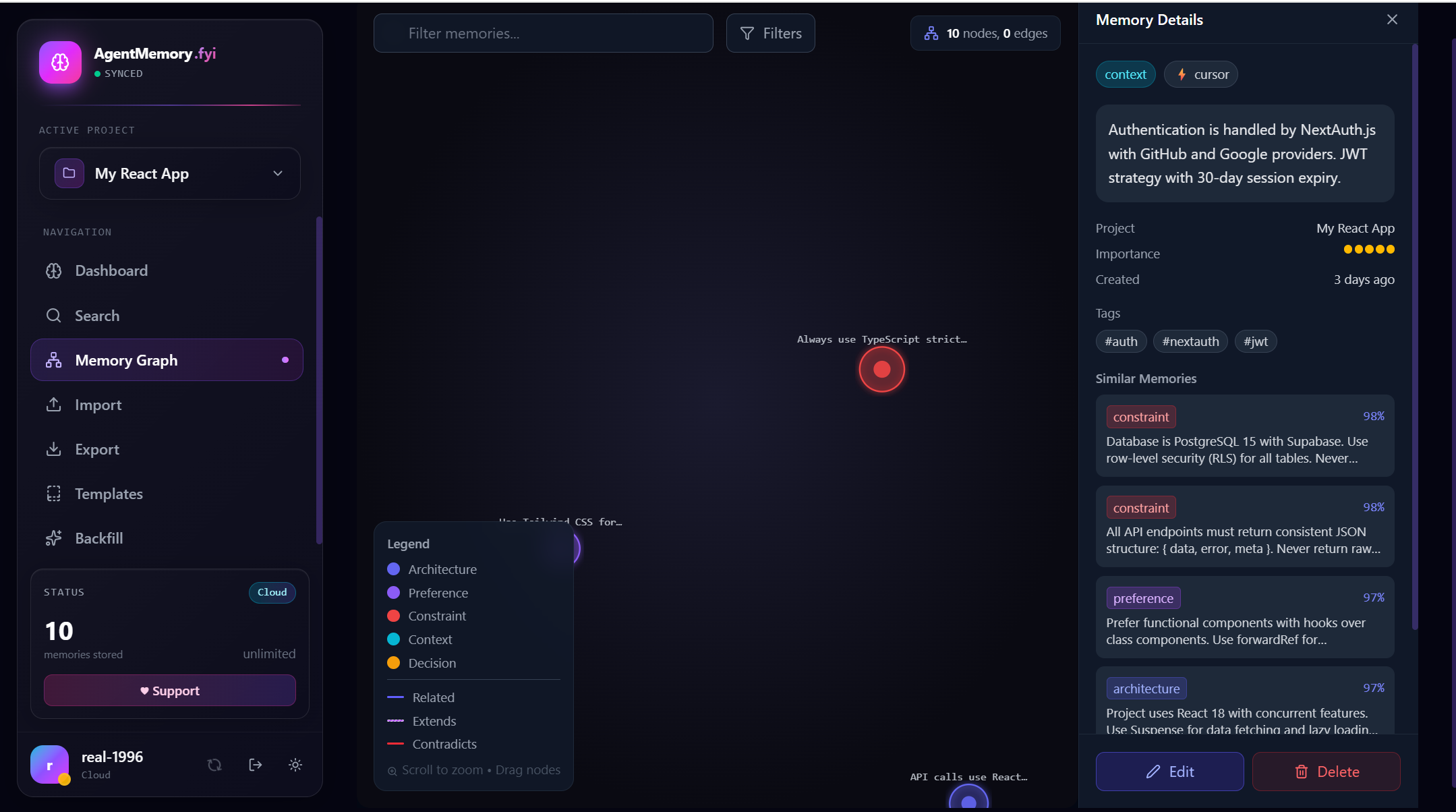
Memory Graph — D3 force-directed view with inline Memory Details panel and Similar Memories (98% / 97% match) ranked by vector distance
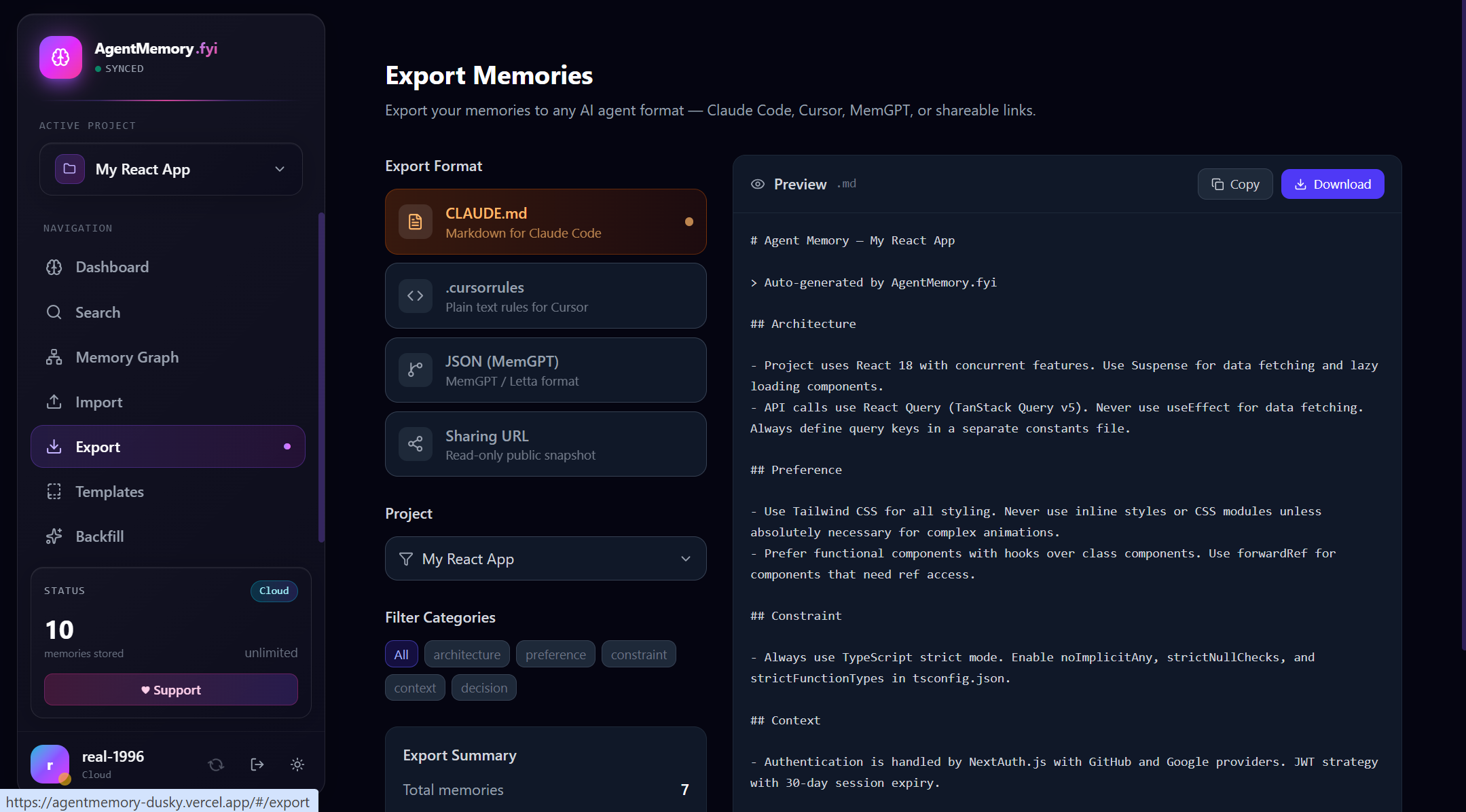
Export — one-click CLAUDE.md, .cursorrules, MemGPT JSON, or shareable read-only URL, with live preview and category filters
100% free, forever
AgentMemory is open source under MIT. No paywalls, no premium tiers, no limits.
- Free for everyone — unlimited memories, unlimited projects
- Self-hostable — run locally forever, no telemetry, no lock-in
- MCP-native — works as a Model Context Protocol server in Claude Desktop, Cursor, Cline, Continue, Windsurf, Roo Code, Kilo Code, Zed, Aider, Goose, Warp, Codex CLI, Gemini CLI, GitHub Copilot CLI, Qwen Code CLI, Google Antigravity, AWS Kiro, Droid, OpenCode, OpenClaw, and pi-mono. See Connect to your AI tool below.
- Visual — graph view of all memories and their semantic relations
- Portable — import/export to
.cursorrules,CLAUDE.md, MemGPT JSON, Claude Code.jsonlsessions - Optional cloud sync — sign in to sync your memories across devices via Supabase
Support the project
AgentMemory is built and maintained in spare time. If it saves you time, consider supporting development:
- Donate on DonationAlerts — cards, SBP, YooMoney, crypto, 100+ methods
- Star the repo — the best $0 donation
- Report bugs or request features
- Contribute PRs
- Spread the word on Twitter / Reddit / HackerNews
Quick start
Web UI (local-only mode)
npm install
npm run dev
# → http://localhost:5173
Works without any backend. Memories are stored in localStorage (browser) or ~/.agentmemory/ (stdio MCP).
MCP server (stdio, local)
npm run mcp
Configures in claude_desktop_config.json (the script runs mcp/index.ts via tsx — no build step):
{
  "mcpServers": {
    "agentmemory": {
      "command": "npx",
      "args": ["tsx", "/absolute/path/to/agentmemory/mcp/index.ts"],
      "env": { "AGENTMEMORY_HOME": "/absolute/path/to/storage" }
    }
  }
}
9 tools: add_memory, search_memories, list_memories, find_similar, delete_memory, list_projects, switch_project, get_project_context, import_jsonl, backfill_embeddings. 3 resources: agentmemory://rules, agentmemory://graph, agentmemory://projects. 100% free, no license keys.
Connect to your AI tool
AgentMemory exposes the same MCP server in two modes:
- Local stdio — runs
mcp/index.tsviatsx; the agent process invokes it as a child process. Best for desktop tools that have file-system access to your machine. - Cloud HTTP — Streamable HTTP endpoint at
https://<your-host>/mcp(Vercel default). Best for hosted tools, web clients, and sharing the same memory across machines. The user's Supabase JWT goes inAuthorization: Bearer <jwt>.
The snippets below assume your clone is at /absolute/path/to/agentmemory. The local stdio command runs the MCP server directly with tsx — no build step needed.
Two reference snippets you'll reuse
// LOCAL — stdio
{
  "command": "npx",
  "args": ["tsx", "/absolute/path/to/agentmemory/mcp/index.ts"],
  "env": { "AGENTMEMORY_HOME": "/absolute/path/to/storage" }
}
// CLOUD — HTTP
{
  "url": "https://your-app.vercel.app/mcp",
  "headers": { "Authorization": "Bearer <supabase-jwt>" }
}
To get a Supabase JWT, sign in to the hosted AgentMemory web UI, then in DevTools run JSON.parse(localStorage.getItem('sb-<project>-auth-token') || 'null') and copy access_token. JWTs last ~1h; refresh by re-running the command after each session.
Table of contents
| # | Tool | Config file | Mode |
|---|---|---|---|
| 1 | Claude Desktop | claude_desktop_config.json | stdio / http |
| 2 | Cursor | .cursor/mcp.json | stdio / http |
| 3 | Cline | Cline sidebar → MCP Servers | stdio / http |
| 4 | Continue | ~/.continue/config.yaml | stdio / http |
| 5 | Roo Code | .roo/mcp.json | stdio / http |
| 6 | Kilo Code | Kilo sidebar → MCP Servers | stdio / http |
| 7 | Windsurf | ~/.codeium/windsurf/mcp_config.json | stdio / http |
| 8 | Zed | ~/.config/zed/settings.json | stdio / http |
| 9 | Aider | --mcp-server flag | stdio |
| 10 | Goose | ~/.config/goose/config.yaml | stdio / http |
| 11 | Warp | Warp Drive → MCP Servers | stdio / http |
| 12 | OpenAI Codex CLI | ~/.codex/config.toml | stdio / http |
| 13 | Google Gemini CLI | ~/.gemini/settings.json | stdio / http |
| 14 | GitHub Copilot CLI | ~/.config/github-copilot/mcp.json | stdio / http |
| 15 | Qwen Code CLI | ~/.qwen/settings.json | stdio / http |
| 16 | Google Antigravity | .antigravity/mcp.json | stdio / http |
| 17 | AWS Kiro | .kiro/settings/mcp.json | stdio / http |
| 18 | Droid (Factory) | ~/.droid/mcp.json | stdio / http |
| 19 | OpenCode | opencode.json / ~/.config/opencode/config.json | stdio / http |
| 20 | OpenClaw & pi-mono | ~/.openclaw/openclaw.json / ~/.pi/config.json | stdio / http |
1. Claude Desktop
~/Library/Application Support/Claude/claude_desktop_config.json (mac) · %APPDATA%\Claude\claude_desktop_config.json (win) · ~/.config/Claude/claude_desktop_config.json (linux).
{
  "mcpServers": {
    "agentmemory": {
      "command": "npx",
      "args": ["tsx", "/absolute/path/to/agentmemory/mcp/index.ts"],
      "env": { "AGENTMEMORY_HOME": "/absolute/path/to/storage" }
    }
  }
}
Restart Claude Desktop. The connector panel should show 9 🔧 tools and 3 📄 resources.
2. Cursor
.cursor/mcp.json in your workspace (per-project) or ~/.cursor/mcp.json (global).
{
  "mcpServers": {
    "agentmemory": {
      "command": "npx",
      "args": ["tsx", "/absolute/path/to/agentmemory/mcp/index.ts"],
      "env": { "AGENTMEMORY_HOME": "/absolute/path/to/storage" }
    }
  }
}
Cursor Settings → Features → MCP. Click Refresh if the server doesn't appear.
3. Cline
VSCode extension. Open the Cline sidebar → ⚙️ Settings → MCP Servers → Configure MCP Servers → edit cline_mcp_settings.json:
{
  "mcpServers": {
    "agentmemory": {
      "command": "npx",
      "args": ["tsx", "/absolute/path/to/agentmemory/mcp/index.ts"],
      "env": { "AGENTMEMORY_HOME": "/absolute/path/to/storage" },
      "disabled": false
    }
  }
}
Cline auto-reloads the file on save. Memory tools appear under the 🔧 icon in chat.
4. Continue
~/.continue/config.yaml (YAML; Continue 1.0+):
mcpServers:
  - name: agentmemory
    command: npx
    args:
      - tsx
      - /absolute/path/to/agentmemory/mcp/index.ts
    env:
      AGENTMEMORY_HOME: /absolute/path/to/storage
For cloud mode, replace with transport: http + url + headers (see Continue MCP docs).
5. Roo Code
.roo/mcp.json in your workspace, or via Roo sidebar → MCP → Edit Global MCP:
{
  "mcpServers": {
    "agentmemory": {
      "command": "npx",
      "args": ["tsx", "/absolute/path/to/agentmemory/mcp/index.ts"],
      "env": { "AGENTMEMORY_HOME": "/absolute/path/to/storage" }
    }
  }
}
6. Kilo Code
Kilo is a fork of OpenCode, so the same schema works. Open the Kilo sidebar → MCP Servers → Edit Global MCP, or .kilocode/mcp.json in your workspace:
{
  "mcpServers": {
    "agentmemory": {
      "command": "npx",
      "args": ["tsx", "/absolute/path/to/agentmemory/mcp/index.ts"],
      "env": { "AGENTMEMORY_HOME": "/absolute/path/to/storage" }
    }
  }
}
For cloud mode, swap the entry for { "url": "https://...", "headers": { "Authorization": "Bearer ..." } }.
7. Windsurf
~/.codeium/windsurf/mcp_config.json:
{
  "mcpServers": {
    "agentmemory": {
      "command": "npx",
      "args": ["tsx", "/absolute/path/to/agentmemory/mcp/index.ts"],
      "env": { "AGENTMEMORY_HOME": "/absolute/path/to/storage" }
    }
  }
}
Windsurf Settings → Cascade → MCP Servers shows it after restart.
8. Zed
~/.config/zed/settings.json (note: Zed uses context_servers, not mcpServers):
{
  "context_servers": {
    "agentmemory": {
      "command": {
        "path": "npx",
        "args": ["tsx", "/absolute/path/to/agentmemory/mcp/index.ts"],
        "env": { "AGENTMEMORY_HOME": "/absolute/path/to/storage" }
      }
    }
  }
}
For cloud mode, use "settings": { "url": "https://...", "headers": { "Authorization": "Bearer ..." } } instead of command. See Zed context servers docs.
9. Aider
Aider 0.73+ added MCP. Pass the server on the command line (one --mcp-server per server):
aider --mcp-server "npx tsx /absolute/path/to/agentmemory/mcp/index.ts AGENTMEMORY_HOME=/path/to/storage"
Or in ~/.aider.conf.yml:
mcp-servers: |
  agentmemory: npx tsx /absolute/path/to/agentmemory/mcp/index.ts AGENTMEMORY_HOME=/path/to/storage
Aider lists available tools at startup; reference them in chat with /tool agentmemory__add_memory ....
10. Goose
~/.config/goose/config.yaml — extensions is Goose's term for MCP servers:
extensions:
  agentmemory:
    type: stdio
    cmd: npx
    args: ["tsx", "/absolute/path/to/agentmemory/mcp/index.ts"]
    envs:
      AGENTMEMORY_HOME: /absolute/path/to/storage
    enabled: true
Cloud mode: set type: streamable_http, uri: https://your-app.vercel.app/mcp, headers.Authorization: "Bearer <jwt>", envs: {}.
11. Warp
Warp Drive → Settings → AI → Manage MCP Servers → + Add:
| Field | Value |
|---|---|
| Name | agentmemory |
| Command | npx tsx /absolute/path/to/agentmemory/mcp/index.ts |
| Env | AGENTMEMORY_HOME=/absolute/path/to/storage |
Warp also supports ~/.warp/mcp_config.json for sync across machines — same mcpServers schema as Claude Desktop.
12. OpenAI Codex CLI
~/.codex/config.toml:
[mcp_servers.agentmemory]
command = "npx"
args = ["tsx", "/absolute/path/to/agentmemory/mcp/index.ts"]
env = { AGENTMEMORY_HOME = "/absolute/path/to/storage" }
For cloud, swap the table for:
[mcp_servers.agentmemory]
url = "https://your-app.vercel.app/mcp"
http_headers = { Authorization = "Bearer <supabase-jwt>" }
Verify with codex mcp list.
13. Google Gemini CLI
~/.gemini/settings.json:
{
  "mcpServers": {
    "agentmemory": {
      "command": "npx",
      "args": ["tsx", "/absolute/path/to/agentmemory/mcp/index.ts"],
      "env": { "AGENTMEMORY_HOME": "/absolute/path/to/storage" }
    }
  }
}
Trusted by default if trust: true is set per-server. See Gemini CLI MCP docs.
14. GitHub Copilot CLI
The new copilot CLI (replaces the old gh copilot). ~/.config/github-copilot/mcp.json:
{
  "mcpServers": {
    "agentmemory": {
      "type": "stdio",
      "command": "npx",
      "args": ["tsx", "/absolute/path/to/agentmemory/mcp/index.ts"],
      "env": { "AGENTMEMORY_HOME": "/absolute/path/to/storage" }
    }
  }
}
Or inline at runtime: copilot --additional-mcp-config @/absolute/path/to/config.json. Tools are auto-prefixed agentmemory__ in chat.
15. Qwen Code CLI
Alibaba's qwen CLI (Qwen3-Coder). ~/.qwen/settings.json (or ~/.qwen-cli/settings.json depending on the build):
{
  "mcpServers": {
    "agentmemory": {
      "command": "npx",
      "args": ["tsx", "/absolute/path/to/agentmemory/mcp/index.ts"],
      "env": { "AGENTMEMORY_HOME": "/absolute/path/to/storage" }
    }
  }
}
16. Google Antigravity
.antigravity/mcp.json in your workspace (per-project) or ~/.antigravity/mcp.json (global):
{
  "mcpServers": {
    "agentmemory": {
      "command": "npx",
      "args": ["tsx", "/absolute/path/to/agentmemory/mcp/index.ts"],
      "env": { "AGENTMEMORY_HOME": "/absolute/path/to/storage" }
    }
  }
}
Cloud mode: replace with { "url": "https://your-app.vercel.app/mcp", "headers": { "Authorization": "Bearer <supabase-jwt>" } }. Antigravity picks up the file on workspace open.
17. AWS Kiro
.kiro/settings/mcp.json in your workspace (per-project) or ~/.kiro/settings/mcp.json (global):
{
  "mcpServers": {
    "agentmemory": {
      "command": "npx",
      "args": ["tsx", "/absolute/path/to/agentmemory/mcp/index.ts"],
      "env": { "AGENTMEMORY_HOME": "/absolute/path/to/storage" }
    }
  }
}
Kiro Settings → MCP Servers shows a refresh button if the server is unreachable.
18. Droid (Factory)
~/.droid/mcp.json (global) or .factory/mcp.json (per-project):
{
  "mcpServers": {
    "agentmemory": {
      "command": "npx",
      "args": ["tsx", "/absolute/path/to/agentmemory/mcp/index.ts"],
      "env": { "AGENTMEMORY_HOME": "/absolute/path/to/storage" }
    }
  }
}
Run droid mcp list to verify it loaded. In TUI, use @agentmemory to invoke tools.
19. OpenCode
opencode.json in your project root, or ~/.config/opencode/config.json for global:
{
  "$schema": "https://opencode.ai/config.json",
  "mcp": {
    "agentmemory": {
      "type": "local",
      "command": ["npx", "tsx", "/absolute/path/to/agentmemory/mcp/index.ts"],
      "environment": { "AGENTMEMORY_HOME": "/absolute/path/to/storage" },
      "enabled": true
    }
  }
}
For cloud mode, swap to "type": "remote", "url": "https://your-app.vercel.app/mcp", "headers": { "Authorization": "Bearer <supabase-jwt>" }. Reference in prompts with use the agentmemory tool.
20. OpenClaw & pi-mono
These are personal AI assistants, not coding IDEs — they accept MCP servers as skills so AgentMemory becomes the assistant's long-term memory.
OpenClaw — ~/.openclaw/openclaw.json:
{
  "mcpServers": {
    "agentmemory": {
      "command": "npx",
      "args": ["tsx", "/absolute/path/to/agentmemory/mcp/index.ts"],
      "env": { "AGENTMEMORY_HOME": "/absolute/path/to/storage" }
    }
  }
}
Restart the gateway with openclaw gateway restart. In Telegram/WhatsApp/Discord, the assistant now has persistent memory across sessions — say "remember that I prefer dark mode" and it sticks.
pi-mono (pi CLI by Mario Zechner) — ~/.pi/config.json:
{
  "mcpServers": {
    "agentmemory": {
      "command": "npx",
      "args": ["tsx", "/absolute/path/to/agentmemory/mcp/index.ts"],
      "env": { "AGENTMEMORY_HOME": "/absolute/path/to/storage" }
    }
  }
}
Run pi and ask the agent to search_memories for prior context.
Troubleshooting
| Symptom | Fix |
|---|---|
ENOENT on mcp/index.ts | Use an absolute path; ~ doesn't expand inside the JSON |
command not found: tsx | npm i -g tsx, or replace npx tsx with node --import tsx |
| Tools never appear | Restart the client. Some (Cline, Kilo, Roo) need explicit "enable" toggle |
401 Unauthorized on cloud | JWT expired; re-copy from the web UI's DevTools localStorage |
429 Too Many Requests on cloud | Hit RATE_LIMIT_PER_HOUR; wait or back off via backfill_embeddings |
Cannot find module '@modelcontextprotocol/...' | npm install in the agentmemory repo root |
Features
Memory decay & access tracking
Memories follow an exponential decay curve (strength = 0.5^(days/30) × importance/5) and get a boost every time they're read. Each memory falls into one of four tiers, displayed as a colored badge on the card:
| Tier | Strength | Color | Meaning |
|---|---|---|---|
| hot | ≥ 0.70 | red | Recently created or frequently accessed |
| warm | ≥ 0.40 | amber | Still relevant |
| cold | ≥ 0.15 | blue | Fading, but kept for context |
| dead | < 0.15 | grey | Auto-candidate for forgetting |
runAutoForget()runs on app boot and removes memories matching any of: TTL expired, OR(strength < 0.05 AND access_count < 3), OR(importance ≤ 2 AND age > 180 days).MemoryCardcallstouchMemory(id)on mount, bumpingaccess_countand refreshinglast_accessed_at.- Survives across all backends: local (zustand), Supabase (Postgres
strengthcolumn +runAutoForgetfromuseAuth).
Hybrid search (BM25 + Vector + Graph via RRF)
Three sources fuse via Reciprocal Rank Fusion (k=60) in src/utils/rrf.ts:
| Source | Weight | Where it runs | Implementation |
|---|---|---|---|
| Vector (cosine) | 0.6 | Server (cloud) / local | pgvector + HuggingFace Inference API, 384-dim MiniLM-L6-v2 (free, no credit card) |
| BM25 | 0.4 | Both | pg_trgm trigram similarity (server) or Porter-stemmed inverted index (local) |
| Graph | 0.3 | Both | 1-hop expansion through relations table (server) or in-memory edges (local) |
Top results from each source are joined with RRF(d) = Σᵢ wᵢ / (k + rankᵢ(d)) and the top-N are returned. The local BM25 index caches by (count, max(updated_at)) and invalidates on every add/update/delete/auto-forget.
Enabling semantic search on the cloud MCP — sign up at huggingface.co (free), grab a read-token at https://huggingface.co/settings/tokens, and set HUGGINGFACE_API_KEY on Vercel. The serverless handler in api/mcp.ts instantiates createHuggingFaceEmbedder(token) and injects it into the SupabaseBackend. On add_memory the content is embedded and stored as vector(384); on search_memories the query is embedded and the semantic_search_memories RPC does cosine search via the HNSW index.
Without the key, the server still works — it just skips the vector source and the RRF becomes 2-way (BM25 + graph).
Backfilling old memories — after enabling the embedder, existing rows have embedding = NULL. Run the backfill_embeddings MCP tool repeatedly until remaining = 0:
backfill_embeddings({ limit: 64 })
backfill_embeddings({ limit: 64 })
…
Each call costs ⌈N/32⌉ embedding API calls and respects the per-user rate limit. The 60s serverless timeout fits ~3 HF batches = ~96 memories per invocation.
Rate limiting — the Supabase schema adds an api_rate_limits table and a consume_rate_limit(p_user_id, p_cost, p_max) RPC. Every embedding call (search query, memory insert, backfill batch) atomically consumes ceil(texts/32) units from a sliding 1-hour window. Default cap is RATE_LIMIT_PER_HOUR=100, which leaves plenty of headroom in HF's 30k/month free tier for ~30 active users. Set the env to 0 to disable. If you hit the limit, the MCP call returns isError: true with the exact reset timestamp.
JSONL import from Claude Code sessions
Drop a Claude Code session file (~/.claude/projects/-my-project/<uuid>.jsonl) into the import page, or call the MCP import_jsonl tool. The parser:
- Reads one JSON object per line
- Drops
tool_use/tool_resultblocks (keeps onlyuser/assistantmessages) - Filters user messages: 20–600 chars, drops system-reminders and shell commands (
ok,./run-build.sh, etc.) - Auto-categorises with regex hints:
decision>constraint>preference>architecture>context(default) - Extracts tags from
#hashtagsand file-extension hints (*.ts→typescript) - Caps at 200 memories per file
MCP usage (works in both stdio and HTTP modes):
{
  "name": "import_jsonl",
  "arguments": {
    "path": "/Users/you/.claude/projects/-my-project/abc123.jsonl"
  }
}
Returns { imported: N, total: M, user_messages: K, accepted: K }.
Cloud sync (Supabase + Vercel)
Run your own private sync backend in ~5 minutes.
1. Create a Supabase project
- Go to supabase.com → New project
- Once provisioned, open SQL Editor → paste the contents of
supabase/schema.sql→ Run- The schema enables the pgvector extension and creates the
embedding vector(384)column + HNSW index on the first run
- The schema enables the pgvector extension and creates the
- In Authentication → Providers, enable Email (magic link) and GitHub (optional — see §1a below for step-by-step)
- In Settings → API, copy your
Project URLandanonkey - (Optional, for semantic search) Sign up at huggingface.co and create a read-token at https://huggingface.co/settings/tokens
1a. Enable GitHub login (optional)
GitHub login is one click in the auth page and lets you skip the email magic-link round trip. Setup takes ~5 minutes.
Step 1 — Create a GitHub OAuth App
- Go to https://github.com/settings/developers → New OAuth App
- Fill in:
- Application name:
AgentMemory(or anything you like) - Homepage URL: your deployed URL (e.g.
https://agentmemory-dusky.vercel.app) orhttp://localhost:5173for local dev - Authorization callback URL: copy this from Supabase in the next step — you'll come back to edit it
- Application name:
- Click Register application
- On the next page, click Generate a new client secret. Copy the Client ID and the Client secret (you won't see the secret again)
Step 2 — Wire it into Supabase
- Back in Supabase Dashboard → Authentication → Providers → GitHub
- Toggle Enable Sign in with GitHub on
- Paste the Client ID and Client Secret from step 1
- Click Save
- In Authentication → URL Configuration, add your site URLs to Site URL and Additional Redirect URLs:
http://localhost:5173(dev)https://your-app.vercel.app(production)
- Supabase now shows the canonical Callback URL for your project — it looks like
https://<project-ref>.supabase.co/auth/v1/callback. Go back to the GitHub OAuth App and paste that into Authorization callback URL
Step 3 — Test it
Open /auth in your app → click Continue with GitHub → you should bounce to GitHub, approve, and land back signed in. The avatar in the sidebar switches to your GitHub profile picture and a Sign out button appears in the bottom-left.
Self-hosting gotcha: every custom domain you serve from needs to be added to Supabase's Additional Redirect URLs, otherwise OAuth will reject the
redirectToparameter. Supabase returns aredirect_uri not in allowlisterror if you skip this.
2. Configure environment
Copy public/.env.example to .env (or set variables on Vercel):
VITE_SUPABASE_URL=https://your-project.supabase.co
VITE_SUPABASE_ANON_KEY=eyJhbGc...
SUPABASE_URL=https://your-project.supabase.co
SUPABASE_ANON_KEY=eyJhbGc...
# Optional: enables pgvector semantic search via HuggingFace Inference API (free tier)
HUGGINGFACE_API_KEY=hf_xxxxxxxxxxxxxxxxxxxxxxxx
# Optional: per-user embedding rate limit (default 100/hr, protects HF free tier)
RATE_LIMIT_PER_HOUR=100
# Service role key NOT used — RLS scopes everything to auth.uid()
3. Deploy to Vercel
npm i -g vercel
vercel
# accept defaults; add the SUPABASE_* env vars when prompted
The web app is a static single-file build (dist/index.html) at the root.
The MCP server is exposed as a serverless function at /mcp and /api/mcp.
4. Use the remote MCP
Clients (Claude Desktop, Cursor, custom) can connect to your hosted MCP server over HTTP. Send the user's Supabase JWT in the Authorization: Bearer <jwt> header:
{
  "mcpServers": {
    "agentmemory-cloud": {
      "url": "https://your-app.vercel.app/mcp",
      "headers": {
        "Authorization": "Bearer <supabase-access-token>"
      }
    }
  }
}
The function validates the JWT via Supabase, then queries Postgres with RLS so each user only sees their own data. No service-role key is ever needed for user requests — RLS does the work.
Architecture
src/
  store/memoryStore.ts        # Zustand store + pure logic helpers (hybridSearch, decay)
  utils/
    bm25.ts                   # BM25 inverted index
    rrf.ts                    # Reciprocal Rank Fusion
    stemmer.ts                # Compact Porter stemmer
    memoryDecay.ts            # calculateStrength, tierOf, touchMemory, runAutoForget
    jsonlImport.ts            # Claude Code session parser
  lib/supabase.ts             # Supabase browser client
  lib/cloudSync.ts            # Pull/push helpers used by memoryStore
  hooks/useAuth.ts            # Wires Supabase auth state to the store
  components/
    MemoryCard.tsx            # Tier badge + touch-on-mount
    Layout.tsx                # Sidebar with sign-in / cloud status
  pages/
    AuthPage.tsx              # Magic-link + GitHub OAuth sign-in
    ImportPage.tsx            # .jsonl + .md/.txt/.cursorrules dropzone
    SupportPage.tsx           # Donate CTA

mcp/
  server.ts                   # Transport-agnostic MCP server (9 tools + 3 resources)
  embeddings.ts               # HuggingFace Inference API wrapper (MiniLM-L6-v2, 384-dim)
  backends/
    local.ts                  # Reads/writes the zustand store on disk
    supabase.ts               # RRF search (BM25+vector+graph), embeds on add, RLS-scoped via caller's JWT
  index.ts                    # Stdio entrypoint (uses LocalBackend)

api/
  mcp.ts                      # Vercel serverless handler (Streamable HTTP)

supabase/
  schema.sql                  # Tables, RLS policies, search_memories / find_similar_memories RPCs
Local mode and cloud mode share the same Memory type and the same memoryStore actions. The only difference is whether mutations are mirrored to Supabase.
Development
npm run dev                 # Vite dev server
npm run build               # Production web build
npm run mcp                 # Run stdio MCP server (tsx, no build step)
npm run typecheck:mcp       # tsc --noEmit on the MCP workspace
npx tsc --noEmit            # tsc --noEmit on the web workspace
License
MIT — see LICENSE.