CHAI pentest tool
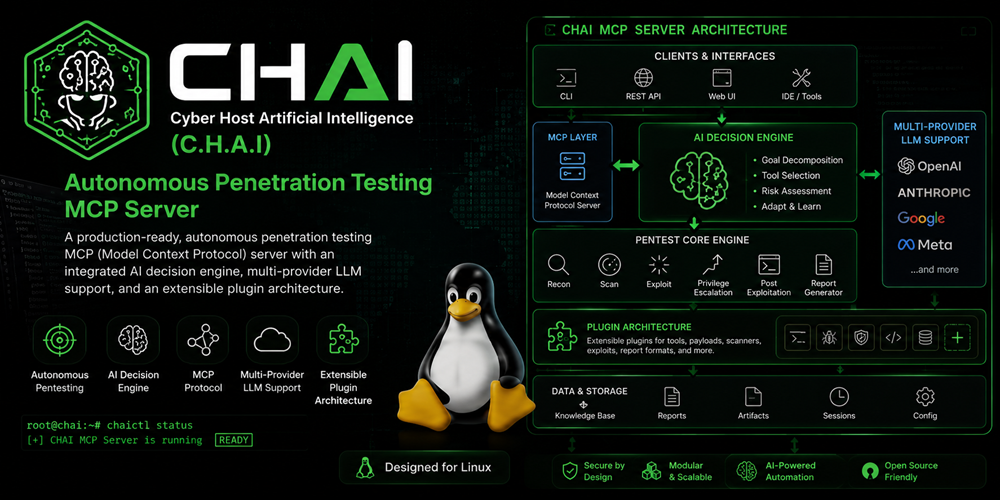
Cyber Host Artificial Intelligence (C.H.A.I) 是自主滲透測試 MCP(模型上下文協定)伺服器,具備整合式 AI 決策引擎、多供應商 LLM 支援,以及可擴展的外掛程式架構。
文件
CHAI
Cyber Host Artificial Intelligence (C.H.A.I)
A production-ready, autonomous penetration testing MCP (Model Context Protocol) server with an integrated AI decision engine, multi-provider LLM support, and an extensible plugin architecture. Designed for Raspberry Pi 4/5 running Kali Linux ARM64.
External Client (CHAI / any MCP tool)
         │  MCP stdio/SSE
         ▼
┌─────────────────────────────────────────┐
│         MCP Security Server             │
│                                         │
│  run_autonomous_scan()                  │
│         │                               │
│    ┌────▼────────────────────┐          │
│    │   execution_loop.py     │          │
│    │  (local, no LLM here)   │          │
│    │  tool1 → tool2 → tool3  │          │
│    └────┬────────────────────┘          │
│         │ at phase boundaries only      │
│    ┌────▼────────────────────┐          │
│    │   ai_planner.py         │          │
│    │  plan / evaluate /      │◄─────────┼── llm/provider_factory.py
│    │  summarize              │          │   (Azure / OpenAI / Claude /
│    └─────────────────────────┘          │    Bedrock / OpenRouter / HF)
│                                         │
│  All tools, safety, sandbox unchanged   │
└─────────────────────────────────────────┘
Design Philosophy: THIN BRAIN, THICK LOOP
- The internal LLM fires only at decision boundaries, not per-step
- A local
execution_loophandles tool chaining deterministically between LLM calls - Keeps token usage low (~6-10 calls per full pentest) and latency acceptable on a Pi 4
Features
Multi-Provider LLM Support
- Azure OpenAI (GPT-4.1, GPT-4o, GPT-5+, Kimi, DeepSeek via Azure AI Foundry)
- Direct OpenAI (GPT-4.1, GPT-4o, etc.)
- Anthropic Claude (Sonnet, Opus)
- Amazon Bedrock (Claude, Titan, Llama via AWS)
- OpenRouter (100+ models with one key)
- HuggingFace (DeepSeek, Qwen, Llama via Inference API)
AI Decision Engine
- plan(): Decides what to test next based on findings
- evaluate(): Decides whether to continue or stop
- summarize_for_report(): Generates executive summary and remediation priorities
Security & Sandboxing
- firejail profiles with rlimit restrictions
- Linux cgroups for resource limiting
- Restricted user (
pentester) execution - Tiered safety policy (Tier 1/2/3)
- Immutable audit logging of all commands and AI decisions
Plugin System
- Auto-discovers plugins from
plugins/bundled/andplugins/external/ - Drop-in plugin architecture — no core changes needed
- Bundled plugins: Feroxbuster, Metasploit, Burp Suite API
Database
- SQLite ONLY — no Neo4j, Redis, or Postgres required
- WAL mode for better concurrency
- Knowledge graph with 50+ attack techniques and recursive CTE chain queries
Project Structure
CHAI/
├── main.py                          # FastMCP server entry point
├── config.py                        # Configuration loader
├── config.yaml                      # Main configuration (no secrets)
├── .security.yml                    # API keys (git-ignored)
├── requirements.txt                 # Python dependencies
├── app_context.py                   # Application context singleton
│
├── llm/                             # Multi-provider LLM adapter layer
│   ├── base_provider.py             # Abstract base class
│   ├── provider_factory.py          # Provider selection with fallback
│   ├── prompt_templates.py          # All LLM prompts (versioned)
│   └── providers/
│       ├── azure_openai.py          # Azure OpenAI
│       ├── openai_direct.py         # Direct OpenAI
│       ├── anthropic_claude.py      # Claude
│       ├── amazon_bedrock.py        # AWS Bedrock
│       ├── openrouter.py            # OpenRouter
│       └── huggingface.py           # HuggingFace
│
├── core/                            # Core engine
│   ├── session_manager.py           # SQLite session CRUD + state machine
│   ├── safety_policy.py             # Command validation, tier system
│   ├── process_controller.py        # firejail/cgroups/chroot wrapper
│   ├── audit_logger.py              # Immutable audit logging
│   ├── ai_planner.py                # LLM decision engine (3 call types)
│   └── execution_loop.py            # Local chain runner
│
├── kb/                              # Knowledge Base
│   ├── graph_db.py                  # Attack graph with recursive CTE
│   ├── playbook_loader.py           # Playbook section extraction
│   └── vector_search.py             # Vector/BM25 search
│
├── tools/                           # Security testing tools
│   ├── base.py                      # Base tool class
│   ├── recon.py                     # Reconnaissance
│   ├── scan.py                      # Vulnerability scanning
│   ├── injection.py                 # Injection testing
│   ├── auth.py                      # Authentication testing
│   ├── network.py                   # Network testing
│   ├── poc.py                       # PoC generation
│   ├── exec.py                      # Custom command execution
│   ├── analyze.py                   # Findings analysis
│   ├── report.py                    # Report generation
│   └── autonomous.py                # Autonomous scan orchestrator
│
├── plugins/                         # Plugin system
│   ├── plugin_base.py               # Base class
│   ├── plugin_loader.py             # Auto-discovery loader
│   └── bundled/
│       ├── feroxbuster_plugin.py    # Directory bruteforcer
│       ├── metasploit_plugin.py     # Metasploit Framework
│       └── burp_api_plugin.py      # Burp Suite Pro API
│
├── models/                          # Data models
│   ├── session.py                   # Session and Finding models
│   └── schemas.py                   # Pydantic schemas
│
├── utils/                           # Utilities
│   ├── command_parser.py            # Command parsing
│   ├── output_parser.py             # Tool output parsing
│   └── cvss_calculator.py           # CVSS v3.1 calculator
│
└── data/                            # Database schemas & profiles
    ├── init_sessions.sql            # Session DB schema + AI decisions table
    ├── init_graph.sql               # Knowledge graph (50+ nodes)
    └── firejail/
        └── pentest.profile          # Firejail sandbox profile
Installation
Prerequisites
- Any linux machine / Raspberry Pi 4/5 with Kali Linux ARM64 (bare metal, NO Docker)
- Python 3.11+
- firejail installed
- Kali Linux pentest tools (nmap, sqlmap, nuclei, ffuf, etc.)
Setup
# Clone the repository
git clone https://github.com/NIHAR-SARKAR/CHAI.git
cd CHAI

# Create virtual environment
python -m venv .venv
source .venv/bin/activate -- linux
.venv\Scripts\activate    -- windows

# Install dependencies
pip install -r requirements.txt

# Configure secrets
cp .security.yml.example .security.yml
chmod 600 .security.yml
# Edit .security.yml with your API keys

# Create required directories
### linux
sudo mkdir -p /opt/sessions /opt/logs /opt/kb /opt/mcp-security-server/plugins/external
sudo chown -R $(whoami) /opt/sessions /opt/logs /opt/kb

### windows PowerSheel
New-Item -ItemType Directory -Force -Path "C:\opt\sessions"
New-Item -ItemType Directory -Force -Path "C:\opt\logs"
New-Item -ItemType Directory -Force -Path "C:\opt\kb"
New-Item -ItemType Directory -Force -Path "C:\opt\mcp-security-server\plugins\external"

icacls "C:\opt" /grant "$env:USERNAME:(OI)(CI)F" /Ts -- Grant current user full permissions

# Install firejail profile
sudo cp data/firejail/pentest.profile /etc/firejail/


# run server
python main.py --transport streamable-http
Configuration
config.yaml (Main Config)
Edit config.yaml to configure:
- Server transport (stdio or SSE)
- Sandbox limits (RAM, CPU, timeout)
- LLM provider selection
- Plugin enable/disable
Key sections:
llm:
  active_provider: "azure_openai" # Change to your preferred provider
  fallback_provider: "openrouter" # Optional fallback

ai_planner:
  max_phases: 4 # Max autonomous phases
  stop_on_critical: true # Stop on critical findings

plugins:
  bundled:
    feroxbuster: true
    metasploit: false # Disabled by default (Tier 3)
    burp_api: false # Needs Burp Pro API key
.security.yml (Secrets)
# NEVER commit this file
azure_openai:
  api_key: "your-azure-key"

openai:
  api_key: "your-openai-key"

anthropic:
  api_key: "your-anthropic-key"

# ... etc for each provider
CHAI Integration
Add to your CHAI config.json:
stdio transport:
{
  "tools": {
    "mcp": {
      "servers": {
        "chai-security": {
          "transport": "stdio",
          "command": "python",
          "args": ["-m", "main.py"],
          "cwd": "/opt/mcp-security-server",
          "env": {
            "PYTHONPATH": "/opt/mcp-security-server"
          },
          "discovery": "deferred"
        }
      }
    }
  }
}
SSE transport (for remote Pi access):
{
  "tools": {
    "mcp": {
      "servers": {
        "chai-security": {
          "transport": "sse",
          "url": "http://raspberrypi.local:9010/sse"
        }
      }
    }
  }
}
Usage
Initialize a Session
initialize_session(
    target="https://target.example.com",
    test_type="web_app",
    scope=["target.example.com"]
)
# Returns: {"session_id": "sess-abc-123", ...}
Run Autonomous Scan (One Call, Complete Test)
run_autonomous_scan(
    session_id="sess-abc-123",
    max_phases=4,
    stop_on_critical=True,
    generate_report=True,
    provider_override=None  # Uses config.yaml active_provider
)
# Internally: plan → [recon → scan → inject] → evaluate → plan → [...] → report
# Returns after ~15-30 min:
# {
#   "phases_completed": 3,
#   "total_findings": 12,
#   "critical_count": 1,
#   "high_count": 4,
#   "report_path": "/opt/sessions/reports/sess-abc-123.md",
#   "status": "complete"
# }
Manual Tool Calls
# Reconnaissance
run_recon(session_id="sess-abc-123", target="target.example.com", recon_type="passive")

# Vulnerability scanning
scan_vulnerabilities(session_id="sess-abc-123", target="target.example.com", scanner="nuclei")

# Injection testing
test_injection(session_id="sess-abc-123", target="target.example.com", injection_type="sqli")

# Authentication testing
test_authentication(session_id="sess-abc-123", target="target.example.com", test_type="bypass")

# Network testing
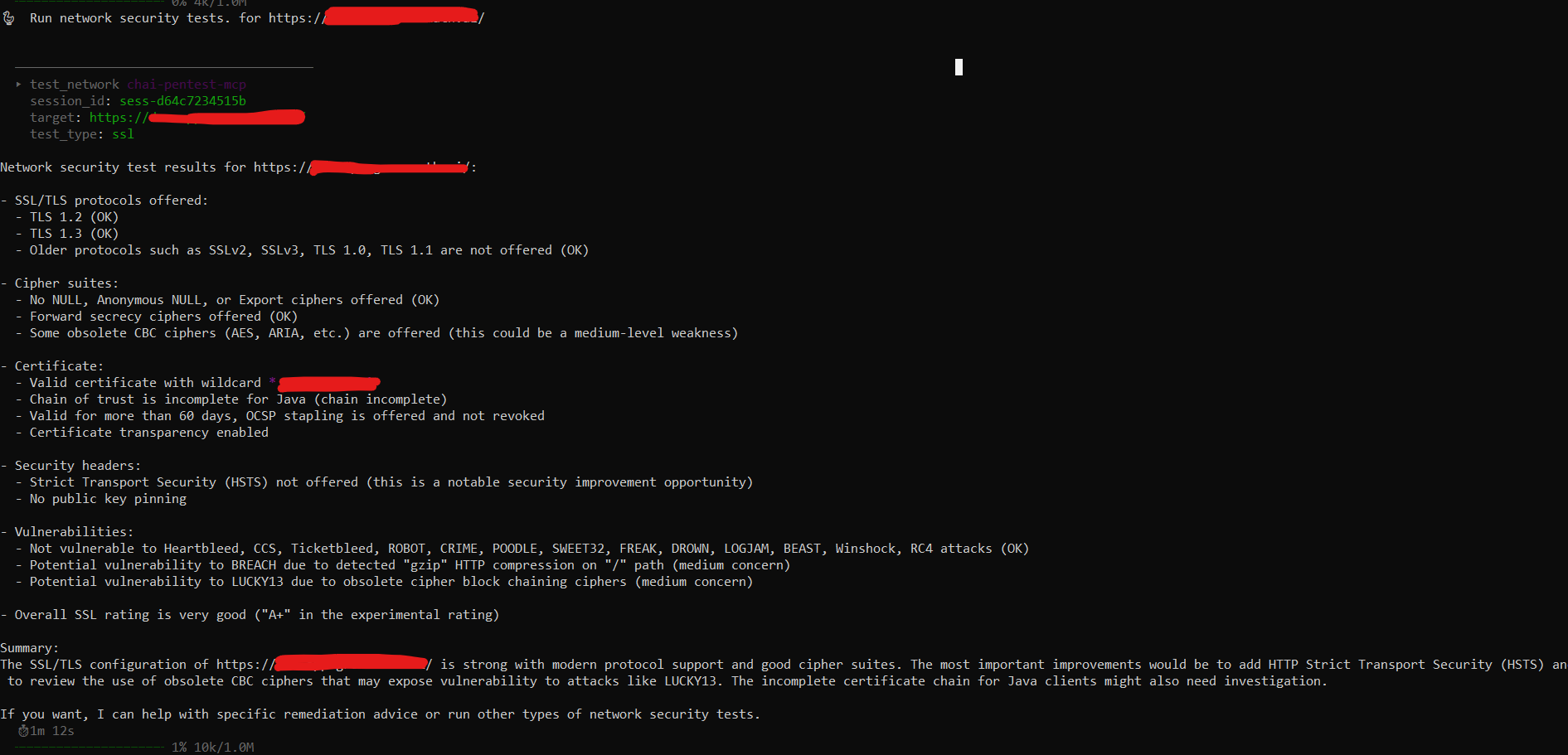
test_network(session_id="sess-abc-123", target="target.example.com", test_type="ssl")

# Custom command
execute_command(session_id="sess-abc-123", command="nmap -sV target.example.com")

# Run plugin
run_plugin(session_id="sess-abc-123", plugin_name="feroxbuster", target="https://target.example.com")

# Generate report
generate_report(session_id="sess-abc-123", format="markdown")

# Check status
get_session_status(session_id="sess-abc-123")

# Emergency stop
emergency_stop(session_id="sess-abc-123")
Adding a New LLM Provider
Step 1 — Create llm/providers/gemini.py:
from llm.base_provider import BaseLLMProvider, LLMResponse

class GeminiProvider(BaseLLMProvider):
    def __init__(self, config): ...
    @property
    def provider_name(self): return "gemini"
    async def complete(self, ...): ...
    async def health_check(self): ...
Step 2 — Add one case to llm/provider_factory.py:
case "gemini":
    from llm.providers.gemini import GeminiProvider
    return GeminiProvider(config)
Step 3 — Add config block to config.yaml:
llm:
  gemini:
    enabled: true
    model: "gemini-2.5-pro"
    api_base: "https://generativelanguage.googleapis.com/v1beta/openai"
Step 4 — Add key to .security.yml:
gemini:
  api_key: ""
Step 5 — Change active_provider: "gemini" in config.yaml.
That's it. No other files change.
Adding a New Pentest Plugin
Step 1 — Create plugins/external/gospider_plugin.py:
from plugins.plugin_base import PentestPlugin, PluginMetadata, PluginResult

class GospiderPlugin(PentestPlugin):
    @property
    def metadata(self):
        return PluginMetadata(
            name="gospider", display_name="GoSpider Web Crawler",
            version="1.1.6", description="Fast web spider",
            tier="tier1", requires_binary="gospider",
            tags=["web", "recon", "crawler"],
        )
    async def run(self, session_id, target, args, process_controller, safety_policy, session_manager):
        # Build command, validate through safety_policy, execute via process_controller
        ...
Step 2 — Restart the server. The plugin auto-loads.
That's it. No changes to core application.
LLM Call Budget
For a 4-phase autonomous scan:
- Phase 1: plan() + evaluate() = 2 calls
- Phase 2: plan() + evaluate() = 2 calls
- Phase 3: plan() + evaluate() = 2 calls
- Phase 4: plan() + evaluate() = 2 calls
- Report: summarize_for_report() = 1 call
- Total: ~9 LLM calls per full pentest
This keeps token usage low and latency acceptable on a Raspberry Pi 4.
Safety & Compliance
- Command denylist: Dangerous commands (rm -rf /, fork bombs, etc.) are blocked
- Tier system: Tools classified by risk (Tier 1/2/3)
- Scope checking: Commands validated against defined scope
- Rate limiting: Per-tier concurrent execution limits
- Sandboxing: All commands run through firejail with resource limits
- Audit trail: Every command and AI decision is logged immutably
License
MIT License — See LICENSE file for details.

Contributing
- Fork the repository
- Create a feature branch
- Make your changes
- Add tests (pytest)
- Submit a pull request
Support
For issues and questions:
- GitHub Issues: https://github.com/NIHAR-SARKAR/CHAI/issues
- Documentation: https://github.com/NIHAR-SARKAR/CHAI/blob/main/README.md
- Site Url: https://aithread.in