Gherkio
Gherkio 讓您以宣告式 YAML 情境描述 HTTP 整合測試。定義請求、斷言、變數提取與編排,全部採用簡單、易讀且長期可維護的格式。
文件
Gherkio — Declarative Integration Testing Platform
Write API integration tests in declarative YAML. No imperative boilerplates required.
Gherkio is a state-of-the-art integration testing platform designed to orchestrate HTTP-based user journeys. Describe request sequences, extract variables, define rich assertions, and enforce security policies — all in a clean, self-documenting YAML DSL that stays readable after 2 years.
What is Gherkio?
Gherkio is a declarative integration testing platform that lets you write API integration tests in pure YAML instead of imperative code. It compiles to a single static Go binary with zero external runtime dependencies, making it ideal for ephemeral CI environments, Docker containers, and air-gapped systems.
- Declarative YAML DSL — Describe what behavior to orchestrate, not how to implement it
- Zero runtime dependencies — Single static binary, no Node.js, Python, or JVM required
- AI-ready — Native MCP server for AI coding assistants
- Enterprise security — Outbound sandboxing, credential masking, SSRF prevention
🎯 The Gherkio Philosophy
Gherkio is built on a simple, uncompromising core principle:
Integration testing should describe what behavior to orchestrate, not how to implement it.
- Declarative-First: Scenarios describe high-level API workflows rather than writing hundreds of lines of custom Javascript/Go scripts.
- Readability Matters: Integration tests are written to be easily read, audited, and maintained by anyone on the team (including Product Managers and QA).
- Deep Observability: Every execution outputs high-precision terminal assertions and structured tracebacks so failures are debugged instantly.
- Constrained DSL: Bounded declarative control flow (
repeat,for_each) without arbitrary scripting or complex branching—keeping tests predictable and auditable.
📚 Developer Documentation Book
Gherkio features an extensive, production-grade Developer Documentation Book (mdBook) that covers all structural layers, detailed DSL syntax references, security guidelines, and real-world testing recipes:
- Progressive Onboarding: Progress through our Introduction, 2-Minute Quickstart, Tutorial, and Interactive Playground.
- Deep DSL Reference: Comprehensive specifications for Assertions & Dot-Paths, Request Configuration, Multipart Form Data, Setup & Teardown, and Retries.
- Variable Precedence & Dynamic Generators: Details on time/date offsets, custom Go layout formatting, base64 encodes, and cryptographic SHA-256 HMAC validations in Variables & Generators.
- Outbound Network Sandboxing: In-depth explanations of SSRF prevention, DNS rebound protection, and network allowlists/blocklists in Project & Security Setup.
- AI Integration & MCP Server: Step-by-step connection guides for Claude Desktop, VS Code (Cline/Continue), Cursor, Neovim, JetBrains, and Zed in Model Context Protocol.
- Frequently Asked Questions: Quick answers to common questions about setup, credentials, CI/CD integration, and troubleshooting in the FAQ.
Build and View Locally
To compile and browse the developer documentation locally:
# Generate Cobra CLI manual pages and compile mdBook
make docs-build

# Open the compiled HTML index in your browser
# (or double-click docs/book/book/index.html)
🎮 Interactive Browser Playground
To lower Gherkio's learning curve to zero, Gherkio includes a self-contained, browser-based Interactive Playground and Documentation Hub located under docs/book/playground/index.html.
- Visual DSL Stepper: Type or edit Gherkio YAML test steps and see a live graphical flowchart built on the fly!
- cURL-to-YAML Step Translator: Paste standard legacy cURL statements and get back perfectly compiled Gherkio steps instantly.
Launch it instantly:
- Online Sandbox: Access the hosted web workspace directly on GitHub Pages Playground.
- Local Launch: Double-click docs/book/playground/index.html to run it in your browser offline, or open it via terminal:
# Linux
xdg-open docs/book/playground/index.html

# macOS
open docs/book/playground/index.html
⚡ Core Features
- Declarative YAML DSL — Describe test scenarios, not implementation. Scenarios double as live, executable documentation readable by engineers, QA, and product managers.
- HTTP Request Execution — POST, GET, PUT, DELETE, PATCH with full header/body support and streaming multipart uploads with explicit MIME overrides.
- Rich Assertion Engine — 30+ built-in matchers including status codes, field types (
uuid,email,datetime,uri), list lengths, existence checks, and negative assertions. - JWT Auto-Decoding — Automatically decode and assert claims from response tokens (
jwt.role: admin) without writing custom parser code. Extract claims into variables viasave: { role: jwt.user_role }. Configure custom token paths in.gherkio/config.yamlwithjwt_token_path: "data.access_token". - Scenario Composition — Reuse existing scenarios as steps with
use:for clean, DRY orchestration across test suites. - Request Retries — Handle eventual consistency with configurable intervals, exponential backoff, and status-based exit conditions.
- Outbound Sandboxing (SSRF Prevention) — Restrict API connection scopes with wildcard domain maps, DNS-level loopback detection, and private subnet blocking.
- Sensitive Field Masking — Automatically redact passwords, API keys, tokens, and authorization headers in all console and report outputs.
- Multi-Account Credentials — Run the same test against multiple user accounts (
--account/--all-accounts) without duplicating test files. - Parallel Execution — Accelerate feedback loops by executing tests concurrently with configurable concurrency (
-p <concurrency>). - Native MCP Server — Built-in Model Context Protocol server for AI assistant integration with Cursor, Claude Desktop, Cline, and Copilot.
- cURL-to-YAML Conversion — Translate legacy cURL statements into Gherkio YAML steps instantly via CLI or interactive playground.
🚀 3-Step Quick Start
1. Installation
Install Gherkio using our lightweight installer script:
curl -fsSL https://raw.githubusercontent.com/muhfaris/gherkio/main/install.sh | sudo bash
2. Scaffold a Project
Initialize Gherkio's canonical workspace layout:
gherkio init
3. Run the Scaffolded Test
Execute the auto-generated test scenario:
gherkio run example/auth/login.yaml -v
🤖 Built-in MCP Server (AI Integration)
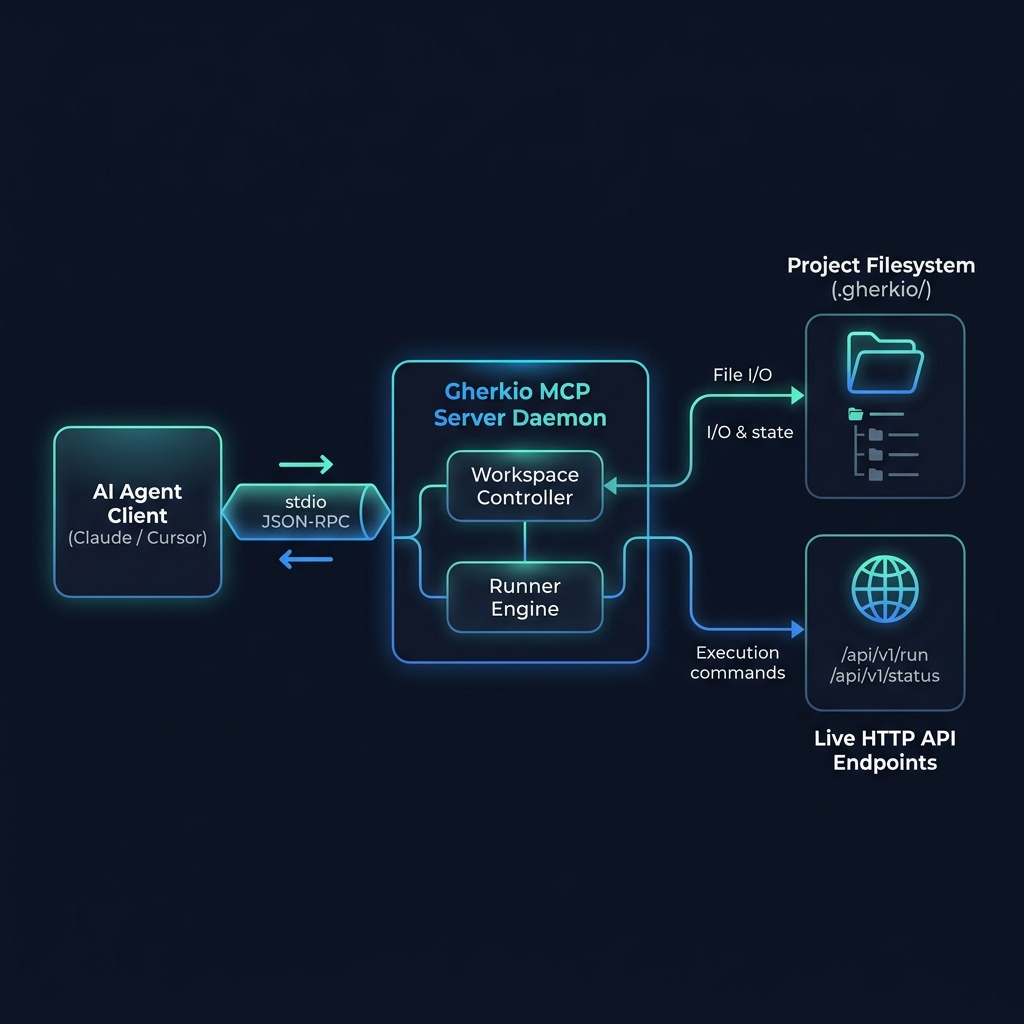
Gherkio ships with a native Model Context Protocol (MCP) server over stdio. This lets AI coding assistants (like Cursor, Claude Desktop, Cline, and Copilot) read specifications, generate scenarios, validate structures, and run tests for you using natural language.
Cursor Setup (.cursor/mcp.json)
{
  "mcpServers": {
    "gherkio": {
      "command": "/usr/local/bin/gherkio",
      "args": ["mcp"]
    }
  }
}
For Claude, Cline, Neovim, JetBrains, and Zed configurations, see the Model Context Protocol Setup Guide.
🤝 Development & Contributing
Prerequisites: Go 1.25+
git clone https://github.com/muhfaris/gherkio.git
cd gherkio

# Build the CLI
go build -o gherkio .

# Run all unit tests
go test ./...

# Regenerate console output golden snapshot files
go test ./internal/runner/ -update
For detailed contribution guidelines, commit standards, and snapshot testing explanations, see the Contributing Guide.
❓ Frequently Asked Questions
What makes Gherkio different from Postman or Bruno?
Postman and Bruno are GUI-centric API clients. Gherkio is a CLI-first integration testing platform designed for CI/CD pipelines. Tests are plain YAML files that live in your repository, execute deterministically, and produce structured reports — no GUI required, no vendor lock-in.
Does Gherkio require Node.js, Python, or a JVM?
No. Gherkio is a single static Go binary with zero external runtime dependencies. It runs anywhere Go compiles — Linux, macOS, Windows, Docker, and even air-gapped environments.
Can Gherkio work with existing CI/CD pipelines?
Yes. Gherkio produces exit codes, structured JSON reports, and machine-readable output that integrates with GitHub Actions, GitLab CI, Jenkins, CircleCI, and any POSIX-compatible pipeline.
How does Gherkio handle authentication and credentials?
Gherkio supports multi-account credentials, environment variable injection, and automatic sensitive field masking. You can run the same test against admin, user, and read-only accounts simultaneously using gherkio run --all-accounts.
Does Gherkio support GraphQL or gRPC?
Gherkio's HTTP engine supports any JSON-based API, including GraphQL endpoints. Native gRPC support is on the roadmap.
Can AI assistants write Gherkio tests?
Yes. Gherkio ships with a native MCP server that lets AI coding assistants (Cursor, Claude Desktop, Cline, Copilot) read specifications, generate scenarios, validate structures, and run tests using natural language.
How do I convert existing cURL commands to Gherkio YAML?
Use gherkio convert --curl "curl -X POST https://api.example.com/login" to instantly translate cURL statements into Gherkio YAML steps. The interactive playground also includes a cURL-to-YAML translator.
What security features does Gherkio include?
Gherkio includes outbound network sandboxing (SSRF prevention), DNS-level loopback protection, sensitive field masking in console output, and credential isolation across accounts.
📄 License
MIT © 2026 Muhammad Faris