XMind MCP
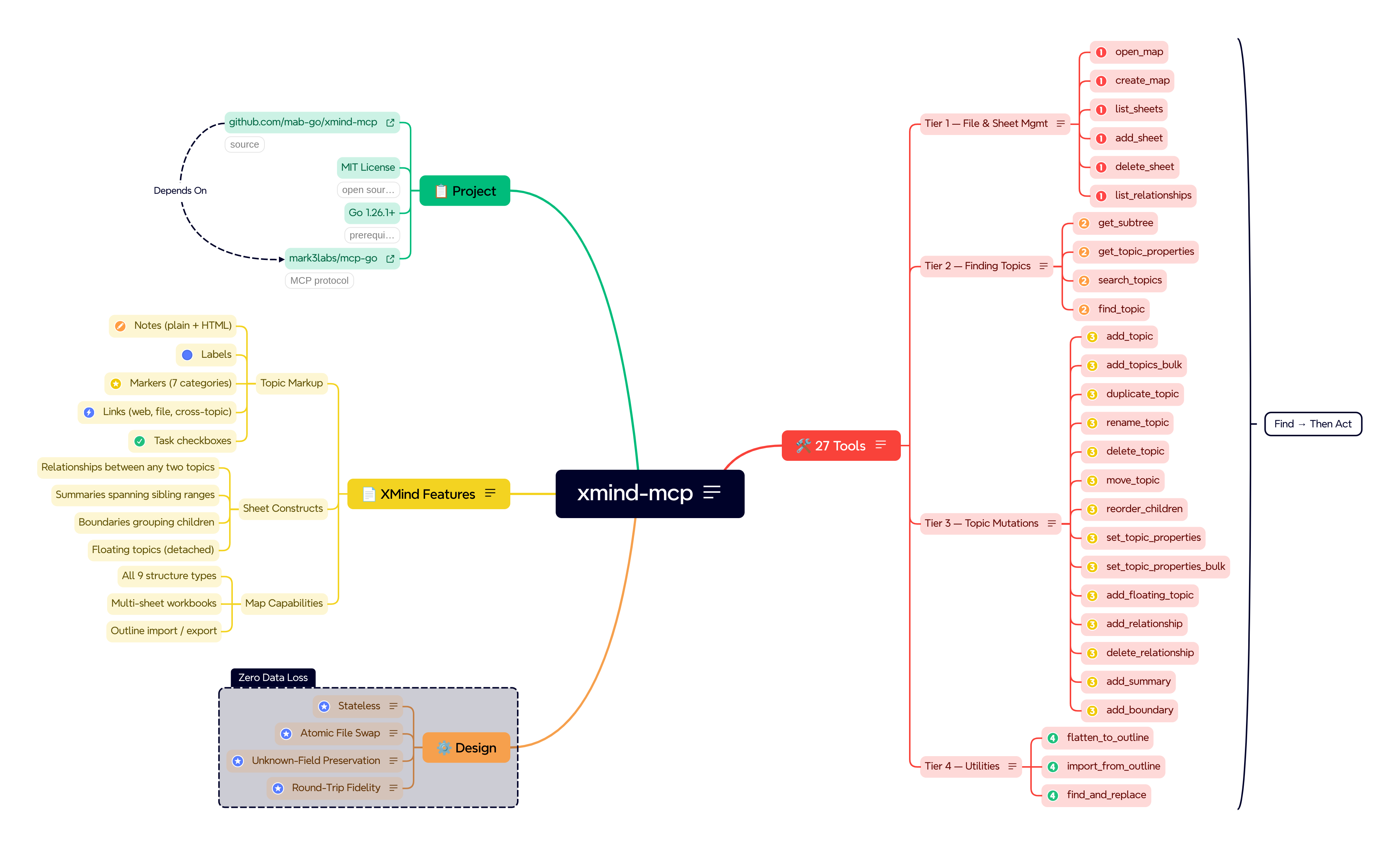
一個用於讀寫本地 XMind 心智圖檔案的 MCP 伺服器。提供超過 25 種工具,讓任何相容 MCP 的 AI 客戶端能直接在磁碟上建立、瀏覽及編輯 .xmind 檔案。
文件
xmind-mcp




An MCP (Model Context Protocol) server for
reading and writing local XMind mind map files. XMind MCP
exposes 27 tools that let any MCP-compatible AI client create, navigate, and
edit .xmind files directly on disk.
Prerequisites
Building
- Go 1.26.1 or later
Using
- Any MCP-compatible client (Claude Desktop, Cursor, etc.)
Installation
Using go install (recommended)
go install github.com/mab-go/xmind-mcp/cmd/xmind-mcp@latest
This fetches, builds, and installs the binary in one step. No cloning required.
Build from source
git clone https://github.com/mab-go/xmind-mcp.git
cd xmind-mcp
make build
The binary is written to ./bin/xmind-mcp with version metadata from
git (see the build target in the Makefile). A plain
go build ./cmd/xmind-mcp also works but omits those ldflags.
Note: A multi-platform container image is published to GHCR on each push to
mainand on version tags (see Docker below). Pre-built binaries for Linux and Windows are attached to each tagged GitHub Release.
Docker
The image ghcr.io/mab-go/xmind-mcp runs the same stdio MCP server as the
host binary. Mount a host directory that contains your .xmind files and pass
paths as seen inside the container to the tools (for example, if you mount
/home/you/maps at /maps, use /maps/my-map.xmind in tool calls).
Build and load locally (single platform):
docker buildx build --platform linux/amd64 --load -t xmind-mcp:test .
Optional build arguments (defaults match a local build without git in context):
docker buildx build \
  --platform linux/amd64 \
  --load \
  --build-arg VERSION="$(git describe --tags --always --dirty 2>/dev/null || echo dev)" \
  --build-arg COMMIT="$(git rev-parse HEAD 2>/dev/null || echo unknown)" \
  --build-arg DATE="$(date -u +%Y-%m-%d)" \
  -t xmind-mcp:test .
Multi-platform build (no --load; suitable for CI or registry push):
docker buildx build --platform linux/amd64,linux/arm64 .
Linux (amd64 host): Building the linux/arm64 variant runs RUN steps
inside an ARM image. Without QEMU user emulation,
those steps fail with exec format error. Install binfmt handlers once:
docker run --privileged --rm tonistiigi/binfmt --install all
Docker Desktop on macOS and Windows usually includes this. If you only need to
check that the Dockerfile builds on your machine, use linux/amd64 only (the
first command above).
Run interactively (stdio requires -i):
docker run --rm -i -v /path/on/host:/maps xmind-mcp:test --version
MCP client configuration (Docker)
For Claude Desktop, run the published image via docker and pass mounts in
args (adjust the host path). Example claude_desktop_config.json:
{
  "mcpServers": {
    "xmind": {
      "command": "docker",
      "args": [
        "run",
        "-i",
        "--rm",
        "-v",
        "/path/on/host:/maps",
        "ghcr.io/mab-go/xmind-mcp:latest"
      ]
    }
  }
}
MCP Client Configuration
Add the following to your MCP client's configuration file. For Claude
Desktop, that's claude_desktop_config.json:
{
  "mcpServers": {
    "xmind": {
      "command": "xmind-mcp"
    }
  }
}
If you built from source or the binary is not on your PATH, use the
full path to the binary:
{
  "mcpServers": {
    "xmind": {
      "command": "/absolute/path/to/xmind-mcp"
    }
  }
}
Log level
The server logs to standard error at info level by default. To change it,
pass the --log-level flag or set the XMIND_MCP_LOG_LEVEL environment
variable (the flag wins if both are set). Accepted values are debug, info,
warn, and error; an unrecognized value exits with an error at startup.
If a tool handler panics, the server keeps running: it returns an internal
error to the client and logs an error-level tool.panic line with a stack
trace, whatever the log level.
debug adds per-connection lifecycle detail: the client's name and MCP
protocol version, logged at the initialize handshake or, for clients on
protocol 2026-07-28, at server/discover. To enable it from a client config,
set it via env:
{
  "mcpServers": {
    "xmind": {
      "command": "xmind-mcp",
      "env": { "XMIND_MCP_LOG_LEVEL": "debug" }
    }
  }
}
Tools
All tools are prefixed with xmind_ to avoid collisions in multi-server
environments. Each tool also carries MCP annotations (a display title plus
read-only, destructive, and idempotent hints), so clients can auto-approve
reads and ask before destructive edits. The server also sends short usage
instructions when a client connects; clients that support them add them to the
model's context. Tools that return JSON also declare an output schema and
return the same data as structuredContent, so clients that support MCP
structured output can use it without parsing text.
Tier 1: File & Sheet Management
| Tool | Description |
|---|---|
xmind_open_map | Parse a .xmind file and return a structural summary (sheet names, root topics, node counts). |
xmind_list_sheets | Return the names and IDs of all sheets in a workbook. |
xmind_create_map | Create a new .xmind file with a single sheet and root topic. |
xmind_add_sheet | Add a new sheet to an existing workbook. |
xmind_delete_sheet | Remove a sheet from a workbook. |
xmind_list_relationships | List all relationships on a sheet (endpoint ids and topic titles as JSON). |
Tier 2: Finding Topics
Use these to resolve topic ids and titles before editing a specific branch
of the tree. Some write tools instead need sheet-level ids or ids from
xmind_list_relationships—see each tool's description.
| Tool | Description |
|---|---|
xmind_get_subtree | Return the full topic hierarchy rooted at a given topic (or the whole sheet); floating and summary topics are marked with childType. |
xmind_get_topic_properties | Return one topic's metadata as JSON (notes, markers, boundaries, sheet relationships for that topic, child counts); use to verify writes. |
xmind_search_topics | Search topics by keyword; returns matches with IDs, ancestryPath (titles from sheet root to parent of match, or null at sheet root), parent title, depth, childType, and sheet fields when searching all sheets. |
xmind_find_topic | Find a single topic by exact title; returns ID, ancestryPath (sheet-root chain to parent of match; null at sheet root; not relative to parent_id scope), plus parent/sibling context relative to the search scope. |
Tier 3: Topic Mutations
Most tools here target a topic and take a topic_id from Tier 2 (or from
prior results). A few use other ids (from_id/to_id, relationship_id,
etc.)—see each row.
On success, xmind_add_topic, xmind_add_topics_bulk,
xmind_duplicate_topic, and xmind_move_topic return JSON (topic
ids, insertion indices, sibling counts, and related fields). Exact keys match
each tool's description from the running MCP server. Other mutation tools in
this tier return plain-text success messages unless their descriptions say
otherwise.
| Tool | Description |
|---|---|
xmind_add_topic | Add a child under a parent; optional notes, labels, markers, link, remove_markers (same rules as xmind_set_topic_properties); success body is JSON. |
xmind_add_topics_bulk | Add many topics (flat or nested); each object may set the same optional metadata fields; success body is JSON. |
xmind_duplicate_topic | Deep-clone a topic subtree under another parent (same sheet); sheet relationships are not copied; success body is JSON. |
xmind_rename_topic | Change the title of an existing topic. |
xmind_delete_topic | Remove a topic and all its descendants. |
xmind_move_topic | Move a topic (and subtree) to a new parent; optional position sets insertion order (omit to append); success body is JSON. |
xmind_reorder_children | Change the order of a topic's children without reparenting. |
xmind_set_topic_properties | Set or update topic metadata (notes, labels, markers, link, remove_markers); clearing rules are on the tool. |
xmind_set_topic_properties_bulk | Apply the same metadata updates as xmind_set_topic_properties to many topic IDs in one read/write. |
xmind_add_floating_topic | Add a detached floating topic not connected to the main hierarchy. |
xmind_add_relationship | Draw a labeled connector between any two topics. |
xmind_delete_relationship | Remove a relationship by id (from xmind_list_relationships). |
xmind_add_summary | Add a summary callout bracketing a range of sibling topics. |
xmind_add_boundary | Add a visual boundary enclosure around all children of a topic. |
Tier 4: Utilities
| Tool | Description |
|---|---|
xmind_flatten_to_outline | Export a sheet or subtree as indented plain text or Markdown. |
xmind_import_from_outline | Build a map or branch from an indented plain text or Markdown outline. |
xmind_find_and_replace | Rename topics matching a pattern across an entire sheet. |
Development
First time only, install project-local tools (golangci-lint, goimports)
into ./bin:
make setup
Then:
# Build (binary in ./bin/xmind-mcp), tests, and lint
make build test lint

# Run the server locally (stdio MCP)
make run
The primary test fixture is located at testdata/kitchen-sink.xmind. It
exercises every supported XMind feature and should be used as the baseline for
any handler development and testing. That file is stored in Git LFS; use a
clone with LFS enabled (or run git lfs pull) before make test, or tests will
fail on a pointer stub.
License
MIT. See LICENSE.