QGIS
connects QGIS Desktop to Claude AI through the MCP. This integration enables prompt-assisted project creation, layer loading, code execution, and more.
QGISMCP - QGIS Model Context Protocol Integration
QGISMCP connects QGIS to Claude AI through the Model Context Protocol (MCP), allowing Claude to directly interact with and control QGIS. This integration enables prompt assisted project creation, layer loading, code execution and more.
This project is strongly based on the BlenderMCP project by Siddharth Ahuja
Features
- Two-way communication: Connect Claude AI to QGIS through a socket-based server.
- Project manipulation: Create, load and save projects in QGIS.
- Layer manipulation: Add and remove vector or raster layers to a project.
- Execute processing: Execute processing algorithms (Processing Toolbox).
- Code execution: Run arbitrary Python code in QGIS from Claude. Very powerful, but also be very cautious using this tool.
Components
The system consists of two main components:
- QGIS plugin: A QGIS plugin that creates a socket server within QGIS to receive and execute commands.
- MCP Server: A Python server that implements the Model Context Protocol and connects to the QGIS plugin.
Installation
Prerequisites
- QGIS 3.X (only tested on 3.22)
- Claude desktop
- Python 3.10 or newer
- uv package manager:
If you're on Mac, please install uv as
brew install uv
On Windows Powershell
powershell -ExecutionPolicy ByPass -c "irm https://astral.sh/uv/install.ps1 | iex"
Otherwise installation instructions are on their website: Install uv
⚠️ Do not proceed before installing UV
Download code
Download this repo to your computer. You can clone it with:
git clone [email protected]:jjsantos01/qgis_mcp.git
QGIS plugin
You need to copy the folder qgis_mcp_plugin and its content on your QGIS profile plugins folder.
You can get your profile folder in QGIS going to menu Settings -> User profiles -> Open active profile folder Then, go to Python/plugins and paste the folder qgis_mcp_plugin.
On a Windows machine the plugins folder is usually located at:
C:\Users\USER\AppData\Roaming\QGIS\QGIS3\profiles\default\python\plugins
and on MacOS: ~/Library/Application\ Support/QGIS/QGIS3/profiles/default/python/plugins
Then close QGIS and open it again. Go to the menu option Plugins > Installing and Managing Plugins, select the All tab and search for "QGIS MCP", then mark the QGIS MCP checkbox.
Claude for Desktop Integration
Go to Claude > Settings > Developer > Edit Config > claude_desktop_config.json to include the following:
If you can't find the "Developers tab" or the
claude_desktop_config.jsonlook at this documentation.
{
    "mcpServers": {
        "qgis": {
            "command": "uv",
            "args": [
                "--directory",
                "/ABSOLUTE/PATH/TO/PARENT/REPO/FOLDER/qgis_mcp/src/qgis_mcp",
                "run",
                "qgis_mcp_server.py"
            ]
        }

    }
}
Usage
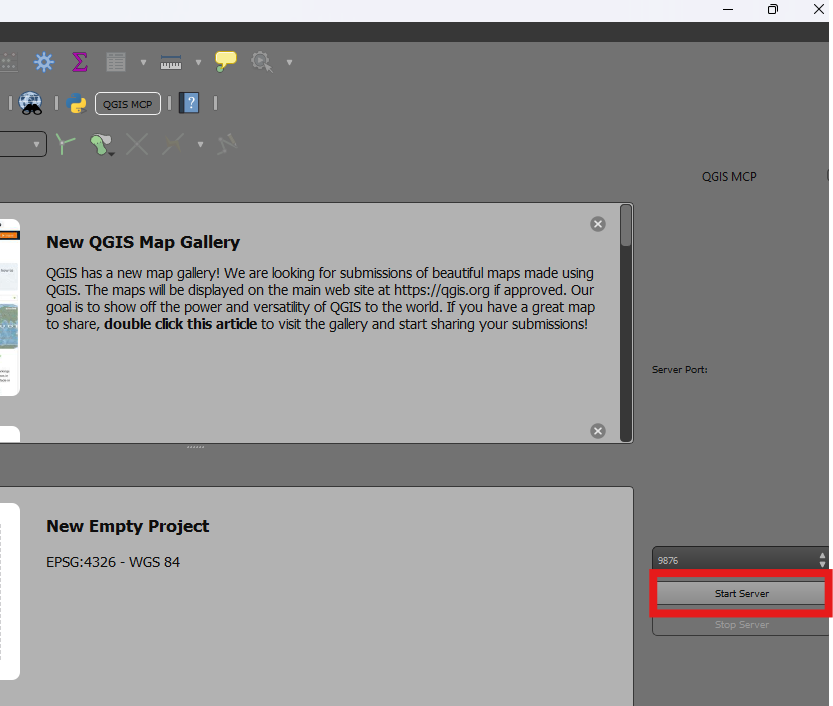
Starting the Connection
- In QGIS, go to
plugins>QGIS MCP>QGIS MCP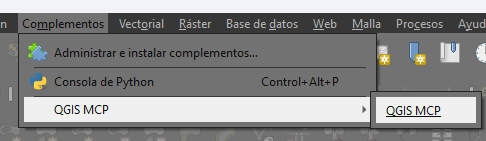
- Click "Start Server"
Using with Claude
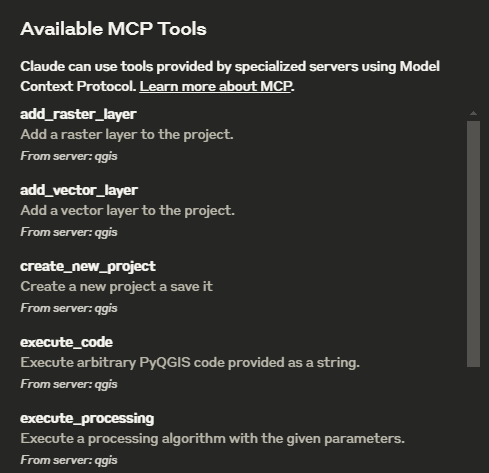
Once the config file has been set on Claude, and the server is running on QGIS, you will see a hammer icon with tools for the QGIS MCP.
Tools
ping- Simple ping command to check server connectivityget_qgis_info- Get QGIS information about the current installationload_project- Load a QGIS project from the specified pathcreate_new_project- Create a new project and save itget_project_info- Get current project informationadd_vector_layer- Add a vector layer to the projectadd_raster_layer- Add a raster layer to the projectget_layers- Retrieve all layers in the current projectremove_layer- Remove a layer from the project by its IDzoom_to_layer- Zoom to the extent of a specified layerget_layer_features- Retrieve features from a vector layer with an optional limitexecute_processing- Execute a processing algorithm with the given parameterssave_project- Save the current project to the given pathrender_map- Render the current map view to an image fileexecute_code- Execute arbitrary PyQGIS code provided as a string
Example Commands
This is the example I used for the demo:
You have access to the tools to work with QGIS. You will do the following:
	1. Ping to check the connection. If it works, continue with the following steps.
	2. Create a new project and save it at: "C:/Users/USER/GitHub/qgis_mcp/data/cdmx.qgz"
	3. Load the vector layer: ""C:/Users/USER/GitHub/qgis_mcp/data/cdmx/mgpc_2019.shp" and name it "Colonias".
	4. Load the raster layer: "C:/Users/USER/GitHub/qgis_mcp/data/09014.tif" and name it "BJ"
	5. Zoom to the "BJ" layer.
	6. Execute the centroid algorithm on the "Colonias" layer. Skip the geometry check. Save the output to "colonias_centroids.geojson".
	7. Execute code to create a choropleth map using the "POB2010" field in the "Colonias" layer. Use the quantile classification method with 5 classes and the Spectral color ramp.
	8. Render the map to "C:/Users/USER/GitHub/qgis_mcp/data/cdmx.png"
	9. Save the project.
相關伺服器
Alpha Vantage MCP Server
贊助Access financial market data: realtime & historical stock, ETF, options, forex, crypto, commodities, fundamentals, technical indicators, & more
jpx
JMESPath query tool with 320+ extended functions for JSON transformation and analysis
Blockchain MCP Server
A server for blockchain interactions, offering Ethereum vanity address generation, 4byte lookup, ABI encoding, and multi-chain RPC calls.
APS AEC Data Model MCP (.NET)
A .NET MCP server for interacting with the Autodesk AEC Data Model API and Viewer.
302AI Basic MCP Server
A toolkit for enhancing the fundamental capabilities of large language models.
agentmem
Governed memory for coding agents with trust lifecycle, conflict detection, staleness tracking, and health scoring. SQLite + FTS5, zero infrastructure. Works with Claude Code, Cursor, Codex, Windsurf.
Storybook MCP
A universal MCP server that connects to any Storybook site and extracts documentation in real-time using Playwright. Use it with any AI or client that supports MCP (Model Context Protocol)—Cursor, Claude Desktop, Windsurf, or other MCP hosts.
FMP MCP Server
Provides tools, resources, and prompts for financial analysis using the Financial Modelling Prep API.
MCP My Mac
Exposes local Mac system information through a simple API for AI assistants.
MCP Read Images
Analyze images using OpenRouter's vision models. Requires an OpenRouter API key.
MCP ZAP Server
Exposes OWASP ZAP as an MCP server, enabling AI agents to orchestrate security scans, import OpenAPI specs, and generate reports.