MCP Todo Server
一個使用 MCPServer 和 JSON Placeholder 以簡潔架構建構的待辦事項應用程式示範伺服器。
文件
mcp-todo-server/README.md
MCP Todo Server
This project is a demonstration of a clean architecture implementation using Node.js and TypeScript. It utilizes the MCPServer from the @modelcontextprotocol/sdk to create a server and manage todos through a JSON placeholder API.
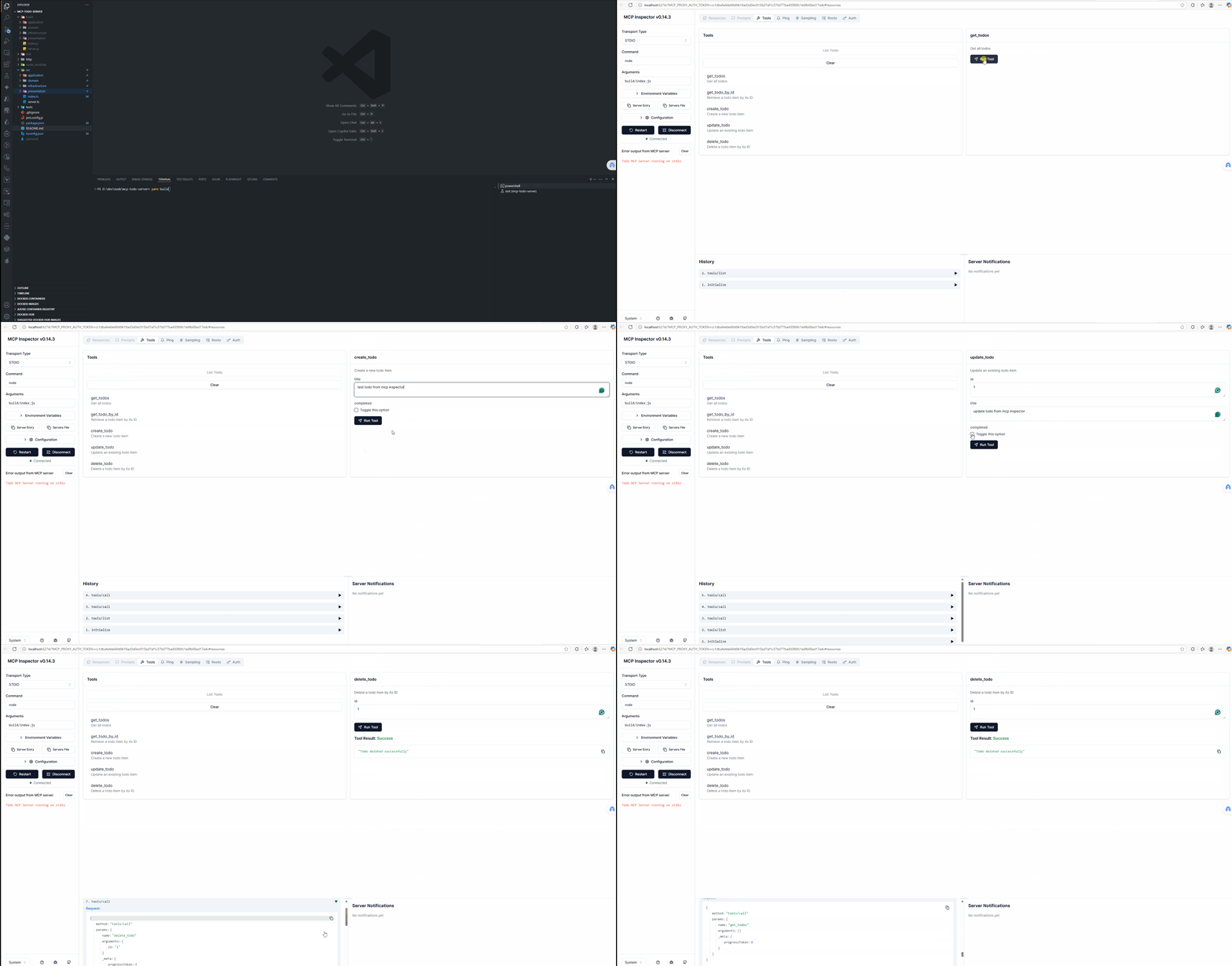
Demo in MCP Inspector
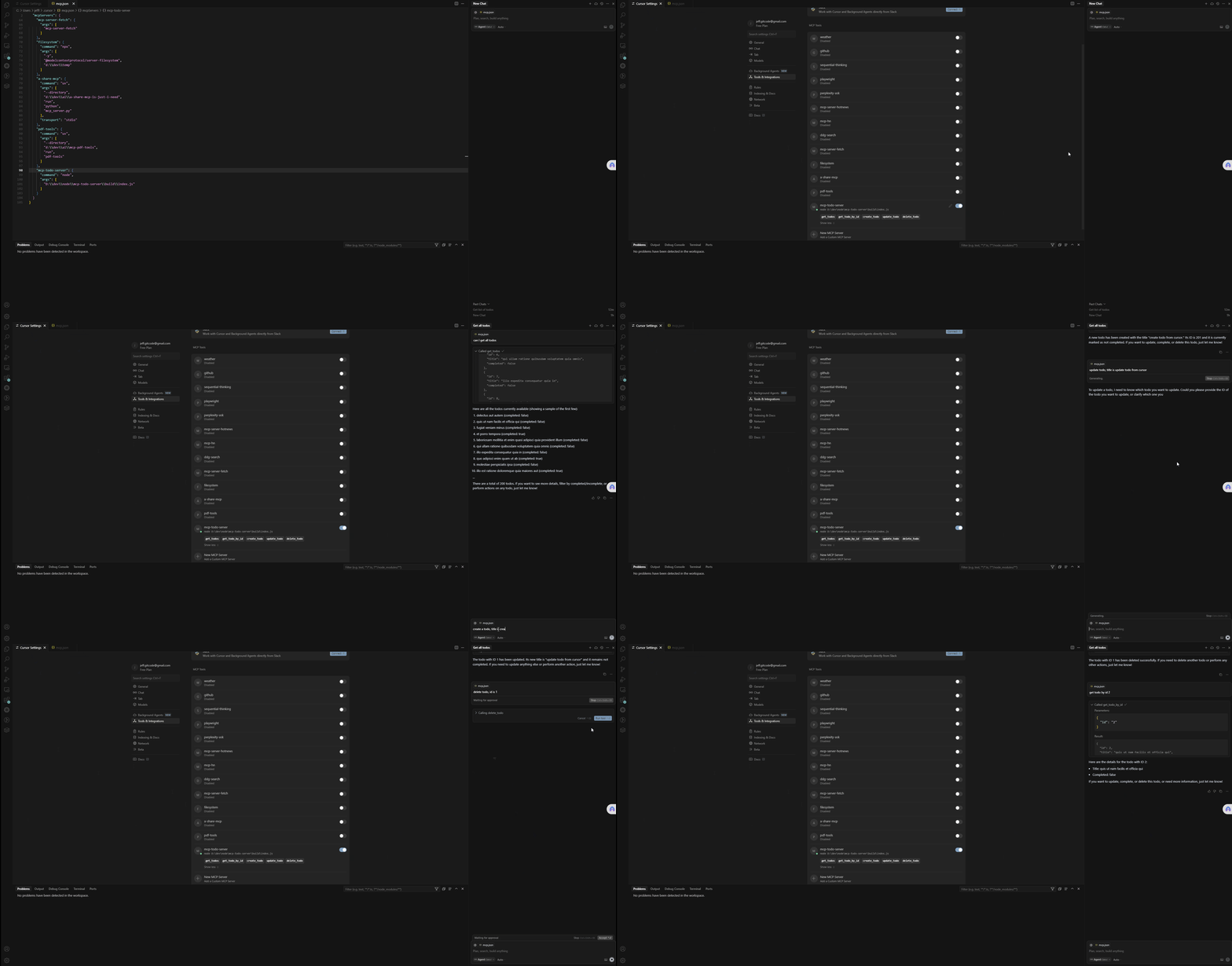
Demo in Cursor
Technology Stack
This project is built with modern technologies and follows clean architecture principles:
Core Technologies
- Node.js: Runtime environment for executing JavaScript code server-side
- TypeScript: Strongly typed programming language that builds on JavaScript
- Model Context Protocol (MCP): Protocol for AI models to interact with external tools and data sources
Backend Framework
- @modelcontextprotocol/sdk: Official SDK for creating MCP-compliant servers
- Zod: TypeScript-first schema validation library used for input validation
Testing
- Jest: JavaScript testing framework
- Supertest: HTTP assertions library for testing API endpoints
Development Tools
- tsx: TypeScript execution environment with native ESM support
- tsc-alias: Tool for resolving TypeScript path aliases during compilation
- ts-node: TypeScript execution engine for Node.js
Architecture
- Clean Architecture: The project follows a clean architecture approach with:
- Domain layer: Core business logic and entities
- Application layer: Use cases and application services
- Infrastructure layer: External interactions and implementations
- Presentation layer: API endpoints and request/response handling
External APIs
- JSONPlaceholder: RESTful API for testing and prototyping providing fake todo data
Architecture Diagram
Sequence Diagram
The following diagram shows how requests flow through the MCP Todo Server:
sequenceDiagram
    participant Client as MCP Client/Inspector
    participant Server as McpServer
    participant Handler as TodoHandlers
    participant Service as TodoService
    participant Repository as JsonPlaceholderTodoRepository
    participant API as JSONPlaceholder API

    Client->>Server: Tool Call Request (e.g., get_todos)

    alt Get All Todos
        Server->>Service: todoService.getAllTodos()
        Service->>Repository: todoRepository.findAll()
        Repository->>API: fetch('https://jsonplaceholder.typicode.com/todos')
        API-->>Repository: JSON Response
        Repository-->>Service: Todo[] entities
        Service-->>Server: Todo[] entities
        Server-->>Client: Formatted JSON Response
    else Get Todo by ID
        Client->>Server: get_todo_by_id with id parameter
        Server->>Service: todoService.getTodoById(id)
        Service->>Repository: todoRepository.findById(id)
        Repository->>API: fetch('https://jsonplaceholder.typicode.com/todos/{id}')
        API-->>Repository: JSON Response
        Repository-->>Service: Todo entity
        Service-->>Server: Todo entity
        Server-->>Client: Formatted JSON Response
    else Create Todo
        Client->>Server: create_todo with title, completed
        Server->>Service: todoService.createTodo(data)
        Service->>Repository: todoRepository.create(data)
        Repository->>API: POST fetch('https://jsonplaceholder.typicode.com/todos')
        API-->>Repository: JSON Response
        Repository-->>Service: New Todo entity
        Service-->>Server: New Todo entity
        Server-->>Client: Formatted JSON Response
    else Update Todo
        Client->>Server: update_todo with id, title, completed
        Server->>Service: todoService.updateTodo(id, data)
        Service->>Repository: todoRepository.update(id, data)
        Repository->>API: PUT fetch('https://jsonplaceholder.typicode.com/todos/{id}')
        API-->>Repository: JSON Response
        Repository-->>Service: Updated Todo entity
        Service-->>Server: Updated Todo entity
        Server-->>Client: Formatted JSON Response
    else Delete Todo
        Client->>Server: delete_todo with id
        Server->>Service: todoService.deleteTodo(id)
        Service->>Repository: todoRepository.delete(id)
        Repository->>API: DELETE fetch('https://jsonplaceholder.typicode.com/todos/{id}')
        API-->>Repository: Response status
        Repository-->>Service: Boolean result
        Service-->>Server: Boolean result
        Server-->>Client: Success/Failure message
    end
Project Structure
mcp-todo-server
├── src
│   ├── domain
│   │   ├── entities
│   │   │   └── todo.ts
│   │   ├── repositories
│   │   │   └── todoRepository.ts
│   │   └── valueObjects
│   │       └── todoId.ts
│   ├── application
│   │   ├── services
│   │   │   └── todoService.ts
│   │   └── useCases
│   │       ├── createTodo.ts
│   │       ├── deleteTodo.ts
│   │       ├── getTodoById.ts
│   │       ├── getTodos.ts
│   │       └── updateTodo.ts
│   ├── infrastructure
│   │   ├── repositories
│   │   │   └── jsonPlaceholderTodoRepository.ts
│   │   └── http
│   │       └── httpClient.ts
│   ├── presentation
│   │   └── handlers
│   │       └── todoHandlers.ts
│   ├── server.ts
│   └── index.ts
├── tests
│   ├── unit
│   │   ├── domain
│   │   │   └── entities
│   │   │       └── todo.test.ts
│   │   ├── application
│   │   │   └── services
│   │   │       └── todoService.test.ts
│   │   └── infrastructure
│   │       └── repositories
│   │           └── jsonPlaceholderTodoRepository.test.ts
│   └── integration
│       └── server.test.ts
├── http
│   └── todo-api.http
├── package.json
├── tsconfig.json
├── jest.config.js
└── README.md
Setup Instructions
-
Clone the repository:
git clone <repository-url> cd mcp-todo-server -
Install dependencies:
npm install -
Run the server:
npm start
Usage
The server exposes various endpoints for managing todos. You can use the provided http/todo-api.http file to test the API endpoints manually.
Using MCP Inspector
What is MCP Inspector?
MCP Inspector is a tool that allows you to interact with MCP-compliant servers directly, testing tool calls and viewing responses without needing to integrate with an AI model.
Installation
To install MCP Inspector globally:
npm install -g @modelcontextprotocol/inspector
Connecting to MCP todo Server
# 1. First, build and start MCP Todo server:
npm run build
npm start

# 2. In a separate terminal, run MCP Inspector and connect it to mcp todo server:
mcp-inspector --server "node ./build/index.js"
or
npx @modelcontextprotocol/inspector node build/index.js

# Alternatively, if mcp todo server is already running, can pipe it to the inspector:
node ./build/index.js | mcp-inspector

# 3. Once connected, the inspector will open in your default web browser, allowing you to:

# Browse available tools
# Execute tool calls with custom parameters
# View responses in a formatted JSON view
# Debug request/response cycles
Setup MCP Todo Server in Cursor
-
Configure MCP integration:
-
Open Cursor settings
-
Navigate to the Extensions or AI Tools section
-
Find "Model Context Protocol" or "MCP Tools" settings mcp.json
{
  "mcpServers": {
   ... other mcp server,

    "todo-mcp-server": {
      "command": "node",
      "args": [
        "D:\\dev\\node\\mcp-todo-server\\build\\index.js"
      ]
    }
  }
}
Testing
To run the unit and integration tests, use the following command:
npm test
License
This project is licensed under the MIT License.