ClickHouse MCP Server
一個用於查詢 ClickHouse 資料庫的 Node.js 伺服器。
文件
ClickHouse MCP Server
A Model Context Protocol (MCP) server implementation that enables Claude AI to interact with ClickHouse databases through a secure and efficient interface.
Prerequisites
- Node.js (version 18 or higher)
- ClickHouse database running locally or remotely
- Claude Desktop application installed
Available Tools
-
clickhouse_query
- Execute SELECT queries on your ClickHouse cluster
- Input:
sql(string): The SQL query to execute - Note: Only SELECT queries are allowed for security reasons
-
clickhouse_show_tables
- List all tables in the ClickHouse database
- No input parameters required
-
clickhouse_describe_table
- Describe the schema of a specific table
- Input:
table(string): The name of the table to describe
Installation Steps
1. Install Dependencies
npm install @modelcontextprotocol/sdk @clickhouse/client typescript @types/node
2. Build the TypeScript
npm run build
3. Create the Server File
Copy the main server code into index.js and make it executable:
chmod +x dist/index.js
4. Configure Claude Desktop
-
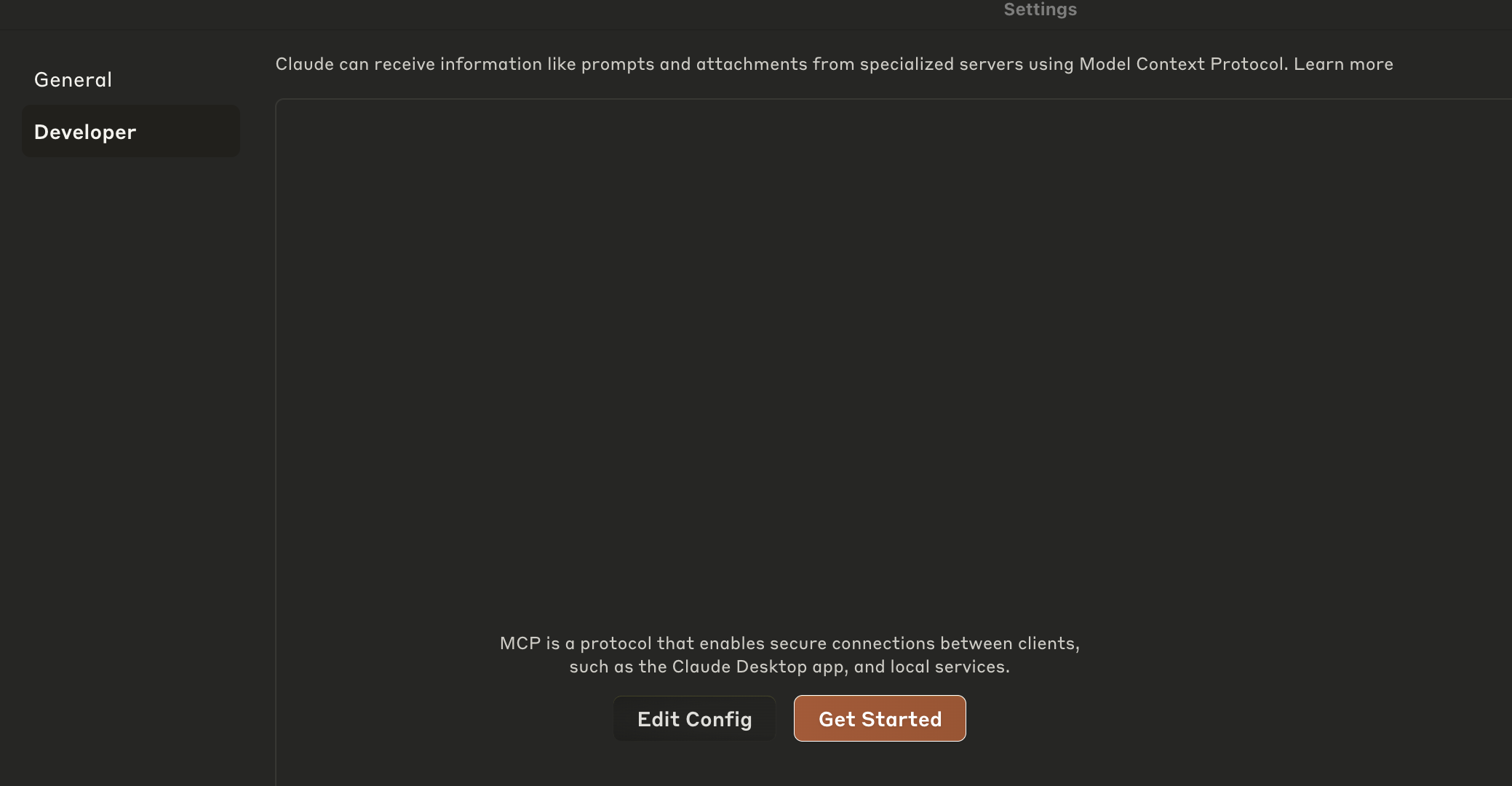
Open the Claude Desktop application, go to settings, then Developer and then click on "Edit Configuration File"
-
OR Open the Claude Desktop configuration file located at:
- On macOS:
~/Library/Application Support/Claude/claude_desktop_config.json - On Windows:
%APPDATA%/Claude/claude_desktop_config.json
- On macOS:
-
Add the following:
{
  "mcpServers": {
    "clickhouse": {
      "command": "node",
      "args": ["/path/to/your/clickhouse-mcp-server/dist/index.js"],
      "env": {
        "CLICKHOUSE_HOST": "<clickhouse-host>",
        "CLICKHOUSE_PORT": "<clickhouse-port>",
        "CLICKHOUSE_USER": "<clickhouse-user>",
        "CLICKHOUSE_PASSWORD": "<clickhouse-password>",
        "CLICKHOUSE_SECURE": "true",
        "CLICKHOUSE_VERIFY": "true",
        "CLICKHOUSE_CONNECT_TIMEOUT": "30",
        "CLICKHOUSE_SEND_RECEIVE_TIMEOUT": "30"
      }
    }
  }
}
Update the environment variables to point to your own ClickHouse service.
Or, if you'd like to try it out with the ClickHouse SQL Playground, you can use the following config:
{
  "mcpServers": {
    "clickhouse": {
      "command": "node",
      "args": ["/path/to/your/clickhouse-mcp-server/dist/index.js"],
      "env": {
        "CLICKHOUSE_HOST": "sql-clickhouse.clickhouse.com",
        "CLICKHOUSE_PORT": "8443",
        "CLICKHOUSE_USER": "demo",
        "CLICKHOUSE_PASSWORD": "",
        "CLICKHOUSE_SECURE": "true",
        "CLICKHOUSE_VERIFY": "true",
        "CLICKHOUSE_CONNECT_TIMEOUT": "30",
        "CLICKHOUSE_SEND_RECEIVE_TIMEOUT": "30"
      }
    }
  }
}
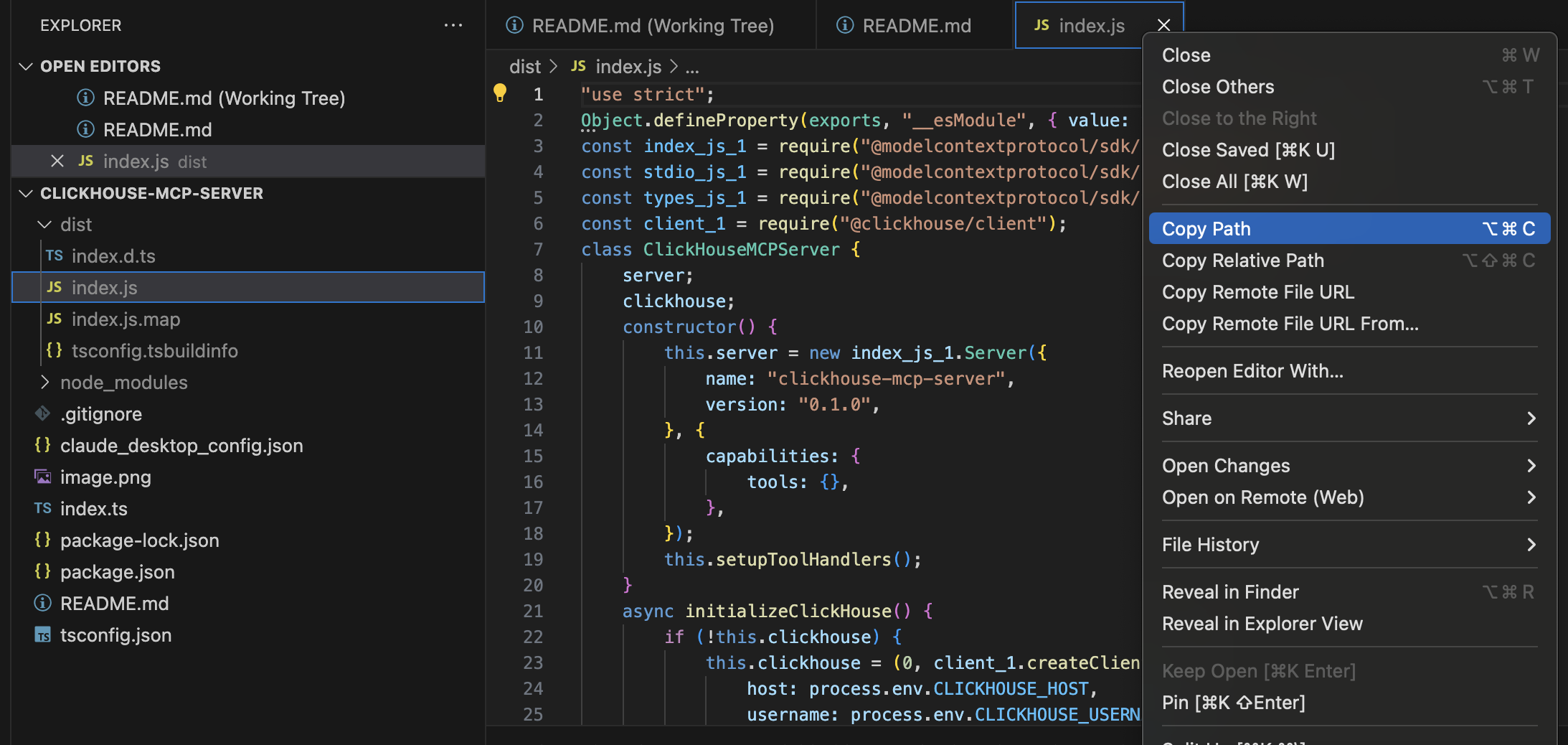
Important: Update the path in the config to point to your actual dist/index.js file location. Copy the full path using as shown in the image below.
5. Test the Server
Before configuring Claude Desktop, test the server locally:
node dist/index.js
The server should start and display "ClickHouse MCP server running on stdio".
7. Restart Claude Desktop
After updating the configuration, restart Claude Desktop for the changes to take effect.
Example Usage
After setup, you can ask Claude to:
- "Show me all tables in the ClickHouse database"
- "Query the user_events table for today's data"
- "Describe the schema of the orders table"
Development
Running Tests
npm test
Building the Project
npm run build
Linting
npm run lint
Security Notes
- The server only allows SELECT queries for the query tool
- Consider setting up proper authentication for your ClickHouse instance
- Use environment variables for sensitive credentials
- Restrict network access to your ClickHouse server as needed
Troubleshooting
- Connection Issues: Check your ClickHouse server is running and accessible
- Permission Errors: Ensure the Node.js script has proper file permissions
- Config Issues: Verify the path in Claude Desktop config points to the correct file
- Dependencies: Make sure all npm packages are properly installed
License
This project is licensed under the MIT License - see the LICENSE file for details.
Example Usage
After setup, you can ask Claude to:
- "Show me all tables in the ClickHouse database"
- "Query the user_events table for today's data"
Security Notes
- The server only allows SELECT queries for the query tool
- Consider setting up proper authentication for your ClickHouse instance
- Use environment variables for sensitive credentials
- Restrict network access to your ClickHouse server as needed
Troubleshooting
- Connection Issues: Check your ClickHouse server is running and accessible
- Permission Errors: Ensure the Node.js script has proper file permissions
- Config Issues: Verify the path in Claude Desktop config points to the correct file
- Dependencies: Make sure all npm packages are properly installed