godot-mcp-runtime
Playwright MCP for Godot,支援截圖、SceneTree操作,以及透過本地UDP橋接在執行階段執行任意GDScript。
文件
Godot MCP Runtime



A lightweight MCP server that gives AI agents the tools to interact with the Godot game engine. Features comprehensive headless editing and full runtime control over a Godot 4.x project. Scene, node, autoload, and validation ops cover everything short of the most niche corners of the engine; the runtime bridge adds screenshots, input simulation, UI discovery, and live GDScript against the running scene tree.
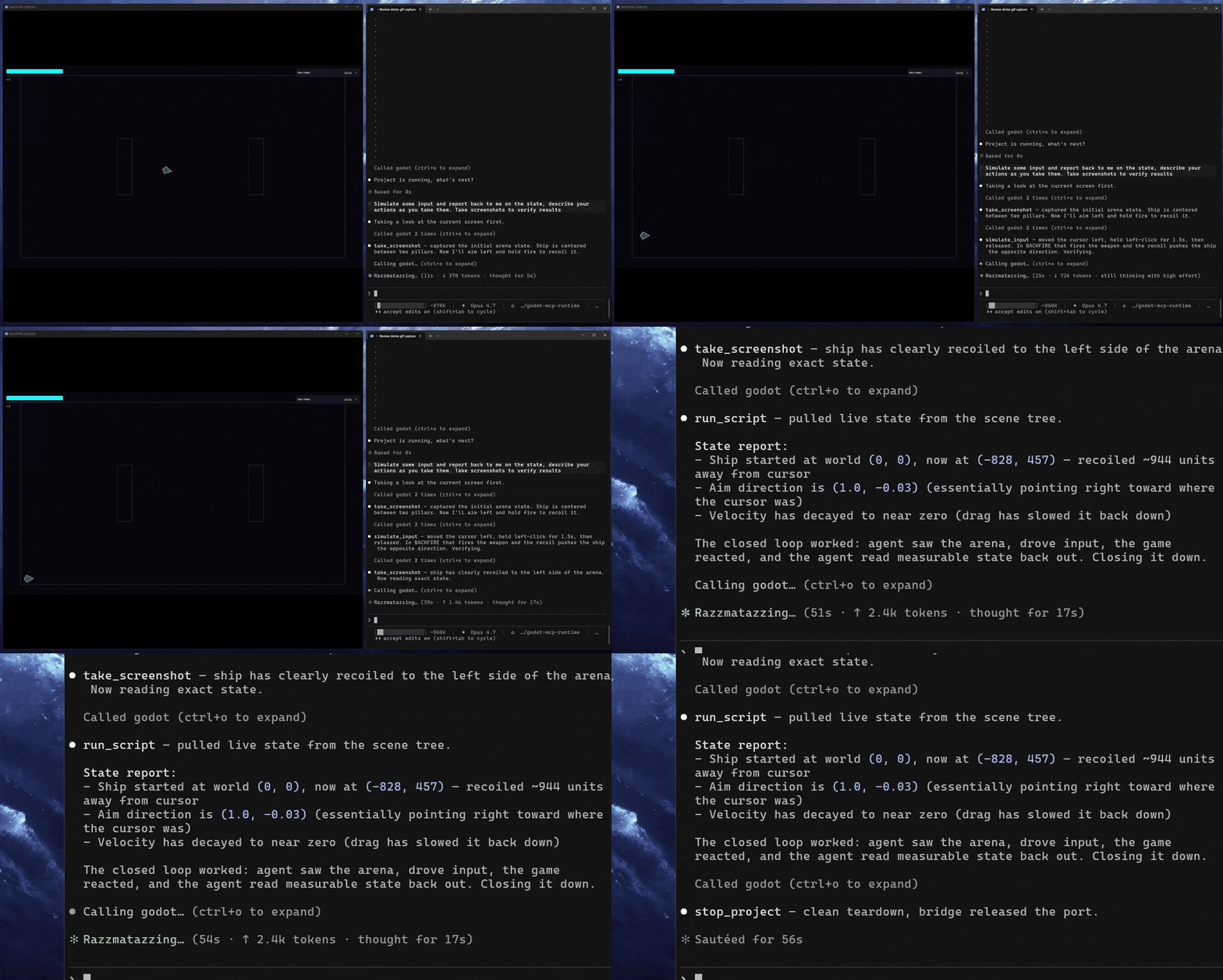
The AI doesn't just write your game, it can check its work.
- Headless editing: scenes, nodes, scripts, signals, validation, no editor window
- Runtime control: screenshots, input simulation, UI discovery, live GDScript, and function profiling against the running game
- Zero footprint: no Godot addon, no project commits, auto-cleanup on shutdown
No addon required. Most Godot MCP servers that offer runtime support ship as a Godot addon, something you install into your project, commit to version control, and manage as a dependency. Use npx and there's no install or setup needed.
Think of it as Playwright MCP, but for Godot. This does the same thing for games: run the project, take a screenshot, simulate input, read what's on screen, execute a script against the live scene tree. The agent closes the loop on its own changes rather than handing off to you to verify.
[!NOTE] This is not a playtesting replacement. It doesn't catch the subtle feel issues that only a human notices, and it won't tell you if your game is fun. What it does is let an agent confirm that a scene loads, a button responds, a value updated, a script ran without errors. The ability to check work is crucial for AI driven workflows.
Contents
What It Does
This server is the perfect tool kit for AI assisted game development with Godot. It provides a comprehensive suite of tools that allows agents to create scenes, nodes, scripts, and more. The runtime tool set provides the capabilities to check work by running the game and interacting with it in real time, all without becoming a cumbersome dependency on your project.
Built for agents. Every tool is purpose-built and self-documenting. When something fails, the response tells the agent how to fix it; when something succeeds, it points toward the next step. The result is an AI that stays unstuck and self-corrects without needing you to nudge it along.
Headless editing. Create scenes, add nodes, set properties, attach scripts, connect signals, validate GDScript. All the standard operations, no editor window required.
Runtime bridge. When run_project or attach_project is called, the server injects McpBridge as an autoload. This opens a localhost-only TCP listener (both auto-select a free port when bridgePort is omitted; pass bridgePort to pin a specific port) and enables:
- Screenshots: Capture the viewport. By default this returns a 960x540 preview inline plus the full PNG on disk
- Input simulation: Batched sequences of key presses, mouse clicks, mouse motion, UI element clicks by name or path, Godot action events, text typed into the focused Control, and timed waits. Each action reports what it did: the Control it hit, the signals it fired, and what changed on screen
- UI discovery: Walk the live scene tree and collect every visible Control node with its position, type, text content, and disabled state
- Live script execution: Compile and run arbitrary GDScript with full SceneTree access while the game is running
- Function profiling: With
profiling: trueat launch, capture Godot's own profiler and rank the most expensive GDScript functions by own or inclusive time, with source locations and per-frame averages
Background mode. Pass background: true to run_project and the Godot window moves off-screen (positioned at (-9999, -9999)) with physical input blocked: borderless, unfocusable, mouse-passthrough. Programmatic input, screenshots, and all runtime tools work exactly the same. Useful for automated agent-driven testing where the window shouldn't be visible or interactive.
Manual attach mode. When something other than MCP launches the game (a CI pipeline, an external debugger, your own shell), call attach_project first. It injects the bridge and marks the project active without spawning Godot, so when you launch the game manually, runtime tools work against it. Use detach_project when done.
[!IMPORTANT]
get_debug_outputis unavailable in attached mode. stdout and stderr only flow through processes MCP started itself, so when Godot is launched externally there's no captured output to return. Userun_projectif you need the debug stream.
The bridge cleans itself up automatically - on stop_project or detach_project, and also without a tool call when the game exits on its own, the bridge connection drops, or the server shuts down (including a client that just closes the connection). Its artifacts live under .mcp/godot-runtime/ in the project, which the server adds to .gitignore. No leftover autoloads, no modified project files.
How It Compares
The Godot MCP space splits on two axes: whether a server can drive a running game (runtime) or only edit files, and what it costs your project to do so. Most servers that offer real runtime control ship as a Godot addon you install and commit to version control, or as a custom engine you download. This one injects a bridge transiently and removes it on shutdown, so you get full live-game control against stock Godot with nothing left in your repo.
| Server | Live-game runtime | Footprint | License | Price |
|---|---|---|---|---|
| Godot MCP Runtime | Full: screenshots, input, live scene tree, script exec | Zero (npx, no committed addon) | MIT | Free |
| Summer Engine | Full | Custom engine download + sign-in | MIT layer / proprietary engine | Free core, paid cloud |
| tugcantopaloglu/godot-mcp | Full | Committed autoload addon | MIT | Free |
| Godot MCP Pro | Full | Committed editor addon | Proprietary | $15 |
| GDAI MCP | Editor-mediated | Committed editor addon | Proprietary | $19 |
| Coding-Solo/godot-mcp | No (launch + debug output) | Zero (npx) | MIT | Free |
Among servers with full live-game control, Godot MCP Runtime pairs a zero-footprint install (no addon committed to version control, no custom engine, no account) with a single npx command, and it has shipped this transient-autoload runtime bridge since February 2026. For the full field of ~20 servers with a source for every claim, see docs/comparison.md.
Quick Start
Prerequisites
That's it. No Godot addon, no project modifications.
Configure Your MCP Client
Add the following to your MCP client config. Works with Claude Code, Claude Desktop, Cursor, or any MCP-compatible client.
Ask your AI assistant to call check_project. If it returns a Godot version string (e.g., 4.4.stable), you're connected and working.
Zero-install via npx (recommended):
{
  "mcpServers": {
    "godot": {
      "command": "npx",
      "args": ["-y", "godot-mcp-runtime"],
      "env": {
        "GODOT_PATH": "<path-to-godot-executable>"
      }
    }
  }
}
Or install globally:
npm install -g godot-mcp-runtime
{
  "mcpServers": {
    "godot": {
      "command": "godot-mcp-runtime",
      "env": {
        "GODOT_PATH": "<path-to-godot-executable>"
      }
    }
  }
}
Or clone from source:
git clone https://github.com/Erodenn/godot-mcp-runtime.git
cd godot-mcp-runtime
npm install
npm run build
{
  "mcpServers": {
    "godot": {
      "command": "node",
      "args": ["<path-to>/godot-mcp-runtime/dist/index.js"],
      "env": {
        "GODOT_PATH": "<path-to-godot-executable>"
      }
    }
  }
}
[!TIP] Prefer pnpm? All three install paths work with pnpm. Substitute
pnpm dlx godot-mcp-runtimefornpx -y godot-mcp-runtime,pnpm add -g godot-mcp-runtimefor the global install, orpnpm install && pnpm run buildfor the source build. pnpm ships stronger defaults against npm supply-chain attacks; see pnpm's supply chain security guide.
If Godot is on your PATH, you can omit GODOT_PATH entirely. The server will auto-detect it.
Optional environment variables
All are set in the same env block as GODOT_PATH:
| Variable | Effect |
|---|---|
DEBUG | "true" enables verbose [DEBUG] logging. |
The three security-gate flags below share one axis (see docs/security.md for the full picture) and are wide enough to wrap badly in a table, so they get a list instead:
GODOT_MCP_DISABLE_ELICITATION-"true"disables the confirmation prompts forrun_projectandrun_script. Use this if your client cannot display elicitation prompts (e.g. Claude Desktop, which auto-cancels them). Fail-open: the action proceeds with a warning. Tier 1 security hard-blocks still apply.GODOT_MCP_STRICT-"true"hard-rejects anything that would otherwise prompt, for unattended operation. Takes precedence overGODOT_MCP_DISABLE_ELICITATIONwhen both are set.GODOT_MCP_DISABLE_SECURITY-"true"turns the entirerun_script/run_projectsecurity gate off: no scan, no block, no elicitation, no warnings, no audit sidecars - Tier 1 included. OverridesGODOT_MCP_STRICTwhen both are set. Enabling this is a human decision - an agent should decline to set it on a user's behalf.
{
  "mcpServers": {
    "godot": {
      "command": "npx",
      "args": ["-y", "godot-mcp-runtime"],
      "env": {
        "GODOT_PATH": "<path-to-godot-executable>",
        "GODOT_MCP_DISABLE_ELICITATION": "true"
      }
    }
  }
}
[!IMPORTANT] Windows path gotchas.
GODOT_PATHmust point at the Godot executable itself, not its install folder. Backslashes in JSON must be escaped or replaced with forward slashes:"GODOT_PATH": "D:\\Godot\\Godot_v4.4-stable_win64.exe" // or equivalently "GODOT_PATH": "D:/Godot/Godot_v4.4-stable_win64.exe"Setting the variable from a wrapper
.batdoes not propagate to the MCP server - the path must live in the client'senvblock above.
Docs
docs/tools.md: full tool reference, grouped by categorydocs/tool-authoring.md: standards for adding or modifying toolsdocs/architecture.md: source layout, bridge sequence diagram, lifecycle steps, runtime artifact behaviordocs/security.md:run_script/run_projectsecurity model, full rule catalogue, strict-mode behavior
Acknowledgments
Built on the foundation laid by Coding-Solo/godot-mcp for headless Godot operations.
Developed with Claude Code.