Intent Leads
Intent Leads (intentleads.si):為 AI agents 提供 B2B 意圖數據和潛在客戶名單。查看有多少美國決策者正在研究您的主題,取得免費報價,並匯出包含電子郵件和手機號碼的潛在客戶名單。100% 按使用量計費:按潛在客戶付費,無需訂閱。只有 intent_export_leads 會扣除您的餘額。
託管 MCP 伺服器
npx add-mcp 'https://mcp.intentleads.si/mcp'可安裝到 Claude Code、Codex、Cursor 等客戶端
文件
MCP for AI agents
Let Claude, Cursor or your own agent check lanes, quote and run exports.
Intent Leads has an MCP server, so an AI agent can work with your lanes, counts, exports and leads in plain language: "How many new high-intent people does L3 have? Export 50 and give me the CSV."
https://mcp.intentleads.si/mcp
It uses streamable HTTP, and you sign in with one of your Intent Leads API keys (il_live_…) sent as a bearer token. There's no separate MCP key: create a key under Settings → API keys, or use one you already have. The agent then sees exactly what that key sees, so a workspace key only reaches its own workspace. To give an agent several workspaces, use an organization key and name the workspace in each tool call.
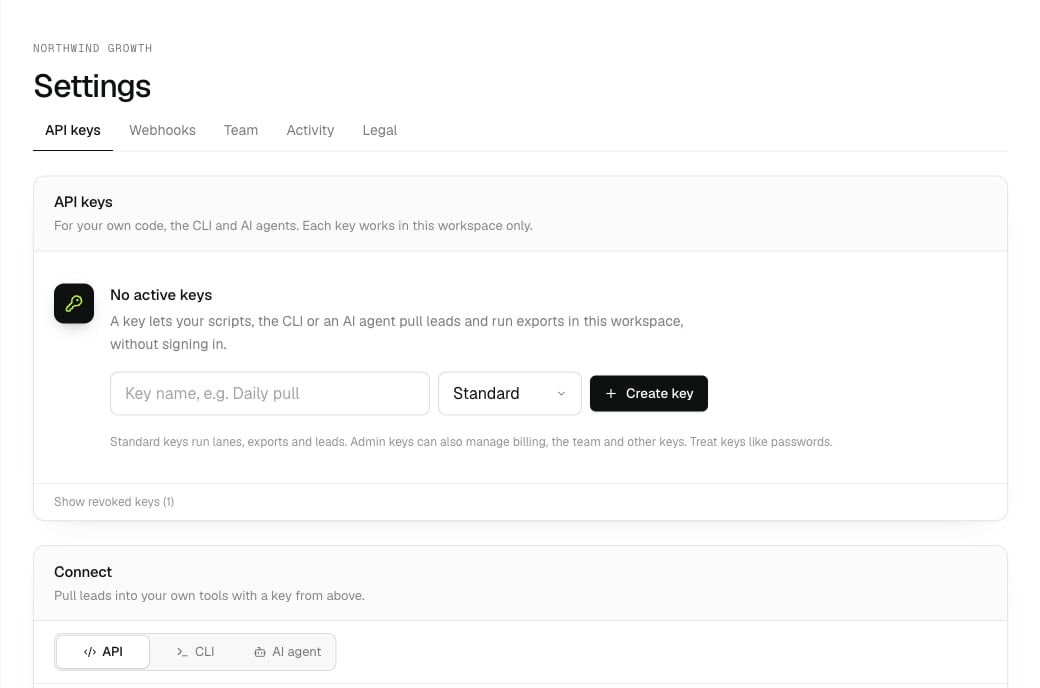
Settings → API keys: create a key, then Connect → AI agent has the setup to copy.
Connect your agent
[tab] Claude Code
claude mcp add --transport http intent-leads https://mcp.intentleads.si/mcp \
  --header "Authorization: Bearer il_live_YOUR_API_KEY"
[tab] Cursor
Add to
~/.cursor/mcp.json:{ "mcpServers": { "intent-leads": { "url": "https://mcp.intentleads.si/mcp", "headers": { "Authorization": "Bearer il_live_YOUR_API_KEY" } } } }
[tab] VS Code
Add to
.vscode/mcp.json:{ "servers": { "intent-leads": { "type": "http", "url": "https://mcp.intentleads.si/mcp", "headers": { "Authorization": "Bearer il_live_YOUR_API_KEY" } } } }
[tab] Claude Desktop
Claude Desktop connects to remote servers with a header through
mcp-remote(needs Node.js). Add toclaude_desktop_config.json:{ "mcpServers": { "intent-leads": { "command": "npx", "args": ["-y", "mcp-remote", "https://mcp.intentleads.si/mcp", "--header", "Authorization: Bearer il_live_YOUR_API_KEY"] } } }
How agents find the tools
The server keeps your agent's context small: it exposes a few general tools, and the agent looks up the Intent Leads tools it needs.
| Tool | What it's for |
|---|---|
search_tools | Find tools by keyword, like search_tools("export"). |
get_tool_schema | The exact parameters of one tool. |
call_tool | Run a tool by name, with its parameters as JSON. |
A good first call is call_tool("intent_how_to_use_me", "{}"): it explains lanes, counts and exports to the agent.
Every Intent Leads tool takes an optional workspace (a workspace id). With an organization's key it says which workspace to work in; intent_list_workspaces lists them. A workspace's own key doesn't need it.
Intent Leads tools
| Tool | Spends your balance | What it does |
|---|---|---|
intent_how_to_use_me | No | Start here: how lanes, counts and exports work. |
intent_list_lanes | No | Lanes with live keywords and how many new people are available now. |
intent_get_lane | No | One lane: filters, keywords and the funnel. |
intent_lane_sample | No | Up to 25 example matches, without names or contact details. |
intent_quote_export | No | Free quote: how many people an export would get. |
intent_export_leads | Yes | Starts an export. The only tool that spends your balance. |
intent_list_exports | No | Past exports, newest first. |
intent_get_export | No | One export and its leads (JSON or CSV). |
intent_pull_leads | No | Leads you haven't pulled yet, or everything since a date. |
intent_list_suppressions | No | People who asked to be removed. |
intent_get_balance | No | Your balance, this month per meter, and the prices. |
intent_estimate_cost | No | What N more people would cost now (free). |
intent_list_filter_values | No | Valid industries, seniority and strengths, and every field more filters can use. |
intent_create_lane | No | Create a lane. |
intent_update_lane | No | Change a lane's filters, more filters (conditions) or settings. |
intent_search_topics | No | Topics we already track, to use before adding new keywords. |
intent_get_topic | No | What one topic covers and its size. |
intent_add_keyword | No | Add an existing topic (topic) or a new keyword to a lane, optionally to group B, C or D. |
intent_move_keyword | No | Move a keyword to another group. |
intent_run_check | No | Re-size a lane now, after changing filters. |
intent_remove_keyword | No | Remove a keyword from a lane. |
intent_get_exclusions | No | Companies and people left out of every lane. |
intent_add_exclusions | No | Leave out companies (domains) or people (emails) on every lane. |
intent_remove_exclusions | No | Stop leaving them out. |
intent_list_workspace_members | No | Who can open a workspace (organization or workspace users) and its open invites. Admin key. |
intent_list_webhooks | No | Your webhook endpoints (URL, events, status, what's waiting) and the event types. |
intent_test_webhook | No | Send a signed test to one endpoint (a ping or a made-up sample) and get what it answered. |
[!WARNING]
intent_export_leadsspends your balance. Its description tells agents to runintent_quote_exportfirst and get your go-ahead, but review what your agent is allowed to do without asking you.
Example prompts
- "Which of my lanes has the most new high-intent people this week?"
- "Show me a sample for L2. Do these look like VPs of sales at SaaS companies?"
- "Quote an export of 100 from all lanes, then export it if it costs under $10, and save the CSV."
- "Find existing topics about answering services and add the best two to L1."
- "Add the keyword 'outbound agency pricing' to L1."
- "In L2, only keep people in sales or business development at companies with $10M+ revenue, then re-check it."
- "Did anyone ask to be removed since Monday? Give me their lead IDs."
- "Leave out every company in this CSV of our current customers."
This documentation is built and hosted on Mintlify, a developer documentation platform.