Substack Publisher API
從 Substack 官方 Publisher API 查詢文章、分析數據及訂閱者資料
文件
substack-publisher-mcp
MCP server for Substack's official Publisher API



Note: This is an unofficial, community-developed tool and is not affiliated with, endorsed by, or supported by Substack, Inc.
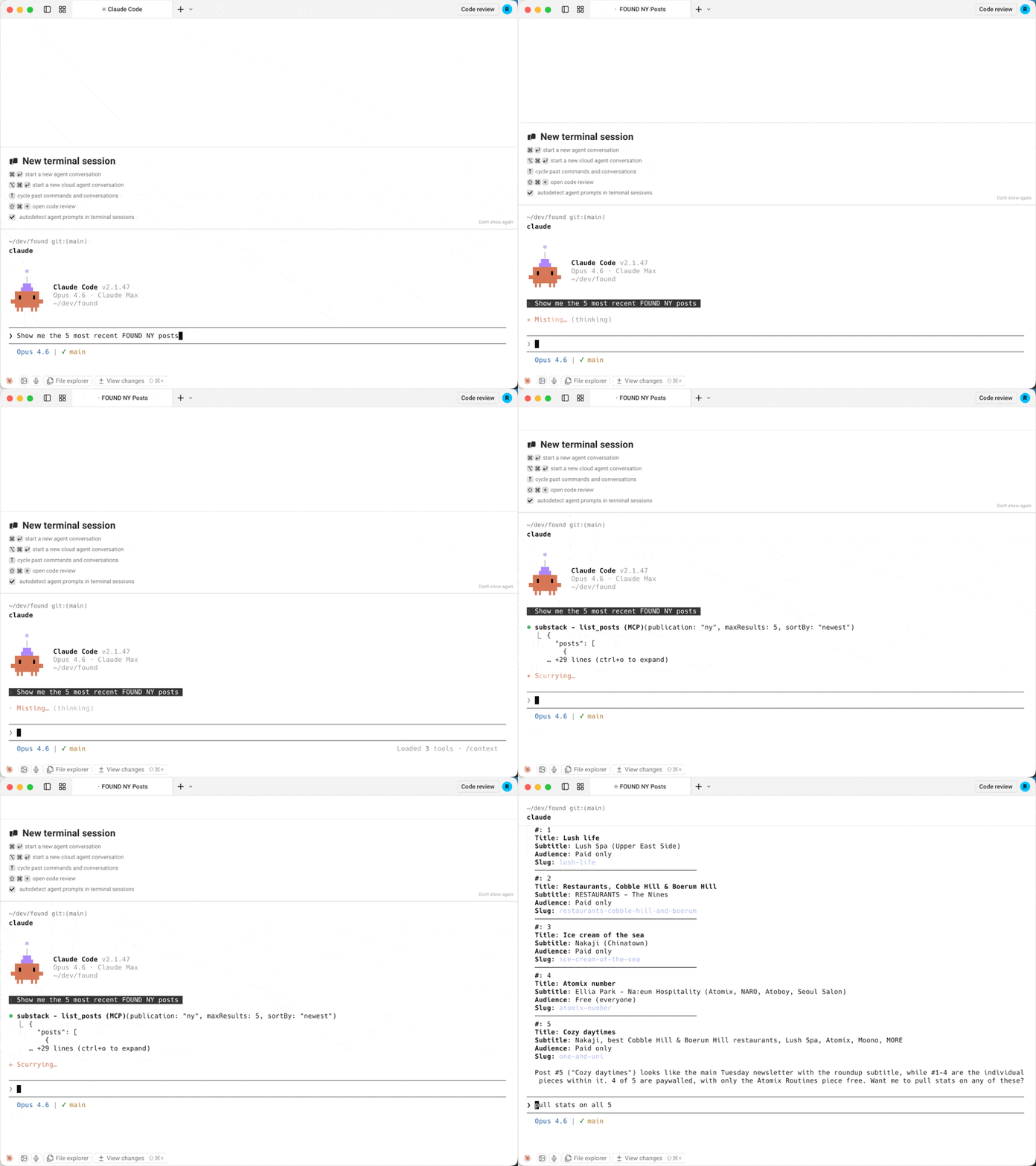
An MCP server for Substack's official Publisher API. Search and read posts, pull post analytics and subscriber counts, and look up subscribers from Claude, Cursor, or any MCP client. All tools are read-only.
Why this server?
| substack-publisher-mcp | Other Substack MCP servers | |
|---|---|---|
| API | Official Publisher API | Unofficial internal API |
| Auth | API key (stable) | Browser cookies (fragile) |
| Stability | Official, documented API | Breaks when Substack changes internals |
| Multi-publication | Built-in support | Not available |
Prerequisites
- Node.js 22+. Check with
node --version; install from nodejs.org if missing. - Substack Publisher API key. Generate one from your publication's Substack dashboard. If you don't see a Publisher API option there, it may not be enabled for your publication yet; see the Publisher API docs for availability.
Quick Start
1. Install
git clone https://github.com/dkships/substack-publisher-mcp.git
cd substack-publisher-mcp
npm install && npm run build
2. Configure your MCP client
Add to your client's MCP config file (create the file if it doesn't exist):
| Client | Config file |
|---|---|
| Claude Desktop (macOS) | ~/Library/Application Support/Claude/claude_desktop_config.json |
| Claude Desktop (Windows) | %APPDATA%\Claude\claude_desktop_config.json |
| Claude Code | .mcp.json in your project directory |
| Cursor | .cursor/mcp.json |
{
  "mcpServers": {
    "substack": {
      "command": "node",
      "args": ["/path/to/substack-publisher-mcp/dist/index.js"],
      "env": {
        "SUBSTACK_API_KEY": "your-api-key-here"
      }
    }
  }
}
Claude Code users: Add
"type": "stdio"to the server config.
Restart your MCP client after editing the config — servers load at startup.
3. Start using it
Ask Claude (or your MCP client):
- "Which Substack publications do I have configured?"
- "Show me my posts from the last month"
- "Find my posts about pricing"
- "Pull up my post with the slug my-latest-post"
- "How many opens and clicks did my latest post get?"
- "What are my subscriber counts for the last 30 days?"
- "Look up subscriber jane@example.com"
Installing through an AI agent or registry? See llms-install.md for a condensed, machine-readable setup guide.
Tools
| Tool | Description | Key Parameters |
|---|---|---|
list_publications | List configured publications | None |
list_posts | List published posts | startDate, endDate, sortBy, type, maxResults, next |
search_posts | Full-text search across published posts | query (required), maxResults (1-100) |
get_post | Get a post and its body by URL slug | urlSlug (required), bodyFormat |
get_post_stats | Get engagement stats for a post | urlSlug (required) |
get_subscriber_counts | Get daily subscriber counts by type | startDate, endDate |
get_subscriber | Look up a subscriber by email | email (required) |
All tools except list_publications accept an optional publication parameter when multiple publications are configured.
get_post returns the post body as Markdown by default. Substack sends it as a JSON-encoded ProseMirror document, typically about twice the size. Pass bodyFormat: "prosemirror" for the raw document or "none" for metadata only.
Date filters take YYYY-MM-DD. In list_posts, endDate is exclusive; in get_subscriber_counts, it is inclusive.
Example responses
get_subscriber_counts
[
  {
    "date": "2025-01-15",
    "total_email_subscribers": 25000,
    "paid_subscribers": 500,
    "free_trial_subscribers": 10,
    "comp_subscribers": 50,
    "gift_subscribers": 15,
    "lifetime_subscribers": 0,
    "founding_subscribers": 25
  }
]
get_post_stats
{
  "clicks": 320,
  "opens": 5400,
  "post_id": 12345678,
  "recipients": 10000,
  "views": 6100,
  "new_free_subscriptions": 80,
  "new_paid_subscriptions": 5,
  "estimated_revenue_increase": 400
}
list_posts
{
  "posts": [
    {
      "post_id": 12345678,
      "title": "My Latest Post",
      "audience": "only_paid",
      "subtitle": "A deep dive into the topic",
      "postDate": "2025-01-15T12:00:00.000Z",
      "urlSlug": "my-latest-post",
      "coverImage": "https://substackcdn.com/image/..."
    }
  ],
  "next": "abc123cursor"
}
next is null on the last page.
Multiple publications
If you manage multiple Substack publications, configure a separate API key for each using the SUBSTACK_API_KEY_<NAME> pattern:
{
  "mcpServers": {
    "substack": {
      "command": "node",
      "args": ["/path/to/substack-publisher-mcp/dist/index.js"],
      "env": {
        "SUBSTACK_API_KEY_MAIN": "your-main-blog-key",
        "SUBSTACK_API_KEY_TECH": "your-tech-newsletter-key",
        "SUBSTACK_API_KEY_COMPANY": "your-company-updates-key"
      }
    }
  }
}
Then specify which publication to query:
"Show me subscriber counts for main" "List recent posts from the tech publication"
Use list_publications to see all configured publication names.
Troubleshooting
| Issue | Solution |
|---|---|
Unauthorized error | Verify your API key is correct. The key goes directly in the authorization header with no Bearer prefix. |
... duplicates publication ... or ... ignoring it on startup | Two env vars map to the same publication name (names are case-insensitive, and SUBSTACK_API_KEY is default), or a key is malformed. Rename or remove the extra variable. |
| Server won't start | Make sure you ran npm run build after cloning. The server runs from dist/, not src/. |
No API keys configured | Set SUBSTACK_API_KEY or SUBSTACK_API_KEY_<NAME> in your MCP client config. |
| Server doesn't appear in your client | Check the config file is valid JSON (no trailing commas), then restart the client. |
command not found / spawn node ENOENT | Node.js isn't installed or isn't on your PATH. Check node --version. |
| Still stuck | Check your client's MCP logs. Claude Desktop on macOS: ~/Library/Logs/Claude/mcp*.log. |
API Reference
This server wraps the Substack Publisher API. See Substack's documentation for details on available data and rate limits.
Contributing
See CONTRIBUTING.md for guidelines.
License
MIT License. See LICENSE for details.
Substack is a trademark of Substack, Inc. This project is not affiliated with Substack, Inc. Use of the Substack name is for descriptive purposes only.