LinkedIn MCP
官方為你的代理提供最安全的 LinkedIn MCP
你可以用 LinkedIn MCP 做什麼?
- 在你的網絡中尋找潛在客戶 — 描述你的理想客戶,讓你的代理為現有連結評分,讓你今天就能傳訊息給他們。
- 找出未回覆的訊息 — 掃描 LinkedIn、Sales Navigator 和 Recruiter 對話串,找出有人在等你回覆的對話。
- 以你的語氣起草訊息 — 研究每位聯絡人,撰寫第一則訊息或分階段的後續訊息序列,並等待你審閱。
- 匯入並標記聯絡人 — 從清單或 CSV 匯入最多 500 個個人檔案,為他們加上標記,並建立一個工作檢視。
- 充實個人檔案 — 取得你交談對象的工作電子郵件和手機號碼,來源為 20 多家供應商。
- 分析外聯成效 — 檢視從送出連結邀請到預約會議的接受率和回覆率,並附上圖表。
託管 MCP 伺服器
npx add-mcp 'https://api.talktohumans.app/mcp'可安裝到 Claude Code、Codex、Cursor 等客戶端
文件
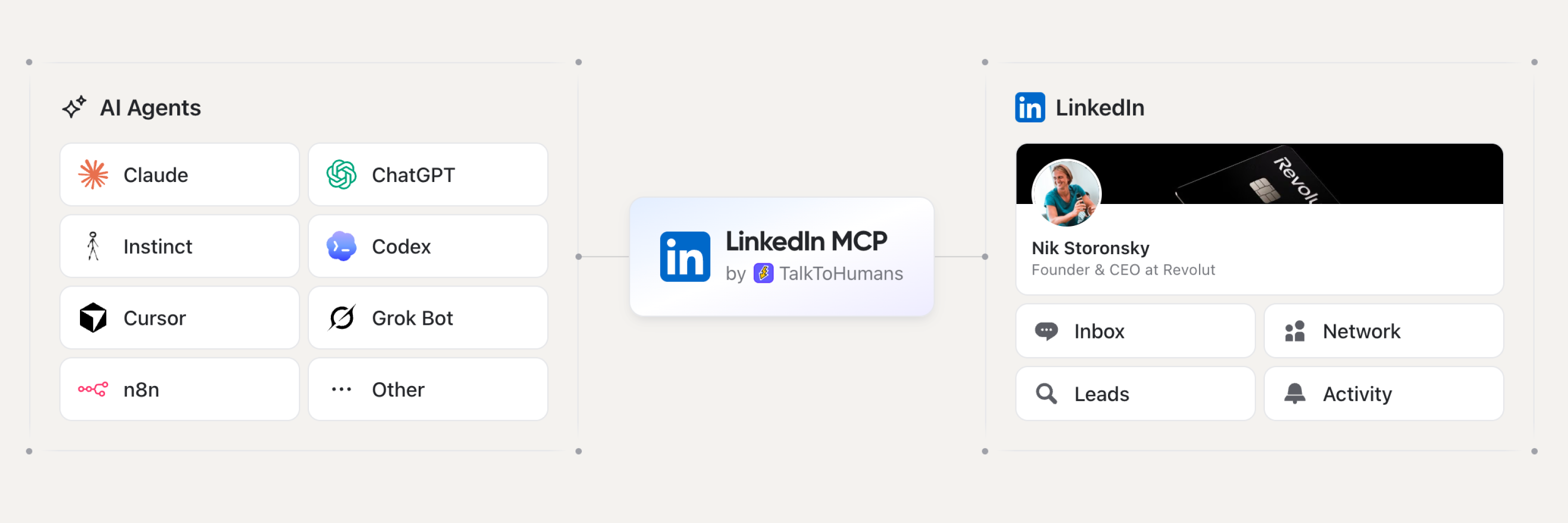
LinkedIn MCP Server
為你的 Agent 打造最安全的 LinkedIn MCP。
將 Claude、ChatGPT、Codex、Cursor、VS Code 或任何遠端 MCP 用戶端連接到你自己的 LinkedIn 帳號。
你的 agent 會讀取你的 LinkedIn 對話、搜尋你的人脈網路、以電子郵件和電話充實個人檔案,並草擬訊息。你審閱後再按下傳送。





https://api.talktohumans.app/mcp
為什麼這個 LinkedIn MCP 更安全
LinkedIn 沒有官方的 MCP server,而其公開 API 也不提供存取你私人訊息的權限。每個 LinkedIn MCP 都是第三方工具,且大多落入以下三類之一:
| 開源爬蟲 | 雲端 LinkedIn 工具 | TalkToHumans | |
|---|---|---|---|
| 節奏 | 由你的 agent 決定節奏 | 依行銷活動量 | 保守的每日上限與模擬人類節奏的延遲,依動作與帳號分別設定 |
| 100 次 agent 呼叫會做什麼 | 100 次造訪 LinkedIn | 從他們的伺服器發出 100 次造訪 LinkedIn | 讀取已同步的快取,因此對 LinkedIn 的活動量不超過一次呼叫 |
| LinkedIn 動作在哪裡執行 | 在你機器上驅動瀏覽器的腳本 | 他們的伺服器,通常位於代理 IP 之後 | 你原本就在使用的瀏覽器。沒有雲端自動化,沒有代理 IP |
| 你在哪裡工作 | 在你 agent 的聊天中 | 在你 agent 的聊天中 | 任何適合該任務的地方:你 agent 的聊天、TalkToHumans 應用程式,或直接在 LinkedIn 與 Sales Navigator 中 |
| 誰按下傳送 | 通常是 agent | agent 或行銷活動 | 你。MCP 只負責草擬 |
沒有任何 LinkedIn 工具是完全零風險的。以下是 TalkToHumans 如何降低風險:
- 內建人類節奏。 每種動作類型都有保守的每日上限與動作之間的延遲,依 LinkedIn 帳號設定,並由所有使用該帳號的人共用。達到上限後,該動作會暫停至隔天。你的 agent 無法覆寫。
- 以快取為基礎的同步。 你的 agent 讀取的是你 LinkedIn 資料的同步副本,而非 LinkedIn 本身。即使向它詢問 100 個關於你收件匣的問題,你的帳號所見的活動量也等同於一次,不會在個人檔案之間跳來跳去。
- 在你的瀏覽器中執行。 LinkedIn 動作會透過你原本就在使用的瀏覽器進行。沒有雲端自動化、沒有代理 IP,也沒有代替你行動的虛擬瀏覽器。
- 在聊天、應用程式或 LinkedIn 中工作。 你 agent 所做的一切也會出現在 TalkToHumans 應用程式,以及嵌入 LinkedIn 自身頁面的面板中。無論你在哪裡,都能查看對話、檢視已排程的內容,並手動接手。
- 僅限草稿。 MCP 可以撰寫回覆或安排完整的後續追蹤序列。在你按下傳送之前,什麼都不會送出。
你的 agent 能在 LinkedIn 上做什麼
創辦人、顧問、業務團隊和代理商都用它來處理同樣的幾項工作。每一項都有可直接貼上的提示詞,詳見下方。
- 在你的網路中尋找潛在客戶。 描述你的理想客戶,你的 agent 會為你的人脈評分。他們已經與你建立連結,因此你今天就能傳訊息給他們。
- 找出你該回覆的訊息。 掃描數百個 LinkedIn、Sales Navigator 和 Recruiter 對話串,找出有人在等你回覆的那些,如果你願意,每天早上都可以執行。
- 以你的語氣草擬訊息。 你的 agent 會研究每個人,並寫出聽起來像你的第一則訊息。你審閱每一份草稿並自行送出。
- 了解什麼能獲得回覆。 分析接受率、回覆率和範本,從送出邀請到預約會議。
- 安排後續追蹤序列。 當潛在客戶回覆時即停止的後續追蹤,為每個人量身撰寫,等待你啟動。
- 匯入新的潛在客戶。 在網路上找出展現意圖的人,或從活動或 Sales Navigator 匯入名單,取得可直接作業的檢視。
- 為聯絡人評分並加上標籤。 為每個聯絡人填入 ICP 分數,或依照你團隊既有的用法,為數百個對話補上標籤。
- 讓你的 CRM 保持同步。 搭配你 CRM 的 MCP 來記錄 LinkedIn 對話,或使用原生 HubSpot 整合。
你的 agent 還能透過瀑布式查詢,從 20 多家供應商取得你交談對象的工作電子郵件和手機號碼。
將你的 AI 用戶端連接到 LinkedIn
你需要一個 Pro 方案的 TalkToHumans 帳號,並已將 TalkToHumans 瀏覽器擴充功能連接到 LinkedIn。免費試用。
將 Claude 連接到 LinkedIn(網頁版與桌面版)
- 在 Claude 中,開啟 Customize > Connectors 並點擊 + Add > Add custom connector。
- 將其命名為
TalkToHumans並貼上https://api.talktohumans.app/mcp。 - 點擊 Continue,然後點擊 Add,並登入 TalkToHumans。
在聊天中,點擊 + > Connectors 並開啟 TalkToHumans。在 Team 和 Enterprise 方案中,需先由擁有者在 Organization settings > Connectors 中新增。
Claude Code
claude mcp add --transport http --scope user talktohumans https://api.talktohumans.app/mcp
接著在 Claude Code 中執行 /mcp,選擇 talktohumans 並登入。
將 ChatGPT 連接到 LinkedIn
- 在 ChatGPT 中,開啟側邊欄的 Plugins 並點擊 + > Add custom MCP server。
- 將其命名為
TalkToHumans並貼上https://api.talktohumans.app/mcp。 - 點擊 Create as a plugin 並登入 TalkToHumans。
在聊天中輸入 @TalkToHumans。自訂 MCP server 需要 ChatGPT Business、Enterprise 或 Edu 方案。
Codex
codex mcp add talktohumans --url https://api.talktohumans.app/mcp
codex mcp login talktohumans
Cursor
將以下內容加入 ~/.cursor/mcp.json。Cursor 首次使用時會要求你登入。
{
  "mcpServers": {
    "talktohumans": {
      "url": "https://api.talktohumans.app/mcp"
    }
  }
}
VS Code
從命令選擇區執行 MCP: Add Server,選擇 HTTP,貼上 https://api.talktohumans.app/mcp,命名為 talktohumans 並選擇 Global。VS Code 會要求你登入。
n8n 與其他 MCP 用戶端
任何支援透過 Streamable HTTP 搭配 OAuth 的遠端 MCP server 的用戶端,都能使用相同的 URL。MCP 文件中有各用戶端的操作步驟。
連接後,請輸入:「Use TalkToHumans to list my LinkedIn accounts.」
偏好使用 CLI?
正在使用 Claude Code、Codex 或其他終端機 agent,或撰寫腳本與 cron 工作?LinkedIn CLI(tth)為你的 agent 提供相同的工作區、安全規則和操作手冊,且不必在每個工作階段載入工具定義。
brew install talktohumans/tap/tth
tth auth login
tth skill --install
LinkedIn MCP 使用案例與提示詞
替換 [brackets] 中的部分。連接 TalkToHumans 後,每個提示詞都能在 Claude、ChatGPT、Codex 或 Cursor 中使用。它們依最多人使用的順序排列。
在你的 LinkedIn 網路中尋找潛在客戶
你的人脈網路中至少有 10–20 人可能已符合你的 ICP,而且你可以不送出邀請就直接傳訊息給他們。
Use TalkToHumans MCP to find up to 20 leads in my LinkedIn network
I should reach out to today for [BUSINESS NAME].

My ICP is: [DESCRIBE YOUR ICP]

Then create a view in TalkToHumans with those 20 leads so I can work through them today.
若想改為尋找引薦途徑,請要求找出能將你引薦給 ICP 的人、每個人相關的原因,以及引薦請求的草稿。
找出你該回覆的 LinkedIn 訊息
潛在客戶很少因為說「不」而冷掉。他們冷掉是因為沒有人回覆。
Use TalkToHumans MCP to go through my LinkedIn conversations.
List every thread where the other person wrote last and I haven't answered,
most important first. Draft a reply for each one. Don't send anything.
在你的 AI 用戶端中將其儲存為排程任務,每天早上取得 LinkedIn 收件匣簡報。你的 agent 會讀取由 TalkToHumans 擴充功能同步的收件匣,因此請在瀏覽器中保持 LinkedIn 開啟以取得最新訊息。
以你的語氣草擬 LinkedIn 訊息
好的第一則訊息是最難的部分。你的 agent 幫你跨過空白頁,而每份草稿都會在 TalkToHumans 中等待你審閱並送出。
Use TalkToHumans MCP and open the contacts in this view:
[LINK TO THE CONTACT VIEW IN TALKTOHUMANS]

Draft a first message for each of them.

Rules:
- Max 3 sentences.
- No pitch in the first message. Open a real conversation.
- Use their profile or our past conversation to show you know something
  true and specific about their world. No fake flattery.
- Match their tone, based on how they write or how their profile reads.
- Ask yourself: "Would I reply to this if I were them?" If not, rewrite it.
- Review your output with https://github.com/hardikpandya/stop-slop/blob/main/SKILL.md

I'll review each message before sending.
分析你的 LinkedIn 外展成效
Use TalkToHumans MCP to analyze my LinkedIn outbound performance over the past 2 weeks.
Work out what tends to work and what doesn't, from accepted connection request
to booked meeting. Then tell me what to change, improve or stop doing for the next 2 weeks.

Add charts where they make the analysis easier to read.
安排 LinkedIn 後續追蹤序列
大多數回覆來自後續追蹤,而為每個潛在客戶寫三則後續訊息,正是多數人放棄的地方。你的 agent 會將每個序列安排為草稿。一旦潛在客戶回覆就會停止,且在你啟動之前不會開始。
Use TalkToHumans MCP to find the contacts who accepted my connection request
in the last 30 days but never replied.

For each one, stage a 2-step follow-up sequence as a draft:
- Day 3: a short follow-up that adds one useful, specific thing for them
- Day 10: a light last nudge

Same rules as a first message: short, no pitch, specific to them.
I'll review and launch each sequence myself.
在網路上尋找新的潛在客戶並匯入
將 TalkToHumans 與網路搜尋 MCP(例如 Parallel)搭配使用,每天找出新的潛在客戶。
Use Parallel Search MCP to find 20 high-quality leads I should reach out to today
for [BUSINESS NAME].

My ICP is: [DESCRIBE YOUR ICP]

Prioritize people who recently showed direct or indirect buying intent online:
engaging with relevant topics, discussing a problem we solve, or interacting with competitors.

Then:
1. Remove duplicates and anyone already in TalkToHumans.
2. Import the new leads with TalkToHumans MCP.
3. Create a view for them so I can start working through them.
匯入你既有的 LinkedIn 潛在客戶名單
有來自活動、網路研討會、Sales Navigator 搜尋或其他工具的名單嗎?你的 agent 一次最多可匯入 500 個 LinkedIn 個人檔案。
Use TalkToHumans MCP to import the people from this list:
[PASTE LINKEDIN PROFILE URLS, OR ATTACH A CSV WITH A LINKEDIN URL COLUMN]

Skip anyone already in TalkToHumans, tag them "[TAG NAME]", and create a view for them.
Then draft a first message for each one that mentions [WHERE THEY COME FROM, E.G. THE EVENT].
依你的 ICP 為聯絡人評分
你的 agent 會將分數儲存在「ICP score」自訂欄位中,讓你能依此排序和篩選聯絡人。
Use TalkToHumans MCP and open the contacts in this view:
[LINK TO THE CONTACT VIEW IN TALKTOHUMANS]

If a contact custom field named "ICP score" doesn't exist yet, create it.
Then analyze each contact one by one and fill in their ICP score.

Our ICP is: [DESCRIBE YOUR ICP]

Use web search and their company website to be more accurate.
自動為 LinkedIn 聯絡人和對話加上標籤
當你在處理新對話時,標籤很好用。若要為數百個舊對話補上標籤,就交給你的 agent。標籤請保持少而簡單,例如「Hot lead」、「Friend」、「Candidate」、「Investor」或「Spam」:沒有標籤的聯絡人勝過標錯的聯絡人。
Use TalkToHumans MCP. First, look at our existing tags and how we use them.
Then tag every lead that has no tags, using those existing tags,
based on our conversations and what you know about the contact and their company.

Rules:
- Reuse existing tags. Only create a new one if none fits, and keep the list short.
- Tags are 1-2 words in plain English, like "Hot lead", "Friend", "Candidate", "Investor", "Spam".
- One tag per contact is usually enough.
- If you're unsure, don't tag the contact.
在你的 CRM 中記錄 LinkedIn 對話
使用 HubSpot?Pro 方案上的原生整合已經會同步。對於任何其他有 MCP server 的 CRM,例如 Attio 或 Twenty,你的 agent 可以這麼做:
Use TalkToHumans MCP and my CRM's MCP.
For every LinkedIn conversation with a new message in the last 7 days:
1. Find the matching person in my CRM, or create them if they're missing.
2. Add a two-line summary of the conversation as a note.
3. If their work email is missing in my CRM, find it with TalkToHumans MCP.
LinkedIn MCP 工具
| 領域 | 工具 |
|---|---|
| 帳號 | list_accounts, get_credit_balance |
| 對話 | list_conversations, list_messages, write_message_draft |
| 聯絡人 | list_contacts, import_contacts, get_import_progress, update_contact, delete_contacts, list_field_definitions, create_field_definition, list_tags, update_tag, delete_tag |
| 公司 | list_companies |
| 充實 | enrich_profile, find_email, find_phone |
| 檢視 | list_views, create_view, update_view |
| 範本與序列 | list_templates, create_template, update_template, update_sequence, delete_sequence |
| 報表 | list_activity, get_activity_summary |
| 技能 | load_skill |
| 意見回饋 | send_feedback |
write_message_draft 會儲存草稿或安排序列供你審閱。它絕不會送出。匯入和充實會使用 TalkToHumans 點數。
常見問題
什麼是 LinkedIn MCP server?
MCP(Model Context Protocol)是讓 Claude、ChatGPT 和 Cursor 等 AI 助理使用外部工具的開放標準。LinkedIn MCP server 會將你的 agent 連接到你的 LinkedIn 資料。它可以讀取你的對話、搜尋你的人脈網路並準備訊息,而不必由你將所有內容複製到聊天中。
有官方的 LinkedIn MCP 嗎?
沒有。LinkedIn 不提供 MCP server,其公開 API 也不涵蓋私人訊息。每個 LinkedIn MCP 都是第三方工具。
我的 agent 可以自行傳送 LinkedIn 訊息嗎?
不行,這是刻意設計的。你的 agent 可以讀取、分類和草擬,甚至到完整的後續追蹤序列。每一則掛上你名字的訊息仍須經你核准。
我必須把 LinkedIn 密碼給你們嗎?
不需要。TalkToHumans 透過你已登入的瀏覽器工作階段運作。你的 AI 用戶端登入的是 TalkToHumans,而非 LinkedIn。
資料有多新?
當你的瀏覽器開啟且 TalkToHumans 擴充功能啟用時,你的工作區會同步,最新的對話優先。較舊的訊息歷史會在你於 TalkToHumans 中開啟對話時載入。
有 LinkedIn CLI 嗎?
有。LinkedIn CLI(tth)是從終端機使用相同的工作區,適用於 Claude Code、Codex、腳本和 cron 工作。它也僅負責草擬。請參閱 CLI 文件。
也有 LinkedIn API 嗎?
有。Pro 方案還包含用於聯絡人、公司、對話、草稿、檢視和活動的 REST API。請參閱開發人員文件。
哪個方案包含 MCP?
MCP、CLI 和 API 存取隨 Pro 方案提供,並包含序列、分析和 CRM 整合。
關於此儲存庫
此儲存庫包含 MCP Registry 項目(server.json)以及託管 TalkToHumans server 的設定文件。該 server 執行於 https://api.talktohumans.app/mcp,其程式碼不在此儲存庫中。
發現錯誤或缺少工具?開啟 issue。
由 TalkToHumans 打造。