Writ
AI代理的權限基礎設施——為代理的每次寫入設置審批關卡,並附帶防篡改的稽核日誌。
文件
pywrit
Find the dangerous writes in your Python agent's code, then gate it. pywrit is the Python
client and writ CLI for Writ: an allow/deny gate that sits
in front of your agent's consequential writes (database, HTTP, files, email, queues,
AWS) and records a hash-chained receipt for every decision.
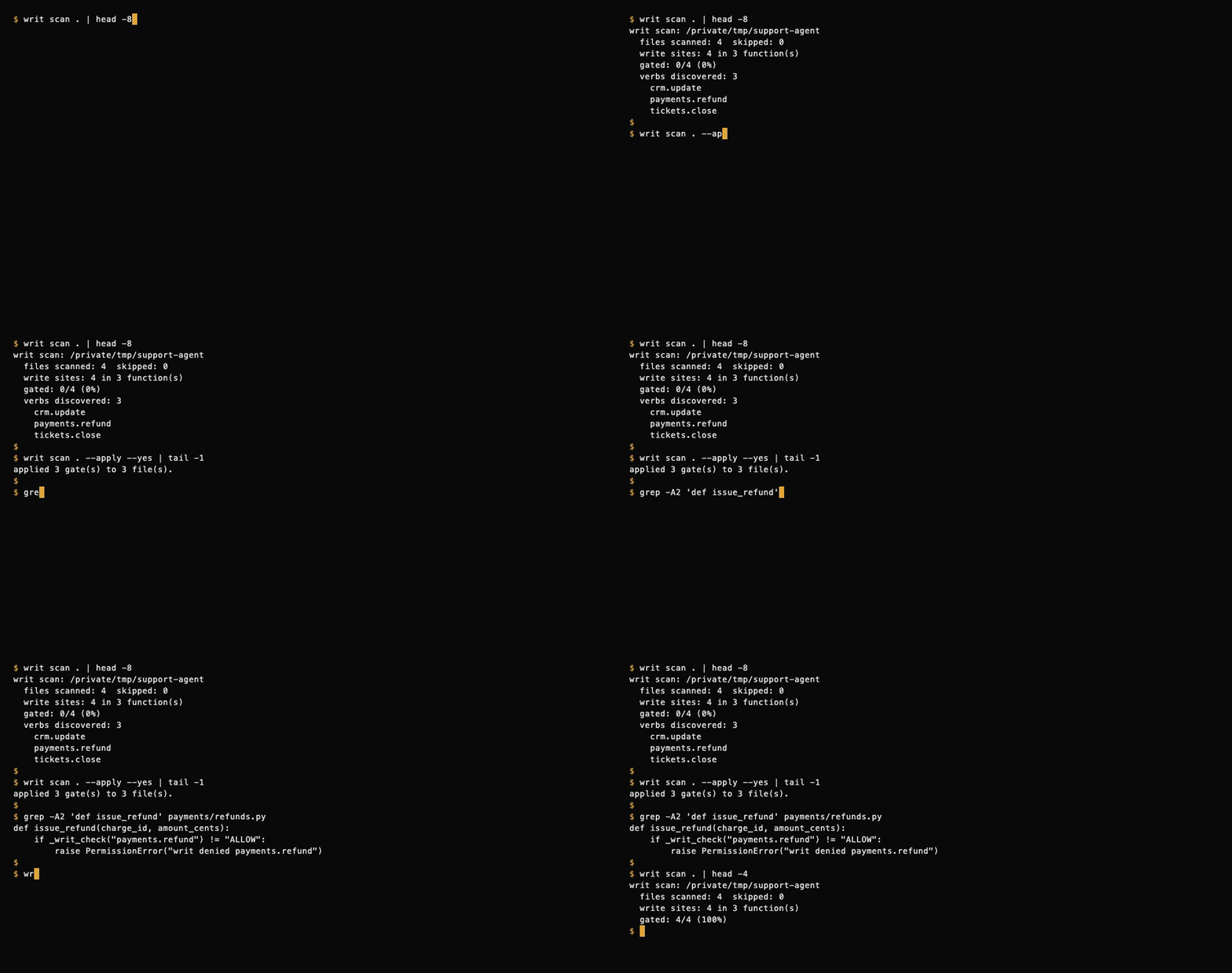
writ scan is local, deterministic, and free: it parses your code with Python's
ast module, makes no network calls, and needs no API key.
Install
pip install pywrit
Requires Python 3.9+. Installs the writ command and the pywrit Python client.
JavaScript/TypeScript devs: run the scanner with no Python setup via npm:
npx writ-scan .
The writ-scan package wraps the same scanner (including TS/JS support). On
first run it installs pywrit[polyglot] from PyPI using your Python 3.9+
(one-time); afterwards it starts instantly. See npm/ for details,
environment overrides (WRIT_PYTHON, WRIT_SCAN_NO_INSTALL), and the
install test.
60-second quickstart: scan → apply → gate
1. Scan. See which functions write, and how many of them are gated.
writ scan .
writ scan: /path/to/support-agent
  files scanned: 4  skipped: 0
  write sites: 4 in 3 function(s)
  gated: 0/4 (0%)
  verbs discovered: 3
    crm.update
    payments.refund
    tickets.close
It also prints a risk report (0-100, weighted by risk tier), writes the discovered
verbs to writ-policy.json, and shows the instrumentation it would add as a unified
diff. Nothing in your code changes yet. writ scan . --score prints just the risk report.
2. Apply. Insert a gate at the top of each writing function.
writ scan . --apply        # shows the diff, then asks before writing
writ scan . --apply --yes  # no prompt (e.g. in CI)
Each gated function now asks Writ before it writes, and fails closed:
def issue_refund(charge_id, amount_cents):
    if _writ_check("payments.refund") != "ALLOW":
        raise PermissionError("writ denied payments.refund")
    ...
Re-run writ scan . and you'll see gated: 4/4 (100%).
3. Gate. Get a free API key, load the discovered policy, and run your agent.
writ key --email you@example.com                  # free API key + tenant
export WRIT_API_KEY=writ_...                      # read by the inserted gate
export WRIT_SPONSOR=acme WRIT_AGENT=support-agent # optional: who is acting
writ scan . --push-policy --key "$WRIT_API_KEY"   # upload the discovered verb policy
Every gated write now gets ALLOW, DENY, or STEP_UP (a human sponsor must
approve), and every decision is written to your tenant's tamper-evident audit log:
writ receipts --key "$WRIT_API_KEY"       # latest receipts
writ verify-chain --key "$WRIT_API_KEY"   # verify the receipt hash chain
writ stream --key "$WRIT_API_KEY"         # tail decisions live
writ report --key "$WRIT_API_KEY"         # Agent Action Report
What writ scan detects
Python (.py) files, parsed with the stdlib ast (no extra dependencies):
| Category | Examples |
|---|---|
| Database | cursor.execute(...) / executemany / executescript (write SQL only; SELECT/WITH/... skipped), session.add / commit / delete / merge / flush |
| HTTP | requests.post / put / patch, client.delete(...), session.request(...) |
| Files | open(..., "w"/"a"/"x"/"+"), Path.write_text / write_bytes / unlink / rename, os.remove / rename / makedirs, shutil.rmtree / move / copy |
sendmail, send_message, send_email | |
| Queues | publish, produce, enqueue, queue.send(...) |
| AWS SDK | put_object, put_item, delete_item, upload_file, send_message, start_execution, ... |
- Each write is mapped to a verb such as
payments.refundorcrm.update, inferred from the file path and function name. - A function that already calls
writ_check(...)/_writ_check(...)counts as gated. - Skipped: tests, hidden directories, virtualenvs,
node_modules,dist,build. Use--exclude SUBSTR(repeatable) to skip more. - Not covered (review by hand): writes behind dynamically built SQL, third-party SDK
calls such as
stripe.Refund.create(...), deferred task queues, or shared clients several layers down. The risk report lists these gaps every time.
TypeScript / JavaScript (scan-only)
writ scan also finds write sites in TypeScript and JavaScript. It needs the
optional extra (tree-sitter based):
pip install 'pywrit[polyglot]'
writ scan .
Without the extra, the scanner prints a one-line hint and keeps going — Python scanning never needs it.
TS/JS is scan-only: findings are listed with verbs for your policy file,
but writ scan --apply never rewrites TS/JS files — gate those by hand.
Covered patterns: fetch/axios writes, fs writes, SQL through knex-style
clients, Prisma writes, and JS SDK calls such as stripe.refunds.create(...).
(Still not covered: the Python SDK equivalents like stripe.Refund.create(...)
— see "Not covered" above.)

GitHub Action
Scan every pull request for ungated write sites. Findings land as check
annotations on the exact file and line, plus a Markdown risk report in the
job summary. The check fails when an ungated finding meets your
fail-on-risk threshold (default: high).
- uses: actions/checkout@v4
- uses: AvenueDAdmin/pywrit@v0
  with:
    fail-on-risk: high   # high | medium | low | never
No API key needed. Full reference: docs/github-action.md · example workflow: examples/github-action/writ-scan.yml
Python client
from pywrit import WritClient

client = WritClient(api_key="writ_...")

result = client.check(
    sponsor_id="acme",
    agent_id="agent-7",
    verb="db.write",
    target="prod.customers",
    purpose="backfill region field",
)

if result.decision == "ALLOW":
    # result.auth_token is a short-lived token bound to this exact write
    perform_write(...)
elif result.decision == "STEP_UP":
    # a human sponsor must approve first: client.grant(...), then re-check
    ...
else:
    # DENY
    ...
No API key yet? Try the keyless sandbox:
client = WritClient()
client.sandbox({
    "sponsorId": "acme",
    "agentId": "agent-7",
    "verb": "demo_write",       # sandbox only allows demo_write ...
    "target": "demo-customers", # ... on targets starting with demo-
    "purpose": "trying the gate",
})
What's covered:
check(...): the gate.ALLOW/DENY/STEP_UP, plus a receipt every timeverify_token(...): validate anALLOWauth token (catches purpose drift)grant(...): human-sponsor approval for theSTEP_UPpathget_policy()/set_policy(...): manage the tenant policyrevoke(...)/reinstate(...)/revoked(): the kill switchreceipts()/receipt(id)/verify_chain()/stream_receipts(): the audit logsandbox(...): keyless trial, no API key required
CLI reference
writ check --key writ_... --sponsor acme --agent agent-7 \
  --verb db.write --target prod.customers --purpose "backfill region field"
writ policy --key writ_... --set payments.refund require_grant
writ revoke --sponsor acme --agent agent-7 --reason "runaway loop"   # kill switch (sponsor token)
writ grant --sponsor acme --agent agent-7 --verb payments.refund \
  --target ch_123 --purpose "approved refund"                        # STEP_UP approval (sponsor token)
Sponsor-token commands (revoke, reinstate, revoked, grant) read
--sponsor-token or WRIT_SPONSOR_TOKEN. Run writ --help for the full command list.
README badge
Show that your agent's writes are gated by Writ. Two flavors:
Static (works today, no API key) — same design, no live count:
[](https://withwrit.com)
Dynamic (live 30-day gated-write count from your audit log) — mint a badge token, then embed the snippet the API returns:
curl -s https://api.withwrit.com/v1/badge/tokens \
  -H "Authorization: Bearer writ_..." \
  -H "Content-Type: application/json" \
  -d '{}'
The dynamic endpoint ships with the gate — until it's live, POST /v1/badge/tokens
returns 404 and the static badge above is the one to use.
See badge/ for embed docs and the verification model (what the
badge proves — and what it doesn't).
Docs
Full docs: docs.withwrit.com · Quickstart: docs.withwrit.com/quickstart · Site: withwrit.com
License
MIT