Google Ads Transparency — API & MCP
透過 API 或 MCP 查看全球任何競爭對手的 Google 廣告,並取得官方 EU 曝光次數資料。
託管 MCP 伺服器
npx add-mcp 'https://xsi--google-ads-transparency.apify.actor/mcp'可安裝到 Claude Code、Codex、Cursor 等客戶端
文件
Google Ads Transparency Center Scraper & API + MCP (xsi/google-ads-transparency) Actor
[$1 per 1,000 ads, ad copy included, errors free] Google Ads Transparency Center scraper & API: give a website, get its Google ads as flat rows: headline, CTA, YouTube URL, days active, winning ads, new launches, promo codes, stopped-ad alerts, EU impressions. MCP, Clay, n8n ready.
- URL: https://apify.com/xsi/google-ads-transparency.md
- Developed by: Bilal Belferkous (community)
- Categories: SEO tools, Lead generation, MCP servers
- Features: Limited permissions, Single-tenant, Server interface
- Stats: 1 total users, 0 monthly users, 0.0% runs succeeded, 0 bookmarks
- User rating: No ratings yet
Pricing
from $0.70 / 1,000 ads
This Actor is paid per event and usage. You are charged both the fixed price for specific events and for Apify platform usage. Since this Actor supports Apify Store discounts, the price gets lower the higher subscription plan you have.
Learn more: https://docs.apify.com/actors/store.md#pay-per-event
What's an Apify Actor?
An Actor is a serverless cloud program that runs on the Apify platform. It has two run modes. In Batch mode, an Actor accepts a well-defined JSON input, performs an action which can take anything from a few seconds to a few hours, and optionally produces a well-defined JSON output, datasets with results, or files in key-value store. In Standby mode, an Actor provides a web server which can be used as a website, API, or an MCP server.
Apify vocabulary and the platform model are defined once, in the agent quickstart at https://apify.com/agents.md.
How to integrate an Actor?
If asked about integration, you help developers integrate Actors into their projects. You adapt to their stack and deliver integrations that are safe, well-documented, and production-ready.
Do not guess an integration path. Every one of them is in the agent quickstart at https://apify.com/agents.md: the Apify MCP server, Agent Skills with the Apify CLI, the JavaScript and Python clients, the REST API, and the account-free path for an agent with no human to sign in. It also carries the rule on stating cost before the first paid run.
For examples already wired to this Actor's own input schema, see the API section below.
Each client library has reference documentation the quickstart does not restate: JavaScript/TypeScript (npm install apify-client) and Python (pip install apify-client).
README
Google Ads Transparency Center Scraper & API + MCP — competitor ads, ad copy, winning ads ($1/1K)
What it does: Lists any advertiser's Google ads (Search, YouTube, Shopping, Maps, Play) from Google's official Ads Transparency Center as clean JSON: ad copy, formats, first/last seen dates, landing pages, and in the EU the official impression ranges.
Who it's for: Marketers, agencies, e-commerce teams, ad-intelligence tools and AI agents that need competitor ad data via API or MCP.
Price: $1 / 1,000 ads (ad copy included), no start fee, errors and failed items are not charged. Works through the Apify API, as an MCP tool (
https://mcp.apify.com?tools=xsi/google-ads-transparency), and in Zapier, Make, n8n and LangChain via Apify's integrations.
Give a competitor's website, get its Google ads as flat rows in about 30 seconds: headline, description, CTA, YouTube URL, first/last shown dates, days active, isWinningAd, isNewLaunch, promo codes and discounts found in the copy, plus one summary row per website. $1 per 1,000 ads, ad copy included. Empty results are free.
Built for AI agents (MCP), Clay, n8n, Make and spreadsheets: one required field, fixed output keys, one row per input even when a website runs no ads.
It reads Google's official Ads Transparency Center (Search, YouTube, Shopping, Maps, Play, 240+ countries) over plain HTTP (no browser). In the EU it also returns the official impression ranges per country and the audience-selection criteria published under the Digital Services Act (DSA).
Quick start
{ "domain": "nike.com" }
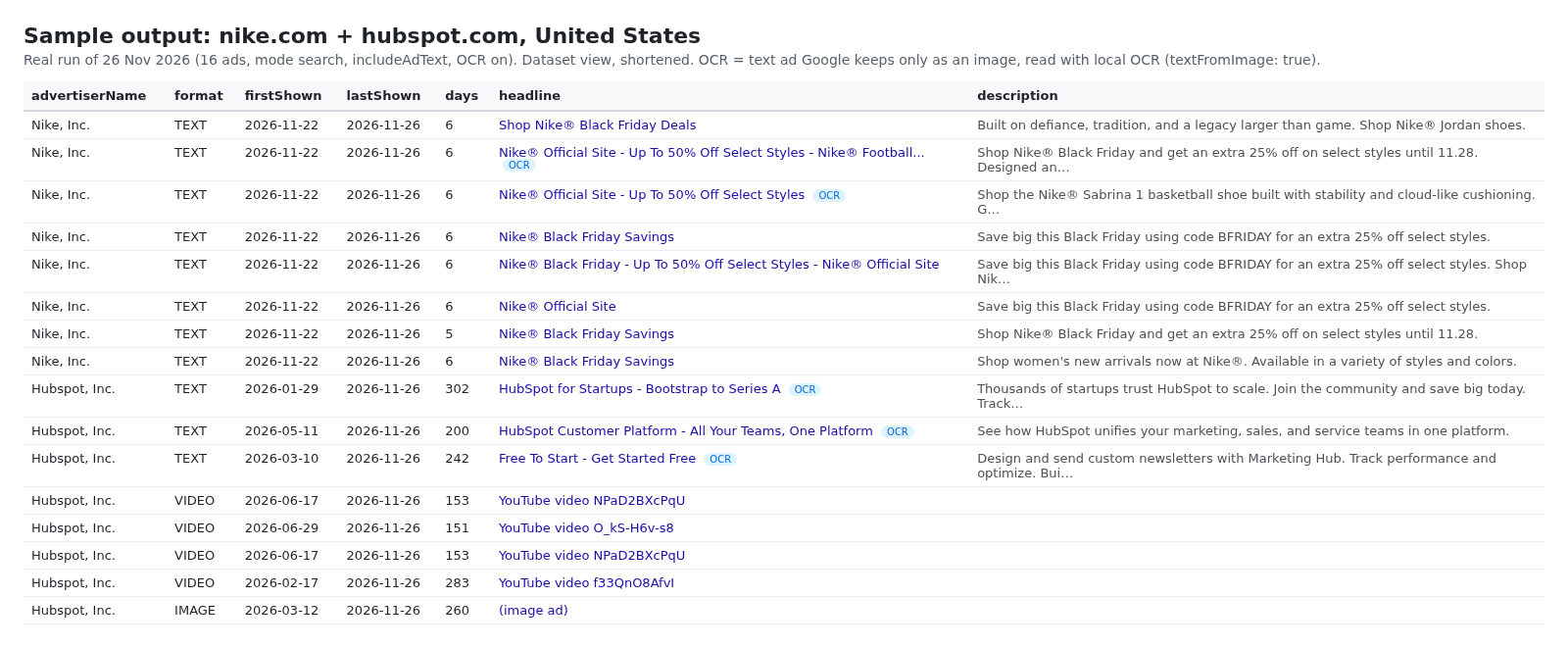
That is the whole input. Defaults: 25 most recent ads, all countries, ad copy on, OCR off (opt-in, see below), compact flat output, one free summary row per website. Add "regions": ["US"], a list in "domains", or "daysBack": 7 for a weekly delta.
Real row (run BSeD0It7oGrfE7OAp of 26 Nov 2026, build 2.1.7, nike.com, default input):
{
  "inputDomain": "nike.com", "status": "ok", "adId": "CR08634947816357101569",
  "advertiserId": "AR18378488041124659201", "advertiserName": "Nike Retail BV", "domain": "nike.com",
  "format": "TEXT", "headline": "Nike Black Friday Days Are On - Up To 40% Off Selected Styles",
  "description": "Nike Black Friday Days Are Here. Up To 40% Off Selected Styles. Ends On December 1st. Discover Products Online At Nike.com. Shop The Official Nike Site.",
  "cta": null, "displayUrl": "www.nike.com/", "landingUrl": "https://www.nike.com/", "landingUrlSource": "display_url",
  "youtubeUrl": null, "imageUrl": null,
  "firstShownDate": "2026-11-01", "lastShownDate": "2026-11-26", "daysActive": 26, "isActive": true, "isWinningAd": false,
  "isNewLaunch": false, "detectedPromoCodes": null, "detectedDiscounts": ["Up To 40% Off"],
  "region": "ANYWHERE", "regionImpressionsMin": null, "regionImpressionsMax": null, "euImpressionsMin": null, "euImpressionsMax": null,
  "textFromImage": false,
  "transparencyUrl": "https://adstransparency.google.com/advertiser/AR18378488041124659201/creative/CR08634947816357101569",
  "adsCount": null, "error": null
}
After the ads of each website comes one free summary row (run kJef56BYFEegxpKxJ, ahrefs.com, US; topCtas, topLandingUrls and longestRunningAds recomputed from that run's ads with the new summary code):
{ "inputDomain": "ahrefs.com", "status": "domain_summary", "region": "US", "adsReturned": 25, "activeAdsCount": 23,
  "winningAdsCount": 21, "newLaunchesCount": 0, "formatSplit": { "TEXT": 17, "IMAGE": 0, "VIDEO": 8 }, "oldestAdDays": 429,
  "newestFirstShownDate": "2026-11-11", "totalAdsReportedMin": 100, "totalAdsReportedMax": 200,
  "topEuCountries": null, "promoCodes": null, "discounts": null, "topCtas": null,
  "topLandingUrls": [{ "url": "https://www.ahrefs.com", "count": 6 }, { "url": "https://www.ahrefs.com/ai-visibility/index", "count": 1 }, …],
  "longestRunningAds": [{ "adId": "CR18142203799769448449", "format": "TEXT", "headline": "See Why Ahrefs Is Better", "daysActive": 428, "firstShownDate": "2025-09-24", … }, …] }
A website without ads (or that failed) still gets one free row: { "inputDomain": "…", "status": "no_ads_found", "adsCount": 0, "error": "…" }. Other statuses: rate_limited, error, not_processed (your cost or item limit was reached first).
Use cases
- Competitor ad monitoring: give a website (
nike.com) or a list of domains and get the latest Google ads as flat JSON — headlines, descriptions, YouTube URLs, first/last shown dates, days active. - Google Ads library / Ads Transparency Center API: there is no official API for the Transparency Center. This Actor is the API (plus CSV/Excel) for Search, YouTube, Shopping, Maps and Play ads, in 240+ countries.
- Winning ads and new launches:
isWinningAd(still running after 30+ days) andisNewLaunch/daysBackfor weekly deltas;monitormode returns only new and stopped ads. - Clay, n8n, Make, Zapier: one required input field, stable keys, one free
no_ads_foundor summary row per website, so a "1 row = 1 run" enrichment is safe. - AI agents (MCP): a dedicated Streamable HTTP MCP endpoint, plus the Apify MCP server, with tools to find an advertiser, list ads, get details and watch for new ads.
Measured speed and cost per run (26 Nov 2026)
Default input (OCR off since 2.1.14, so the price is the ads only): {"domain":"nike.com"} took 29.1 s at 256 MB and returned 25 ads (7 with headline from Google's preview) + 1 free summary row; billed events: 25 ad, 0 ad-text = $0.025 on the FREE plan, $0.0175 on GOLD (run oxr6VSx5a1yHu9c3B).
With OCR turned on ("ocrImageAds": true, build 2.1.7, 1 GB):
| Input | Run time | Ads | You pay (FREE plan) | Platform cost (paid by the developer) |
|---|---|---|---|---|
nike.com | 54.7 s | 25 (15 with headline, 7 by OCR) | $0.032 | $0.0041 |
hubspot.com, US | 66.2 s | 25 (1 with headline) | $0.025 | $0.0048 |
adidas.com, US | 63.6 s | 25 (7 with headline, 1 by OCR) | $0.026 | $0.0048 |
5 websites in domains, US | 162.0 s | 100 + 4 free summary rows + 1 free no_ads_found row | $0.120 | $0.0130 |
| A website with no ads | 4.6 s | 1 free no_ads_found row | $0 | $0.0005 |
Run time depends mostly on how fast Google serves the ad previews at that moment: the same inputs took 23–61 s (nike) and 114–213 s (5 websites) in other runs that day. Headline coverage varies the same way, because ad copy is fetched within a time budget so a run never hangs. Need speed over copy? "includeAdText": false returns the ads with dates and flags in seconds: hubspot.com, 50 ads, 5.6 s (run bzOlb2F3EECTcefw6, 256 MB, OCR off).
Video and image ads have no text headline in Google's preview; video ads give youtubeUrl when Google exposes it.
Fields (stable keys and types)
inputDomain, status, adId (stable CR… ID, use it to de-duplicate), advertiserId, advertiserName, domain, format (TEXT/IMAGE/VIDEO), headline, description, cta, displayUrl, landingUrl, landingUrlSource, youtubeUrl, imageUrl, firstShownDate, lastShownDate (YYYY-MM-DD), daysActive (integer), isActive (seen in the last 2 days), isWinningAd (still running and running for at least winningAdMinDays, default 30 — a heuristic: advertisers keep ads that work), isNewLaunch (first shown in the last 7 days), detectedPromoCodes (codes written after a "code" keyword in 8 languages, e.g. ["BFRIDAY"]) and detectedDiscounts (e.g. ["Up To 40% Off"]; "100% cotton" or "24/7" are not discounts) — both null when none, read from the copy only, never guessed, region, regionImpressionsMin/Max and euImpressionsMin/Max (EU/EEA with includeDetails), textFromImage, transparencyUrl, adsCount and error (status rows only). Every key is always present (null when unknown). Set compactOutput: false to also get every raw field: all variants, sitelinks, per-country EU impressions and platforms, audience selection, topic, payer.
Summary row (status: "domain_summary", free, one per website & country, also saved as the DOMAIN_SUMMARY record): adsReturned, activeAdsCount, winningAdsCount, newLaunchesCount, formatSplit, oldestAdDays, newestFirstShownDate, totalAdsReportedMin/Max (what Google announces), topEuCountries (with includeDetails), promoCodes, discounts, topCtas (most used call-to-action buttons with counts), topLandingUrls (the pages they send ad traffic to, with counts), longestRunningAds (the 3 live ads running the longest: the copy they keep paying for). Filter on status to keep only ads or only summaries.
Monitor rows: alert: "NEW_AD" for each new ad (billed as a new-ad alert) and alert: "STOPPED_AD" (free, stoppedReason) for each ad that was running at the previous check and no longer is.
Inputs
| Field | Default | What it does |
|---|---|---|
domain | — | One website (nike.com), advertiser name, AR… ID or Transparency Center URL |
domains | — | Several of the above |
regions | all countries | ISO codes, e.g. ["US","GB","DE"] |
maxAdsPerQuery | 25 | Exact cap per website and country |
includeAdText | true | Ad copy from Google's preview (included in the ad price) |
ocrImageAds / ocrTimeBudgetSecs | false / 40 | Opt-in local OCR for image-only text ads (+$0.001 per text found, 1 GB); seconds of OCR per website |
onlyNewSince / daysBack | — | Delta mode: only ads first shown since a date / in the last N days (older running ads are skipped, not billed) |
winningAdMinDays | 30 | Threshold for isWinningAd |
compactOutput | true | Flat rows only |
includeDomainSummary | true | One free summary row per website & country |
alertOnStopped | true | Monitor mode: also report ads that stopped (free) |
includeDetails | false | EU DSA details, billed as ad-detail instead of ad |
mode | search | Also advertiser (does a website advertise, how many ads per country), details (ad URLs), monitor (alerts on new and stopped ads, schedule it) |
Every input is validated before anything is fetched. Errors name the field and the expected format, e.g. "daysBack" must be a whole number of days between 1 and 3650, e.g. 7 (got 0).
Pricing (pay per event)
| Event | FREE plan | BRONZE | SILVER | GOLD+ |
|---|---|---|---|---|
| Ad (primary event, ad copy included) | $0.001 | $0.0009 | $0.0008 | $0.0007 |
| Ad with EU DSA details (replaces Ad) | $0.0015 | $0.0013 | $0.0012 | $0.001 |
OCR ad copy (opt-in ocrImageAds, only when text is found) | $0.001 | $0.001 | $0.001 | $0.001 |
| Media file saved | $0.002 | |||
| Advertiser record (advertiser mode) | $0.002 | |||
| Monitored target checked (monitor mode) | $0.001 | |||
| New ad alert (monitor mode, details + copy included) | $0.005 | |||
| MCP tool call (plus the ads it returns) | $0.003 |
Never billed: empty results, status rows, summary rows, stopped-ad rows, duplicates, failed runs, invalid input. No start fee: a run on a website without ads costs you $0 (run h4dbATcj0vjr0bviz: 0 events charged). The "$0.01 minimum" you may see in Apify Console is only the lowest Max cost per run you can set, not a fee. Your Max cost per run is checked before each paid request. Compute and proxy are included for normal runs; on the MCP endpoint Apify bills you the small Standby usage, as for any Standby Actor.
Use it from AI agents (MCP)
Claude Desktop / Cursor (mcpServers config):
{ "mcpServers": { "google-ads-transparency": { "url": "https://xsi--google-ads-transparency.apify.actor/mcp", "headers": { "Authorization": "Bearer <APIFY_TOKEN>" } } } }
ChatGPT (connectors / developer mode) and other clients: add a remote MCP server with URL https://xsi--google-ads-transparency.apify.actor/mcp and header Authorization: Bearer <APIFY_TOKEN>. Or use Apify's generic MCP server (https://mcp.apify.com) and add the Actor xsi/google-ads-transparency.
Tools: find_advertiser, list_ads (max 50), get_ad_details (EU impressions, targeting), new_ads_since.
MCP answers are built for agents: a summary (active, winning and new ads, formats, oldest ad, promo codes, discounts) plus token-lean rows (null and false keys left out, compact JSON), ad copy fetched within about 6 seconds, OCR off unless you pass includeOcr: true. Pass verbose: true to get every flat key. list_ads waits for ad copy only until the call reaches about 10 s. Measured on 26 Nov 2026 at 15:49 Brussels time (build 2.1.10): five timed calls answered in 4.5–8.3 s (nike.com US 4.5 s, hubspot.com 5.1 s, semrush.com 5.0 s, nike.com GB 6.4 s, adidas.com 8.3 s), plus 0.6–3.5 s for initialize; text answers are about 8.6 KB, 54% smaller than in v2.0. When Google is slow to list ads it takes longer: a few minutes earlier (15:45–15:47, build 2.1.9, before this 10 s limit), five calls took 12.4–15.6 s. Headlines are often still pending at that point (adCopyPending tells the agent).
Prompt to paste:
Use the google-ads-transparency tools. For each of these competitors: nike.com, adidas.com, puma.com, list their Google ads in the US (limit 25). Return a table of the ads with isWinningAd = true (running 30+ days): competitor, format, headline, description, daysActive, transparencyUrl. Then summarise in 5 bullets which offers and angles they keep running.
Clay (4 steps)
- Connect Apify once: Clay Settings → Connections → Add connection → Apify, paste your Apify API token.
- In a table with a website column, Add enrichment → search Apify → Run Apify Actor → Actor
xsi/google-ads-transparency. - Input Data:
{ "domain": /Website, "regions": ["US"], "maxAdsPerQuery": 10 }(type/to insert the column; the key stays quoted, the token does not). - Run 5 rows first (auto-update off), open a result cell and click
status,headline,daysActive,isWinningAd,transparencyUrlto make columns. A company without ads returns one freeno_ads_foundrow, sostatus == "ok"means "runs Google ads". Cost: about $0.01 per company at 10 ads, billed on your Apify account.
Part of xsi Ad Intelligence
- Only need "does this company run Google Ads?" for a Clay or CRM list? Use Google Ads Signals for Clay — xsi/ad-signals-clay: one domain in, one flat row out (is_running_ads, ad counts, formats, winning and new ads, advertiser, Transparency link). $3 per 1,000 domains on the Free plan, $2 on Gold; technical errors are free.
- Need the ads themselves (copy, YouTube, EU impressions, targeting, monitoring, MCP)? Stay here.
n8n and Make
A ready-to-import n8n workflow (weekly trigger → this Actor for 5 competitors with daysBack: 7 → keep daysActive >= 30 → Slack) is in the GitHub repository google-ads-transparency-mcp (folder workflows/). It uses a plain HTTP Request node:
POST https://api.apify.com/v2/acts/xsi~google-ads-transparency/run-sync-get-dataset-items
Authorization: Bearer <APIFY_TOKEN>
{ "domains": ["competitor1.com", "competitor2.com"], "regions": ["US"], "daysBack": 7 }
Make: module Apify → Run an Actor (Actor xsi/google-ads-transparency, Run synchronously on) → Apify → Get Dataset Items → Filter isWinningAd = true → Slack / Google Sheets / Notion.
API (curl):
curl -X POST "https://api.apify.com/v2/acts/xsi~google-ads-transparency/run-sync-get-dataset-items" \
  -H "Authorization: Bearer <APIFY_TOKEN>" -H "Content-Type: application/json" \
  -d '{"domain":"nike.com","regions":["US"]}'
How it compares (honest, data of 26 Nov 2026)
Read that day from the Apify Store API (users, rating, prices) and each competitor's README. "—" = not mentioned in its README.
| This Actor | silva95gustavo | lexis-solutions | memo23 | |
|---|---|---|---|---|
| Users (total / last 30 days) | new | 6,149 / 1,297 | 2,377 / 138 | 614 / 139 |
| Rating (reviews) | none yet | 4.97 (20) | 4.82 (31) | 5.0 (6) |
| Price per 1,000 ads, FREE plan → GOLD | $1.00 → $0.70, copy included | $1.90 → $0.90 | $1.48 → $0.77 | $2.00 + $0.005 per run |
| EU impressions per country | $1.50 → $1.00 per 1,000 | included | included | included |
| Default memory | 256 MB (1 GB only if you turn OCR on) | 1 GB | 1 GB | 512 MB |
| Promo codes, discounts, new launches, summary row, stopped-ad alerts | ✅ | — | — | — |
| OCR of image-only text ads | ✅ opt-in | ✅ | — | — |
| Flat rows + one row per input (no ads / errors) | ✅ | — | — | — |
| Delta mode / new-ad alerts | ✅ daysBack, onlyNewSince, monitor (new + stopped) | — | — | ✅ |
| Own MCP endpoint (+ Apify MCP server) | ✅ 4 tools | Apify MCP server | Apify MCP server | Apify MCP server |
| Runs that did not succeed, last 30 days (Apify public stats) | not enough public runs yet | 2.1 % | 1.4 % | 5.7 % |
| Track record | 1 day | 3 years, 8.6 M runs | 911 k runs | 103 k runs |
Choose this Actor for agent- and workflow-ready flat output, ad copy included in the lowest FREE-plan price, winning-ad and delta fields, and billing that never charges empty or failed inputs. Choose silva95gustavo or lexis-solutions if you want a proven track record and many reviews, or EU impressions included in every ad at no extra price.
Questions people ask
How do I see all the Google ads a competitor is running?
Enter the competitor's domain, name or advertiser ID (AR…). The Actor returns one row per ad from the Ads Transparency Center, with copy, format, dates and landing page.
Is there an API for the Google Ads Transparency Center?
Google has no official public API for it. This Actor reads the public Transparency Center pages and returns JSON through the Apify API or as a remote MCP server (https://xsi--google-ads-transparency.apify.actor/mcp).
How do I get Google ad impressions by country?
For EU and EEA countries Google publishes impression ranges per country and per platform under the Digital Services Act. Request ad details and the ranges appear in the row. They are not published for the US or the UK.
How do I get alerted when a competitor launches new Google ads?
Schedule the Actor with the new-ads mode. You pay only for ads first seen since the last check.
How much does it cost to scrape Google Ads Transparency?
$1 per 1,000 ads, ad copy included, with no start fee. Empty results and failures are not charged.
Can ChatGPT, Claude or my own AI agent use this tool?
Yes. This Actor has its own remote MCP endpoint, https://xsi--google-ads-transparency.apify.actor/mcp, and is also available through Apify's MCP server (https://mcp.apify.com?tools=xsi/google-ads-transparency). Authenticate with Authorization: Bearer <your Apify token>.
Is there a free trial?
Apify's free plan includes monthly platform credit, which covers many runs at these prices. You only pay for results; failures are free.
Comparison with alternatives
| Tool | Price | Start fee | Users (30 days) |
|---|---|---|---|
| xsi/google-ads-transparency (this Actor) | $1 / 1,000 ads (ad copy included) | no | new |
| scrapesage/google-ads-transparency-scraper | $2 / 1,000 ads (+$2/1K for ad text) | no | 1,635 |
| silva95gustavo/google-ads-scraper | $1.90 / 1,000 ads | $0.00005 | 1,296 |
| solidcode/ads-transparency-scraper | $1.50 / 1,000 rows | $0.001 | 529 |
Competitor prices and 30-day user counts: public Apify Store API, checked 26 Nov 2026. Prices change, so check each page before buying.
Keywords: google ads transparency api, competitor google ads, google ads library, ad spy tool, ads transparency center scraper, google ads mcp, DSA ad repository
FAQ
Is there an official Google Ads Transparency Center API? No. Google publishes no API for the Ads Transparency Center (its Google Ads API only covers your own accounts), and its BigQuery dataset only covers ads shown in the EU/EEA and Turkey, without ad copy. This Actor is the API: send a domain, a brand name or an advertiser ID, get JSON, CSV or Excel back, by API call, schedule, webhook or MCP.
Is this a Google Ads library scraper? Yes. "Google ads library" and "Google Ads Transparency Center" are the same public register. This Actor scrapes it for Search, YouTube, Shopping, Maps and Play ads, in 240+ countries.
Can I scrape YouTube ads? Yes. Set Platform to YOUTUBE (or Format to VIDEO) to get a competitor's YouTube ads with the youtubeVideoId, youtubeUrl, dates and, in the EU, impressions per country.
How much does it cost? $1 per 1,000 ads with ad copy ($0.70 on Apify GOLD plans and above), $1.50 per 1,000 ads with EU details, +$0.001 per ad read by OCR only if you turn OCR on (ocrImageAds, off by default). No start fee, no rental, no subscription. Empty results, duplicates and failed runs are free. Apify's free plan ($5 of credit every month) covers about 5,000 ads.
How do I monitor a competitor's new Google ads? Use monitor mode with a schedule (daily or weekly). The first run records the current ads; each next run returns only the ads first shown since (NEW_AD), plus the ads that stopped running (STOPPED_AD, free), ready for Slack, e-mail, n8n, Make or Zapier.
Does a run on a website without ads cost anything? No. You get one no_ads_found row and no event is charged (tested on 26 Nov 2026: run h4dbATcj0vjr0bviz). That makes Clay "1 row = 1 run" safe: companies that don't advertise cost you nothing. In advertiser mode the answer "this website runs no ads" is the product itself and is billed as one advertiser record ($0.002).
How accurate is the OCR? It only runs on text ads that Google keeps as a picture of the Search result, and it reads them by layout (blue headline, grey description, sitelink rows). In 14 test runs on 26 Nov 2026 it read 122 of 150 such images (81 %); it takes about 0.5–10 s per image depending on platform load, OCR is off by default; when you turn it on ("ocrImageAds": true) it stops after 40 s per website (ocrTimeBudgetSecs) and the rest keep headline: null (not billed). English, German, French, Spanish, Italian, Portuguese, Dutch and Polish models are bundled and picked from the country you search; other Latin-script languages use the English model and can lose accents. In countries whose ads are mostly in another script (Japan, China, Korea, Russia, Greece, Israel, Arab countries, Thailand…) OCR is skipped, and any read below 60 % confidence is dropped: you get null and pay nothing for it rather than garbled text. Every OCR row says textFromImage: true and gives ocrConfidence, so you can filter.
Can it download the videos? It saves the thumbnail of every YouTube video ad and gives the official youtubeUrl and youtubeVideoId. It does not download the video file itself: YouTube's Terms of Service forbid downloading videos outside YouTube, and the raw stream is not available over plain HTTP. Ad images, image renderings of text ads and Shopping product images are downloaded in full.
How does it handle Google's rate limits? Google throttles fast traffic. Requests are paced, retried with exponential backoff and random jitter, and moved to a new Apify Proxy session (new IP) when Google refuses one; each run uses its own proxy sessions. Parallelism adapts on its own: it halves on each refusal and climbs back after a run of successes. Google's CAPTCHA page is treated as a refusal and never solved. If Google still blocks a run, it stops with a clear message, keeps the results it already has and does not bill the rest. If a run is restarted by the platform, results already returned are skipped and never billed twice. Keep the default Residential proxy group: Google often blocks shared datacenter IPs.
Is it legal? The Ads Transparency Center is a public transparency tool from Google. The Actor reads only public data, needs no login and collects no personal data. You are responsible for how you use the results.
Why are impressions empty for the US or UK? Google publishes impression ranges only for ads shown in the EU/EEA, because the DSA requires it. Elsewhere you still get dates, formats and creatives.
Can I search names in non-Latin scripts? Yes (Hebrew, Greek, Cyrillic, Japanese…). Google matches names by prefix. If you get nothing, try the legal name in Latin script or the website domain.
What is "paidBy"? The entity Google lists as paying for the ad. It can be an agency or a local entity, for example "Nike Retail BV" for Nike ads in Europe.
Why do recent ads have no impressions yet? Google publishes the EU numbers with a delay of about 90 days. You get impressionsPendingUntil with the date Google announces, rather than an unexplained empty field.
Do you return the headline, description or landing page of the ad? Yes, by default: headline, description, visible URL, call-to-action and YouTube URL are read from Google's official ad preview and included in the $0.001 ad price. Text ads that Google keeps only as an image of the Search result keep headline: null by default; turn on ocrImageAds to read them with local OCR (textFromImage: true, +$0.001 only when text is found). Stylised image banners and HTML5 ads are not OCR'd: their copy stays null rather than guessed. The real click-through URL is not published by the Transparency Center, so we don't invent one: landingUrl is the visible URL in https:// form and landingUrlSource says so.
Can I search by keyword (for example "family lawyer")? No. The Transparency Center only searches by advertiser name or website, not by words inside ads. Search by the competitors' websites or names instead.
Why did I get 0 results? The status message tells you why: no advertiser with that name, or Google shows 0 ads for that country, date range, format or platform. Nothing is billed. OUTPUT shows the total Google announces for each query.
Does it see age-restricted ads? No. They require a signed-in Google account, and the Actor never logs in.
Data freshness? Live. Every run queries the Transparency Center at that moment.
Changelog
- 2.1.15 (26 Nov 2026): free summary row now has
topCtas,topLandingUrlsandlongestRunningAds(also in the MCP summary). OCR fix for display URLs read from ad images: misreads seen in real runs (Owww.semrush.com,Ip.similarweb.com) are now corrected towww.semrush.comandlp.similarweb.com, checked against the advertiser's domain. README: Use cases section. Prices unchanged. - 2.1.14 (26 Nov 2026): OCR of image-only text ads is now opt-in (
ocrImageAdsdefaultfalse): default runs use 256 MB and are billed for ads only (noad-textevents). MCPserverInfo.versionnow follows the build version. Prices unchanged. - 2.1.13 (26 Nov 2026): README only: link to the new companion Actor xsi/ad-signals-clay (one row per company for Clay). Code unchanged.
- 2.1.10 (26 Nov 2026): MCP
list_adsstops waiting for ad copy when the call reaches about 10 s. - 2.1 (26 Nov 2026):
isNewLaunch,detectedPromoCodes,detectedDiscountson every ad row; one freedomain_summaryrow per website (also theDOMAIN_SUMMARYrecord); monitor mode reports stopped ads (STOPPED_AD, free); MCP answers are token-lean with a summary, ad copy within ~6 s and OCR opt-in; OCR engine can run several images in parallel when the run has more than one CPU core (ocrWorkers). Prices unchanged. - 2.0 (26 Nov 2026): flat output, one row per input,
domain/domains, delta mode (daysBack,onlyNewSince),isWinningAd, ad copy included in the ad price, OCR for image-only text ads, lower prices on BRONZE/SILVER/GOLD.
Keywords: Google Ads Transparency scraper, Google Ads Transparency API, Google Ads Transparency MCP server, Google ads scraper, Google ads library, Ads Transparency Center, competitor ads, Google ads monitor, YouTube ads scraper, EU DSA ad impressions.
Actor input Schema
domain (type: string):
One website whose Google ads you want, e.g. "nike.com" (no https:// needed). Also accepts an advertiser name ("HubSpot"), an advertiser ID ("AR16735076323512287233") or a URL copied from adstransparency.google.com. Use this OR "domains".
domains (type: array):
Several websites at once, e.g. ["nike.com", "adidas.com", "puma.com"]. Same formats as "domain". Each website gets at least one output row (status "no_ads_found" when it runs no ads, never billed).
regions (type: array):
ISO 3166-1 alpha-2 country codes, e.g. ["US"], ["GB", "DE"]. Empty = all countries ("anywhere"). EU/EEA countries also return Google's official impression ranges with includeDetails.
maxAdsPerQuery (type: integer):
Exact cap per website and country; the run never returns or bills more. Empty = 25 (a default run takes about 15–40 s), or 500 ads scanned per check in monitor mode.
includeAdText (type: boolean):
Reads Google's official ad preview: headline, description, visible URL, call-to-action and the YouTube URL of video ads. Included in the $0.001 ad price. Text ads that Google keeps only as an image stay without copy unless you turn on OCR (next option, opt-in).
onlyNewSince (type: string):
Delta mode: only ads whose first shown date is on or after this date, e.g. "2026-11-01". Older ads that are still running are skipped and not billed. Stable key for de-duplication: adId.
daysBack (type: integer):
Delta mode, relative: e.g. 7 = only ads first shown in the last 7 days (ideal for a weekly schedule). If both are set, the later of onlyNewSince and daysBack wins.
winningAdMinDays (type: integer):
isWinningAd is true when an ad is still running (seen in the last 2 days) and has been running for at least this many days. Advertisers keep ads that convert, so long-running ads are a common proxy for winners (a heuristic, not a Google metric).
compactOutput (type: boolean):
true = one flat row per ad with fixed keys (inputDomain, adId, format, headline, description, cta, landingUrl, firstShownDate, lastShownDate, daysActive, isWinningAd, isNewLaunch, detectedPromoCodes, detectedDiscounts…), ideal for AI agents, Clay, n8n, Make and Sheets. false = same keys plus every raw field (all variants, EU DSA breakdowns, sitelinks).
includeDomainSummary (type: boolean):
Adds one free row per website & country (status "domain_summary") after its ads: adsReturned, activeAdsCount, winningAdsCount, newLaunchesCount, formatSplit, oldestAdDays, topEuCountries (with includeDetails), promoCodes, discounts. Never billed. Also saved as the DOMAIN_SUMMARY record. Ideal for Clay (1 row = 1 website) and AI agents.
mode (type: string):
search = list ads; advertiser = find advertiser IDs; details = full data for ad URLs; monitor = only ads first shown since the previous run ($0.001 per target checked; the first run stores a baseline and sends no alerts).
queries (type: array):
Optional extra inputs merged with domain/domains: advertiser names in any script (HubSpot, 株式会社ルミネ), advertiser IDs (AR…), or URLs copied from the Ads Transparency Center (ad URLs are required in details mode). One per line.
includeDetails (type: boolean):
Adds per-country impressions (EU/EEA), per-platform breakdown, audience-selection criteria, topic and all variants. Billed as 'ad-detail' instead of 'ad'. In monitor mode, new-ad alerts always include these details (included in the alert price).
ocrImageAds (type: boolean):
Off by default (fast, 256 MB, price = ads only). Google stores some Search ads only as a picture of the ad (no preview text). Turn this on to read their headline and description with local OCR (no external service): rows get textFromImage: true and are billed 'ad-text' ($0.001) only when readable text is found (confidence ≥ 60 %, Latin scripts). Runs with OCR on get 1 GB of memory automatically (about 5 s per image).
ocrTimeBudgetSecs (type: integer):
OCR is CPU-heavy (about 5 s per image at the default 1 GB). After this many seconds per website & country, remaining image-only ads are returned without OCR (headline null, not billed) so the run stays fast; the number skipped is in OUTPUT.timing.ocrSkippedForSpeed. 0 = no limit.
ocrWorkers (type: integer):
How many images are read by OCR at the same time. Empty = automatic: one per CPU core (on Apify 4 GB of memory = 1 core, so 1 worker at the default 1 GB). More workers than cores is not faster (measured on 26 Nov 2026). Each worker uses about 40–90 MB.
downloadMedia (type: boolean):
Saves each ad's image (or rendering), Shopping product images and the YouTube thumbnail of video ads to the run's key-value store and returns public links in media[]. $0.002 per file actually saved (re-used files are free). YouTube video files themselves are not downloaded (YouTube's Terms forbid it): you get the thumbnail + the YouTube link.
maxMediaPerAd (type: integer):
Upper limit of files saved per ad when downloading media.
format (type: string):
Only this ad format.
platform (type: string):
Only ads shown on this Google platform.
dateFrom (type: string):
Only ads shown on or after this date.
dateTo (type: string):
Only ads shown on or before this date.
maxItems (type: integer):
Hard cap across all queries (together with your 'Max cost per run').
maxAdvertisersPerQuery (type: integer):
When a query is a name, how many matching advertisers to include. Empty = 3 in search/advertiser mode, 1 in monitor mode (each monitored advertiser is a billed check).
monitorKey (type: string):
Separate memory per watch list, e.g. 'client-a'.
alertOnStopped (type: boolean):
Monitor mode: besides NEW_AD alerts, writes one STOPPED_AD row for each ad that was running at the previous check and is no longer running (last shown over 2 days ago, or gone from a complete scan). Free: included in the $0.001 check.
maxConcurrency (type: integer):
Parallel requests. Keep low; Google rate-limits aggressively.
proxyConfiguration (type: object):
Residential (default) is what Google's Transparency Center tolerates; it is used only for the small Transparency Center requests (about 1 KB per ad). Ad previews and media files go through Apify datacenter proxy, so the proxy cost stays tiny. Datacenter-only works too but Google often blocks shared datacenter IPs with CAPTCHA pages.
assetProxyConfiguration (type: object):
Optional. By default ad previews, images and thumbnails use Apify datacenter proxy when the main proxy is Residential (much cheaper, same data).
Actor input object example
{
  "domain": "nike.com",
  "regions": [
    "US"
  ],
  "includeAdText": true,
  "winningAdMinDays": 30,
  "compactOutput": true,
  "includeDomainSummary": true,
  "mode": "search",
  "queries": [],
  "includeDetails": false,
  "ocrImageAds": false,
  "ocrTimeBudgetSecs": 40,
  "downloadMedia": false,
  "maxMediaPerAd": 3,
  "format": "ALL",
  "platform": "ALL",
  "maxItems": 1000,
  "alertOnStopped": true,
  "maxConcurrency": 2,
  "proxyConfiguration": {
    "useApifyProxy": true,
    "apifyProxyGroups": [
      "RESIDENTIAL"
    ]
  }
}
Actor output Schema
results (type: string):
No description
summary (type: string):
No description
domainSummary (type: string):
No description
API
You can run this Actor programmatically using our API. Below are code examples in JavaScript, Python, and CLI, as well as the OpenAPI specification and MCP server setup.
JavaScript example
import { ApifyClient } from 'apify-client';

// Initialize the ApifyClient with your Apify API token
// Replace the '<YOUR_API_TOKEN>' with your token
const client = new ApifyClient({
    token: '<YOUR_API_TOKEN>',
});

// Prepare Actor input
const input = {
    "domain": "nike.com",
    "regions": [
        "US"
    ],
    "proxyConfiguration": {
        "useApifyProxy": true,
        "apifyProxyGroups": [
            "RESIDENTIAL"
        ]
    }
};

// Run the Actor and wait for it to finish
const run = await client.actor("xsi/google-ads-transparency").call(input);

// Fetch and print Actor results from the run's dataset (if any)
console.log('Results from dataset');
console.log(`💾 Check your data here: https://console.apify.com/storage/datasets/${run.defaultDatasetId}`);
const { items } = await client.dataset(run.defaultDatasetId).listItems();
items.forEach((item) => {
    console.dir(item);
});

// 📚 Want to learn more 📖? Go to → https://docs.apify.com/api/client/js/docs
Python example
from apify_client import ApifyClient

# Initialize the ApifyClient with your Apify API token
# Replace '<YOUR_API_TOKEN>' with your token.
client = ApifyClient("<YOUR_API_TOKEN>")

# Prepare the Actor input
run_input = {
    "domain": "nike.com",
    "regions": ["US"],
    "proxyConfiguration": {
        "useApifyProxy": True,
        "apifyProxyGroups": ["RESIDENTIAL"],
    },
}

# Run the Actor and wait for it to finish
run = client.actor("xsi/google-ads-transparency").call(run_input=run_input)

# Fetch and print Actor results from the run's dataset (if there are any)
print(f"💾 Check your data here: https://console.apify.com/storage/datasets/{run.default_dataset_id}")
for item in client.dataset(run.default_dataset_id).iterate_items():
    print(item)

# 📚 Want to learn more 📖? Go to → https://docs.apify.com/api/client/python/docs/quick-start
CLI example
echo '{
  "domain": "nike.com",
  "regions": [
    "US"
  ],
  "proxyConfiguration": {
    "useApifyProxy": true,
    "apifyProxyGroups": [
      "RESIDENTIAL"
    ]
  }
}' |
apify call xsi/google-ads-transparency --silent --output-dataset
MCP server setup
{
    "mcpServers": {
        "apify": {
            "type": "http",
            "url": "https://mcp.apify.com/?tools=fetch-actor-details,xsi/google-ads-transparency"
        }
    }
}
The hosted server signs you in with OAuth on first connect, so no API token belongs in this config. Clients without OAuth support can send an Authorization: Bearer <APIFY_API_TOKEN> header instead, using a token from API & Integrations in Apify Console (https://console.apify.com/settings/integrations).
OpenAPI specification
Download the OpenAPI definition: https://api.apify.com/v2/actors/wSrbgwU2Kp5kkJMGf/builds/QSzJCpG0Z83H9ixYC/openapi.json