MGC Blackbox
Một kho thực thi cục bộ cho các tác nhân AI: cung cấp ủy quyền khóa mã hóa, thực thi chuỗi tác vụ mã hóa và quyền thực thi bên ngoài có kiểm soát. Nó bảo tồn khả năng thực thi hiệu suất cao của AI đồng thời bảo vệ dữ liệu người dùng và tài sản nhận thức — đặt một dây cương thực sự lên AI (AI Harness).
Tài liệu
MirginCipher Blackbox (MGC) — Multi-Agent Cross-Node Privacy Execution Base
A local encrypted execution base for multi-agent, cross-node, privacy-preserving task execution — sensitive operations never leave the device in plaintext; scripts, files, and skill / workflow folders can be sealed and dispatched across trusted nodes without exposing source code.




📌 Roadmap: MGC Blackbox — 2026 Development Plan
What is MGC Blackbox?
MirginCipher Blackbox (MGC) is a Multi-Agent Cross-Node Privacy Execution Base. It is not an agent itself — it is the encrypted execution layer underneath your agents.
MGC provides:
- A local encrypted execution base for AI agents, system scripts, and human users
- Cross-node task delegation via sealed, node-bound script capsules
- Zero plaintext leakage: secrets stay inside the encrypted boundary
- A trusted device-level boundary shared by Copilot / Claude / Trae / IDE Agents
Why MGC?
-
🔐 End‑to‑End Encrypted Storage
AES‑256 encrypted vault for API keys, credentials, configs — never exposed to AI agents or external systems. -
🧱 Local‑First Security Boundary
All execution and decryption happen on‑device. No cloud dependency, no plaintext leakage, no telemetry. -
🧩 Sealed Script & Folder Execution (Unique)
Convert scripts, files, and skill / workflow folders into unreadable, node-bound execution capsules.
Only the target node can decrypt & run them — neither sender nor third parties can read the source. -
⚡ Deterministic Local Execution
Stable, reproducible behavior across macOS / Linux / Windows with a Cython‑compiled secure core. -
🛠️ Native MCP / Skill Integration
Exposes mgc_save / mgc_get / mgc_list / mgc_run / mgc_find / mgc_package / mgc_seal_package / mgc_open_webui as standard MCP tools.
Works out‑of‑the‑box with Copilot, Claude, Trae, IDE Agents. -
🔄 Zero Integration Cost
Any MCP‑compatible agent can immediately use MGC as its secure execution backend — no SDK, no custom code. -
🛡️ Designed for AI Agent Security
Protects human intent, prevents agent overreach, and enforces strict execution boundaries.
Use Cases
1. Protect API Keys & Credentials from AI Agents
Store secrets encrypted. Agents can use them, but never see plaintext.
2. Secure Local Automation
Run Python / Shell / Node scripts locally without exposing sensitive data to AI logs or cloud systems.
3. Sealed Script Distribution
Share scripts with collaborators or devices without exposing source code — they can execute but cannot read.
4. Cross‑Node Execution
Send sealed scripts to trusted remote nodes:
- Sender cannot read the sealed content
- Recipient cannot read the sealed content
- Only the target node can decrypt and execute
5. Local‑First AI Agent Security Boundary
Provides a local security layer for Copilot / Claude / Trae / IDE Agents.
6. Privacy‑Preserving AI Workflows
Enables financial automation, personal data processing, and enterprise internal workflows with privacy protection.
7. Skill / Workflow Folder Sealing
Bulk-import a skill / workflow folder via mgc_save(info_type='file', content=<local folder path>), then ship it as a sealed .mgc_file via mgc_seal_package — the recipient node decrypts and runs each script in its own encrypted boundary, with no source code exposure.
📘 Value Scenarios
MGC Blackbox provides a trusted, encrypted execution boundary for different roles and environments.
Detailed scenario documents:
-
🔐 Sensitive Credentials Authorization
docs/Sensitive_Credentials_Authorization.md -
🧠 Encrypted Cognitive Script Execution
docs/Encrypted_Cognitive_Script_Execution.md -
🌐 Cross‑Node Execution Grant (Encrypted Capability Sharing)
docs/Cross‑Node_Execution_Grant%20(Encrypted_Capability_Sharing).md
Architecture
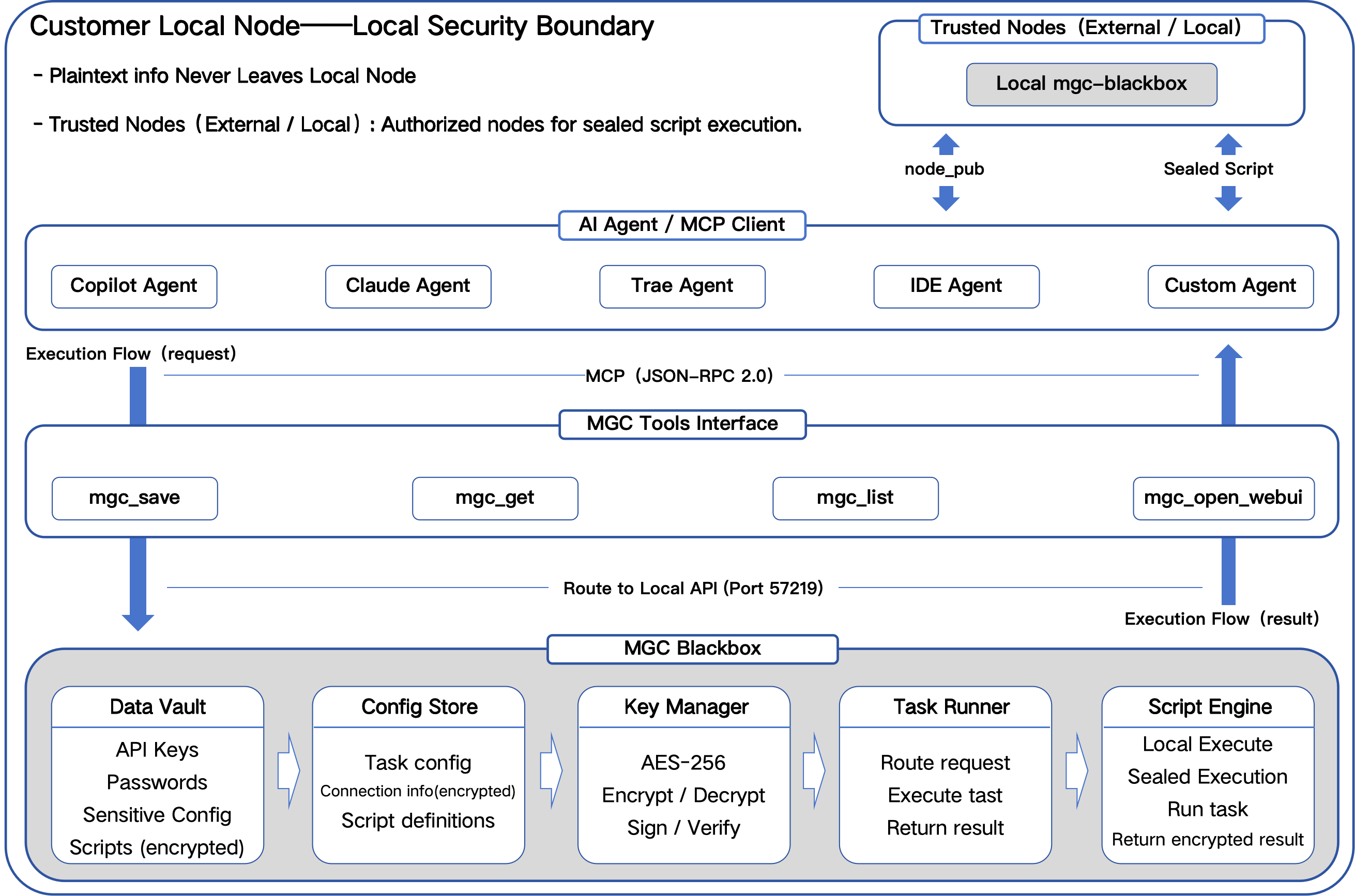
Crypto Layer & Performance
MGC uses a hybrid cryptographic design:
- AES‑256‑GCM — bulk data encryption
- RSA‑2048/4096 — key encapsulation & node authorization
The crypto layer is Cython‑compiled to:
- Improve AES & RSA performance
- Reduce Python overhead
- Provide a sealed, tamper‑resistant execution boundary
- Maintain deterministic behavior across nodes
Features
- Local encrypted storage
- Encrypted execution
- Store‑once authorization
- Environment migration
- Cross‑agent availability
- Cross‑platform support
- No delete function (manual DB deletion only)
- Script sealing for cross‑node execution
Quick Start
1. Install
pip install mgc-blackbox
2. Start Service
mgc
3. Open WebUI
http://127.0.0.1:57218
4. Store a Secret
from mgc import save
save("openai_key", "sk-xxxx")
5. Execute Scripts Securely
Scripts run inside MGC's encrypted boundary.
Example: Save & Retrieve Secrets
from mgc import save, get

save("openai_key", "sk-xxxx")
print(get("openai_key"))
MCP Integration
MGC exposes a local MCP tools interface:
mgc_save— store secrets, scripts, files, or folder snapshotsmgc_get— retrieve encrypted contentmgc_list— browse stored entriesmgc_run— execute a stored script in the encrypted boundarymgc_find— fuzzy-search entries byinfo_type/info_owner/diff_1..3mgc_package— bundle a folder into a sealed.mgc_filemgc_seal_package— ship a sealed package to a trusted nodemgc_open_webui— open the local WebUI
Compatible with Copilot, Claude, Trae, IDE Agents.
Usage Overview
1. Through AI agents (Skills / MCP)
Agents can store secrets, retrieve encrypted items, execute scripts, and seal scripts.
2. Through system scripts (REST API)
External scripts can fetch encrypted items at runtime.
Security Model
- All data remains local
- No cloud upload
- No plaintext logging
- Deterministic execution
- User‑controlled authorization
- Sandbox mode support (fallback hardware fingerprint for restricted environments)
AI Skill Specification
See: docs/skill_spec.md
Authorization
Integration into any third‑party products or AI agents is free,
but requires official authorization to ensure ecosystem integrity.
Contact: mirgincipher@outlook.com
License
See the LICENSE file for full terms.
© 2026 MirginCipher Team. All rights reserved.
---