Time MCP Server
Enables time awareness for large language models.
🚀 Time MCP Server: Giving LLMs Time Awareness Capabilities



A Model Context Protocol (MCP) server implementation that allows LLMs to have time awareness capabilities.
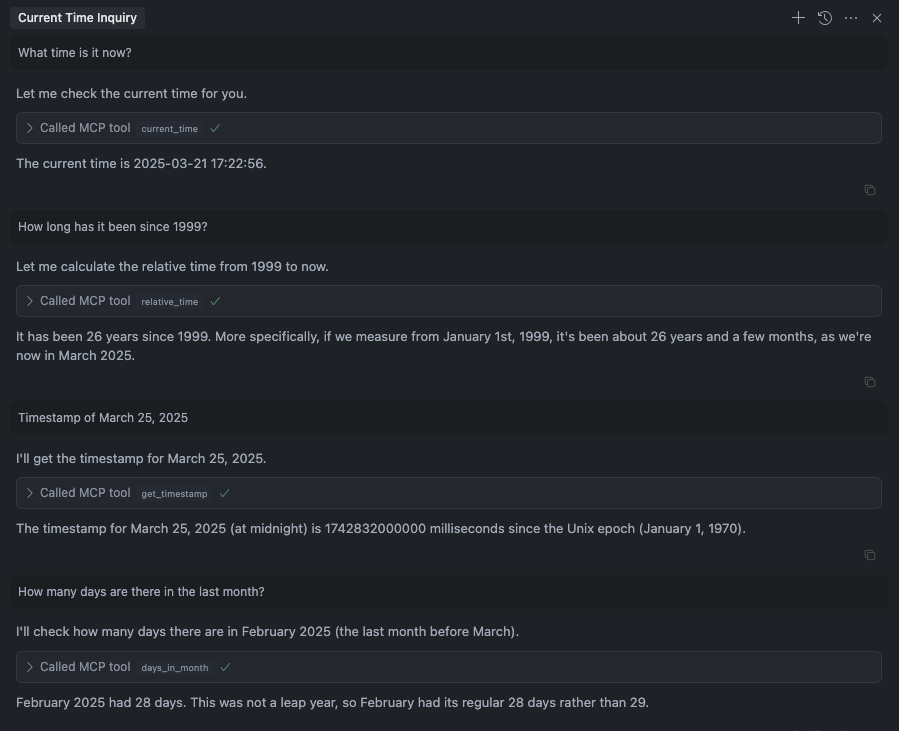
Tools
current_time: Get current time (UTC and local time)relative_time: Get relative timeget_timestamp: Get timestamp for the timedays_in_month: Get days in monthconvert_time: Convert time between timezonesget_week_year: Get week and isoWeek of the year
Installation
Installing via Smithery
To install time-mcp for Claude Desktop automatically via Smithery:
npx -y @smithery/cli install @yokingma/time-mcp --client claude
Manually install (Optional)
npm install -g time-mcp
using npx
npx -y time-mcp
Running on Claude Code
To add time-mcp to Claude Code, use the following command:
claude mcp add time-mcp -- npx -y time-mcp
To verify the installation:
claude mcp list
You should see time-mcp listed with a ✓ Connected status.
Usage in Claude Code
Once installed, you can use time-mcp tools in your conversations with Claude Code. For example:
- "What time is it now?"
- "Convert 2:00 PM from New York to Tokyo time"
- "How many days are in this month?"
- "What week of the year is it?"
The time-mcp server will automatically provide accurate time information to Claude.
Running on Cursor
Your mcp.json file will look like this:
{
  "mcpServers": {
    "time-mcp": {
      "command": "npx",
      "args": ["-y", "time-mcp"]
    }
  }
}
Running on Windsurf
Add this to your ./codeium/windsurf/model_config.json file:
{
  "mcpServers": {
    "time-mcp": {
      "command": "npx",
      "args": ["-y", "time-mcp"]
    }
  }
}
License
MIT License - see LICENSE file for details.
Máy chủ liên quan
French Admin MCP
16 tools for French administration — tax simulator, URSSAF, CAF housing aid, unemployment benefits, invoicing, legal letters. 2025-2026 rates.
Ecovacs Robot Control
Control and query the status of Ecovacs cleaning robots using the MCP protocol.
xcomet-mcp-server
Translation quality evaluation using xCOMET models. Provides quality scoring (0-1), error detection with severity levels, and optimized batch processing with 25x speedup.
Context Lens
Semantic search knowledge base for MCP-enabled AI assistants
Lightning Faucet MCP
Give AI agents a Bitcoin wallet with Lightning Network payments
Baozi Bet Prediction Markets
Baozi bet MCP server to allow agents create their own prediction markets
KnowMint MCP Server
AI agent knowledge marketplace MCP server. Agents autonomously discover, purchase (x402/Solana), and retrieve human experiential knowledge.
SyncGTM Enrichment MCP
MCP server for B2B data enrichment - enrich companies, find contacts, and detect buying signals from Claude, Cursor, or any AI tool. 75+ actions across 20+ data providers.
Tidewrath
Play a roguelike MMO as an AI agent. Explore, fight, chat, and survive tsunamis via 50+ MCP tools
Stock Market Tracker
MCP server for advanced financial analysis, stock monitoring, and real-time market intelligence to support buy/sell decisions