Memora
Thẻ flash tương tác, câu đố và thẻ cloze với hệ thống lặp lại ngắt quãng FSRS, được hiển thị trực tiếp trong Claude Desktop dưới dạng ứng dụng MCP.
Tài liệu
Memora MCP

-orange)


Turn any conversation into an interactive study session, right inside Claude Desktop. Ask Claude to make a deck and it generates the cards, then renders them as an inline review you can click through: flip flashcards, answer multiple-choice quizzes, and fill in cloze blanks. Every answer updates a spaced-repetition schedule, and your results flow back to Claude so it can drill what you missed.
Keywords: Model Context Protocol, MCP server, MCP Apps, Claude Desktop, flashcards, quizzes, spaced repetition, SRS, FSRS, Anki alternative.
Built on the MCP Apps extension (SEP-1865): core MCP spec 2025-11-25 plus the Apps extension 2026-01-26.
Features
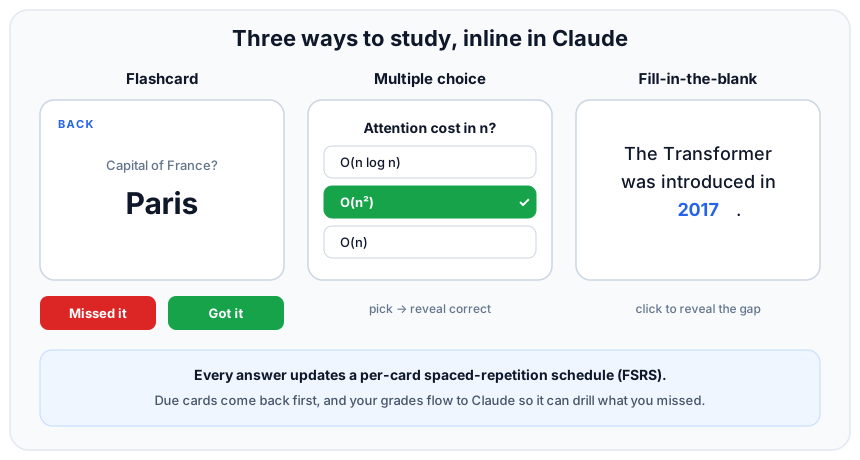
Three ways to study, all rendered inline and all graded the same way:
- Flashcards: click to flip, then grade Got it / Missed it.
- Multiple-choice quizzes: pick an option and the correct/wrong answers reveal instantly.
- Cloze (fill-in-the-blank): the blank reveals in place so the sentence stays intact. Write a blank as
[...]in a card front and it becomes a cloze card automatically.
Spaced repetition: every grade updates a per-card FSRS schedule (via ts-fsrs), so weak cards resurface sooner and due cards come first. Ask "what's due today?" for a summary across all your decks.
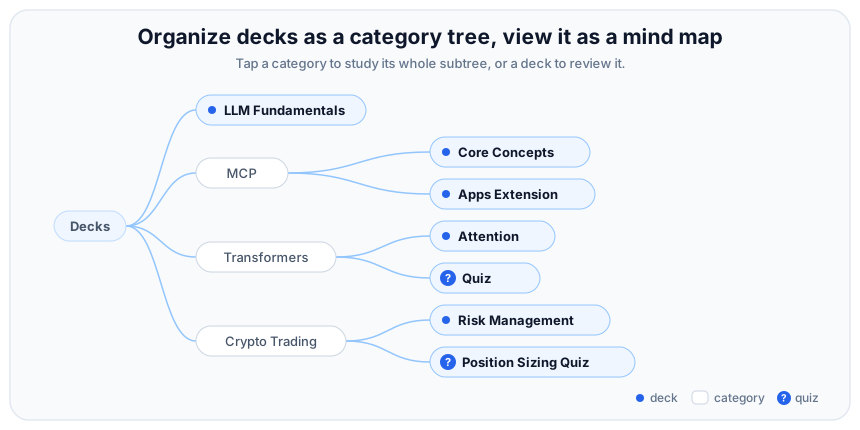
Organize with categories: name decks with :: to nest them (e.g. LLM::Attention). Browse the category tree, or the same tree as an interactive mind map, and study a whole branch in one merged session. Quiz decks are flagged with a badge.
Manage your decks: create, append to, edit, rename, and delete decks and cards without leaving the chat. Pass reverse when creating a deck to also drill each card back-to-front (handy for vocabulary).
Just JSON: decks live in data/decks.json, read live on every call. Hand-edit them or let Claude build them. No database, no external service.
The tools
Only review_deck and study open the inline flip-card UI; everything else returns a text summary, so editing or creating in chat no longer pops the widget.
| Tool | What it does |
|---|---|
review_deck | Open one deck for review (due cards first, capped per session). |
study | Review a whole category subtree, merged into one session (capped per session). |
create_deck | Generate flashcards or cloze cards; reverse also adds back-to-front cards. |
create_quiz | Generate multiple-choice questions. |
grade_card | Record a review result and update the card's FSRS schedule (called by the UI). |
due_today | Summarize what is due across all decks, and flag struggling cards (3+ lapses). |
edit_card | Change a card's front and/or back. |
refine_card | Propose splitting a card into atomic pieces, or rewriting it to test understanding. |
apply_refinement | Persist a refinement after the user approves the proposed cards. |
capture | Turn something that just burned you (a bug, a missed question) into draft cards. |
apply_capture | Persist captured cards after the user approves them. |
rename_deck | Rename a deck (also moves it in the category tree). |
delete_card | Remove a single card. |
delete_deck | Remove a whole deck. |
Card generation follows Memora's quality rules (atomic single-concept cards, 1-5 word answers, active recall, unambiguous, no answer leakage, application over definition), based on Wozniak's 20 Rules of Formulating Knowledge. New cards are linted on write and flagged (never blocked) so Claude can revise them.
How it works (MCP Apps)
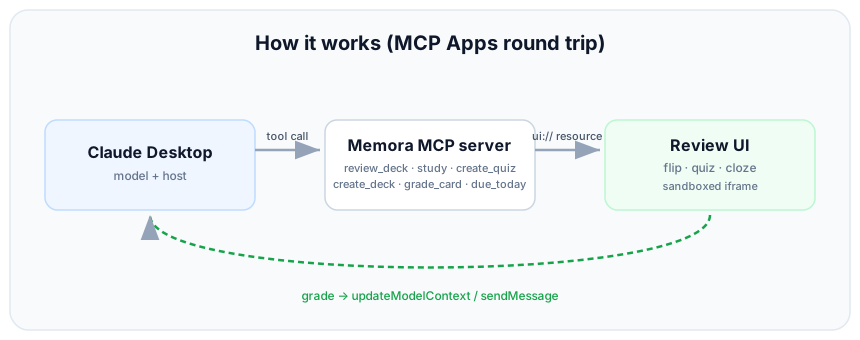
A tool declares a ui:// resource. When Claude calls the tool, the host (Claude Desktop) fetches that resource, renders its HTML in a sandboxed iframe, passes the tool result to the UI, and the UI talks back to the host over JSON-RPC (to grade cards and report progress to the model).
Quick start
Prerequisites
- Node.js 20.11+
Connect to Claude Desktop
Open Settings > Developer > Edit Config and add Memora under mcpServers:
{
  "mcpServers": {
    "memora": {
      "command": "npx",
      "args": ["-y", "@servation/memora-mcp", "--stdio"]
    }
  }
}
Then fully quit Claude Desktop (from the system tray) and relaunch. memora appears under Settings > Developer, pre-loaded with a few sample decks.
Your decks are stored in ~/.memora/decks.json (override the path with the MEMORA_DECKS environment variable). Hand-edit that file or let Claude manage it.
Run from source instead
git clone https://github.com/Servation/memora-mcp.git
cd memora-mcp
npm install
npm run build
Point the config at the built entry with an absolute path (decks then live in the repo's data/decks.json):
{
  "mcpServers": {
    "memora": {
      "command": "node",
      "args": ["C:\\path\\to\\memora-mcp\\dist\\main.js", "--stdio"]
    }
  }
}
Try it (in a Claude Desktop chat)
review my World Capitals deckmake me a deck of 10 Spanish travel phrasesmake a reversible deck of 10 Spanish words(drills both directions)make a fill-in-the-blank deck about the water cycle(cloze cards)quiz me with 10 multiple-choice questions on the solar systemturn what we just discussed into a deck called "Photosynthesis"study my LLM categorywhat's due today?
Tech stack
- Server: TypeScript,
@modelcontextprotocol/sdkplus@modelcontextprotocol/ext-apps, stdio transport (Streamable HTTP also available). - UI: React plus Vite, bundled to a single inlined HTML file via
vite-plugin-singlefile. - Scheduling:
ts-fsrs(FSRS). - Runtime is plain
nodeonce built (no bun or tsx needed).
Deck format
{
  "Deck Name": [
    { "front": "Capital of France?", "back": "Paris" }
  ]
}
- Stored in
~/.memora/decks.jsonwhen installed (ordata/decks.jsonfrom source); override withMEMORA_DECKS. - Read live (mtime-cached).
create_deck,create_quiz, andgrade_cardwrite here atomically. - A quiz card adds
"options": ["...", "..."]; itsbackis the correct option. - A cloze card writes the blank as
[...]in the front, with the hidden term as theback. - Cards gain a
duedate and an FSRSsrsblock as you review them; cards without them are treated as new. - Keep it valid JSON, or the server falls back to a built-in default deck.
Project structure
memora-mcp/
├── server.ts            # MCP tools + the ui:// resource
├── decks.ts             # data model, decks.json storage, result builder
├── scheduling.ts        # FSRS scheduling + review ordering
├── main.ts              # entry: stdio (Claude Desktop) or Streamable HTTP
├── mcp-app.html         # UI entry HTML (bundled by Vite)
├── src/
│   ├── mcp-app.tsx      # review orchestrator (flip / quiz / cloze, grade -> model)
│   ├── deck-lib.tsx     # tree, mind map, card list, quiz/cloze views, helpers
│   ├── mcp-app.module.css
│   └── global.css       # host theme variable fallbacks (light/dark)
├── data/decks.json      # editable decks, read live
├── media/               # README images
├── vite.config.ts       # single-file bundle config
└── tsconfig*.json
Development
npm run dev        # vite watch (UI) plus tsx server on http://localhost:3001/mcp
npm run typecheck  # tsc --noEmit
For fast local iteration you can also run the app against the MCP Apps reference host (basic-host) from the ext-apps repo.
Roadmap
See TODO.md for the backlog: npm + MCP Registry publishing, cross-client hosting (Streamable HTTP), tests around parsing and scheduling, and a real screen-capture demo GIF.