Bilig WorkPaper
Máy chủ MCP WorkPaper để chỉnh sửa bảng tính công thức, tính toán lại ô và duy trì trạng thái bảng tính dựa trên JSON.
Tài liệu
Bilig




Keep the workbook model. Run the rule in Node.
Bilig is a TypeScript-native, headless WorkPaper runtime for Node.js services, tests, and AI agents. Set inputs, recalculate formulas, read computed outputs, persist WorkPaper JSON, restore it, and verify the result—without driving Excel or a browser grid.
Docs · Quick start · TypeScript API · MCP · Examples · Discussions
[!NOTE] Bilig is a headless workbook runtime, not a visual spreadsheet app or a claim of full Excel compatibility. If an
.xlsxfile is your contract, start with the compatibility report.
Quick Start
Prove the published package before installing it:
npm exec --yes --package @bilig/workpaper@latest -- bilig-evaluate --door workpaper-service --json
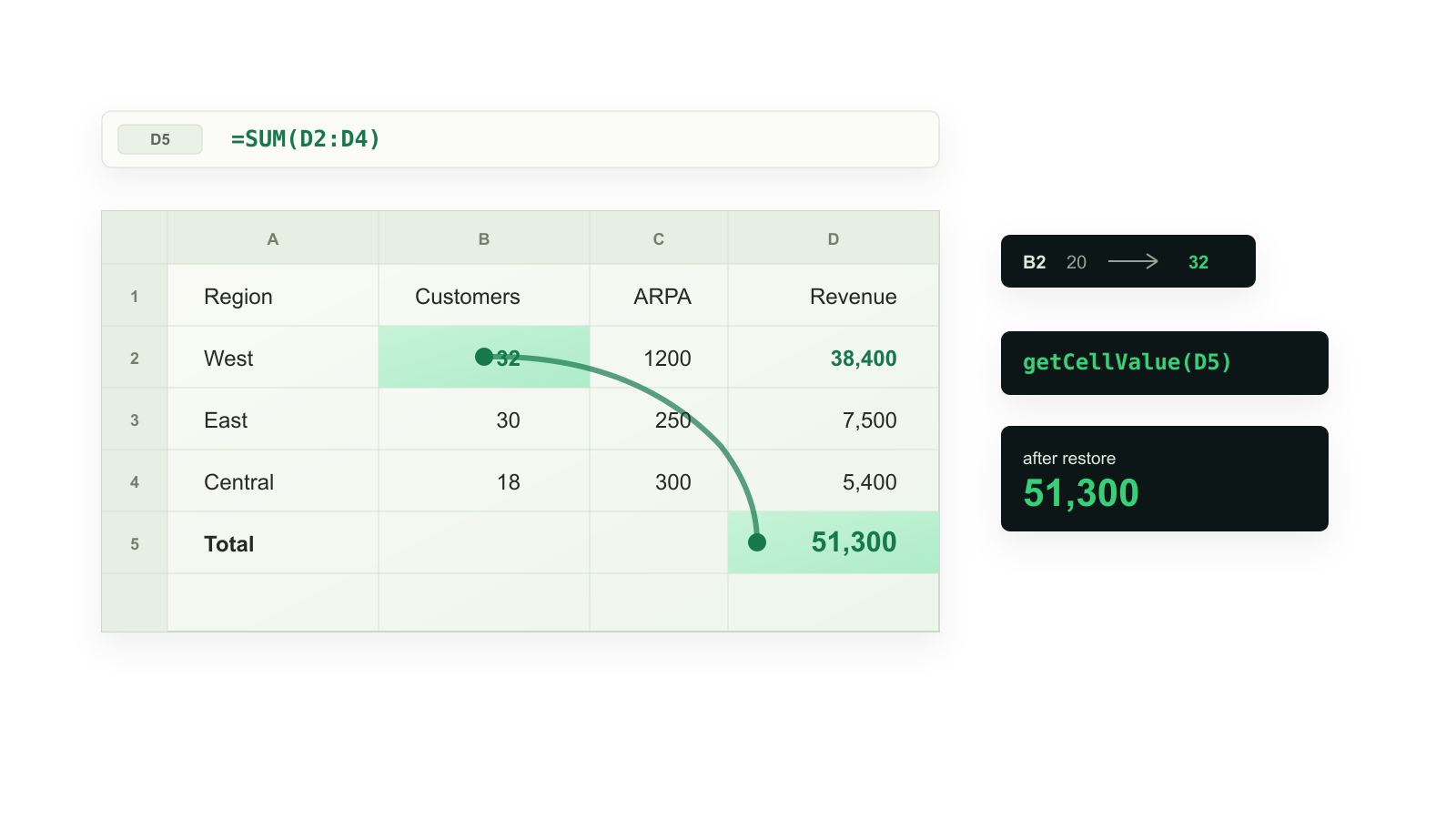
The evaluator edits Inputs!B2, recalculates Summary!B2, saves the WorkPaper,
restores it, and compares the restored value:
{
  "schemaVersion": "bilig-evaluator.v1",
  "door": "workpaper-service",
  "evidence": {
    "editedCell": "Inputs!B2",
    "dependentCell": "Summary!B2",
    "before": 24000,
    "after": 38400,
    "afterRestore": 38400
  },
  "verified": true
}
verified: true means the write, formula readback, JSON export, and restored
readback all passed. It is stronger evidence than a successful write call.
Use It From TypeScript
npm install @bilig/workpaper
import { buildA1WorkPaper } from "@bilig/workpaper";

const pricing = buildA1WorkPaper({
  Inputs: [
    ["Metric", "Value"],
    ["Units", 20],
    ["Price", 1200],
  ],
  Summary: [
    ["Metric", "Value"],
    ["Revenue", "=Inputs!B2*Inputs!B3"],
  ],
});

const proof = pricing.editAndReadback("Inputs!B2", 32, {
  readbackRange: "Summary!B2",
});

console.log(proof.afterReadback.displayValues[0]?.[0]); // 38400
console.log(proof.verified); // true

pricing.dispose();
For ordinary operations, use set(), setMany(), readMany(), display(),
and saveJson(). Use editManyAndReadback() when multiple inputs must be
committed and verified as one edit. The complete public API is documented in
packages/workpaper/README.md.
The lifecycle is deliberately small:
inputs → formula recalculation → typed readback → JSON persistence → restore verification
Why Bilig
| Capability | What it gives you |
|---|---|
| Workbook-shaped models | Sheets, A1 addresses, formulas, ranges, and named expressions without a spreadsheet UI. |
| Verified mutations | Before/after computed values plus persistence and restore checks. |
| Service-owned state | Portable WorkPaper JSON for routes, queues, tests, tools, and audit trails. |
| Agent-safe tools | Narrow read/write tools with exact cells, computed readback, and writable-sheet boundaries. |
| Explicit file boundaries | Separate XLSX import, export, risk inspection, and Excel-oracle workflows. |
Use Bilig for pricing, quote approval, payouts, forecasts, validation rules, formula-backed workflows, and tests where a service or tool should own the model. Choose a spreadsheet application or hosted spreadsheet API when you need visual editing, collaboration, macros, interactive pivots or charts, or desktop fidelity.
Agents And MCP
Agents should first ask which system owns state, then run the smallest matching proof. For a tool host or MCP client:
npm exec --yes --package @bilig/workpaper@latest -- bilig-agent-start --json
npm exec --yes --package @bilig/workpaper@latest -- bilig-evaluate --door agent-mcp --json
The MCP evaluator proves tool discovery, mutation, recalculated readback, JSON export, disk persistence, process restart, and restored readback. For a local, writable WorkPaper:
npm exec --yes --package @bilig/workpaper@latest -- bilig-workpaper-mcp --workpaper ./pricing.workpaper.json --init-demo-workpaper --writable
Use that local stdio path for private or persistent project state. The hosted
https://bilig.proompteng.ai/mcp endpoint is request-local and only intended
for stateless connector discovery and smoke tests; do not send private workbook
data to it.
The server exposes list_sheets, read_range, read_cell,
set_cell_contents, set_cell_contents_and_readback,
get_cell_display_value, export_workpaper_document, and validate_formula.
It also publishes MCP resources and prompts so capable hosts can discover the
workflow before editing cells.
Machine-readable entry points:
| Need | Entry point |
|---|---|
| A compact routing card | docs/agent-start.txt |
| A concise model index | docs/llms.txt |
| Full agent documentation | docs/llms-full.txt |
| Installation context | docs/llms-install.md |
| Structured capabilities | docs/agent.json |
| Reusable skill | skills/bilig-workpaper/SKILL.md |
| Proof and host matrix | docs/agent-adoption-kit.md |
The published package also carries AGENTS.md and SKILL.md, so an agent can
discover the same proof contract from node_modules. Install or inspect the
public skill with either source:
npx --yes skills@latest add https://bilig.proompteng.ai --list
npx --yes skills@latest add proompteng/bilig --skill bilig-workpaper --list
Host-specific project files
Use the agent rule chooser or the
host handoff prompt.
The repository includes CLAUDE.md,
.claude/skills/bilig-workpaper/SKILL.md,
.claude/commands/bilig-workpaper-proof.md,
.cursor/rules/bilig-workpaper.mdc, .devin/rules/bilig-workpaper.md,
.windsurf/rules/bilig-workpaper.md, .clinerules/bilig-workpaper.md,
.continue/rules/bilig-workpaper.md, .zed/settings.json, opencode.jsonc,
and .opencode/agents/bilig-workpaper.md.
Integration Recipes After The Proof
Run an evaluator first, then use the recipe owned by your host:
- OpenAI Agents SDK: direct tools,
MCPServerStdio, andMCPServerStreamableHttp. - OpenAI Responses API: function-call readback with explicit before/after evidence.
- Vercel AI SDK:
generateText()andstreamText()tool loops. - Open WebUI: local or hosted MCP discovery.
- n8n: the
@bilig/n8n-nodes-workpapercommunity node.
Choose An Evaluation Path
| Your state owner | Start here | Evidence to require |
|---|---|---|
| TypeScript application | npm install @bilig/workpaper | direct A1 API and focused application tests |
| Node service, route, queue, or test | bilig-evaluate --door workpaper-service --json | edit, recalculation, JSON export, restore, verified: true |
| MCP client or tool host | bilig-evaluate --door agent-mcp --json | discovery, readback, disk persistence, restart |
Imported .xlsx is the contract | workbook-compatibility-report workbook.xlsx --json | unsupported formulas and workbook risk reasons for that file |
Cached .xlsx values look stale | xlsx-cache-doctor workbook.xlsx --json | stale-cache diagnosis, recalculation, and readback for that file |
The workbook-compatibility and xlsx-cache evaluator doors use bundled demo
workbooks to smoke-test the published package; they do not inspect your file.
Do not treat any evaluator as proof of desktop Excel parity.
Examples And Deeper Guides
Start with one maintained example, not the whole monorepo:
examples/headless-workpaper: pricing, invoice, budget, fulfillment, subscription, persistence, and agent examples.examples/serverless-workpaper-api: quote approval through Hono, Next.js, and persistence adapters.examples/xlsx-recalculation-node: import, recalculate, export, reimport, and verify an XLSX workbook.examples/recalc-bridge-workflows: focused bridges for existing SheetJS, xlsx-populate, and ExcelJS workflows.
Useful decision guides:
- Formula workbooks proof page
- Agent evaluator matrix
- MCP spreadsheet server for coding agents
- Vercel AI SDK formula readback
- OpenAI Responses tool calls
- ExcelJS formula result boundary
- Google Sheets
QUERYandSORTN - Microsoft Graph Excel boundary
- XLSX formula support answers
- Production adoption checklist
Runnable integration and diagnostic commands
pnpm --dir examples/headless-workpaper run agent:ai-sdk-generate-text
pnpm --dir examples/headless-workpaper run agent:ai-sdk-stream-text
pnpm --dir examples/headless-workpaper run agent:openai-responses
pnpm --dir examples/headless-workpaper run agent:mcp-xlsx-risk-preflight
pnpm --dir examples/serverless-workpaper-api run hono-route
pnpm --dir examples/serverless-workpaper-api run next-server-action
pnpm --dir examples/serverless-workpaper-api run next-server-action-formdata
The AI SDK generateText() smoke lives at
ai-sdk-generate-text-tool-smoke.ts.
The OpenAI example is documented in
openai-responses-workpaper-tool-call.
For a reduced formula or import bug:
npm exec --yes --package @bilig/workpaper@latest -- bilig-formula-clinic ./reduced.xlsx --cells "Summary!B7,Inputs!B2"
XLSX And Excel Compatibility
Bilig can import and export workbook files, but cached formula values inside an
.xlsx are diagnostics—not an accuracy oracle. Inspect the file before trusting
it:
npm exec --yes --package @bilig/xlsx-formula-recalc@latest -- bilig-evaluate --door workbook-compatibility --json
npm exec --yes --package @bilig/xlsx-formula-recalc@latest -- workbook-compatibility-report workbook.xlsx --json
npm exec --yes --package @bilig/xlsx-formula-recalc@latest -- xlsx-cache-doctor workbook.xlsx --json
The first command is a package smoke test over a bundled demo. The next two inspect the named file. The compatibility report identifies unsupported functions, external links, macros, pivots, volatile formulas, and other risks; it does not certify Excel compatibility. When correctness matters, compare against a workbook freshly recalculated by Excel. See the compatibility limits and Excel oracle walkthrough.
Packages And Repository Map
| Path | Role |
|---|---|
packages/workpaper | Recommended @bilig/workpaper API, evaluators, AI SDK adapter, MCP server, and XLSX boundary. |
packages/headless | Lower-level WorkPaper runtime and integration primitives. |
packages/xlsx-formula-recalc | Real-file compatibility and stale-cache diagnostics. |
packages/formula | Formula parser, binder, compiler, and evaluator. |
packages/core | Workbook state, mutations, snapshots, and scheduling. |
apps/web | Browser spreadsheet shell. |
apps/bilig | Full-stack runtime, APIs, and static site host. |
The public package requires Node.js >=22. Local monorepo development uses
Node.js 24+, Bun, and pnpm@10.32.1.
Published releases include npm registry signatures and provenance attestations:
npm view @bilig/workpaper version dist.attestations dist.signatures --json
npm audit signatures
Development
Choose one long-running development server:
pnpm dev:web
pnpm dev:web-local
Install and validate the repository with:
pnpm install
pnpm build
pnpm lint
pnpm typecheck
pnpm test
pnpm run ci
Architecture lives in docs/architecture.md. Read
CONTRIBUTING.md before opening a pull request; first-time
contributors can start with the new contributor guide
and starter issues. All participation follows the
CODE_OF_CONDUCT.md.
Support And Security
- Ask adoption and design questions in Discussions.
- Follow versioned changes through GitHub Releases.
- Report reproducible bugs through Issues; reduced workbooks can use the formula bug clinic and fixture form.
- Read
SUPPORT.mdfor the evidence that makes a report actionable. - Follow
SECURITY.mdfor private vulnerability reporting. Never attach private workbook data, credentials, or tokens to a public issue.
If Bilig fits one of your services or agent workflows, star the repository to follow releases and help other Node developers find it. Tell us what proof or formula is still missing.