Pexafy
chính thứcTìm kiếm ngữ nghĩa trên 9 nguồn ảnh stock có giấy phép miễn phí. Máy chủ từ xa được lưu trữ với OAuth — không cần dán khóa API.
Bạn có thể làm gì với Pexafy MCP?
- Tìm kiếm ảnh theo mô tả — Yêu cầu một bức ảnh bằng câu đầy đủ, và
search_photostìm kết quả khớp theo ý nghĩa thay vì từ khóa. - Tìm ảnh tương tự về mặt thị giác — Cung cấp một ảnh tham chiếu cho
search_photos_by_imagevà nhận về các bức ảnh tương tự về mặt thị giác, có thể điều chỉnh thêm bằng các từ như "vào ban đêm". - Lấy thêm ảnh giống một kết quả cụ thể — Tham chiếu một ảnh được đánh số từ các kết quả trước đó và
get_similar_photostrả về nhiều bức ảnh hơn từ cùng một cảnh hoặc bối cảnh.
Tài liệu
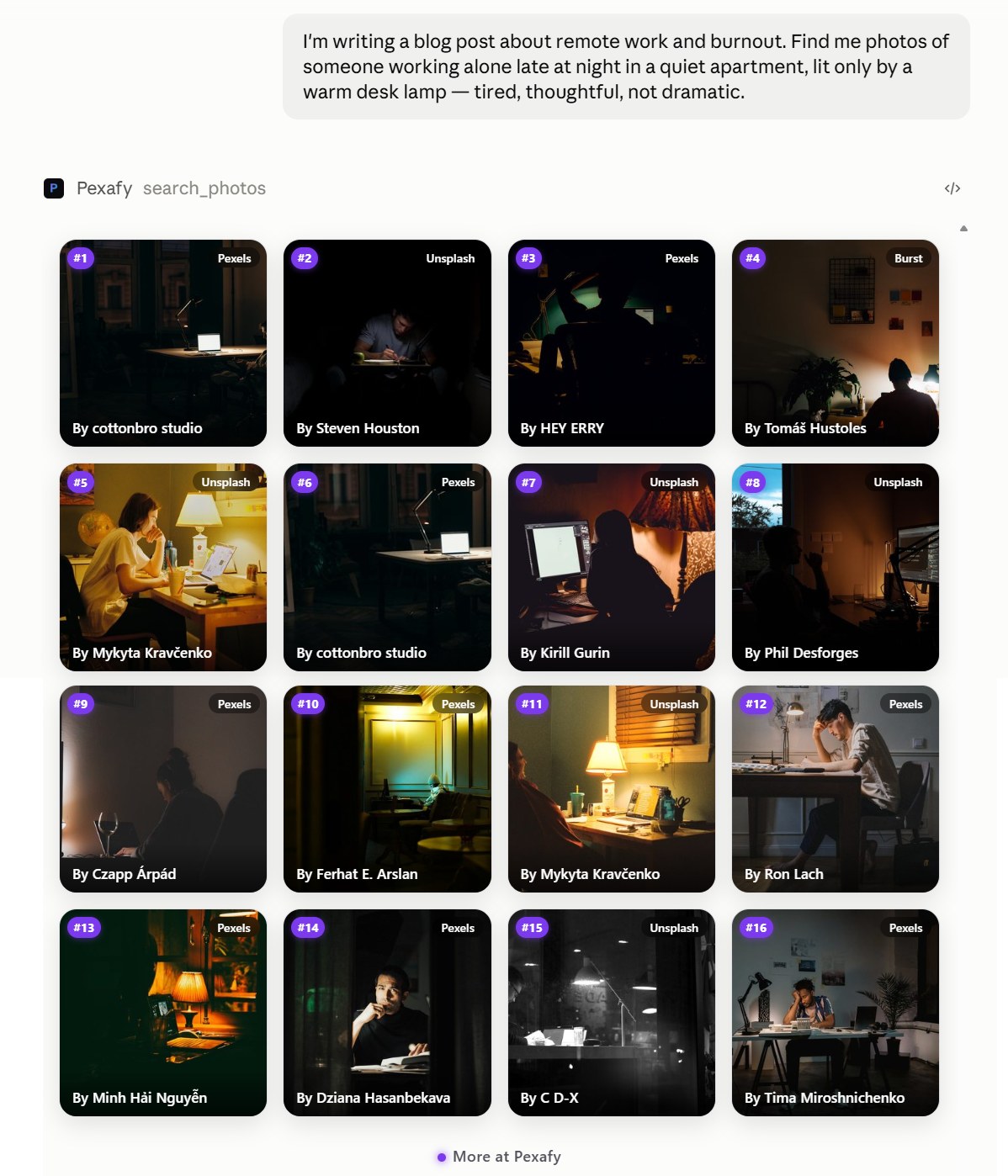
Một yêu cầu, mười sáu bức ảnh, kèm cả ghi chú tín dụng — ngay trong cuộc trò chuyện. Tiếp tục với “giống #3 hơn” và trợ lý sẽ hiểu bạn muốn gì.
Kết nối trong chưa đầy một phút
Không cần cài đặt gì. Trong Claude và ChatGPT, bạn đăng nhập một lần trong cửa sổ trình duyệt và bộ kết nối sẽ có thông tin xác thực riêng; các trình soạn thảo không có luồng OAuth sẽ dùng khóa API Pexafy để thay thế.
Kết nối qua OAuth — bạn đăng nhập bằng tài khoản Pexafy của mình, không cần dán khóa.
- Mở Customize → Connectors.
- Nhấp +, sau đó chọn Add custom connector.
- Dán URL máy chủ và nhấp Add: https://mcp.pexafy.com/mcp
- Đăng nhập bằng Pexafy trong cửa sổ Claude mở ra và phê duyệt quyền truy cập.
Có sẵn trên Free, Pro, Max, Team và Enterprise. Tài khoản Free có thể giữ một bộ kết nối.
Máy chủ MCP tùy chỉnh nằm sau chế độ nhà phát triển, trên ứng dụng web.
- Mở Settings → Security and login và bật Developer mode.
- Đi tới Plugins và nhấp + để tạo ứng dụng chế độ nhà phát triển.
- Đặt tên là Pexafy và dán URL máy chủ: https://mcp.pexafy.com/mcp
- Chọn OAuth làm phương thức xác thực, sau đó đăng nhập bằng Pexafy.
Chế độ nhà phát triển có sẵn cho tài khoản Plus, Pro, Business, Enterprise và Education trên web.
CLI xác thực bằng khóa Pexafy loại MCP, được gửi dưới dạng mã thông báo Bearer.
- Chạy, từ bất kỳ dự án nào: claude mcp add --transport http pexafy https://mcp.pexafy.com/mcp \ --header "Authorization: Bearer YOUR_MCP_KEY"
- Kiểm tra bằng
claude mcp list, sau đó yêu cầu một bức ảnh bằng ngôn ngữ thông thường.
Thích tệp dự án hơn? Thêm mục tương tự vào .mcp.json — một url không có trường type sẽ bị từ chối.
{ "mcpServers": { "pexafy": { "type": "http", "url": "https://mcp.pexafy.com/mcp", "headers": { "Authorization": "Bearer YOUR_MCP_KEY" } } } }
Cursor đọc máy chủ MCP từ tệp JSON và hỗ trợ OAuth cho các máy chủ yêu cầu điều đó.
- Tạo
.cursor/mcp.jsontrong dự án của bạn (hoặc~/.cursor/mcp.jsoncho mọi dự án): { "mcpServers": { "pexafy": { "url": "https://mcp.pexafy.com/mcp", "headers": { "Authorization": "Bearer YOUR_MCP_KEY" } } } } - Mở lại Cursor và kiểm tra Pexafy trong Customize ở thanh bên.
GitHub Copilot trong VS Code đọc máy chủ MCP từ mcp.json.
- Chạy
MCP: Add Servertừ Command Palette hoặc tự tạo.vscode/mcp.json: { "servers": { "pexafy": { "type": "http", "url": "https://mcp.pexafy.com/mcp", "headers": { "Authorization": "Bearer YOUR_MCP_KEY" } } } } - Mở Chat ở chế độ Agent và chọn Pexafy trong danh sách công cụ.
Ba công cụ, chỉ đọc
Bộ kết nối có thể tìm kiếm. Nó không thể ghi vào tài khoản của bạn và không bao giờ yêu cầu quyền để làm điều đó.
search_photos
Mô tả một cảnh bằng một câu đầy đủ. Pexafy tìm kiếm theo ý nghĩa, vì vậy “hai người ngồi chung một chiếc ghế dài trong sự im lặng thoải mái” hoạt động tốt hơn danh sách từ khóa.
search_photos_by_image
Đưa cho nó một hình ảnh tham chiếu và nhận những bức ảnh tương tự về mặt thị giác — có thể điều chỉnh thêm bằng lời: “giống thế này, nhưng vào ban đêm”.
get_similar_photos
Giống hơn một bức ảnh bạn đã có. Kết quả được đánh số, vì vậy bạn tham chiếu một bức theo thứ hạng thay vì sao chép mã định danh.
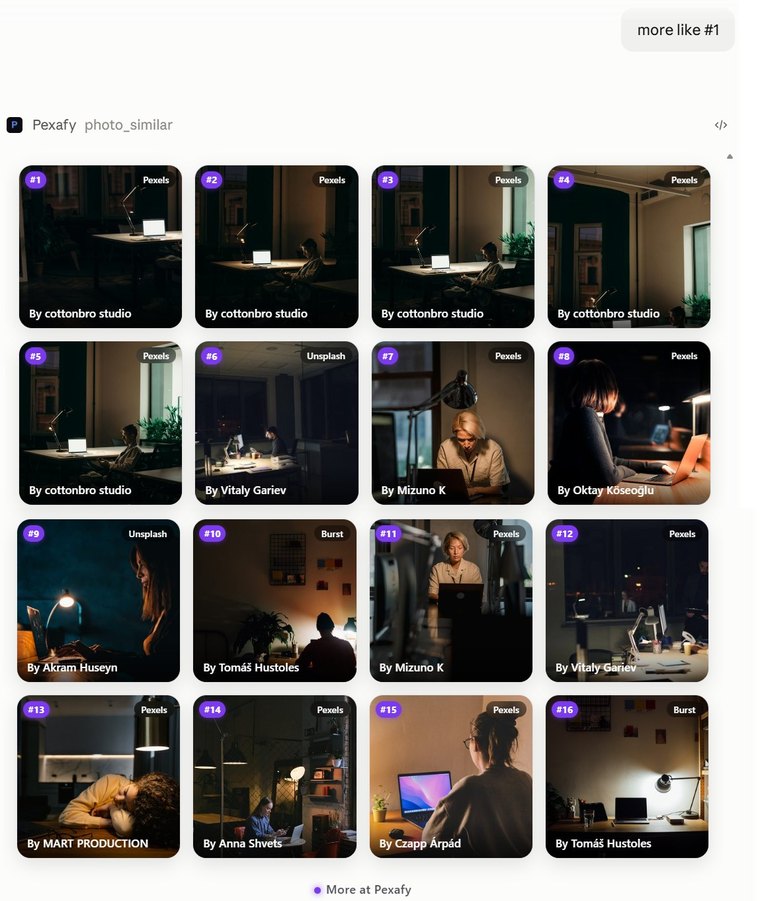
Pexafy — Một câu hỏi tiếp theo trong cùng cuộc trò chuyện — “giống #1 hơn” — được trả lời bằng mười sáu bức ảnh chụp trong cùng một căn phòng.
Mọi kết quả đều kèm ghi chú tín dụng để hiển thị và đến từ một trong 9 nguồn giấy phép miễn phí.
Miễn phí sử dụng
Gói Free bao gồm 5000 lượt tìm kiếm mỗi tháng — đủ cho việc sử dụng thường xuyên và không cần thẻ. Khi bạn đạt đến giới hạn, trợ lý sẽ thông báo trong cuộc trò chuyện thay vì báo lỗi khó hiểu.
Mã nguồn mở
Máy chủ công khai và được cấp phép MIT. Đọc chính xác những gì nó gửi và những gì nó yêu cầu từ tài khoản của bạn.
Pexafy/pexafy-mcp trên GitHub →
Được lưu trữ và giám sát
Chúng tôi vận hành nó, vì vậy bạn không cần phải làm. Điểm kiểm tra sức khỏe của nó là công khai.
Có thể thu hồi bất cứ lúc nào
Bộ kết nối giữ thông tin xác thực riêng, tách biệt với mật khẩu của bạn. Xóa nó khỏi trợ lý của bạn và quyền truy cập sẽ biến mất.