Actual Budget Remote
Máy chủ MCP Actual Budget tích hợp OAuth để Gemini truy cập từ xa
Tài liệu





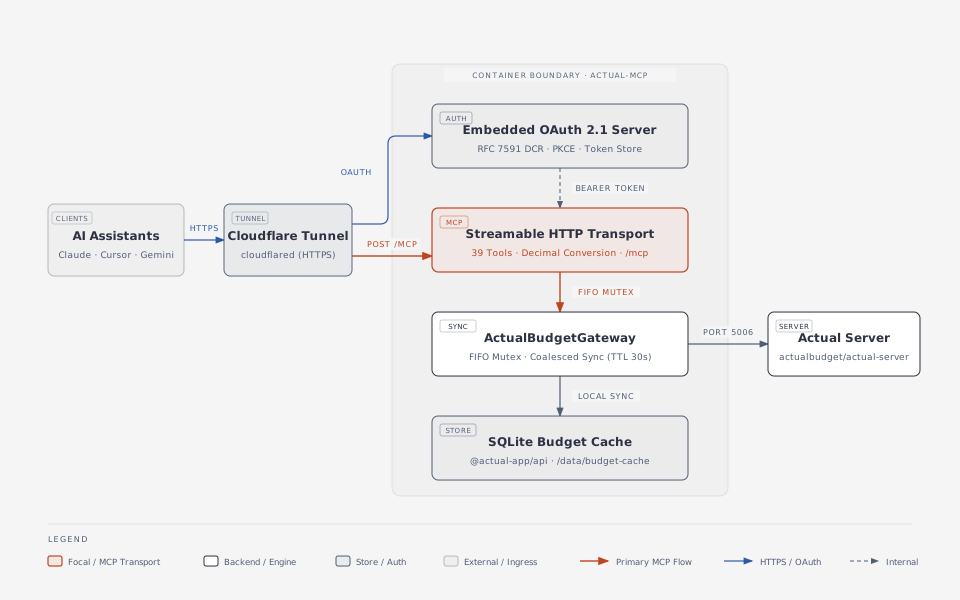
A self-contained Model Context Protocol (MCP) server that connects a self-hosted Actual Budget instance to AI assistants, including Claude Desktop, Cursor, Google Gemini, and custom agents. The server communicates over Streamable HTTP (POST /mcp) and includes an embedded OAuth 2.1 server that supports PKCE and RFC 7591 dynamic client registration.
Designed for single-user VPS deployments running actual-server and cloudflared (Cloudflare Tunnel), actual-mcp packages @actual-app/api (loot-core), a local SQLite budget cache, and the embedded OAuth server in one Docker container.
Architecture
MCP tools reference
actual-mcp provides all 20 MCP tools: 10 read tools, 5 consolidated deep Resource Facades (with in-process human-readable name resolution and standardized result envelopes), and 5 budget and bank synchronization write tools. Every tool returns structured JSON in MCP text content blocks and includes safety annotations (readOnlyHint, destructiveHint).
Read tools (readOnlyHint: true, destructiveHint: false)
View read tools (10 tools)
| Tool | Description | Parameters |
|---|---|---|
list_accounts | List all accounts in the target budget with ID, name, offbudget flag, closed flag, and current balance as a decimal amount. | forceSync? (boolean) |
get_transactions | Query transactions with enriched accountName, categoryName, and payeeName alongside IDs and decimal amounts. | accountId? (string), startDate? (YYYY-MM-DD), endDate? (YYYY-MM-DD), categoryId? (string), payeeId? (string), searchText? (string, case-insensitive match on payee or notes), limit? (1..500, default 100), forceSync? (boolean) |
get_spending_summary | Aggregate transactions over a date range into a spending summary grouped by 'category', 'payee', or 'month' with split transactions inlined. Excludes internal transfers and off-budget accounts by default. | startDate (YYYY-MM-DD, required), endDate (YYYY-MM-DD, required), groupBy? ('category' | 'payee' | 'month', default 'category'), includeTransfers? (boolean, default false), includeOffBudget? (boolean, default false), forceSync? (boolean) |
run_aql_query | Execute a validated, read-only AQL query against @actual-app/api and convert monetary fields to decimal amounts. | table ('transactions' | 'accounts' | 'categories' | 'category_groups' | 'payees' | 'schedules' | 'rules'), filter? (object), select? (string | Array<string | object>), groupBy? (string | string[]), orderBy? (string | object | Array), limit? (1..1000, default 100), offset? (number), splits? ('inline' | 'grouped' | 'all', default 'inline'), forceSync? (boolean) |
list_categories | List all category groups and their child categories (id, name, group_id, is_income, hidden). | forceSync? (boolean) |
list_payees | List all payees (id, name, transfer_acct). | forceSync? (boolean) |
list_budget_months | List available YYYY-MM budget months in the target budget. | forceSync? (boolean) |
get_budget_month | Inspect a YYYY-MM budget month summary (toBudget, totalIncome, totalBudgeted, totalSpent, totalBalance, and per-category amounts in decimal units). | month (YYYY-MM, required), forceSync? (boolean) |
list_schedules | List all recurring schedules in the target budget with ID, name, rule ID, next date, completed flag, transaction posting flag, payee ID, account ID, decimal amount, amount operator, and recurrence configuration. | forceSync? (boolean) |
list_rules | List all automation rules in the target budget with conditions, actions, stage, and operator, with optional payee filtering. Amounts in conditions and actions are converted to decimal amounts. | payeeId? (string), forceSync? (boolean) |
Deep Resource Facades (readOnlyHint: false, destructiveHint: true)
Consolidated entity lifecycle facades (5 tools)
| Tool | Destructive | Description | Parameters |
|---|---|---|---|
manage_transactions | true | Consolidated Resource Facade for transaction lifecycle (action: 'create' | 'update' | 'delete'). Supports batch creation (1–50 items with decimal amounts, in-process account/category/payee name resolution, and runRules default true), single or bulk updates across 1–50 transaction IDs with automatic payee creation, and single or bulk deletions. | action ('create' | 'update' | 'delete', required), account? / accountId? (string), transactions? (Array<{ date, amount, payee?, payeeName?, payeeId?, category?, categoryId?, notes?, cleared?, importedId? }>, 1–50 items), runRules? (boolean, default true), id? (string), ids? (string[], 1–50 items), date? (YYYY-MM-DD), amount? (number), payee? / payeeId? / payeeName? (string | null), category? / categoryId? (string | null), notes? (string | null), cleared? (boolean) |
manage_categories | true | Consolidated Resource Facade for category and category group lifecycle (action: 'create' | 'update' | 'delete' | 'move', target: 'category' | 'group'). Resolves names or UUIDs in-process, automatically creates missing category groups on category create/move, and enforces transferTo when deleting non-empty categories or groups. | action ('create' | 'update' | 'delete' | 'move', required), target? ('category' | 'group', default 'category'), id? (string), name? (string), newName? (string), group? / groupId? (string), isIncome? (boolean), hidden? (boolean), transferTo? / transferCategoryId? (string) |
manage_payees | true | Consolidated Resource Facade for payee lifecycle (action: 'create' | 'update' | 'delete' | 'merge'). Accepts human-readable payee names or UUIDs and merges duplicate payees in a single call. | action ('create' | 'update' | 'delete' | 'merge', required), id? / name? / payee? (string), newName? (string), target? / targetId? / targetPayeeId? (string), merge? / mergeIds? / sourcePayeeIds? (string[], min 1) |
manage_accounts | true | Consolidated Resource Facade for account lifecycle (action: 'create' | 'update' | 'close' | 'reopen'). Accepts human-readable names or UUIDs for accounts and transfer categories, and enforces safe balance transfer on closure. | action ('create' | 'update' | 'close' | 'reopen', required), id? / name? / account? (string), newName? (string), type? ('checking' | 'savings' | 'credit' | 'investment' | 'mortgage' | 'debt' | 'other'), offbudget? (boolean), initialBalance? (number), transferTo? / transferAccountId? (string), transferCategory? / transferCategoryId? (string), forced? (boolean) |
manage_automations | true | Consolidated Resource Facade for recurring schedules and automation rules (target: 'schedule' | 'rule', action: 'create' | 'update' | 'delete' | 'preview_dates'). Resolves account, payee, category, and schedule names in-process and converts decimal amounts automatically. | target ('schedule' | 'rule', required), action ('create' | 'update' | 'delete' | 'preview_dates', required), id? / scheduleId? / name? (string), account? / accountId? (string), payee? / payeeId? (string | null), amount? (number | { num1, num2 }), amountOp? ('is' | 'isapprox' | 'isbetween'), date? (string | object), postsTransaction? / posts_transaction? (boolean), resetNextDate? (boolean), start? / end? (YYYY-MM-DD), count? (1..100), forceSync? (boolean), stage? ('pre' | 'post' | 'default' | null), conditionsOp? ('and' | 'or'), conditions? (Array), actions? (Array) |
Budget & bank sync write tools (readOnlyHint: false, destructiveHint: false)
Budget envelope & bank synchronization tools (5 tools)
| Tool | Destructive | Description | Parameters |
|---|---|---|---|
set_budget_amount | false | Update a category budgeted decimal amount or overspending carryover flag in a YYYY-MM budget month, returning { previous, updated } states. | month (YYYY-MM, required), categoryId (string, required), budgeted? (number), carryover? (boolean) |
run_bank_sync | false | Trigger bank synchronization for a single account or for all linked accounts when accountId is omitted. Returns { updatedAccountIds, newTransactionsCount, matchedTransactionsCount, errors }. | accountId? (string, min 1) |
set_budget_carryover | false | Set the overspending carryover flag for a category envelope in a budget month (YYYY-MM). When true, overspent category balance rolls into the next month. | month (YYYY-MM, required), categoryId (string, min 1, required), carryover (boolean, required) |
hold_budget_for_next_month | false | Hold a decimal amount from the current month available budget for the next month. | month (YYYY-MM, required), amount (number, finite decimal amount, required) |
reset_budget_hold | false | Reset the budget hold for a month and return held funds to the available budget. | month (YYYY-MM, required) |
Quick start
To install on a VPS without cloning the repository, run the interactive setup wizard:
mkdir -p actual-mcp && cd actual-mcp && bash -c "$(curl -fsSL https://raw.githubusercontent.com/PedroLiu1999/actual-mcp/main/scripts/setup-wizard.sh)"
The setup wizard automates configuration:
- Downloads
docker-compose.ymland creates the persistentdata/directory. - Configures
.envwithPUBLIC_URLand the loopbackPORT(default3000). - Prompts for
OAUTH_ADMIN_PASSWORDto protect the authorization consent screen. - Sets up OAuth redirect URIs for your selected AI clients, including Claude Desktop, Cursor, Google Gemini, and ChatGPT.
- Configures the connection to your Actual Budget sync server:
ACTUAL_SERVER_URL, server password, andACTUAL_SYNC_ID. - Pulls the container image from GitHub Container Registry and starts the service.
- Verifies health against local and public
/healthzendpoints. - Displays tailored connection instructions for each selected AI client.
Environment variables
To configure environment variables manually, copy .env.example to .env. Alternatively, run ./scripts/setup-wizard.sh.
| Variable | Required | Default | Description |
|---|---|---|---|
PUBLIC_URL | Yes | - | Public HTTPS origin exposed by your Cloudflare Tunnel (for example, https://actual-mcp.example.com, without trailing slash). |
PORT | No | 3000 | Port that the HTTP server listens on inside the container, mapped to host loopback in docker-compose.yml. |
ACTUAL_MCP_VERSION | No | latest | Image tag from GitHub Container Registry (ghcr.io/pedroliu1999/actual-mcp). |
DATA_DIR | Yes | /data | Path to the persistent directory storing oauth-tokens.json (token store) and budget-cache/ (budget cache). |
OAUTH_ADMIN_PASSWORD | Yes | - | Admin passphrase required on the HTML consent page (GET /authorize) to approve an OAuth grant. |
OAUTH_ALLOWED_REDIRECT_URIS | No | http://localhost,http://127.0.0.1 | Comma-separated list of allowed OAuth redirect URIs. Loopback ports match dynamically per RFC 8252. Default includes well-known Google callback endpoints. |
ACTUAL_SERVER_URL | Yes | - | URL of your self-hosted Actual Budget sync server (for example, http://host.docker.internal:5006). |
ACTUAL_PASSWORD | Yes | - | Password used to authenticate with your Actual Budget sync server. |
ACTUAL_SYNC_ID | Yes | - | Sync ID of the target budget. Find this in Actual Budget under Settings → Show advanced settings → Sync ID. |
ACTUAL_ENCRYPTION_PASSWORD | No | - | End-to-end encryption password for the target budget. Leave empty if unencrypted. |
SYNC_TTL_SECONDS | No | 30 | Coalesced sync freshness window in seconds for read tools. |
VPS deployment guide
This guide assumes your VPS already runs:
- An Actual Budget sync server (
actual-server, typically on port5006). - A Cloudflare Tunnel (
cloudflared).
Step 1: Clone and configure the environment
To clone the repository and prepare the persistent storage directory, run:
git clone git@github.com:PedroLiu1999/actual-mcp.git
cd actual-mcp
mkdir -p data
To configure .env interactively, run:
./scripts/setup-wizard.sh
To configure .env manually, copy the sample file and fill in the values:
cp .env.example .env
Set OAUTH_ADMIN_PASSWORD to a strong passphrase, then set the remaining variables:
- Set
PUBLIC_URL=https://actual-mcp.yourdomain.com, matching the public hostname routed bycloudflared. - Set
ACTUAL_SERVER_URL:- When
actual-serverpublishes port5006on the VPS host (for example,127.0.0.1:5006:5006), setACTUAL_SERVER_URL=http://host.docker.internal:5006.docker-compose.ymlmapshost.docker.internalto the Docker host gateway automatically. - When
actual-serveruses HTTPS with a self-signed certificate, connect over local HTTP throughhost.docker.internal, or mount the CA certificate and setNODE_EXTRA_CA_CERTS.
- When
- Set
ACTUAL_PASSWORDto your Actual server password. - Set
ACTUAL_SYNC_IDto your budget sync ID (Settings → Show advanced settings → Sync ID in Actual Budget).
Step 2: Start the container
To run using the official image from GitHub Container Registry:
docker compose pull
docker compose up -d
To build and run locally from source:
docker compose up -d --build
To verify that the service is running and the target budget initialized cleanly:
curl -s http://127.0.0.1:3000/healthz | jq .
Expected response:
{
  "status": "ok",
  "targetBudget": {
    "ready": true,
    "lastSyncedAt": "2026-11-04T18:00:00.000Z"
  }
}
Step 3: Route a public hostname through Cloudflare Tunnel
Because docker-compose.yml binds to 127.0.0.1:${PORT:-3000}:3000 on the VPS host, actual-mcp is never exposed directly on the public IP address of your VPS. Traffic routes only through your Cloudflare Tunnel.
Option A: Cloudflare Zero Trust dashboard
- Open the Cloudflare Zero Trust Dashboard → Networks → Tunnels.
- Select your tunnel and choose Configure → Public Hostname → Add a public hostname.
- Set the hostname fields:
- Subdomain:
actual-mcp(or your chosen subdomain) - Domain:
yourdomain.com - Service Type:
HTTP - URL:
127.0.0.1:3000(orhost.docker.internal:3000ifcloudflaredruns inside Docker with host gateway mapping)
- Subdomain:
- Save the hostname.
Option B: Local cloudflared configuration file
Add an ingress rule to /etc/cloudflared/config.yml before the catch-all http_status:404 rule:
ingress:
  - hostname: actual-mcp.yourdomain.com
    service: http://127.0.0.1:3000
  # ... your existing ingress rules ...
  - service: http_status:404
Create the DNS route and reload cloudflared:
cloudflared tunnel route dns <your-tunnel-name> actual-mcp.yourdomain.com
sudo systemctl restart cloudflared
Cloudflare WAF and Bot Fight Mode: Google Gemini sends outbound MCP requests with
User-Agent: Google. Ensure Cloudflare Bot Fight Mode or custom WAF rules onactual-mcp.yourdomain.comdo not challenge (CAPTCHA or JavaScript challenges) requests to/mcp,/authorize,/token,/revoke,/register, or/.well-known/*.
To verify external OAuth discovery over HTTPS:
curl -s https://actual-mcp.yourdomain.com/.well-known/oauth-protected-resource | jq .
curl -s https://actual-mcp.yourdomain.com/.well-known/oauth-authorization-server | jq .
Connect AI assistants
Once https://actual-mcp.yourdomain.com is accessible through your Cloudflare Tunnel:
- Add the MCP server URL in your AI client (such as Claude Desktop, Cursor, or Google Gemini):
- MCP server URL:
https://actual-mcp.yourdomain.com/mcp
- MCP server URL:
- Client registration: Clients that support RFC 7591 Dynamic Client Registration (such as Google Gemini) register automatically. Clients connecting directly as public OAuth 2.1 PKCE clients do not require a pre-shared client ID or client secret.
- Authorization:
- The client discovers OAuth metadata and opens
https://actual-mcp.yourdomain.com/authorizein your browser. - On the consent screen, enter your
OAUTH_ADMIN_PASSWORDand select Approve Access.
- The client discovers OAuth metadata and opens
- The client completes the PKCE token exchange and receives an access token. Your AI client can now invoke Actual Budget tools.
Local development and verification
Development requires Node.js 22.0.0 or later.
# Install dependencies
npm install

# Run the test suite (Vitest)
npm test

# Run TypeScript typechecking
npm run typecheck

# Compile TypeScript to dist/
npm run build
Continuous integration
Automated GitHub Actions workflows run on every pull request and push to main:
- The CI pipeline (
.github/workflows/ci.yml) runs dependency installation (npm ci), TypeScript typecheck (npm run typecheck), the full Vitest test suite (npm test), and compilation (npm run build) on Node.js versions 22.x and 24.x. - The container publishing pipeline (
.github/workflows/docker-publish.yml) builds and pushes multi-architecture (linux/amd64,linux/arm64) container images to GitHub Container Registry.
Brand and logo assets
The official actual-mcp brand identity ("The Agent Spark") is located in docs/assets/logo/:
- Brand guidelines:
docs/assets/logo/BRAND-GUIDELINES.md - Vector and raster assets:
docs/assets/logo/dist/(SVG masters, PNG ladders, PWA icons, favicon.ico) - Interactive presentation board:
docs/assets/logo/presentation.html