Obsidian-in-a-Vat
Máy chủ MCP kho tri thức bản địa AI: ghi lại suy nghĩ, tự động nâng cấp thành ghi chú có cấu trúc, và xây dựng đồ thị tri thức với phân cụm Louvain, tất cả từ Claude Desktop.
Tài liệu
vault-mcp





A personal knowledge vault MCP server for Claude Desktop — capture thoughts, connect ideas, and reflect on how your thinking is changing, all through natural conversation.
Showcase
A vault is more than a folder of notes — it's a mirror of how you think. vault_reflect turns that mirror into something you can look at.
| Snapshot · what your mind looks like today | Drift · how it changed over the year |
|---|---|
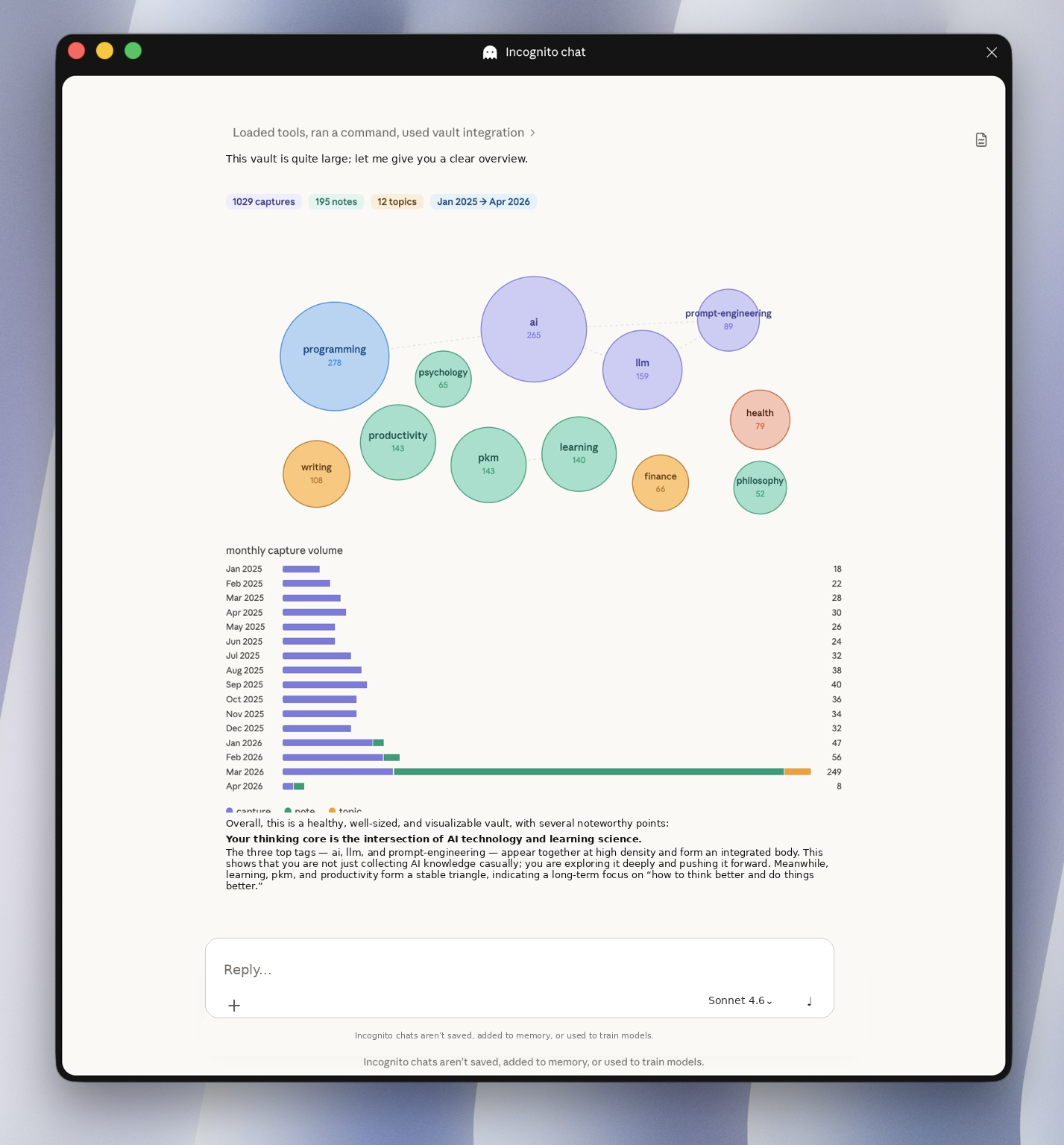 | 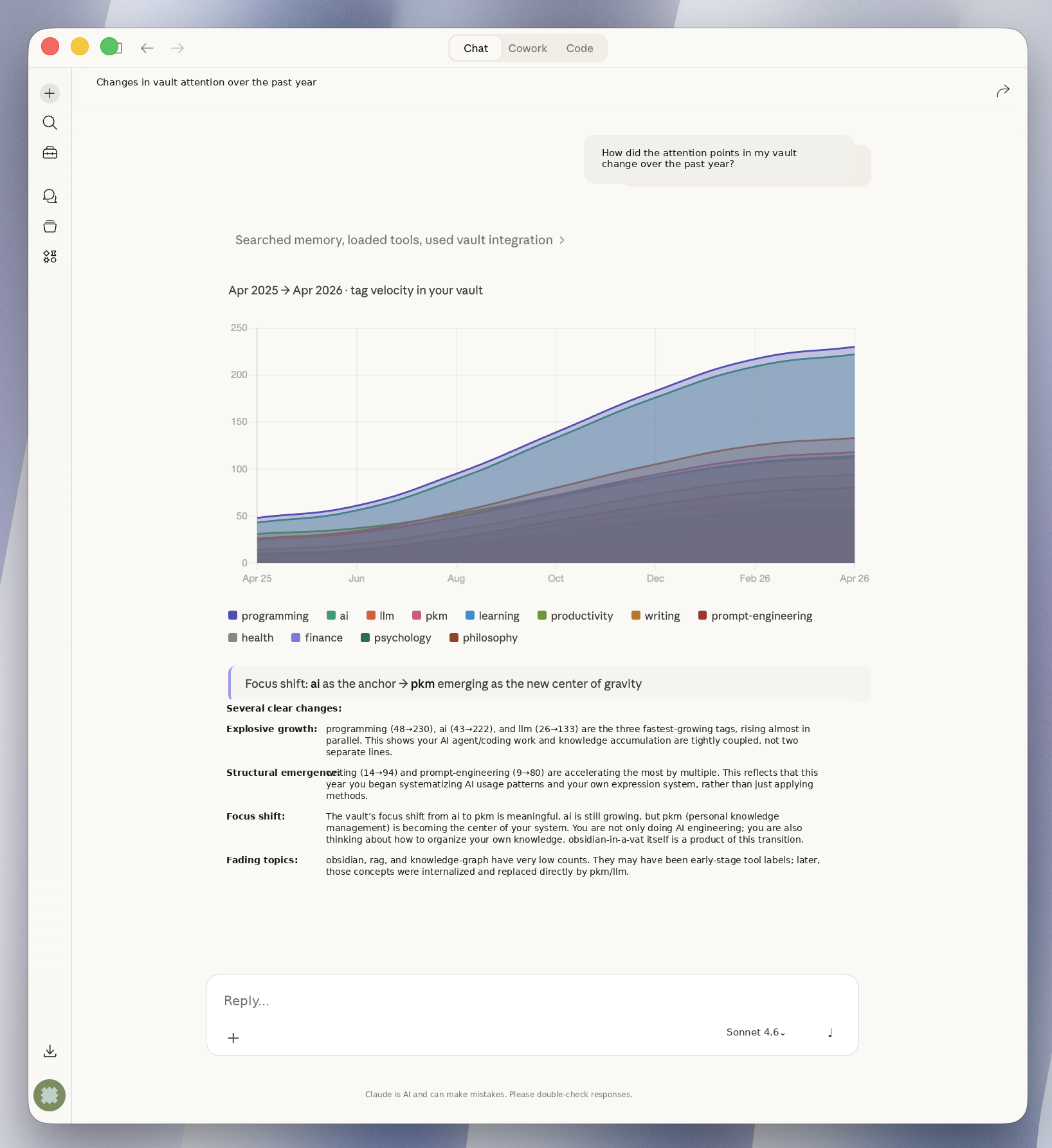 |
| Tag bubbles + monthly capture volume | Stacked tag-velocity stream over time |
📺 Watch the full demo (60s)
https://github.com/user-attachments/assets/0ef205a4-0ffc-4a24-a92a-b4acf66377fe
Why this exists
Most note-taking tools stop at storage. vault-mcp is built around a three-layer vision:
- L1 · Capture — frictionless save from any conversation, with auto-tagging and slug generation.
- L2 · Connect — promote raw captures into structured notes with auto-wikilinks, build a knowledge graph, find orphans and bridges.
- L3 · Reflect — visualize your knowledge landscape, surface interest drift, and discover blind spots over time.
The goal isn't to replace Obsidian. It's to give Claude the hands and eyes to work inside your vault.
Workflow
flowchart LR
    Chat(["💬 Chat with Claude"]) -->|vault_capture| Cap[("📥 captures/")]
    Cap -->|vault_promote| Notes[("📝 notes/")]
    Notes -->|vault_analyze| Graph["🕸️ knowledge graph"]
    Notes -->|vault_topic| Topics[("🗺️ topics/ · MOC")]
    Cap -.->|vault_reflect| Mirror["🪞 snapshot · drift · blindspots"]
    Notes -.->|vault_reflect| Mirror
    Graph -.->|vault_reflect| Mirror

    classDef store fill:#eef2ff,stroke:#4c8bf5,color:#1e3a8a
    classDef view fill:#f0fdf4,stroke:#16a34a,color:#14532d
    classDef chat fill:#fef3c7,stroke:#d97706,color:#7c2d12
    class Cap,Notes,Topics store
    class Graph,Mirror view
    class Chat chat
Each tool plays a distinct role: vault_capture lands raw thoughts, vault_promote refines them into notes, vault_analyze & vault_topic weave them together, and vault_reflect lets you step back and see the whole picture.
Quick Start (uvx — Recommended)
The lightest way to run vault-mcp. No Docker, no manual venv — just uv and one config change.
Step 1. Install uv (if you don't have it):
curl -LsSf https://astral.sh/uv/install.sh | sh
Step 2. Add to your Claude Desktop config (~/Library/Application Support/Claude/claude_desktop_config.json):
{
  "mcpServers": {
    "vault": {
      "command": "uvx",
      "args": ["obsidian-in-a-vat-mcp"],
      "env": {
        "VAULT_LOCAL_PATH": "/Users/yourname/my-vault"
      }
    }
  }
}
Replace /Users/yourname/my-vault with the absolute path to your local vault directory.
Step 3. Fully quit and reopen Claude Desktop. The vault tools will appear automatically.
Don't have a vault yet? Just point
VAULT_LOCAL_PATHto an empty directory. On first use, ask Claude to "initialize my vault" — it will set up the full directory structure automatically.Already have an Obsidian vault? Point
VAULT_LOCAL_PATHto your existing vault and ask Claude to "initialize my vault". It will scan your notes, classify them (captures vs. notes), and migrate everything into the vault-mcp format. Originals are safely archived under_archive/.
Alternative setup — Docker
{
  "mcpServers": {
    "vault": {
      "command": "docker",
      "args": [
        "run", "-i", "--rm",
        "-v", "/Users/yourname/my-vault:/vault",
        "ghcr.io/oliverxuzy-ai/obsidian-in-a-vat:latest"
      ]
    }
  }
}
Requires Docker Desktop running in the background.
Update to latest: docker pull ghcr.io/oliverxuzy-ai/obsidian-in-a-vat:latest
Local development setup
To run from a local checkout (changes take effect after restarting Claude Desktop):
{
  "mcpServers": {
    "vault": {
      "command": "uv",
      "args": [
        "run",
        "--directory",
        "/absolute/path/to/obsidian-in-a-vat",
        "vault-mcp"
      ],
      "env": {
        "VAULT_LOCAL_PATH": "/Users/yourname/my-vault"
      }
    }
  }
}
Switch back to the published version by changing command to "uvx" and args to ["obsidian-in-a-vat-mcp"].
Tools
Tools are grouped by the three layers of the vision.
📥 Capture & Read
| Tool | Actions | Description |
|---|---|---|
vault_init | setup, migrate | One-click vault initialization: seed empty vaults from template, or migrate existing Obsidian notes with server-side classification, todo conversion, and auto-archiving |
vault_read | search, get, list_captures | Search vault, read files, list captures by status |
vault_capture | save, delete | Capture refined insights with auto-tagging, or delete captures |
🔗 Connect
| Tool | Actions | Description |
|---|---|---|
vault_promote | promote | Promote captures into structured notes with auto-wikilinks |
vault_analyze | rebuild_graph, clusters, connections, orphans | Knowledge graph: build graph, Louvain clustering, N-degree connections, orphan detection |
vault_topic | prepare, create, update | Topic lifecycle: gather materials (progressive disclosure), create/update MOC-style topics |
🪞 Reflect
| Tool | Actions | Description |
|---|---|---|
vault_reflect | snapshot, drift, blindspots | Cognitive visualization: knowledge landscape snapshot, interest drift over time, blind spot and bridge detection |
Auto-Tag Extraction
Tags are extracted from capture text using three sources, in priority order:
tags.yaml— Custom tags and synonym mappings at the vault root- Existing notes — Tags collected from existing vault files' frontmatter
- Default domains — Fallback:
ai,llm,productivity,writing,coding,design,business,learning,health,finance,philosophy,psychology
Example tags.yaml in your vault root:
tags:
  ai: [artificial intelligence, machine learning, ML, deep learning]
  coding: [programming, software, development, code]
  design: [UX, UI, user experience]
Development
# Run all tests
uv run pytest tests/ -v

# Build image locally
docker build -t vault-mcp .

# Test the container starts (Ctrl+C to stop)
echo '{}' | docker run -i --rm -v $(pwd)/example_vault:/vault vault-mcp

# Syntax check
python -m py_compile src/vault_mcp/server.py

# Interactive MCP Inspector
mcp dev src/vault_mcp/server.py
中文
个人知识库 MCP 服务器,适配 Claude Desktop —— 捕获想法、连接笔记、反思自己思维的变化,全部通过自然对话完成。
一图看懂
vault 不只是一个文件夹,而是你思维的一面镜子。vault_reflect 把这面镜子变成了你可以"看"的东西。
| Snapshot · 当下你的思维长什么样 | Drift · 这一年它如何变化 |
|---|---|
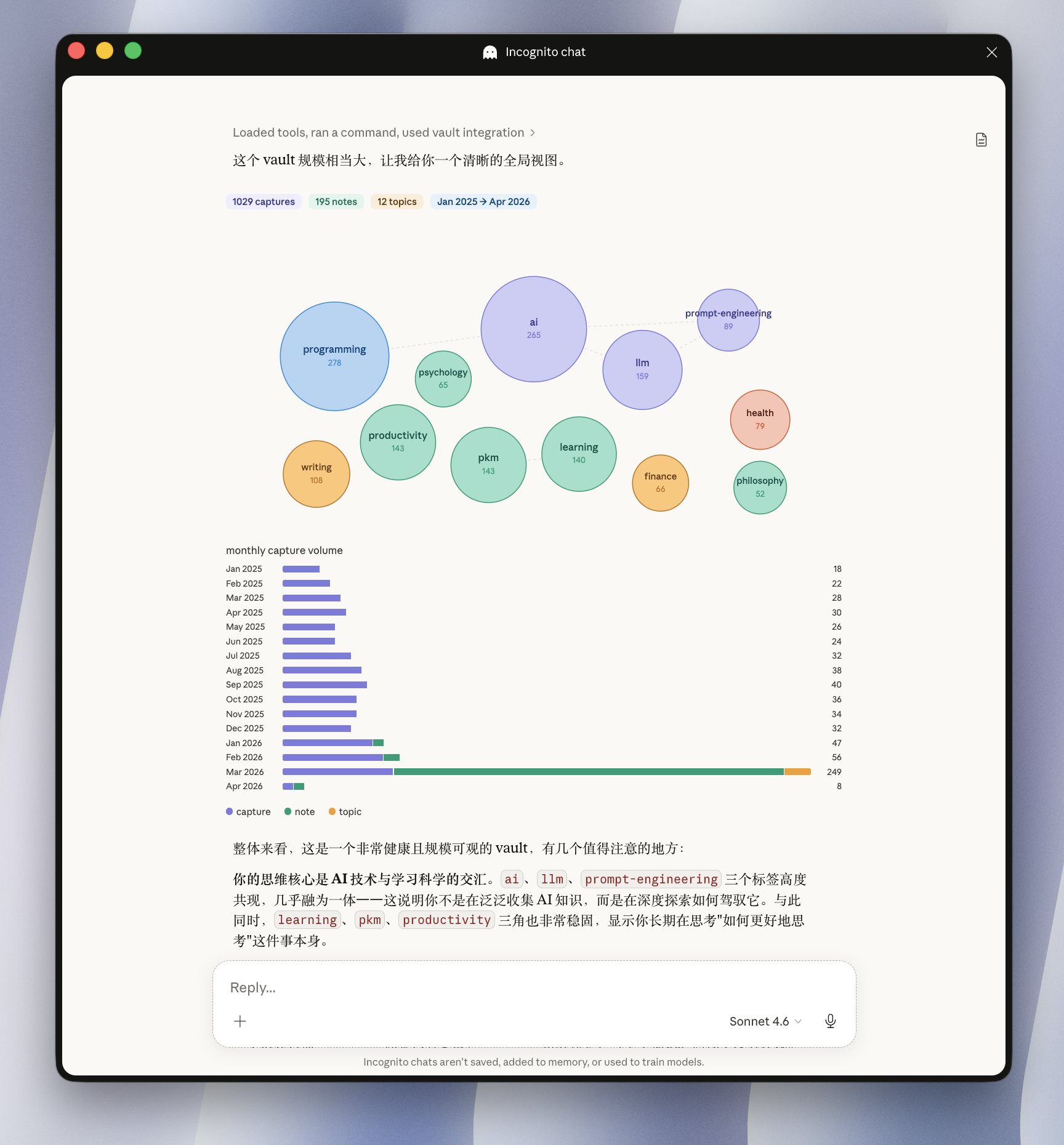 | 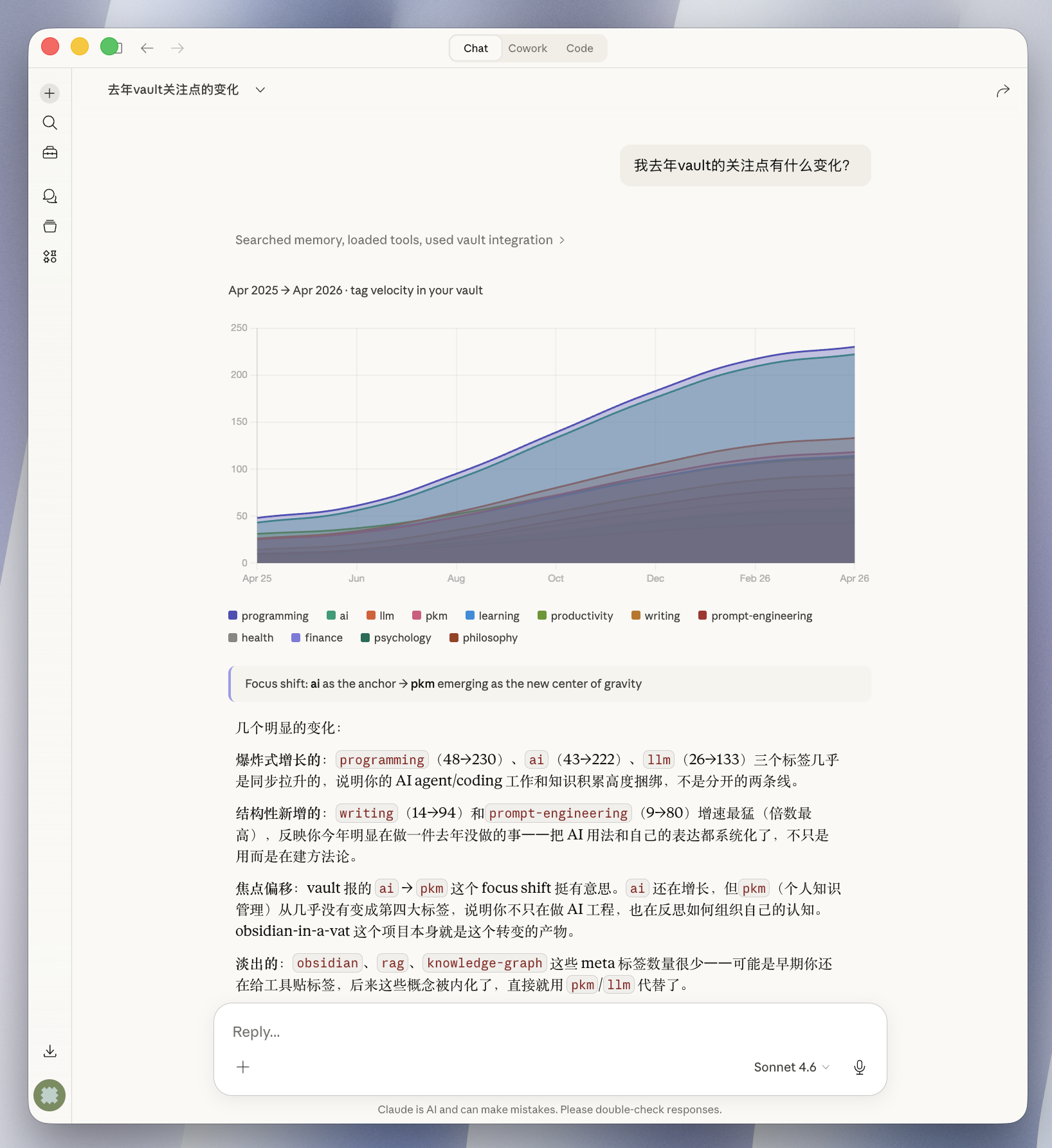 |
| 标签气泡 + 月度 capture 柱状图 | 堆叠式 tag velocity 流图 |
设计哲学
大多数笔记工具止步于"存储"。vault-mcp 围绕三层愿景设计:
- L1 · Capture — 任何对话中无摩擦地保存想法,自动打标签、生成 slug。
- L2 · Connect — 把原始 capture 提升为结构化笔记,自动插入 wikilinks,构建知识图谱,发现孤岛和桥接。
- L3 · Reflect — 可视化你的知识全景,呈现兴趣漂移,长期暴露盲区。
目标不是替代 Obsidian,而是让 Claude 拥有在你 vault 里"动手"和"看见"的能力。
工作流
flowchart LR
    Chat(["💬 与 Claude 对话"]) -->|vault_capture| Cap[("📥 captures/")]
    Cap -->|vault_promote| Notes[("📝 notes/")]
    Notes -->|vault_analyze| Graph["🕸️ 知识图谱"]
    Notes -->|vault_topic| Topics[("🗺️ topics/ · MOC")]
    Cap -.->|vault_reflect| Mirror["🪞 snapshot · drift · blindspots"]
    Notes -.->|vault_reflect| Mirror
    Graph -.->|vault_reflect| Mirror

    classDef store fill:#eef2ff,stroke:#4c8bf5,color:#1e3a8a
    classDef view fill:#f0fdf4,stroke:#16a34a,color:#14532d
    classDef chat fill:#fef3c7,stroke:#d97706,color:#7c2d12
    class Cap,Notes,Topics store
    class Graph,Mirror view
    class Chat chat
每个工具有清晰的分工:vault_capture 接住原始想法,vault_promote 把它们提炼成笔记,vault_analyze 和 vault_topic 把笔记编织起来,vault_reflect 让你后退一步看到全貌。
快速开始(uvx — 推荐)
最轻量的运行方式。不需要 Docker,不需要手动创建虚拟环境 — 只需安装 uv 即可。
第一步. 安装 uv(如果还没有):
curl -LsSf https://astral.sh/uv/install.sh | sh
第二步. 添加到 Claude Desktop 配置文件(~/Library/Application Support/Claude/claude_desktop_config.json):
{
  "mcpServers": {
    "vault": {
      "command": "uvx",
      "args": ["obsidian-in-a-vat-mcp"],
      "env": {
        "VAULT_LOCAL_PATH": "/Users/yourname/my-vault"
      }
    }
  }
}
将 /Users/yourname/my-vault 替换为你本地 vault 目录的绝对路径。
第三步. 完全退出并重新打开 Claude Desktop,vault 工具会自动出现。
还没有 vault? 将
VAULT_LOCAL_PATH指向一个空目录即可。首次使用时让 Claude "初始化我的 vault" — 它会自动创建完整的目录结构。已有 Obsidian vault? 将
VAULT_LOCAL_PATH指向你现有的 vault 目录,让 Claude "初始化我的 vault"。它会扫描你的笔记,自动分类(capture vs. note),并批量迁移为 vault-mcp 格式。原始文件安全归档到_archive/。
备选安装方式 — Docker
{
  "mcpServers": {
    "vault": {
      "command": "docker",
      "args": [
        "run", "-i", "--rm",
        "-v", "/Users/yourname/my-vault:/vault",
        "ghcr.io/oliverxuzy-ai/obsidian-in-a-vat:latest"
      ]
    }
  }
}
需要 Docker Desktop 在后台运行。
更新到最新版:docker pull ghcr.io/oliverxuzy-ai/obsidian-in-a-vat:latest
本地开发
从本地代码运行(修改代码后重启 Claude Desktop 即可生效):
{
  "mcpServers": {
    "vault": {
      "command": "uv",
      "args": [
        "run",
        "--directory",
        "/绝对路径/obsidian-in-a-vat",
        "vault-mcp"
      ],
      "env": {
        "VAULT_LOCAL_PATH": "/Users/yourname/my-vault"
      }
    }
  }
}
切回已发布版本:将 command 改为 "uvx",args 改为 ["obsidian-in-a-vat-mcp"]。
工具
按三层愿景分组。
📥 Capture & Read · 捕获与读取
| 工具 | Actions | 说明 |
|---|---|---|
vault_init | setup, migrate | 一键初始化:空 vault 自动创建模板结构;已有 Obsidian vault 自动扫描分类、todo 转换、批量迁移,原始文件归档到 _archive/ |
vault_read | search, get, list_captures | 搜索 vault、读取文件、按状态列出 captures |
vault_capture | save, delete | 捕获精炼洞察并自动打标签,或删除 capture |
🔗 Connect · 连接
| 工具 | Actions | 说明 |
|---|---|---|
vault_promote | promote | 将 captures 提升为结构化笔记,自动插入 wikilinks |
vault_analyze | rebuild_graph, clusters, connections, orphans | 知识图谱:构建图谱、Louvain 聚类、N 度关联查询、孤岛检测 |
vault_topic | prepare, create, update | Topic 生命周期:收集原材料(渐进式披露)、创建/更新 MOC 结构笔记 |
🪞 Reflect · 反思
| 工具 | Actions | 说明 |
|---|---|---|
vault_reflect | snapshot, drift, blindspots | 认知可视化:知识全景快照、兴趣漂移分析、盲区与桥接发现 |
自动标签提取
标签从 capture 文本中提取,使用三个来源(按优先级排序):
tags.yaml— vault 根目录的自定义标签和同义词映射- 已有笔记 — 收集已有 vault 文件 frontmatter 中的标签进行匹配
- 默认领域 — 兜底列表:
ai,llm,productivity,writing,coding,design,business,learning,health,finance,philosophy,psychology
tags.yaml 示例(放在 vault 根目录):
tags:
  ai: [artificial intelligence, machine learning, ML, deep learning]
  coding: [programming, software, development, code]
  design: [UX, UI, user experience]
开发
# 运行所有测试
uv run pytest tests/ -v

# 本地构建镜像
docker build -t vault-mcp .

# 测试容器启动(Ctrl+C 停止)
echo '{}' | docker run -i --rm -v $(pwd)/example_vault:/vault vault-mcp

# 语法检查
python -m py_compile src/vault_mcp/server.py

# 使用 MCP Inspector 交互测试
mcp dev src/vault_mcp/server.py