Novada-MCP
Tìm kiếm, trích xuất, thu thập dữ liệu, lập bản đồ và nghiên cứu web — từ bất kỳ tác nhân AI hoặc thiết bị đầu cuối nào.
Tài liệu
Novada MCP
Web search, page extraction and structured platform data for AI agents, backed by Novada's own proxy network.




Free to start: $10 in credits, up to 1,000 calls a month, no credit card.
What it is good at
- Structured data from 14 sources, no HTML parsing. One typed tool per platform (Amazon, Google, LinkedIn, TikTok, YouTube, Instagram, Facebook, X, Walmart, GitHub and more). The
operationis a closed list, so a wrong value is rejected before any call and the error lists the valid ones. - Pages that block bots.
novada_extractescalates from a plain fetch to JS render to a real browser on its own, takes up to 10 URLs per call, and names the blocker when it cannot get through (for exampleanti_bot:kasada). - Cited research in one call.
novada_researchruns several searches, de-duplicates, and returns numbered source passages for your agent to write the answer from. It returns source material, not a generated summary.
Try these prompts
| Use case | Ask your agent |
|---|---|
| Price research | "Compare the top 5 Amazon results for 'standing desk' by price and rating, then check the cheapest one on Walmart." |
| Lead research | "List open Data Analyst jobs on LinkedIn in Germany posted this week, with company and link." |
| Cited answer | "What changed in the EU battery regulation this year? Give me sources I can quote." |
Quickstart
Hosted, nothing to install. Sign up at novada.com for a key; check your balance any time with novada_setup.
claude.ai: Settings → Connectors → Add custom connector, paste https://mcp.novada.com/mcp, sign in with your Novada account (OAuth).
Claude Code:
claude mcp add --transport http novada https://mcp.novada.com/mcp --header "Authorization: Bearer YOUR_KEY"
Cursor, Windsurf, VS Code and self-host (npx -y novada-mcp): see the install guide. The hosted endpoint accepts the key only in an Authorization: Bearer header or via OAuth, never in a URL.
How to choose a tool
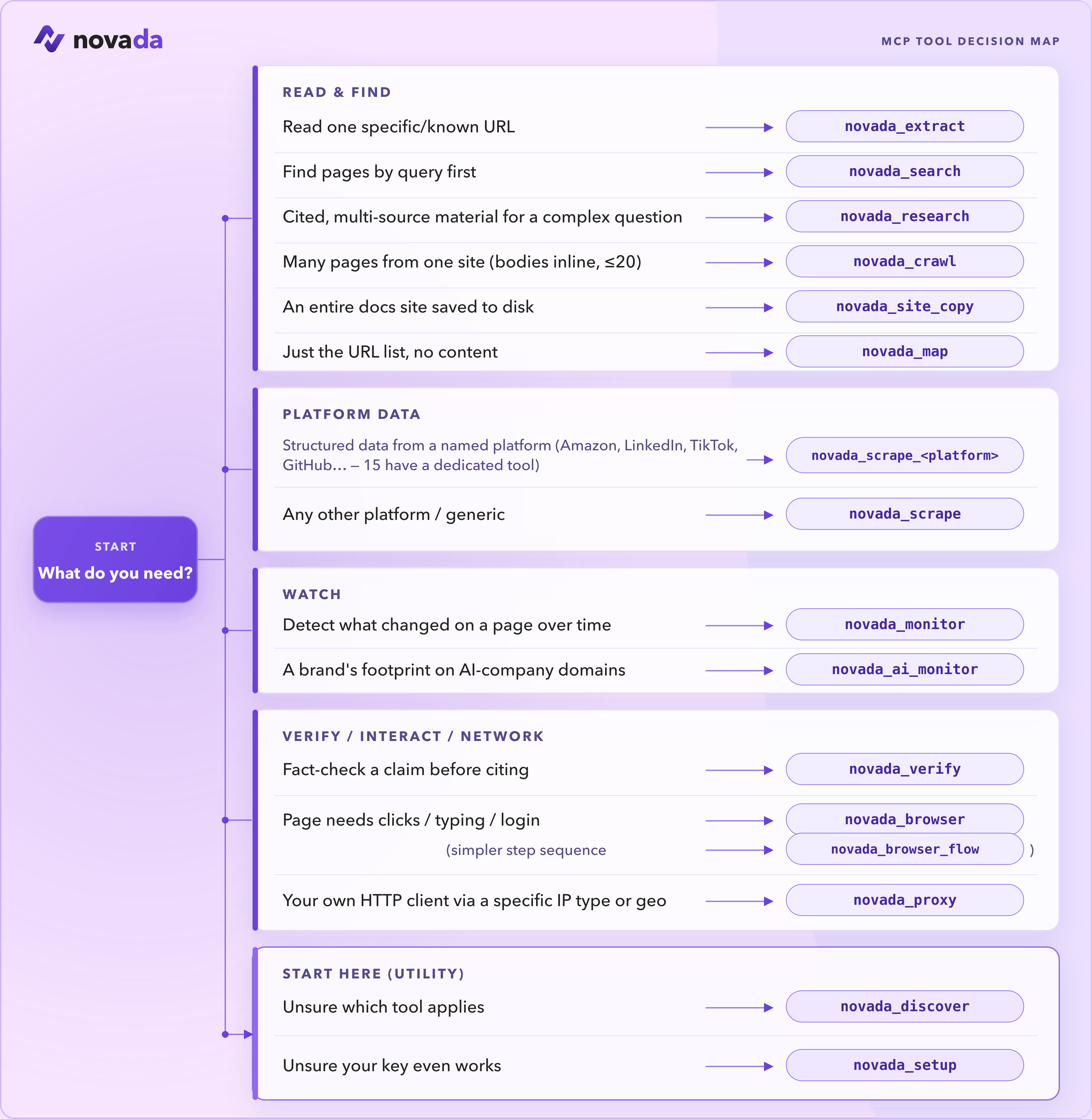
| Tool | Use it when |
|---|---|
novada_search | Find pages by query (google / duckduckgo / yandex; time, domain, geo filters). |
novada_extract | Read one known URL, or up to 10 in parallel, through anti-bot pages. |
novada_research | Answer a complex question with passages from several sources in one call. |
novada_scrape | Structured records from 14 platforms, plus 14 typed per-platform tools such as novada_scrape_amazon and novada_scrape_linkedin. |
novada_crawl | Pull content from a bounded set of related pages (up to 20) on one site. |
novada_map | Discover what URLs exist on a site before fetching. |
novada_proxy | Route your own HTTP client through a specific IP type, country or session. |
Not sure? Call novada_discover. 37 tools self-hosted; the hosted endpoint exposes 28 of them (self-host adds browser automation and site copy). Full list and per-surface availability: docs/TOOLS.md.
How it compares
| Typed platform scrapers | Search / extract / crawl / map | Own proxy network | Notes | |
|---|---|---|---|---|
| Novada | Yes (14) | Yes, plus research | Yes | Proxy config from Novada's own network via novada_proxy |
| Tavily | No | Yes | No | Search, extract, map, crawl |
| Firecrawl | No | Yes | No | Scrape, crawl, search, extract and an agent tool |
| Bright Data | Yes | Yes | Yes | Closest in scope |
Pick Tavily or Firecrawl if you only need search and page-to-markdown. Pick Novada or Bright Data if you also need records from specific platforms or control over proxy routing. Comparison reflects each project's public MCP README as of 2026-10-26; check theirs for current details.
Built for agents: write operations (proxy sub-accounts, IP whitelist, static IPs, key capture) use a two-step approval token, and novada_discover and novada_setup let an agent find the right tool or check its key without reading this page. Basic novada_extract also works without a key (no render escalation).
Repository layout
npm-package/ is the novada-mcp package and holds all tool logic. hosted-server/ is the HTTP wrapper behind mcp.novada.com. distribution/ holds plugin and registry packaging plus the release consistency check, monitoring/ the smoke, stress and report tooling, config/ the surface definitions, scripts/ repo-level checks, and docs/ the tool reference and assets. See ARCHITECTURE.md and CONTRIBUTING.
Links
novada.com · npm · GitHub · Issues
License
MIT, see LICENSE.