Splunk
Một máy chủ MCP dành cho Splunk để tìm kiếm, phân tích và trực quan hóa dữ liệu do máy tạo ra từ phiên bản Splunk của bạn.
Tài liệu
MCP Server for Splunk
A Go implementation of the MCP server for Splunk. Supports STDIO and SSE (Server-Sent Events HTTP API). Uses github.com/mark3labs/mcp-go SDK.
Quickstart - Cursor integration
By configuring MCP Settings in Cursor, you can include remote data directly into the LLM context.
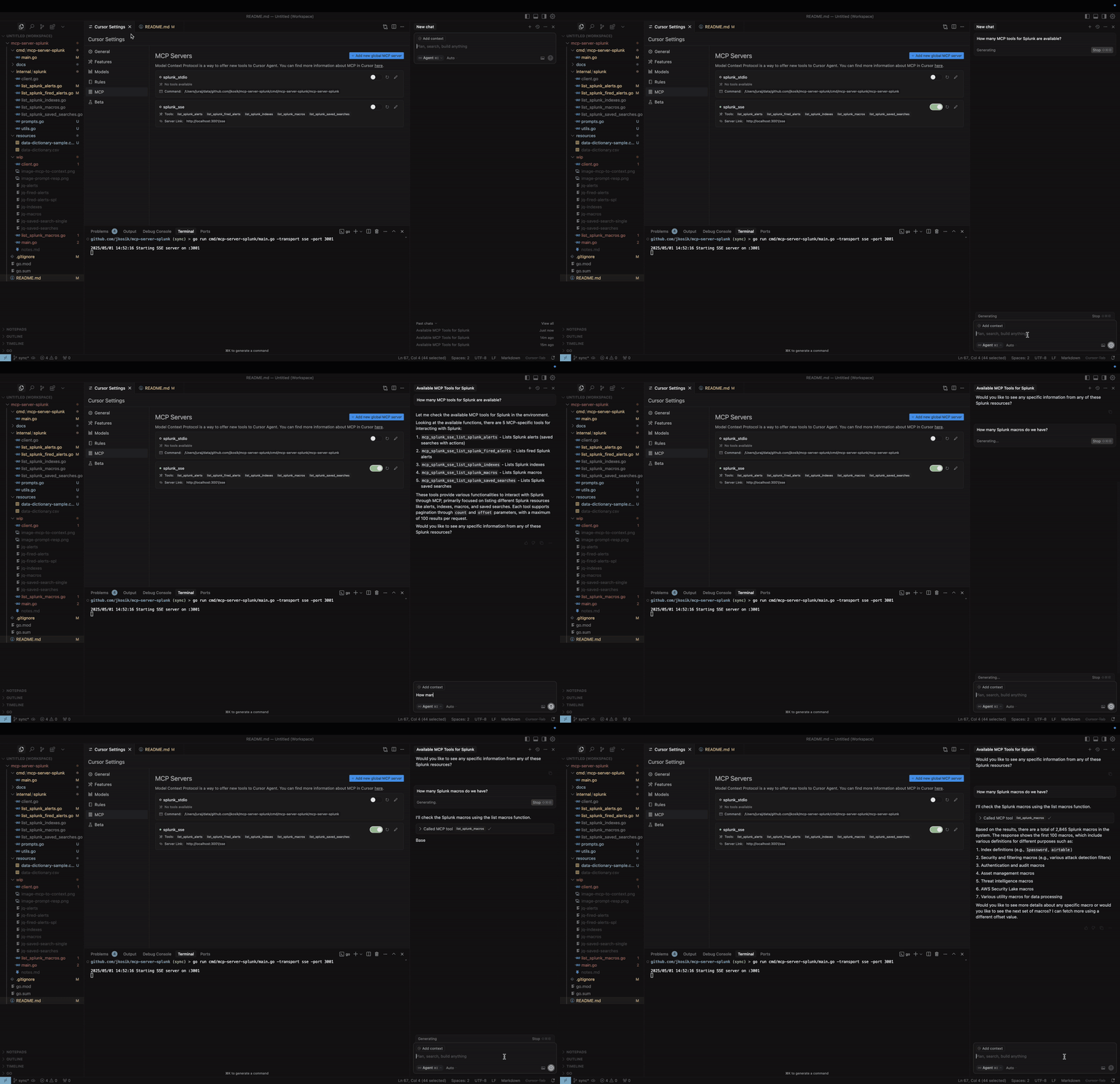
STDIO mode
cd /tmp # CHANGE ME
git clone https://github.com/jkosik/mcp-server-splunk.git
cd mcp-server-splunk/cmd/mcp-server-splunk/
Update Cursor settings in ~/.cursor/mcp.json:
{
  "mcpServers": {
    "splunk_stdio": {
      "name": "Splunk MCP Server",
      "description": "Splunk MCP server",
      "type": "stdio",
      "command": "/tmp/mcp-server-splunk/cmd/mcp-server-splunk/mcp-server-splunk", # CHANGE ME
      "env": {
        "SPLUNK_URL": "https://changeme.splunkcloud.com:8089", # CHANGE ME
        "SPLUNK_TOKEN": "abcdef" # CHANGE ME
      }
    }
  }
}
Alternatively re-build the server first:
go build -o cmd/mcp-server-splunk/mcp-server-splunk cmd/mcp-server-splunk/main.go
SSE mode
Start the server:
export SPLUNK_URL=https://your-splunk-instance:8089
export SPLUNK_TOKEN=your-splunk-token

# Start the server
go run cmd/mcp-server-splunk/main.go -transport sse -port 3001
Update Cursor settings in ~/.cursor/mcp.json:
{
  "mcpServers": {
    "splunk_sse": {
      "name": "Splunk MCP Server (SSE)",
      "description": "MCP server for Splunk integration (SSE mode)",
      "type": "sse",
      "url": "http://localhost:3001/sse"
    }
  }
}
MCP Tools and Prompts
-
list_splunk_saved_searches- Parameters:
count(number, optional): Number of results to return (max 100, default 100)offset(number, optional): Offset for pagination (default 0)
- Parameters:
-
list_splunk_alerts- Parameters:
count(number, optional): Number of results to return (max 100, default 10)offset(number, optional): Offset for pagination (default 0)title(string, optional): Case-insensitive substring to filter alert titles
- Parameters:
-
list_splunk_fired_alerts- Parameters:
count(number, optional): Number of results to return (max 100, default 10)offset(number, optional): Offset for pagination (default 0)ss_name(string, optional): Search name pattern to filter alerts (default "*")earliest(string, optional): Time range to look back (default "-24h")
- Parameters:
-
list_splunk_indexes- Parameters:
count(number, optional): Number of results to return (max 100, default 10)offset(number, optional): Offset for pagination (default 0)
- Parameters:
-
list_splunk_macros- Parameters:
count(number, optional): Number of results to return (max 100, default 10)offset(number, optional): Offset for pagination (default 0)
- Parameters:
-
internal/splunk/prompt.goimplements an MCP Prompt to find Splunk alerts for a specific keyword (e.g. GitHub or OKTA) and instructs Cursor to utilise multiple MCP tools to review all Splunk alerts, indexes and macros first to provide the best answer. -
cmd/mcp/server/main.goimplements MCP Resource in the form of local CSV file with Splunk related content, providing further context to the chat.
Local usage and testing
STDIO mode (default)
export SPLUNK_URL=https://your-splunk-instance:8089
export SPLUNK_TOKEN=your-splunk-token

# List available tools
echo '{"jsonrpc":"2.0","id":1,"method":"tools/list","params":{}}' | go run cmd/mcp-server-splunk/main.go | jq

# Call list_splunk_saved_searches tool
echo '{"jsonrpc":"2.0","id":1,"method":"tools/call","params":{"name":"list_splunk_saved_searches","arguments":{}}}' | go run cmd/mcp-server-splunk/main.go | jq
SSE mode (Server-Sent Events HTTP API)
export SPLUNK_URL=https://your-splunk-instance:8089
export SPLUNK_TOKEN=your-splunk-token

# Start the server
go run cmd/mcp-server-splunk/main.go -transport sse -port 3001

# Call the server and get Session ID from the output. Do not terminate the session.
curl http://localhost:3001/sse

# Keep session running and and use different terminal window for the final MCP call
curl -X POST "http://localhost:3001/message?sessionId=YOUR_SESSION_ID" \
  -H "Content-Type: application/json" \
  -d '{"jsonrpc":"2.0","id":1,"method":"tools/list","params":{}}' | jq
Installing via Smithery
Dockerfile and smithery.yaml are used to support hosting this MCP server at [Smithery](https://smithery.ai/server/@jkosik/.
Certified by MCP Review: https://mcpreview.com/mcp-servers/jkosik/mcp-server-splunk