MCP Interactive
Cho phép giao tiếp giữa LLM và người dùng thông qua giao diện Electron tương tác.
Tài liệu
MCP Interactive




An interactive MCP (Model Context Protocol) server with an Electron interface for user interaction.
Key Features
This MCP server enhances LLM coordination, offering greater control and predictability, and significantly reduces billable requests by minimizing user interactions within a single task.
For a detailed history of changes, see the Changelog.
Demo
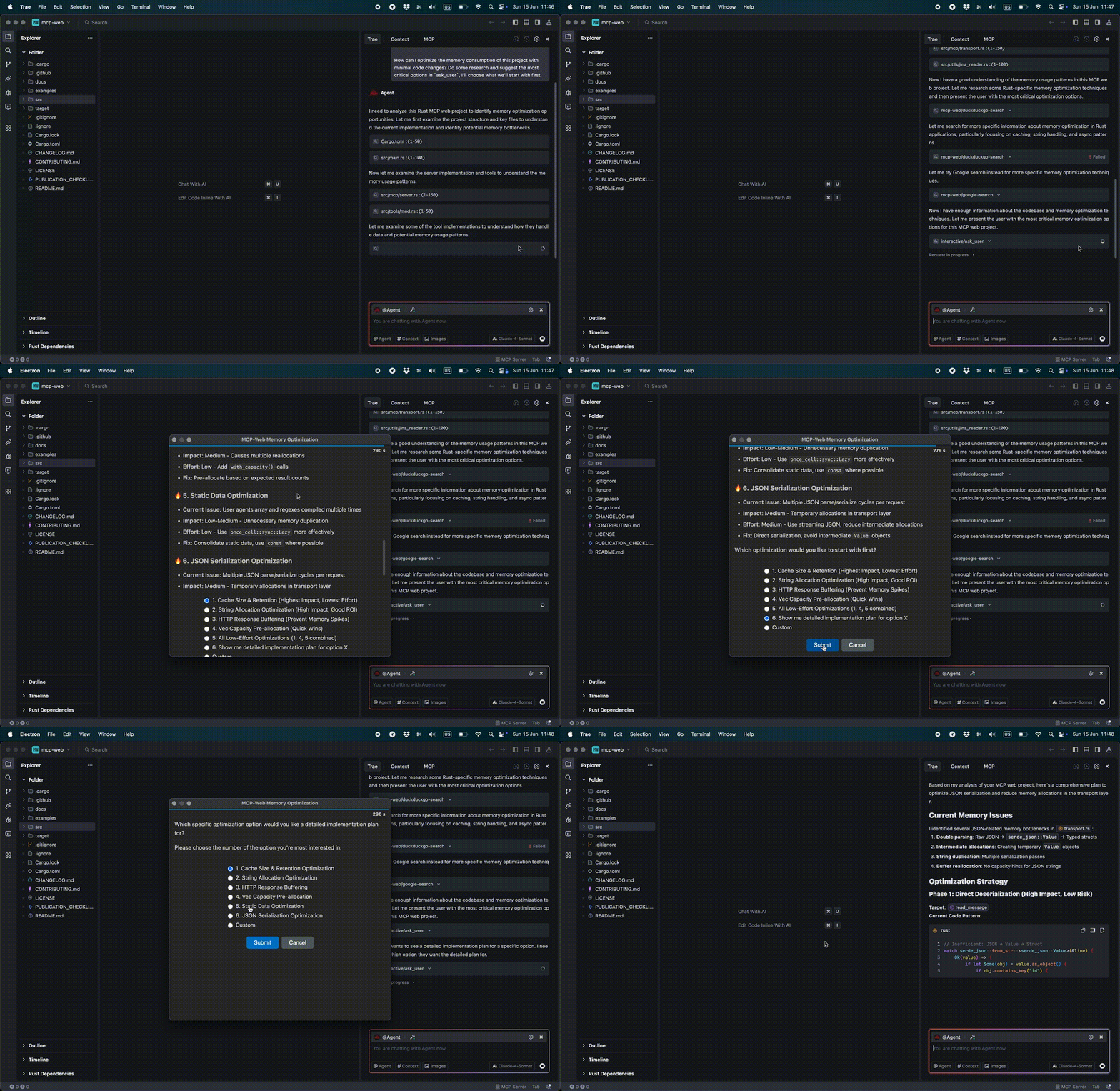
Compatibility
- Tested and Confirmed:
- Trae IDE
- Claude for Mac
- augment code
- Cursor IDE
- VSCode with Copilot
Available Tools
ask_user - Prompts the user with a question via a pop-up command prompt and awaits their interactive response.
Input Schema:
{
  "type": "object",
  "properties": {
    "projectName": {
      "type": "string",
      "description": "Identifies the context/project making the request"
    },
    "message": {
      "type": "string",
      "description": "The specific question for the user. Supports Markdown formatting."
    },
    "predefinedOptions": {
      "type": "array",
      "items": {
        "type": "string"
      },
      "description": "Predefined options for the user to choose from (optional)"
    }
  },
  "required": [
    "projectName",
    "message"
  ]
}
Installation
Using npx
{
  "mcpServers": {
    "interactive": {
      "command": "npx",
      "args": [
        "mcp-interactive",
        "-t",
        "300"
      ]
    }
  }
}
Local Installation
Install dependencies:
npm install
Configure MCP server:
{
  "mcpServers": {
    "interactive": {
      "command": "node",
      "args": [
        "/path/to/project/mcp-interactive/index.js",
        "-t",
        "300"
      ]
    }
  }
}
System Prompt Recommendations for Visual Studio Code, Cursor IDE
## Decision Making
- **Ambiguous tasks**: ALWAYS clarify using `mcp_interactive_ask_user` tool
- **Requires decisions**: ALWAYS clarify using `mcp_interactive_ask_user` tool

## Code Development
- **Final confirmation**: MUST ask user if all requirements from specification are completed using `mcp_interactive_ask_user` tool with work report

## Final gate
- Before ANY final answer (after actions/edits/checks), it is **MANDATORY** to call `mcp_interactive_ask_user` with a report on the work done and the option ["Yes, everything is OK"].
- If the answer is not "Yes, everything is OK" — continue working until the comments are resolved and repeat every time `mcp_interactive_ask_user`.
- There are no exceptions (including minor edits).
Example of "Human In The Loop" mode in chat of Visual Studio Code
Can you check the docs and explain how the project works? #interactive
System Prompt Recommendations for Trae IDE
This section outlines recommended guidelines for system prompts or rules for LLMs to ensure optimal interaction and task execution.
## Decision Making
- **Ambiguous tasks**: ALWAYS clarify using `ask_user` tool via MCP
- **Requires decisions**: ALWAYS clarify using `ask_user` tool via MCP

## Code Development
- **Final confirmation**: MUST ask user if all requirements from specification are completed using `ask_user` tool via MCP with work report

## Final gate
- Before ANY final answer (after actions/edits/checks), it is **MANDATORY** to call `ask_user` with a report on the work done and the option ["Yes, everything is OK"].
- If the answer is not "Yes, everything is OK" — continue working until the comments are resolved and repeat every time `ask_user`.
- There are no exceptions (including minor edits).
Command Line Options
--timeoutor-t(seconds): Specifies the waiting time for the user's response dialog. If no response is received within this period, the reply "User did not reply: Timeout occurred." will be sent.
Troubleshooting
Common Issues
Electron not starting:
- Ensure the current version of Node.js is installed
- Try reinstalling dependencies by running:
npm install
Timeout issues for answer (progressbar):
- Increase timeout value using
-tparameter - Default timeout is 60 seconds, adjust as needed
Contributing
Contributions are welcome! Please feel free to submit a Pull Request. For major changes, please open an issue first to discuss what you would like to change.
Please make sure to update tests as appropriate and follow the existing code style.
Support
If you encounter any problems or have questions, please open an issue on GitHub.
Dependencies
This project includes a local copy of marked.js (marked.min.js) for Markdown parsing functionality. Marked is licensed under the MIT License and is maintained by the Marked.js team and contributors.
License
MIT
Third-Party Licenses
- marked.js: MIT License - Copyright (c) 2018+, MarkedJS contributors