esp-mcp
Một máy chủ MCP cho quy trình làm việc ESP-IDF, hỗ trợ xây dựng dự án, nạp firmware và tự động giải quyết vấn đề từ nhật ký xây dựng.
Tài liệu
Goal
The goal of this MCP is to:
- Consolidate ESP-IDF and related project commands in one place.
- Simplify getting started using only LLM communication.
How to contribute to the project
Simply find a command that is missing from this MCP and create a PR for it!
If you want someone to help you with this implementation, just open an issue.
Notice
This project is currently a Proof of Concept (PoC) for an MCP server tailored for ESP-IDF workflows.
Current Capabilities:
Core Features:
run_esp_idf_install: Install ESP-IDF dependencies and toolchain viainstall.sh.create_esp_project: Create a new ESP-IDF project.setup_project_esp_target: Set target chip for ESP-IDF projects (esp32, esp32c3, esp32s3, etc.).build_esp_project: Build ESP-IDF projects with incremental build support.list_esp_serial_ports: List available serial ports for ESP devices.flash_esp_project: Flash built firmware to connected ESP devices.run_pytest: Run pytest tests with pytest-embedded support for ESP-IDF projects.
Additional Features:
- Flexible ESP-IDF path management: supports per-project ESP-IDF versions via
idf_pathparameter. - SDK config management: supports custom
sdkconfig_defaultsfiles for build configuration (multiple files can be specified separated by semicolons). - Build time tracking for performance monitoring.
- Optional port specification for flashing operations.
- Includes experimental support for automatic issue fixing based on build logs.
Vision & Future Work: The long-term vision is to expand this MCP into a comprehensive toolkit for interacting with embedded devices, potentially integrating with home assistant platforms, and streamlining documentation access for ESP-IDF and related technologies.
We envision features such as:
- Broader ESP-IDF command support (e.g.,
monitor,menuconfiginteraction if feasible). - Device management and information retrieval.
- Integration with other embedded development tools and platforms.
Your ideas and contributions are welcome! Please feel free to discuss them by opening an issue.
Install
First, clone this MCP repository:
git clone git@github.com:horw/esp-mcp.git
Then, configure it in your chatbot.
The JSON snippet below is an example of how you might configure this esp-mcp server within a chatbot or an agent system that supports the Model Context Protocol (MCP). The exact configuration steps and format may vary depending on the specific chatbot system you are using. Refer to your chatbot's documentation for details on how to integrate MCP servers.
{
    "mcpServers": {
        "esp-run": { // "esp-run" is an arbitrary name you can assign to this server configuration.
            "command": "<path_to_uv_or_python_executable>",
            "args": [
                "--directory",
                "<path_to_cloned_esp-mcp_repository>", // e.g., /path/to/your/cloned/esp-mcp
                "run",
                "main.py" // If using python directly, this might be just "main.py" and `command` would be your python interpreter
            ],
            "env": {
                "IDF_PATH": "<path_to_your_esp-idf_directory>" // e.g., ~/esp/esp-idf or C:\\Espressif\\frameworks\\esp-idf
            }
        }
    }
}
A few notes on the configuration:
command: This should be the full path to youruvexecutable if you are using it, or your Python interpreter (e.g.,/usr/bin/python3orC:\\Python39\\python.exe) if you plan to runmain.pydirectly.args:- The first argument to
--directoryshould be the absolute path to where you cloned theesp-mcprepository. - If you're using
uv, the argumentsrun main.pyare appropriate. If you're using Python directly, you might only needmain.pyin theargslist, and ensure yourcommandpoints to the Python executable.
- The first argument to
IDF_PATH: (Optional) This environment variable can point to the root directory of your ESP-IDF installation. ESP-IDF is Espressif's official IoT Development Framework. If you haven't installed it, please refer to the official ESP-IDF documentation for installation instructions. Note: All tools support anidf_pathparameter that can be manually specified when calling the tool, allowing you to use different ESP-IDF versions for different projects without setting the environment variable. Ifidf_pathis not provided, the tool will use theIDF_PATHenvironment variable if available.
Usage
Once the esp-mcp server is configured and running, your LLM or chatbot can interact with it using the tools defined in this MCP. For example, you could ask your chatbot to:
- "Install ESP-IDF dependencies for the ESP-IDF installation at
/path/to/esp-idf." - "Set the target chip to esp32s3 for the project in
/path/to/my/esp-project." - "Build the project located at
/path/to/my/esp-projectusing theesp-mcp." - "Build the project with custom sdkconfig defaults:
sdkconfig.defaults;sdkconfig.ci.release." - "Run pytest tests for the project at
/path/to/my/esp-projecttargeting esp32c3." - "Flash the firmware to my connected ESP32 device for the project in
my_app."
The MCP server will then execute the corresponding ESP-IDF commands (like idf.py build, idf.py set-target, idf.py flash, pytest) based on the tools implemented in main.py.
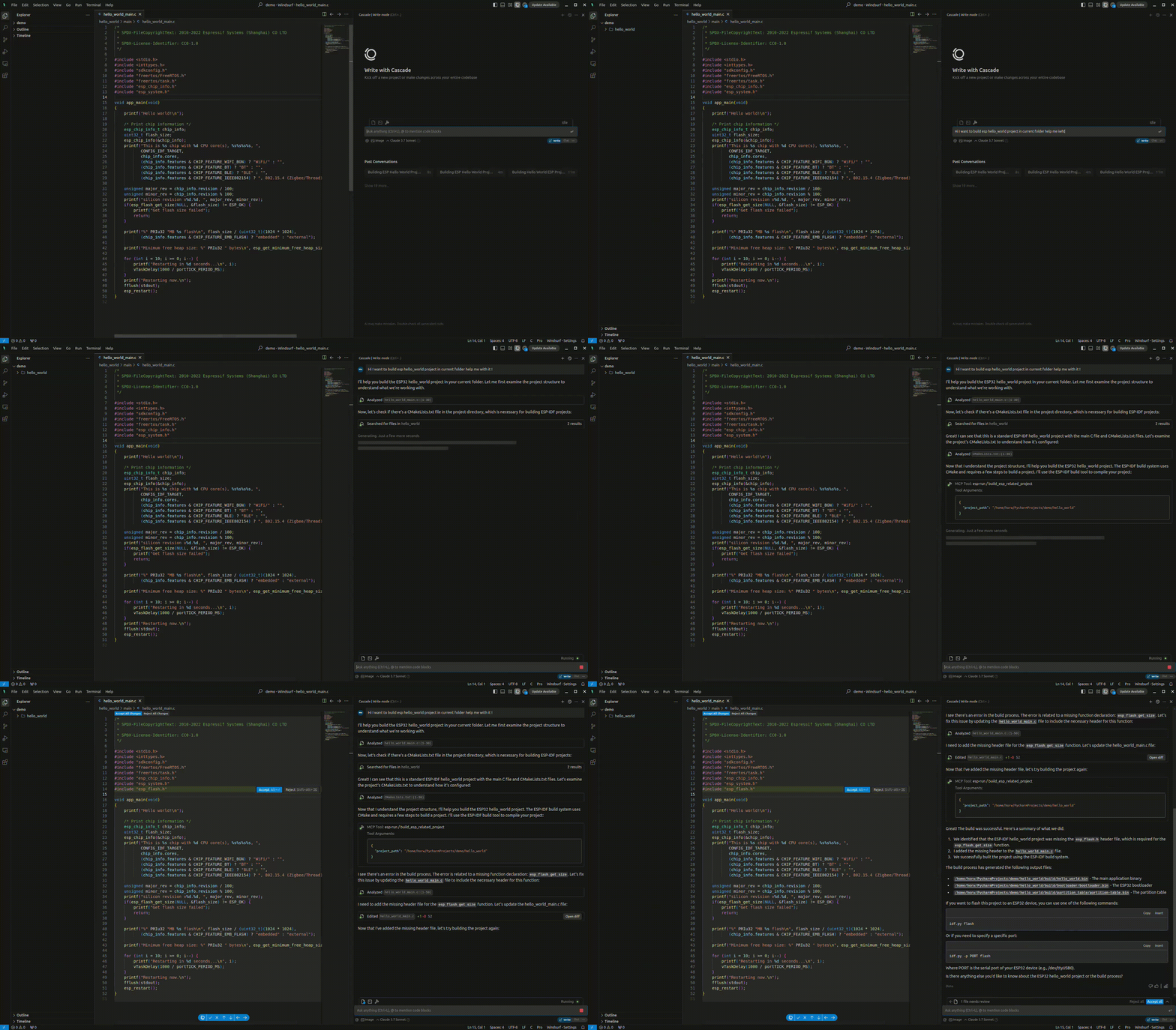
The result.gif below shows an example interaction:
Examples
- Build and Flash