MiniMax MCP
chính thứcTương tác với các API tạo văn bản thành giọng nói, hình ảnh và video mạnh mẽ của MiniMax.
Bạn có thể làm gì với Mini Max MCP?
- Chuyển văn bản thành giọng nói — Yêu cầu trợ lý của bạn tạo âm thanh lời nói từ bất kỳ văn bản nào bằng cách sử dụng
text_to_audiovới giọng nói đã chọn. - Nhân bản giọng nói từ một mẫu — Cung cấp một tệp âm thanh và sử dụng
voice_cloneđể tạo giọng nói tùy chỉnh bắt chước người nói gốc. - Thiết kế giọng nói từ một mô tả — Mô tả chất lượng giọng nói mong muốn và sử dụng
voice_designđể tạo bản xem trước của giọng nói tùy chỉnh đó. - Tạo hình ảnh từ một gợi ý — Tạo một hình ảnh bằng cách mô tả những gì bạn muốn với
text_to_image. - Tạo video từ một gợi ý — Tạo một đoạn video clip bằng cách mô tả cảnh, với các tùy chọn điều khiển thời lượng và độ phân giải thông qua
generate_video. - Tạo nhạc từ một gợi ý và lời bài hát — Soạn một bản nhạc bằng cách cung cấp gợi ý về phong cách và lời bài hát cho
music_generation.
Tài liệu









Máy chủ Model Context Protocol (MCP) chính thức của MiniMax cho phép tương tác với các API Chuyển văn bản thành giọng nói và tạo video/hình ảnh mạnh mẽ. Máy chủ này cho phép các ứng dụng khách MCP như Claude Desktop, Cursor, Windsurf, OpenAI Agents và các ứng dụng khác tạo giọng nói, sao chép giọng nói, tạo video, tạo hình ảnh và hơn thế nữa.
💡 Khuyến nghị: MiniMax CLI (mmx-cli) — công cụ dòng lệnh chính thức của chúng tôi với các mô hình mới nhất và các tính năng bổ sung bao gồm văn bản, thị giác, tìm kiếm và bìa nhạc. Hoạt động như một kỹ năng tác nhân AI cho Claude Code, Cursor, OpenClaw, v.v.
Tài liệu
- Tài liệu tiếng Trung
- MiniMax-MCP-JS - Triển khai JavaScript chính thức của MiniMax MCP
Bắt đầu nhanh với Ứng dụng khách MCP
- Lấy khóa API của bạn từ MiniMax.
- Cài đặt
uv(trình quản lý gói Python), cài đặt bằngcurl -LsSf https://astral.sh/uv/install.sh | shhoặc xemuvrepo để biết các phương thức cài đặt bổ sung. - Quan trọng: Máy chủ API và khóa thay đổi theo khu vực và phải khớp nhau; nếu không, bạn sẽ gặp lỗi
Invalid API key.
| Khu vực | Toàn cầu | Trung Quốc đại lục |
|---|---|---|
| MINIMAX_API_KEY | lấy từ MiniMax Global | lấy từ MiniMax |
| MINIMAX_API_HOST | https://api.minimax.io | https://api.minimaxi.com |
Claude Desktop
Đi tới Claude > Settings > Developer > Edit Config > claude_desktop_config.json để bao gồm những điều sau:
{
  "mcpServers": {
    "MiniMax": {
      "command": "uvx",
      "args": [
        "minimax-mcp",
        "-y"
      ],
      "env": {
        "MINIMAX_API_KEY": "insert-your-api-key-here",
        "MINIMAX_MCP_BASE_PATH": "local-output-dir-path, such as /User/xxx/Desktop",
        "MINIMAX_API_HOST": "api host, https://api.minimax.io | https://api.minimaxi.com",
        "MINIMAX_API_RESOURCE_MODE": "optional, [url|local], url is default, audio/image/video are downloaded locally or provided in URL format"
      }
    }
  }
}
⚠️ Cảnh báo: Khóa API cần phải khớp với máy chủ. Nếu xảy ra lỗi "API Error: invalid api key", vui lòng kiểm tra máy chủ api của bạn:
- Máy chủ toàn cầu:
https://api.minimax.io - Máy chủ Trung Quốc đại lục:
https://api.minimaxi.com
Nếu bạn đang sử dụng Windows, bạn sẽ phải bật "Chế độ nhà phát triển" trong Claude Desktop để sử dụng máy chủ MCP. Nhấp vào "Trợ giúp" trong menu hamburger ở góc trên bên trái và chọn "Bật Chế độ nhà phát triển".
Cursor
Đi tới Cursor -> Preferences -> Cursor Settings -> MCP -> Add new global MCP Server để thêm cấu hình trên.
Vậy là xong. Ứng dụng khách MCP của bạn giờ đây có thể tương tác với MiniMax thông qua các công cụ sau:
Phương thức truyền tải
Chúng tôi hỗ trợ hai loại phương thức truyền tải: stdio và sse.
| stdio | SSE |
|---|---|
| Chạy cục bộ | Có thể triển khai cục bộ hoặc trên đám mây |
Giao tiếp qua stdout | Giao tiếp qua network |
Đầu vào: Hỗ trợ xử lý tài nguyên local files hoặc URL hợp lệ | Đầu vào: Khi triển khai trên đám mây, nên sử dụng URL cho đầu vào |
Công cụ khả dụng
| công cụ | mô tả |
|---|---|
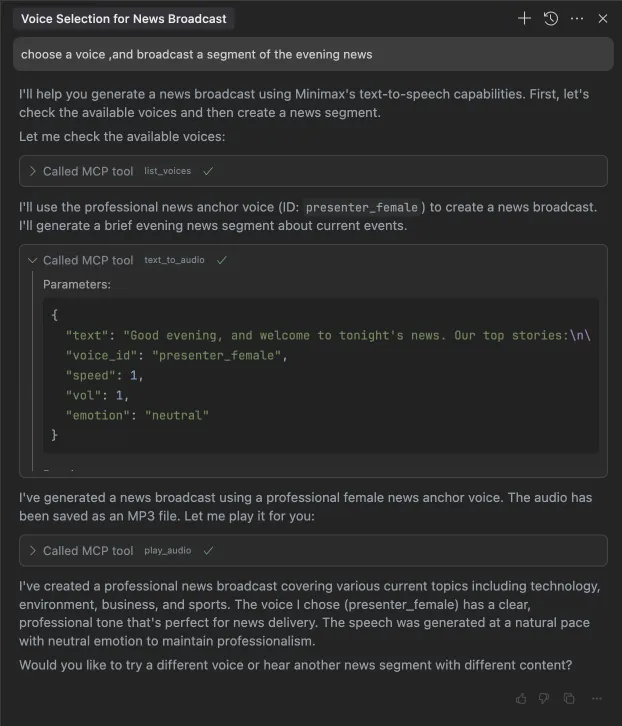
text_to_audio | Chuyển đổi văn bản thành âm thanh với một giọng nói nhất định |
list_voices | Liệt kê tất cả các giọng nói có sẵn |
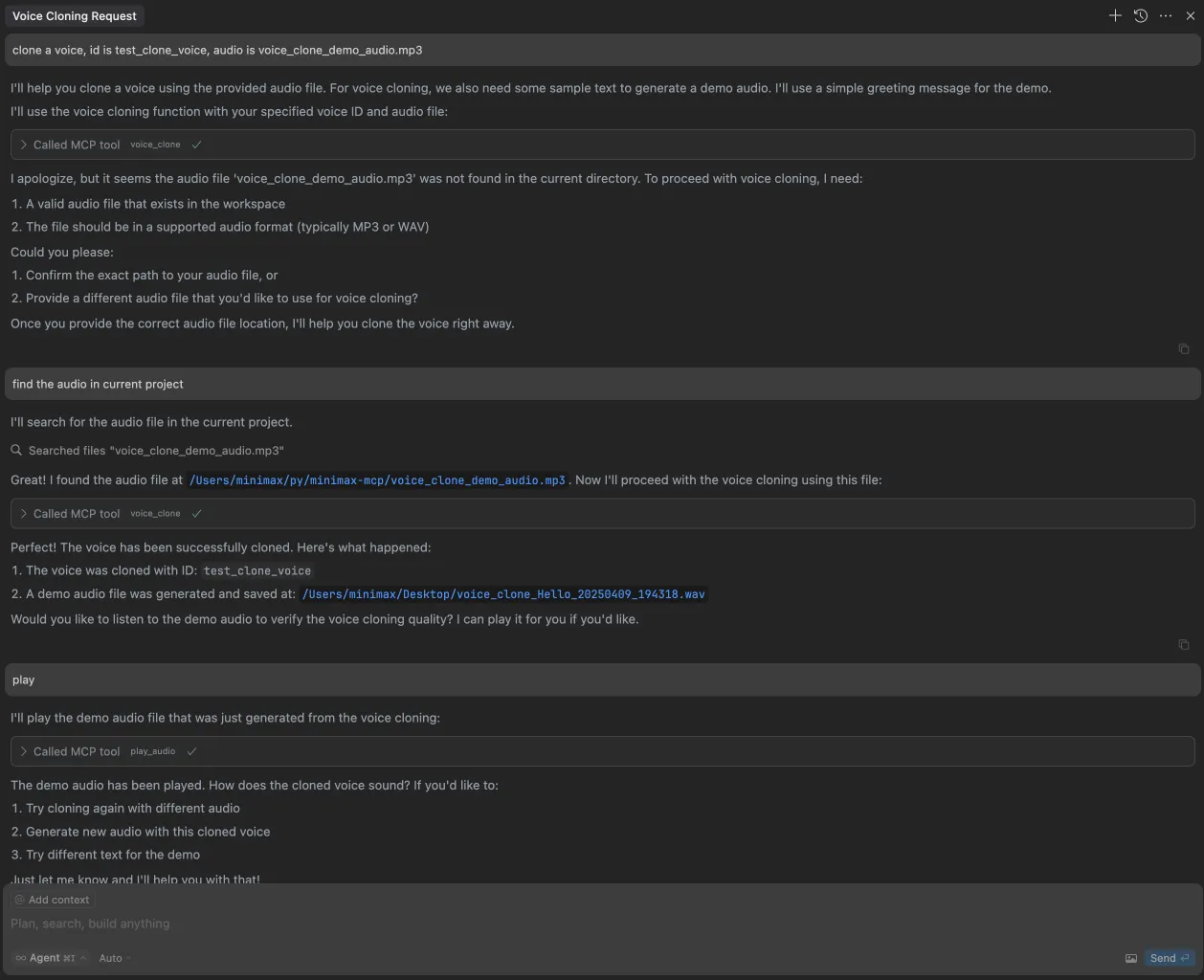
voice_clone | Sao chép một giọng nói bằng các tệp âm thanh được cung cấp |
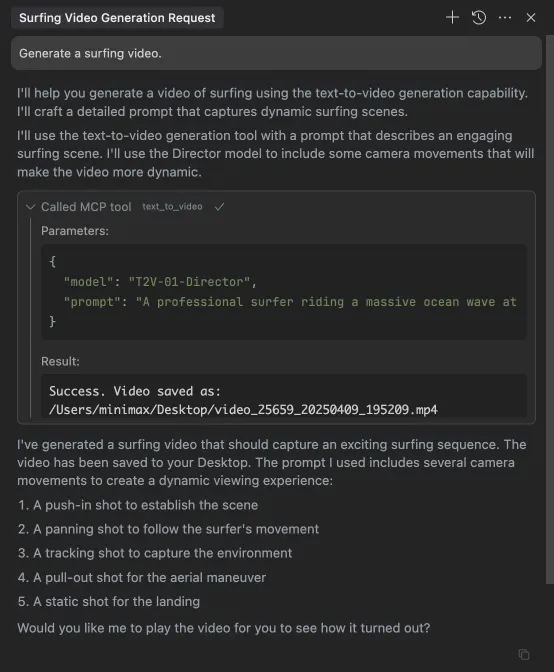
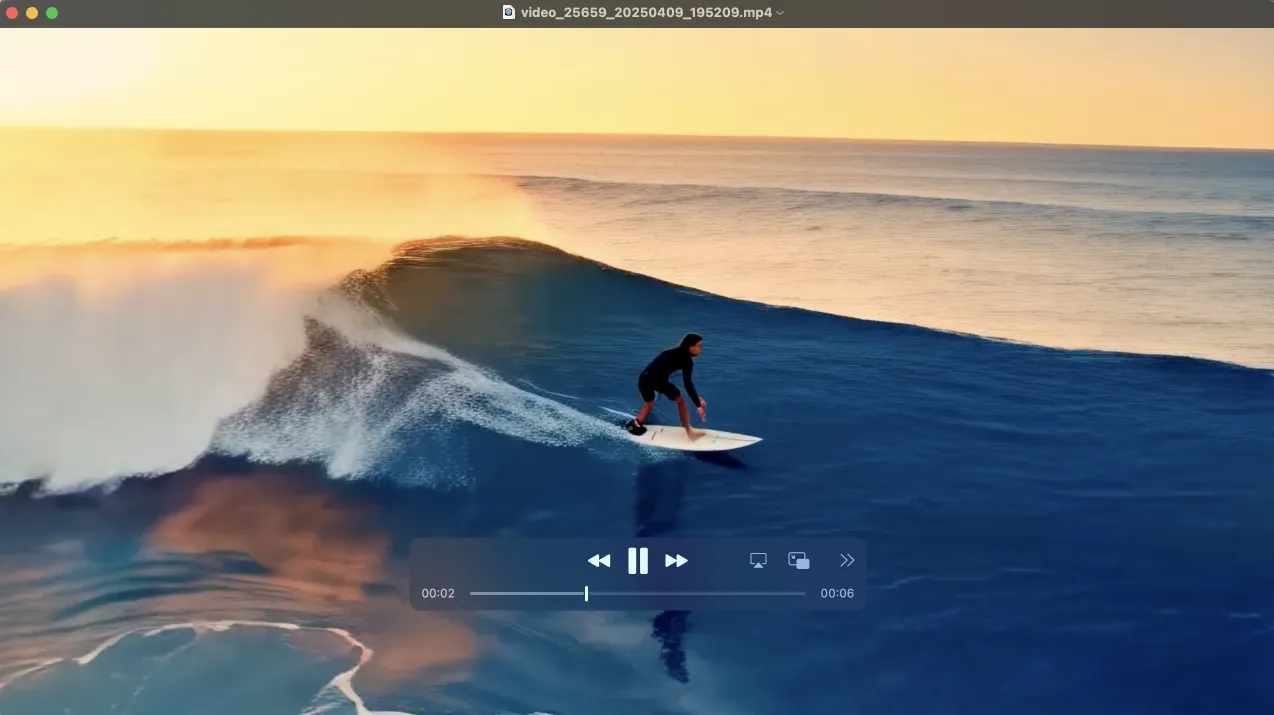
generate_video | Tạo video từ một lời nhắc |
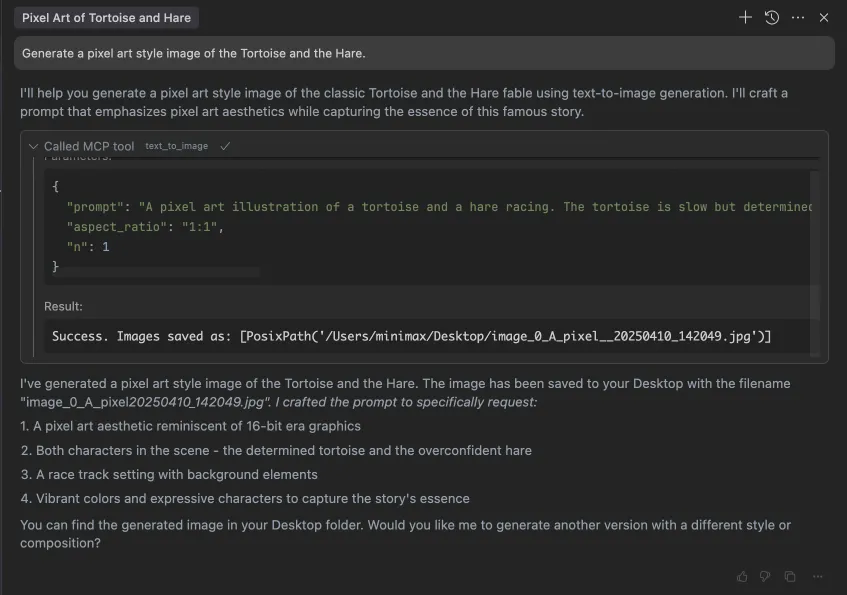
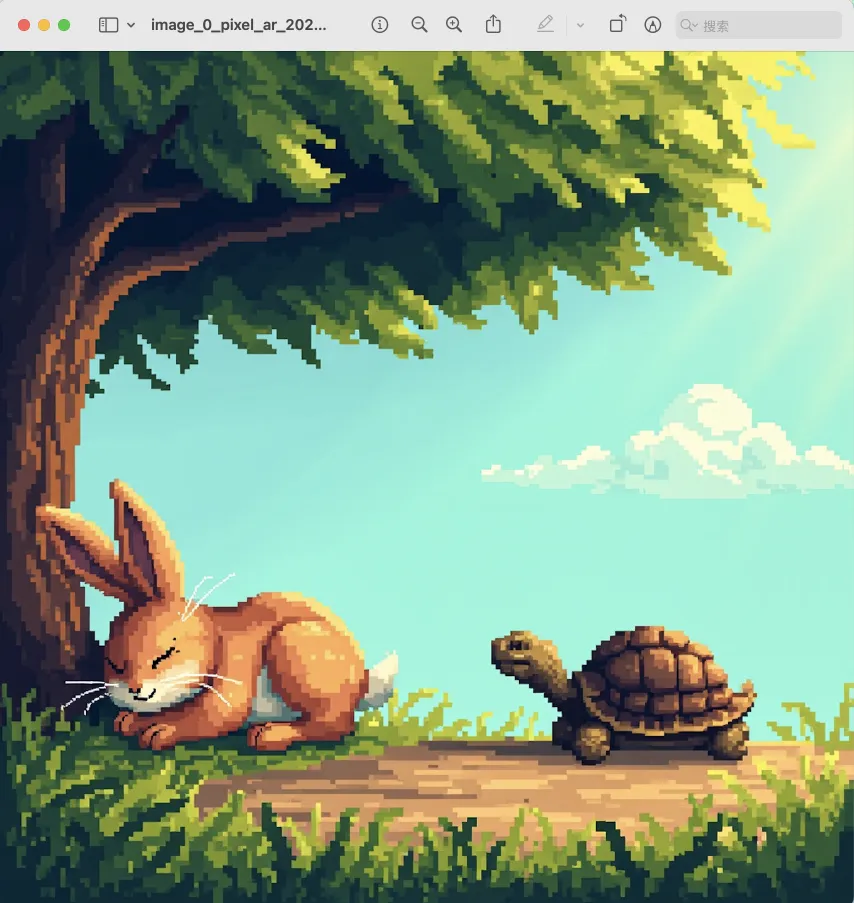
text_to_image | Tạo hình ảnh từ một lời nhắc |
query_video_generation | Truy vấn kết quả của tác vụ tạo video |
music_generation | Tạo một bản nhạc từ lời nhắc và lời bài hát |
voice_design | Tạo giọng nói từ một lời nhắc sử dụng văn bản xem trước |
Ghi chú phát hành
Ngày 2 tháng 7 năm 2025
🆕 Có gì mới
- Thiết kế giọng nói: Công cụ
voice_designmới - tạo giọng nói tùy chỉnh từ các lời nhắc mô tả với âm thanh xem trước - Nâng cao video: Đã thêm mô hình
MiniMax-Hailuo-02với chất lượng siêu nét và các điều khiển thời lượng/độ phân giải - Tạo nhạc: Công cụ
music_generationnâng cao được hỗ trợ bởi mô hìnhmusic-1.5
📈 Công cụ nâng cao
voice_design- Tạo giọng nói cá nhân hóa từ mô tả văn bảngenerate_video- Giờ đây hỗ trợ MiniMax-Hailuo-02 với các tùy chọn thời lượng 6s/10s và độ phân giải 768P/1080Pmusic_generation- Tạo nhạc chất lượng cao với mô hình music-1.5
Câu hỏi thường gặp
1. invalid api key
Vui lòng đảm bảo khóa API và máy chủ API của bạn được căn chỉnh theo khu vực
| Khu vực | Toàn cầu | Trung Quốc đại lục |
|---|---|---|
| MINIMAX_API_KEY | lấy từ MiniMax Global | lấy từ MiniMax |
| MINIMAX_API_HOST | https://api.minimax.io | https://api.minimaxi.com |
2. spawn uvx ENOENT
Vui lòng xác nhận đường dẫn tuyệt đối của nó bằng cách chạy lệnh này trong terminal của bạn:
which uvx
Khi bạn có được đường dẫn tuyệt đối (ví dụ: /usr/local/bin/uvx), hãy cập nhật cấu hình của bạn để sử dụng đường dẫn đó (ví dụ: "command": "/usr/local/bin/uvx").
3. Cách sử dụng generate_video ở chế độ không đồng bộ
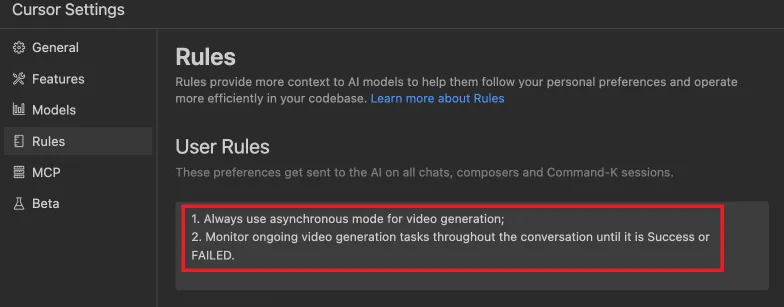
Xác định các quy tắc hoàn thành trước khi bắt đầu:
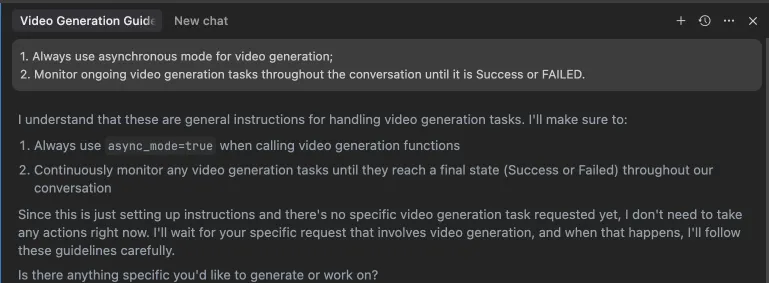 Ngoài ra, các quy tắc này có thể được cấu hình trong cài đặt IDE của bạn (ví dụ: Cursor):
Ví dụ sử dụng
⚠️ Cảnh báo: Sử dụng các công cụ này có thể phát sinh chi phí.
1. phát sóng một đoạn tin tức buổi tối
2. sao chép một giọng nói
3. tạo một video
4. tạo hình ảnh