mockd
Máy chủ mô phỏng đa giao thức với 18 công cụ MCP — mô phỏng các API HTTP, GraphQL, gRPC, WebSocket, MQTT, SSE và SOAP với kỹ thuật hỗn loạn, CRUD có trạng thái và phản hồi xác định dựa trên seed.
Tài liệu

One binary. Seven protocols. Zero dependencies.
Mock HTTP, gRPC, GraphQL, WebSocket, MQTT, SSE, and SOAP from a single CLI tool.
Import OpenAPI specs. Build digital twins. Let AI agents create mocks for you.



Website · Docs · Samples · Contributing
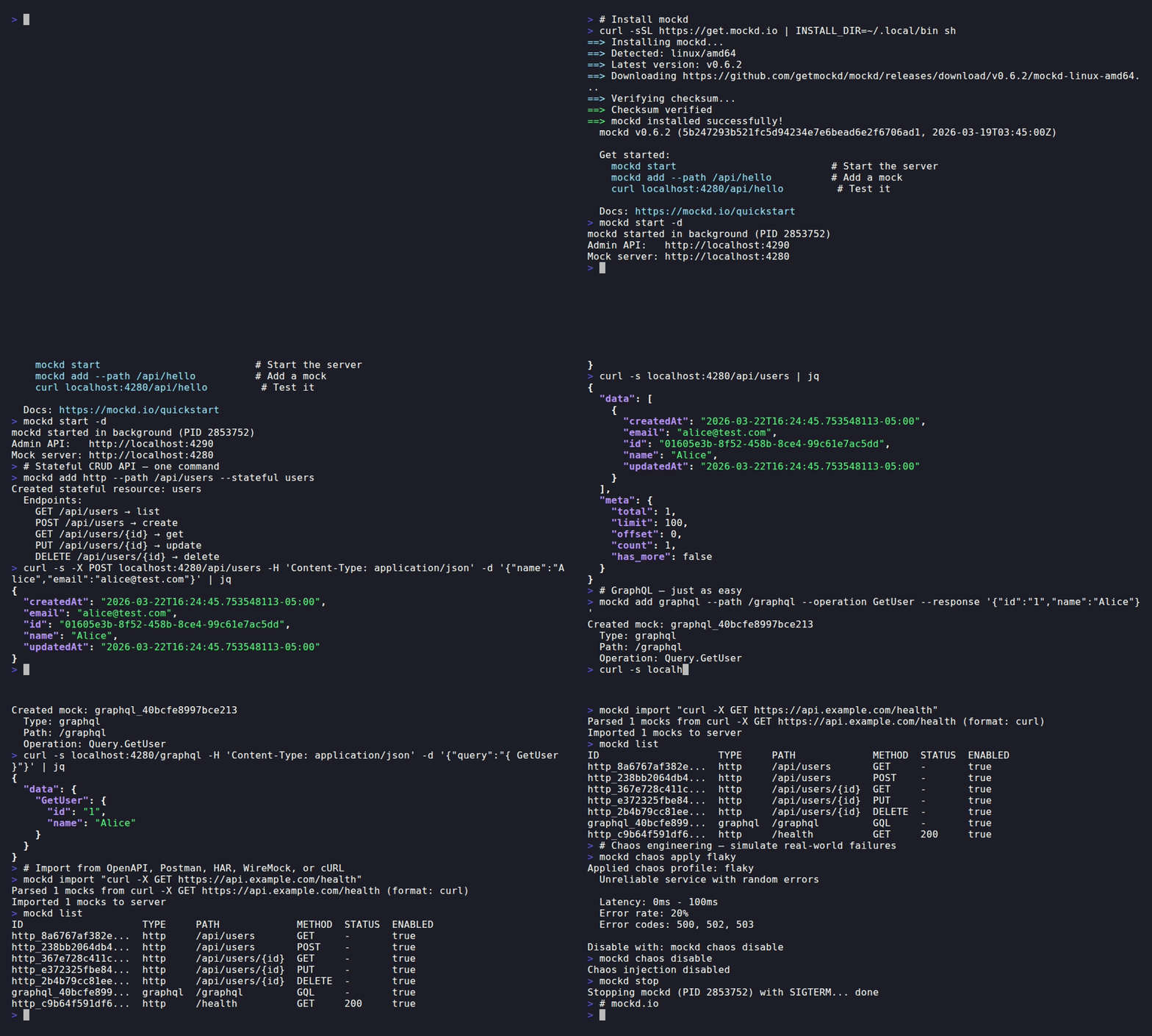
Quick Start
# Install
curl -sSL https://get.mockd.io | sh

# Start + create a stateful CRUD API in one command
mockd start
mockd add http --path /api/users --stateful users

# It works immediately
curl -X POST localhost:4280/api/users -d '{"name":"Alice","email":"alice@test.com"}'
# → {"id":"a1b2c3","name":"Alice","email":"alice@test.com"}

curl localhost:4280/api/users
# → {"data":[{"id":"a1b2c3","name":"Alice","email":"alice@test.com"}],"meta":{"total":1}}
More install options
brew install getmockd/tap/mockd                                          # Homebrew
docker run -p 4280:4280 -p 4290:4290 ghcr.io/getmockd/mockd:latest      # Docker
go install github.com/getmockd/mockd/cmd/mockd@latest                    # Go
Pre-built binaries for Linux, macOS, and Windows on the Releases page.
Why mockd?
Every other mock tool makes you choose: pick one protocol, install a runtime, bolt on extensions. mockd doesn't.
| mockd | WireMock | Mockoon | Prism | MockServer | Beeceptor | json-server | |
|---|---|---|---|---|---|---|---|
| Single binary, no runtime | ✅ | ❌ JVM | ❌ Electron | ✅ | ❌ JVM | ❌ SaaS | ❌ Node |
| All 9 protocols built-in | ✅ | 🔌 Ext | Partial | HTTP only | HTTP only | Partial | REST only |
| Chaos profiles + circuit breakers | ✅ | ⚠️ Cloud | ❌ | ❌ | ❌ | ❌ | ❌ |
| MCP server | ✅ local | ⚠️ Cloud | ❌ | ❌ | ❌ | ⚠️ Cloud, Team+ | ❌ |
| Free + self-hostable, unlimited | ✅ | ✅ | ✅ | ✅ | ✅ | 50 req/day | ✅ |
🔌 Ext = requires separate extension JAR • ⚠️ Cloud = only in paid/hosted tier
Full capability matrix (deployment, protocols, capabilities, imports/exports, pricing)
Deployment
| mockd | WireMock | Mockoon | Prism | MockServer | Beeceptor | json-server | |
|---|---|---|---|---|---|---|---|
| Native single binary | ✅ Go | ❌ | ❌ | ✅ | ❌ | ❌ | ❌ |
| Runtime required | none | JVM | Electron/Node | optional Node | JVM | n/a (SaaS) | Node |
| Docker image | ✅ | ✅ | ✅ CLI | ✅ | ✅ | ⚠️ Enterprise | ❌ |
| Managed SaaS offering | roadmap | WireMock Cloud | Mockoon Cloud | Stoplight | ❌ | ✅ | ❌ |
Protocol support
| mockd | WireMock OSS | Mockoon | Prism | MockServer | Beeceptor | json-server | |
|---|---|---|---|---|---|---|---|
| REST / HTTP | ✅ | ✅ | ✅ | ✅ | ✅ | ✅ | ✅ |
| gRPC | ✅ | 🔌 Ext | ❌ | ❌ | ❌ | ✅ | ❌ |
| GraphQL | ✅ | 🔌 Ext | ❌ | ❌ | ❌ | ✅ | ❌ |
| WebSocket | ✅ | 🔌 Ext (beta) | ✅ | ❌ | ❌ | ❌ | ❌ |
| MQTT | ✅ | ❌ | ❌ | ❌ | ❌ | ❌ | ❌ |
| SSE | ✅ | ❌ | ❌ | ❌ | ❌ | ❌ | ❌ |
| SOAP (WSDL) | ✅ | ❌ | Partial | ❌ | Partial | ✅ | ❌ |
| mTLS | ✅ | ✅ | Partial | ❌ | ✅ | ✅ | ❌ |
| OAuth flows | ✅ | ❌ | ❌ | ❌ | ❌ | ❌ | ❌ |
Capabilities
| mockd | WireMock OSS | Mockoon | Prism | MockServer | Beeceptor | json-server | |
|---|---|---|---|---|---|---|---|
| Stateful CRUD | ✅ | ❌ | ✅ | Partial | ❌ | ✅ | ✅ |
| Multi-step stateful flows | ✅ | ✅ Scenarios | Partial | ❌ | Partial | ✅ | ❌ |
| Fault injection (delay, errors) | ✅ | ✅ | ✅ | ❌ | ✅ | ✅ | ❌ |
| Chaos profiles | ✅ | ⚠️ Cloud | ❌ | ❌ | ❌ | ❌ | ❌ |
| Circuit breakers | ✅ | ⚠️ Cloud | ❌ | ❌ | ❌ | ❌ | ❌ |
| Bandwidth throttling | ✅ | ❌ | ❌ | ❌ | ❌ | roadmap | ❌ |
| Admin REST API | ✅ | ✅ | CLI only | ❌ | ✅ | ✅ | Partial |
| Built-in web dashboard | ✅ | ⚠️ Cloud | ⚠️ Cloud | ❌ | ✅ read-only | ✅ | ❌ |
| Native desktop GUI | ❌ | ❌ | ✅ Electron | ❌ | ❌ | ❌ | ❌ |
| MCP server | ✅ local | ⚠️ Cloud | ❌ | ❌ | ❌ | ⚠️ Cloud Team+ | ❌ |
| Cloud tunnel sharing | ✅ | ❌ | ⚠️ Cloud | ❌ | ❌ | ✅ | ❌ |
Import / export
| mockd | WireMock OSS | Mockoon | Prism | MockServer | Beeceptor | json-server | |
|---|---|---|---|---|---|---|---|
| OpenAPI import | ✅ | ⚠️ Cloud | ✅ | ✅ | ✅ | ✅ | ❌ |
| Postman import | ✅ | ⚠️ Cloud | ❌ | ✅ | ❌ | ❌ | ❌ |
| HAR import | ✅ | ❌ | ❌ | ❌ | ❌ | ❌ | ❌ |
| WSDL import | ✅ | ❌ | ❌ | ❌ | ❌ | ✅ | ❌ |
| cURL import | ✅ | ❌ | ❌ | ❌ | ❌ | ❌ | ❌ |
| WireMock format import | ✅ | native | ❌ | ❌ | ❌ | ❌ | ❌ |
| Mockoon format import | ✅ | ❌ | native | ❌ | ❌ | ❌ | ❌ |
| HAR export | ✅ | ✅ | ❌ | ❌ | ✅ | ✅ | ❌ |
Free tier limits
| Requests | Mock rules | Cost | |
|---|---|---|---|
| mockd | unlimited | unlimited | free (Apache 2.0) |
| WireMock OSS | unlimited | unlimited | free (Apache 2.0) |
| Mockoon desktop / CLI | unlimited | unlimited | free (MIT) |
| Prism | unlimited | unlimited | free (Apache 2.0) |
| MockServer | unlimited | unlimited | free (Apache 2.0) |
| Beeceptor free tier | 50 / day / endpoint | 3 | $10/mo+ for more |
| json-server | unlimited | unlimited | free (MIT) |
Legend: ✅ built-in • 🔌 Ext = separate OSS extension • ⚠️ Cloud = only in paid / hosted tier • Partial = limited implementation • roadmap = on the project's stated roadmap, not yet shipped
Note on WireMock imports. The
⚠️ Cloudmarks on OpenAPI and Postman import reflect first-party WireMock features. Community converters exist (e.g.openapi-to-wiremock, OpenAPI Generator targets) but are not bundled with the OSS standalone JAR.
Digital Twins
Import a real API spec, bind it to stateful tables, and get a mock that passes the real SDK:
# mockd.yaml — Stripe digital twin
version: "1.0"
imports:
  - path: stripe-openapi.yaml
    as: stripe
tables:
  - name: customers
    idStrategy: prefix
    idPrefix: "cus_"
    seedData:
      - { id: "cus_1", name: "Acme Corp", email: "billing@acme.com" }
extend:
  - { mock: stripe.GetCustomers, table: customers, action: list }
  - { mock: stripe.PostCustomers, table: customers, action: create }
  - { mock: stripe.GetCustomersCustomer, table: customers, action: get }
  - { mock: stripe.PostCustomersCustomer, table: customers, action: update }
  - { mock: stripe.DeleteCustomersCustomer, table: customers, action: delete }
mockd start -c mockd.yaml --no-auth
curl -X POST localhost:4280/v1/customers -d "name=Test&email=test@corp.com"
# → {"id":"cus_a1b2c3","object":"customer","name":"Test","email":"test@corp.com"}
Validated with real SDKs:
- Stripe: 49/49
stripe-goSDK tests pass - Twilio: 13/13
twilio-goSDK tests pass - OpenAI:
openaiPython SDK verified (models, assistants, chat completions)
See mockd-samples for complete digital twin configs.
AI-Native (MCP)
mockd includes a built-in Model Context Protocol server with 18 tools. AI agents can create mocks, manage state, import specs, and verify contracts without touching the CLI:
{
  "mcpServers": {
    "mockd": { "command": "mockd", "args": ["mcp"] }
  }
}
Works in Claude Desktop, Cursor, Windsurf, and any MCP-compatible editor. Tools cover mock CRUD, stateful resources, chaos injection, request logs, verification, workspaces, and import/export.
Features
Multi-Protocol Mocking — 7 protocols, unified CLI
| Protocol | Port | Example |
|---|---|---|
| HTTP/HTTPS | 4280 | mockd add http --path /api/hello --body '{"msg":"hi"}' |
| gRPC | 50051 | mockd add grpc --proto svc.proto --service Greeter --rpc-method Greet |
| GraphQL | 4280 | mockd add graphql --path /graphql --operation hello |
| WebSocket | 4280 | mockd add websocket --path /ws --echo |
| MQTT | 1883 | mockd add mqtt --topic sensors/temp --payload '{"temp":72}' |
| SSE | 4280 | mockd add http --path /events --sse --sse-event 'data: hello' |
| SOAP | 4280 | mockd add soap --path /soap --operation GetWeather --response '<OK/>' |
Import & Export — OpenAPI, Postman, HAR, WireMock, cURL, WSDL
mockd import openapi.yaml           # OpenAPI 3.x / Swagger 2.0
mockd import collection.json        # Postman collections
mockd import recording.har          # HAR files
mockd import wiremock-mapping.json  # WireMock stubs
mockd import service.wsdl           # WSDL → SOAP mocks
mockd import "curl -X GET https://api.example.com/users"  # cURL commands
mockd export --format yaml > mocks.yaml
Chaos Engineering — latency, errors, circuit breakers
mockd chaos apply flaky       # 30% error rate
mockd chaos apply slow-api    # 200-800ms latency
mockd chaos apply offline     # 100% 503 errors
mockd chaos disable
Cloud Tunnel — share local mocks instantly
mockd tunnel
# → https://a1b2c3d4.tunnel.mockd.io → http://localhost:4280
All 7 protocols multiplexed through a single secure connection on port 443. Works behind NAT and firewalls.
Workspaces — isolated mock environments
mockd workspace create -n "Payment API" --use
mockd import stripe-openapi.yaml
mockd workspace create -n "Comms API" --use
mockd import twilio-openapi.yaml
# Mocks, state, and logs are fully isolated per workspace
Proxy Recording — record real traffic, replay as mocks
mockd proxy start --port 8888
# Configure your app to use http://localhost:8888 as proxy
# Traffic is recorded, then replay with:
mockd import recordings/session.json
Web Dashboard — manage mocks visually
Release builds serve a web UI from the admin port (http://localhost:4290). VS Code-style editor, command palette, mock tree with folders, request log viewer, and near-miss debugging.
Mockd Cloud
mockd works fully offline with no account required. For teams that want shared environments:
- Persistent cloud mocks — deploy mock environments your whole team can hit
- Team management — shared workspaces with access controls
- Cloud tunnels — authenticated tunnels with custom domains
Coming soon. Join the waitlist.
Documentation
Full guides, API reference, and config docs at docs.mockd.io.
Contributing
Contributions welcome! See CONTRIBUTING.md for setup.
License
Apache License 2.0 — free for commercial use.