Spire.XLS MCP Server
Create, read, edit, and convert Excel files without requiring Microsoft Office.
What is Spire.XLS MCP Server?
The Spire.XLS MCP Server is a robust solution that empowers AI agents to work with Excel files using the Model Context Protocol (MCP). It is totally independent and doesn't require Microsoft Office to be installed on system. This tool enables AI agents to create, read, edit, and convert Excel workbooks seamlessly
Main Features:
- Convert Excel to PDF, Excel to HTML, Excel to CSV, Excel to image, Excel to XML, and more with high fidelity.
- Create, modify, and manage Excel workbooks
- Manage and control worksheets: rename, move, hide, freeze panes, and more.
- Manage worksheets and cell ranges
- Read and write data
- Analyze Excel data
- Add various chart types to create visual Excel dashboards from data
- Create and manipulate pivot tables to summarize, analyze, explore, and present Excel data.
How to use Spire.XLS MCP Server?
Prerequisites
- Python 3.10 or higher
Installation
- Clone the repository:
git clone https://github.com/eiceblue/spire-xls-mcp-server.git
cd spire-xls-mcp-server
- Install using uv:
uv pip install -e .
Running the Server
Start the server (default port 8000):
uv run spire-xls-mcp-server
Custom port (e.g., 8080):
# Bash/Linux/macOS
export FASTMCP_PORT=8080 && uv run spire-xls-mcp-server

# Windows PowerShell
$env:FASTMCP_PORT = "8080"; uv run spire-xls-mcp-server
Integration with AI Tools
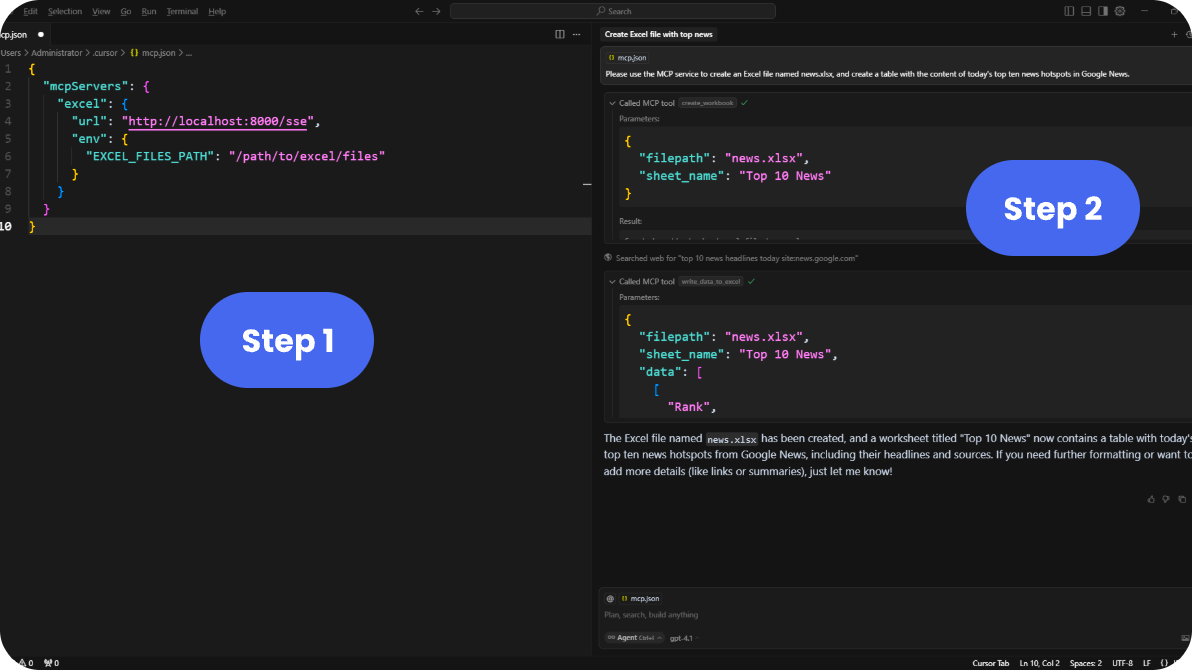
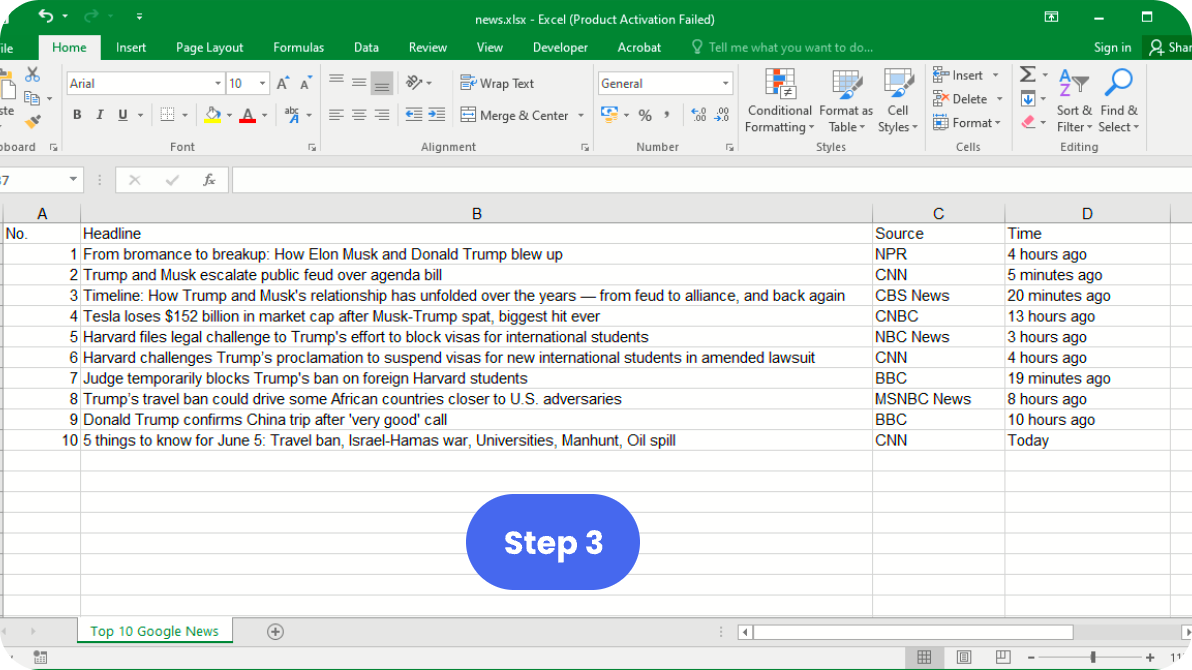
The following visual guide illustrates the three-step process to integrate Spire.XLS MCP Server with supported AI development environments:
Step 1 and Step 2: Start the server and configure AI tool
Step 3: Use Excel features through AI interface
Cursor IDE
- Add this configuration to Cursor:
{
  "mcpServers": {
    "excel": {
      "url": "http://localhost:8000/sse",
      "env": {
        "EXCEL_FILES_PATH": "/path/to/excel/files"
      }
    }
  }
}
- The Excel tools will be available through your AI assistant.
Remote Hosting & Transport Protocols
This server uses Server-Sent Events (SSE) transport protocol. For different use cases:
-
Using with Claude Desktop (requires stdio):
- Use Supergateway to convert SSE to stdio
-
Hosting Your MCP Server:
Environment Variables
| Variable | Description | Default |
|---|---|---|
FASTMCP_PORT | Server port | 8000 |
EXCEL_FILES_PATH | Directory for Excel files | ./excel_files |
Available Tools
The server provides a comprehensive set of Excel manipulation tools. Here are the main categories:
- Basic Operations: Create, read, write, and delete Excel worksheets or workbooks.
- Data Processing: Read and write cell data, apply formulas, sort and filter
- Formatting: Apply styles, merge cells, set fonts and colors
- Advanced Features: Create charts, pivot tables, conditional formatting
- Conversion: Convert Excel to PDF, HTML, CSV, image, XML, and more with high fidelity.
See TOOLS.md for complete documentation of all available tools.
FAQ from Spire.XLS MCP Server?
Q1. Can I use Spire.XLS MCP Server for any directory?
Yes, Spire.XLS MCP Serer works for any directory.
Q2. Is Spire.XLS MCP Server free to use?
Yes, it is licensed under the MIT License, allowing free use and modification.
Q3. What programming languages does Spire.XLS MCP Server support?
It is built with Python.
License
MIT
Máy chủ liên quan
Kone.vc
nhà tài trợMonetize your AI agent with contextual product recommendations
ImprintMCP
Autoupdating MCP Vector Memory
JSON Canvas MCP Server
A server for creating, modifying, validating, and exporting JSON Canvas files, a format for infinite canvas data.
MCP Platform
Local MCP runtime with multi-agent orchestration, distributed tool servers, and ML-powered media recommendations.
DateTime
Provides current date and time with configurable formats and timezones.
Splid MCP
A Model Context Protocol (MCP) server that exposes Splid (splid.app) via tools, powered by the reverse‑engineered splid-js client.
Home Assistant MCP
An MCP integration for controlling Home Assistant devices with AI assistants.
MATLAB MCP Core Server
Run MATLAB® using AI applications with the official MATLAB MCP Server from MathWorks®.
Meta Ads Mcp Server
MCP (Model Context Protocol) server for the Meta (Facebook) Ads API.
Peekaboo
a macOS-only MCP server that enables AI agents to capture screenshots of applications, or the entire system.
Featurebase
Manage posts and comments on Featurebase, a user feedback platform, using its API.