MCP Memory Visualizer
Công cụ trực quan hóa đồ thị để khám phá và phân tích dữ liệu bộ nhớ của Claude.
Tài liệu
Claude MCP Memory Visualization Tools
Graph visualization utilities for exploring and analyzing Claude's memory data captured by Anthropic's Memory MCP server.
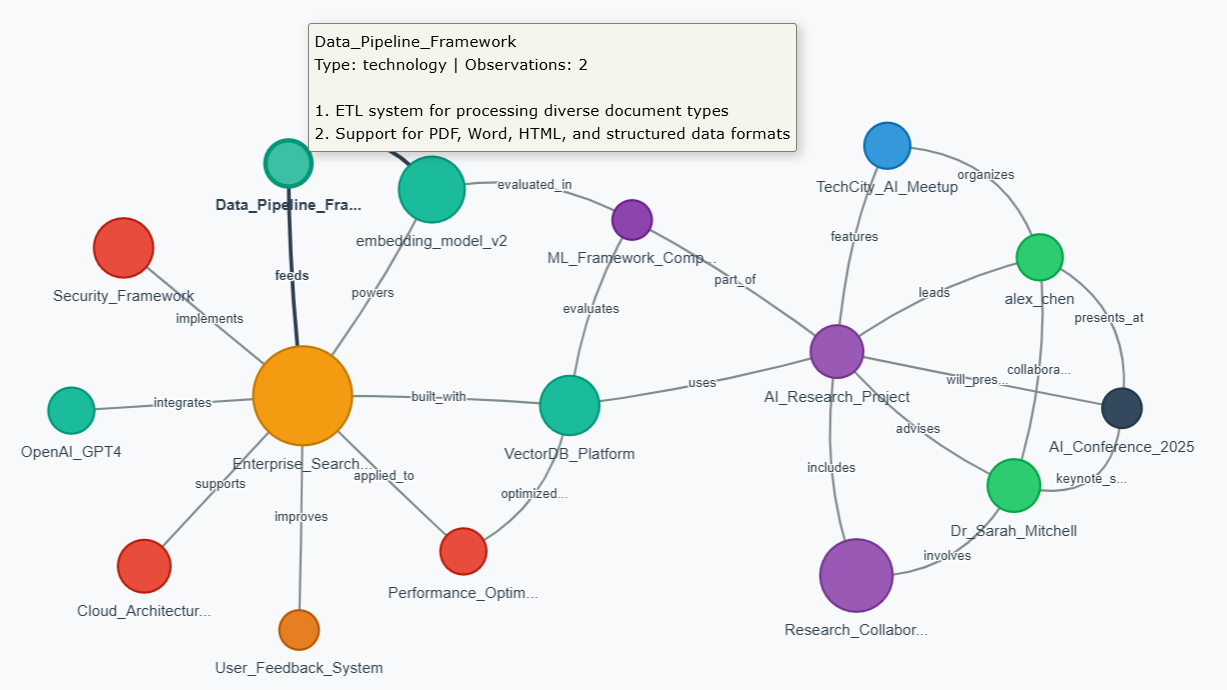
🌐 Try It Now!
Launch Interactive Web Visualizer →
No installation needed! Upload your memory.json file directly in your browser.
- 🔒 100% Private - All processing happens locally in your browser
- 📊 Interactive - Drag, zoom, search, and explore
- 🎨 Beautiful - Color-coded entities with smooth animations
- 📱 Works Everywhere - No Python or dependencies required
Overview
This repository provides three ways to visualize your Claude memory data:
- 🌐 Web Visualizer - Interactive browser-based visualization (no installation required!)
- 📊 Python Static Analysis - NetworkX-based statistical analysis and high-res graphs
- 🔍 Python Interactive - PyVis-powered browser visualization with Python processing
Perfect for:
- Memory Analysis: Understanding what Claude remembers about your conversations
- Knowledge Mapping: Visualizing entity relationships and connections
- Memory Cleanup: Identifying redundant or sparse entities for optimization
- Research: Exploring how AI memory systems organize information
Quick Start
Option 1: Web Visualizer (Easiest!)
Simply visit: https://dzivkovi.github.io/mcp-memory-visualizer/
- No installation required
- Works on any device with a web browser
- Drag & drop your memory.json file
- 100% private - all processing happens in your browser
Option 2: Python Tools
For advanced analysis and batch processing:
# Install dependencies
pip install -r requirements.txt

# Run static analysis
python visualize_memory.py

# Run interactive Python version
python visualize_memory_interactive.py
Memory File Location
Default Location (Problematic)
The Memory MCP server stores memory.json by default in:
C:\Users\[username]\AppData\Local\npm-cache\_npx\[hash]\node_modules\@modelcontextprotocol\server-memory\dist\memory.json
⚠️ Warning: This location is temporary and gets wiped during npm cache clears or package updates.
Recommended Setup
Always configure a persistent location using the MEMORY_FILE_PATH environment variable in your Claude Desktop config:
{
  "mcpServers": {
    "memory": {
      "command": "npx",
      "args": ["-y", "@modelcontextprotocol/server-memory"],
      "env": {
        "MEMORY_FILE_PATH": "C:\\Users\\[username]\\Documents\\claude-memory\\memory.json"
      }
    }
  }
}
Safe Storage Locations
C:\Users\[username]\Documents\claude-memory\memory.jsonC:\Users\[username]\AppData\Roaming\claude-memory\memory.jsonC:\claude-memory\memory.json(requires admin rights)
Note: Create the directory first and use double backslashes (\\) in Windows paths for proper JSON escaping.
Tool Comparison
| Feature | Web Visualizer | Python Static | Python Interactive |
|---|---|---|---|
| Installation | None | Python + libs | Python + libs |
| Privacy | 100% local | Local | Local |
| Interactivity | High | None | High |
| Analysis | Visual | Statistical | Both |
| Export | Screenshot | PNG + stats | HTML |
| Best For | Quick exploration | Research/reports | Deep analysis |
Demo Data
The repository includes a demo memory.json file with realistic but fictional data showcasing:
- 16 entities across 9 different types (person, technology, project, etc.)
- 25 relationships forming a connected knowledge graph
- Complex connections between AI research, enterprise systems, and academic collaboration
- Varied node sizes from 1 to 10 observations
Features
Web Visualizer
- Drag & Drop file upload
- Search entities and observations
- Interactive Graph with physics simulation
- Detail Panel showing observations and relationships
- Auto-layout with zoom controls
- Privacy-first design with clear messaging
Python Static Analysis (visualize_memory.py)
- Network statistics (nodes, edges, connected components)
- Centrality analysis (most connected entities)
- Redundancy detection (similar entities, sparse nodes)
- High-resolution graph visualization (300 DPI)
- Detailed terminal analysis output
Python Interactive (visualize_memory_interactive.py)
- Browser-based interactive visualization
- Hover tooltips with full entity details
- Physics-based node positioning
- Zoom, pan, and node dragging
- HTML export for sharing
Memory File Format
These tools work with memory.json files in JSONL format (one JSON object per line):
{"type": "entity", "name": "Python", "entityType": "technology", "observations": ["Used for data analysis", "Popular ML language"]}
{"type": "relation", "from": "Python", "to": "Data Science", "relationType": "used_in"}
Technical Details
Web Visualizer
- D3.js for powerful data visualization
- Force-directed graph layout
- Client-side processing for privacy
- Responsive design for all screen sizes
Python Tools
- NetworkX for graph analysis
- Matplotlib for static visualization
- PyVis for interactive HTML output
- Force-directed algorithms for natural clustering
Contributing
Feel free to extend these tools with additional features:
- Export formats (GraphML, GEXF, JSON)
- Filtering options (entity types, date ranges)
- Advanced metrics (betweenness centrality, clustering coefficients)
- Memory editing capabilities
Credits
Built for exploring Claude's memory data from Anthropic's Memory MCP server.
Philosophy: "Perfection is achieved, not when there is nothing more to add, but when there is nothing left to take away." - Antoine de Saint-Exupéry