dynoweb-shopify-mcp
Kết nối Claude, Cursor hoặc ChatGPT với dữ liệu khách truy cập thực tế của cửa hàng Shopify — bản đồ nhiệt, phát lại phiên, kênh chuyển đổi, phân bổ doanh thu — với khoảng 70 công cụ cũng có thể ghi lại: chỉnh sửa sản phẩm, bật popup, áp dụng các bản sửa lỗi SEO.
Tài liệu
A remote MCP server that puts your store's analytics and controls into Claude, Cursor or ChatGPT — 66 tools, the same approval gates as the in-app agent.
If you would rather not open another dashboard, don't. DynoWeb runs a remote Model Context Protocol server, so your store's behavioural data and its controls become tools inside whatever AI client you already work in.
The practical difference: instead of navigating to a report, you ask in the place you are already thinking — and the answer arrives next to your code, your notes, or the rest of the conversation.
Where to find it
In your Shopify admin, open DynoWeb and go to Settings → MCP. Everything below happens on that one screen: your endpoint URL, token creation, OAuth credentials, and the list of what is currently connected.
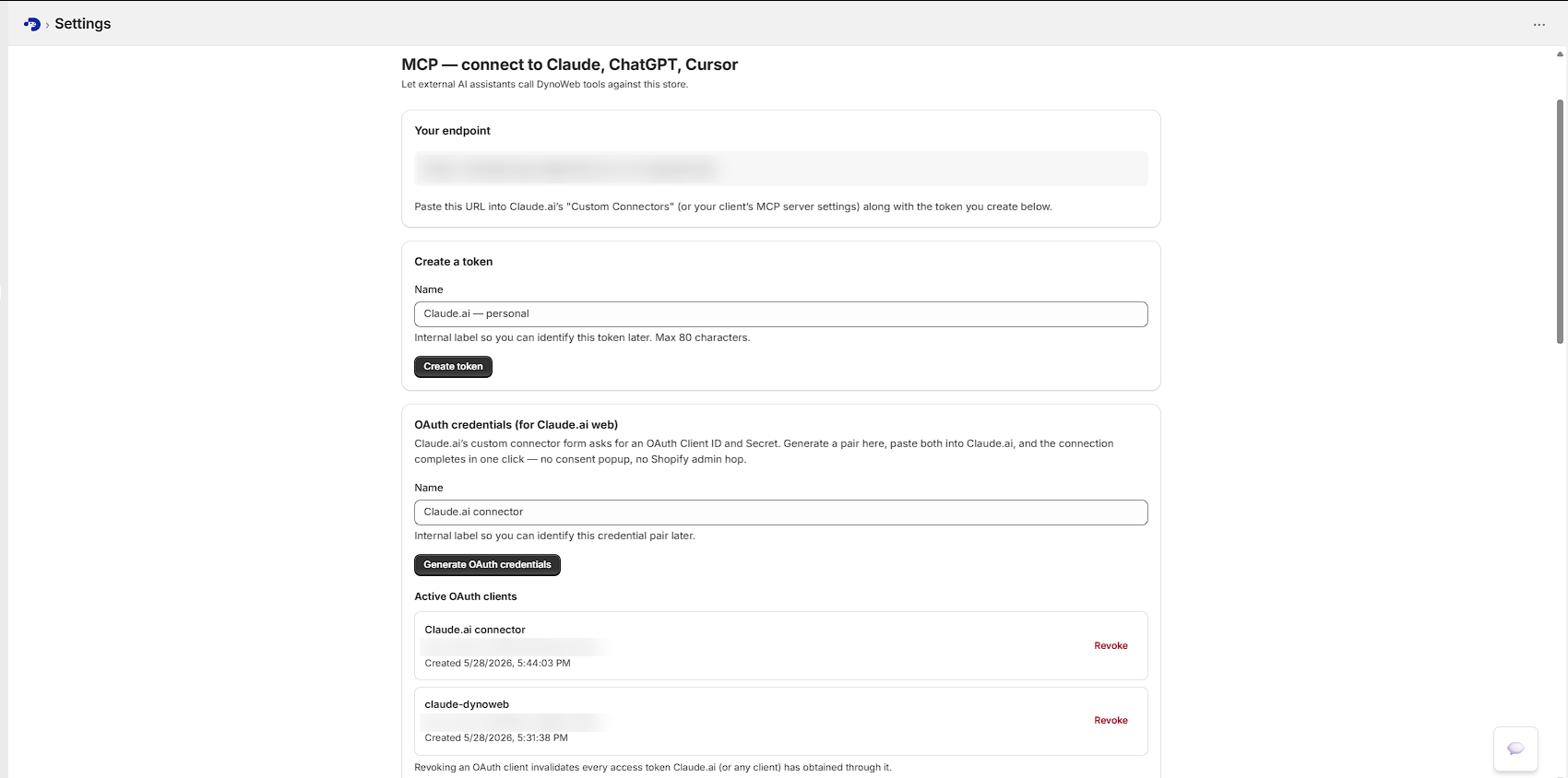
Settings → MCP. Your endpoint, a token generator, OAuth credentials for Claude.ai, and every active connection with a revoke button.
Your endpoint is the URL shown at the top of that page, ending in /api/mcp. It is per-deployment, so copy it from the app rather than from here. The transport is Streamable HTTP, stateless — every request builds a fresh tool surface.
Connecting
Pick the path that matches your client. Both end up as revocable records on the same settings page.
Claude.ai on the web — use OAuth credentials
Claude.ai's custom connector form does not accept a raw bearer token. It asks for an OAuth Client ID and Secret, so generate a pair instead.
In Settings → MCP → OAuth credentials, name the pair and press Generate OAuth credentials. Copy both values immediately — the secret is shown once and never again.
Then in Claude.ai, go to Settings → Connectors → Add custom connector, paste your endpoint URL, open Advanced settings, and paste the Client ID and Secret. The connection completes in one click — no consent popup and no hop back into the Shopify admin.
Claude Code — one command
Create a token in Settings → MCP → Create a token, copy it, then run:
claude mcp add dynoweb "https://your-endpoint/api/mcp" \
  --transport http \
  --header "Authorization: Bearer YOUR_TOKEN"
Launch claude, and confirm it registered with claude mcp list — you should see dynoweb in the output. The app shows this command pre-filled with your real endpoint and token the moment you create one, so there is nothing to assemble by hand.
Cursor
Add the server to your Cursor MCP config, via Settings → Cursor Settings → MCP or by editing ~/.cursor/mcp.json directly:
{
  "mcpServers": {
    "dynoweb": {
      "url": "https://your-endpoint/api/mcp",
      "transport": "http",
      "headers": {
        "Authorization": "Bearer YOUR_TOKEN"
      }
    }
  }
}
Restart Cursor after saving. The tools appear in Cursor's chat.
ChatGPT — as a Custom GPT
Create or edit a Custom GPT, then Configure → Actions → Add MCP server. Use your endpoint as the server URL, set authentication to API Key → Bearer, and paste your token.
MCP Inspector — for debugging
To call tools directly and watch the raw JSON-RPC traffic:
npx @modelcontextprotocol/inspector
Set transport to Streamable HTTP, paste your endpoint, and use your token as the bearer credential. This is the fastest way to tell a server problem from a client problem.
Which one should I use?
What the tools cover
66 tools on a store with the full Shopify scope set. The exact list depends on which permissions you have granted — a category you have not authorised simply does not appear — and any client can enumerate the live set itself via tools/list.
Behavioural queries
Analysis
Catalogue and content
Popups
Context and memory
Capability discovery
How the authorisation actually works
Standard OAuth 2.0, discoverable. A compliant client configures itself from the endpoint URL alone:
- Authorization server metadata (RFC 8414) and protected resource metadata (RFC 9728) are served from the conventional
.well-knownpaths. - PKCE with
S256is the only code challenge method accepted. - Two grant types:
authorization_codefor interactive clients, andclient_credentialsfor the shop-bound credential pairs you generate in the admin. - Scopes are
mcp:readandmcp:write. - Redirect URIs are checked against an exact allow-list held in the codebase rather than accepted from the request.
Tokens are stored hashed — the plaintext is returned once and never persisted, the same model as a GitHub personal access token. Every token carries an expiry; there is deliberately no way to mint one that never expires, and the default lifetime is one year. Auth codes live for ten minutes and are single-use, consumed atomically so a replayed exchange fails rather than races.
Managing what is connected
Tokens and OAuth clients each appear in their own list on the settings page, with the name you gave them, the scopes they hold, when they were created, and when they were last used — or "Never used", which is usually the first sign a setup did not take.
Revoking is immediate. Revoking an OAuth client invalidates every access token that client has ever obtained, not just the newest one. Token issue and revoke events are audit-logged, and so is every individual tool call, with the client identity attached.
Safety carries over
An external client does not get a wider blast radius
Tokens are shop-scoped and bound to a single store server-side. Clients never pass a shop identifier in tool arguments, so a token issued by your store can only ever read and write your store's data.
Worth doing when
- You are a developer. Reading conversion data next to the theme code you are about to change beats alt-tabbing to a dashboard and back.
- You want your own analysis. The query tools return structured data. Compose, join and chart it however you like, in a client that already does that well.
- You are building something. An internal report, a Slack digest, a weekly-summary agent — the tools are the API.
- You keep asking the same question. Save it as an insight, or wire it into a scheduled prompt in your client.
Limits
- A token is a credential. It grants a client read and write access to your store's analytics, products, pages, discounts, themes and popups — the same scope as the in-admin agent. Issue one per client, name them so you can tell them apart, and revoke on suspicion rather than on proof.
- Bounded by your plan, like everything else. MCP calls consume the same daily action allowance and AI budget as in-app use, and there is a separate per-minute rate limit. A busy scripted loop will exhaust a daily allowance — see pricing for what each plan includes.
GETon the endpoint is not supported. The server runs stateless, so there is no server-initiated SSE channel to open. A client that expects one is misconfigured.- Client quality varies. Tool discovery, argument handling and error surfacing differ substantially between MCP clients. A tool that behaves well in one client can be awkward in another.
- Data availability is unchanged. MCP is a different door onto the same data. If a page has no traffic, the tools will say so — they cannot query what was never tracked.
- Interactive OAuth needs a browser. A fully headless environment should use a manually issued token.
Related
DynoAgent
The same tool surface with DynoWeb's own model and UI in front of it.
AI Suggestions
Queryable over MCP, so the ranked queue can drive your own workflow.
Popups
Fully drivable from an MCP client, creation through attribution.
Common questions
What is MCP?
The Model Context Protocol is an open standard for connecting AI assistants to external data and tools. It means any compatible client can talk to DynoWeb without a custom integration on either side.
Is this safe to connect to an assistant?
Connections are scoped, revocable, and separate read from write. Grant read-only if that is all you need — an assistant with read access cannot alter your storefront.
Do I need to be technical to use it?
To set it up, a little — it is a few minutes of client configuration. To use it afterwards, no. DynoAgent gives non-technical users the same capability inside the dashboard.
Which tools are exposed?
Analytics and behavioral queries, cart and funnel data, suggestions, nudge management, revenue attribution, catalogue reads, and scoped catalogue and content writes.
[
Revenue Attribution
Which buttons, links and images on your store actually carry orders — per element, per page, per device, written from Shopify's own order webhooks.