mcp-apple-notes
Tìm kiếm ngữ nghĩa và RAG trên Apple Notes với embeddings trên thiết bị, đầy đủ CRUD, quản lý thư mục và khớp tiêu đề mờ. 10 công cụ. Hoàn toàn cục bộ trên macOS.
Tài liệu
Features · Security · Installation · Tools · Verification · Response Shape
MCP Apple Notes

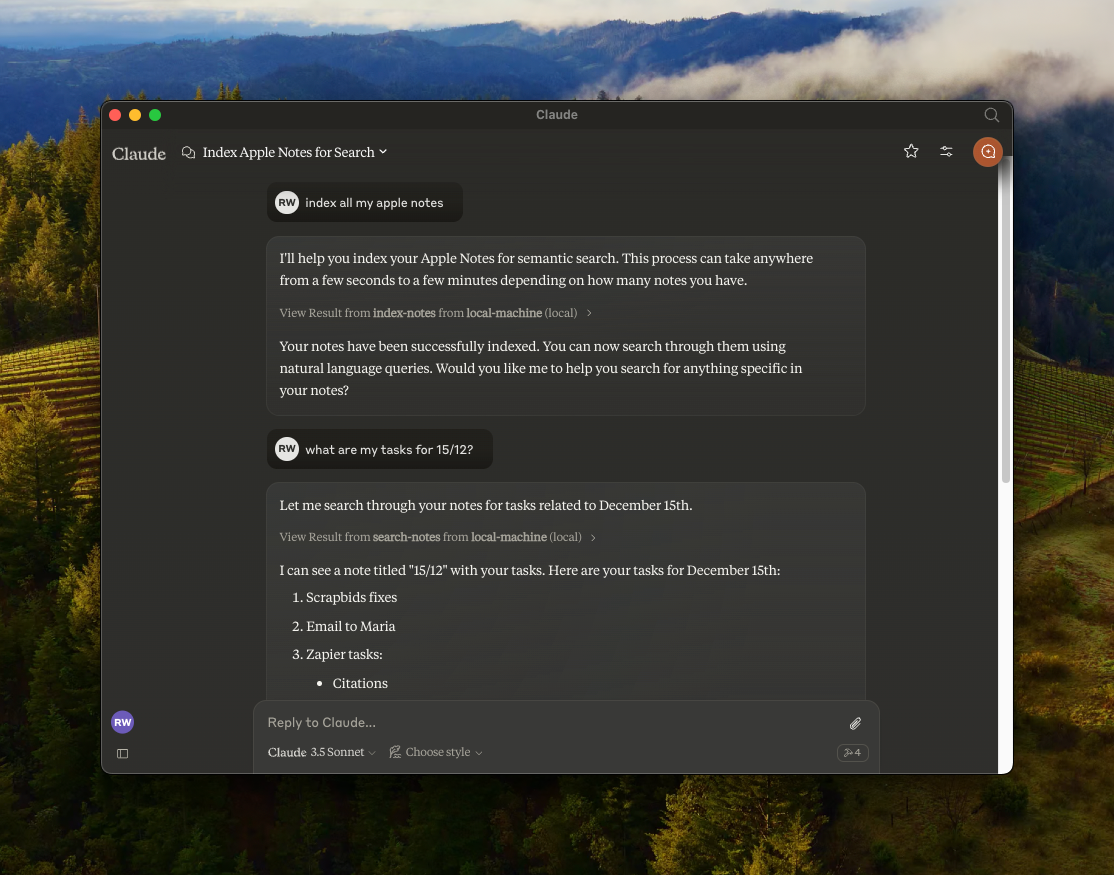
A Model Context Protocol (MCP) server that enables semantic search and RAG (Retrieval Augmented Generation) over your Apple Notes. Works with any MCP-compatible client — Claude Desktop, Cursor, Windsurf, Cline, and others.
Features
- 🔍 Semantic search over Apple Notes using
all-MiniLM-L6-v2on-device embeddings model - 📝 Full-text search capabilities
- 📂 Folder support — list folders, browse by folder, filter search by folder
- 📊 Vector storage using LanceDB
- 🤖 Works with any MCP-compatible client (Claude, Cursor, Windsurf, Cline, etc.)
- 🍎 Native Apple Notes integration via JXA
- 🔒 Optional read-only mode for safe exploration
- 🏃♂️ Fully local execution — no API keys needed
Security & Transparency
Because this server interacts with your private Apple Notes, it is designed with absolute transparency in mind. It runs 100% locally on your Mac.
- No Cloud, No Telemetry — No API keys, no data leaving your machine.
- Native Apple JXA — Uses Apple's official JavaScript for Automation scripting bridge.
- Embeddings on-device — The
all-MiniLM-L6-v2model runs locally via@huggingface/transformers. - Verifiable — You are highly encouraged to read every line of code (especially
index.ts) before it ever touches your notes. - GitHub releases include SHA-256 checksums so you can verify downloaded artifacts.
Installation & Setup
Choose the installation method that fits your workflow.
Method 1: Install from source (recommended)
By cloning the repository locally, you can inspect the source code and know exactly what is executing on your machine.
Prerequisites: Node.js (v18+) or Bun
Using Bun?
git clone https://github.com/Dan8Oren/mcp-apple-notes && cd mcp-apple-notes && bun install
{
  "mcpServers": {
    "apple-notes": {
      "command": "bun",
      "args": ["run", "/path/to/mcp-apple-notes/index.ts"]
    }
  }
}
Using NPM:
git clone https://github.com/Dan8Oren/mcp-apple-notes && cd mcp-apple-notes && npm install
Then add the server to your MCP client config. Replace /path/to/mcp-apple-notes with where you cloned the repo:
{
  "mcpServers": {
    "apple-notes": {
      "command": "npx",
      "args": ["tsx", "/path/to/mcp-apple-notes/index.ts"]
    }
  }
}
Tip: Want to try it without risk? Enable read-only mode to block all write operations while you explore.
"env": { "MCP_APPLE_NOTES_READ_ONLY": "1" }
Method 2: Quick start via npx
If you prefer a zero-setup approach and trust the published npm package, you can simply add this directly to your MCP config:
{
  "mcpServers": {
    "apple-notes": {
      "command": "npx",
      "args": ["-y", "@dan8oren/mcp-apple-notes"]
    }
  }
}
After setup, restart your client and ask your AI assistant to "index my notes" to get started.
Per-client instructions
Claude Desktop
- Open Settings → Developer → Edit Config
- Paste your chosen JSON config into
claude_desktop_config.json - Restart Claude Desktop
Logs:
tail -n 50 -f ~/Library/Logs/Claude/mcp-server-apple-notes.log
Claude Code
# npm version:
claude mcp add apple-notes npx -- -y @dan8oren/mcp-apple-notes
# or from source:
claude mcp add apple-notes npx -- tsx /path/to/mcp-apple-notes/index.ts
Cursor
Add the JSON config to ~/.cursor/mcp.json (global) or .cursor/mcp.json in your project root.
Windsurf
Add the JSON config to ~/.windsurf/mcp.json.
Available Tools
| Tool | Description |
|---|---|
index-notes | Index all notes for semantic search. Run this first |
list-folders | List all Apple Notes folders with full paths and note counts |
list-notes | List notes with metadata. Optional path filter, includeContent flag, and contentPreviewChars (HTML-stripped per-note preview truncated to N chars — one fast call, avoids the response token cap when listing many notes' content) |
search-notes | Semantic + full-text search with optional path filter and limit |
get-note | Get full content by noteId or title. Returns candidates on ambiguity |
create-note | Create a new note with markdown content, optionally in a folder |
edit-note | Edit title and/or content (markdown) of an existing note |
append-to-note | Append markdown content to an existing note |
move-note | Move a note to a different folder |
delete-note | Delete a note (moves to Recently Deleted) |
Verify Before You Trust
Every Apple Notes operation is a JXA call you can inspect in index.ts. No network requests, no background syncing — just local scripting bridge calls.
Read-only mode
Want a safety net? Enable read-only mode to block all write operations — only search, list, and read tools will be available:
{
  "mcpServers": {
    "apple-notes": {
      "command": "npx",
      "args": ["-y", "@dan8oren/mcp-apple-notes"],
      "env": { "MCP_APPLE_NOTES_READ_ONLY": "1" }
    }
  }
}
When enabled, only these tools are available: index-notes, list-folders, list-notes, search-notes, get-note.
Verbose mode
Enable verbose logging to see every JXA call before it executes (logged to stderr):
CLI flag — add --verbose to your MCP client config args:
{
  "mcpServers": {
    "apple-notes": {
      "command": "npx",
      "args": ["--verbose", "-y", "@dan8oren/mcp-apple-notes"]
    }
  }
}
Environment variable — for clients that support env:
{
  "mcpServers": {
    "apple-notes": {
      "command": "npx",
      "args": ["-y", "@dan8oren/mcp-apple-notes"],
      "env": { "MCP_APPLE_NOTES_VERBOSE": "1" }
    }
  }
}
JXA operations reference
| Operation | Type | What it does |
|---|---|---|
getNotes | Read | Lists all notes (id, title, folder path) |
getFolders | Read | Lists all folders with paths and note counts |
getNotesByPath | Read | Gets notes in a specific folder |
getNoteDetailsById | Read | Gets full content of one note by ID |
createNote | Write | Creates a new note with title and content |
appendToNote | Write | Appends HTML content to an existing note |
editNote | Write | Updates title and/or content of a note |
moveNote | Write | Moves a note to a different folder |
deleteNote | Destructive | Moves a note to Recently Deleted |
All operations go through Apple's JXA scripting bridge (Application('Notes')). No direct file system access, no network calls. The delete operation is non-permanent — notes go to Recently Deleted and can be recovered within 30 days.
Response Shape
Tool responses are JSON objects in a consistent envelope:
- Success:
{ "ok": true, "data": ... } - Error:
{ "ok": false, "error": { "type": "...", "message": "..." } }
Most note-oriented responses now include the stable Apple Notes id so clients can track notes safely across renames and moves.
Community & Support
Bug reports, ideas, questions, and showcases all have a home — please use the channel that fits:
- 🐛 Found a bug? → Open an issue
- 💡 Have a feature idea? → Start a thread in Ideas
- ❓ Need help with setup or integration? → Ask in Q&A
- 🛠 Built something cool with it? → Share in Show and tell
- 📣 Watch for updates → Announcements
PRs are welcome. For non-trivial changes, please open an issue or discussion first so we can align on direction before you invest time.
Acknowledgments
Originally based on RafalWilinski/mcp-apple-notes.