Chargebee
chính thứcMáy chủ MCP kết nối các tác nhân AI với nền tảng Chargebee.
Bạn có thể làm gì với Chargebee MCP?
- Tìm kiếm tài liệu Chargebee — Đặt câu hỏi về API, tính năng hoặc khái niệm thanh toán và nhận câu trả lời từ tài liệu chính thức thông qua
chargebee_documentation_search. - Tạo dàn ý mã tích hợp — Yêu cầu kế hoạch mã có cấu trúc và đoạn mã mẫu cho tích hợp Chargebee của bạn với
chargebee_code_planner. - Tra cứu ghi chú phát hành và Câu hỏi thường gặp — Truy xuất các bản cập nhật sản phẩm mới nhất, các câu hỏi thường gặp và nội dung cơ sở kiến thức khác.
Tài liệu
Chargebee Model Context Protocol (MCP) Server


⚠️ Thông báo Ngừng hỗ trợ
Gói này đã ngừng phát triển và sẽ không còn nhận được cập nhật hoặc hỗ trợ. Vui lòng chuyển sang Máy chủ MCP KnowledgeBase mới của chúng tôi, cung cấp các khả năng nâng cao và độ chính xác được cải thiện. Tìm hiểu thêm và nâng cấp tại đây: Tài liệu Chargebee MCP Server
Model Context Protocol (MCP) là một giao thức chuẩn hóa được thiết kế để quản lý ngữ cảnh giữa các mô hình ngôn ngữ lớn (LLM) và các hệ thống bên ngoài.
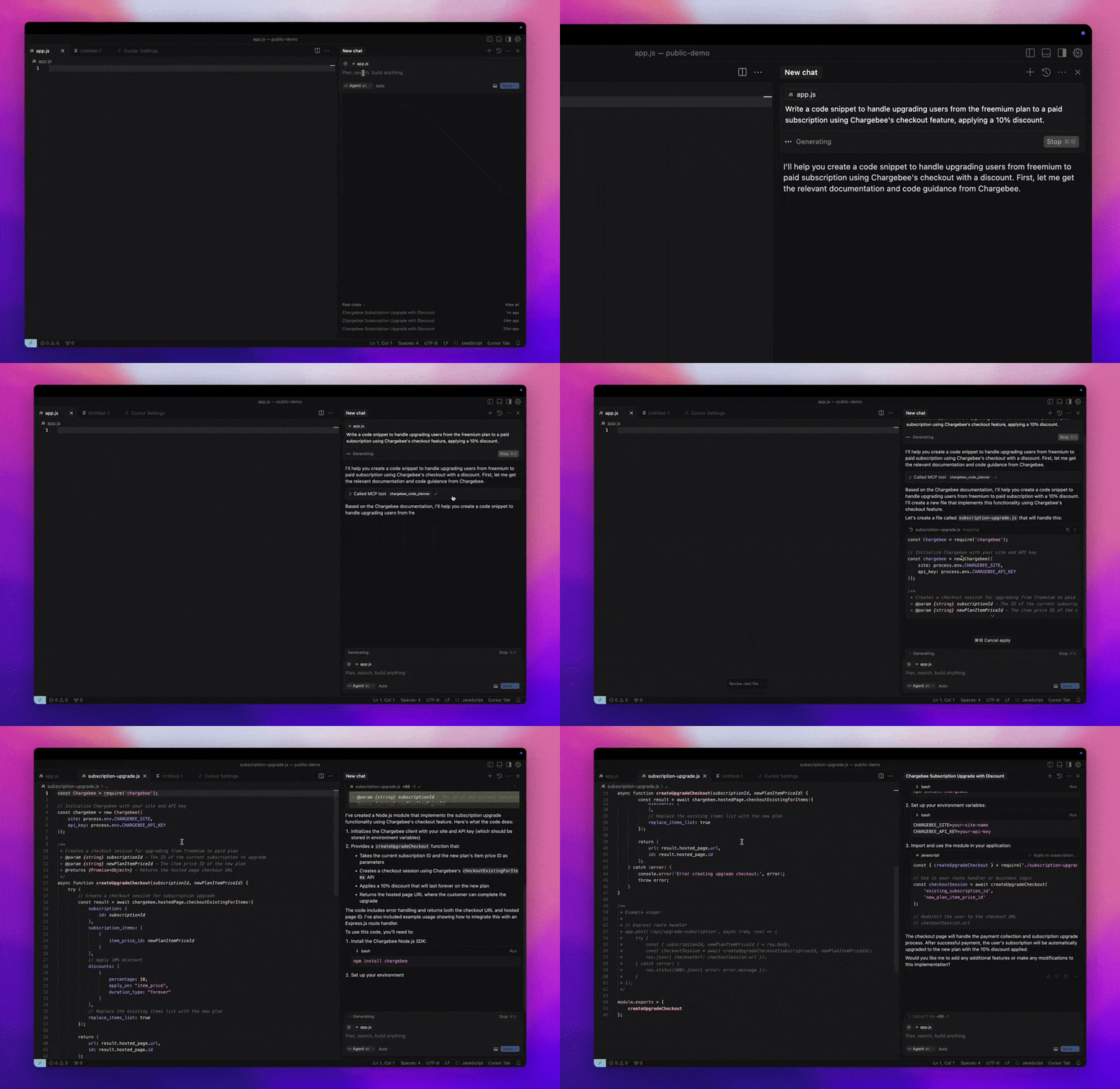
Chargebee MCP Server cung cấp một bộ công cụ mạnh mẽ để nâng cao hiệu quả của nhà phát triển. Nó tích hợp với các trình soạn thảo mã hỗ trợ AI như Cursor, Windsurf và Cline, cũng như các công cụ đa năng như Claude Desktop. Nó tương thích với mọi MCP Client.
Với MCP Server này, bạn có thể:
-
Nhận câu trả lời ngay lập tức về các sản phẩm và dịch vụ API của Chargebee.
-
Nhận các đoạn mã mẫu theo ngữ cảnh, phù hợp với nhu cầu tích hợp của bạn.
-
Truy cập cơ sở kiến thức của Chargebee, bao gồm:
- Tài liệu
- Câu hỏi thường gặp
- Ghi chú phát hành
- Và nhiều hơn nữa
Điều kiện tiên quyết
- Node.js LTS - Chargebee MCP server yêu cầu phiên bản Node.js LTS để hoạt động chính xác.
Thiết lập
Để chạy Chargebee MCP server bằng Node.js npx, hãy thực thi lệnh sau:
npx -y @chargebee/mcp@latest
Công cụ có sẵn
| Công cụ | Mô tả |
|---|---|
chargebee_documentation_search | Tìm kiếm tài liệu của Chargebee để truy xuất thông tin chi tiết và hướng dẫn sử dụng. |
chargebee_code_planner | Tạo dàn ý mã có cấu trúc và mã mẫu để tích hợp các API và tính năng của Chargebee. |
Cài đặt
Cursor
Để thêm máy chủ này vào Cursor IDE:
- Điều hướng đến
Cursor Settings>MCP. - Nhấp vào
+ Add new Global MCP Server. - Thêm cấu hình sau vào tệp
.cursor/mcp.jsontoàn cục của bạn:
{
  "mcpServers": {
    "chargebee": {
      "command": "npx",
      "args": [
          "-y",
          "@chargebee/mcp"
      ]
    }
  }
}
Tham khảo tài liệu Cursor để biết thêm chi tiết. Lưu ý: Bạn cũng có thể thêm cấu hình này vào cấu hình Cursor dành riêng cho dự án (được hỗ trợ trong Cursor 0.46+).
Windsurf
Để thiết lập MCP với Cascade:
- Mở Windsurf và điều hướng đến
Settings>Advanced Settingshoặc sử dụng Bảng lệnh >Open Windsurf Settings Page. - Cuộn đến phần Cascade để thêm máy chủ mới, xem các máy chủ hiện có hoặc truy cập tệp cấu hình JSON thô tại
mcp_config.json. - Nhấp vào “Thêm máy chủ tùy chỉnh +” để đưa Chargebee MCP server trực tiếp vào
mcp_config.json:
{
  "mcpServers": {
    "chargebee": {
      "command": "npx",
      "args": [
          "-y",
          "@chargebee/mcp"
      ]
    }
  }
}
Tham khảo tài liệu Windsurf để biết thêm thông tin.
VS Code
Cài đặt Chargebee MCP server trong VS Code bằng một trong các nút sau:

Ngoài ra, bạn có thể cài đặt Chargebee MCP server bằng VS Code CLI:
# For VS Code
code --add-mcp '{"name":"chargebee","command":"npx","args":["-y","@chargebee/mcp"]}'
# For VS Code Insiders
code-insiders --add-mcp '{"name":"chargebee","command":"npx","args":["-y","@chargebee/mcp"]}'
Sau khi cài đặt, Chargebee MCP server sẽ sẵn sàng để sử dụng với tác nhân GitHub Copilot của bạn trong VS Code.
Claude
Thêm cấu hình sau vào tệp claude_desktop_config.json của bạn. Tham khảo tài liệu Claude Desktop để biết thêm chi tiết:
{
  "mcpServers": {
    "chargebee": {
      "command": "npx",
      "args": [
          "-y",
          "@chargebee/mcp"
      ]
    }
  }
}
Cline
Thêm thủ công JSON sau vào tệp cline_mcp_settings.json của bạn thông qua cài đặt Cline MCP Server:
{
  "mcpServers": {
    "chargebee": {
      "command": "npx",
      "args": [
          "-y",
          "@chargebee/mcp"
      ]
    }
  }
}
Roo Code
Truy cập cài đặt MCP bằng cách chọn Edit MCP Settings trong cài đặt Roo Code hoặc sử dụng lệnh Roo Code: Open MCP Config trong bảng lệnh VS Code:
{
  "mcpServers": {
    "chargebee": {
      "command": "npx",
      "args": [
          "-y",
          "@chargebee/mcp"
      ]
    }
  }
}
Đóng góp
Để đóng góp cho dự án này, hãy tham khảo hướng dẫn đóng góp.