AST2LLM for Go
Một công cụ dựa trên AST giúp tăng cường ngữ cảnh cho LLM bằng cách tự động chèn các cấu trúc mã Go liên quan vào prompt.
Tài liệu
AST2LLM for Go




Local AST-powered context enhancement tool for LLM
Automatically injects relevant code structure into your prompts using precise Go AST analysis.
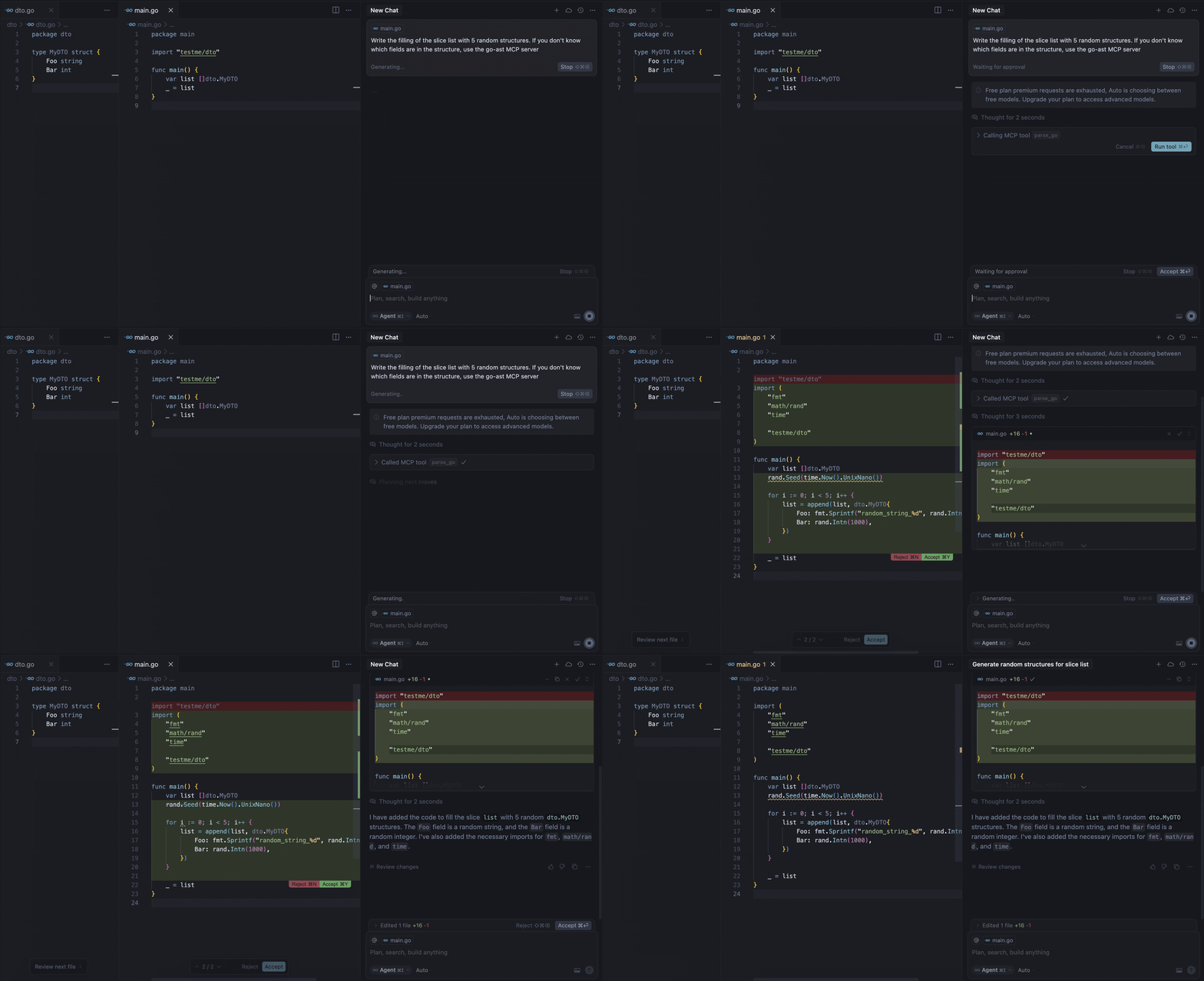
Our MCP server provides the parse-go tool that:
- Analyzes your Go project structure
- Identifies external type declarations
- Packages context for LLM prompts
- Delivers 3-5x faster context resolution than grap-based approaches
For example, the demo above shows the model calling the tool to get the missing information about the fields of the MyDTO structure. In response, the model received all the necessary information from the response:
Used Imported Structs (from this project, if available):
  Struct: testme/dto.MyDTO
    Fields:
      - Foo string
      - Bar int
Requirements
- Go 1.22 or higher (if building from source)
- Supported MCP client (Cursor, Claude, VS Code, etc.)
Installation
Binaries
To install ast2llm-go on your system, run the following command in your terminal:
curl -LsSf https://raw.githubusercontent.com/ast2llm/ast2llm-go/main/install.sh | sh
This script will automatically detect your OS and architecture, download the appropriate binary, and attempt to add it to your PATH. You can also specify an installation directory:
curl -LsSf https://raw.githubusercontent.com/ast2llm/ast2llm-go/main/install.sh | sh -s -- --install-dir /usr/local/bin
Self-Update
To update ast2llm-go to the latest version, simply re-run the installation command:
curl -LsSf https://raw.githubusercontent.com/ast2llm/ast2llm-go/main/install.sh | sh
Uninstallation
To remove ast2llm-go from your system, run the uninstallation script:
curl -LsSf https://raw.githubusercontent.com/ast2llm/ast2llm-go/main/uninstall.sh | sh
This script will remove the binary, clean up PATH modifications, and delete related configuration files. You may need to restart your shell after uninstallation.
Setup in Clients
After installation ast2llm-go, you need to restart the IDE.
Cursor
Add to your ~/.cursor/mcp.json:
{
  "mcpServers": {
    "go-ast": {
      "command": "ast2llm-go",
      "args": []
    }
  }
}
Claude Desktop
Add to claude_desktop_config.json:
{
  "mcpServers": {
    "go-ast": {
      "command": "ast2llm-go"
    }
  }
}
Visual Studio Code
Add to your VS Code MCP config:
{
  "servers": {
    "go-ast": {
      "type": "stdio",
      "command": "ast2llm-go"
    }
  }
}
Note About Current State
This MCP server is under active development and may have stability issues or incomplete functionality. We're working hard to improve it, but you might encounter:
- Occasional parsing errors
- Limited type support in current version
- Performance bottlenecks with large codebases
Found an issue?
Open a GitHub Issue to help us improve! We appreciate all bug reports and feature requests.
Roadmap
Language Support
- Support for struct types
- Support for interface types
- Support for function types
- Support for global variables
Multi-file Context
- Analyze multiple open files simultaneously
- Cross-file dependency resolution
- Context-aware import optimization
AST Representation
- Improved type hierarchy visualization
- Research optimal AST representation for LLMs. Provide different output formats tailored to various scenarios like in repomix:
- XML: For compatibility with traditional solutions akin to Repomix.
- JSON: A modern format suitable for integration with contemporary tools and environments.
- Markdown: An easily readable format ideal for quick viewing and documenting changes.
Performance
- Incremental parsing
- AST caching
- Parallel analysis
Contributing
We welcome contributions! Here's how you can help:
-
Report Bugs
- Open an issue with a clear description
- Include steps to reproduce
- Add relevant logs/screenshots
-
Suggest Features
- Open an issue with the feature request
- Explain the use case and benefits
- Include any relevant examples
-
Submit Pull Requests
- Fork the repository
- Create a feature branch
- Add tests for new functionality
- Ensure all tests pass
- Submit a PR with a clear description