Pepys
Pepys là phần mềm phiên âm AI trả phí theo nhu cầu, dùng để chuyển đổi âm thanh và video thành bản ghi có gắn nhãn người nói và dấu thời gian. Nó hỗ trợ phiên âm đa ngôn ngữ, tìm kiếm và trò chuyện với bản ghi bằng AI, tóm tắt, dịch thuật, xuất dữ liệu, API dành cho nhà phát triển và truy cập MCP.
Tài liệu

Pepys – Transcribe anything
Pay-once AI transcription for audio and video. Fast, accurate speech-to-text with no subscription.







Pepys is a web app that turns any recording into clean, editable text. Named after the diarist Samuel Pepys, it is built for people who just want an accurate transcript without a monthly bill: upload a file or paste a link, get text back, then edit, summarize, translate, or export it however you need. There is nothing to install – it runs at pepys.co.
This README doubles as a short, practical guide to transcription – how to do it, which export format to reach for, and the vocabulary worth knowing.
Contents
- How to transcribe (the quick way)
- Transcribe straight from a link
- For AI agents (MCP)
- Features
- Export-format cheat-sheet
- Transcription glossary
- Find the right tool for the job
- Who it is for
- Clean or verbatim, in any language
- Pricing
- FAQ
- The Talk Type podcast
- Links
How to transcribe audio or video (the quick way)
In short: Open pepys.co, drop in an audio or video file, and Pepys auto-detects the language and transcribes it. Then review, ask questions, translate, or export. Your first 60 minutes are free, no credit card.
- Open pepys.co and add a file – or paste a link. Audio or video, a short clip or a long recording, or a URL from YouTube, TikTok, Instagram, or a podcast.
- Pepys detects the language and transcribes. 99+ languages with automatic detection – nothing to configure.
- Review in the workspace. Speaker labels ("who said what"), clean or verbatim text, and optional word-level timestamps.
- Summarize, ask, or translate. Get an AI summary, chat with your transcript via Ask, or deliver it in another language with subtitles preserved.
- Export the format you need. TXT, Markdown, DOCX, PDF, SRT, VTT, or JSON.

The transcript workspace: speaker labels, clean or verbatim text, and one-click exports.
Transcribe straight from a link
No file to hunt down. Paste a URL and Pepys pulls the audio and transcribes it – ideal for social clips and podcast episodes you never had a file for.
| Paste a link from… | Go straight to |
|---|---|
| YouTube (videos and Shorts) | YouTube transcript |
| TikTok | TikTok transcript |
| Instagram (Reels and video) | Instagram reel transcript |
| Facebook (videos and Reels) | Facebook video transcript |
| Apple Podcasts | Apple Podcasts transcript |
| Spotify and any podcast RSS feed | Podcast transcript |
You can also paste a direct link to an audio or video file. Prefer to upload? That works too – drop in any file instead.
For AI agents (MCP)
Pepys runs an MCP server, so AI agents – Claude, ChatGPT, Cursor, and any Model Context Protocol client – can transcribe on their own. Point a connector at https://pepys.co/api/mcp (OAuth sign-in, no API key), or run npx pepys-mcp locally with an API key.
The agent gets the same capabilities as the app: transcribe a file or a pasted link, speaker diarization, correctly-timed SRT/VTT export, whole-podcast-feed batch, and search across a transcript. See the MCP server page or the developer docs.
Features
Everything below is live today.
- 99+ languages with automatic language detection.
- Translation – deliver the finished transcript in another language, with timestamps and subtitles preserved.
- Speaker diarization – "who said what," resilient through cross-talk and interruptions.
- AI summaries and Ask – get the gist in seconds, then query your transcript in plain language.
- Structured analysis frameworks – use-case-specific insight cards that pull out what matters.
- Clean vs verbatim modes – a readable edit, or every "um" exactly as spoken.
- Word-level timestamps (opt-in) for precise editing and captioning.
- Seven export formats – TXT, Markdown, DOCX, PDF, SRT, VTT, and JSON.
- Long files welcome – both audio and video.

Export-format cheat-sheet
Not sure which download to pick? Match the format to where the text is going.
| Format | File | Reach for it when you want to… |
|---|---|---|
| Plain text | .txt | Read, quote, or paste plain text fast – just the words |
| Markdown | .md | Drop the transcript into notes, docs, or a blog (keeps headings and speaker labels) |
| Word | .docx | Keep editing in a word processor and share for review |
.pdf | Send a final, fixed copy that looks the same everywhere | |
| SubRip | .srt | Add subtitles in most video editors and players |
| WebVTT | .vtt | Caption web video (HTML5 <track>) |
| JSON | .json | Build your own pipeline around structured segments and timestamps |
Rule of thumb: SRT for video editing, VTT for the web, DOCX or Markdown for editing prose, PDF to hand off, JSON to build on.
Transcription glossary
Plain-language definitions for the terms you will meet.
- Diarization ("who said what"). Labels each speaker turn (Speaker 1, Speaker 2 …) so a two-person interview reads as a dialogue instead of a wall of text. Pepys diarization holds up through cross-talk and interruptions.
- Verbatim vs clean. Verbatim keeps every "um," false start, and repetition exactly as spoken. Clean (readable) mode removes filler and tidies the text for a smooth read. Pepys does both.
- Word-level timestamps. A time code on every word, not just each line, so you can jump to the exact moment a phrase was said. Opt-in.
- Automatic language detection. Pepys identifies the spoken language for you across 99+ languages, with no manual setting.
- Translation. Deliver the finished transcript in another language with timestamps and subtitles preserved.
- Summaries and Ask. An AI recap of the recording, plus a chat you can query against the transcript – for example, "What did they decide about the budget?"
- Structured analysis. Use-case-specific insight cards that pull the key points into a ready-made framework.
Find the right tool for the job
Pepys has task-specific tools so you land on exactly the right workflow. Browse them all at the tools hub, or jump straight in:
| If you want to… | Start here |
|---|---|
| Turn a YouTube video into text | YouTube transcript |
| Make subtitles or captions for a video | Subtitle generator |
| Get notes and action items from a meeting | Meeting summarizer |
| Convert an audio file to text | Audio to text |
| Transcribe a Zoom recording | Zoom meeting transcription |
| Pull text out of an MP4 | MP4 to text |
Working in a specific field? The by-industry pages tailor the flow, and step-by-step guides walk through common tasks. For deeper insight cards, see Analyze.

Who it is for
| 🎙️ Podcasters – show notes, chapters, and shareable quotes. | 📰 Journalists – interviews you can search and cite. |
| 🔬 Researchers – clean data from every recorded session. | 🎓 Students – lectures turned into notes you can study. |
| 👥 Meetings & teams – summaries and action items that stick. | 🎬 Video creators – captions and subtitles in minutes. |
| ⚖️ Legal – careful, verbatim records when accuracy is the point. | ♿ Accessibility – captions and transcripts for everyone. |
Clean or verbatim, in any language
Choose a smooth, readable transcript or a word-for-word verbatim record – then deliver it in another language when you need to, timestamps and subtitles intact.
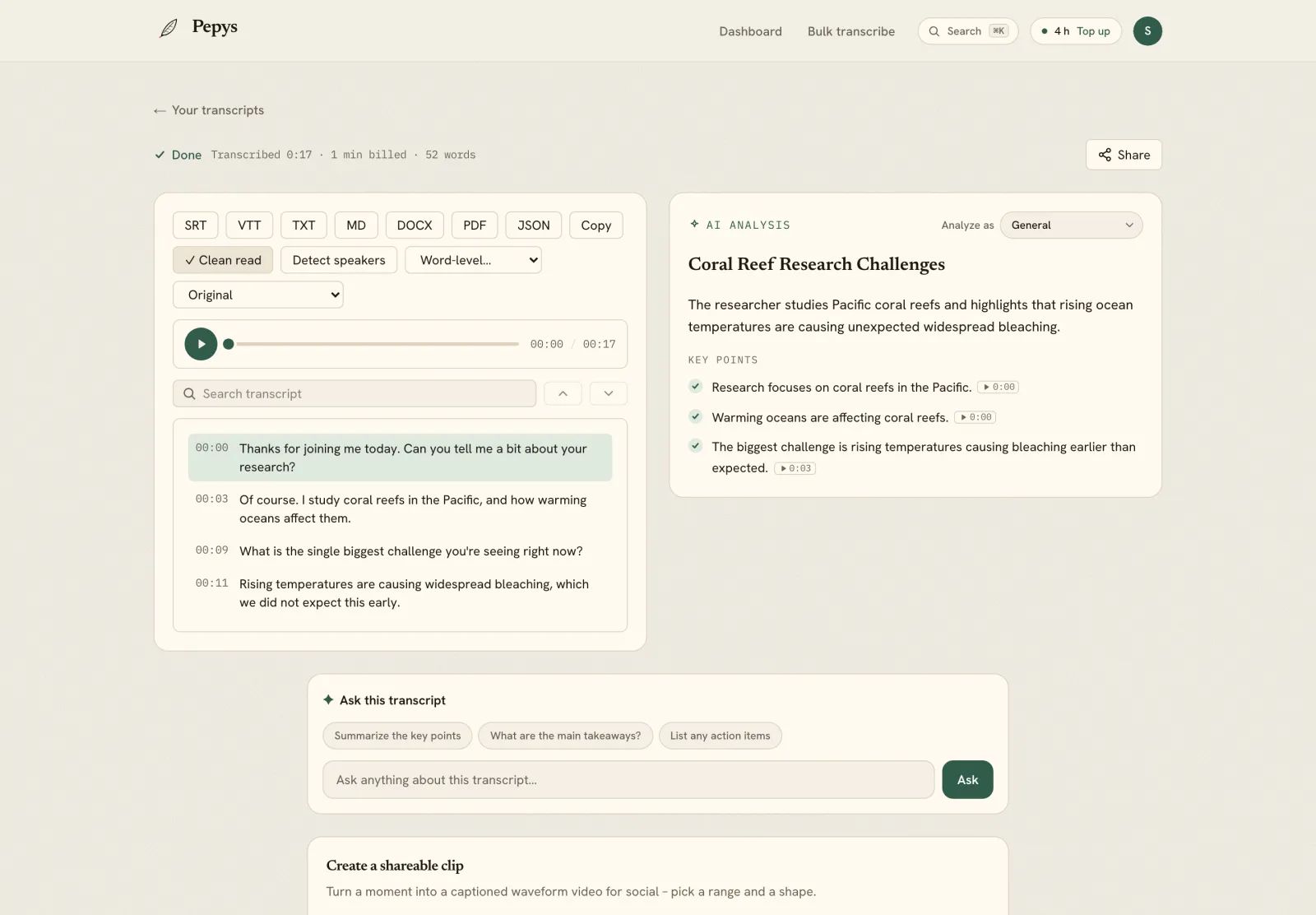
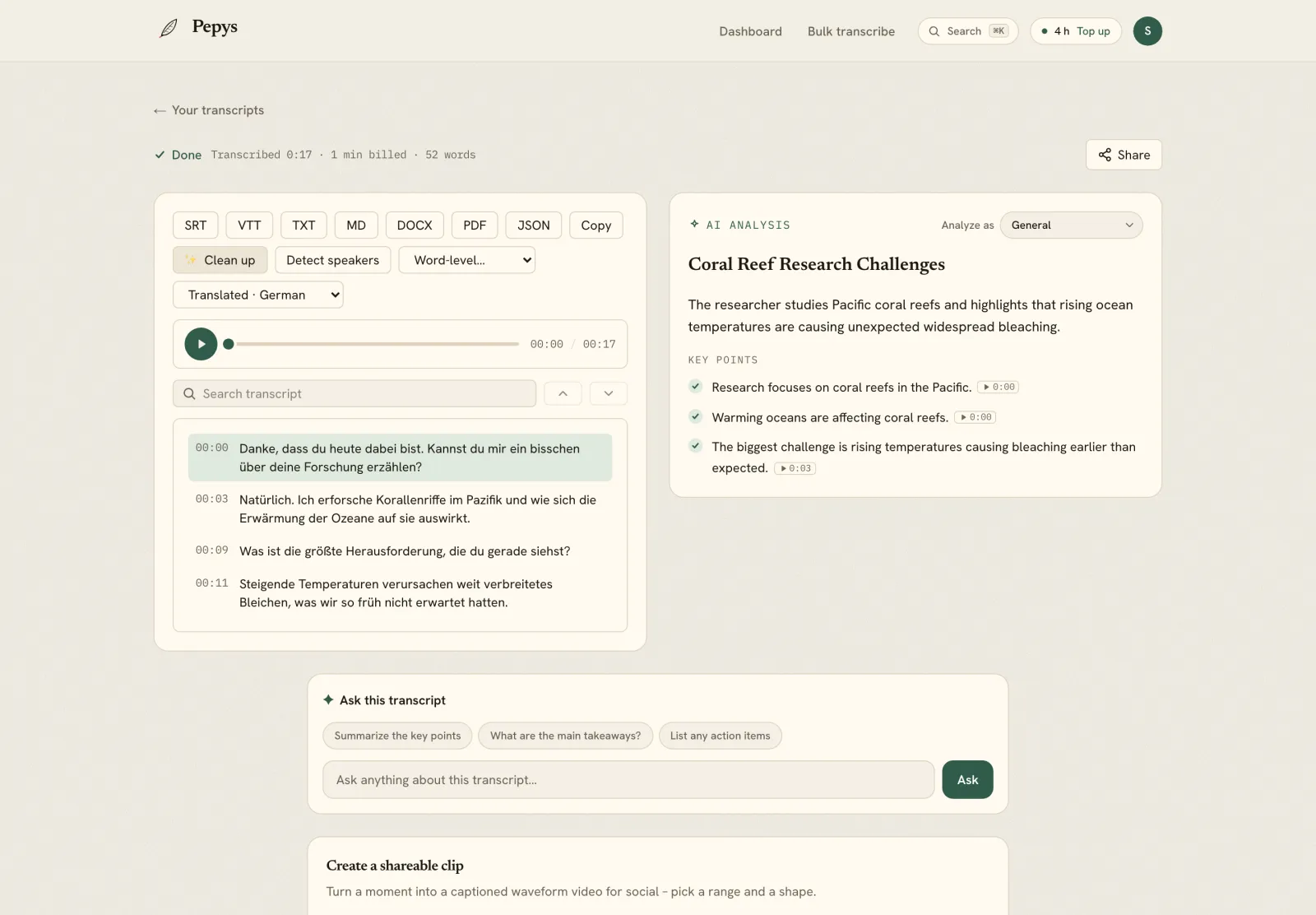
The marketing site is localized in 15+ languages, so international users land in their own – for example 日本語 and 한국어, alongside German, French, Spanish, Thai, Vietnamese, and more.
Pricing – pay once, use anytime
1 credit = 1 minute. Credits never expire. No subscription. Start with 60 free minutes, no credit card. Packs get cheaper per hour as they grow.
| Pack | One-time price | Per hour |
|---|---|---|
| Free start (60 min) | $0 – no card | – |
| 10 hours | $12.50 | $1.25 |
| 20 hours ⭐ Recommended | $20 | $1.00 |
| 30 hours | $30 | $1.00 |
| 50 hours | $50 | $1.00 |
| 75 hours | $75 | $1.00 |
| 100 hours | $85 | $0.85 |
| 200 hours | $170 | $0.85 |
The more you buy, the less each hour costs – from $0.85/hr at volume. Buy once, transcribe whenever, nothing expires.

FAQ
How much does Pepys cost? Pepys is pay-once: 1 credit equals 1 minute, and credits never expire. Start free with 60 minutes (no credit card). Packs scale down with volume – from $1.25/hr, to 20 hours for $20 (the Recommended pack), down to $0.85/hr at higher volumes. There is no subscription.
Do credits expire? No. You buy minutes once and use them whenever you like.
Is there a subscription? No. Pepys is pay-once. Buy a pack, and the balance is yours until you spend it.
What languages can Pepys transcribe? 99+ languages, with automatic language detection. You can also translate a finished transcript into another language while keeping the timestamps and subtitles intact.
Can Pepys tell speakers apart? Yes. Speaker diarization labels who said what and holds up through cross-talk and interruptions.
What can I export? TXT, Markdown, DOCX, PDF, SRT, VTT, and JSON.
What files can I transcribe? Both audio and video, including long recordings.
Can I transcribe from a YouTube or podcast link? Yes. Paste a URL from YouTube, TikTok, Instagram, Facebook, Apple Podcasts, or Spotify (and podcast RSS feeds), and Pepys fetches the audio and transcribes it – no download needed.
Is there an app to install? No. Pepys is a web app – it runs at pepys.co, with nothing to install.
Does Pepys have an MCP server?
Yes. Connect Claude, ChatGPT, or Cursor to https://pepys.co/api/mcp (OAuth, no API key) or run npx pepys-mcp, and the agent transcribes on its own. See pepys.co/mcp.
The Talk Type podcast
Pepys makes a podcast too: Talk Type – short episodes on transcription, audio, and getting the spoken word onto the page. Listen on Apple Podcasts or Spotify, or read the time-synced transcripts at pepys.co/podcast.
Links
- Try it: pepys.co
- Pricing: pepys.co/pricing
- Tools hub: pepys.co/tools
- How-to guides: pepys.co/how-to
- Transcribe by industry: pepys.co/transcribe
- Ask your transcript: pepys.co/ask
- Analyze: pepys.co/analyze
- MCP for AI agents: pepys.co/mcp
- Developer API: pepys.co/developers
- Podcast (Talk Type): pepys.co/podcast · Apple · Spotify