Teradata
chính thứcMột bộ công cụ để quản lý nền tảng, xử lý chất lượng dữ liệu và đọc ghi vào Teradata Database.
Bạn có thể làm gì với Teradata MCP?
- Truy vấn và phân tích dữ liệu — Đặt câu hỏi bằng ngôn ngữ tự nhiên để khám phá bảng, lập hồ sơ dữ liệu và trực quan hóa các mẫu mà không cần viết SQL.
- Tạo lớp ngữ nghĩa — Tạo các công cụ, lời nhắc và khối dữ liệu tùy chỉnh theo miền cụ thể từ định nghĩa YAML thông qua hướng dẫn tùy chỉnh.
- Chạy các pipeline AI và RAG — Thực hiện tìm kiếm ngữ nghĩa, tạo sinh tăng cường truy hồi và lưu trữ vector bằng các công cụ
rag,tdvsvàfs. - Quản lý quản trị cơ sở dữ liệu — Xử lý bảo mật, giám sát dung lượng và tự động hóa sao lưu thông qua bộ công cụ
dba,secvàbar. - Thực thi phân tích chạy dài — Khởi chạy các hàm phân tích
tdml_*dưới dạng tác vụ nền và thăm dò kết quả thay vì chặn. - Bảo vệ khỏi các hành động phá hủy — Sử dụng Chế độ Bảo vệ cho các luồng xác nhận nhiều bước trên các thao tác
bar_*vàsec_*.
Tài liệu
Teradata MCP Server



Kết nối các tác nhân AI trực tiếp với Teradata với bảo mật doanh nghiệp và khả năng mở rộng.
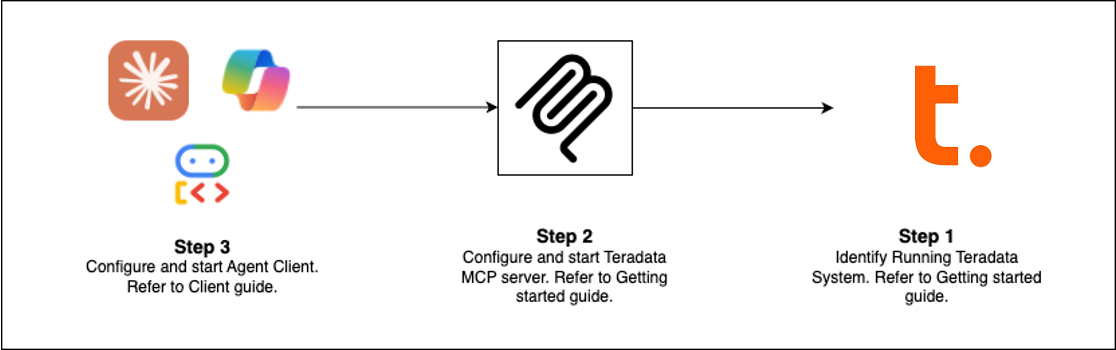
Bắt đầu nhanh (Chọn lộ trình của bạn)
| Máy khách | Phù hợp nhất cho | Thời gian thiết lập |
|---|---|---|
| Claude Desktop | Phân tích khám phá, quản trị nền tảng | 5 phút |
| VS Code + Copilot | Kỹ thuật dữ liệu, phát triển tác nhân | 5 phút |
| Open WebUI | Kiểm thử các LLM mới cục bộ | 5 phút |
| Code Examples | Xây dựng máy khách của riêng bạn | thay đổi |
| Flowise | Trình xây dựng tác nhân trực quan | 10 phút |
Điều kiện tiên quyết: Teradata database (hoặc sandbox miễn phí) + uv
Thiết lập Claude Desktop (Không cần cài đặt)
Thêm vào claude_desktop_config.json (Cài đặt > Nhà phát triển > Chỉnh sửa cấu hình):
{
  "mcpServers": {
    "teradata": {
      "command": "uvx",
      "args": ["teradata-mcp-server"],
      "env": {
        "DATABASE_URI": "teradata://<USERNAME>:<PASSWORD>@<HOST_URL>:1025/<USERNAME>"
      }
    }
  }
}
Những gì bạn có thể làm
| Trường hợp sử dụng | Khả năng | Công cụ |
|---|---|---|
| Truy vấn & Phân tích | Khám phá bảng, hồ sơ dữ liệu, giải thích kết quả, trực quan hóa mẫu—không cần SQL | base, dba, qlty, plot |
| Lớp ngữ nghĩa | Tạo các lớp ngữ nghĩa và công cụ tùy chỉnh từ YAML hoặc với Kỹ năng tác nhân của chúng tôi | Tìm hiểu thêm → |
| Đường ống AI & RAG | Tìm kiếm ngữ nghĩa, tạo sinh tăng cường truy hồi, lưu trữ vector | rag, tdvs, fs |
| Quản trị cơ sở dữ liệu | Quản lý bảo mật, giám sát dung lượng, tự động hóa sao lưu | dba, sec, bar |
Tin mới (Bản phát hành mới nhất)
- FastMCP v4 — Giao thức không phiên, tác vụ nền cho phân tích chạy dài, hoàn thành đối số
- Bộ nhớ đệm phản hồi — Tín hiệu TTL 5 phút giảm truy vấn cơ sở dữ liệu trùng lặp trong các cuộc hội thoại nhiều lượt
- Chế độ bảo vệ — Luồng xác nhận nhiều bước cho các thao tác phá hủy (bar_, sec_)
- Tác vụ nền —
tdml_*các hàm phân tích trả về ID tác vụ để thăm dò thay vì chặn - Hoàn thành đối số — Tự động gợi ý tên bảng và cột từ lược đồ khi người dùng nhập
- Khả năng Hooks — Chặn các lệnh gọi công cụ để giám sát, kiểm toán hoặc giới hạn tốc độ tùy chỉnh
- Bảo vệ giới hạn hàng — Giới hạn có thể cấu hình (
DEFAULT_ROW_LIMIT,MAX_ROW_LIMIT) ngăn tràn token LLM - Bảo mật nâng cao — Chế độ xem VX để kiểm soát truy cập cấp hàng chi tiết
Mở rộng & Triển khai
Thêm logic tùy chỉnh
Sử dụng hooks để chặn các lệnh gọi công cụ cho giám sát, nhật ký kiểm toán hoặc xác thực → Hướng dẫn Hooks
Xác định các lớp ngữ nghĩa
Tạo các công cụ, lời nhắc và khối dữ liệu theo miền cụ thể trong YAML → Hướng dẫn tùy chỉnh
Triển khai ở mọi nơi
Chạy dưới dạng CLI (uv), máy chủ HTTP, vùng chứa Docker hoặc dịch vụ đám mây → Hướng dẫn cài đặt
Xem hoạt động
- Voice Agent — Âm thanh hai chiều thời gian thực với Amazon Nova Sonic
- Web Agent — Giao diện trò chuyện tương tác với khung Google ADK
- Flowise Builder — Quy trình làm việc kéo-thả trực quan
- Custom Middleware — Các mẫu giám sát hiệu suất
Tìm hiểu thêm
- Tài liệu đầy đủ — Cài đặt, cấu hình, kiến trúc, bảo mật
- Video hướng dẫn — Hướng dẫn từng bước
- Hướng dẫn nhà phát triển — Mở rộng và đóng góp
- Kiến trúc — Cách các thành phần hoạt động cùng nhau
Đóng góp
Chúng tôi hoan nghênh mọi đóng góp! Xem Hướng dẫn đóng góp và Hướng dẫn nhà phát triển của chúng tôi để bắt đầu.