Kubernetes Interactive
Chạy và diễn giải các lệnh Kubernetes một cách tương tác với kubeconfig được cung cấp.
GitHub
4
Dùng thử MCP nàyĐược tài trợTài liệu
k8s-interactive-mcp
A MCP server that can run Kubernetes commands with a given kubeconfig path and provide interpretation of the commands.
Result
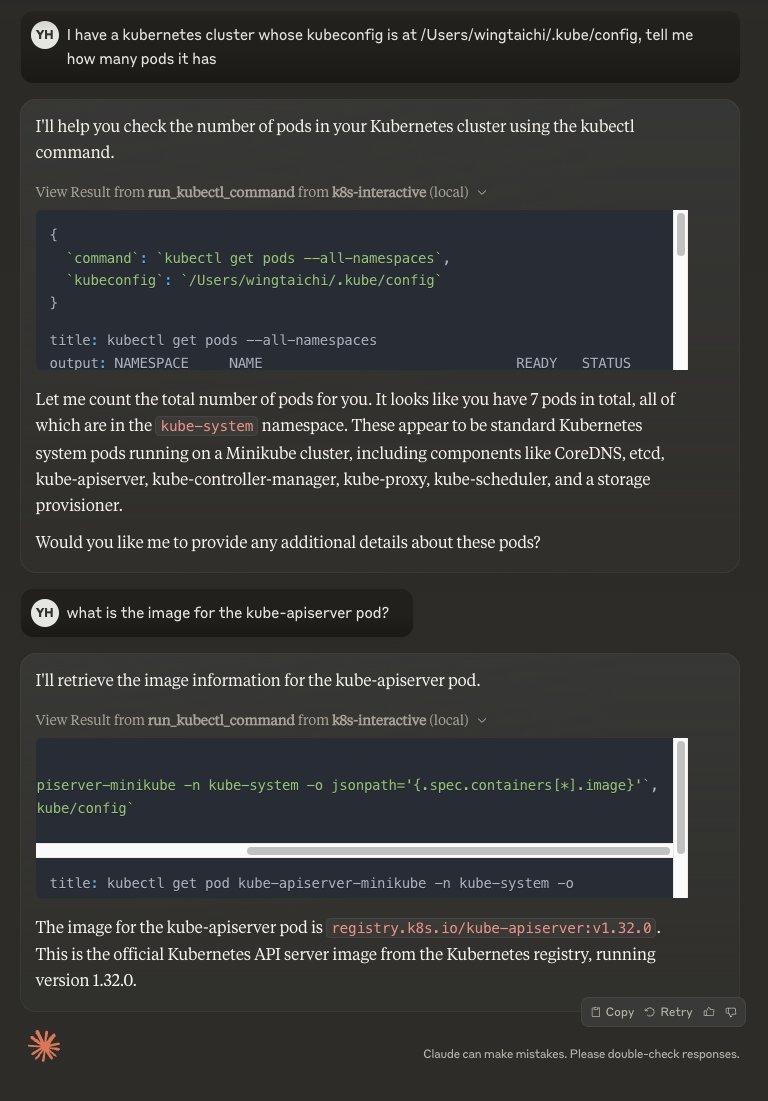
Features
- Run kubectl commands through MCP tools
- Flexible command line piping
- Automatic kubectl installation check
- Support for custom kubeconfig paths
- Error handling and helpful messages
Usage
- Install dependencies:
npm install
Build the server:
npm run build
For development with auto-rebuild:
npm run watch
Installation
To use with Claude Desktop, add the server config:
On MacOS: ~/Library/Application Support/Claude/claude_desktop_config.json
On Windows: %APPDATA%/Claude/claude_desktop_config.json
{
  "mcpServers": {
    "k8s-interactive": {
      "command": "/path/to/k8s-interactive/build/index.js"
    }
  }
}
Debugging
Since MCP servers communicate over stdio, debugging can be challenging. We recommend using the MCP Inspector, which is available as a package script:
npm run inspector
The Inspector will provide a URL to access debugging tools in your browser.