Unreal Engine MCP
Control Unreal Engine with AI. An MCP server that gives AI assistants (like Claude and Cursor) direct, programmatic access to the Unreal Engine environment to manipulate scenes, spawn objects, and execute commands.
Documentation
unreal-mcp
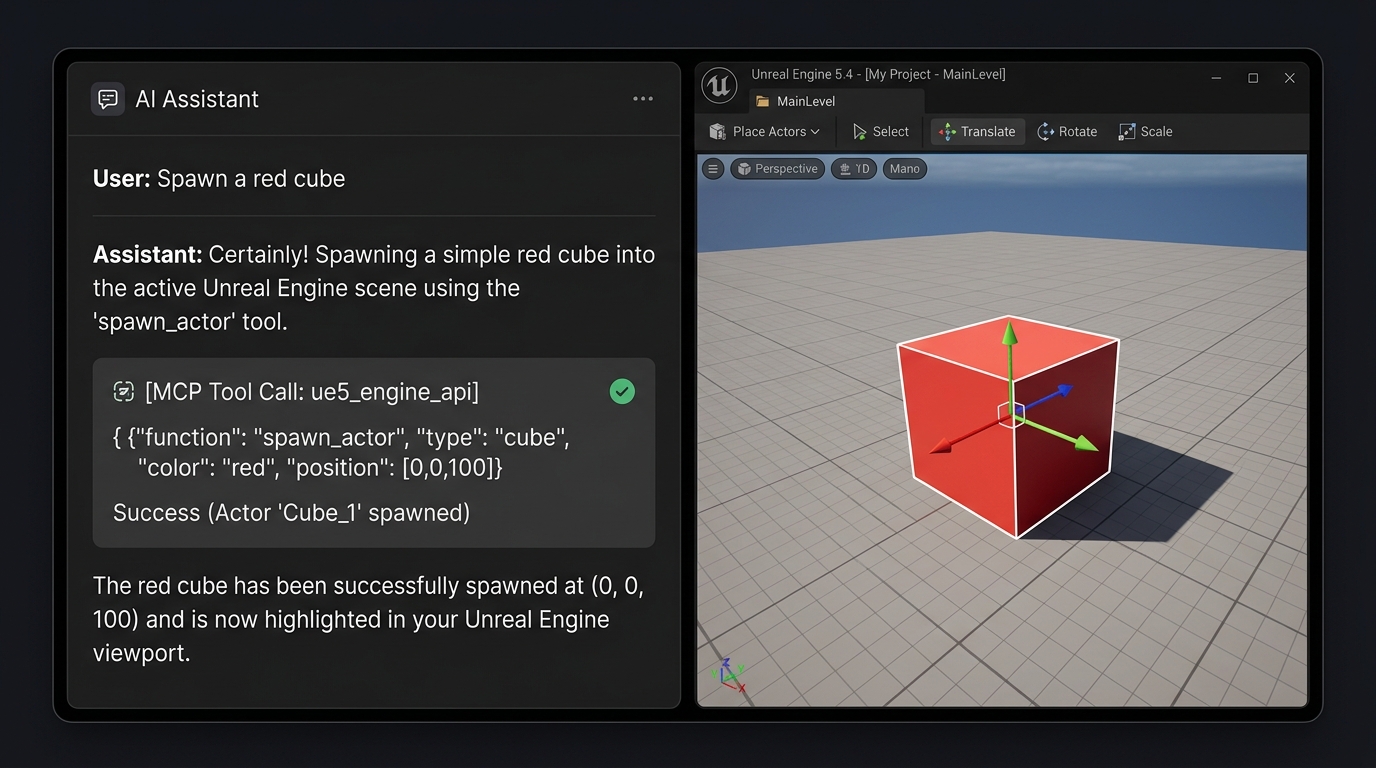
An MCP server that allows AI agents (Claude, Cursor) to directly control and manipulate Unreal Engine.
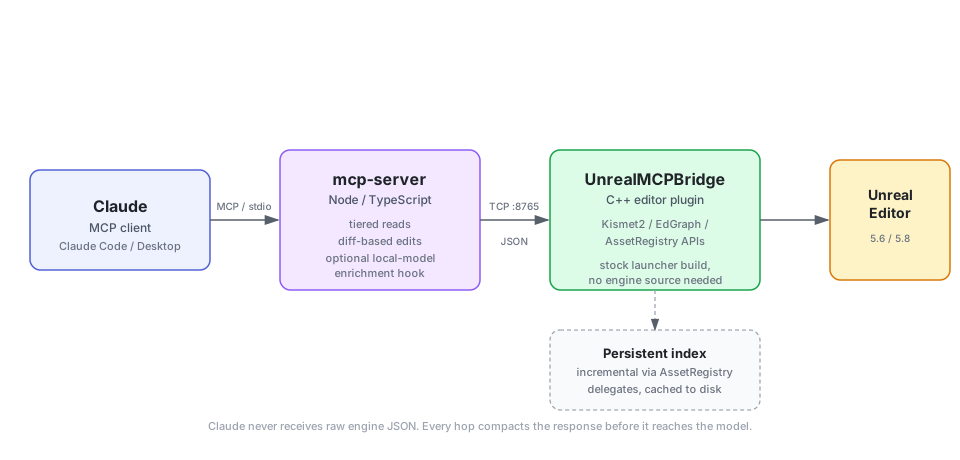
This server lets Claude (or any MCP client) read and edit Unreal Engine 5.6/5.8 Blueprints directly, without burning your context window on raw engine JSON, and without needing anything beyond a stock Epic Games Launcher install.
The problem this solves
If you've tried pointing an AI assistant at a real Unreal project, you've hit this: Blueprints don't fit in a context window. A single graph dumped as raw engine data is enormous, so either the model never sees enough of the project to have real context, or you spend most of your budget re-explaining what already exists every time you open a new conversation.
This project is built around one idea: the model should never receive a raw engine dump. Every hop between the Unreal Editor and Claude compacts the data: tiered reads, diff-based edits, and a persistent index that's built once and updated incrementally instead of re-scanned on every question.
How it works
Two pieces:
UnrealMCPBridgeis a C++ editor plugin that runs insideUnrealEditor.exeand exposes a local TCP interface over the engine's own Kismet2/EdGraph/AssetRegistry APIs. Built against a stock launcher install: no engine source required to build or run it.mcp-serveris a Node/TypeScript MCP server that translates MCP tool calls into bridge requests, and is responsible for keeping every response cheap: compact field names, capped result sizes, and no re-serializing verbose engine data verbatim.
See ARCHITECTURE.md for the full design.
What it can do
101 tools, grouped by the job rather than by the API they call. Every one is exercised against a real ~1,000-Blueprint project, not a fixture.
Understand a project you did not write
get_project_overview, search_project, find_references, map_system, explain_graph,
list_blueprints, read_blueprint_summary, read_node_detail, describe_class, find_source,
trace_variable, trace_function_calls, list_actors, read_class_defaults, undo_history.
Ask for "the countdown" and get the system back - the Blueprints, the functions, what calls what,
ordered for reading - rather than a list of string matches.
Find bugs, in plain English
audit_project, review_blueprint, project_health, find_orphans, check_data_tables,
read_runtime_errors, doctor. The audit prices every finding, so what surfaces first is what
actually costs you: a missing Parent: BeginPlay, a replicated variable whose OnRep_ is empty, a
Data Table row pointing at a deleted asset, an event graph nothing reaches.
Build features, and prove they work
plan_feature, scaffold_blueprint, scaffold_widget, build_graph, add_node, connect_pins,
add_event_handler, create_function, add_variable, set_variable_replication,
auto_layout_graph, cleanup_blueprint, compile_blueprint, verify_feature. Graphs come out laid
out and commented, because output that compiles and output someone is happy to inherit are different
things.
Whatever the work happens to be made of
Blueprints, C++ (find_source, compile_cpp, hot_reload_cpp), Data Tables, Data Assets, structs,
enums, materials and instances, UMG widgets, input mappings, levels and actors, Animation Blueprints,
Behavior Trees, Niagara. Read support is deliberately wider than write support, and the README says
which is which for each.
Watch it actually run
start_pie, watch_runtime, pie_status, screenshot, run_console_command, stop_pie. Every
other read here says what a Blueprint claims it does. These say what it did - including the one
class of bug a single person cannot reproduce alone:
Authority: 0 -> 490  changed=true
Client0:   0 -> 0    changed=false      <- the variable is not replicated
Added in the last day
115 commits. The parts worth knowing about:
watch_runtime- observe a running game. Samples variables on live actors during play, in every PIE world, labelled by net role. Proven by planting a replication bug in a real project, watching only the server's copy move, fixing it, and watching both move.hot_reload_cpp- the Ctrl+Alt+F11 a human presses. Until this, a model could find a native bug, write the fix and prove it compiled - and the change sat on disk, because the running editor holds the DLL. Applying it meant you closing the editor. Now it is one call.run_console_command- the tilde key.ce StartWaveto fire an event nothing calls yet,Ke * ResetHealthto call a function on every instance,stat unit,slomo, cvars, cheats. One definition instead of forty, and it reportsrecognised: falsefor a typo rather than letting a misspelled command look like a working one that did nothing.- Reads got cheaper again, measured. Against the same 809-node graph:
explain_graph3,671 -> 2,329,get_project_overview1,698 -> 829, andfind_referencesandlist_blueprintsboth compacted as well. The whole plant-find-fix-prove loop is 9 calls and ~1,544 tokens, whichnpm run trial:diagnoseruns against a live editor rather than asserting. Two further compactions were measured and reverted - one saved 38 tokens and broke how you naturally identify an actor. - Dead-graph detection. A liveness fixpoint over the whole project, biased toward calling things
live: 52 of 511 graphs nothing reaches, in the project it was validated against.
map_systemandplan_featurenow say out loud that a system matching your search may be the replaced one, because extending something nothing calls produces a feature that cannot run. - New reads: Animation Blueprints, Behavior Trees, Niagara, Data Assets. "The enemies are not following" and "the effect does not play" are real sentences people say, and none of them had anything to land on.
- A failure class named and hunted down. A check reporting "I found no problems" and "I could not
look" with the same word. Four instances fixed - the doctor claiming an all-clear on a plugin that
was missing two commands,
find_orphanssaying "clean" when the class name matched nothing,check_data_tablessaying "clean" when a column was empty in every row, and a preset missing the one tool its own job starts from. - The tests were mutation-tested. 444 tests, all with assertions - but has assertions is not can fail. Twelve deliberate mutations; eleven caught, one not. That one led to a real defect: a check name that drifts or was never priced silently scores 1 and sinks under every cosmetic finding.
- A feature built and then deleted. A
SpawnActornode the tool's own instructions had claimed for months. It crashed the editor four times; the whole thing was reverted and the README now says plainly that it is not buildable this way. A claim that is not true is worse than a missing feature.
What's different about this one
There are several Unreal MCP projects on GitHub already, and as of UE 5.8 Epic ships its own experimental first-party MCP plugin (5.8 only, opt-in). Worth being direct about where this project actually differs, rather than just claiming "better":
-
Built around reading, not just writing. Most existing projects are strong at creating and manipulating Blueprints from a prompt, but don't address what happens when the model needs to understand a large, already-built project first. Reading is the first-class citizen here: tiered summaries before full detail, node IDs you can reference without re-fetching.
-
A persistent, incrementally-updated project index. The bridge indexes Blueprints, functions, variables, and cross-asset references once, caches it to disk, and updates it from
AssetRegistrydelegates as you edit, instead of rescanning the project on every query.find_referencesanswers "what actually uses this Blueprint" without the model having to enumerate the project itself. -
Reads that fit in a context window. Reading one real Blueprint graph — 807 nodes — used to return 126,477 tokens, 63% of a 200k window in a single call, from a project whose whole premise is that the model never sees a raw engine dump. It is 3,110 now, with the full graph one parameter away and a
matchfilter that answers a specific question for a fraction of that. Every read is measured against a real project bynpm run measure:reads, which finds the worst graph itself and fails the build if any read grows past its ceiling. -
A tool surface that costs 2.4k tokens instead of 34.8k. Tool definitions are paid for on every request, before your message is read. The
searchprofile stands up four tools and switches the other 97 off — and because they are switched off rather than hidden behind a generic dispatcher,unreal_enable_toolshands back their real, fully typed schemas. One extra call at the start of a session, nothing given up, and 32k tokens a turn saved for the rest of it. The numbers are measured bynpm run check:profiles, which fails the build if a profile grows past its budget. -
Graphs read and write as code.
explain_graphwithformat: "dsl"returns a graph as S-expressions — realif/else, the literal arguments to each call, named continuations for casts and latent nodes — andbuild_graphtakes the same text back through itsdslparameter. Changing a Blueprint becomes "read it, edit two lines, send it back" rather than working out which node ids to rewire. A five-node branching graph is 2,045 characters as node-and-pin structure and 302 as DSL:(event EventBeginPlay (bind v1 (cast BP_Door :Object (GetOwner)) (:then (if bIsLocked (call PrintString :InString "locked" :Duration 2.0) (else (set bIsLocked true)))) (:CastFailed (call PrintString :InString "not a door"))))The shape is taken from Epic's own
blueprint_dsl.pyin the 5.8 first-party plugin — see docs/EPIC_58_TEARDOWN.md — but the vocabulary is this server's, so the text round-trips through our own writer rather than their toolset registry. -
The server tells the model how to work before it starts. MCP's
instructionsfield carries the call order and the exact strings no model can recall reliably — the target pin isself, Sequence's outputs arethen_0/then_1— so the model arrives knowing them instead of spending failed calls discovering them.unreal_guidethen lets it look anything else up mid-task, a section at a time. -
It can see the game run, not just read the files.
watch_runtimesamples variables on live actors during play, in every PIE world, labelled by net role. Replication bugs are the one class of defect a single person cannot reproduce alone —Authority: 0 -> 490, Client0: 0 -> 0is that bug observed rather than argued. No other project in the survey reads runtime state at all. -
It can finish a C++ change, not just check one.
compile_cppproves an edit builds;hot_reload_cpppatches it into the editor that is already open, which is the Ctrl+Alt+F11 a human presses. Without it, every native fix ends with a human closing the editor. -
Findings are priced, so the important one is first. The audit scores every finding by what it actually costs you, and every check name is guarded by a test — an unpriced name silently scored 1 and sank below every cosmetic result, which was found by mutation-testing the suite rather than by reading it.
-
Verdicts distinguish "nothing is wrong" from "I could not look". They used to share a word, in four places. A tool that says
cleanwhen it could not check is worse than one that says nothing. -
Targets both 5.6 and 5.8 from one codebase, where several existing projects are pinned to a single engine version.
Small local models are still supported and still measured — the minimal profile exists because a 14B on a 12 GB card loads at 8k context and fails at 16k — but they are now an explicit opt-in rather than what the install path quietly hands everyone. There is also an optional local-model hook for indexing (UNREAL_MCP_LOCAL_LLM_URL), which generates search summaries off your context budget. Fully optional; the index works without it.
Full survey of the existing ecosystem (licenses, architectures, what each one does well) is in docs/COMPETITIVE_LANDSCAPE.md.
There is also a companion document that starts from the other end: docs/COMPLAINTS_SOLVED.md collects the complaints people actually file about Unreal MCP servers, each with its source link, and states plainly whether this project solves it, partly solves it, or does not. The open rows are left open on purpose.
Status
This is being built and verified in public, milestone by milestone. Each milestone's status doc is written honestly, including what's compiled/tested versus what's still unverified:
- Milestone 1: read-only Blueprint introspection: compiles and runs against a real UE 5.8 install; MCP protocol verified end-to-end.
- Milestone 2: create/edit Blueprint graphs: create Blueprints, add nodes, connect pins, add variables, compile with structured error reporting.
- Milestone 3: persistent project index, search, references: incrementally-updated index (AssetRegistry-backed, disk-cached),
search_project,find_references,get_project_overview, optional local-model enrichment for search results. - Milestone 4: UE 5.6 support: live-verified on 5.6, 21 of 21 checks passing, and released. The plugin source needs zero changes between the two engine versions.
- Milestone 5: node/function ground-truth catalog:
unreal_find_nodeandunreal_get_node_signature, reading the running engine's real Blueprint-callable surface via reflection (12,402 functions on 5.6, 15,775 on 5.8, built in ~0.1s).unreal_add_nodenow answers a wrong function name withdidYouMeannear-misses instead of a dead end.
All four milestones are build-verified, protocol-verified, and live-verified on both engine versions. See docs/LIVE_VERIFICATION.md for the 5.8 session against a real ~20-Blueprint project and docs/UE56_STATUS.md for the 5.6 one: reads returning correct real data, a full create/wire/compile/save write round-trip, and confirmation that the incremental project index actually stays fresh without restarting the editor (M3's core claim).
Both live sessions earned their keep by catching a real bug that no amount of compiling or protocol
testing would have surfaced. On 5.8 it was add_node duplicating an already-present override-event
node. On 5.6 it was the .uplugin hard-pinning EngineVersion to 5.8.0: every build check passed
because UnrealBuildTool ignores that field, but the runtime plugin loader honors it, so the editor
stopped on a modal incompatibility dialog and the bridge never started.
Since then, all of that has been exercised live too: remove_node and VariableGet are covered by
the node-id and control-flow suites, and add_node now places Branch, Sequence, Cast, and
standard-library macros (ForEachLoop, WhileLoop, ...) directly, verified by building and
compiling a real conditional graph through the bridge alone. Node ids are persistent GUIDs, and
every write is undoable with Ctrl+Z under a named "MCP:" transaction. Still outstanding:
CustomEvent/VariableSet node types have not had a dedicated live check, and the M5 catalog
covers UFunction-backed nodes; native UK2Node types are placed via the dedicated nodeType
values rather than discovered through unreal_find_node.
Quickstart (4-Step Installation)
Ensure you have Node.js 18+ and a UE 5.6 / 5.8 project.
1. Install the Unreal Plugin
Copy the UnrealMCPBridge plugin folder into your Unreal project's Plugins/ directory:
# macOS / Linux
mkdir -p "/path/to/YourProject/Plugins" && cp -r UnrealMCPBridge "/path/to/YourProject/Plugins/"

# Windows (PowerShell)
New-Item -ItemType Directory -Force -Path "C:\path\to\YourProject\Plugins"; Copy-Item -Recurse UnrealMCPBridge "C:\path\to\YourProject\Plugins\"
Note: Rebuild/open your Unreal project to compile the plugin, and ensure it is enabled in the editor.
There are prebuilt plugin releases on the releases page, and they are older than this server.
The bridge has gained more than twenty commands since the last one, and the protocol number did not
change, so an old plugin looks healthy and then fails on the first tool that needs a command it does
not have. --doctor now probes for those commands specifically and says so. Building from this
checkout is the reliable path.
2. Build the MCP Server
Install the node dependencies and compile the typescript codebase:
cd mcp-server && npm install && npm run build
3. Check it works before wiring anything up
With the editor open, run:
node mcp-server/dist/index.js --doctor
It reports whether the plugin is reachable, whether its protocol matches the server, whether the project index is built or still scanning, whether the engine's node catalog is readable, and whether a PIE session is in the way. Every failed check comes with the remedy, so you never have to guess which of six things is wrong. Exit code 1 means the editor could not be reached.
4. Register the Server
Do not hand-write the config. Run this from your project directory and it writes the files:
node mcp-server/dist/index.js --install-config
That writes every project-scoped client at once — .mcp.json (Claude Code), .cursor/mcp.json,
.vscode/mcp.json, .gemini/settings.json, .codex/config.toml — creating directories as needed.
If a file already exists, only the unreal entry is touched; MCP servers you already had are
preserved, and a file that is not valid JSON is refused rather than overwritten.
node mcp-server/dist/index.js --install-config --client cursor          # just one client
node mcp-server/dist/index.js --install-config --client claude-desktop  # global, per-user config
node mcp-server/dist/index.js --install-config --dir /path/to/project   # somewhere other than cwd
Claude Desktop is not part of the sweep and has to be named, because its config is global and shared
with every other project on the machine. The file locations and root keys follow Epic's own
ModelContextProtocol.GenerateClientConfig in UE 5.8, so they are the ones every Unreal developer
will be told to expect.
--print-config still emits the JSON without writing anything, if you would rather paste it:
node mcp-server/dist/index.js --print-config                      # Claude Desktop
node mcp-server/dist/index.js --print-config --client cursor      # Cursor
node mcp-server/dist/index.js --print-config --client claude-code # Claude Code
It emits the exact JSON for this machine, with absolute paths already resolved, and tells you which file it goes in.
That exists because client setup is its own category of failure and all of it is self-inflicted: a
missing comma breaks the whole file, a relative path silently does not resolve, and on Windows a
bare node may not be on the PATH the client uses. Every one of those produces the same symptom —
the server never starts, with no explanation. The printed config uses the absolute path of the Node
that ran the command, so it cannot be the wrong one.
Then fully quit and reopen the client. Closing the window is not enough, and it is the most common reason a correct config appears not to work.
Writing the config by hand (only if the command above cannot run)
Point your client at the absolute path of mcp-server/dist/index.js:
Claude Code:
claude mcp add unreal -- node "/path/to/unreal-mcp/mcp-server/dist/index.js"
Claude Desktop (claude_desktop_config.json):
{
  "mcpServers": {
    "unreal": {
      "command": "node",
      "args": ["/path/to/unreal-mcp/mcp-server/dist/index.js"]
    }
  }
}
Note that "command": "node" depends on node being on the PATH your client uses, which on Windows
it often is not. That is the single most common reason a correct-looking config never starts, and
the reason --print-config exists.
Once registered, open your project in the Unreal Editor and verify the connection via unreal_ping.
For more configuration options and details, see mcp-server/README.md.
What CI covers, and what it does not
Status: the workflow is committed but has never run. GitHub refused to start it - "the job was not started because your account is locked due to a billing issue" - so no badge is shown here. A badge reading "failing" for a billing reason would say something false about the code. The workflow is structurally valid and the whole suite is verified to pass locally with no editor running, which is the same thing it does on a runner; that is a claim about local runs, not a CI result.
The badge above covers the parts that need no Unreal install, run on a clean Linux machine with
nothing preinstalled: build, typecheck, tool/bridge parity, documentation guards, profile token
budgets, strict-client protocol conformance, and the unit tests - on the oldest Node the README
promises and on the current one. It also checks that --doctor and --print-config behave
correctly with no editor running, since that is exactly when someone reaches for them.
It does not run live verification or the local-model benchmark. Those need a running editor, and one needs a GPU. Their results live in docs/LIVE_VERIFICATION.md and docs/LOCAL_MODEL_BENCHMARK.md, and they are run by hand against both engine versions. Claiming them in CI would make the badge mean less than it does.
The C++ plugin is not compiled in CI either, because Epic does not ship an engine that can be
fetched there. npm run build:engines builds it against every configured engine locally and reports
success only if every one of them actually built.
Contributing
Issues and PRs welcome. This project is young and moving fast, so check the status docs above before assuming something works end-to-end.
License
MIT. See LICENSE.