AdLens
Your AdMob numbers, without the AdMob console. A fast MCP server so your AI assistant can query the same live data
Hosted MCP Server
npx add-mcp 'https://adlens.moreproductive.in/mcp'Installs into Claude Code, Codex, Cursor and more
Documentation
AdLens
Your AdMob numbers, without the AdMob console.
A fast AdMob analytics dashboard, plus an MCP server so your AI assistant can query the same live data.
Live app · MCP setup · Self-host · Issues




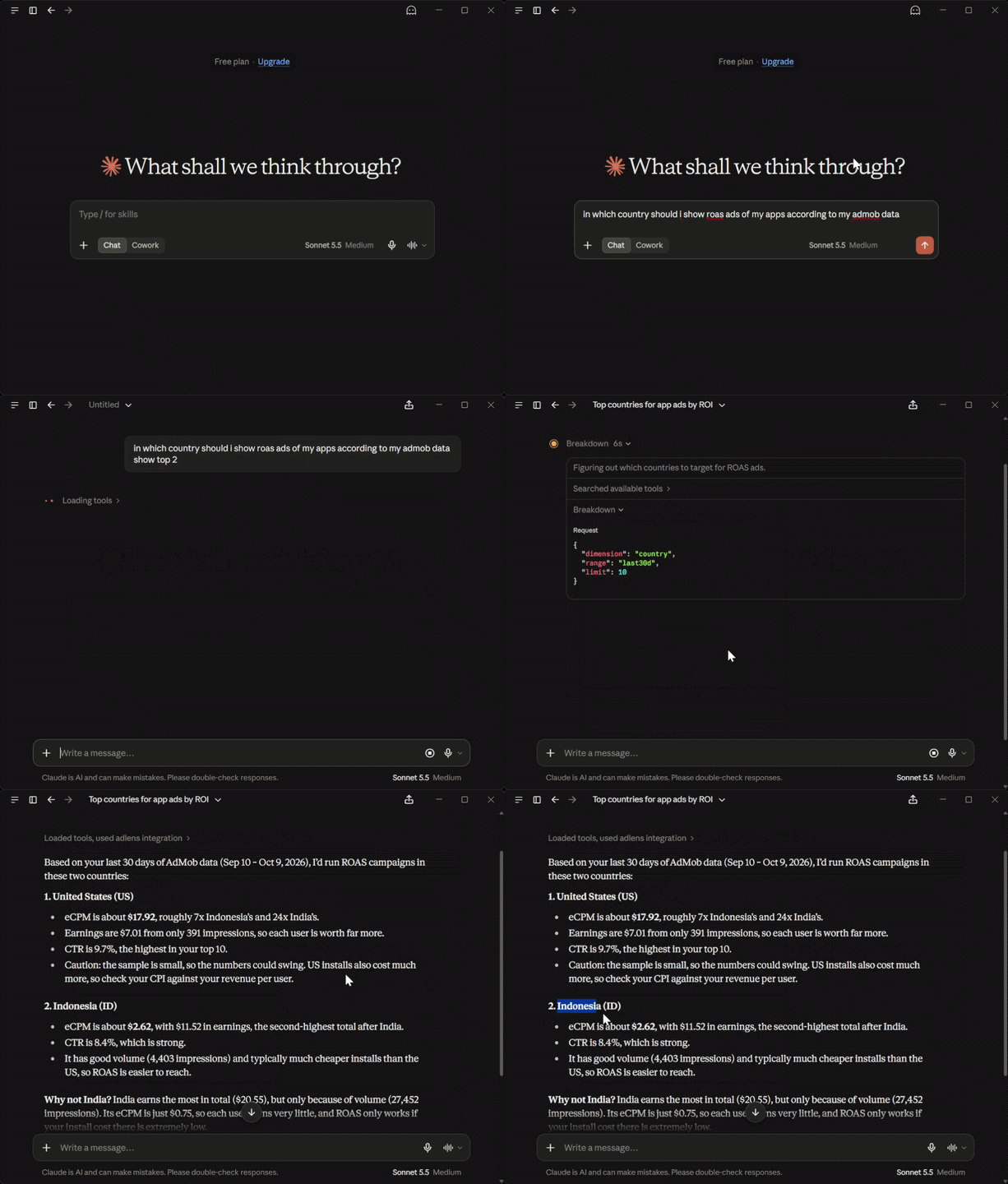
Ask a question. Claude calls AdLens. Live AdMob answers.
What is AdLens?
The AdMob console shows you totals. AdLens shows you causes.
Connect your AdMob account once (read-only) and you get:
- A fast web dashboard for revenue, impressions, eCPM, mediation and country breakdowns.
- An MCP server so Claude, Cursor, Codex and other AI clients can answer questions from the same live data, such as "Which ad format has the best eCPM this month?"
It is free, read-only, and stores none of your report data. You can use the hosted version or run your own.
Features
Dashboard
- Live, not synced: fetched from the AdMob API when you open a page.
- Today at a glance: today, yesterday, last 7 days and this month, with impressions and eCPM.
- Period comparisons: every KPI shows its change vs. the previous period.
- Sortable breakdowns: by day, app, ad unit, format, mediation source or country.
- Per-app deep dives with the same depth, plus dark and light themes.
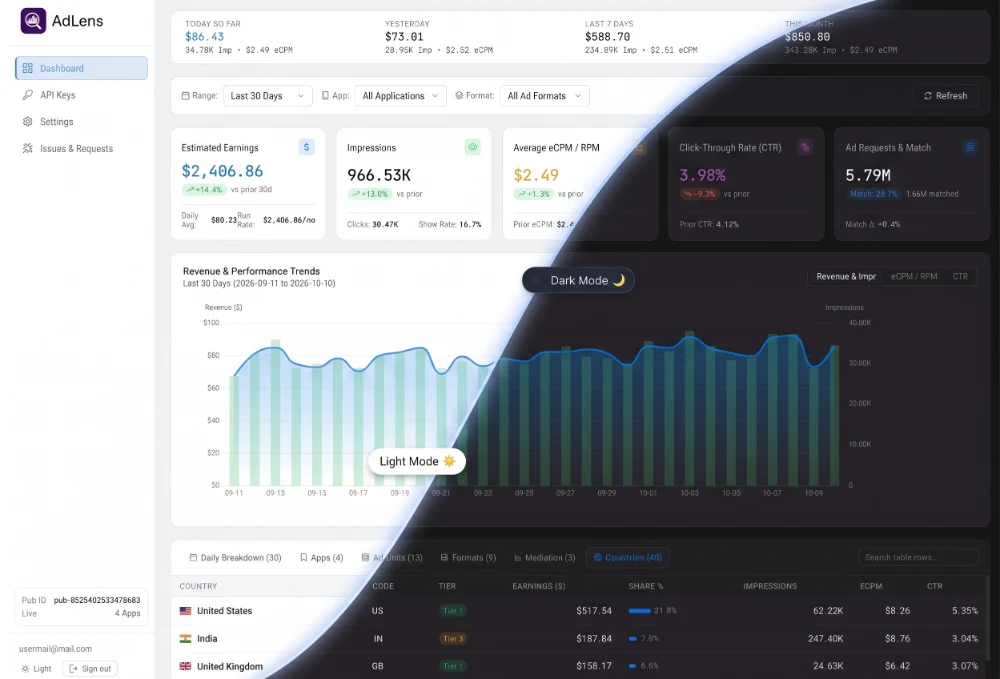
The AdLens dashboard (sample data).
MCP server
Five read-only tools that any MCP client can call:
| Tool | What it does |
|---|---|
account_overview | Lists your connections and apps (id, name, platform, package name) |
revenue_summary | Totals plus daily or weekly series, using presets or explicit dates |
breakdown | Revenue by app, ad unit, format, country, ad source (mediation) or date |
top_movers | Period-over-period movers, with the previous period chosen automatically for presets |
list_ad_units | Your ad unit inventory |
Example prompts to try:
- "Revenue summary for the last 30 days"
- "Top movers by country, this week vs last week"
- "Break down mediation revenue for my top app"
- "Which ad format has the best eCPM this month?"
Getting started (hosted)
Setup takes about a minute.
- Sign in at adlens.moreproductive.in with an email one-time code or Google. A password is optional.
- Connect AdMob. You approve one Google OAuth consent screen with the
admob.readonlyscope. - Use it your way. Open the dashboard, or generate an API key and connect your AI client (below).
Connect your AI assistant (MCP)
Generate an API key on the API Keys page of the dashboard. Keys look like ak_live_... and are shown once, so copy yours right away. Then add AdLens to your client.
The MCP endpoint is:
https://adlens.moreproductive.in/mcp
If you self-host, replace the domain with your own. AdLens is a standard Streamable HTTP MCP server authenticated with a Bearer token, so any client that supports a remote URL with custom headers will work.
Claude Code
claude mcp add --transport http adlens https://adlens.moreproductive.in/mcp \
  --header "Authorization: Bearer ak_live_..."
Or add it to .mcp.json:
{
  "mcpServers": {
    "adlens": {
      "type": "http",
      "url": "https://adlens.moreproductive.in/mcp",
      "headers": { "Authorization": "Bearer ak_live_..." }
    }
  }
}
Claude Desktop
Claude Desktop's config file has no native URL + header support, so bridge it with mcp-remote.
Edit claude_desktop_config.json:
- macOS:
~/Library/Application Support/Claude/ - Windows:
%APPDATA%\Claude\ - Linux:
~/.config/Claude/
{
  "mcpServers": {
    "adlens": {
      "command": "npx",
      "args": [
        "-y", "mcp-remote",
        "https://adlens.moreproductive.in/mcp",
        "--header", "Authorization: Bearer ak_live_..."
      ]
    }
  }
}
On Windows, use npx.cmd instead of npx as the command:
{
  "mcpServers": {
    "adlens": {
      "command": "npx.cmd",
      "args": [
        "-y", "mcp-remote",
        "https://adlens.moreproductive.in/mcp",
        "--header", "Authorization: Bearer ak_live_..."
      ]
    }
  }
}
Codex
In ~/.codex/config.toml (Windows: %USERPROFILE%\.codex\config.toml):
[mcp_servers.adlens]
url = "https://adlens.moreproductive.in/mcp"
http_headers = { "Authorization" = "Bearer ak_live_..." }
Cursor, VS Code, Windsurf and other clients
For Cursor, edit ~/.cursor/mcp.json (Windows: %USERPROFILE%\.cursor\mcp.json):
{
  "mcpServers": {
    "adlens": {
      "url": "https://adlens.moreproductive.in/mcp",
      "headers": { "Authorization": "Bearer ak_live_..." }
    }
  }
}
For stdio-only clients, use the mcp-remote bridge shown in the Claude Desktop section.
Antigravity
In ~/.gemini/antigravity/mcp_config.json (Windows: %USERPROFILE%\.gemini\antigravity\mcp_config.json), or via the MCP Store panel → Manage MCP Servers → View raw config:
{
  "mcpServers": {
    "adlens": {
      "serverUrl": "https://adlens.moreproductive.in/mcp",
      "headers": { "Authorization": "Bearer ak_live_..." }
    }
  }
}
OpenCode
In opencode.json (project) or ~/.config/opencode/opencode.json. This path is the same on Windows (%USERPROFILE%\.config\opencode\opencode.json), not %APPDATA%. Setting oauth: false makes OpenCode use your Bearer key instead of trying OAuth sign-in first.
{
  "$schema": "https://opencode.ai/config.json",
  "mcp": {
    "adlens": {
      "type": "remote",
      "url": "https://adlens.moreproductive.in/mcp",
      "enabled": true,
      "oauth": false,
      "headers": { "Authorization": "Bearer ak_live_..." },
      "timeout": 30000
    }
  }
}
Tip: to test the endpoint without an AI client, run the MCP Inspector:
npx @modelcontextprotocol/inspector
Self-hosting
AdLens is multi-tenant by design and easy to run yourself. You need:
- Node.js (LTS) and pnpm, or just Docker
- A Postgres database (the included Docker Compose file starts one)
- A MojAuth project for sign-in (email OTP + Google). You'll need its API key.
- A Google Cloud OAuth client with the AdMob API enabled and the
admob.readonlyscope
1. Clone and configure
git clone https://github.com/ys-pro-duction/AdLens.git
cd AdLens
cp .env.example .env   # then fill in the values below
Generate the random secrets with:
openssl rand -hex 32
| Variable | Required | Description |
|---|---|---|
APP_URL | yes | Public URL of your instance (use your https domain in production) |
DATABASE_URL | yes | Postgres connection string |
MOJOAUTH_API_KEY | yes | Your MojAuth project's key (email OTP + Google sign-in) |
SESSION_SECRET | yes | Random secret used to sign session cookies |
GOOGLE_CLIENT_ID / GOOGLE_CLIENT_SECRET | yes | Google OAuth client for connecting AdMob |
ENCRYPTION_KEY | yes | 32-byte hex key used to encrypt refresh tokens at rest |
OAUTH_STATE_SECRET | no | Separate secret for signing OAuth state |
TRUST_PROXY | no | Set to 1 when running behind nginx so rate limits see real client IPs |
HOST | no | Bind address. Use 127.0.0.1 behind a reverse proxy |
MOJOAUTH_AUDIENCE | no | Optional audience check for MojAuth tokens |
MOJOAUTH_ISSUERS | no | Override the allowed MojAuth token issuers |
.env.example is kept current and has the full annotated list.
In your Google Cloud OAuth client, register <APP_URL>/api/admob/callback as an authorized redirect URI. In your MojAuth dashboard, register the callback URL it shows you.
2a. Run with Docker (everything)
docker compose up --build
2b. Run locally for development
pnpm install
docker compose up -d db   # Postgres only
pnpm db:migrate
pnpm dev                  # API on :3000, web on :5173
3. Production
Build from the repo root (building a single package can leave a stale packages/db/dist):
git pull && pnpm install && pnpm db:migrate && pnpm build
In production the API serves the built web app (apps/web/dist), so there is a single process to run. Run it under a process manager of your choice (the hosted instance uses pm2, with Postgres in Docker).
Behind nginx (or any reverse proxy):
- Set
APP_URLto yourhttpsdomain - Set
TRUST_PROXY=1 - Bind the app to localhost with
HOST=127.0.0.1
Note: rate limits are held in memory per process, so AdLens is designed to run as a single process. If it is exposed directly (no proxy), leave
TRUST_PROXYunset, becauseX-Forwarded-Forcan be spoofed.
Fair-use limits
AdLens is free, with no plans and no billing. Per-IP rate limits protect the service:
| Endpoint | Limit |
|---|---|
Dashboard API (/api) | 300 requests / minute |
MCP server (/mcp) | 15 requests / minute |
If you self-host, these limits are yours to adjust in the source.
Architecture
flowchart LR
  A[Vue dashboard] --> B[Express API]
  C[MCP clients] --> B
  B --> D[Live AdMob layer<br/>60-min cache · single-flight]
  D --> E[(Google AdMob API)]
  B --> F[(Postgres<br/>identity · encrypted keys )]
There is no worker, no warehouse and no stored metrics. Reports are fetched from Google on demand and aggregated in JS.
Tech stack & layout
TypeScript monorepo (pnpm workspaces):
apps/web        Vue 3 + Vite SPA (ECharts): dashboard, reports, mediation, API keys, settings
apps/api        Express API + stateless MCP server; serves web/dist in production
                (live AdMob serving layer: apps/api/src/live)
packages/db     Drizzle schema + migrations (multi-tenant: tenant_id everywhere)
packages/admob  AdMob OAuth + reporting API client
packages/crypto AES-256-GCM secrets, API key generation/hashing, scrypt
packages/shared Shared TypeScript types and AdMob constants
Disclaimer
AdLens is an independent project and is not affiliated with, endorsed by, or sponsored by Google. AdMob and Google are trademarks of Google LLC.